Comparisons · · 28 min read
Mintlify vs GitBook vs ReadMe: 2026 Comparison
All three publish good documentation, and none of them includes the assistant your readers talk to in the price it advertises. Mintlify bills per site, GitBook per site and per login, ReadMe per project with the AI sold beside it. We built the same documentation on each and priced what a working team actually pays.

Roop Reddy
Co-Founder, Documentation.AI
On this page
- Quick Decision Guide
- How These Platforms Were Compared
- Which Is Fastest to Set Up: Mintlify, GitBook, or ReadMe?
- Editing and Restructuring Docs
- AI Feature Comparison Across Platforms
- Published Docs: Design, Search and API Reference Depth Compared
- Mintlify vs GitBook vs ReadMe Pricing: How Costs Scale
- Pros and Cons
- Mintlify vs GitBook vs ReadMe: Final Comparison
- Final Verdict
- Frequently Asked Questions
- Sources
These three reach the same shortlist while answering to three different owners. Mintlify is built for engineers who keep documentation in a repository. GitBook is built for teams where documentation is nobody's engineering job. ReadMe is built around a single API and the developers integrating against it.
The usual framing, docs-as-code against a visual editor, expired a while ago. What separates them now is who may publish, where each one puts its reader-facing AI, and what the bill does when you add a second product.
Every figure below comes from each vendor's latest published pricing page and product documentation. Where we describe how something behaved, that is our own build on all three.
Quick Decision Guide
None of the three is cheaper or better in the abstract. The shortlist usually resolves on three questions: how many people need a login, whether your readers sign in to use your API, and how many products you document separately.
Mintlify may be the better fit when:
- Your editing team is large or growing, since the paid plan includes unlimited seats while the other two bill per head [1] [3] [5]
- Documentation ships through CI and you want broken links and build errors caught before a merge, which the
mintCLI does locally [2] - You want the site to update itself from merged code, which automations do and neither competitor offers at any tier [2]
GitBook may be the better fit when:
- Writers, support staff, and product managers all edit pages, and the editor has to be one they adopt without training [4]
- You need a reader-facing chat assistant, which GitBook opens a tier earlier than Mintlify and does not sell as an add-on [3] [4]
- You document several products, because site sections collapse them into one subscription instead of multiplying it [3] [4]
ReadMe may be the better fit when:
- Your product is an API and adoption data drives the roadmap, because the Developer Dashboard reports per-key endpoint usage that neither competitor attempts [6]
- Readers need to fire real requests with their own credentials instead of a sample key [6]
- You want AI that inspects documentation rather than writes it, which the Linter and Docs Audit do [6]
Bottom line: GitBook is the cheapest route to a reader assistant at almost any team size, Mintlify the cheapest route to a large editing team, and ReadMe is not really bought on price at all, it is bought on knowing which developer called which endpoint. All three bill per documentation site or project, so price your second product before comparing a single feature. If none of the three billing shapes matches the team you have, Documentation.AI prices the plan rather than the seat, the site, or the answer, which makes it a useful control against three quotes. Our Mintlify vs Documentation.AI, GitBook vs Documentation.AI, and ReadMe vs Documentation.AI comparisons run each against that model. Start free.
How These Platforms Were Compared
We built the same documentation on all three, using one OpenAPI description and one page tree, and compared signup and setup, writing and restructuring a page, the authoring and reader-facing AI, the published reading experience, total cost at the tier a team would actually buy, and what each one does when you reach a limit.
Each section reports what each platform did, then what the difference costs you in practice. For each platform assessed on its own, see our Mintlify review, GitBook review, and ReadMe review.
Which Is Fastest to Set Up: Mintlify, GitBook, or ReadMe?
ReadMe, if your documentation starts from a specification, because the OpenAPI import sits inside signup rather than after it. Mintlify reaches a published site about as quickly from a repository you already have. GitBook asks the most questions before it builds anything.
Mintlify
Signup runs through Google or email and ends on one fork: point Mintlify at a GitHub repository, or start from a template. We pointed it at an existing repository, and what came back held its structure, with the navigation configured rather than skeletal.
The repository never recedes afterwards. Pages are MDX files, docs.json carries the structure, a new branch opens a draft pull request, and publishing writes a commit. A writer who has never merged anything can still ship a page, but they are inside a Git workflow whether or not they have the vocabulary for it. GitLab works, though you issue a project access token and build the webhook yourself [2]. Nothing expires either: the site you publish while evaluating stays yours on five seats and a custom domain, though the free plan carries no AI beyond a 14-day trial grant [1].
GitBook
Signup offers email, Google, or GitHub, so nobody is pushed through a Git provider. Onboarding then asks a real set of questions about what you are documenting, whether it has to stay private, and what it should connect to, which makes it the most considered onboarding of the three and the slowest path to a URL.
Git Sync stays opt-in, which is the single biggest reason documentation owners outside engineering pick GitBook. A team can run an entire site from the block editor and never connect a repository. Review still borrows Git's shape through change requests, so branches and merges do not disappear so much as get renamed.
The evaluation is where the free plan bites. GitBook Free seats one person and carries no custom domain, so a team cannot assess it together without paying for the privilege [3].
ReadMe
Signup takes Google or email, then asks you to name the documentation, upload a logo, and pick an organization. The OpenAPI import lives inside that flow, which changes the shape of the first hour: link a description and you have an interactive reference with endpoints, parameters, and a working request console before a single guide exists.
GitHub sync comes afterwards and connected quickly, and bi-directional sync then keeps the description and the published reference in step on every plan including the free one [6]. Publishing does something neither competitor does, routing you through the pricing page, because a plan gets selected before documentation goes live. Calling it a paywall would be unfair, since the free plan is one of the options, but a billing screen still sits between a finished draft and a public URL [5].
Seats are the harder constraint. The free plan includes one teammate, so inviting a technical writer into an evaluation means changing plan rather than changing a setting, and the 14-day Pro trial with no card is the only practical way to test collaboration [5] [6].
Verdict: ReadMe gets an API reference live fastest, Mintlify gets a whole site live fastest from a repository you already have, and GitBook takes the longest and earns some of it back by asking what you are building. Evaluation capacity separates them more usefully than speed: Mintlify seats five people free on a custom domain, ReadMe seats one, and GitBook seats one without a domain at all.
Editing and Restructuring Docs
All three run a visual editor over Markdown or MDX with a source mode underneath, so on a single page there is barely anything left to choose between them. Everything that still separates them happens either side of that page, in the tooling around it and in how hard it turns out to be to leave.
Mintlify
Mintlify gives writers and engineers two different front doors to the same MDX. In the browser, a visual mode hides the syntax, live cursors show who else is in the page, and comments, suggestions, and a diff view make review feel like editing a document rather than filing a pull request. Reordering the site is a drag, not a config edit [2].
From a terminal it looks nothing like that. mint serves the site locally, formats MDX across the tree, fails on a broken link or a build error before a reader meets it, and flags when your checkout has drifted from production [2].
Underneath both doors sits an ordinary MDX file in a repository you already own, and that is what keeps the rest of your tooling working unchanged. Grep it, script a bulk rename, lint it, gate it in CI. It settles the exit question too, since leaving means moving files rather than extracting them.
GitBook
Elements arrive from a toolbar, a slash menu, or drag and drop, and the drag handling is smooth enough that writers stop noticing the tool. Markdown sits underneath, so you can work in the editor, in the repository, or across both.
Editing happens inside change requests, which hands pull-request review to people who have never opened a terminal. That buys real editorial control at the cost of ceremony on small fixes. Real-time collaboration and reusable content both start at Premium, so the single-user free plan gets neither [3]. Scale exposed two rough edges: past 50 or so pages the page tree gets heavy, and after a few dozen uploads there is no good way to find an image again, so people re-upload instead of hunting.
The exit is the real constraint, and it is worth settling before you commit. No export button exists. GitBook's documented route out is to sync a section to an empty repository and treat that repository as the export, and it warns that some blocks have no Markdown representation and come through as HTML [3] [4].
ReadMe
Visual is the default mode, restructuring is straightforward, and a source mode hands you the MDX when you want it. Someone who has never touched Git is not stopped. One quirk to plan around: while somebody edits the raw source, the page turns read-only for every other teammate.
Content types are where ReadMe quietly pulls ahead. Guides, API reference, recipes, a changelog, and discussion forums all sit as first-class types inside one project, and recipes especially have no real counterpart elsewhere here. Reusable content, branching, and reviews all arrive with the paid plan [5] [6]. The project boundary is the constraint: self-serve plans each cover one project, so a second product means a second plan, and putting two products on one domain or searching across them is an Enterprise conversation [5].
Upgrading to ReadMe Refactored cannot be undone, which deserves naming before anyone starts. It drops Suggested Edits, and Enterprise projects also lose Staging and Translations. ReadMe's own wording is that customers relying on any of those should not upgrade [6].
Verdict: GitBook takes the editor for a mixed team, and change requests are the reason, because review without a terminal is a capability rather than a convenience. ReadMe takes the content model. Mintlify takes everything around the editor, from the local preview loop to link validation before a merge. Restructuring separates them further: Mintlify's editor agent rewrites navigation and edits docs.json directly, GitBook routes every structural change through a change request somebody merges, and ReadMe reorders freely inside a project and stops dead at its boundary.
So the deciding question is who writes your documentation, and the honest answer is rarely one group. If your team is genuinely mixed, that is the case Documentation.AI was built for: it publishes from a browser for people who will not open a terminal and syncs two ways with GitHub or GitLab for people who live in one, writing to the same source either way. See how setup works.
AI Feature Comparison Across Platforms
Capability is not what separates these three, since all ship a working authoring agent and a working reader-facing assistant. What separates them is which plan opens each one, whether the reader assistant is inside the plan at all, and what happens when readers ask more questions than you paid for. Each has also picked a different job: Mintlify aims it at writing and maintaining the pages, GitBook at drafting pages and answering readers, ReadMe at inspecting what you already published.
They no longer disagree about the machine audience. All three ship llms.txt and an MCP server on every plan, the free ones included, so AI agents answering on your readers' behalf can read the documentation directly.
Mintlify
The assistant runs on your published site, answers by tool calling rather than flat retrieval, links every citation, and reads method, parameter, and schema detail out of your OpenAPI description. Indexing happens on publish, which catches people out before a demo, because draft branches and preview deployments are never indexed and hidden pages stay out unless you change the indexing setting in docs.json [2].
The agent researches, plans, writes, validates against the CLI, then opens a pull request instead of touching your live site, so its worst output costs a review rather than a rollback. Navigation and docs.json both sit within its reach, and the panel still carries a beta label [2]. Automations have no counterpart on either competitor at any price: the agent runs on four triggers, covering content updates, code changes, a schedule, and integration events, with the last held for Enterprise, each capped at 500 runs a day [2].
Most write-ups of Mintlify credits are out of date, because the rates changed recently. Only two actions spend them: an assistant answer at a fixed 25, and an automation run that actually changes your documentation at 250. Failed answers, empty automation runs, and the editor and Slack agents all cost nothing on the paid plan [2].
GitBook
GitBook Agent lives in the editor, and on a scoped single-page change it writes and edits cleanly. It will also review a page for staleness and return the claims it thinks a human should check. The free plan caps it at 10 messages a week, Premium removes the cap, and it is not metered per action at any tier [3] [4].
Reader AI splits into two products, and the split is the most expensive detail on GitBook's pricing page. AI search puts a short generated answer beside keyword results and starts at Premium. GitBook Assistant, the full chat sidebar, is Ultimate only, along with embedding it in your own product and connecting outside knowledge. Those connections are a genuine strength: Zendesk, Intercom, Front, Linear, and Jira all feed the Assistant, the widest set of support-desk connectors here. AI insights, also Ultimate, reports which reader questions went fully, partially, or entirely unanswered, grouped into topics [3] [4].
Reader AI is metered here, whatever gets repeated to the contrary. Ultimate includes 500 successful answers a month, labelled a soft limit, and GitBook's billing documentation confirms the feature keeps running past the allowance and bills the extra on your next invoice at a rate published nowhere. Give it credit for the half it does not meter: authoring AI is gated by plan rather than counted, so a writer never works against a balance [3] [4].
ReadMe
Ask AI fields reader questions inside the published hub, grounded in your pages and linking back to each source. Pro and Enterprise bundle Ask AI Lite at no extra charge, which puts the assistant on the page and goes no further. Tone, answer length, forbidden topics, model choice, API access, and analytics all sit on the paid add-on, sold against all three tiers rather than bundled into any of them [5] [6].
Pay for the full add-on and the analytics is most of what arrives, listing every question asked, the answer given, and a thumbs up or down on each, which amounts to a gap report your readers wrote for you. Either way the logs last 60 days and content re-indexes on a two-hour cycle, so a correction you publish takes a while to reach readers [6]. On the authoring side, the inline Agent works on a selection and shows a diff you accept or reject. Reach is what that design costs: tables are off limits, it cannot generate new MDX components, and a selection caps at 10,000 characters [6].
An AI editor rather than an AI writer is rare, and the Linter is one. Write your style guide in prose, separated into rules, hard errors, and soft warnings, and it becomes a rubric that scores every page, with a Fix All that passes the work to the Agent. Docs Audit runs the same rules site-wide, though a preview is all the paid plan gets. Odd for a tool built around API documentation, API Reference endpoints are excluded from linting altogether [5] [6].
What Each Plan Actually Buys
| AI capability | Mintlify | GitBook | ReadMe |
|---|---|---|---|
| Authoring agent | Pro, and it costs no credits | 10 messages a week on free, uncapped from Premium | Inline Agent on Pro, scoped to a selection |
| Generated answers in search | Not sold separately | Premium | Ask AI Lite on Pro |
| Reader chat assistant | Pro | Ultimate | A paid add-on at any tier, Enterprise included |
| Reader answers included | 400 a month, at 25 credits each | 500 a month on Ultimate | No published volume |
| Buying more answers | Credit packs and per-credit overage, both published | Not published | Not published |
| At the limit | The assistant stops unless overage is enabled | Keeps answering, billed next invoice at an unpublished rate | Not published |
| Scheduled or merge-triggered updates | Automations on four triggers, 500 runs a day each | Not offered | Not offered |
| Answer analytics | Conversations grouped by topic and rating, on Pro | AI insights with unanswered-question topics, on Ultimate | On the paid add-on only, logs kept 60 days |
| External knowledge sources | 21 integrations including Jira and Zendesk, on Enterprise | Zendesk, Intercom, Front, Linear, and Jira, on Ultimate | Private AI context, on Enterprise |
| Machine-readable layer | llms.txt, llms-full.txt, skill.md, and an MCP server, every plan | llms.txt, llms-full.txt, and an MCP server, every plan | llms.txt, a custom llms.txt, and an MCP server, every plan |
| AI on the free plan | None, beyond a 14-day trial grant | The authoring agent, capped | The machine-readable layer and AI change summaries |
Verdict: Automations put Mintlify ahead on autonomy, because nothing on GitBook or ReadMe repairs a page when the code changes. GitBook is the easiest of the three to try before paying, since its authoring agent works on the free plan and its reader assistant arrives a tier earlier than Mintlify's. ReadMe went somewhere else entirely and built a critic: a rubric that scores pages you have already written against a style guide you wrote yourself, which neither competitor attempts.
Access separates them more than capability does, and none of the three lets you live with a reader assistant before paying for it. Mintlify's free plan has no AI, GitBook's carries only the authoring half, and ReadMe's assistant is an add-on with a card attached. Judge reader AI from use rather than from a feature table, which is easier when it is not sitting behind a paywall: Documentation.AI puts both the reader assistant and the documentation agent on its free plan, charges 10 credits a question rather than 25, and pauses credits instead of billing an overage, so you can point it at your own pages and read what comes back. Start free or book a demo.
Published Docs: Design, Search and API Reference Depth Compared
All three publish fast, responsive, accessible sites with light and dark modes, working search, and clean SEO output. They disagree on what the site is for. Mintlify treats it as a designed product surface, GitBook as a knowledge base that happens to be public, ReadMe as a console the reader is logged into.
Mintlify
Mintlify's default output needs the least work of the three, arriving with clean typography, working dark mode, sensible syntax highlighting, and components for tabs, callouts, cards, steps, and code groups already built.
The playground builds itself from OpenAPI 3.0 or 3.1, or from AsyncAPI 3.0 for WebSocket channels, and rebuilds whenever the description changes. Authentication fields come from securitySchemes, an x-default extension can prefill test credentials so a reader's first request succeeds rather than returning a 401, and code samples generate in 18 languages [2].
For a hosted platform, customization stays unusually open: custom CSS and JavaScript sit on every plan including the free one, and only white labeling waits for Enterprise [1] [2]. Pages go uncounted, so growing the site never adds a line item. Access control stops at page level, and both preview deployments and password protection wait for the paid plan [1] [2].
GitBook
Pages render as clean responsive layouts, OpenAPI integrations produce interactive API blocks on a Scalar playground, and SEO handling needs no configuration. Specification support reaches back further than either competitor, covering Swagger 2.0 as well as OpenAPI 3.0 and 3.1 [4].
Every plan builds unlimited preview deployments, the free one included, which few competitors match, and a pushed branch gets its preview link posted on the commit status. Versions and translations arrive as free site variants [3]. Search tiers upward rather than sideways: full text is free, generated answers in the search box start at Premium, and the Assistant sidebar is Ultimate, with analytics laddering the same way [3] [4].
The constraints are structural rather than cosmetic. Customization is theme-driven, covering logos, fonts, footer, colors, code themes, and icon styles. You cannot change page layout, and no custom CSS, HTML, or JavaScript can be injected. GitBook's own name stays in the footer on every plan, Enterprise included [4].
ReadMe
The published hub is clean, fast, readable on a phone, and carries light and dark modes with an Ask AI search bar. Design is not ReadMe's strength, and the ceiling moves with your plan: custom CSS and HTML on the paid plan, then custom JavaScript, landing page templates, and removing ReadMe's own logo at Enterprise [5].
Nothing else here knows who is reading. ReadMe fills a logged-in developer's own API keys into the reference and shows them their own request history on the page, so debugging a failed integration happens inside the documentation rather than in a separate HTTP client. Admins see a My Developers view they can filter by key, email, company, endpoint, method, and status [6].
That capability is an add-on and an engineering project rather than a toggle, billing per volume of API logs and requiring the Personalized Docs Webhook plus the Metrics SDK in your production API [5] [6]. Retention catches teams out: by default every plan retains 24 hours of API request history, Enterprise included, and the 30 days of detailed logs plus a year of request history is precisely what the add-on buys [5].
Verdict: Mintlify takes design quality and anything driven by a specification file, and it is the only one of the three that lets a site match a design system without a contract. GitBook takes the free tier of published features, with unlimited previews, versioning, and site variants at no cost, and it is also the most locked: theme options only, no custom code at any price, and another company's name permanently in your footer. ReadMe takes the reference outright once your readers sign in. When a developer's integration is failing and they need their own keys and their own recent requests in front of them to work out why, ReadMe answers on the page and the other two structurally cannot.
Search is where GitBook's ladder costs the most. Keyword search is free on all three, generated answers are a paid step on GitBook and ReadMe, and the chat sidebar is the top self-serve tier on two of them and an add-on on the third. If custom CSS and a live preview on every plan are part of what you are buying, Documentation.AI carries both from its free tier, and removing its footer badge is an Enterprise line rather than something no plan sells.
Mintlify vs GitBook vs ReadMe Pricing: How Costs Scale
This section decides most of these evaluations, because the three headline numbers describe three different things. Mintlify's is close to a total. GitBook's is a site fee with a per-login multiplier attached. ReadMe's is a starting point with two add-ons beside it. All figures below are the annual billing rates each vendor publishes.
Mintlify
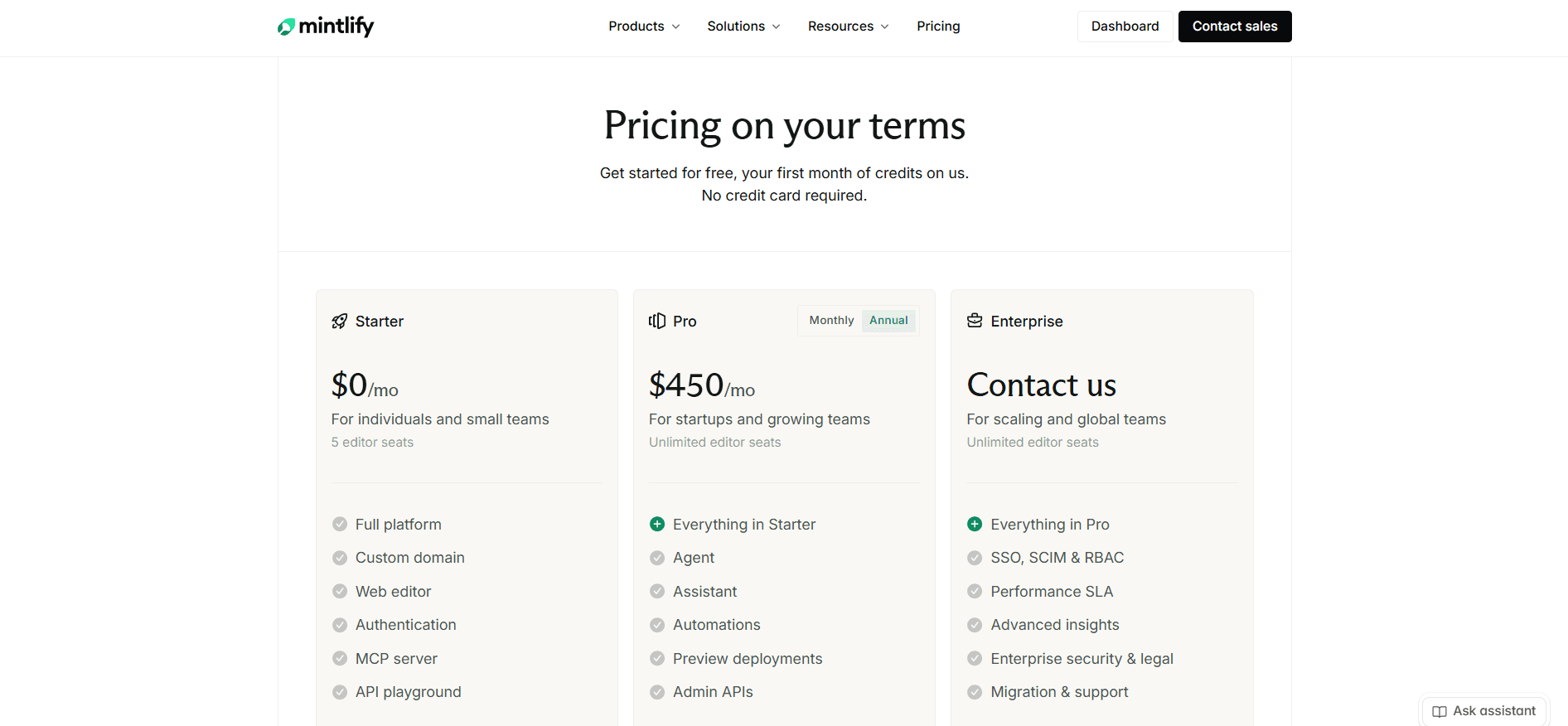
Starter is free with no time limit and seats five editors on a custom domain, with the browser editor, the API playground, and an MCP server. No AI sits on it, beyond a 14-day trial carrying 5,000 credits [1].
Pro is $450 per site per month with unlimited editor seats and 10,000 credits pooled across your organization, and it holds everything the product is sold on: the assistant, the agent, automations, analytics, and previews [1].
Enterprise is custom, and governance is what it adds, from SSO and role-based access control to audit logs, self-hosting, and migration services [1] [2]. Below it, any editor on Pro can push to production.
Credits top up at $145 for 15,000, $370 for 40,000, or $800 for 90,000, with overage at $0.01 a credit, off by default, and half of anything unused rolling over up to 1.5 times your allowance [1] [2]. Our Mintlify pricing breakdown works through the credit math in full.
GitBook
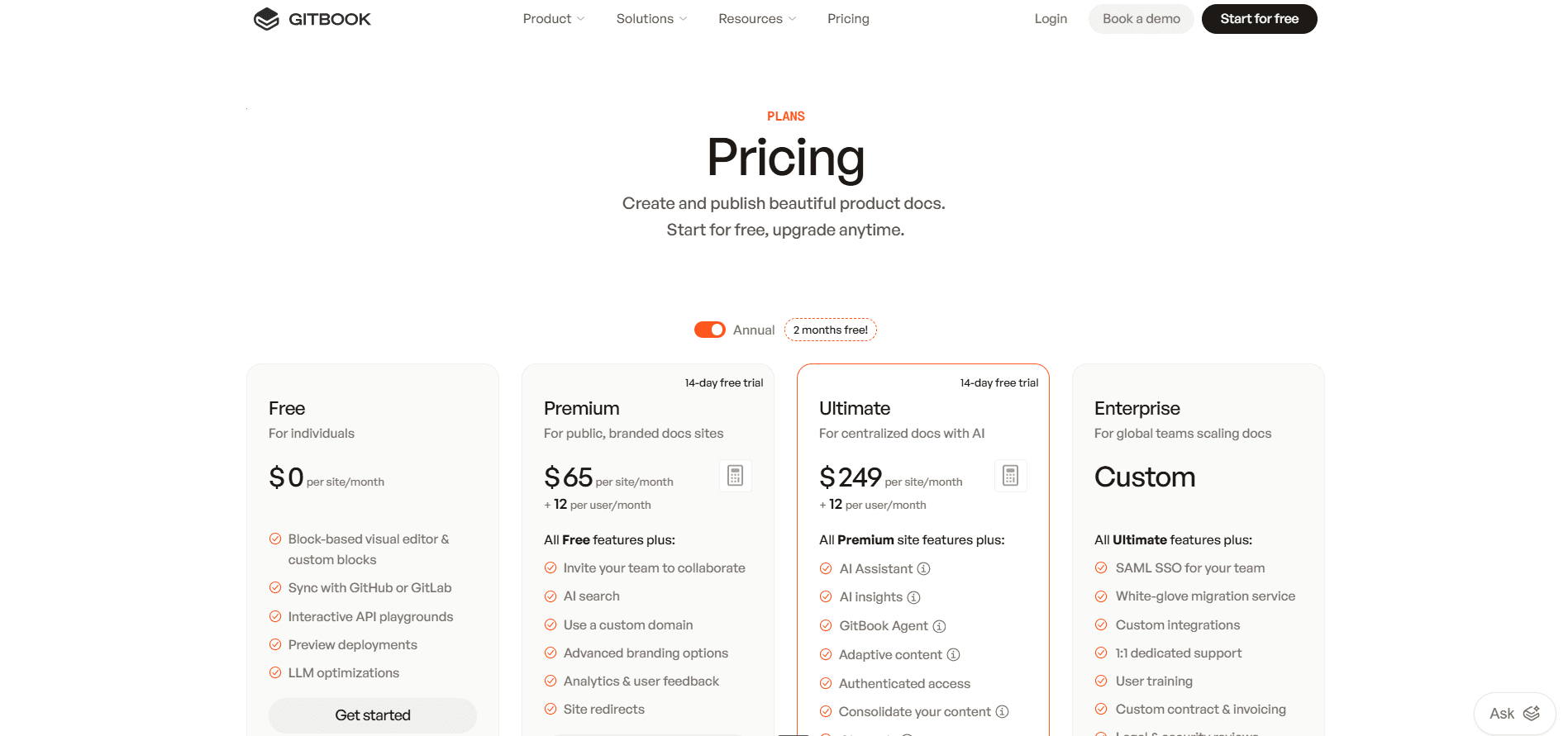
GitBook multiplies two numbers, and both grow. Free seats one user with no custom domain, which makes it a personal plan, though it still carries unlimited previews, versioning, and the machine-readable layer. Premium is $65 per site per month plus $12 per user, which buys the custom domain, real-time collaboration, reusable content, and generated answers in search. Ultimate is $249 per site per month plus the same $12 per user, and it is where the reader Assistant, AI insights, site sections, and authenticated documentation live [3] [4].
Sites multiply, members are counted once across the organization, and guests and readers cost the same $12 as editors. Translations on Premium bill separately at $25 for the first 50,000 words then $0.20 per 1,000. Ultimate's Assistant includes 500 answers a month and bills the excess on your next invoice at an unpublished rate [3] [4]. Our GitBook pricing guide works through the site-and-seat arithmetic.
Off the main ladder sits the Community plan. It is free, and it hands non-profits, open source projects, and education groups every Ultimate feature except SAML SSO, the reader Assistant included [4].
ReadMe
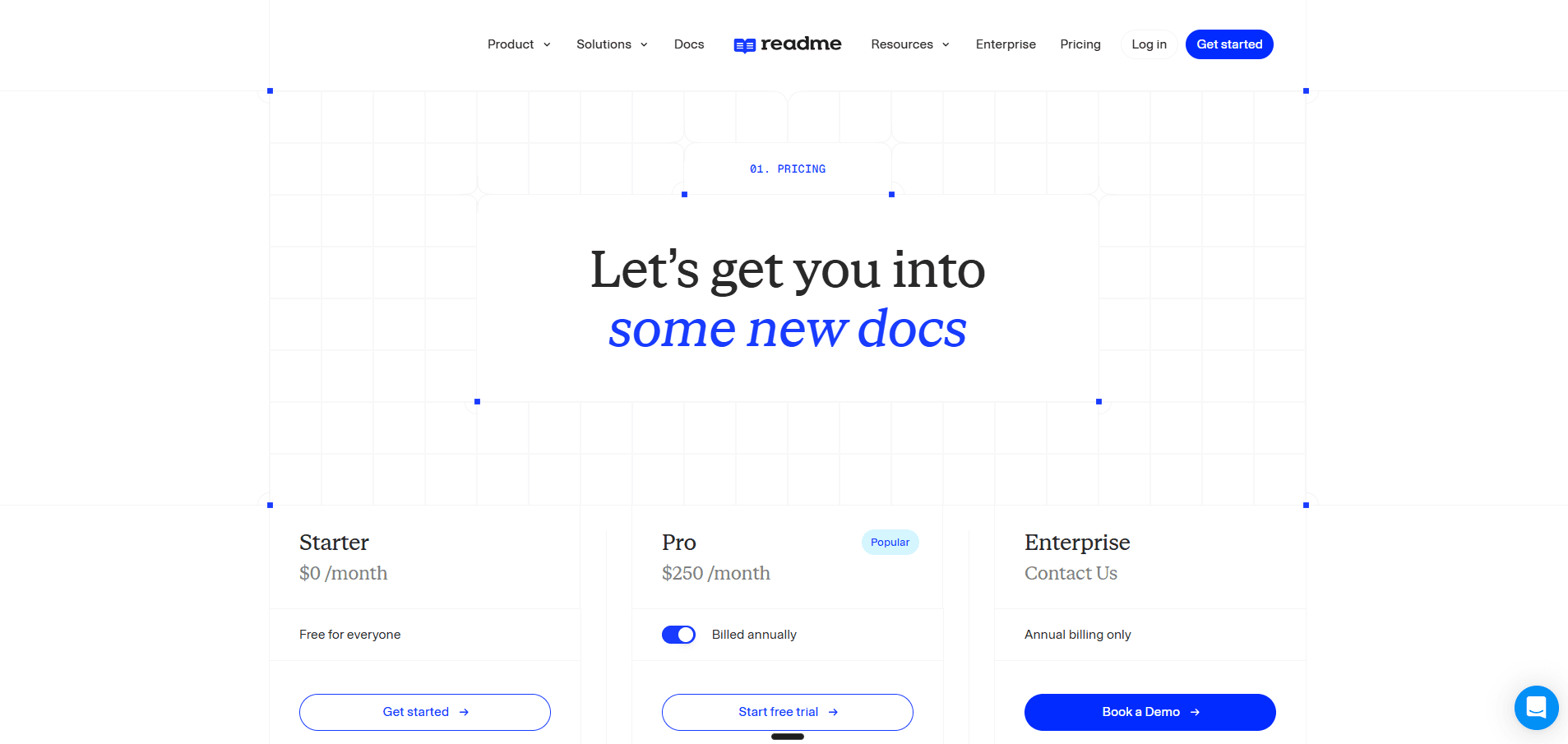
Starter is free with one teammate, one project, and one published version, and it is a real plan rather than a preview, carrying an interactive API reference, a custom domain, and bi-directional Git sync [5].
Pro is $250 a month with five teammates, then $20 a month each, still capped at one project. It adds branching and reviews, custom CSS and HTML, the richer content types, the AI Linter, and Ask AI Lite [5].
Enterprise is custom on annual billing only, and governance lives there, from Editor and Viewer roles to multi-project management, SAML, audit logs, and the Ask AI API [5].
Then two add-ons, and price those before committing to anything. Ask AI is $150 a month and sits against all three tiers, so an Enterprise contract does not include it. The Developer Dashboard is $100 a month for 5 million API logs, then $10 per additional million, and it buys the extended retention in the same charge [5] [6]. Add-ons are billed for the whole year upfront, and every teammate on the self-serve plans is a full Admin. Our ReadMe pricing breakdown covers both.
What a Team Actually Pays
Without reader AI the answer is short. Mintlify's free plan covers one site and five editors for nothing, where GitBook stops at a single user with no custom domain and ReadMe at a single teammate. Past five editors Mintlify jumps straight to $450, so GitBook Premium is cheapest from six logins all the way to 32, and Mintlify's unlimited seats take over from 33.
Add AI for readers and the first thing to settle is which product you mean, because two sit a tier apart. Generated answers beside search results, at five editors, cost $125 on GitBook Premium against $250 on ReadMe Pro and $450 on Mintlify Pro. A full chat sidebar costs $309, $400 and $450. From there the seat count decides it:
| Editors, full reader assistant | Mintlify Pro | GitBook Ultimate | ReadMe Pro plus Ask AI |
|---|---|---|---|
| 5 | $450 | $309 | $400 |
| 10 | $450 | $369 | $500 |
| 16 | $450 | $441 | $620 |
| 17 | $450 | $453 | $640 |
| 25 | $450 | $549 | $800 |
The crossover is 17 logins, and it runs between two of the three. Below it GitBook Ultimate is the cheapest way to put an assistant on your documentation, and it includes 500 monthly answers against Mintlify's 400. From 17, Mintlify's unlimited seats lead and keep leading as the team grows.
ReadMe never comes out cheapest, and the arithmetic says it cannot: $249 plus $12 a login stays under $400 plus $20 a login at every headcount. Price ReadMe on the Developer Dashboard instead, which is the capability neither competitor sells at any price.
One more number belongs in the comparison, and only Mintlify publishes it. Its included answers work out to about $1.13 each, with packs that bring that down as volume rises. GitBook's 500 included answers are about $0.50 each before seats, cheaper inside the allowance and unknowable one answer past it. ReadMe's $150 buys an unstated quantity, which makes it the cheapest option past roughly 130 questions a month and a guess after that. Get both numbers in writing before you sign.
Documenting Several Products
All three bill per site or project, so this is where the quotes separate most. Four products, 10 editors, reader assistant on:
| Setup | Monthly |
|---|---|
| GitBook Ultimate, one site with four sections | $369 |
| GitBook Ultimate, four separate sites | $1,116 |
| Mintlify Pro, four deployments | $1,800 |
| ReadMe Pro plus Ask AI, four projects | $2,000 |
| ReadMe Enterprise, four projects on one domain | Quoted |
Site sections are GitBook's own answer to its per-site fee and the largest single saving in this comparison. What you give up is real: one domain, one set of branding, one set of access rules across all four products. Mintlify pools credits across the organization but bills every deployment as its own subscription, and ReadMe caps self-serve plans at one project, so a second product means a second plan and a second add-on.
Priced all three and still short of a fit?
Documentation.AI bundles four documentation projects into one plan with unlimited editor seats, no page counting, and no overage billing on any tier, with the reader assistant and the documentation agent on the free plan rather than the top one.
Start free or book a demo and bring your existing docs across.
Pros and Cons
Mintlify
Pros
- Output that looks designed with no configuration, and custom CSS and JavaScript on every plan when you want to change it [1] [2]
- Editor seats are unlimited on the paid plan, so headcount growth costs nothing [1]
- A maintained local loop: CLI, preview server, MDX formatting, build errors, and broken-link detection before merge [2]
- Automations on four triggers, so the merge that invalidated a page can be the event that repairs it [2]
- Published credit rates, packs, and overage off by default, so the AI bill is forecastable, with no page limits of any kind [1] [2]
Cons
- No AI on the free plan, so the capability the product is sold on cannot be tested without a card or a 14-day trial [1]
- Nothing between free and the paid tier, the steepest single step of the three [1]
- The included allowance covers 400 reader answers, so traffic you do not control becomes a monthly capacity question, and a second product means a second subscription [1] [2]
- Role-based access control, audit logs, SSO, PDF export, white labeling, and self-hosting are all Enterprise, and without the first every paid-plan editor can publish live [2]
- OpenAPI 3.0 and 3.1 plus AsyncAPI 3.0 only, with no Swagger 2.0, GraphQL, or SOAP, and GitLab setup is a hand-built webhook [2]
GitBook
Pros
- A block editor over Markdown, with drag-and-drop structure, that mixed teams pick up without training [4]
- Change requests, which hand pull-request review to people who have never opened a terminal [4]
- The cheapest route to a reader chat assistant at any headcount under 17, with 500 answers included [3]
- Site sections, which collapse several products into one subscription instead of multiplying it [3] [4]
- A free plan carrying unlimited preview deployments, versioning, full-text search, and the machine-readable layer, with ISO 27001 and SOC 2 on every plan [3]
- The broadest support-desk connectors here, and specification support reaching back to Swagger 2.0 [4]
Cons
- Two multipliers, per site and per login, so a second product costs about what the first one did, and every login bills the same whether that person writes or only comments [3]
- The reader chat assistant is an Ultimate feature and metered on top, at 500 answers before an overage rate published nowhere [3] [4]
- No custom CSS, HTML, or JavaScript, no layout control, and a footer link that cannot be removed on any plan, Enterprise included [4]
- No export button. GitBook documents the way out as a Git sync into an empty repository, with custom blocks arriving as HTML [4]
- One user and no custom domain on the free plan, which rules out evaluating it as a team without paying [3]
- Nothing updates documentation on a schedule or on merge, and only the published-site renderer self-hosts, unsupported and GPLv3 [4]
ReadMe
Pros
- An interactive reference that fires real requests with the reader's own credentials rather than a sample key [6]
- Per-key endpoint analytics through the Developer Dashboard, which neither competitor offers at any price [6]
- The OpenAPI import sits inside signup instead of waiting to be configured afterwards [5]
- Recipes, a changelog, and discussion forums all count as first-class content inside one project [5]
- An AI Linter that scores pages against a style guide you write in prose, plus a site-wide Docs Audit [6]
- A free plan that publishes a real site on a custom domain, with bi-directional spec sync on every tier [5] [6]
Cons
- The free plan seats a single teammate, so evaluating together means buying a paid plan first [5]
- The reader assistant is a paid add-on at every tier including Enterprise, and no question volume, cap, or overage rate is published anywhere [5] [6]
- Priced above GitBook for a reader assistant at every headcount, since the site fee and the per-seat rate are both higher [3] [5]
- No role below full Admin until Enterprise, so a reviewer holds the same keys as the domain owner, and one project per plan means a second product is a second subscription [5] [6]
- The upgrade to ReadMe Refactored cannot be reversed, dropping Suggested Edits plus Staging and Translations for Enterprise projects [6]
Mintlify vs GitBook vs ReadMe: Final Comparison
| Category | Mintlify | GitBook | ReadMe |
|---|---|---|---|
| Best suited to | Developer documentation a larger team edits | Documentation owned across writing, support, and engineering | One API, with the usage data behind it |
| Free plan | Five seats, custom domain, playground, no AI | One user, no custom domain, agent capped weekly | One teammate, one project, interactive reference |
| Entry paid price | $450 per site a month, seats included | $65 per site a month plus $12 a user | $250 a month, five teammates, then $20 each |
| Where the reader assistant sits | Pro, the entry paid plan | Ultimate, $249 per site a month plus seats | A $150 a month add-on at any tier |
| Reader answers included | 400 a month, at 25 credits each | 500 a month on Ultimate | No published volume |
| Editor seats | Unlimited on Pro | $12 each on every paid plan | Five on Pro, then $20 each |
| Several products | One deployment per subscription | Per site, or one site with sections | One project per plan, multi-project is Enterprise |
| Visual editing | Visual and MDX source modes, live cursors | Block editor with Markdown underneath | Visual by default, source mode available |
| Restructuring | Drag and drop, or the editor agent | Manual, through a change request | Free inside a project, blocked at its boundary |
| Local development | mint CLI, preview server, link validation | None, the editor and repository are the workflow | rdme CLI, no local preview server |
| Automated maintenance | Automations on four triggers | Not offered | Not offered |
| API reference | Generated playground, samples in 18 languages | Interactive blocks on a Scalar playground | Real requests with the reader's own key |
| Specification support | OpenAPI 3.0 and 3.1, AsyncAPI 3.0 | Swagger 2.0, OpenAPI 3.0 and 3.1 | OpenAPI, bi-directional sync on every plan |
| Knows who is reading | No | No | Yes, personalized keys and My Developers |
| API usage analytics | Not offered | Not offered | $100 a month for 5 million logs, then $10 a million |
| Custom CSS and JavaScript | Every plan, including free | Not supported on any plan | CSS and HTML on Pro, JavaScript on Enterprise |
| Vendor branding in the footer | White labeling on Enterprise | Cannot be removed on any plan | Logo removal on Enterprise |
| Export and exit | Move the MDX files | Git sync to an empty repository, blocks as HTML | Git sync, and the Refactored upgrade is one-way |
A fourth column changes the shape of that table. Documentation.AI arrived after these three, which mostly meant declining the trades each of them made. The reader assistant and the documentation agent sit on the free plan instead of the top one, and a reader question costs 10 credits rather than 25. Editor seats are unlimited and four documentation projects come inside a single plan, so a second product does not mean a second subscription. Pages are never counted, custom CSS and JavaScript work on every tier, and a live preview comes with every plan. No plan bills an overage either, so when credits run out the AI pauses and your documentation stays published.
Its own gating is narrower but real, and worth knowing before you compare: role-based permissions and migration services arrive on the Pro plan, and removing the footer branding is an Enterprise line. Start free and point it at the docs you already have.
Final Verdict
Three questions settle this, and not one of them is about features: who is allowed to publish, how many of them there are, and whether your readers log in. The decision guide at the top of this page says which platform those answers point to. What follows is what the choice costs you after you have made it.
GitBook asks you to live inside a theme. No custom CSS at any price, its own name permanently in your footer, no export button when you want out, and an overage rate nobody will quote you in advance. What you get back is the only one of the three that does not charge you twice for a second product, and the cheapest reader assistant under 17 logins.
Mintlify asks you to start at the top. Nothing sits between the free plan and its only paid tier, the free plan carries no AI to judge it by, a second site is a second subscription, and governance stays behind a sales call. What you get back is unlimited seats, uncounted pages, and the only platform here that repairs a page from the merge that broke it.
ReadMe asks you to fund an engineering project. The capability worth buying it for needs the Metrics SDK running in your production API, the assistant is an add-on at every tier including Enterprise, and it costs more than either competitor for reader AI at any headcount. What you get back is the only documentation here that knows who is reading.
All three sell you the documentation, then sell you the assistant that reads it. None will let you keep one running for free long enough to learn whether your readers reach for it. All three bill by the site or the project, so the second product costs roughly what the first did. And all three meter the one thing a working documentation site produces more of every quarter, differing only at the wall: Mintlify stops answering, GitBook keeps answering and bills a number it will not print, ReadMe has never published a wall to hit. Worth pricing Mintlify alternatives, GitBook alternatives, and ReadMe alternatives against the same requirements first. For any two of the three head to head, see GitBook vs Mintlify, Mintlify vs ReadMe, and ReadMe vs GitBook. Each also has its own comparisons against the rest of the field: Mintlify vs Redocly, Archbee vs Mintlify, Mintlify vs Fern, and Document360 vs Mintlify for Mintlify, Archbee vs GitBook and GitBook vs Document360 for GitBook, and Document360 vs ReadMe for ReadMe.
All three also stop short of the same thing. Drafting was the earlier problem and each of them solved some version of it. Maintenance is the current one, and each holds only a fragment: Mintlify fires its agent when code changes, ReadMe scores existing pages against a style guide you wrote, GitBook reports which reader questions went unanswered. None of them carries the signal from a reader's failed question back to the page that failed them.
Documentation.AI closes the loop the other three leave open at both ends: workflows fire on the merge that changed the product, and the assistant scores its own answers, so a question your documentation could not handle comes back as a page to write rather than as a support ticket.
Migrating from Mintlify, GitBook, or ReadMe?
Mintlify content moves as files. GitBook comes out through a Git sync and ReadMe through its bi-directional sync, so the pages travel and the custom blocks need a look. The real work is rebuilding navigation and preserving your existing URLs, redirects included.
Start free, book a demo, or ask us in the Documentation.AI Slack channel.
Frequently Asked Questions
1. Which Is Cheapest, Mintlify, GitBook, or ReadMe?
Headcount decides it, and the answer changes twice. Without reader AI: Mintlify is free to five editors, GitBook is cheapest from six to 32 logins, and Mintlify takes over from 33 on unlimited seats. With a reader assistant: GitBook is cheapest to 16 logins, Mintlify from 17. ReadMe is not cheapest in either case, and cannot be, since its seat rate and its site fee are both higher than GitBook's [1] [3] [5].
2. Which Platform Should You Pick for API Documentation?
They are strong at different parts of it. ReadMe is built for the integrator, with a reference that fires real requests using the reader's own credentials, their request history on the page, and per-key endpoint analytics. Mintlify generates the most polished playground from OpenAPI 3.0 or 3.1 and AsyncAPI 3.0, with samples in 18 languages. GitBook covers the widest range of specification versions, Swagger 2.0 included. If your readers sign in, ReadMe. Otherwise Mintlify [2] [4] [6].
3. Do Mintlify, GitBook, and ReadMe All Have Free Plans?
All three, and they are not comparable. Mintlify's Starter seats five editors on a custom domain with the playground and an MCP server, and no AI at all. ReadMe's Starter seats one teammate and publishes a real interactive reference on a custom domain with Git sync. GitBook's Free seats one user with no custom domain, though it includes the authoring agent at 10 messages a week. Only Mintlify's lets a team evaluate together without paying [1] [3] [5].
4. How Much Does the Reader-Facing Assistant Cost on Each Platform?
Three different models, which is why the totals are hard to compare. Mintlify bundles it into Pro and meters it per answer, at roughly $1.13 for each of the 400 included. GitBook reserves the sidebar for Ultimate and includes 500 answers with the seat price rather than a meter. ReadMe does not bundle it at any tier: the full version is a $150 a month add-on you buy alongside your plan, Enterprise included, and Pro carries a Lite version with no customization, analytics, or API [1] [3] [5] [6].
5. Which Is Better for Non-Technical Contributors?
GitBook, on two counts. Git Sync is optional rather than deferred, so a team can run an entire site from the block editor, and change requests give writers pull-request review without a terminal. ReadMe comes second, since its editor opens in visual mode, though everything stops at the project boundary. Mintlify has closed most of the gap with visual mode, live cursors, and drag-and-drop navigation, but the model underneath is still branches, pull requests, and MDX in a repository [2] [4] [6].
6. What Happens When You Run Out of AI Usage?
Three different answers, worth deciding on before you sign. Mintlify switches the assistant off until the balance resets, because overage is off by default, though you can enable it at $0.01 a credit with a spending cap. GitBook keeps the Assistant running past its 500 monthly answers and bills the extra on your next invoice at a rate it does not publish. ReadMe publishes no allowance at all, which is not the same as unlimited, so ask for the limit in writing [1] [3] [4] [5].
7. Which Platform Handles Documentation for Several Products?
GitBook, by a wide margin, and site sections are the reason: several products collapse into one Ultimate subscription instead of multiplying it, at the cost of sharing one domain, one set of branding, and one set of access rules. Neither competitor has an equivalent. Mintlify bills every deployment separately, and ReadMe caps self-serve plans at one project, so consolidating there means an Enterprise contract. The pricing section prices four products on all three [1] [3] [5].
8. How Hard Is It to Move Off Each Platform?
Mintlify is easiest, since pages are ordinary MDX in a repository you already control, so leaving is a file move. GitBook is hardest, because there is no export button and the documented route out is syncing a section to an empty repository, with custom blocks arriving as HTML. ReadMe sits between, with bi-directional Git sync on every plan, though its Refactored upgrade is a one-way door. On all three, the work that takes real time is rebuilding navigation and preserving your existing URLs [2] [4] [6].
Sources
- Mintlify. "Pricing." Mintlify. https://www.mintlify.com/pricing
- Mintlify. "Mintlify Docs." Mintlify. https://www.mintlify.com/docs
- GitBook. "Pricing." GitBook. https://www.gitbook.com/pricing
- GitBook. "GitBook Docs." GitBook. https://gitbook.com/docs
- ReadMe. "Pricing." ReadMe. https://readme.com/pricing
- ReadMe. "ReadMe Docs." ReadMe. https://docs.readme.com/main/docs
Priced all three?
Reader AI on the free plan
All three gate the reader assistant or sell it beside the plan. Ours is on the free tier.
Start freeNo credit card required