Mintlify Pricing 2026: Plans, Credits & Real Cost
Mintlify's plan price is only part of what you pay. This guide explains what each plan includes, how the shared AI credit balance is spent, what happens when it runs out, and how to estimate a monthly bill that reflects how your documentation is actually read.

Roop Reddy · Co-Founder, Documentation.AI
Last updated
On this page
- At a Glance
- How Does Mintlify's Pricing Work?
- What You Get on the Free Plan and What You Do Not
- How Mintlify AI Credits Work, and What Overages Cost
- What Does Mintlify Actually Cost for a Real Team?
- Mintlify Enterprise Pricing
- Is Mintlify the Right Choice for You?
- Before You Decide
- Related Mintlify Comparisons
- FAQs
- Sources
Mintlify Pro costs $450 a month, and that price includes 10,000 AI credits. Since 8 September 2026 every AI Assistant answer costs a fixed 25 credits, so those credits cover 400 reader questions a month.
That number is not on the pricing page, and it decides what Mintlify actually costs you. The subscription is the predictable half of your bill. The credit meter is the half that moves, and it moves with your traffic rather than your team. That meter is what sends most teams to price the Mintlify alternatives alongside it.
This guide breaks down each tier, explains what consumes credits, and works through realistic cost scenarios so you can estimate your total monthly spend before booking a sales call. Every figure was checked against Mintlify's pricing page and credit documentation on 11 September 2026, after Mintlify moved to fixed per-action credit prices on 8 September. It has changed the model twice this year, so confirm the current numbers on mintlify.com/pricing before you commit. [1] [2] [5]
At a Glance
Mintlify has three tiers, with AI usage billed through credits on top of the paid plans.
| Plan | Price | AI features | Credits |
|---|---|---|---|
| Starter | $0 | None. AI Assistant, agent, and automations are available on the 14-day trial only | 5,000 during the trial, then none, and you cannot buy more |
| Pro | $450/mo billed annually | AI Assistant, writing agent, agent skills, automations, narration, AI translations | 10,000/month included, spent on Assistant answers, page narration, automation updates, and Autopilot pull requests |
| Enterprise | Custom quote | Everything in Pro, plus AI Assistant customization and external sources | Custom credit tiers |
Need more credits than your plan includes? Add-ons stack on top:
| Add-on credits per month | Monthly cost |
|---|---|
| 15,000 | $145 |
| 40,000 | $370 |
| 90,000 | $800 |
| Pay as you go (overage) | $0.01 per credit |
So What Will This Actually Cost Me?
Somewhere between $450 and several thousand a month, and the deciding variable is how many people read your documentation.
A team running internal docs with light AI use pays the $450 and nothing more. A public documentation site fielding around 1,000 reader questions a month lands near $615. A busy site fielding 500 questions a day runs to roughly $4,000 on self-serve pricing. Those scenarios are priced out in full further down.
The reason for that spread is the cost of a single reader question, which varies enormously across platforms:
| Platform and plan | Monthly price | Included credits | Cost per reader question | Questions covered |
|---|---|---|---|---|
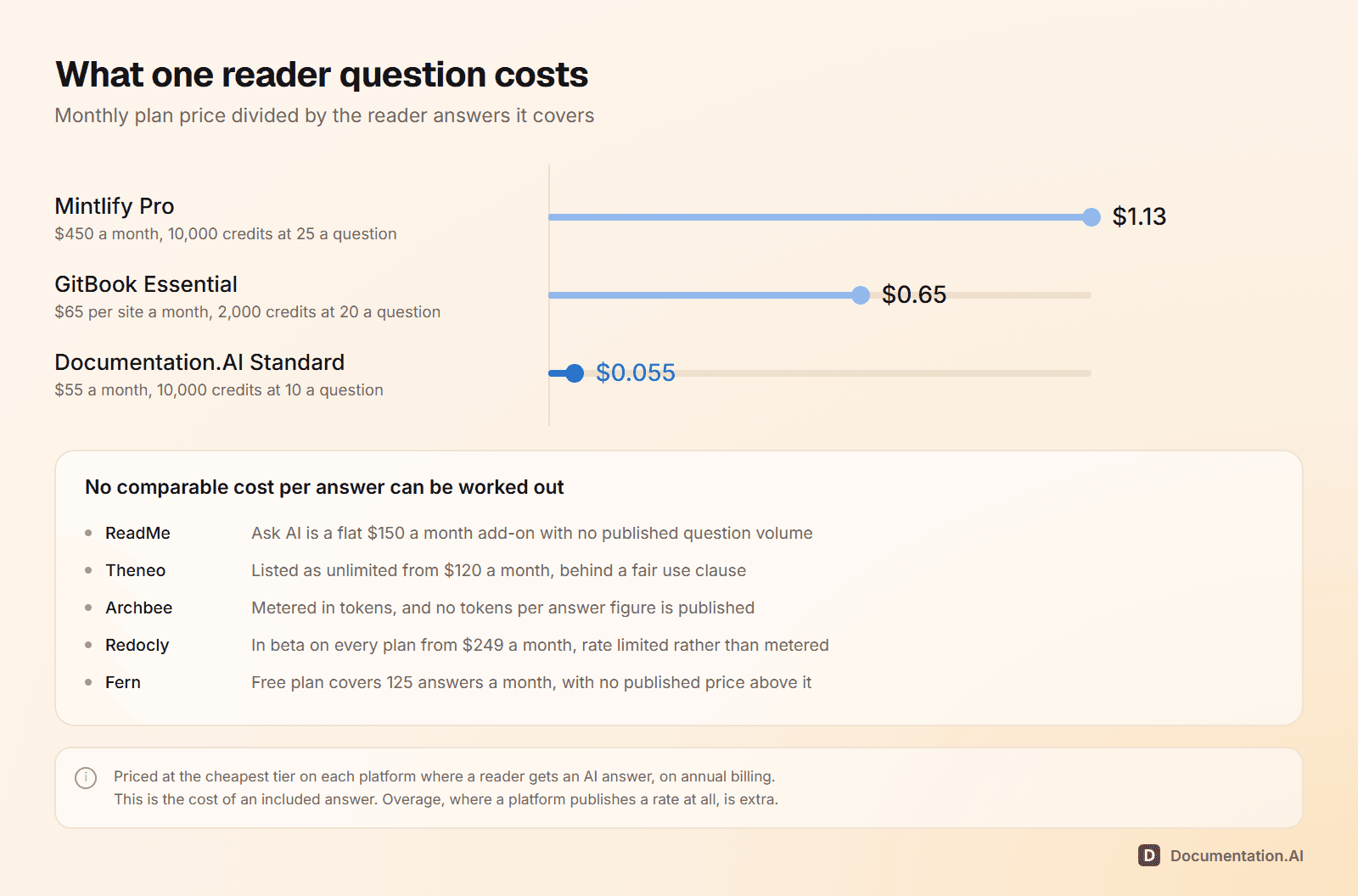
| Mintlify Pro | $450 | 10,000 | 25 credits | 400 |
| Documentation.AI Standard | $55, billed annually | 10,000 | 10 credits | 1,000 |
| Documentation.AI Pro | $159, billed annually | 30,000 | 10 credits | 3,000 |
Both platforms roll over 50% of unused credits, capped at 1.5 times the monthly allowance, so the difference is not in the mechanics. It is in what one credit buys.
What Changed in 2026
If you priced Mintlify earlier this year, six things have moved:
- Every AI action now has a fixed credit price. From 8 September 2026, an AI Assistant answer costs 25 credits, generating narration audio for a page costs 50, and an automation run that updates your docs, or an Autopilot run that opens or updates a pull request, costs 250. A question the Assistant cannot answer, and a run that finds nothing to change, cost nothing. Before that date, credits varied with the tokens each run used. [2] [5]
- The writing agent is no longer metered. The editor agent and the Slack agent draw no credits on Pro and Enterprise, so your balance goes on reader answers, page narration, automation updates, and Autopilot pull requests. [2] [5]
- Editor seats are no longer metered. Starter now includes up to five editor seats, and Pro and Enterprise include unlimited seats. The old $15 to $20 per extra editor is gone, so a documentation team of 20 costs the same as a team of five. [1]
- Credits pool at the organization level. They used to be tracked per deployment. Each Pro plan in your organization contributes 10,000 credits a month, so an organization running two Pro deployments starts each month with 20,000 in one shared pot. [2]
- Spending controls became real. You can now cap spend, pause AI at your quota, and get an email alert as you approach it. [1][2]
- Automations were rebuilt in April 2026 into two-click presets rather than prompts you maintain, which changed how often teams run them and therefore what they burn. [3]
How Does Mintlify's Pricing Work?
Most buyers should slow down here.
Mintlify's pricing is not just about picking a plan. The plan determines which features you can access, while your AI usage determines how much you may end up paying each month. Understanding that distinction makes the rest of the pricing much easier to follow.
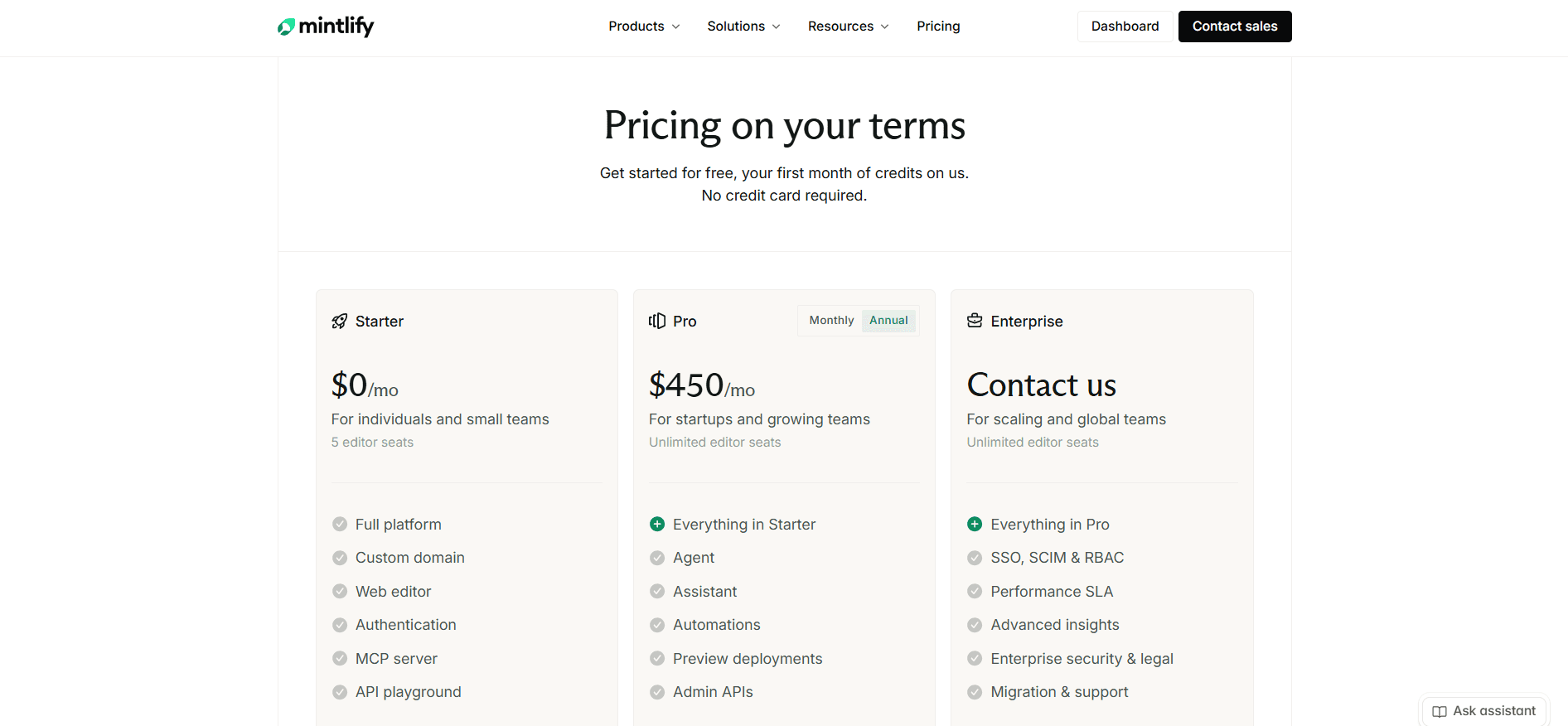
Starter (Free)
The Starter plan gives you access to Mintlify's core documentation platform, including the web editor, custom domains, Git sync, search, the API playground, and authentication. It is a solid option if your primary goal is to publish and manage documentation without committing to a paid plan. It includes up to five editor seats and requires no credit card to start.
The Starter plan focuses on Mintlify's core documentation platform rather than its AI capabilities. Features like Ask AI, AI agents, and automations are not included as part of the free plan, and you cannot buy credits on it. New users can explore these AI features during Mintlify's 14-day free trial, which includes up to 5,000 AI credits. The headline on the pricing page promises your first month of credits on Mintlify, but its own FAQ is the precise version: 14 days, up to 5,000 credits. That gives you a chance to test how the AI fits into your documentation workflow before deciding whether to upgrade.
Pro
For most growing teams, the Pro plan is where Mintlify's AI capabilities become part of the workflow.
Each Pro subscription includes 10,000 AI credits per month, and since 8 September four things spend them. Two are triggered by your readers: AI Assistant answers at 25 credits each, and narration at 50 credits the first time someone plays a page's audio. Two are triggered by your own automation: automation runs that update your docs at 250, and Autopilot runs that open or update a pull request, still in beta, also at 250. The writing agent, in the editor and in Slack, is included without drawing credits. If your readers ask a lot of questions, or your automations change your docs often, these credits become an important part of your monthly costs.
Need more? Mintlify lets you buy an add-on that stacks on top of what your plan includes: 15,000 extra credits for $145, 40,000 for $370, or 90,000 for $800. You can also enable overage billing if you prefer to pay for additional usage as you go. [2]
One detail the pricing page does not spell out is that Pro is priced per deployment, not per organization. If you publish two documentation sites, you are buying two Pro plans at $450 each. The upside is that each Pro plan contributes its own 10,000 credits into a single organization-wide pool, and any deployment can spend from it. Add-ons work the same way, bought once for the organization rather than once per site. [2]
Editor seats are no longer part of this arithmetic. Pro includes unlimited editors, so your total monthly bill is best thought of as two costs rather than three: the Pro subscription itself, and the AI credits your readers and your automations consume.
Enterprise
The Enterprise plan is custom-priced and is aimed at larger organizations with more advanced security, governance, and compliance requirements.
Beyond enterprise-grade features, it unlocks custom AI credit packages with committed volume discounts, giving larger teams more flexibility than the standard add-on tiers. Since pricing is not published, you will need to contact Mintlify's sales team for a tailored quote based on your team's size and requirements.
| Capability | Starter (free) | Pro | Enterprise |
|---|---|---|---|
| Editor seats | Up to 5 | Unlimited | Unlimited |
| AI Assistant, writing agent, automations | 14-day trial only | Included | Included |
| Buy extra AI credits | No | Yes | Custom packages |
| Preview deployments | No | Yes | Yes |
| Platform analytics and agent analytics | No | Yes | Yes |
| Developer API, webhooks, websockets | No | Yes | Yes |
| Authentication | Mintlify auth | Mintlify auth, password | OAuth, JWT, SSO |
| Personalization and search filters | No | No | Yes |
| Role-based permissions | No | No | Yes |
| Audit logs and audit log streaming | No | No | Yes |
| Dashboard SSO and SCIM | No | No | Yes |
| Self-hosting, EU hosting, BYOK | No | No | Yes |
| White labeling and custom developer portals | No | No | Yes |
| Support | Community | Standard | Dedicated, 24/7, custom SLA |
Source: Mintlify pricing. [1]
Note: every plan includes the core platform, meaning the web editor, custom domains, Git sync, search, the API playground, the MCP server, and custom components and CSS. What changes as you move up is AI access, authentication depth, and enterprise controls.
What You Get on the Free Plan and What You Do Not
The Starter plan gives you Mintlify's full documentation platform and none of its AI. That single distinction explains most of what people find confusing about the free tier, so it is worth being precise about where the line falls.
What you do get is genuinely complete. Starter includes the web editor, Git sync, a custom domain, search, the API playground, the MCP server, built-in and custom components, custom CSS and JavaScript, and Mintlify's SEO, GEO, and agent optimizations. Up to five people can edit, and no credit card is required. If your goal is to publish good documentation and nothing more, you can do that indefinitely without paying.
What you do not get is the AI, and Mintlify's documentation is direct about it: "The Starter plan does not include AI features, and you cannot purchase credits on it." [2] There is no Ask AI for your readers, no writing agent, no automations, and no option to buy your way in. Upgrading to Pro is the only route.
A few platform features are also held back, and they tend to matter more once documentation becomes something several people maintain rather than one person's project:
| Not included on Starter | Where it starts |
|---|---|
| AI Assistant, writing agent, agent skills, automations, AI translations | Pro |
| Preview deployments, grammar and spelling checks | Pro |
| User feedback, webhooks, websockets, developer API | Pro |
| Platform analytics and agent analytics | Pro |
| Authentication beyond Mintlify auth (password on Pro, OAuth, JWT and SSO on Enterprise) | Pro and Enterprise |
You can still evaluate everything before committing. Signing up starts a 14-day trial with all AI features unlocked and up to 5,000 credits included, no credit card needed. [1] In practice that is 200 AI Assistant answers, or 20 automation runs that update your docs. It is a fair test of how the AI handles your writing workflow, and a fairly thin one for judging what reader traffic will cost you.
This is worth flagging if free-tier AI is what you are shopping for, because it is not universal. Documentation.AI includes 10,000 one-time AI credits on its free plan, so the assistant and the agent can be tested against your own content without a countdown running.
Building the number?
Credits that survive your traffic
Ten credits per reader question, on every plan. Import your docs and check the arithmetic yourself.
No credit card required
How Mintlify AI Credits Work, and What Overages Cost
Credits are Mintlify's unit of AI consumption. Since 8 September 2026 each action has a fixed price, and four actions have a price at all: an AI Assistant answer at 25 credits, narration audio generated for a page at 50, an automation run that updates your docs at 250, and an Autopilot run that opens or updates a pull request, in beta, at 250. Everything else, the editor agent and the Slack agent included, is free on Pro and Enterprise. [2] [5]
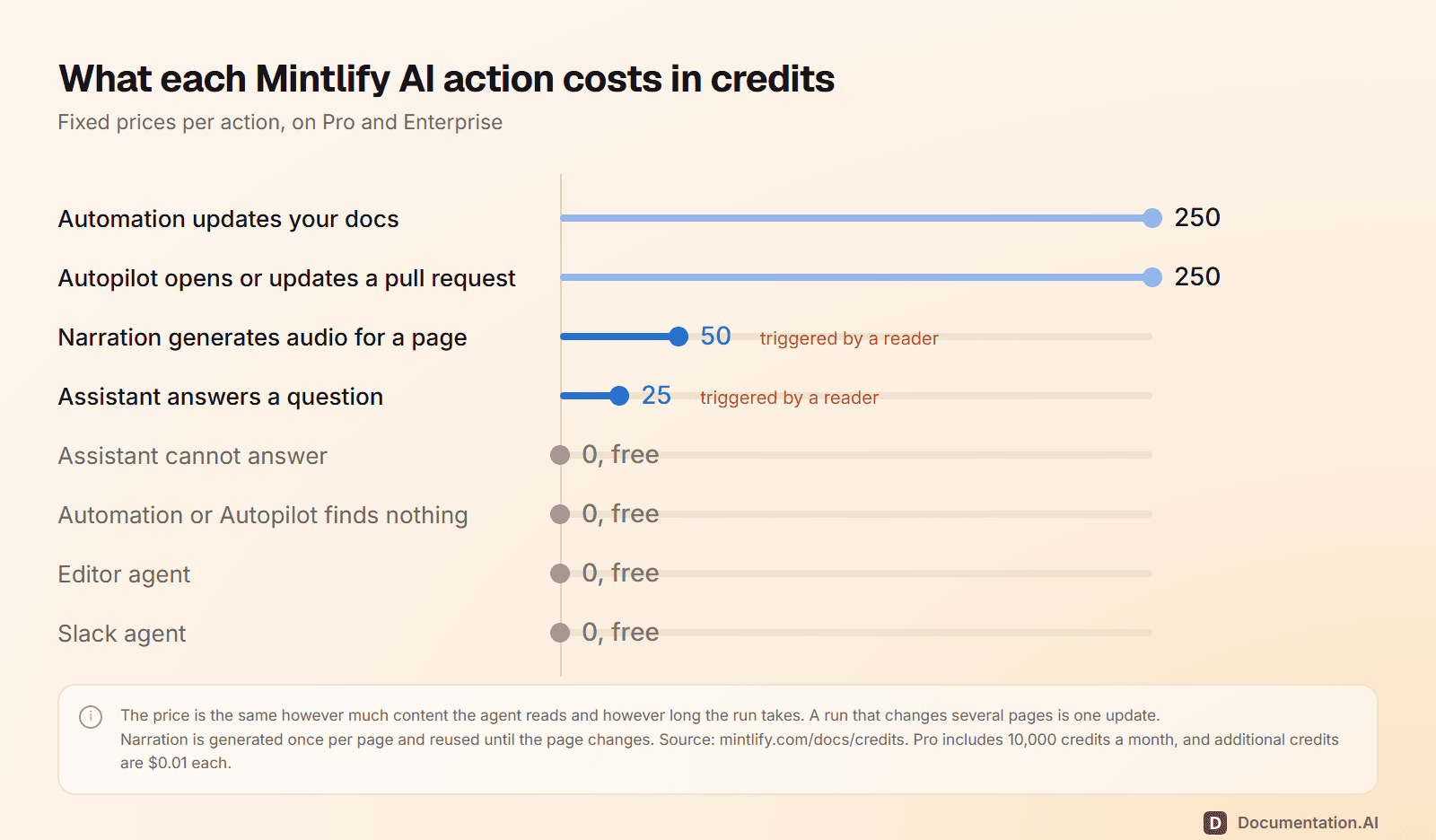
Source: mintlify.com/docs/credits. [2]
The price no longer depends on how much content the agent reads, how many passes it takes, or how long the action runs. Mintlify's own explanation for the change is that token-based credits made costs unpredictable: the same automation could cost a different amount every run, and the Assistant charged for questions it could not answer. It also says 96% of teams will spend the same or fewer credits on the Assistant under the new prices, and that teams using automations should spend around 70% fewer. [5]
A few usage patterns are worth keeping in mind when you estimate your monthly costs:
- The AI Assistant is the line that scales with traffic. Every answered visitor question draws 25 credits, so your costs grow with your audience, not with your team. That is the single most important thing to model.
- Narration is the second reader-triggered line. The first reader to play a page's audio spends 50 credits generating it, and later plays are cached and free until the page's narratable content changes, when the next listener pays 50 again. It tracks how many pages you publish and edit more than how many people visit. [2]
- The editor and Slack agents cost nothing. Your team can draft, edit, and restructure with the agent as often as it likes without touching the balance.
- Automations cost 250 credits per update, and nothing when they find nothing. A run that changes several pages is still one update. Each automation can run up to 500 times a day, and failed runs do not count toward that limit. The ones to watch trigger on every push to a busy repository, which is why Mintlify recommends running checks such as SEO audits and broken link detection on a daily or weekly schedule instead, so several changes batch into one update. Autopilot, still in beta, bills the same 250 for each run that opens or updates a pull request. [2]
Credit systems are not directly comparable between platforms, which is why the credit count on a pricing page tells you so little on its own. Documentation.AI counts a reader question as 10 credits rather than 25, and meters agent work by task: five credits for a quick edit, 35 for a single page, 50 to create a page, and 320 for a large import. Mintlify now charges nothing for editor agent work, so neither scheme is cheaper across the board. The comparison that matters is total monthly cost for your own workload.
The unit that does compare is the reader question, because every platform in this category sells one. Divide each plan price by the answers its allowance covers and the spread is wide enough to matter:
Credit Packages, Overage Charges, and Credit Rollover
Once you are on a paid plan, these three settings have the biggest effect on what you actually pay each month.
- Credit packages. If you are regularly running out, you do not have to change plans. Add-ons stack on top of what your plan includes, and you buy them from the Usage page, with changes taking effect immediately and charges prorated to your current billing cycle. An add-on is one purchase for the whole organization, so a second documentation site does not need its own.
- Overage charges. Running out of credits does not automatically mean a bigger bill. Overages are off by default, so once your shared balance is spent, AI features simply become unavailable until credits reset at the start of the next cycle. That prevents surprise charges, but it can interrupt your team, and because Ask AI is reader-facing, it interrupts your visitors too. If you would rather keep working, you can enable overages and pay $0.01 per additional credit. Every add-on tier costs less per credit than that, which is deliberate: overages are priced to absorb an occasional busy month, not to be a standing arrangement.
- Credit rollover. Not every month looks the same, and Mintlify allows for that. Up to 50% of your unused credits carry into the next cycle, so you can accumulate as much as 1.5 times your monthly allowance. There is one important caveat, and it is easy to miss: rollover resets when you change your add-on. That applies to downgrades as well as upgrades, and it takes effect immediately, so if you have built up a healthy balance it is worth timing any tier change carefully.
Mintlify also gives you three controls on the Usage page that are worth setting on day one. Overage behavior is configured per deployment, so you can leave it on for public documentation where a pause would affect readers and off for an internal site where it would not. Usage alerts email you when your organization reaches a chosen percentage of its balance. And you can export the activity log to CSV, which is the only reliable way to find out which automation is making the most updates. The download link expires after 72 hours. [2]
What Does Mintlify Actually Cost for a Real Team?
Pro starts at $450 a month, but that is only part of the picture. What you actually pay depends on how many AI credits your team and your readers consume. Here are three realistic scenarios priced against Mintlify's published rates, all on annual billing.
An internal documentation site (six writers, a known audience)
The team works with the editor agent every day, which costs nothing. A weekly broken link check and a weekly writing style pass that each find something to fix come to eight updates (2,000 credits), and around 100 internal questions add 2,500. That is 4,500 credits, well inside the 10,000 included with Pro. The bill is $450 a month, or $5,400 a year, and because editor seats are unlimited, adding a seventh writer changes nothing.
A public documentation site (~1,000 AI Assistant questions per month)
Those questions alone come to 25,000 credits. Add a weekly broken link check and a weekly changelog automation that each update the docs (eight updates, 2,000 credits), and you are at 27,000. The editor agent sessions your team runs cost nothing. The included 10,000 leaves 17,000 to find. The 15,000 add-on at $145 plus $20 of overage works out cheaper than moving up to the 40,000 add-on at $370. Expect around $615 a month, or $7,380 a year.
A busy documentation site (~500 AI Assistant questions per day)
That is about 15,000 questions a month, or 375,000 credits. Even the largest add-on you can buy yourself takes you to 100,000 credits, leaving 275,000 to cover at the overage rate, which is $2,750. Your bill lands near $4,000 a month, and at that point the pricing page has stopped being the right document. Custom credit packages are Enterprise only, so this is a conversation to have with sales before you sign an annual Pro contract, not after.
The takeaway?
Mintlify is reasonably priced when your AI usage is moderate and predictable, and since 8 September it is cheaper for teams that lean on the agent. Costs climb in two situations: high volumes of reader questions, and automations that trigger on every push to a busy repository. If your documentation is public and growing, model the reader-question line before anything else, because it is the only part of the bill you do not control.
Mintlify Enterprise Pricing
Mintlify does not publish Enterprise pricing, so you will need to contact sales for a custom quote. Several third-party trackers put Enterprise near $1,500 a month, but the company does not confirm a starting figure and the real number moves with your deployment model, security review, and support commitments. Treat any published Enterprise price, that one included, as an estimate rather than a rate card.
The plan is aimed at larger organizations that need stronger security, governance, and administrative controls. It includes: [1]
- Identity and governance. Dashboard SSO, SCIM, role-based permissions, audit logs, audit log streaming, and a session IP allowlist.
- Deployment control. Self-hosting, EU hosting, BYOK, instant rollbacks, and multi-repo support.
- Reader-facing depth. OAuth and JWT authentication, personalization, search filters, PDF export, white labeling, custom developer portals, and AI Assistant customization with external sources.
- Operations and support. Advanced insights, analytics data warehouse streaming, integrations, a performance SLA, migration services, Slack support, dedicated customer success, and 24/7 incident monitoring.
- Custom AI credit packages, which are available nowhere else. Above the 90,000-credit add-on, Enterprise is the only route, and it can also run the Assistant on your own model provider and API key at a reduced credit rate. [2]
It is worth checking whether you need the tier at all, or only one thing on the list. Private documentation with user login, for example, sits at $159 a month billed annually on Documentation.AI Pro through JWT or OAuth, where on Mintlify it is a quoted Enterprise line item.
Is Mintlify the Right Choice for You?
It depends far less on the headline price than on how your documentation is read. Mintlify's 2026 pricing is genuinely good for a large documentation team with a predictable audience, because the thing that used to be expensive, namely people, is now free. It gets expensive in one specific situation: public documentation with traffic you do not control.
Mintlify is a great fit if you:
- Have a documentation team larger than five and were previously paying per seat somewhere else
- Run internal or gated documentation where the reader count is known
- Use AI mainly to write and maintain content rather than to answer readers, since the editor and Slack agents no longer draw credits
- Need enterprise capabilities such as self-hosting, BYOK, EU hosting, audit logs, and advanced governance
It may not be the best fit if you:
- Want to evaluate AI features without paying, since Starter includes none and the trial runs 14 days
- Prefer a flat monthly number you can defend in a budget
- Publish high-traffic public documentation, where your bill grows with your audience
- Run several documentation sites and would rather not multiply the subscription by each one
Three things catch teams out after signing, none of them on the pricing page. The self-serve ceiling is 100,000 credits a month, so heavy traffic means negotiating rather than clicking upgrade. Changing your add-on wipes any rollover you have banked. And customers on legacy credit plans keep their old credit packs and pack pricing, so an older contract will not match the add-on table here. [2]
If any of that gives you pause, the number worth comparing is not the plan price, it is what a single reader question costs. On Documentation.AI, an Ask AI question costs 10 credits rather than 25, and every paid tier bundles a fixed allowance, so a traffic spike is a capacity question rather than an invoice. Our Mintlify vs Documentation.AI comparison covers features as well as cost. Mintlify's usage-based model genuinely suits teams whose AI usage fluctuates. The question is whether yours does.
Before You Decide
Before choosing a plan, estimate three things:
- How many AI Assistant questions is your documentation likely to receive each month?
- How often will your team use AI for writing, editing, and automations?
- Will you eventually need Enterprise features like SSO, audit logs, or self-hosting?
Then do one sum. Multiply your expected monthly reader questions by 25, add 50 for every new or changed page you expect readers to listen to, add 250 for every automation or Autopilot run you expect to change your docs, and compare the total against 10,000. Mintlify's own worked example, 200 answers and 12 automation updates in a month, comes to 8,000 credits. [2] That tells you more about your Mintlify bill than the $450 on the pricing page does. If you publish more than one documentation site, remember to multiply the subscription as well.
Once you have estimated your usage, confirm your expected pricing with Mintlify's sales team, particularly if you are considering Enterprise or expect heavy AI usage.
If predictable pricing is what you are after, book a Documentation.AI demo to see how bundled AI credits keep your monthly cost flat, or start free with no credit card required.
Related Mintlify Comparisons
Pricing is one input. These put Mintlify against the rest of the field on features and workflow as well as cost:
- Mintlify review 2026, the hands-on assessment of the editor, agent, and playground, with scores
- GitBook vs Mintlify, a collaborative block editor against docs-as-code
- Mintlify vs ReadMe, developer docs sites against API-first developer portals
- Document360 vs Mintlify, a governed knowledge base against docs-as-code
- Archbee vs Mintlify, token-metered AI add-ons against a credit-metered Pro plan
- Mintlify vs Fern, a published second plan against a free plan with only a quote above it
- Mintlify vs Redocly, one plan per site against flat plans with unlimited seats and pages
- Mintlify vs GitBook vs ReadMe, three billing shapes priced on the same documentation
- GitBook pricing, billed per site and per user rather than in credits
- ReadMe pricing, billed per teammate, with reader AI as a paid add-on
- Theneo pricing, billed per workspace with seats included and endpoints capped by plan
- Archbee pricing, a low entry price with AI and analytics charged as add-ons
- Redocly pricing, flat plans with unlimited seats and pages, priced by how many sites you run
- Fern pricing, where the only published plan is free and everything above it is a quote
FAQs
1. How Much Does Mintlify Cost in 2026?
Mintlify has three plans. Starter is free, with up to five editor seats and no AI features. Pro is $450 a month billed annually, per deployment, and includes unlimited editor seats and 10,000 AI credits. Enterprise is custom-priced, with third-party estimates starting around $1,500 a month. AI usage beyond your included credits is billed separately as credits.
2. What Is a Mintlify AI Credit?
A credit is Mintlify's unit of AI usage, and since 8 September 2026 each action has a fixed price. Four actions spend credits: an AI Assistant answer costs 25, narration audio generated for a page costs 50, and an automation run that updates your docs or an Autopilot run that opens or updates a pull request costs 250. Unanswered questions, runs that find nothing to change, and the editor and Slack agents cost nothing. Additional credits beyond your allowance cost $0.01 each.
3. Is There a Free Mintlify Plan?
Yes. Starter is free and includes the core documentation platform, custom domains, up to five editor seats, and login for organization members. It does not include AI features, and you cannot buy credits on it. You can test the AI Assistant, agents, and automations through a 14-day trial with up to 5,000 credits.
4. Is Mintlify Open Source?
No. The hosted platform is a commercial product, though Mintlify publishes its own documentation and its starter kit on GitHub under the MIT license. There is a pricing angle worth knowing, however: through the Mintlify OSS Program, qualifying non-commercial open source projects get Pro free forever, including custom domains, analytics, the API playground, and the AI features. To qualify, a project needs a recognized OSS license and must not be venture-backed, revenue-funded, or primarily maintained by a for-profit company. [4]
5. Can Mintlify Be Self-Hosted?
Only on Enterprise. Self-hosting appears in the Enterprise column of Mintlify's pricing table alone, and its docs describe it as a deployment in your own cloud or on-premises environment, on AWS or Kubernetes, scoped with Mintlify's account team and typically a few weeks of setup. [1] [2] Starter and Pro sites run on Mintlify's hosting, and the mint dev command in its CLI previews a site on your own machine before it deploys rather than serving it to readers.
6. What Are the Open Source Alternatives to Mintlify?
The main ones are Docusaurus, MkDocs, Starlight, Fumadocs, and Scalar for API reference. Docusaurus is the closest to Mintlify's docs-as-code model and the most mature, MkDocs is the simplest starting point for Python-adjacent teams, and Starlight and Fumadocs suit teams already on Astro or Next.js. All of them are free, and all of them trade managed hosting and built-in AI for engineering time, so the real comparison is your team's hours against a subscription. Our roundup of Mintlify alternatives covers both the open source and the hosted options.
7. What Happens When You Run Out of Mintlify Credits?
It depends on one setting. Overages are off by default, so a deployment with them off loses its AI features, including Ask AI for your readers, until the balance resets next month. With overages enabled, additional credits are billed at $0.01 each. You can also set a hard spending limit and email alerts at a chosen percentage of your balance.
8. Is Mintlify Expensive Compared to the Alternatives?
It depends on your traffic. Mintlify Pro is $450 a month for 10,000 credits, which covers 400 AI Assistant answers at 25 credits each. Documentation.AI Standard is $55 a month for 10,000 credits at 10 credits per reader question, and Pro is $159 for 30,000, both billed annually. For internal documentation with light AI use the gap is mostly the subscription. For public documentation, it widens with every visitor.
Sources
- Mintlify. "Pricing." Mintlify. Accessed September 2026. https://www.mintlify.com/pricing
- Mintlify. "Mintlify Docs." Mintlify. Accessed September 2026. https://www.mintlify.com/docs
- Mintlify. "Mintlify Blog." Mintlify. Accessed September 2026. https://www.mintlify.com/blog
- Mintlify. "OSS Program." Mintlify. Accessed September 2026. https://www.mintlify.com/oss-program
- Mintlify. "Simpler, Outcome-Based AI Pricing." Mintlify Blog. September 8, 2026. https://www.mintlify.com/blog/outcome-based-ai-pricing
Building the number?
Credits that survive your traffic
Ten credits per reader question, on every plan. Import your docs and check the arithmetic yourself.
No credit card required