GitBook Review 2026
GitBook pairs an editor that leads its category with a pricing model built around individual sites. This review assesses the editor, Git Sync, API reference, agent, and reader AI through hands-on use, and explains how costs change as a team adds sites and people.

Roop Reddy · Co-Founder, Documentation.AI
Last updated
On this page
GitBook is a hosted documentation platform for publishing product docs, API references, and knowledge bases on the web. Teams write in a block editor or in Markdown inside a GitHub or GitLab repository, two-way Git Sync keeps both versions in step, and GitBook hosts the published site with search, an MCP server, and optional reader AI. [1] [2]
GitBook has been around longer than most of the products it now competes with, and it started as something much simpler: a way to turn a repository of Markdown files into a readable site. GitBook describes that arc itself, from a documentation platform to what it now calls an intelligent knowledge layer. Today that means a block editor, two-way Git sync, an authoring agent, and a reader-facing assistant, and the long runway shows in how finished the core feels.
What has changed recently is not the software. It is the shape of the bill, and that is where a 2026 evaluation actually turns.
Everything below comes from building on the platform and from GitBook's own pricing page, product documentation, and billing FAQ, with an access date on every citation.
GitBook Review: The Verdict
GitBook is a strong single-site documentation platform, and its pricing is built around that assumption. Add a second site or a reader-facing assistant and the bill moves further than the requirement did, which is usually the point at which a GitBook alternative starts to earn its keep.
Our overall score is 3.9 out of 5, the unweighted average of the eight scores below, rounded to one decimal. Every review in this series is scored on the same eight criteria, so the rows compare directly from one platform to the next.
| What we rated | Score | Why |
|---|---|---|
| Editing and structuring | 4.7 | The best block editor in the category, drag-and-drop structure, real Markdown underneath |
| API reference and explorer | 3.7 | Swagger and OpenAPI import that stays current, on a Scalar playground rather than its own |
| Published output and design | 4.3 | Clean and fast, but theme-only and permanently badged |
| AI authoring and the agent | 3.9 | Good scoped edits, uncapped from Essential, and no help restructuring |
| Reader AI and search | 3.2 | Search-box answers at Essential, the Assistant at Ultimate, both spending credits from a monthly allowance |
| Analytics and reader insight | 3.8 | Reports which reader questions went unanswered, once you are on the top tier |
| Governance and collaboration | 4.3 | Change requests, two-way Git Sync, and review a non-developer can actually use |
| Pricing and value | 3.2 | A genuinely generous free tier, then two multipliers and AI credits that bill past the allowance |
Buy GitBook if you run one documentation site, your team already works in GitHub or GitLab, and you want writers contributing to the same content without cloning a repository.
Look elsewhere if you publish docs for more than one product, you need a reader-facing AI assistant without a $249 per site line item, you need custom CSS or your own branding in the footer, or your compliance rules require the content itself, not only the published site, to live on your own infrastructure.
Most of what holds GitBook back is priced in rather than missing. The documentation work is good, and the cost of it climbs with every site you add.
What Is GitBook Built For?
GitBook is built for documentation that a whole team owns but engineering underwrites. A block editor lets anyone write, two-way Git Sync keeps a repository as the source of truth, and change requests bring pull-request review to people who have never opened a terminal. [1]
In practice that means writers get a Notion-like editing surface, and developers commit Markdown from their own editor without opening the app. Most of the category offers some version of this now.
The distinction worth drawing is where the center of gravity sits. A visual editor is present, but the model underneath stays branches, change requests, and merges. Merge conflicts get resolved in Git, structural changes are best made through SUMMARY.md in the repository, and the supported answer to almost every scale problem, from bulk edits to large imports to getting your content back out, is Git Sync. [1]
That is a sound foundation, and the accommodation for non-technical contributors is real. It is still accommodation rather than the base model.
What GitBook is not is a support desk. It can answer from Zendesk, Intercom, Front, Linear, and Jira as external knowledge sources on Ultimate, which is a real strength, but there is no ticketing workflow and no deflection reporting aimed at support agents. [2] For a support-led knowledge base, our GitBook vs Document360 comparison covers the governed alternative.
GitBook Features: What Stands Out
The GitBook Editor: Blocks, Slash Commands, and Change Requests
The web editor is a WYSIWYG surface with a Notion-like block model and the elements you would expect: callouts, tabs, cards, code groups, API blocks, and reusable content. Press / on a new line and the insert palette lists every block, or hover beside an existing block and click the + icon. [1]
Editing is branch-based. Clicking Edit opens a change request, a draft copy of the section with Editor, Changes, and Preview tabs, and nothing reaches the live site until someone clicks Merge. [1] Merge rules can require conditions to be met before a change request merges, which gives a docs team the review gate an engineering team gets from pull requests.
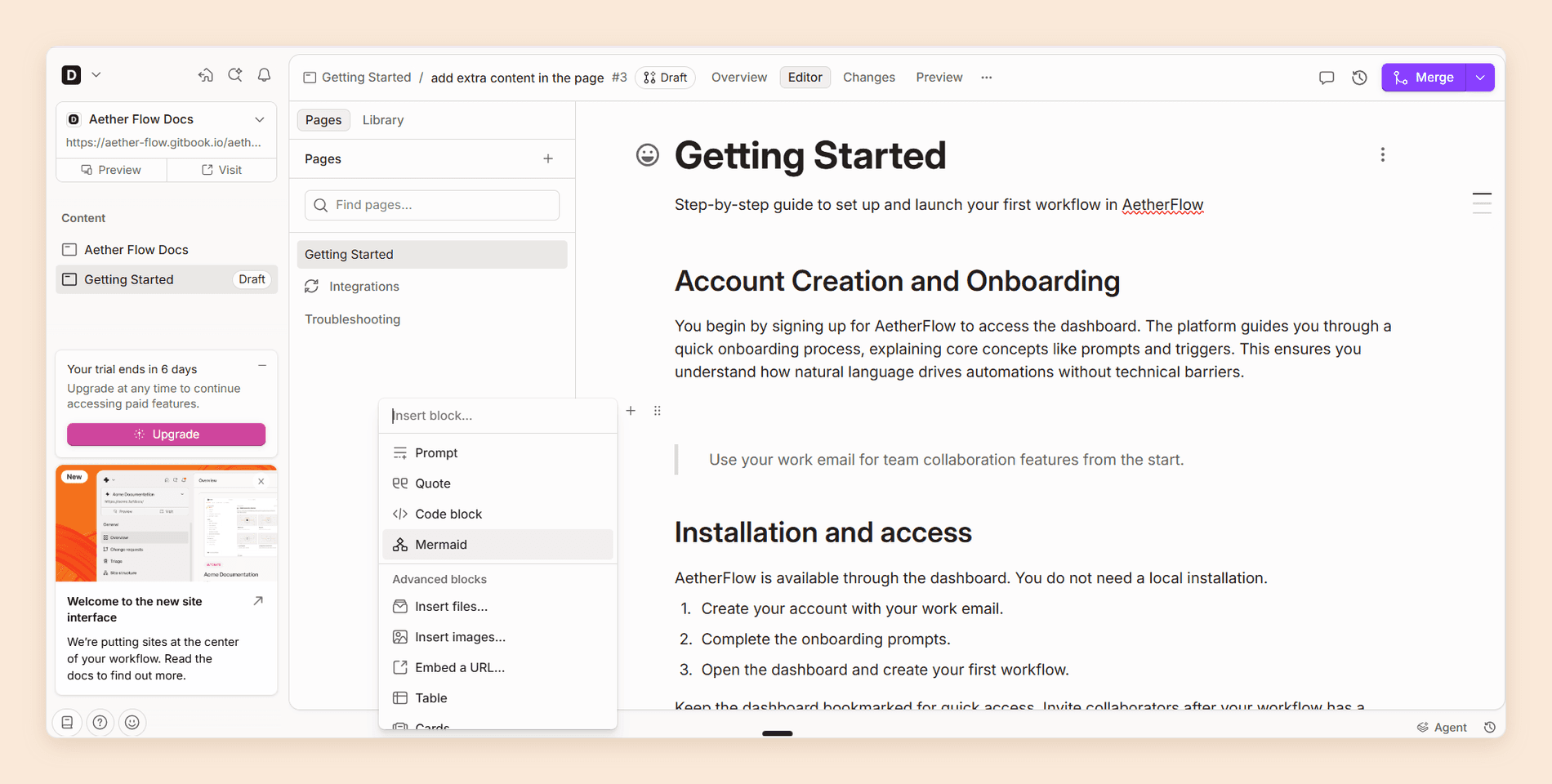
Restructuring is drag and drop, inside a page and across the page tree, and moving a section does not break the links pointing at it. Underneath, the content is still Markdown, so you can work in the editor, in your repository, or across both. Real-time collaboration requires Essential. [2]
As the site grew, two things wore on us. Past 50 or so pages the page tree starts to feel heavy, with a beat of lag on drag operations that is not there at 10 pages. And media is the weakest corner of the editor: once you have uploaded a few dozen images there is no good way to find one again, so people re-upload rather than hunt.
Git Sync and Docs-as-Code
Git Sync is genuinely bi-directional. Push a commit to GitHub or GitLab and it appears in the app. Edit in the app and GitBook commits back. Merge conflicts are resolved in Git. [1]
Git Sync is on every plan, Free included, and it can map a whole site to one repository or connect each section to its own repository and branch. Only administrators and creators can set it up, and GitBook's GitHub app does not work with GitHub Enterprise Server instances. [1] [2]
Around it sits the workflow developers expect. Opening a pull request makes GitBook import that branch and post a commit status linking to a rendered preview. Batch changes, linting, and find-and-replace become repository operations, and monorepo configuration lets one repository feed several spaces from different folders.
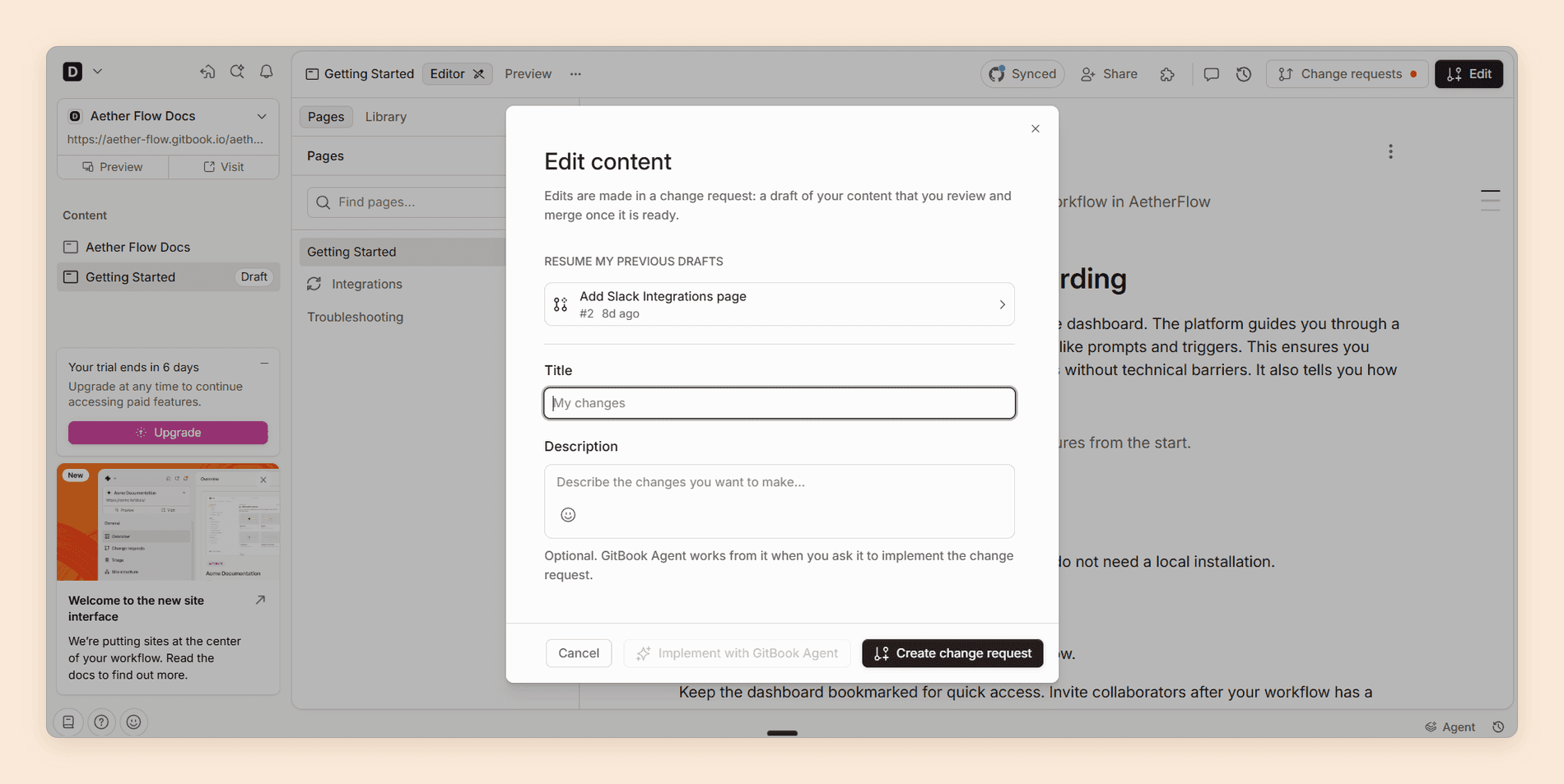
The care needed is on the human side rather than the technical one. Two people editing the same pages through separate change requests will produce a conflict someone has to resolve in Git, and the person who wrote the content in a visual editor is often not the person who can resolve it. Agree who owns which sections before you hand the editor to a wide team.
API Reference and OpenAPI
GitBook imports Swagger 2.0, OpenAPI 3.0, and OpenAPI 3.1 specs, including 3.1-only features such as webhooks, and turns them into interactive API blocks. [1] You can upload a file, point at a hosted URL, or publish through the GitBook CLI. [1]
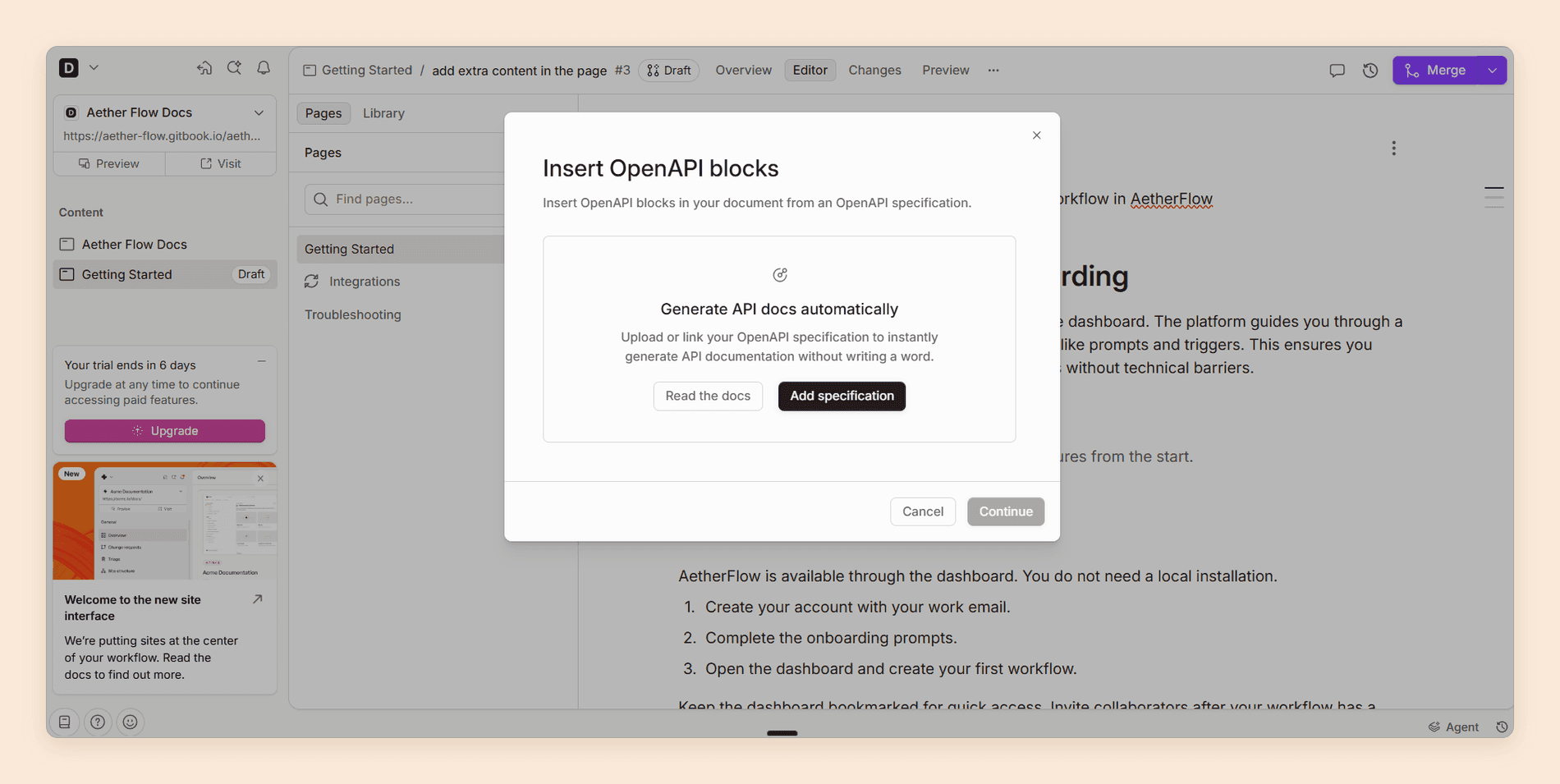
Keeping the reference current works well. A URL-linked spec is checked for updates every six hours, with a manual refresh button when you cannot wait, and the CLI command doubles as your CI step, so a release pipeline can push a new spec on merge. [1]
Know two details before you build on it. The "Test it" playground is Scalar rather than something GitBook built, which is fine in use and worth knowing when you are comparing playgrounds feature by feature. [1] And a spec added by URL needs your API to allow cross-origin GET requests from your docs domain, or the block will not load. If you cannot change CORS, GitBook's proxy routes test requests server-side, switched on with an x-enable-proxy extension at the root of the spec or per operation, and it will only forward to hosts already listed in your servers array. [1]
This is a competent API reference layer rather than a market-leading one. If your product is API-first and the reference is the documentation, weigh it against platforms built around that job first. Our ReadMe vs GitBook comparison sets it against one of them.
GitBook Agent
The agent works inside the editor. It writes, edits, and updates content, interprets a request accurately, and responds without stalling. On a scoped, single-page change it produces a clean result that needs little cleanup.
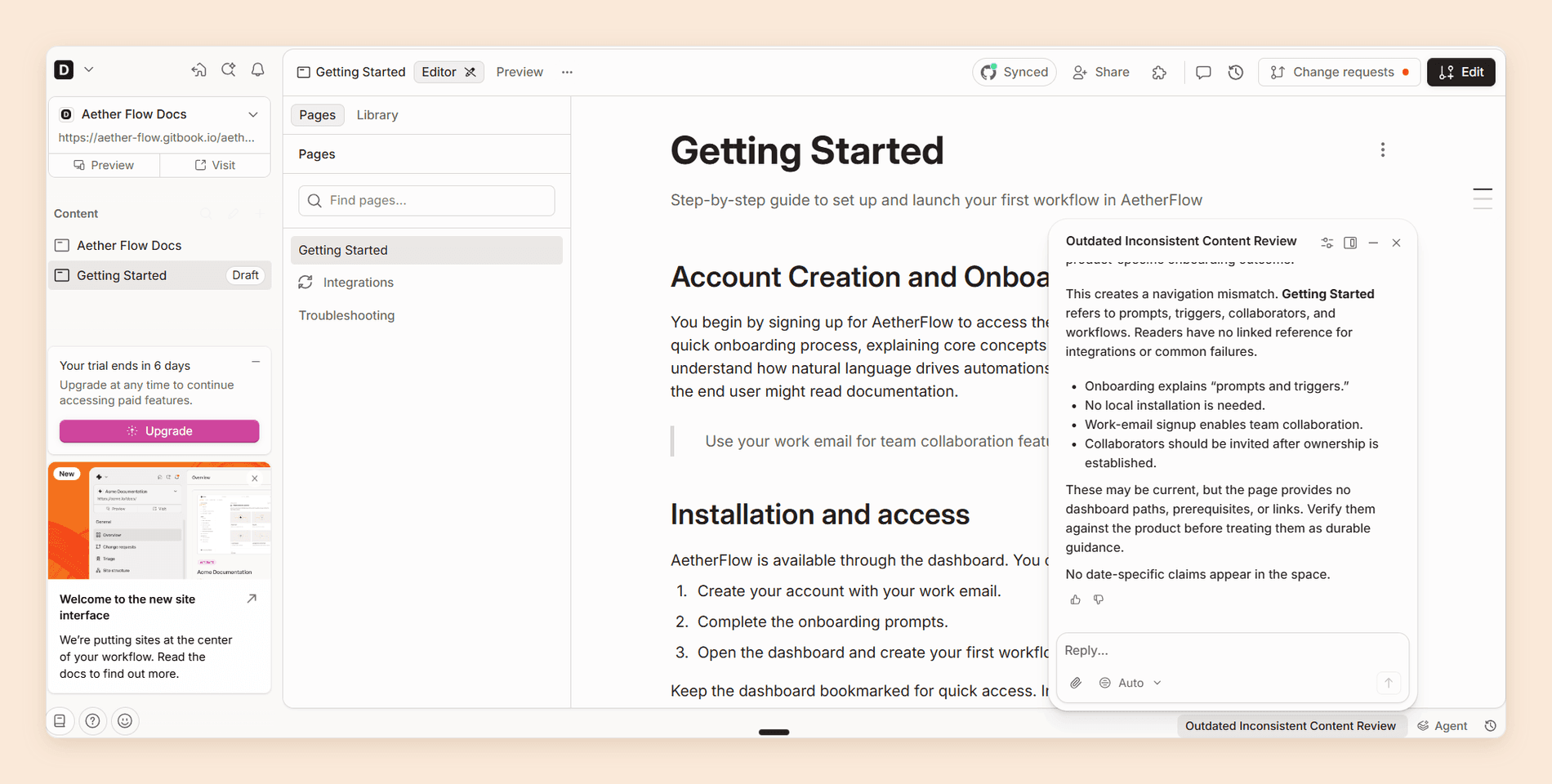
It will also audit a page for outdated or inconsistent content, as above, and hand back the claims it wants a person to check against the product.
Where it stops is structure. Every change it makes is scoped through a change request that a human opens, reviews, and merges, so reorganizing a documentation set is still page-by-page work. It is a writing assistant, not an autonomous maintainer.
Plan limit. On the free plan GitBook Agent is capped at 10 messages per week. Essential removes the cap. [2]
Reader-Facing AI and External Sources
GitBook splits reader-facing AI into two products, and the split is the single most expensive detail on the pricing page.
AI Assistant Ask puts a short generated answer next to keyword results and starts on Essential. AI Assistant Chat, the full sidebar, is Ultimate only, as are embedding it in your own product, customizing it, connecting external knowledge sources, and the Slack, GitHub, and Linear channels. [2]
The Assistant is good, and its external source connectors are broader than anything else in this comparison. But the free plan has no reader AI at all, and Essential at $65 gets you an answer in a search box rather than a conversation, paid for from 2,000 AI credits a month, about 100 answers. [2]
Analytics and AI Insights
Page view analytics and full-text search are on every plan including Free. Search analytics, which surfaces your top keywords and the ones worth improving, starts on Essential. [2]
Pay attention to AI insights. It reports how many unique questions readers asked, the percentage the Assistant answered, and topics that group related questions so you can watch a theme build. Drill into a question and you see whether it was answered fully, partially, or not at all, and which sources were used. [1]
That is a documentation gap list built from what readers actually asked, which beats any content audit. It is also Ultimate only.
Preview and Publish
The publishing loop is reassuring in a way that is hard to demo and easy to appreciate. Preview deployments give you unlimited full-site previews on every plan, including Free, so you see the change in context before it ships. [2] Pushing a branch through Git posts a preview link on the commit status.
Publishing is one action, with sharing options for the usual platforms attached. For a team shipping documentation continuously rather than in releases, seeing the rendered result and deciding from there is the right shape.
Customization, Themes, and Templates
A new site can start from the Docs template, which builds a working layout with Home, Documentation, API Reference, Changelog, and Help Center sections filled with placeholder content. The other starting points are an import, an OpenAPI spec, a blank section, or Git Sync. [1]
GitBook offers four themes. Clean, the default, and Muted are available on every site, while Bold and Gradient are marked Essential and Ultimate in GitBook's documentation. A primary color and a tint color drive the rest of the palette, and code blocks take an adaptive theme or one of more than 60 Shiki presets. [1]
Logos, icon styles, the footer, and custom font uploads sit under what GitBook calls advanced customization. The pricing table lists both advanced customization and custom fonts on every plan including Free, while the customization docs still mark them as paid features, so check the editor before you plan a brand around them. [1] [2]
Structure is part of the design too. Variants for versions and languages are on every plan, site sections that group several products under one site are Ultimate only, and each section or variant can override the site-wide theme. [1] [2] What none of these settings reach is page layout or custom code, covered under theme-only customization below.
GitBook examples worth opening. These public sites are served by GitBook today, each returning GitBook's routing headers:
- Snyk User Docs, a large product documentation site
- Raycast API, a developer reference for building extensions
- n8n Docs, documentation for a workflow automation product
- PancakeSwap, user documentation for a decentralized exchange
A Genuinely Generous Free Tier
Credit where it is due. On the free plan you get the block editor, Git Sync, unlimited private content, preview deployments, page view analytics, full-text search, interactive API blocks, site variants for versions and translations, llms.txt and llms-full.txt, and an MCP server for your docs. [2] Several competitors gate the last two behind a paid plan.
Non-profits, open source projects, and education groups can also apply for the Community plan, which includes every Ultimate feature except SAML SSO at no cost. The criteria are specific: a public repository with a README, a contributing guide, a license, and a code of conduct, and no cryptocurrency or gaming projects. [1]
The gap is reader AI. Everything above is authoring and publishing, and a reader still cannot ask your docs a question until you reach Essential. If that is the capability you are actually shopping for, Documentation.AI includes the AI Assistant on its free Starter plan, so you can put it in front of real readers before deciding what GitBook tier you need. [3]
Pricing a second site?
Sites bundled, seats included
Projects come with the plan instead of being billed one at a time, and reader AI starts on the free tier.
No credit card required
Where GitBook Slows Down
Six things to weigh before you commit. Two are cost, two are lock-in, and two are the constraints that decide whether GitBook can be the platform at all.
Compounding Price Multipliers
GitBook bills per site and per user at the same time, so the second documentation site costs as much as the first. There is no free reader seat either: anyone who can log in costs $12 a month, including a stakeholder who only comments. [2]
GitBook's own answer to running several products is to stop running several sites and consolidate into one Ultimate site using sections. [1] It is cheaper, and it collapses your products under one domain and one set of access rules.
AI Credits and Overage
Most write-ups say GitBook does not meter AI, and the pricing page says otherwise. Reader AI and translations run on AI credits: each Essential site adds 2,000 a month and each Ultimate site 10,000 to one organization-wide wallet, a relevant answer costs 20 credits, and translating 1,000 words costs 30. That is about 100 answers a month for an Essential site and 500 for an Ultimate site. [1] [2]
Past the allowance, extra credits cost $0.01 each, so $0.20 an answer, billed on your next invoice, with prepaid monthly bundles for a discount. You can also set a low-balance alert and have AI usage auto-pause when credits run out. [1] [2] Five hundred answers is about 17 a day, which is comfortable for an internal knowledge base and gone in a week on public docs with support volume behind them. The rate is something you can budget against now; the volume still is not.
Translations draw on the same wallet, so a large translation run and a busy month of reader questions compete for the same credits. [1]
Theme-Only Customization
Logos, fonts, colors, icon styles, code themes, and the footer are yours to change. Page layout is not, and you cannot inject custom CSS, HTML, or JavaScript into a published site. [1]
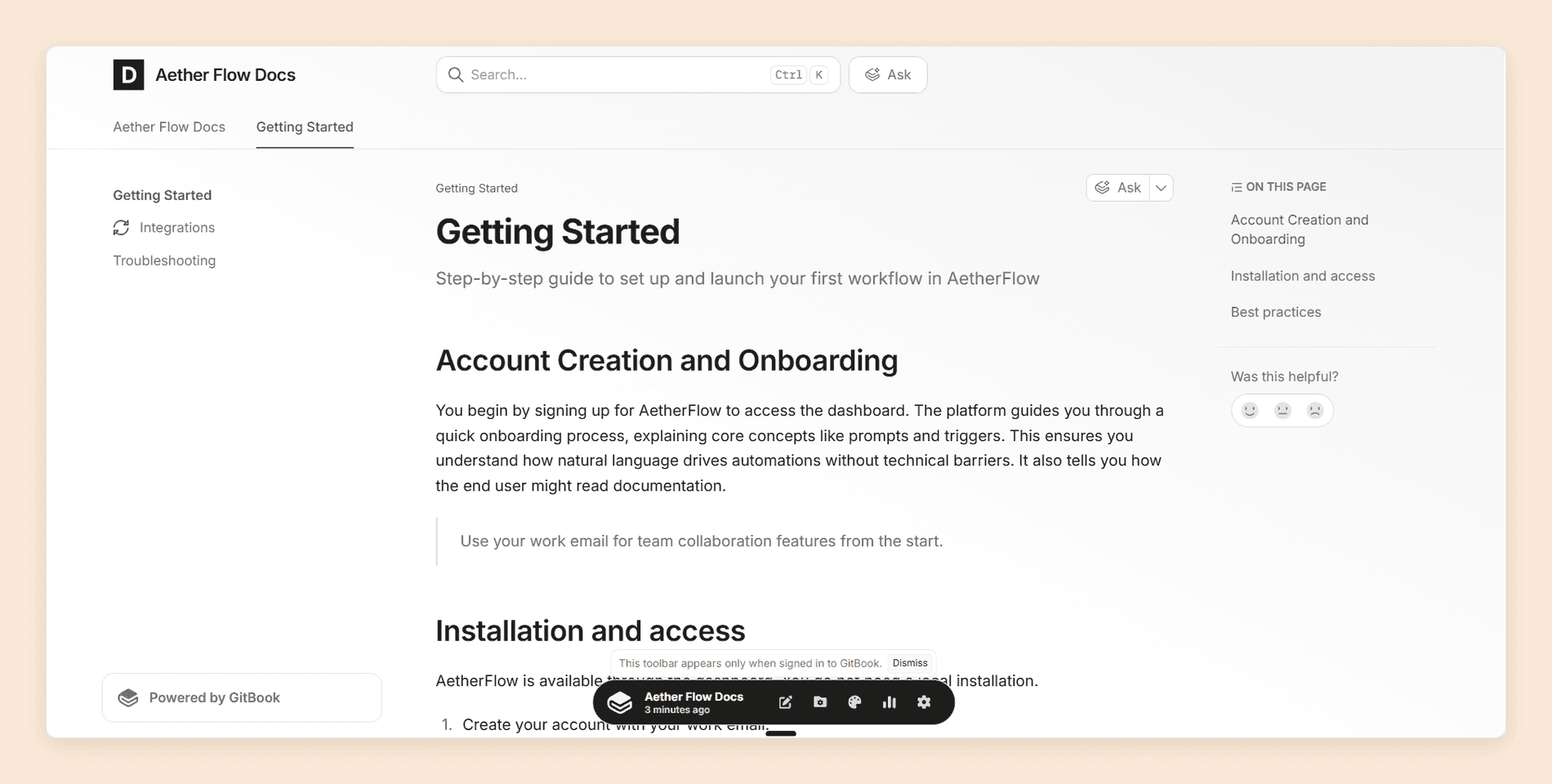
The "Powered by GitBook" link cannot be removed on any plan, Enterprise included. [1] If your docs sit on your own domain carrying another company's name in the footer, someone in marketing will eventually escalate it.
No Direct Markdown Export
There is no export button. GitBook's documented route out is to sync the section to an empty GitHub or GitLab repository and treat that repository as your export, and it warns that "some blocks don't have a Markdown representation and appear as HTML in the export." [1] PDF export starts at Essential. [2]
Your exit is a project with a cleanup phase, and the custom blocks you leaned on hardest survive it worst. Weigh that when you choose the platform, not when you leave it.
Billing Surprises
GitBook's own billing FAQ carries a section titled "Why was I charged for an unexpected plan upgrade?", which explains that publishing a site with Essential or Ultimate features enabled, or adding a custom domain, can trigger an upgrade prompt. The prompts require confirmation, but a vendor writing that FAQ entry is a vendor that gets asked. The same page confirms GitBook does not offer refunds, and that unused fees become account credit. [1]
Only the Renderer Can Be Self-Hosted
The editor, your content, and everything behind them run on GitBook's cloud. What you can host yourself is the rendering layer: GitBook's published-site renderer is open source, and its pricing FAQ confirms you can clone it and serve your published documentation from your own infrastructure. [2] [4]
The repository is blunt about the terms. Keeping it in step with the GitBook platform becomes your job, GitBook will not support a self-hosted instance, and the code is GPLv3, so a private fork needs a commercial license. [4] That suits a team that wants its docs embedded deep in its own application. It does not help an air-gapped environment or a strict data-residency review, because only the rendering moves, and for those GitBook is out at the first question regardless of how good the editor is.
GitBook Pricing
GitBook has four plans: Free, Essential, Ultimate, and Enterprise. Essential was called Premium until recently, at the same price. Every figure below is the annual rate, which is what GitBook publishes on its pricing page. Paying monthly costs more. [2]
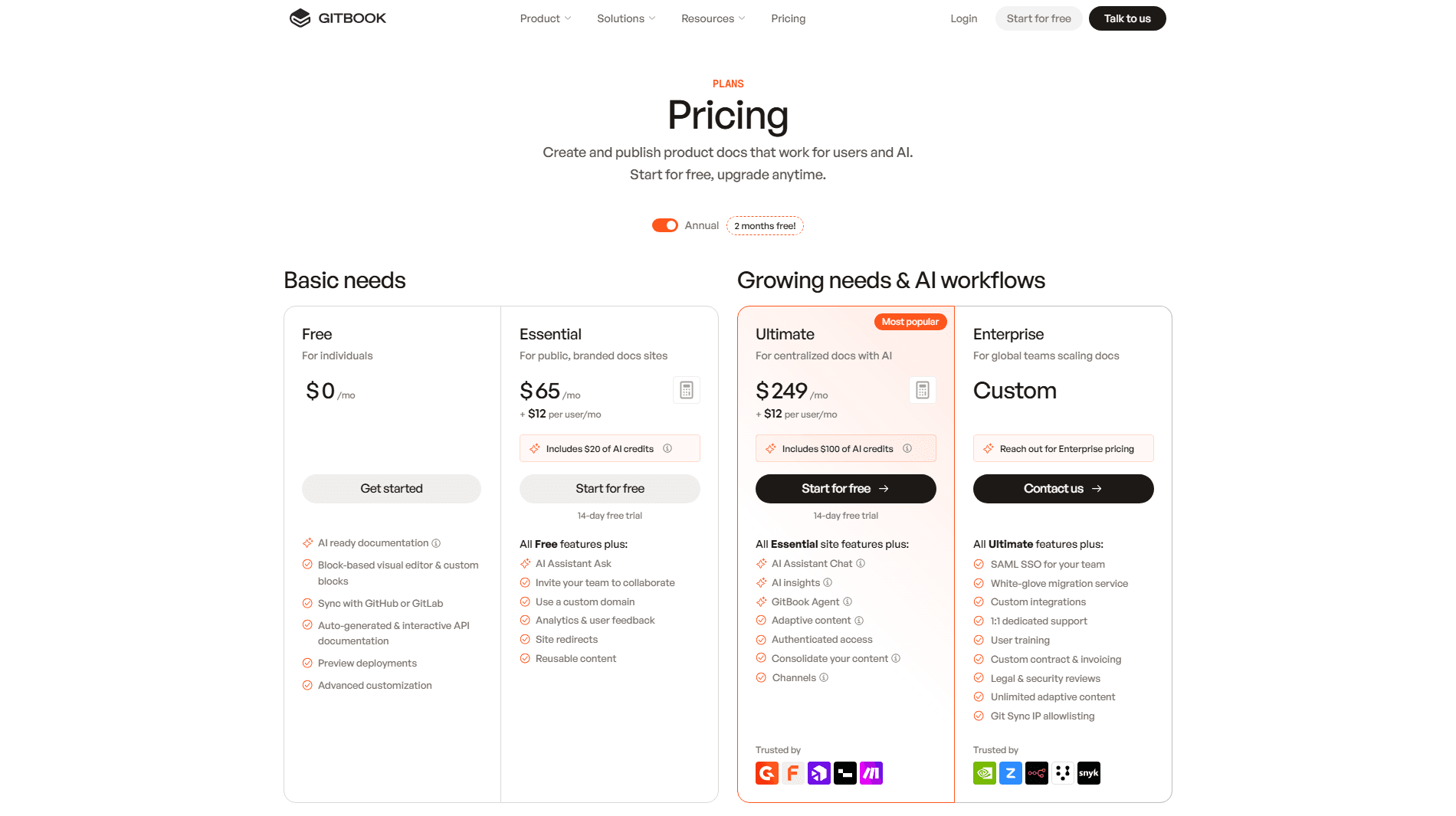
| Plan | Price | Users | Reader AI | The catch |
|---|---|---|---|---|
| Free | $0 | 1 included | None | No custom domain, no real-time collaboration, agent capped at 10 messages a week |
| Essential | $65 per site/mo + $12 per user/mo | Paid seats | Search-box answers, 2,000 credits (about 100 answers) | No Assistant sidebar, no site sections, no AI insights |
| Ultimate | $249 per site/mo + $12 per user/mo | Paid seats | Assistant, 10,000 credits (about 500 answers) | Extra answers cost $0.20 each unless AI usage is set to pause |
| Enterprise | Custom | Paid seats | Set by contract | The only tier with SAML SSO |
Worth knowing before you assume you need Enterprise: ISO 27001 and SOC 2 apply to every plan, including Free, and SAML SSO is the requirement that actually forces the sales conversation. [2]
Our GitBook pricing guide prices five real teams against these rates, works through AI credits, translations, and overage, and shows what four documentation sites cost under each of GitBook's two routes.
Does It Fit Your Team?
Fit is decided by two questions: how many documentation sites you run, and whether your readers need to ask questions. GitBook is excellent at one site with a team that reads rather than interrogates. The further you move from that, the faster the price moves.
| Your situation | Fit | What decides it |
|---|---|---|
| One product, one docs site, small team | Excellent | One site fee plus a few seats is fair for what arrives |
| Engineering-owned docs, GitHub or GitLab already | Excellent | Two-way Git Sync is the best in the category |
| Open source project or non-profit | Excellent | The Community plan is Ultimate for free |
| Writers and engineers sharing ownership | Good | The block editor is why teams pick GitBook |
| Multiple products, multiple docs sites | Poor | Per-site billing, or consolidation you may not want |
| Public docs needing a reader assistant | Mixed | Sidebar is Ultimate only, with about 500 answers a month before overage |
| Marketing-owned docs needing custom design | Poor | Theme options only, and permanent footer branding |
| Air-gapped or strict data residency | Wrong tool | Only the renderer can be self-hosted, and the content stays on GitBook |
Questions to put to sales before you sign:
- How many documentation sites will you run in 18 months, and what does the second one cost?
- How many people need a login who will never write a page?
- How many reader questions a month do you expect, and should the AI pause or bill when the credits run out?
- Does anyone need to remove third-party branding from the footer?
- If you migrate away in two years, who cleans up the blocks that export as HTML?
Is GitBook Worth It in 2026?
Yes, for one documentation site. The editor is the best in the category, Git Sync is the most reliable two-way implementation available, and onboarding asks better questions than any competitor.
Whether it holds for you turns on four things, and only the first is about price.
A second site costs what the first one did. GitBook's own answer to running several products is to consolidate into one Ultimate site with sections, which works and gives up separate domains, separate branding, and separate access rules. [1]
Reader AI is metered, and the full assistant is an Ultimate feature. Search-box answers start on Essential at about 100 a month per site. The Assistant sidebar starts at $249 per site per month, includes credits for about 500 answers, and charges $0.20 an answer past that unless you set it to pause. [1] [2]
Your published site stays inside the theme. No custom CSS, HTML, or JavaScript, no control over page layout, and a "Powered by GitBook" link that stays on your own domain at every tier including Enterprise. [1]
The agent writes but does not restructure. Every change goes through a change request that a person opens and merges, so reorganizing a documentation set is still manual work, and its outdated-content review runs when someone asks for one. Broken-link checks run on their own, and Content gaps on Ultimate scans reader questions daily, but no agent runs on a schedule or on a merge to keep pages current.
Our verdict stands at 3.9 out of 5. GitBook is a very good documentation platform built for a company that will only ever have one set of documentation.
What to Use Instead of GitBook
The closest alternative on capability is Documentation.AI, and the difference is arithmetic rather than features. It runs the same core jobs: a visual editor, a Git workflow, an authoring agent, and an assistant on published docs. What differs is that it prices per plan rather than per site. Pro is $159 a month billed annually and includes four documentation projects with unlimited editor seats. [3]
Most switches turn on three differences. Reader AI is included on the free Starter plan rather than reserved for a $249 tier. Credits are metered but there is no overage billing on any plan, so the failure mode is always the AI pausing until the next cycle or a top-up, where on GitBook it is a billing setting someone has to choose and watch. And published sites accept custom CSS and JavaScript on every plan, though removing the footer branding needs Enterprise on both platforms. [3]
GitBook still wins on three counts worth naming. Its block editor is better. Its external knowledge connectors, covering Zendesk, Intercom, Front, Linear, and Jira, are broader. And site variants for versions and translations are included on every plan, including the free one. [2]
If neither fits, the field splits cleanly, and our roundup of GitBook alternatives prices all five side by side. Mintlify is the pick for API-first developer documentation with a generated playground. ReadMe is the pick for developer portals that need per-key usage metrics. Docusaurus is the pick when you want to self-host and pay in engineering time rather than subscription. Our hands-on Mintlify review and ReadMe review cover the first two in depth, and our Theneo review covers the API-first portal builder billed per workspace. For customer guides, internal knowledge, and an API reference in one tool, our Archbee review covers a knowledge portal built around separate spaces, and our Redocly review covers the Git-native OpenAPI toolchain. Our Fern review covers the platform that generates docs and SDKs from one API spec.
| Platform | Pricing model | Reader AI on the free tier | Best for |
|---|---|---|---|
| GitBook | $65 or $249 per site/mo, plus $12 per user/mo [2] | None, Essential and up | One collaborative docs site |
| Documentation.AI | $159/mo Pro billed annually, four projects, unlimited seats [3] | Included on Starter | Several docs sites, and keeping them current |
| Mintlify | $450/mo Pro, unlimited editor seats [5] | None on any free plan | API-first developer docs |
| ReadMe | $250/mo Pro, one project, Ask AI $150/mo extra [6] | Paid add-on only | Developer portals with usage metrics |
| Docusaurus | Free, self-hosted | None, you build it | Full control, paid in engineering time |
All rates are the annual figures each vendor publishes.
These go deeper:
- GitBook vs Documentation.AI, per-site billing against bundled projects
- GitBook vs Mintlify, collaborative visual editing against docs-as-code
- Archbee vs GitBook, one plan with add-ons against per-site and per-user multipliers
- Mintlify vs GitBook vs ReadMe, three billing shapes priced on the same documentation
FAQs
1. What Is GitBook and How Does It Work?
GitBook is a hosted documentation platform for product docs, API references, and knowledge bases. You write in a block editor or in Markdown in a GitHub or GitLab repository, edits go through change requests that someone reviews and merges, and GitBook publishes the result as a searchable site. Paid plans add a custom domain, reader AI, and collaboration features on top of that loop. [1] [2]
2. Is GitBook Good?
Yes, for one documentation site: we score it 3.9 out of 5, and its block editor and two-way Git Sync are the reasons. It gets weaker as you add sites, because each one is billed again, and when readers need the full Assistant, which is Ultimate only. Published sites also stay inside the theme, with no custom CSS and a permanent "Powered by GitBook" link. [1] [2]
3. Is GitBook the Same as GitHub?
No. GitHub is a code hosting service, and GitBook is a separate company's documentation platform. The two connect through Git Sync, which keeps a GitBook site or section in two-way sync with a GitHub or GitLab repository, so commits appear in GitBook and edits made in GitBook are committed back. Git Sync is on every plan, including Free. [1] [2]
4. How Much Does GitBook Cost in 2026?
GitBook has four plans. Free is $0 for one user with no custom domain and no reader AI. Essential, formerly Premium, is $65 per site per month plus $12 per user per month on annual billing. Ultimate is $249 per site per month plus $12 per user per month. Enterprise is a custom quote and is the only tier with SAML SSO. [2]
5. Does GitBook Meter AI Usage?
Yes, despite what most reviews say. Reader answers spend 20 AI credits each. Essential includes 2,000 credits a site per month, about 100 answers, and Ultimate includes 10,000, about 500. Past that, credits cost $0.01 each, so $0.20 an answer, billed on your next invoice, unless you set AI usage to auto-pause. Prepaid bundles lower the rate. [1] [2]
6. Does GitBook Have an MCP Server?
Yes, two kinds, and both are listed on every plan including Free. Every published site gets a read-only MCP server at its URL followed by /~gitbook/mcp, which AI tools such as Claude, Cursor, and VS Code can use to search and read your docs, provided Page actions stays switched on. Separately, GitBook MCP connects your team's own agents to the GitBook API so they can create sites, open change requests, and edit content. [1] [2]
7. Is GitBook Good for Non-Technical Contributors?
Better than most, and not as much as the marketing implies. The block editor is genuinely approachable and drag-and-drop restructuring works. But the model underneath stays branches, change requests, and merges. Merge conflicts are resolved in Git, and structural changes are best made through SUMMARY.md in the repository. [1] Expect a technical contributor to own the workflow.
8. How Do You Export Content Out of GitBook?
There is no direct Markdown export in the app. GitBook's documented route is to sync the section with an empty GitHub or GitLab repository using Git Sync and treat that repository as your export. Blocks with no Markdown equivalent come out as HTML. PDF export is available from Essential and up. [1]
Sources
- GitBook. "GitBook Docs." GitBook. Accessed October 2026. https://gitbook.com/docs
- GitBook. "Pricing." GitBook. Accessed October 2026. https://www.gitbook.com/pricing
- Documentation.AI. "Pricing." Documentation.AI. Accessed September 2026. https://documentation.ai/pricing
- GitBook. "GitBook Open" repository README. GitHub. Accessed September 2026. https://github.com/GitbookIO/gitbook
- Mintlify. "Pricing." Mintlify. Accessed September 2026. https://mintlify.com/pricing
- ReadMe. "Pricing." ReadMe. Accessed September 2026. https://readme.com/pricing
Pricing a second site?
Sites bundled, seats included
Projects come with the plan instead of being billed one at a time, and reader AI starts on the free tier.
No credit card required