Comparisons · · 18 min read
Archbee vs GitBook: Features & Pricing Compared (2026)
Two block editors that publish almost the same documentation site, priced in opposite directions. Archbee sells one plan and charges for capability. GitBook charges again for every site and every login. We built on both and worked out which shape is cheaper for which team.

Roop Reddy
Co-Founder, Documentation.AI
On this page
- Quick Decision Guide
- How These Platforms Were Compared
- Onboarding: Which Gets You to a Live Page Faster?
- Writing and Maintaining Docs: Block Editors and Git Sync in Archbee vs GitBook
- AI Capabilities in Real Usage: Ask AI, Writing Assistants, and What Each Tier Unlocks
- Pricing: What Archbee and GitBook Actually Cost
- Public Documentation Experience
- Pros and Cons
- Head to Head Comparison: Archbee vs GitBook
- Final Take
- FAQs: Archbee vs GitBook
- Sources
Put Archbee and GitBook side by side and the products look like siblings. Both are block editors, both sync two ways with Git, both publish a branded portal, and both can be handed to someone who has never opened a terminal.
The invoices are nothing alike. Archbee quotes one plan price and sells seven capabilities separately on top. GitBook quotes a lower number, then charges it again for every documentation site and again for every person who logs in. Which works out cheaper swings by several hundred dollars a month on facts about your team, not your documentation.
Prices and plan limits here are taken from what each vendor publishes. Anything about how the software felt to use is ours, from building on both, and is flagged as such.
Quick Decision Guide
Three variables decide this one: how many documentation sites you publish, how many people hold a login, and whether reviewed publishing matters more to you than control over the page readers see.
Archbee may be the better fit when:
- You document more than one product, since spaces are unlimited on one plan and GitBook bills each site over again [1] [3]
- More than one person edits, because five members are included before anyone is billed per head [1]
- Readers need logins you can scope and revoke: guest accounts, magic links, JWT, and private links issued per group [1]
- Reader AI should be an add-on you switch on, not a move to the top self-serve tier [1] [3]
- Your published site has to carry your CSS and not the vendor's name [1]
GitBook may be the better fit when:
- One site, and you want reviewed publishing from day one, which GitBook includes at every tier and Archbee holds back [1] [3]
- You need to try before buying, or never to pay at all, because the free plan has no expiry [3]
- You qualify for the Community plan, which hands non-profits, open source projects, and schools everything except SAML SSO for nothing [4]
- Procurement wants ISO 27001 and SOC 2, which cover every plan down to Free [3]
- You want to know which reader questions your documentation failed to answer [4]
Bottom line: Archbee costs less from the second editor and much less from the second site. GitBook gives away more at zero and includes the approval workflow Archbee reserves for its upper tier. If your answer to those three is "several, a lot, and both", neither shape fits you, and Documentation.AI is built for that corner: four projects and unlimited readers on one plan, with an import that reads your existing Markdown rather than asking you to rewrite it. Our Archbee vs Documentation.AI and GitBook vs Documentation.AI comparisons run each against that model.
How These Platforms Were Compared
One documentation set, built twice, judged on six things: reaching a live site, writing and reorganising, how each handles Git, the AI under real use, what readers get, and the invoice at the tier a growing team lands on.
Nothing is scored to produce a winner. The distinction that carries the most weight is between a product that cannot do something and a product that charges separately for it, because with these two it is nearly always the second. For each platform assessed on its own, see our Archbee review and GitBook review.
Onboarding: Which Gets You to a Live Page Faster?
Neither one needs a repository, a Git account, or a developer. Both reach a live page the same afternoon. They differ on what you are given at the start and what you keep at the end.
Archbee
Setup begins with a question about what you are documenting and ends with a template built for it: user manuals, API reference, internal knowledge, or a departmental starter for engineering, sales, marketing, or leadership. Templates can be previewed before you commit and saved for whoever writes next [2].
Starting from a structure rather than an empty page is the practical advantage here, particularly for one person setting documentation up without help.
No free plan. Fourteen days, then a paid plan, and the trial site is not yours to keep. Refunds inside the first paid month are given without argument, open source projects can apply for a free Growing plan, and startups can apply for half off for two years [1].
GitBook
You can sign up with email, Google, or GitHub, so no one is forced through a Git provider. Onboarding asks more than Archbee does, covering what you are building, whether it stays private, and what it connects to, which produces a better-configured site and a slower start. Connecting a repository was simple; the first sync was slow enough that we left it running.
Git stays optional afterwards. A team can work entirely in the editor and never connect anything, though change requests keep the vocabulary of branching and merging in view [4].
Verdict: Archbee gets a finished page faster. GitBook lets you stay, which matters more. Its free plan has no clock, so the editor, Git Sync, previews, and the published site can all be tried against real pages long before anyone signs off on spending. Neither reader assistant is available that way, which is the one thing worth testing early.
Writing and Maintaining Docs: Block Editors and Git Sync in Archbee vs GitBook
The products are closest here. Both put Markdown under a block editor and bolt two-way Git sync to the side. What separates them is everything around the writing: who reviews it, what you can reuse, and how it behaves at a few hundred pages.
Archbee
The slash menu is sorted into Basic, Media, Developer, and Embed, and the Developer group is the reason this is not a wiki: a tabbed code editor, Mermaid, TeX, an API endpoint block, OpenAPI and Swagger import with a working console, and a GraphiQL explorer. Markdown shortcuts work while typing, pasted Markdown is offered as converted blocks, and links between pages survive renames and moves [2].
Sync covers GitHub, GitLab, and Bitbucket on both paid plans. Markdown in a connected repository is processed as MDX, so components keep rendering, and the repository holds authority: an edit made in the app arrives as a pull request for someone to accept. Writers who want raw Markdown have to work outside Archbee, since no source view exists in the app. Branching without an external repository is in beta and only on newly created spaces [2].
Plan around the process gap. Approvals, a Reviewer role, snippets, and variables all sit on the upper tier, and below it publishing is immediate and unreviewed [1].
GitBook
Blocks arrive from a toolbar, a slash menu, or by dragging, and moving a section does not break inbound links. Content underneath stays Markdown, so the editor and the repository are two views of one thing [4].
Change requests carry the workflow. Every edit becomes a draft that somebody reviews and merges, putting pull request discipline in front of people who will never use Git, and GitBook includes them even on the free plan. Sync is properly bidirectional: commits appear in the app, app edits commit back, conflicts resolve in Git, and an open pull request gets a rendered preview on its commit status [4].
Scale, media, and the exit are where it frustrated us. Drag operations slow noticeably once a space passes roughly 50 pages. Images become unfindable after a few dozen uploads, so people upload duplicates rather than hunt. And there is no export at all: the documented way out is syncing to an empty repository and keeping that, with a warning that blocks lacking a Markdown equivalent arrive as HTML [4].
Verdict: GitBook takes the editor by a little and the workflow by a lot. Reviewed publishing included at every tier, against an approval system Archbee holds for its upper plan, is the widest gap between these two products. Archbee answers on range rather than refinement: a deeper developer block set, Bitbucket alongside GitHub and GitLab, and per-document Markdown and PDF export in the plan, so nothing is stranded if you leave. Ask both vendors the leaving question early, because it is the one nobody asks during a trial. Documentation.AI keeps every page as Markdown in a repository it syncs two ways with GitHub or GitLab, so the exit costs nothing to keep open.
AI Capabilities in Real Usage: Ask AI, Writing Assistants, and What Each Tier Unlocks
Neither includes reader-facing AI at its entry price, and both keep serving answers past your allowance and bill for them. The differences are where the gate sits and whether you can find out what the overage costs.
Archbee
AI is a purchase before it is a feature. Buy it and you get Ask AI in search on internal and published portals, a writing assistant in the block menu, summaries, and external sources [2].
The writing assistant is the reliable half. It rewrites, shortens, expands, translates, and adjusts tone from a box attached to whichever paragraph you are in, and it answered fast enough to stay in the flow of editing.
Ask AI was not reliable. On a real project space it returned less than plain search did, and slowly, while the same feature handled a template-built space well. That reads as an indexing problem rather than a model one, and Archbee's documentation still marks the AI as beta. Point it at your own content during the trial rather than judging it on a demo [2].
Shadow Docs has no counterpart in GitBook. A shadowDocs entry in .archbee.yaml feeds files from a synced repository to the assistant without publishing them, so answers can come from the source code instead of from whatever somebody wrote down [2].
GitBook
The authoring agent works inside the editor, handles a contained single-page change cleanly, and will read back through a page, flagging statements it thinks somebody should confirm against the product. Ten messages a week is the free ceiling, paid plans lift it, and no tier charges by the action [3] [4].
Reader AI is two products at two prices. Generated answers beside search results start at Premium. The chat assistant, embedding it in your own product, customising it, and connecting outside sources are all Ultimate. Those outside sources are the inverse of Shadow Docs: Zendesk, Intercom, Front, Linear, and Jira feed support history into reader answers [3] [4].
AI insights, also Ultimate, is the capability Archbee cannot match. It counts the questions readers asked, how many were answered, and which ones were missed, grouped by topic, which amounts to a list of your documentation's gaps written by your readers [4].
GitBook does meter reader AI, whatever gets repeated to the contrary. Ultimate covers 500 successful answers a month, described as a soft ceiling, and GitBook's own billing pages say the assistant carries on serving past it while the extra usage appears on the following invoice. What that usage costs is stated nowhere [3] [5].
The Two Meters, Side by Side
| Archbee | GitBook | |
|---|---|---|
| Reader answers start at | An add-on on the entry plan | Premium for search answers, Ultimate for chat |
| Authoring AI | Draws on the same token pool | Free at 10 messages a week, uncapped from Premium |
| What is counted | Tokens | Successful reader answers |
| Included | 20M tokens, 40M on Scaling | 500 answers a month |
| Past the allowance | Keeps serving, at a published per-token rate | Keeps answering, billed next invoice |
| Is the overage rate public? | Yes | No |
| Private sources | Shadow Docs, from a synced repo | Zendesk, Intercom, Front, Linear, Jira |
| Gap reporting | Conversation log with ratings | Answered and unanswered rates by topic |
Treat that as a risk profile rather than a price list. Neither gives you a free hard stop, so you are choosing which unknown to sign: Archbee names its rate and lets you cap the spend, while GitBook will keep answering your readers at a price it has never printed.
Verdict: On reader AI, GitBook is the one we would put in front of customers. Steadier answers, wider connectors, and it tells you what it failed to answer. Archbee takes the writing assistant, at a price in another bracket entirely, which the pricing section works out. A third model is worth holding beside both: Documentation.AI opens both AI surfaces on its free tier and counts them in credits that stop when exhausted rather than rolling onto an invoice, so the assistant is something you can run against your live pages while you are still deciding, which neither a two-week trial nor a single-seat free plan permits.
Pricing: What Archbee and GitBook Actually Cost
The features are close, so this decides it. All rates below are annual billing.
Archbee
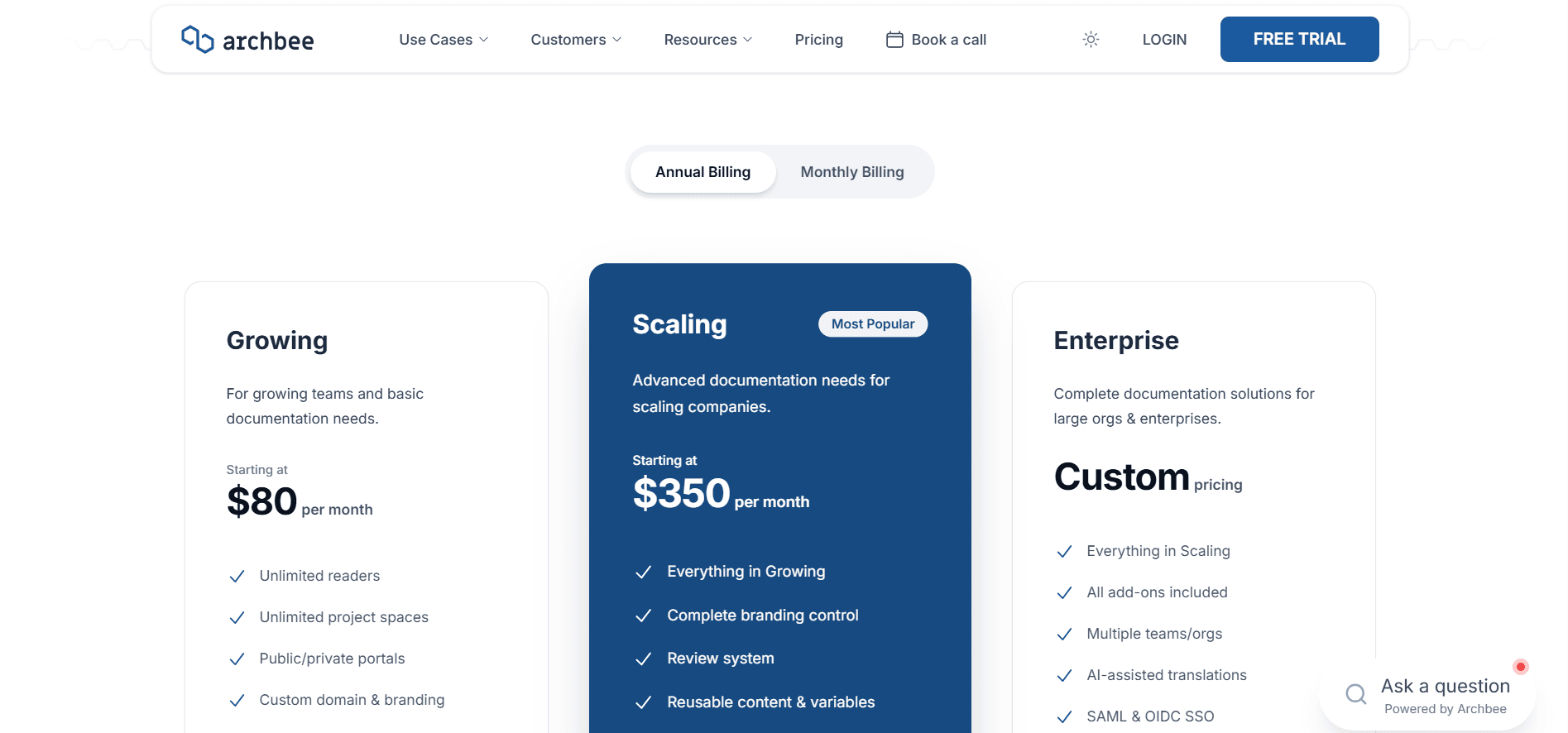
Growing, $80 a month, includes five members and charges $5 for each one after. It covers unlimited spaces and documents, public and private portals, one custom domain, branding and custom JavaScript, password protection, search, SEO and LLM output, two-way sync with all three Git providers, OpenAPI import with a console, and the Jira and Slack integrations [1].
Scaling, $350 a month, also includes five members and charges $10 after. It adds reviews and approvals, permission groups, snippets and variables, versioning, localisation, search analytics, custom CSS, landing pages, logo removal, and reader authentication [1].
Enterprise is quoted, and folds in SSO, conditional content, Cloud-Prem hosting, and every add-on [1].
Those add-ons are the part to price before signing, because most cost as much as the entry plan:
| Add-on | Growing | Scaling |
|---|---|---|
| AI (Ask AI, Write Assist, external sources) | $16/mo, 20M tokens | $40/mo, 40M tokens |
| Insights (page analytics) | $80/mo | $80/mo |
| Public API access | $80/mo | $80/mo |
| In-product widget | $80/mo | $80/mo |
| Reader Q&A | $80/mo | $80/mo |
| Portal-wide PDF export | $80/mo | $80/mo |
| Static HTML export | $80/mo | $80/mo |
| Each extra domain | $10/mo | $20/mo |
Insights catches people out. Reader query logs and Ask AI ratings come with the AI add-on, and search analytics is a Scaling feature, but views, time on page, visitors, and bounce rate are $80 a month on their own. That is the entry plan's whole price, charged again to tell you whether anybody read the thing. GitBook includes page views free. Our Archbee pricing breakdown has the full stack [1] [3].
GitBook
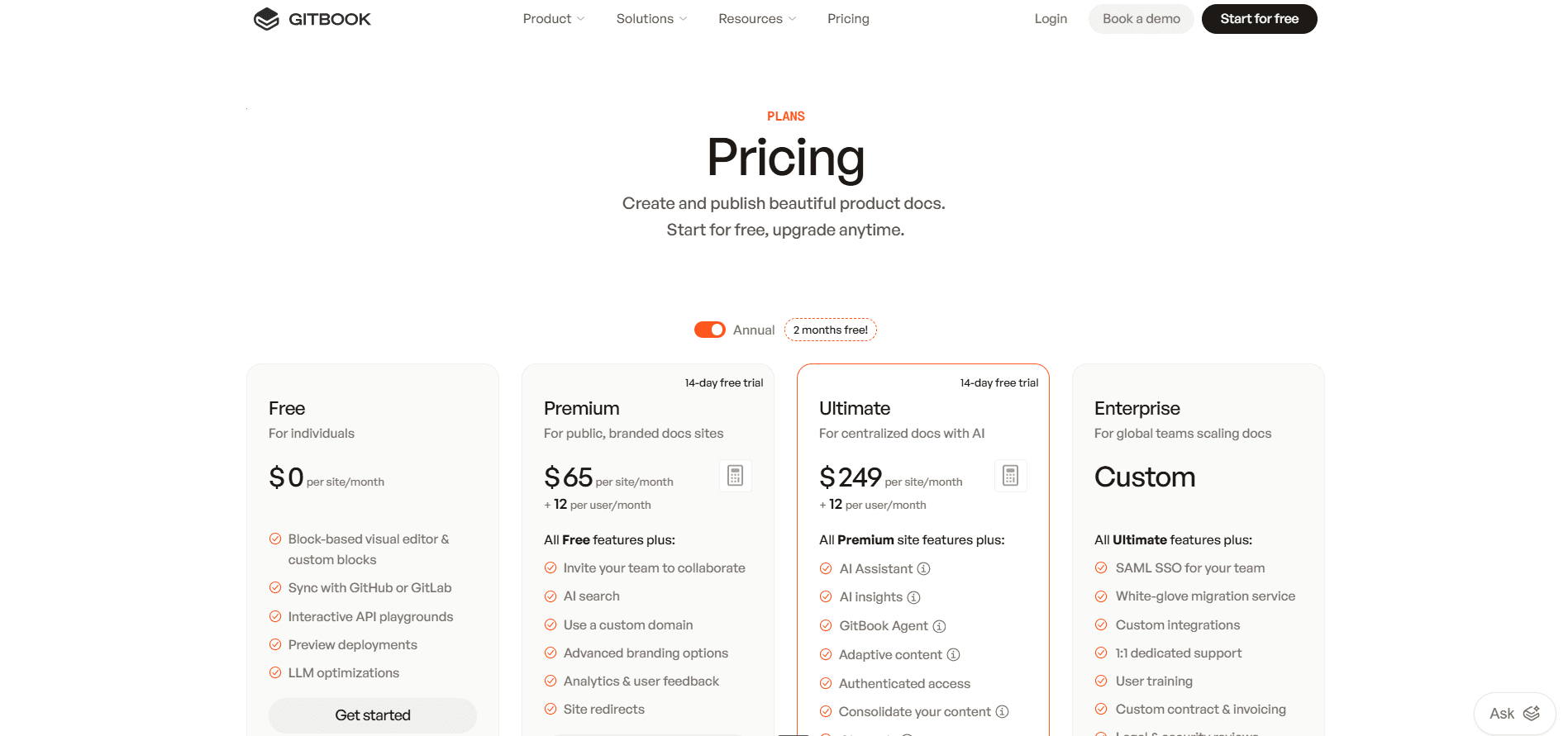
Free is one user with no custom domain, and it still carries the editor, Git Sync, change requests, preview deployments, page analytics, search, API blocks, site variants, and the machine-readable layer. Premium, $65 per site plus $12 per user, adds a custom domain, live collaboration, reusable content, search answers, an uncapped authoring agent, and PDF export. Ultimate, $249 per site plus $12 per user, adds the assistant, AI insights, outside sources, reader logins, site sections, and translations. Enterprise adds SAML SSO. ISO 27001 and SOC 2 apply to every plan, Free included [3].
The bill moves more on seats, sites, and sections than on the plan names. Sites multiply but members do not, since seats are counted once across the organisation. Every login costs $12 whether that person writes or only comments. And site sections let you fold several products into one Ultimate site, which is far cheaper and costs you separate domains, branding, and access rules. Our GitBook pricing guide works through it [3] [4].
What a Working Setup Actually Costs
Cheaper option in bold.
| What you need | Archbee | GitBook |
|---|---|---|
| One private site, one person, no custom domain | $80/mo | Free |
| One site, one editor, custom domain | $80/mo | $77/mo |
| One site, five editors | $80/mo | $125/mo |
| One site, 20 editors | $155/mo | $305/mo |
| Reader chat assistant, five editors | $96/mo | $309/mo |
| Page analytics, five editors | $160/mo | $125/mo |
| Review and approvals, five editors | $350/mo | $125/mo |
| Reader logins, five editors | $350/mo | $309/mo |
| Three products, 10 editors, assistant | $141/mo | $867/mo |
| The same three folded into one site | $141/mo | $369/mo |
Verdict: Those rows point in opposite directions. Breadth is where Archbee costs less: three products with an assistant is $141 against $867, and folding them into one GitBook site still lands at $369 with separate domains and branding given up. Process and the free end are where GitBook costs less, because review, page views, and previews are all included, so a single-site team pays $125 where Archbee needs its upper tier for review and an add-on for page views. Reader AI never crosses over: GitBook's assistant is $249 per site against a $16 add-on, and the difference buys a steadier assistant, support-desk connectors, and reporting on unanswered questions. Reviewed publishing is free on GitBook, yet the review line still reads $125, because the free plan holds one user and a review workflow needs at least two. That is the GitBook pattern in miniature: the capability is given away and the seats are not.
Priced both and still unconvinced?
Documentation.AI's free tier covers five seats, unlimited readers, a domain of your own, traffic reporting, and both AI surfaces, and no tier above it bills an overage.
Start free or book a demo and bring your existing docs across.
Public Documentation Experience
Both ship fast, responsive sites with light and dark modes, search, and clean SEO output. They split on how far you can change the result and who you can keep out of it.
Archbee
Preview is slower than the editor that feeds it, though what renders is accurate and the published site matched it. The entry plan covers more than its price implies: a custom domain, brand colours, custom JavaScript, search, sitemaps and structured data, URL aliases, unlimited readers, and per-page reader feedback, which is switched off until you enable it per space. Machine-readable output is in the plan rather than an add-on, covering an MCP server, llms.txt, and a Markdown copy of every page [1] [2].
Reader access goes deeper here than on GitBook. Passwords come with Growing, then Scaling adds guest accounts, magic links, JWT, JWKS, and per-group private links you can revoke one customer at a time. Partner documentation where every customer sees a different portal has no self-serve equivalent in GitBook [1].
Custom CSS and removing the Archbee logo also wait for the upper plan [1].
GitBook
Pages are clean, OpenAPI integrations become interactive blocks, and SEO needs no configuration. A spec added by URL is rechecked every six hours, with a manual refresh available, and the console is Scalar rather than something GitBook built [4].
GitBook gives away an unusual amount here. Full-site preview deployments are unlimited on every plan, a pushed branch gets a preview link on its commit status, and versions, translation variants, page analytics, search, llms.txt, and an MCP server all cost nothing [3] [4].
The ceiling is what you are not allowed to change. Customisation stops at theme level, meaning logos, fonts, colours, code themes, and icons. Page layout is fixed and your own stylesheets and scripts never reach a published site, whatever you pay. The "Powered by GitBook" link survives an Enterprise contract, which makes it the only line item here you cannot buy your way out of. Reader logins are Ultimate, scoped to a whole site [3] [4].
Verdict: Archbee wants your site to look like yours. Custom CSS, its logo gone, and access revoked one customer at a time are all purchasable, and none of them is sold by GitBook at any price. What GitBook gives instead is the publishing stack itself, unlimited preview deployments included, on a plan costing nothing. Which matters depends on the audience. Internal documentation will not care about a footer. Customer-facing documentation on your own domain usually does, so ask every vendor on the shortlist what the footer costs: Documentation.AI takes custom CSS on every plan and removes its own footer badge on Enterprise, a tier up rather than never.
Pros and Cons
Table stakes are left out here. What follows is what an evaluation usually comes down to.
Archbee
Pros
- Unlimited spaces on one plan, so a second product costs a domain rather than a subscription [1]
- Five members included, where GitBook bills per head from the first login [1] [3]
- The deeper developer block set: Mermaid, TeX, tabbed code, API endpoints, Swagger, GraphiQL [2]
- Reader access GitBook does not sell: guest accounts, magic links, JWT, revocable per-group links [1]
- Shadow Docs, which lets unpublished source code inform reader answers [2]
- Reader AI as a low-cost add-on, plus custom CSS and logo removal that can at least be bought [1]
Cons
- No free plan, so the evaluation is 14 days and you keep nothing [1]
- Seven add-ons, most priced at the entry plan's own monthly rate, page analytics among them [1]
- Reviews, reusables, versioning, and reader logins all need the upper tier [1]
- Ask AI was slow and thin on our own content, and is still marked beta [2]
- Token overage bills by default, so set the ceiling yourself [1]
- No raw Markdown view in the app, and no mobile app [2]
GitBook
Pros
- Change requests on every plan, giving non-developers review without Git [3]
- A free tier with no expiry carrying Git Sync, previews, versioning, analytics, and an MCP server [3]
- Authoring AI gated by plan rather than counted, so writers never watch a balance [3]
- Reporting that names the reader questions your documentation failed [4]
- Support-desk connectors feeding the assistant: Zendesk, Intercom, Front, Linear, Jira [4]
- A free Community plan for non-profits, open source, and education, minus SAML [4]
- ISO 27001 and SOC 2 on every plan, Free included [3]
Cons
- Two multipliers, per site and per user, so documenting a second product costs as much as the first [3]
- The chat assistant is Ultimate and metered on top, at a rate published nowhere [3] [5]
- Styling stops at the theme, your own code never reaches the page, and the footer credit is permanent [4]
- No export. The way out is a Git sync to an empty repository [4]
- One user and no custom domain on Free, so a team still pays to evaluate [3]
- Drag operations slow past roughly 50 pages, and uploaded images are hard to find again
- Self-hosting covers the renderer only, unsupported and GPLv3, which rules it out of air-gapped reviews [4]
Head to Head Comparison: Archbee vs GitBook
| Archbee | GitBook | |
|---|---|---|
| Best suited to | Several portals on one budget | One site with real editorial process |
| Free plan | None, 14-day trial | One user, no custom domain |
| Paid entry | $80/mo before add-ons | $65 per site plus $12 per user |
| Seats | 5 included, then $5 to $10 | $12 each, counted once across sites |
| A second site | Included, plus $10 to $20 for a domain | Another $65 or $249 |
| Review and approvals | $350/mo | Every plan, including Free |
| Reader AI | Add-on from $16/mo | Search answers $65, chat $249 |
| Overage rate | $1.20 per 1M tokens, published | Unpublished |
| Page analytics | $80/mo add-on | Free on every plan |
| Preview deployments | Per document | Unlimited full-site, every plan |
| Reader logins | Password on Growing, the rest on Scaling | Ultimate |
| Custom CSS | $350/mo | Not sold at any price |
| Vendor footer | Removable at $350 | Permanent |
| In-product widget | $80/mo add-on | Assistant embedding on Ultimate |
| Export | Markdown and PDF per document, in plan | None, sync to an empty repo |
| Compliance | SSO on Enterprise | ISO 27001 and SOC 2 on every plan |
Final Take
It usually reduces to one question. Are you publishing one documentation site, or several?
Pick GitBook if it is one. Review comes free, analytics and previews arrive with the tier, the free plan has no clock, and the compliance coverage shortens a procurement review. You accept a permanent footer, no custom CSS at any price, no export button, and a reader assistant that sits on the top self-serve tier and is metered at a rate nobody will quote.
Pick Archbee if it is several. Unlimited spaces, five members in the plan, and an assistant sold as a cheap add-on turn a three-product estate into a fraction of GitBook's bill, as the pricing tables above set out. Price the add-ons first, because analytics, the API, the widget, and PDF export each cost roughly what the entry plan does, and approvals plus reader logins move you a tier.
What they share is the part worth arguing with. Documentation owned by several teams that needs review, analytics, and reader AI at once means Scaling plus add-ons on one platform and Ultimate on the other. Neither solves the problem that arrives later, either. Once a site is large, writing help stops being the constraint and maintenance takes over, and neither one updates a page from the release that made it wrong or reports which reader questions went unanswered. That matters to more than human readers now, since AI agents answering for customers read the same pages. It is worth reading Archbee alternatives and GitBook alternatives before committing, and if either vendor is the fixed point on your shortlist, the same test runs through Archbee vs Mintlify, GitBook vs Mintlify, ReadMe vs GitBook, GitBook vs Document360, and Mintlify vs GitBook vs ReadMe.
That combination is what Documentation.AI puts in a single plan, free to start with no expiry. Moving is the part people dread, so it is worth knowing the shape of it: an Archbee space or a GitBook site comes across as Markdown with its structure intact, and you run it as a second site until the redirects are ready, rather than cutting over on a Friday.
Migrating from Archbee or GitBook?
Several spaces, a synced repository, hand-built navigation, or a portal your customers have bookmarked are the cases that go wrong unattended, so we do those with you rather than handing over a guide.
Start free, book a demo, or ask us in the Documentation.AI Slack channel.
FAQs: Archbee vs GitBook
1. Is Archbee or GitBook Cheaper?
It turns on editors and sites rather than the headline price. GitBook is cheaper for exactly one user, $77 against $80, and free without a custom domain. From two editors Archbee costs less, and from two sites the gap widens sharply, because GitBook charges $65 or $249 again per site while Archbee's spaces are unlimited [1] [3].
2. Does Archbee or GitBook Have a Free Plan?
GitBook does, Archbee does not. GitBook Free is one user without a custom domain, carrying the editor, Git Sync, change requests, previews, and page analytics, with the agent capped at 10 messages a week. Archbee runs a 14-day trial and refunds the first paid month. If a free plan a whole team can use is the requirement, Documentation.AI includes five seats, a custom domain, analytics, and working reader AI [1] [3].
3. Which Is Better for a Non-Technical Team?
Both aim at one, and GitBook is ahead on process. The editors are comparable, but change requests give writers and support staff reviewed publishing on every plan, where Archbee keeps approvals for its upper tier. Archbee replies with templates that finish a first page faster and a developer block set that helps if those writers also document an API [1] [3] [4].
4. Does Archbee Support Markdown and Git?
Yes, which the block editor tends to obscure. Two-way sync with GitHub, GitLab, and Bitbucket is on both paid plans, Markdown works alongside Archbee's components, and Markdown in a connected repository is processed as MDX. The repository stays authoritative, so an app edit opens a pull request. The missing piece is a raw source view inside the app [2].
5. How Much Does Reader-Facing AI Cost on Each Platform?
Archbee sells it as a $16 add-on with 20M tokens, or $40 with 40M, and bills overage at $1.20 per 1M. GitBook puts search answers on Premium at $65 per site and the chat assistant on Ultimate at $249 per site with 500 answers, then keeps answering and invoices the excess at an unpublished rate. Both bill for going over, which is worth comparing against Documentation.AI, where credits pause instead [1] [3] [5].
6. Can You Remove the Vendor Branding From the Published Site?
On Archbee yes, on its upper plan, which also unlocks custom CSS. On GitBook no. The "Powered by GitBook" link stays on every plan including Enterprise, and no custom CSS, HTML, or JavaScript reaches a published site at any price. For brand control, that is the clearest difference between them [1] [4].
7. How Do You Get Your Content Out of Each Platform?
Archbee exports Markdown and PDF per document inside the plan, with portal-wide PDF and static HTML sold as add-ons. GitBook has no export function: you sync a section to an empty repository and keep that, accepting that blocks without a Markdown equivalent arrive as HTML. Price the exit on either before you commit [1] [4].
8. What Are the Alternatives to Archbee and GitBook?
The shortlist usually includes Documentation.AI, Mintlify, Document360, ReadMe, and Fern, and which fits depends on whether your constraint is site count, review, or AI cost. Documentation.AI is the one whose free tier carries both AI surfaces alongside traffic reporting, five seats, and a custom domain, so a trial can run on your real pages rather than a sample set. Start free, no credit card required.
Sources
- Archbee. "Pricing." Archbee. https://www.archbee.com/pricing
- Archbee. "Archbee Docs." Archbee. https://www.archbee.com/docs
- GitBook. "Pricing." GitBook. https://www.gitbook.com/pricing
- GitBook. "GitBook Docs." GitBook. https://gitbook.com/docs
- GitBook. "Payments and Invoices." GitBook Docs. https://gitbook.com/docs/account-and-billing/billing-faq/payments-and-invoices
Add-ons or multipliers?
Four projects, one plan, no add-ons
Reader AI, the docs agent, and analytics come with the tier instead of arriving as separate line items.
Start freeNo credit card required