5 Best ReadMe Alternatives in 2026
ReadMe builds an exceptional interactive API reference, then places roles, additional projects, and full reader AI on higher tiers or separate add-ons. This guide compares the platforms ReadMe teams most often shortlist on the points that decide a switch, and is plain about where ReadMe still leads.

Roop Reddy · Co-Founder, Documentation.AI
Last updated
On this page
ReadMe is still the benchmark for one kind of documentation: an API reference developers use rather than read. Readers send real requests with their own key filled in, and the Developer Dashboard tells you which endpoints each key calls. If that is the whole of your documentation problem, you may not need this list.
Most teams looking for a ReadMe alternative arrive for a different reason. The software keeps up with them, and the plan boundaries do not. A second editor on the free plan, a reviewer who should not hold Admin rights, a second product, and reader AI you can learn from all sit on a higher tier or a separate line item. Customers still on the legacy platform also face an upgrade to ReadMe Refactored that cannot be reversed.
This guide ranks five alternatives by how well they solve those specific problems, and says where ReadMe remains the better tool. We have built documentation on every platform here for our review series, and every price is the vendor's own published rate.
One disclosure before the list: we make Documentation.AI, and it ranks first below. Judge that placement against its Cons, which include the one ReadMe capability nothing in this guide replaces, and against the prices, which are all cited at the foot of the page.
Quick Verdict (TL;DR)
Documentation.AI is the best ReadMe alternative for most teams in 2026. It does the same core jobs: an OpenAPI spec becomes an interactive playground, a visual editor sits over Git-synced MDX, and an assistant answers readers on the published site. The other four each win a narrower job:
- Documentation.AI: best overall, and the pick when docs are owned by more than one team or cover more than one product
- Mintlify: best published design, for engineering-owned API and SDK docs
- Redocly: best for docs reviewed as code, where every contributor already works in Git
- Fern: best for docs and SDKs generated from the same spec
- GitBook: best editor for a single writer-led documentation site
Stay on ReadMe if you document one API for the developers who integrate against it, and its per-key usage metrics shape your roadmap.
Why Look for Alternatives to ReadMe?
Most teams leave when their documentation outgrows the shape ReadMe prices around: one project, maintained by a handful of Admins, for developer readers. What ReadMe does well matters as much as where it stops, because the first list is what a switch gives up.
What ReadMe Does Well
No other platform here turns a spec into a reference this usable. Readers send real requests with their own key filled in and get code snippets back in the language they work in. That removes the step where a developer copies an endpoint into a separate HTTP client, which is where many integrations stall.
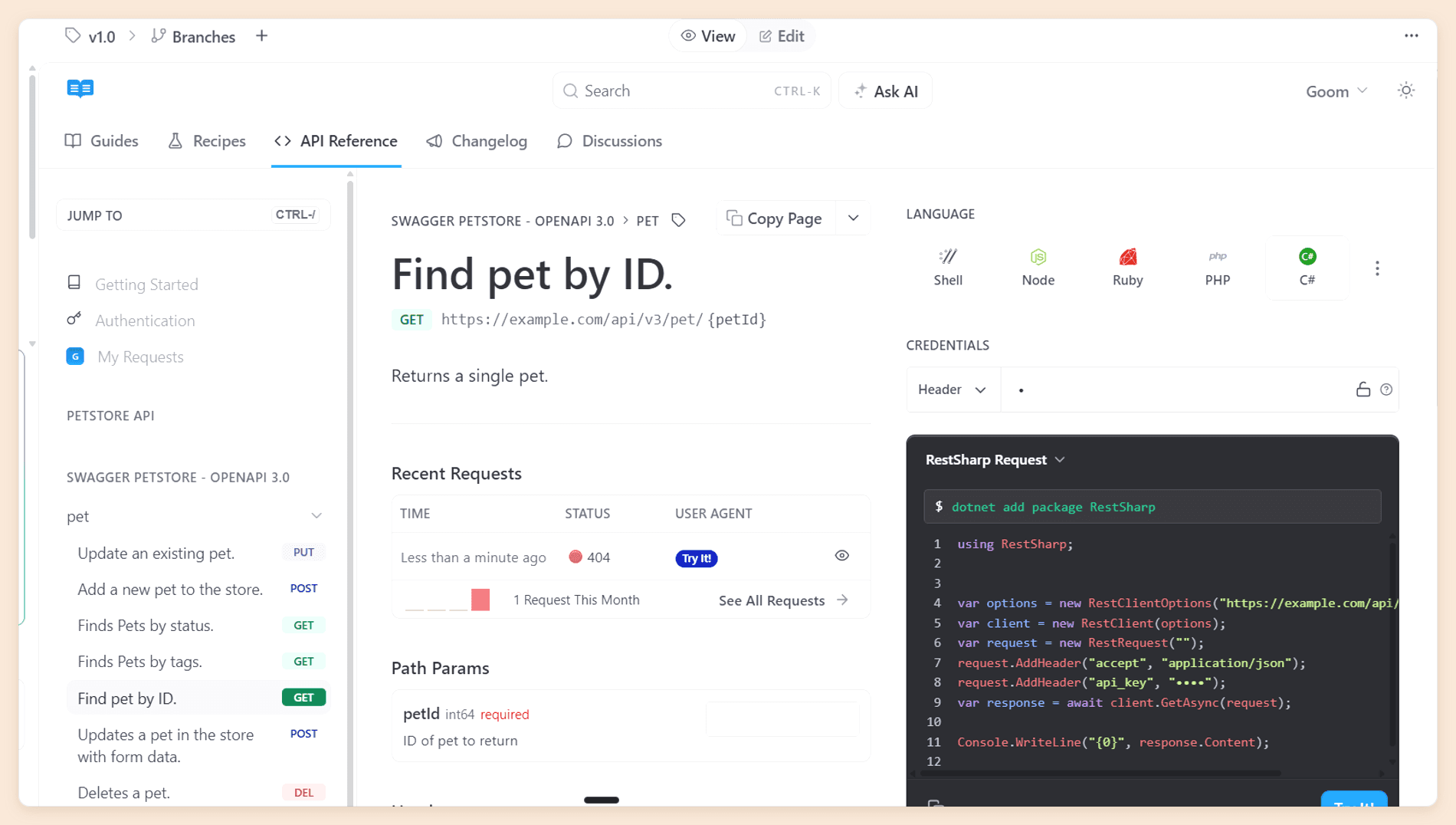
It knows who is reading. The Developer Dashboard ingests your production API logs and reports which endpoints each key calls and where integrations fail, and logged-in developers can read their own request history inside the docs. None of the five alternatives below does this.
The free plan is real. Starter publishes an interactive reference on a custom domain, with bi-directional Git sync, llms.txt, and an MCP server, for $0. [1]
It has content types built for developers. Recipes, a changelog, and discussion forums sit alongside guides, and importing an OpenAPI spec during onboarding produces most of a portal before anyone writes a word. On Pro, the AI Linter turns a style guide written in plain language into a rubric and scores every page against it, which few competitors attempt.
Where ReadMe Falls Short
The free plan is built for one person. Starter includes a single teammate, and nothing sits between it and Pro. A second contributor, whether that is a writer, a support lead, or another engineer, moves the whole team to $250 a month. [1]
Every teammate is an Admin. Pro includes five teammates, then $20 a month each, and on both Starter and Pro there is no role below full Admin. Editor and Viewer roles exist only on Enterprise. [1]
A plan covers one project. A second product means a second plan, and putting both on one domain with shared search and navigation is an Enterprise feature. Our ReadMe pricing guide works through what a second product and its add-ons do to the bill.
Reader AI you can learn from is an add-on. Pro includes Ask AI Lite, which answers readers but shows you nothing about what they asked. The full Ask AI, with analytics and customization, is $150 a month on every tier, Enterprise included, and ReadMe publishes no question volume for it. [1]
The upgrade to Refactored is one-way. Legacy projects that move to ReadMe Refactored cannot go back. They lose Suggested Edits, including edits not yet merged, and Enterprise projects also lose Staging and Translations. For a team that relies on any of those, the upgrade is a migration in its own right, which makes it a sensible moment to compare platforms.
Our ReadMe review scores all of this in detail.
You can test this list for free. Start free carries five editors and the AI Assistant, your OpenAPI spec imports as it is, and nothing on your ReadMe hub has to come down while you try it.
1. Documentation.AI
Documentation.AI draws every line ReadMe draws, one plan earlier. Roles arrive on Pro instead of Enterprise, a second product is another project rather than another subscription, and reader AI with question analytics starts on the free plan rather than behind a $150 add-on.
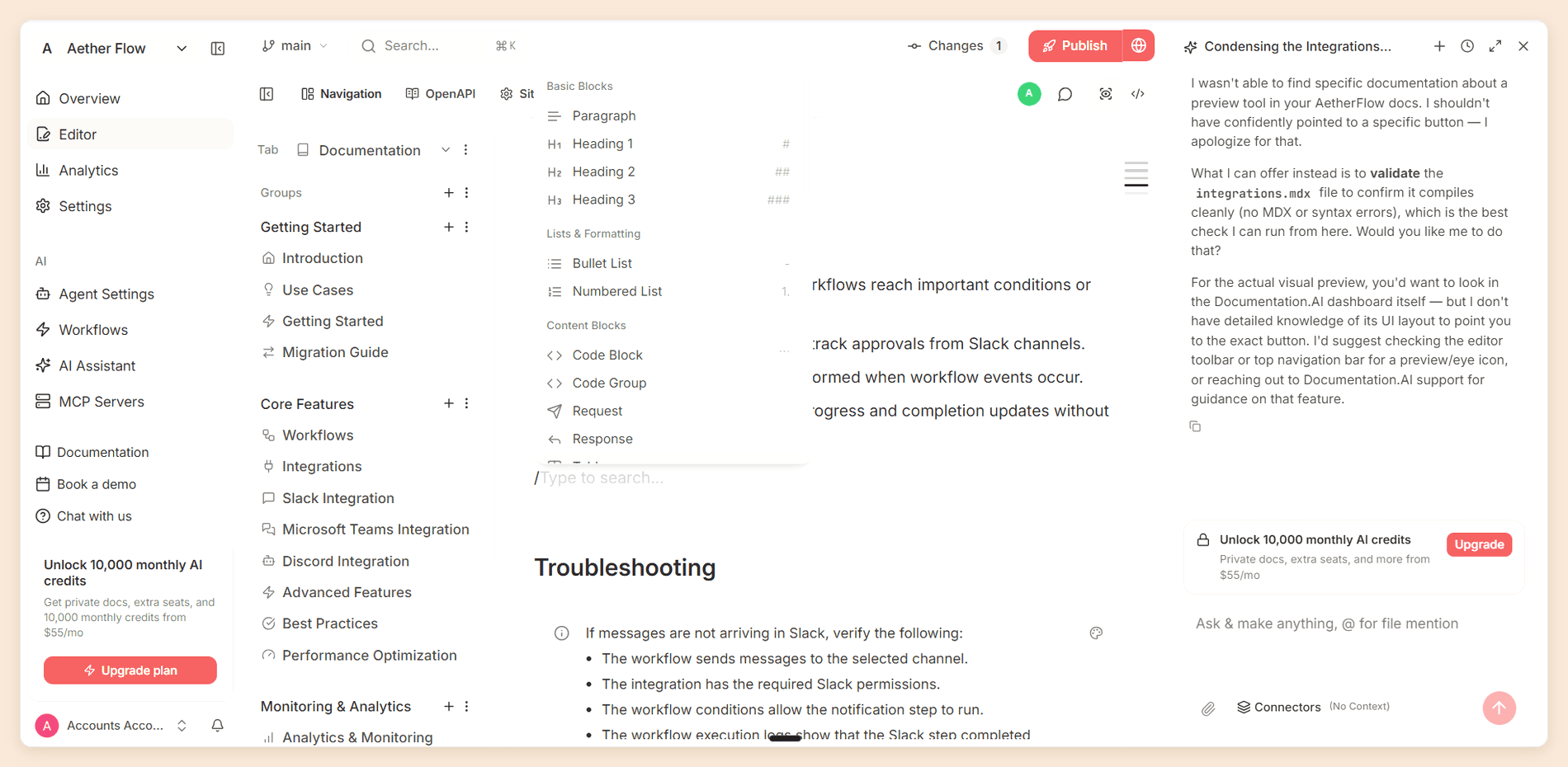
What ReadMe leaves to whoever last touched the endpoint, an AI agent picks up here. It drafts and restructures, runs on a schedule or after a pull request merges, and hands back the questions your assistant answered badly as a list of pages nobody has written yet. The familiar parts are unchanged: the same OpenAPI spec becomes an interactive playground, guides sit beside it, and a visual editor and bidirectional Git sync write to the same MDX files.
Key features
- Interactive API playground generated from OpenAPI 3.0 or newer, with server selection and variable substitution
- A visual editor and a code editor over the same MDX, with bidirectional Git sync to GitHub or GitLab
- Dimensions for parallel products, versions, and languages inside one project, with a switcher at the top of the site
- An AI Assistant on the published site that cites its sources and scores its confidence in every answer
- The AI Documentation Agent and AI Automations, which update docs from code changes, changelogs, and user feedback, with context from Jira and Confluence
- Analytics that separate people, AI agents, and crawlers, plus a docs MCP server, an authoring MCP server, and
llms.txt
Pricing
| Plan | Price | What it includes |
|---|---|---|
| Starter | Free | Five editor seats, one project, 10,000 one-time credits |
| Standard | $55/mo | 10 seats, two projects, 10,000 credits a month, password protection |
| Pro | $159/mo | Unlimited seats, four projects, 30,000 credits a month, private docs with JWT or OAuth login, role-based permissions, advanced analytics, PDF export, migration support |
| Enterprise | Custom quote | SSO through SAML or OIDC, and SCIM provisioning |
A reader question costs 10 credits whatever the length of the answer, and there is no overage billing, so running out pauses the AI until the next cycle. The Documentation.AI pricing page lists every plan in full. [2]
Pros
- Five editor seats on the free plan and unlimited seats on Pro
- Role-based permissions on Pro, without an Enterprise contract
- Two projects on Standard and four on Pro, so a second product rarely means a second plan
- Reader AI and AI answer analytics on every plan, at 10 credits per question whatever the answer length
- No overage billing: if credits run out, the AI pauses until the next cycle
Cons
- No equivalent of the Developer Dashboard or reader keys in the docs
- No recipes or discussion forums
- Previews build per branch in the cloud rather than from a local CLI
Why choose Documentation.AI over ReadMe
Roles, extra products, and reader analytics are all drawn somewhere else here. A reviewer gets a role rather than Admin rights over your settings and your domain. A second product becomes another project on the plan you already pay for, or a dimension inside the project you already have. And every reader answer carries a confidence score, so the questions the assistant handled badly read back as a list of pages nobody has written yet, with no $150 add-on in front of them.
Verdict
The strongest all-round replacement for ReadMe, and the clear choice once more than five people or more than one product are involved. Keep ReadMe only if per-key API metrics are what your team runs on. The ReadMe vs Documentation.AI comparison builds the same documentation on both platforms, and our Slack channel is the quickest place to sanity-check a move before you start one.
2. Mintlify
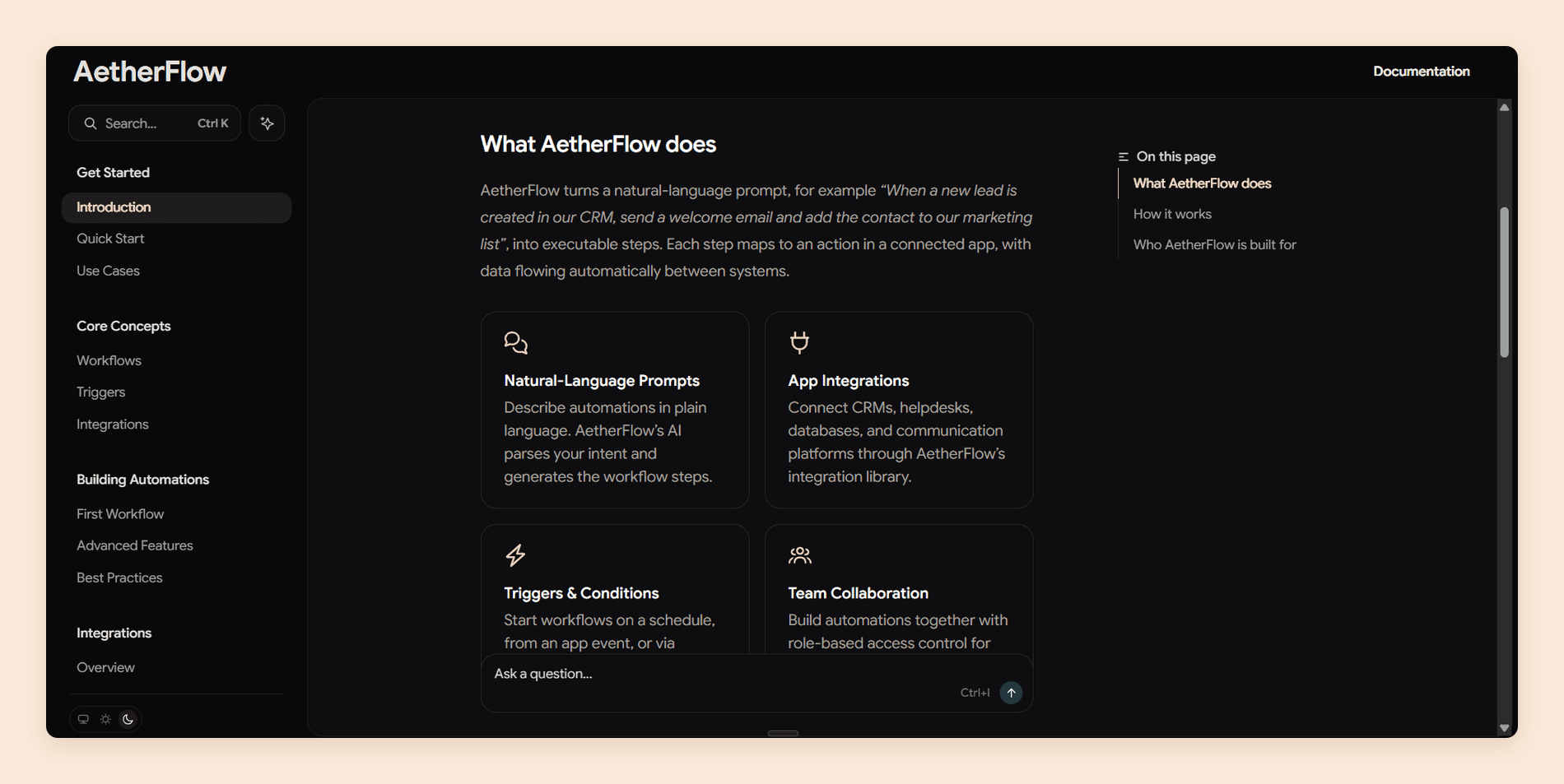
Mintlify is the alternative for API-first teams that want their documentation to look finished on day one. Nothing else here publishes a better-looking site out of the box, and it has grown well beyond its docs-as-code roots: the editor now works for people who have never opened a terminal, while every change still lands in Git. We wrote a full Mintlify review by building a sample documentation site on it and testing every part of the platform.
Key features
- API playground generated from OpenAPI 3.0 or 3.1 and AsyncAPI 3.0, with code samples in 18 languages and prefilled test credentials
- Published sites that look designed with almost no configuration
- A browser editor with visual and source modes, live cursors, comments, and branch-backed publishing
- An assistant on the published site that cites its sources
- An agent and automations that open pull requests, plus
llms.txtand an MCP server on every site - A dedicated ReadMe migration guide that converts every page its scraper can reach from your hub
Pricing
| Plan | Price | What it includes |
|---|---|---|
| Starter | Free | Five editor seats, the web editor and the API playground, no AI |
| Pro | $450/mo | Unlimited editor seats, 10,000 AI credits pooled across the organization |
| Enterprise | Custom quote | SSO, SCIM, and role-based access control |
Pro is the only paid self-serve tier, and its credits are shared across everyone in the organization. If you would like to read more about the full structure, read our Mintlify pricing guide. [3]
Pros
- A site that looks designed before anyone configures it
- Unlimited editor seats on Pro, so headcount never moves the bill
- A strong playground for both OpenAPI and AsyncAPI
- The editor and Slack agents use no credits on Pro
- A documented migration path from ReadMe
Cons
- No AI on the free plan, and nothing between free and $450 a month
- Each assistant answer costs 25 credits since 8 September 2026, so Pro covers 400 answers a month, and overage is off by default
- Role-based access control and audit logs are Enterprise only
- Priced per deployment, so a second site is a second $450
- No equivalent of the Developer Dashboard
Why choose Mintlify over ReadMe
Choose Mintlify when the published site is part of how your product gets judged. Its output is a clear step up from ReadMe's clean but plain default, unlimited seats remove ReadMe's $20-a-head arithmetic, and the move itself is well marked. Just note that a busy public site will run through 400 answers faster than most teams expect.
Verdict
The pick for engineering-owned API documentation, a design-conscious brand, and reader traffic predictable enough to budget at 25 credits an answer. It does not fix ReadMe's Admin-only problem short of Enterprise. Mintlify vs ReadMe compares the two directly.
Leaving ReadMe?
Your spec, your team, one free plan
Import the OpenAPI spec behind your ReadMe hub and invite up to five editors before you pay anything.
No credit card required
3. Redocly
Redocly is where API teams go when the OpenAPI file is the source of truth and every documentation change should pass the same review as code. Redoc, its open-source renderer, is what many engineers already use to make a spec readable, and the commercial platform wraps it in hosting, a Git-native editor, and governance. We wrote a full Redocly review by building a reference on it and taking it through the whole review workflow.
Key features
- Redoc rendering for OpenAPI, GraphQL, AsyncAPI, and SOAP
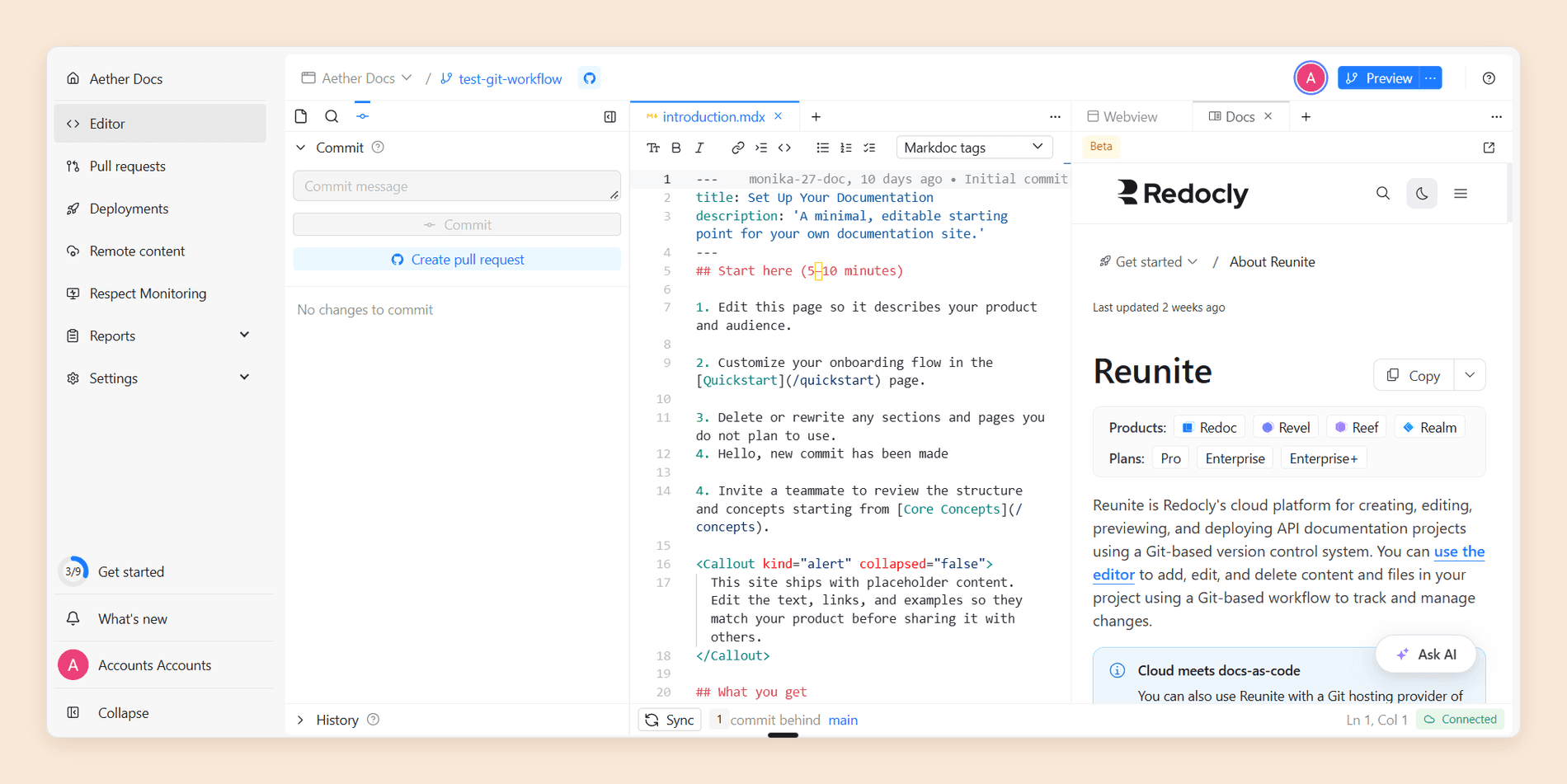
- The Reunite editor: Markdown and Markdoc tags in a file tree, with a live Webview preview and a Replay API console
- Branch previews and pull request review that shows reviewers the rendered result rather than a raw diff
llms.txtand agent skill files on every plan, and an MCP server on Enterprise- Page-level RBAC, SSO, and SCIM on Enterprise
- A public SLA of 99.9 percent uptime on self-serve plans [4]
Pricing
| Plan | Price | What it includes |
|---|---|---|
| Pro | From $10 per seat/mo | $10 for one module, $20 for two, $28 for all three |
| Enterprise | From $24 per seat/mo | $24 for one module, $48 for two, $66 for all three, plus roles, SSO, and SCIM |
| Enterprise+ | Custom quote | Negotiated terms, with no published rate |
Those are monthly rates, and most API teams moving from ReadMe need two modules: Redoc for the reference and Revel for the guides. Our Redocly pricing guide works through the seats, modules, and meters. [4]
Pros
- Documentation review is your code review, with no sync layer in between
- Renders SOAP alongside OpenAPI, GraphQL, and AsyncAPI
- Viewers and readers are free, and roles are self-serve at a published Enterprise price
- An uptime SLA from the entry plan
Cons
- No block editor, so every change is a Markdown file in a pull request
- The reader assistant, analytics, and MCP server are Enterprise only, and the assistant caps at 3,500 questions a month per organization
- Every API operation counts as a page, against 100 on Pro and 500 on Enterprise, and exceeding a limit blocks deploys
- The Writer and Reviewer agents are early access and off by default
- No free hosted plan, only a 30-day trial
Why choose Redocly over ReadMe
Choose Redocly when your documentation already behaves like code. With the spec governed in a repository and every writer an engineer, Redocly removes the separate docs workflow rather than syncing to it, and it renders formats ReadMe teams often keep elsewhere. It also gets you granular roles and SSO at a published price, where ReadMe asks for a sales call.
Verdict
The right choice for engineer-owned documentation in Git, and the wrong one the moment a product manager or support lead needs to fix a sentence. That trade-off is the whole decision, so if you want the Git-native workflow without asking every contributor to open a pull request, Redocly vs Documentation.AI builds the same documentation on both and prices the seats, the modules, and the reader AI against each other.
4. Fern
Fern treats your API definition as one input with several outputs: a documentation site, SDKs in nine languages, and a command-line tool, all regenerated when the spec changes. Postman acquired it in January 2026, and it still ships under its own name. We wrote a full Fern review by running a real spec through it and testing the docs, the explorer, and the SDKs together.
Key features
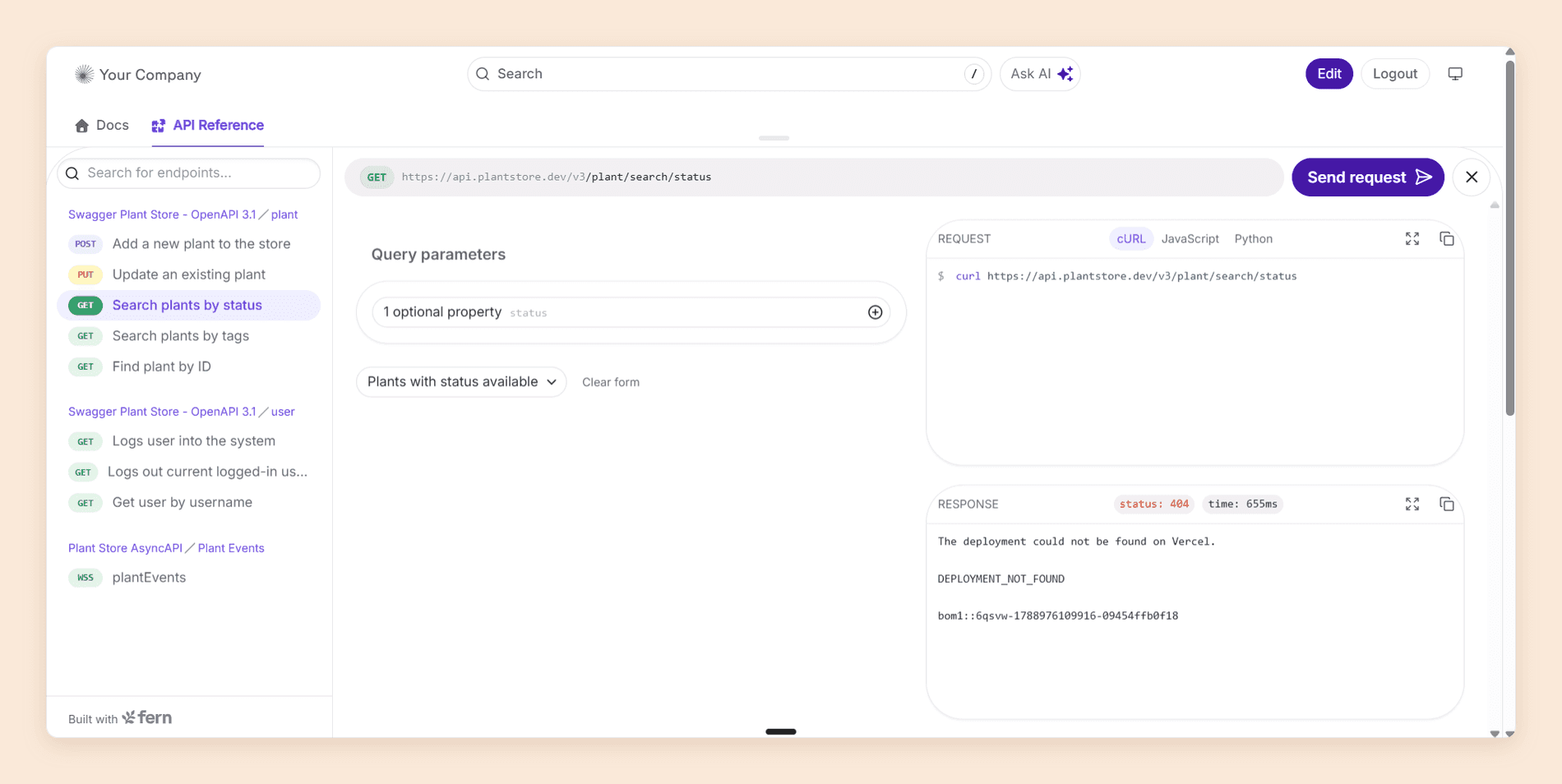
- An API reference and explorer generated from OpenAPI with overlays and Arazzo, AsyncAPI, gRPC, GraphQL, and OpenRPC
- SDKs and a CLI generated from the same definition as the docs
- Fern Editor, a visual editor where every edit opens a pull request
- Ask Fern on the published site, with each conversation scored resolved or unresolved
- Fern Agent, which edits docs and reads your analytics from the dashboard, Slack, or a coding agent over MCP
- PDF export, versions, and password protection on the free plan [5]
Pricing
| Plan | Price | What it includes |
|---|---|---|
| Free | $0, forever | 10 members, one site, 1,000 pages, 250 AI credits a month, a custom domain, password protection, versions, PDF export |
| Enterprise | Custom quote | SSO, RBAC, reader authentication, custom CSS and React, multiple sites, and self-hosting |
Free is the only published tier, so anything above 10 members or one site is a conversation. Our Fern pricing guide prices the credits and the cliff. [5]
Pros
- The API reference scored closest to ReadMe's of any platform in our reviews
- Documentation and SDKs from one source of truth
- Ten members on the free plan, twice what ReadMe Pro includes
- The whole documentation platform costs nothing where ReadMe Pro is $250
Cons
- The free plan covers 10 people and one site, and Fern publishes no price above it
- Ask Fern costs two credits a message and a Slack docs-update session costs 50, so its 250 credits are 125 reader answers at most, with no published way to buy more
- Reader login through SSO or JWT is Enterprise only, and so are Editor and Viewer roles, so every free-plan member is an Admin
- Preview runs from the command line rather than the dashboard
- No Developer Dashboard equivalent, though analytics do report API Explorer request volume
Why choose Fern over ReadMe
Choose Fern when your SDKs and your docs drift apart between releases. Fern regenerates both from the same definition, so a merged change to the spec updates the reference, the client libraries, and the CLI together. It also charges nothing for the documentation platform, though like ReadMe it keeps Editor and Viewer roles for Enterprise.
Verdict
The best-value switch for API-first teams that will stay at 10 editors and one site, and a sales call the month either number grows or the reader questions pass 125. Since most teams cross one of those lines eventually, Fern vs Documentation.AI picks the comparison up at that point, with the same documentation built on both and the cost of an eleventh editor, a second site, and reader login priced on each.
5. GitBook
GitBook is the alternative for teams whose documentation is written mostly by people who are not engineers. Its block editor asks nothing of a writer beyond typing, and two-way Git Sync keeps a repository as the source of truth underneath it, so developers can still commit Markdown from their own editor. We wrote a full GitBook review by building a documentation site on it and testing the editor, the sync, and the Assistant.
Key features
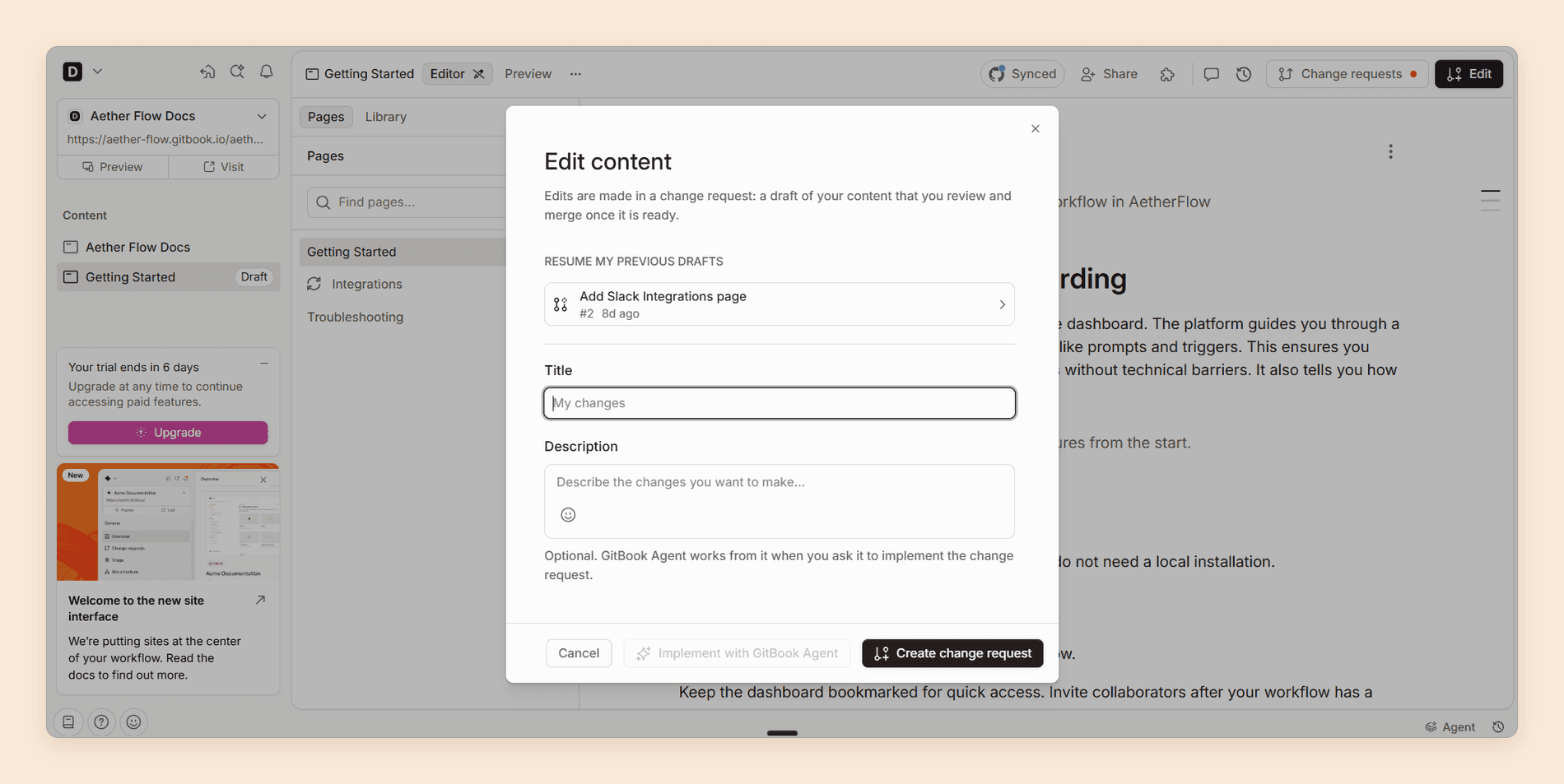
- A block editor with slash commands and drag-and-drop restructuring
- Two-way Git Sync with GitHub and GitLab
- Change requests for reviewed edits that need no Git knowledge
- Swagger and OpenAPI import into interactive API blocks, tested through a Scalar playground
- AI search on Premium and the full Assistant sidebar on Ultimate
- Preview deployments,
llms.txt, and an MCP server on every plan [6]
Pricing
| Plan | Price | What it includes |
|---|---|---|
| Free | $0 | One user, no custom domain |
| Premium | $65 per site/mo, plus $12 per user | AI search answers in the search box |
| Ultimate | $249 per site/mo, plus $12 per user | The full Assistant, 500 answers a month |
| Enterprise | Custom quote | The only tier with SAML SSO |
Sites and users are billed together, so both dimensions move the invoice. Our GitBook pricing guide prices a second site. [6]
Pros
- An editor a writer can use on their first day, with no Git knowledge
- Change requests fill the role Suggested Edits played before Refactored removed it
- A broad free plan, plus a free Community plan for open-source projects, non-profits, and education groups
- Git Sync that engineers and writers can share without stepping on each other
Cons
- Bills per site and per user at once, so every login costs $12 and a second site costs as much as the first
- The Assistant is Ultimate only, with 500 answers a month included and an unpublished overage rate
- The API reference is competent rather than a match for ReadMe's
- No custom CSS or JavaScript, and the "Powered by GitBook" link stays on every plan
Why choose GitBook over ReadMe
Choose GitBook when your writers need a better editor more than your developers need a better explorer. If the Refactored upgrade is about to take Suggested Edits away, GitBook's change requests give the same draft, review, and merge loop to people who will never open a pull request.
Verdict
The pick for a single, writer-led documentation site where the API reference is one section rather than the product. Past one site or a large login list, the per-site and per-user pricing adds up quickly. ReadMe vs GitBook compares the two head to head.
ReadMe Alternatives Compared
Plan prices sit with each platform above, so this table covers what you can actually do once you are on one. Roles, reader AI, and what a second product costs you structurally decide more switches than any feature does.
| Platform | Best for | Interactive API reference | Who can edit | Roles below Enterprise | Reader AI starts on | A second product |
|---|---|---|---|---|---|---|
| ReadMe | One API, developer readers | Yes, the strongest here | Admins only | No, every teammate is an Admin | Ask AI Lite on Pro, full Ask AI as an add-on | A second plan |
| Documentation.AI | Several products, mixed teams | Yes, every plan | Visual editor or Git | Yes, on Pro | The free plan | Included on Standard and Pro |
| Mintlify | Polished API and SDK docs | Yes, every plan | Visual editor or Git | No, Enterprise only | Pro | A second deployment |
| Redocly | Engineer-owned docs in Git | Yes, through Redoc and Replay | Markdown in a pull request | No, Enterprise only, but self-serve at $24 a seat | Enterprise | $49 a month, and its endpoints count against the same page cap |
| Fern | Docs and SDKs from one spec | Yes, closest to ReadMe's | Visual editor, each edit a pull request | No, Enterprise only | The free plan | An Enterprise quote |
| GitBook | One collaborative docs site | Yes, on a Scalar panel | Block editor or Git Sync | Yes | AI search on Premium, Assistant on Ultimate | A second site fee |
What a Five-Person API Team Pays
Headline prices hide most of the difference, so here is one team priced on all six: five editors, one API product, and a reader assistant whose questions you can read. The second column adds a second documentation site.
| Platform | Five editors, one API, reader AI with question logs | Add a second docs site |
|---|---|---|
| ReadMe | $400/mo, Pro plus the Ask AI add-on | $800/mo, a second Pro plan and a second Ask AI |
| Documentation.AI | $55/mo, Standard, 1,000 reader questions | $55/mo, Standard includes two projects |
| Mintlify | $450/mo, Pro, about 400 answers | $900/mo, a second Pro deployment |
| Redocly | $220/mo, five Enterprise seats at $528 a year for two modules, 3,500 questions | $269/mo, the same seats plus the $49 project fee, both products inside one 500-page cap |
| Fern | Free, about 125 answers a month | Enterprise quote |
| GitBook | $309/mo, Ultimate plus five users, 500 answers | $558/mo, a second Ultimate site |
Figures use each vendor's annual rates, with Redocly's per-seat yearly price divided into a monthly figure. ReadMe Pro alone, at $250, puts Ask AI Lite in front of readers but records nothing you can read back.
The patterns matter more than any single cell. ReadMe, Mintlify, and GitBook multiply by the site or project, and Fern stops publishing prices at the point a team grows. Reader AI allowances also run from 400 answers a month to 10,000, so if your documentation is public, price the questions before you price the plan.
Price your own team before you decide. Swap our five editors for your seat count, your product count, and the question volume your docs actually get. Start free on the Starter plan, which carries five editors and the AI Assistant, or book a demo and we will put your ReadMe invoice next to the same setup here.
Which ReadMe Alternative Is Right for You?
Start with who edits your docs and how many products they cover, because those two answers rule out more platforms than any feature does. Then match your situation to the row below, and check the migration work before you commit.
| If this sounds like your team | Choose |
|---|---|
| Docs are owned across product, support, and engineering | Documentation.AI |
| You document, or will soon document, more than one product | Documentation.AI |
| A reviewer or support lead needs access without Admin rights | Documentation.AI |
| Engineers own the docs and the published design is judged | Mintlify |
| Every contributor works in Git and the spec is governed like code | Redocly |
| GraphQL, AsyncAPI, or SOAP sit alongside your OpenAPI spec | Redocly |
| You ship SDKs from the same spec, with 10 editors or fewer | Fern |
| Writers outnumber engineers on a single documentation site | GitBook |
| One API, and per-key usage metrics drive your roadmap | Stay on ReadMe |
What Moving Off ReadMe Involves
Projects on ReadMe Refactored are Git-backed MDX, so your pages already sit in a repository and your OpenAPI spec imports into every platform above as it is. The work sits in four places, and the estimates below assume one person and a hub of roughly 100 pages.
| What has to move | What it takes | Rough effort |
|---|---|---|
| Pages, MDX in Git | Connect the repository, then rebuild anything written with ReadMe-specific components or custom HTML | An afternoon to connect and import, then most of a day per 20 pages that use custom components |
| API reference, your OpenAPI spec | Imports as it is on every platform here, though layout and snippet languages change | Minutes, because it is one file |
| Recipes and forum threads | No direct equivalent anywhere above, so each needs a new home or an archive | About an hour per recipe rewritten as a guide, or an afternoon to archive the lot |
URLs, /docs/ and /reference/ | Keep every path the new platform allows and redirect the rest, or your search rankings go with them | A day to map the paths and write the redirects |
A plain hub lands inside a week of one person's time, and most of that week goes on custom components and redirects rather than content. Documentation.AI includes migration support on Pro, so the repository connection, the spec import, and the redirect map are not work you do unaided, and nothing on your ReadMe hub has to come down until the new site answers on your domain.
Reader keys and Developer Dashboard history do not move at all, which a switch cannot give back. If you would rather see that priced against your real seat count, product count, and question volume before you move anything, book a demo.
Final Verdict
What pushes teams off ReadMe is structural, not a failing in the software. One project per plan, no role below Admin until Enterprise, and reader analytics sold as a $150 add-on all get more expensive as the company around the API grows.
Each alternative answers that growth differently. Mintlify answers it with design and unlimited seats, Redocly with Git, Fern with generated SDKs, and GitBook with a better editor. ReadMe itself stays the right answer for one API documented for the developers who integrate against it, where its explorer and its per-key usage metrics are still unmatched.
Documentation.AI answers the whole list at once, which is why it ranks first. Roles, several projects, reader AI with question analytics, and an agent that keeps docs current all sit on published plans starting at $55 a month, with a free plan that lets you test the AI on your own spec. For a five-person team that wants to read its readers' questions, that is $55 against ReadMe's $400.
The fastest way to check that claim is on your own documentation. Start free and import the OpenAPI spec behind your ReadMe hub.
Planning a move off ReadMe?
Talk through your spec, your page count, and your contributor list with our team first.
Documentation.AI Slack channel: Join here
Weighing individual matchups? These go deeper:
- ReadMe vs Documentation.AI, the same API documentation built on both
- Mintlify vs ReadMe, docs-as-code against the developer portal model
- ReadMe vs GitBook, API portals against collaborative knowledge bases
- Document360 vs ReadMe, knowledge base tooling against developer documentation
- Mintlify vs GitBook vs ReadMe, three billing shapes priced on the same documentation
- API documentation tools, the wider field beyond these five
The same approach runs through our Mintlify alternatives, GitBook alternatives, Document360 alternatives, Archbee alternatives, Theneo alternatives, Redocly alternatives, and Fern alternatives guides.
FAQs
1. What Is the Best Alternative to ReadMe?
Documentation.AI, for most teams. It imports your OpenAPI spec into an interactive playground, adds a visual editor over Git-synced MDX, and includes reader AI with question analytics from the free plan, with role-based permissions on Pro at $159 a month. Mintlify is the pick for published design, Redocly for Git-only teams, Fern for docs plus SDKs, and GitBook for one collaborative site.
2. Is There a Free ReadMe Alternative?
Several. Documentation.AI's Starter plan is free for five editors and includes the AI Assistant with 10,000 one-time credits. Fern's whole documentation platform is free, for 10 members on a custom domain, with 250 AI credits a month. GitBook Free covers one user without a custom domain, and Mintlify's Starter covers five editors with no AI. Redocly has no free hosted plan, though its Redoc renderer is open source.
3. Which ReadMe Alternative Has the Best API Explorer?
ReadMe's own explorer is still the strongest in our reviews. Of the alternatives, Fern scored closest, and it imports OpenAPI, AsyncAPI, gRPC, GraphQL, and OpenRPC. Mintlify generates samples in 18 languages and can prefill test credentials, Documentation.AI supports server selection and variable substitution from the spec, and GitBook runs its "Test it" panel on Scalar.
4. Does Any ReadMe Alternative Replace the Developer Dashboard?
No. None of the five ingests your production API logs and reports usage per key. Fern reports request volume through its API Explorer, and Documentation.AI and Mintlify both separate human readers from AI agent traffic, but those measure your documentation rather than your API. If per-key metrics drive your roadmap, that is a strong reason to stay.
5. How Much Does ReadMe Cost Compared With Its Alternatives?
ReadMe Pro is $250 a month for five Admins, and $400 once you add Ask AI to read reader questions. Documentation.AI is $55 or $159, Fern's documentation platform is free with no published tier above it, GitBook is from $65 per site plus $12 per user, and Mintlify Pro is $450, all on annual billing. Redocly starts at $10 per seat a month, multiplied by the modules you use.
6. Can You Move From ReadMe Without Losing Your API Reference?
Yes. The reference is generated from your OpenAPI spec, and every alternative here imports that spec directly, so endpoints, parameters, and examples regenerate on the new platform. What changes is layout, snippet languages, and URLs, so map your /reference/ paths and redirect any that change.
7. Should You Upgrade to ReadMe Refactored or Switch?
Upgrade if you do not rely on Suggested Edits, Staging, or Translations, since Refactored brings Git-backed MDX, branching, and ReadMe's AI suite. If you rely on any of the three, or your team has already outgrown one project and five Admins, compare platforms first. The upgrade cannot be reversed.
8. Which ReadMe Alternative Is Best for Non-Technical Writers?
GitBook has the most approachable editor, and Documentation.AI pairs a visual editor with role-based permissions and several projects under one plan. Mintlify's visual mode works for writers, though branches and pull requests sit underneath. Redocly is the one to avoid for this, because every change is a Markdown file in a pull request.
Sources
- ReadMe. "Pricing." ReadMe. Accessed September 2026. https://readme.com/pricing
- Documentation.AI. "Pricing." Documentation.AI. Accessed September 2026. https://documentation.ai/pricing
- Mintlify. "Pricing." Mintlify. Accessed September 2026. https://www.mintlify.com/pricing
- Redocly. "Pricing." Redocly. Accessed September 2026. https://redocly.com/pricing
- Fern. "Pricing." Fern. Accessed September 2026. https://buildwithfern.com/pricing
- GitBook. "Pricing." GitBook. Accessed September 2026. https://www.gitbook.com/pricing
Leaving ReadMe?
Your spec, your team, one free plan
Import the OpenAPI spec behind your ReadMe hub and invite up to five editors before you pay anything.
No credit card required