Mintlify Review 2026
Mintlify has become a leading platform for polished developer documentation, and its pricing has changed considerably this year. This review assesses the editor, API playground, assistant, and agent through hands-on use, and explains what the free plan withholds and how costs behave as usage grows.

Roop Reddy · Co-Founder, Documentation.AI
Last updated
On this page
Mintlify is a hosted documentation platform that turns MDX files in a Git repository into a published docs site, with an API playground, an AI assistant for readers, and an AI agent that proposes changes as pull requests. It is built for software companies whose developer and API documentation is written and owned by engineering teams.
Most of what is written about Mintlify has gone stale. Articles dated 2026 still quote $250/month and $300/month, describe an editor that has since been rebuilt, and skip the credit meter that now decides most of the bill. Mintlify has shipped a great deal this year, repriced its credits again on 8 September, and the Pro plan today is $450/month on annual billing.
This review exists to close that gap. Mintlify is a good product with a real cost structure, and the buying decision turns on details that older write-ups miss: what a credit buys, what the free tier withholds, what Pro still does not include at $450, and how the platform behaves once documentation stops being one person's side project.
Everything below is checked against Mintlify's own pricing page and product documentation, both listed at the end.
Mintlify at a Glance
Most of these figures come from Mintlify's own funding announcements. The company does not disclose revenue, and we have left out the revenue and valuation estimates that circulate on data aggregators.
| Fact | Detail |
|---|---|
| Founded | 2022, through Y Combinator's Winter 2022 batch [4] |
| Founders | Han Wang and Hahnbee Lee [6] |
| Headquarters | San Francisco [4] |
| Seed round | $2.8 million, led by Bain Capital Ventures, 2022 [6] |
| Series A | $18 million, led by Andreessen Horowitz, September 2024 [5] |
| Series B | $45 million, led by Andreessen Horowitz and Salesforce Ventures, April 2026 [4] |
| Total raised | About $66 million: $21 million through the Series A, plus the Series B [4] [5] |
| Valuation | $500 million at the Series B [4] |
| Revenue | Not disclosed |
| Customers | More than 20,000 companies, by Mintlify's count [4] |
Mintlify Review: The Verdict
Mintlify is one of the stronger options for polished, Git-backed developer documentation, and it is priced accordingly. Pro is $450/month on annual billing with 10,000 AI credits. If your reader is a developer and your budget clears that line, it is worth buying. If either condition fails, the value case gets thin quickly.
Our overall score is 4.1 out of 5, the unweighted average of the eight scores below, rounded to one decimal. Every review in this series is scored on the same eight criteria, so the rows compare directly from one platform to the next.
| What we rated | Score | Why |
|---|---|---|
| Editing and structuring | 4.5 | Visual and source modes, live cursors, comments, branch-backed publishing |
| API reference and explorer | 4.6 | OpenAPI and AsyncAPI generated playground that sends real requests |
| Published output and design | 4.8 | Excellent defaults, almost no configuration needed |
| AI authoring and the agent | 4.3 | Real pull requests, five trigger types, editor agent free on Pro |
| Reader AI and search | 4.1 | Fast, accurate, cites sources, and absent from the free plan entirely |
| Analytics and reader insight | 3.8 | Solid traffic and assistant views, thin on content-health signals |
| Governance and collaboration | 4.0 | Branch-backed review for everyone, and the model underneath is still Git |
| Pricing and value | 2.7 | No middle tier, no AI on free, variable cost on public docs |
Buy Mintlify if your documentation is API and SDK reference, your team already lives in GitHub or GitLab, and AI usage on your docs is predictable enough to budget.
Look elsewhere if documentation is owned across product, support, and engineering, your docs are public with unpredictable traffic, or you need role-based permissions, audit logs, or PDF export without an Enterprise contract.
That second list catches more teams than it looks like it should. Mintlify Pro's 10,000 credits cover 400 reader questions a month, so any public docs site with real traffic runs out. Documentation.AI charges 10 credits per question instead of 25, puts role-based permissions on a $159/month plan (billed annually) rather than an Enterprise contract, and starts at $55/month billed annually. That is why it is the platform most teams end up comparing this against, and the full comparison is further down.
What Is Mintlify Built For?
Mintlify is a documentation platform for product and API docs, built docs-as-code so every change lands in Git. Your content is MDX in a repository, docs.json describes the site, and you can write in the browser editor or your own IDE.
Its 2026 positioning goes further. The company now calls itself a knowledge platform built for agents, and the recent work shows it: every site publishes llms.txt and llms-full.txt, serves content to agents as Markdown, and hosts an MCP server.
What Mintlify is not built for matters just as much. This is developer documentation, not a customer support knowledge base. There is no ticket deflection workflow and no article workflow aimed at support agents. Its connections to Zendesk, Intercom, Plain, and Pylon exist to feed support themes back into developer docs, not to run a help center. If you are shopping for a knowledge base, you are in the wrong category, and the Mintlify alternatives are where that search should start.
Mintlify Features: What Stands Out
The rest of the feature list is competent. What follows is what teams switch for.
- Published output, which looks designed without you designing it.
- The editor, now a genuine collaborative one rather than a Git wrapper.
- The API playground, generated from your OpenAPI spec.
- The assistant, answering reader questions on the published site.
- The agent and automations, opening pull requests rather than writing to your live site.
- Publishing for agents, the part Mintlify has invested most in this year.
1. Published Output and Design
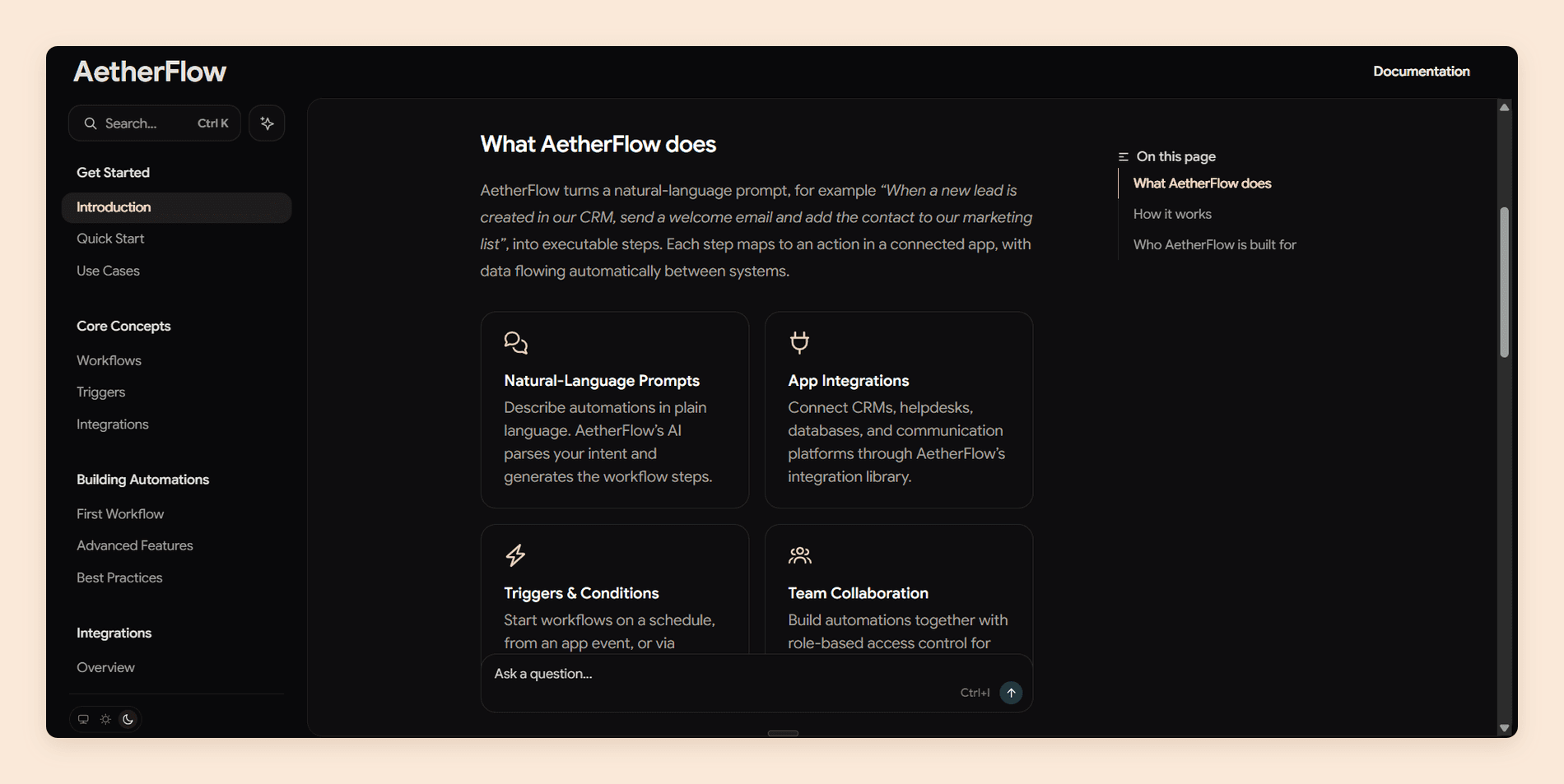
Design is where Mintlify is hardest to argue with. A default Mintlify site looks like someone designed it, with clean typography, working dark mode, sensible syntax highlighting, and components for tabs, callouts, cards, steps, and code groups that you do not have to build.
2. The Editor and Collaboration
The 2026 editor is a different product from the one older reviews describe. It runs in the browser with a visual mode and a source mode, several people can edit the same page with live cursors, and comments and suggestions are visible to everyone.
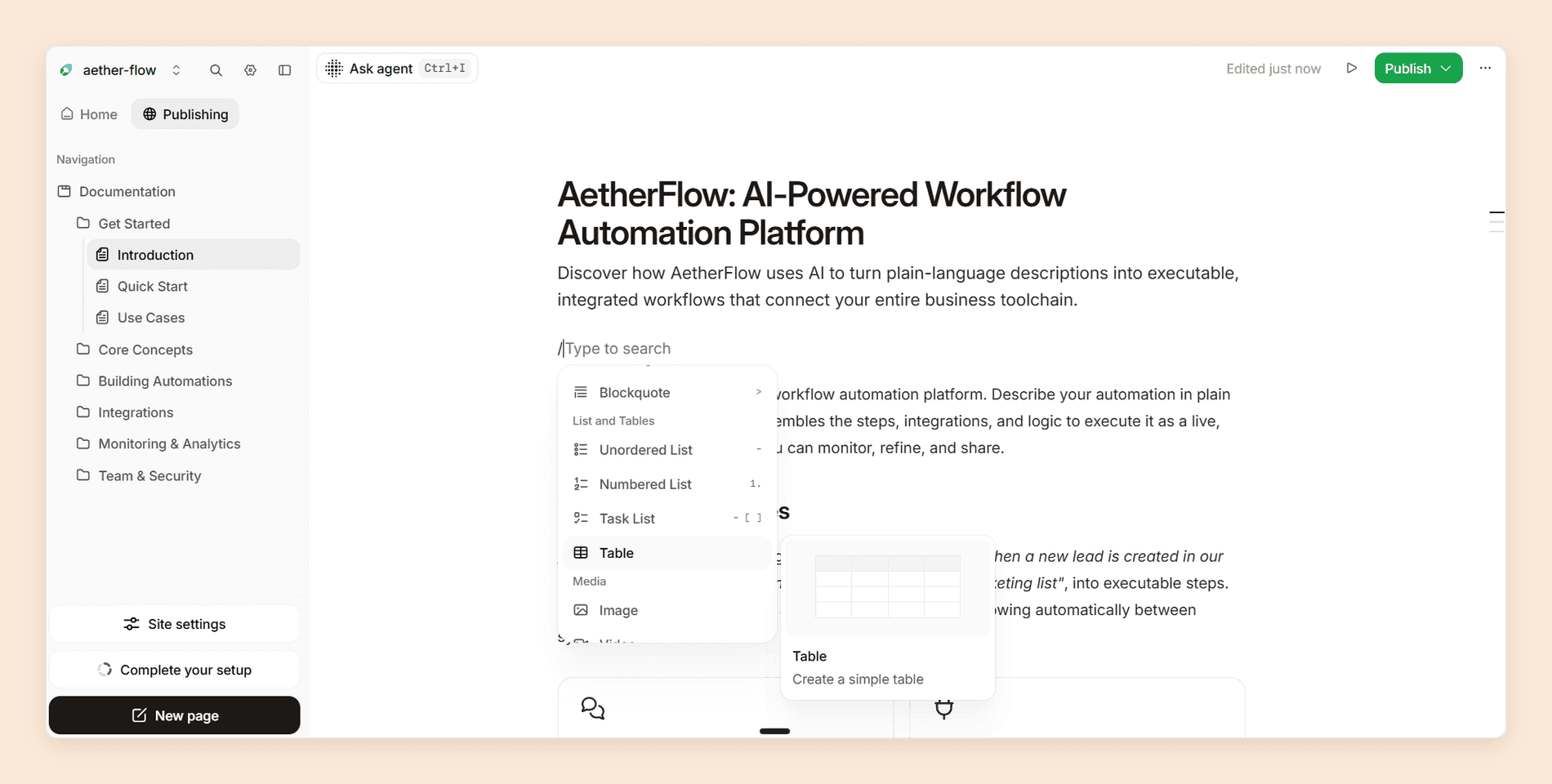
Publishing is branch-aware in a way that reads as deliberate. Creating a branch opens a draft pull request and autosaves your changes to Git, you can rename or discard branches, and GitLab merge requests sync into editor branches the same way GitHub pull requests do. You can also mention the agent in a comment and it answers in the same thread.
3. API Playground
The playground generates interactive pages from an OpenAPI 3.0, 3.1 or 3.2 specification, or from an AsyncAPI 3.0 schema for WebSocket channels, and it updates those pages automatically when your spec changes. Readers can craft a request, send it, and read the response without leaving the docs.
The configuration is where it earns its reputation. Authentication fields come straight from the securitySchemes in your spec, and an x-default extension can prefill test credentials so a reader's first request works immediately. Code samples generate in 18 languages, from cURL and Python to Kotlin, Rust, and Dart, in whatever order you list them. Requests route through Mintlify's proxy by default, which sidesteps most cross-origin trouble, and you can turn that off when your API needs the call to come from the reader's own browser.
How it behaves in production comes down to the details. An auth display mode shows the interactive playground only to signed-in readers, so the reference can stay public while live requests stay gated. A specification without a servers field quietly falls back to a copyable endpoint with no playground, which is the first thing to check when yours does not appear. And Mintlify resolves only internal $ref references, so a spec split across several files needs bundling before it goes in.
For an API-first product this is the single feature that justifies the platform.
4. The AI Assistant
The assistant sits on your published site and answers questions in natural language. It uses tool calling rather than plain retrieval, so it searches your documentation as Markdown, builds context from the page the reader is on, cites its sources with navigable links, and returns method, parameter, and schema detail from your OpenAPI specs.
Indexing is immediate on publish, which is the behavior you want. Two caveats before you demo it: draft branches and preview deployments are not indexed, and hidden pages are excluded unless you set seo.indexing: "all" in docs.json.
5. The Agent and Automations
The agent researches, plans, writes, validates with the CLI, and then, by default, opens a pull request rather than writing straight to your live site. It can read source code from any repository with the Mintlify GitHub App installed, and it can work from prompts, pull requests, Slack threads, or file attachments.
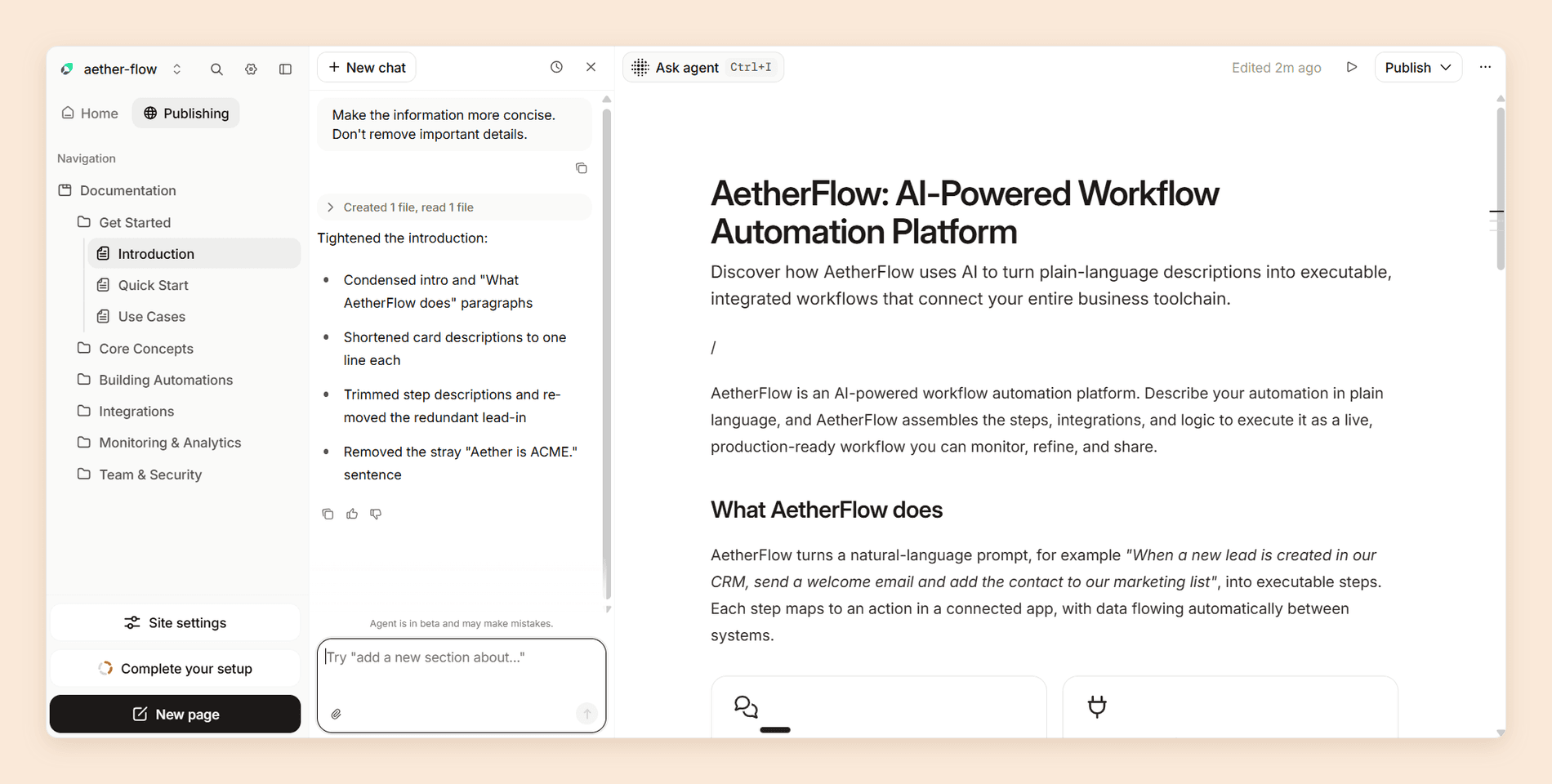
The panel itself still labels the agent beta. Since 8 September it also draws no credits on Pro and Enterprise, in the editor or in Slack. Automations run that agent on a trigger. There are five: content update, code change, custom schedule, webhook, and integration events, though the integration trigger requires Enterprise. A run that updates your docs costs 250 credits, and a run that finds nothing to change costs none. Related changes group into a single pull request instead of flooding your review queue.
6. Publishing for Agents
Every site gets llms.txt and llms-full.txt with no maintenance, hosted at the root and at a .well-known path. Content is served to agents as Markdown to cut token usage, and each site carries an MCP server. That is the full current stack for agents reaching docs from outside; the in-page route, WebMCP, is still in origin trial and would sit alongside it rather than replace it.
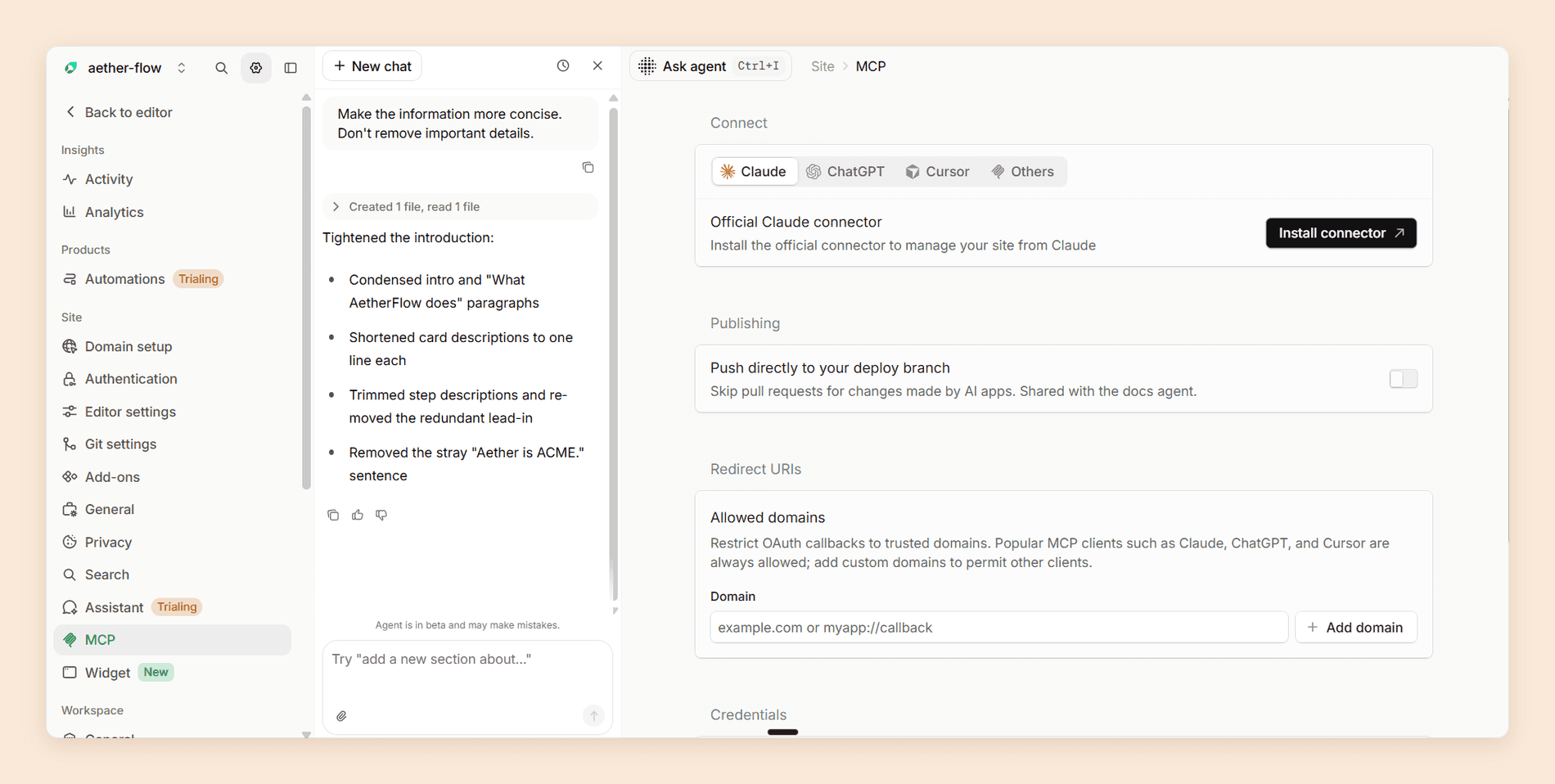
The same settings page carries a switch that lets changes made from Claude, ChatGPT, or Cursor skip the pull request and push straight to the deploy branch, and it applies to the docs agent too. Leave it off unless you trust every prompt your team writes.
Analytics closes the loop. The dashboard splits human from agent traffic and adds views for assistant conversations, search queries, engagement, and feedback, all exportable to CSV or readable from the CLI.
Starting from scratch?
A free docs site with real AI
10,000 credits on the free plan, so the assistant works before you pay. Import what you have or start clean.
No credit card required
Where Mintlify Slows Down
The Free Tier Has No AI at All
Starter is free, gives you five editor seats, and is unusually complete for a free plan. Custom domain, web editor, MCP server, and API playground are all there.
What it withholds:
- All of the AI. No assistant, no agent, no automations, and no way to buy credits even if you want to.
- Analytics, both traffic and agent.
- Preview deployments, webhooks, and the developer API.
The headline capability of an AI documentation platform therefore cannot be evaluated for free beyond the 14-day trial. Worth knowing that Documentation.AI puts 10,000 one-time credits on its free plan for exactly this reason, so you can judge its AI from use rather than from a feature list.
The Credit Meter Is the Real Price
AI runs on credits, and since 8 September 2026 each action has a fixed price. Four actions spend them, and two of those are triggered by your readers: an assistant answer at 25 credits and narration at 50 the first time a page's audio is played. The other two are an automation run that updates your docs and an Autopilot run that opens or updates a pull request, still in beta, at 250 each. The editor and Slack agents are free on Pro, and a question the assistant cannot answer costs nothing. Our Mintlify pricing guide has the full breakdown if you want to model your own usage.
Most of it rests on a single number. An assistant answer costs 25 credits, so Pro's 10,000 monthly credits cover 400 reader questions. Fixed prices make each answer predictable, but not how many your readers will ask. On a public documentation site with traffic you do not control, that is a variable cost attached to being read.
Overages run at $0.01 per credit and are off by default, with usage alerts and 50 percent rollover. Off by default is the part to plan for: the failure mode is your assistant switching itself off mid-month rather than a surprise invoice.
400 reader questions is the practical ceiling on Pro.
Documentation.AI charges 10 credits per question rather than 25, so the same 10,000 credits answer 1,000 questions and a traffic spike stays a capacity question instead of a billing one. See the pricing.
You Are Paying $450/month and Still Not Getting
Pro is not the full product. Role-based access control, audit logs, PDF export, personalization, white labeling, SCIM, self-hosting, and EU hosting all sit behind an Enterprise contract, as do migration services and Slack support.
RBAC and audit logs are where it hurts. Without RBAC, every editor on Pro can publish to your live site and delete API keys. And if a compliance review requires audit logs, Pro cannot pass it at any price.
In fairness, plenty of the category gates some of these the same way. The difference is how far up the price ladder they sit.
Paying $450/month and still waiting on an Enterprise quote?
Documentation.AI includes role-based permissions, private docs with JWT or OAuth login, and migration services on Pro at $159/month, with password-protected docs on Standard at $55/month, both billed annually. Compare the plans.
Migration Help Is an Enterprise Line Item
Mintlify's docs now carry migration guides for Docusaurus, ReadMe, GitBook, Fern, and Document360, built on its scraper or an export from the old platform, plus a manual workflow for everything else. The FAQ on its pricing page still names only ReadMe and Docusaurus, so go by the docs. What the guides do not include is people: hands-on migration services sit on Enterprise only. If you are moving a large corpus from Confluence, a home-grown system, or a static site generator, price that as a project rather than a click.
Moving a large documentation set between platforms?
Documentation.AI offers hands-on migration support for big knowledge bases, custom navigation, and mixed Git and visual workflows, with an AI agent that restructures content as it lands rather than after.
Documentation.AI Slack channel: Join here
Mintlify Pricing
Mintlify has three plans and one meter. The plan decides which features you can open, the credit meter decides what you actually pay. Starter is free, Pro is $450/month on annual billing with 10,000 credits, and Enterprise is a custom quote. All figures here are the annual rate.
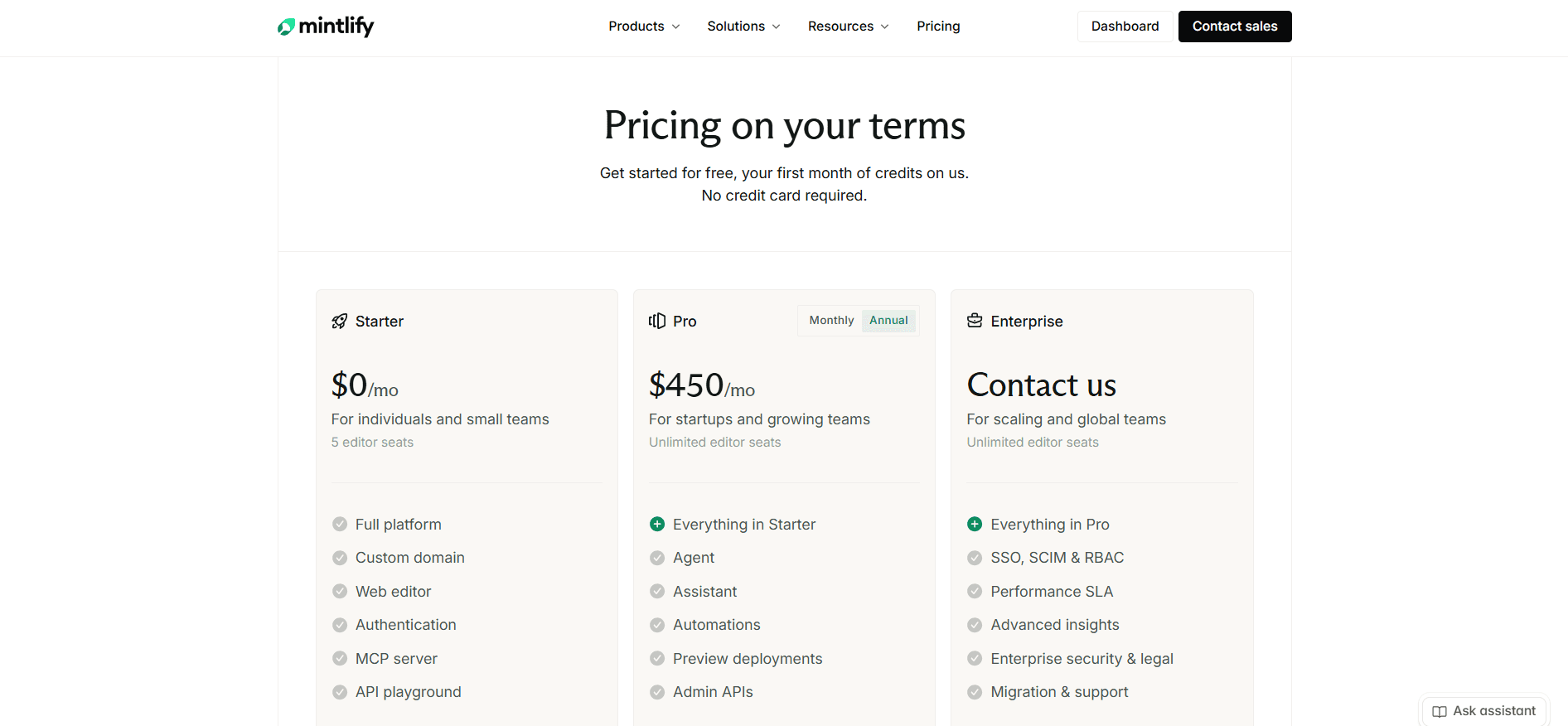
Ignore the headline above the plans, which promises your first month of credits free. Mintlify's FAQ on the same page is the precise version: a 14-day trial with up to 5,000 credits.
Unlimited editor seats on Pro is a good deal and deserves credit. Most competitors charge per seat, Mintlify does not, so adding your whole engineering team costs nothing extra.
Credits changed in 2026 and older articles have this wrong. Your organization now has one shared monthly balance rather than a balance per site. Every Pro plan in the organization contributes 10,000 credits, so two Pro deployments start the month with 20,000, and any deployment can spend from the pool.
The prices changed again on 8 September. Credits used to vary with the tokens each run consumed. Now an assistant answer costs a fixed 25 credits, an automation run that updates your docs costs 250, and the editor and Slack agents cost nothing, while the plan, its included credits, and the price per credit stay the same.
Add-ons are also bought once for the organization: 15,000 extra credits for $145/month, 40,000 for $370, or 90,000 for $800. All three cost less per credit than the $0.01 overage rate, so if you exceed your balance every month, an add-on is the cheaper answer. Above 90,000 you need an Enterprise contract.
What a Real Team Pays
Three scenarios, using the fixed credit prices Mintlify introduced on 8 September 2026.
A five-person API startup, internal traffic only. Roughly 200 assistant answers a month is 5,000 credits, and the team's editor agent sessions cost nothing. Pro at $450 covers it with room to spare. This is the case where Mintlify's pricing works.
A growing SaaS company with public docs. 1,500 assistant answers a month is 37,500 credits, plus 1,000 for a weekly link check that fixes something each week. The editor agent runs cost nothing. That is 38,500 credits against an allowance of 10,000. Add the 40,000-credit add-on and the bill becomes $820/month.
A docs team running automations. A daily typo check that finds something to fix on 20 days of the month is 5,000 credits. Weekly SEO fixes add 1,000, and a translation update after each of 30 content pushes adds 7,500. That is 13,500 credits spent before a single reader asks a question. It is at least predictable now: the cost follows how often your docs change, and the runs that find nothing are free.
Mintlify is priced well for internal or low-traffic documentation. On public documentation it prices your success.
Does It Fit Your Team?
| Your situation | Fit | Why |
|---|---|---|
| API-first product, engineering-owned docs | Excellent | The playground and OpenAPI generation justify the price on their own |
| Devtools startup on a free tier | Good | Starter is unusually complete, as long as you do not need AI |
| Public docs with heavy reader traffic | Poor | 25 credits per answer makes being read a variable cost |
| Docs owned by product and support too | Mixed | The editor works, the Git model underneath still shows |
| Support knowledge base or ticket deflection | Wrong tool | Out of scope by design |
| Regulated industry needing audit logs | Enterprise only | RBAC, audit logs, and SSO are not on Pro |
Worth asking before you commit:
- How many reader questions a month do you expect, and what do they cost at 25 credits each?
- Does anyone in your compliance chain require audit logs or role-based permissions?
- Who is migrating your existing content, and from what?
- Will your non-developer contributors accept a branch and pull request model?
- What happens when the credit balance runs out mid-month, overages or a switched-off assistant?
Is Mintlify Worth It in 2026?
Yes, for a specific and reasonably common team: engineering-owned documentation, a developer audience, predictable AI usage, and a budget where $450/month is a line item rather than an argument. Outside those conditions the answer softens, then reverses, and it does so on cost rather than capability.
The value case is strongest for API-first companies. The playground replaces weeks of custom work, the design defaults replace a designer, and unlimited editor seats mean the price does not scale with headcount. For a Series A devtools company, $450/month is cheap against the cost of building it.
It breaks in two places. Public documentation with real traffic is the first, because the assistant turns readers into a variable cost and a good month for your marketing team becomes a bad month for your docs bill. The second is the missing middle tier. Nothing sits between a free plan with no AI and $450/month, so a three-person team that wants an assistant has exactly one option and it is the expensive one.
There is a quieter cost too. At $450 you still do not get role-based permissions, audit logs, PDF export, personalization, or white labeling, so teams that assume Pro is the full product meet a second surprise at renewal.
Our verdict stands at 4.1 out of 5. Mintlify is an excellent product with a pricing model that suits its original audience better than its current one.
Best Mintlify Alternative
If Mintlify does not fit, the closest platform on capability is Documentation.AI. It does the same core jobs: a visual editor, a Git workflow, an AI agent that writes and restructures, and an assistant answering questions on your published docs. The difference shows up on the invoice rather than the feature list.
Reader questions are where the two diverge. Mintlify charges 25 credits per assistant answer, so Pro's 10,000 credits cover 400 questions a month. Documentation.AI charges 10 credits per question on every paid plan, and its Pro tier includes 30,000 credits at $159/month billed annually. The free tier carries 10,000 one-time credits, so the AI can be tested before any card is entered, and Standard at $55/month billed annually sits in the gap Mintlify leaves between free and $450.
It is also the better answer when documentation is not owned by engineering alone. Setup does not require GitHub, and the agent restructures against a named model of dimensions, views, and groups, with documented rules for moving pages without breaking URLs.
Here is the whole comparison in one view.
| Mintlify | Documentation.AI | |
|---|---|---|
| Entry paid plan | $450/month | $55/month, billed annually |
| Main paid tier | $450/month, 10,000 credits | $159/month billed annually, 30,000 credits |
| Cost per reader question | 25 credits | 10 credits |
| Reader questions covered | 400/month | 3,000/month |
| AI on the free tier | None, 14-day trial only | 10,000 one-time credits |
| Editor seats, main paid tier | Unlimited | Unlimited |
| Role-based permissions | Enterprise | Pro |
| Password-protected docs | Pro | Standard |
| OAuth or JWT login | Enterprise | Pro |
| Preview deployments | Pro | Every plan, free included |
| Setup without a Git provider | No, GitHub or GitLab required | Yes |
| Structural reorganization | Editor agent, on request | Agent-assisted, with safe-restructure rules |
| AI context sources | Repos, pull requests, Slack, plus Jira, Confluence, Linear, and more on Enterprise | GitHub repos, plus Jira, Confluence, Linear, Notion, HubSpot, and Plain |
| Migration services | Enterprise | Pro |
| Credit rollover | 50%, capped at 1.5x | 50%, capped at 1.5x |
Book a demo if you want these rows checked against your own setup, with your traffic and your question volume rather than ours.
Mintlify still wins on two counts, and both are worth weighing. The API playground is stronger for OpenAPI-first products, and the published design defaults remain the best in the category.
Switching cost decides this in practice, and it is smaller than most teams assume. Your content is already MDX in a repository, and Documentation.AI keeps that shape: MDX, Git, and a code editor for the developers who want one, with the site structure described in documentation.json instead of docs.json. The import runs as an agent task rather than a manual re-typing job, and migration services are included on Pro rather than gated behind a contract. The docs-as-code workflow, which is usually the thing holding a team on Mintlify, is not what you give up.
If neither is right, the rest of the field splits cleanly, and our roundup of Mintlify alternatives prices all five side by side. GitBook suits teams who want collaborative visual editing more than the Git model. ReadMe suits API-first developer portals that need per-key usage metrics. Docusaurus suits teams who would rather self-host, own the stack, and pay in engineering time. Our GitBook review and ReadMe review score both platforms on the same eight criteria used here, as does our Theneo review, for API portals billed per workspace rather than per seat. Our Archbee review uses the same criteria for a knowledge portal that keeps customer guides, internal docs, and an API reference in separate spaces, and our Redocly review applies them to a Git-native OpenAPI toolchain. For docs and SDKs generated from a single API definition, our Fern review applies the same criteria.
Four of our comparisons go deeper on each:
- Mintlify vs Documentation.AI, the two platforms compared feature by feature and on cost
- GitBook vs Mintlify, collaborative visual editing against Git-first docs-as-code
- Mintlify vs ReadMe, developer docs sites against API-first developer portals
- Document360 vs Mintlify, a governed support knowledge base against docs-as-code
- Archbee vs Mintlify, a block editor with a portal attached against a repository with a docs site attached
- Mintlify vs Fern, two docs-as-code platforms split by pricing and generated SDKs
- Mintlify vs Redocly, one plan per site against flat plans with unlimited seats and pages
- Mintlify vs GitBook vs ReadMe, three billing shapes priced on the same documentation
FAQs
1. What Is Mintlify?
Mintlify is a hosted documentation platform for developer and API docs, built docs-as-code so every page lives as MDX in a Git repository. It generates an API playground from your OpenAPI spec, answers readers with an AI assistant on the published site, and runs an agent that drafts changes as pull requests. The company was founded in 2022, is based in San Francisco, and says it powers documentation for more than 20,000 companies. [4]
2. How Much Does Mintlify Cost in 2026?
Starter is free with five editor seats and no AI features. Pro is $450/month on annual billing with unlimited editor seats and 10,000 AI credits. Enterprise is a custom quote that adds SSO, SCIM, RBAC, a performance SLA, migration services, and enterprise security terms.
3. Is Mintlify's Free Plan Actually Usable?
Yes, for a documentation site without AI. Five editor seats, a custom domain, the web editor, Git sync, search, an MCP server, and the API playground are all included. The assistant, agent, automations, analytics, and preview deployments are not.
4. How Do Mintlify AI Credits Work?
Every Pro plan contributes 10,000 credits a month to one shared organization balance. Since 8 September 2026 each action has a fixed price: an assistant answer costs 25 credits, narration audio for a page 50, an automation run that updates your docs or an Autopilot pull request 250, and the editor and Slack agents nothing. Overages cost $0.01 per credit and are off by default, and up to 50 percent of unused credits roll over, capped at 1.5 times your allowance.
5. Can Mintlify Be Self-Hosted?
Yes, but only on an Enterprise contract. Mintlify's docs describe self-hosting in your own cloud or data center, on AWS or any Kubernetes platform, as a scoped engagement with its account team that typically takes a few weeks, with the AI assistant and agent shipped disabled until you approve them. [1] [2] On Starter and Pro, Mintlify hosts the site for you, and the mint dev CLI command only runs a local preview for checking changes before they deploy.
6. Does Mintlify Have an MCP Server and llms.txt?
Yes, every Mintlify site publishes both, the free Starter plan included. Mintlify generates llms.txt and llms-full.txt at the site root and at /.well-known/llms.txt, and hosts a search MCP server at the site's /mcp path so tools like Claude, Cursor, and ChatGPT can search your pages and read them as Markdown. [2] A separate admin MCP server gives trusted AI tools write access to your content, with edits landing as unpublished changes or pull requests, and WebMCP, which registers the same search tools inside the reader's browser, requires Pro or Enterprise. [2]
7. Is There an Open-Source Alternative to Mintlify?
Mintlify itself is not open source. The closest self-hosted options are Docusaurus, Material for MkDocs, and Astro Starlight. All three are free and you own the whole stack, but none ships a hosted AI assistant or agent, so you are trading a subscription for engineering time and giving up the AI layer entirely.
Check this before you self-host purely on cost: Mintlify runs an OSS program that gives Pro free forever to projects under a recognized open-source license, provided they are not venture-backed and not primarily maintained by a for-profit company.
8. What Is the Best Mintlify Alternative?
Documentation.AI is the closest on capability and the clearest on cost, charging 10 credits per reader question against Mintlify's 25, with Pro at $159/month against $450, both billed annually. GitBook is the stronger pick for collaborative visual editing, ReadMe for API-first developer portals, and Docusaurus if you would rather self-host.
Where That Leaves You
Mintlify prices its AI for a smaller audience than it now serves. If your documentation is internal, engineering-owned, and read by a predictable number of developers, buy it and stop reading. It is a good platform and it will do the job well.
Teams tend to leave at one of these moments:
- The credit balance runs out mid-month and the assistant switches itself off. That happens at 400 reader questions, and popular documentation passes it without trying.
- A compliance review asks for audit logs or role-based permissions, and Pro cannot supply either at any price.
- You need a tier in the middle and find nothing between a free plan with no AI and $450/month.
If you have hit one of those, the comparison is worth an hour of your time. Documentation.AI charges 10 credits per reader question instead of 25, puts role-based permissions and migration services on a $159/month plan (billed annually), and includes 10,000 credits on its free tier so you can judge the AI before paying for it.
Book a demo and we will run the numbers with you: your traffic, your question volume, and what the same documentation costs on each platform. If you would rather poke at it yourself first, import your docs on the free tier and check the arithmetic against this article.
Migrating a large documentation set? Join the Documentation.AI Slack and we will look at your structure with you before you move anything.
Sources
- Mintlify. "Pricing." Mintlify. Accessed September 2026. https://www.mintlify.com/pricing
- Mintlify. "Mintlify Docs." Mintlify. Accessed September 2026. https://www.mintlify.com/docs
- Mintlify. "Simpler, Outcome-Based AI Pricing." Mintlify Blog. September 8, 2026. https://www.mintlify.com/blog/outcome-based-ai-pricing
- Mintlify. "Mintlify Raises $45M Series B Led by Andreessen Horowitz and Salesforce Ventures." Mintlify Blog. April 14, 2026. https://www.mintlify.com/blog/series-b
- Mintlify. "Mintlify Raises $18M Series A Led by Andreessen Horowitz." Mintlify Blog. September 3, 2024. https://www.mintlify.com/blog/series-a
- TechCrunch. "Mintlify Taps AI to Automatically Generate Documentation from Code." TechCrunch. May 30, 2022. https://techcrunch.com/2022/05/30/mintlify-taps-ai-to-automatically-generate-documentation-from-code/
Starting from scratch?
A free docs site with real AI
10,000 credits on the free plan, so the assistant works before you pay. Import what you have or start clean.
No credit card required