Document360 vs Documentation.AI: Best Document360 Alternative in 2026
Compare Document360 and Documentation.AI to understand how each platform supports modern documentation teams. This hands-on comparison covers collaboration, publishing, and long-term maintenance, and explains why many teams evaluating a Document360 alternative are choosing Documentation.AI in 2026.

Roop Reddy · Co-Founder, Documentation.AI
Last updated
On this page
Documentation has evolved from a simple publishing task into a system for managing product knowledge over time. Teams increasingly rely on documentation platforms to support collaboration, governance, and ongoing accuracy as products change, making long-term maintenance just as important as initial creation.
Document360 is widely used as a collaborative knowledge base by teams that require structured authoring, review workflows, and controlled publishing for internal or external documentation. In contrast, Documentation.AI is an AI documentation platform built on an AI-first approach, enabling faster creation and long-term maintenance through instant publishing, a visual editor, and an AI agent designed to generate, update, and explain documentation, and was recently featured as Product of the Day on Product Hunt.
This comparison is based on hands-on usage rather than marketing claims, evaluating onboarding, editing, publishing, AI capabilities, and day-to-day maintenance using the same workflow across both platforms, with supporting observations drawn from recorded Loom walkthroughs where relevant.
TL;DR: Quick Decision Guide
Document360 makes sense if:
- You need a structured, collaborative knowledge base with strong approval workflows
- Your documentation is primarily managed by support, operations, or enterprise teams
- You are comfortable with private-by-default documentation and controlled publishing
- You expect pricing to start at higher, enterprise-oriented tiers
Documentation.AI makes more sense if:
- Documentation is owned across developers, product managers, founders, and support teams
- You want documentation to be generated and maintained with AI, not just assisted
- You want instant publishing without manual approval or deployment steps
- You prefer transparent, predictable pricing that starts at a lower entry point and scales gradually
Bottom line: Document360 is a solid collaborative knowledge base for governed environments. Documentation.AI is built for teams that want AI to actively reduce documentation work while keeping costs predictable as they grow. If neither is a clear fit, our Document360 alternatives guide ranks the wider field.
How These Platforms Were Compared
I evaluated both platforms using the same end-to-end lifecycle: signup, onboarding, documentation setup, editing, publishing, and interaction with AI features.
The evaluation focused on practical questions teams actually face in real usage, such as how quickly documentation can go live, how much manual effort is required to maintain it over time, how publishing works in practice, and whether AI meaningfully reduces ongoing documentation work.
The goal is not to declare a single winner, but to clearly show where each platform fits best and where it starts to feel limiting as documentation scales in size and complexity.
Onboarding Experience
Document360
Document360’s onboarding is clearly designed for enterprise and support-led teams. Signing up for a free trial requires a work email and phone number, and documentation created during the trial remains private by default. There is no immediate public publishing during onboarding.
The onboarding flow is lengthy and form-heavy, with multiple steps before users reach the editor. While this process establishes structure and permissions early, it also creates friction for teams that want to quickly publish or experiment.
Documentation.AI
Documentation.AI offers a much lighter onboarding experience. Signup supports Google sign-in and email-based registration, without requiring mandatory GitHub authorization or enterprise details. This makes the initial setup more flexible for non-technical users.
Users confirm a company or product name, which is automatically used for the documentation header and temporary public URL.
Users can choose between a Quick Setup for non-technical contributors and a Developer Flow for Git-based workflows. Once a path is selected, a complete documentation structure is generated and published immediately, with a live public URL available within minutes.
Onboarding verdict: Document360 emphasizes control and governance. Documentation.AI prioritizes speed, accessibility, and fast time-to-live documentation.
Writing and Editing Experience
For Non-Technical Contributors
Document360 provides a structured editor with strong collaboration features. Content is organized into categories, and permissions, approvals, and review workflows are first-class concepts. This works well for teams that require formal content governance, but restructuring content or navigation can feel rigid.
Document360’s AI offering functions as an AI writing assistant. It helps generate article drafts, rewrite sections, and improve tone, but it does not manage documentation structure or navigation. All changes still require manual review and publishing.
Documentation.AI takes a more flexible approach. The visual editor allows non-technical users to create, restructure, and maintain documentation without touching configuration files. Navigation updates happen visually and reflect immediately. An embedded AI agent can generate entire sections, suggest missing content, and reorganize documentation based on user intent.
For Developers
Document360 is not built around a docs-as-code workflow. Developers cannot manage documentation structure or publishing directly from their IDE. Most configuration and updates happen through the web interface.
Documentation.AI supports both visual editing and Git-based workflows. Developers can work in Markdown and Git when needed, while non-technical contributors safely make updates through the UI. Structural configuration is handled automatically, reducing the need for manual changes.
Editing verdict: Document360 excels at controlled collaboration. Documentation.AI balances developer flexibility with accessibility for non-technical teams.
Reading our side of it?
Judge it on your own docs
Import your knowledge base on the free tier and read your own articles.
No credit card required
AI Capabilities in Real Usage
Document360 AI
Document360’s AI features are centered around Eddy AI, which functions as an AI writing assistant. It can generate articles from prompts, improve wording, adjust tone, and apply style guides. However, it does not operate as an autonomous agent. It does not create or maintain documentation structure, manage navigation, or apply changes across multiple sections without manual input.
AI usage in Document360 is scoped to individual articles and requires explicit user actions for every change.
Documentation.AI AI Agent
Documentation.AI’s AI agent is designed to work end-to-end. From a single prompt, it can generate a complete documentation structure, expand sections, add missing areas like FAQs or troubleshooting, and keep content updated over time.
Changes are applied directly in the editor and reflected immediately on the published site. Users do not need to locate files, manage approvals, or trigger publishing manually.
AI verdict: Document360 provides an AI writing assistant. Documentation.AI provides an AI documentation agent.
Published Documentation Experience
Document360
Publishing in Document360 is a manual, article-by-article process. Each page must be explicitly published, and there is no global publish action. During trials, documentation remains private, and public access typically requires plan upgrades or additional configuration.
The published documentation resembles a traditional knowledge base with top-level navigation, category filters, and search. While functional and familiar, it feels more like a support portal than a modern product documentation site.
Documentation.AI
Documentation.AI publishes documentation automatically. Once content is created or updated, it is live immediately on a public documentation site. No manual deployment or publishing step is required.
Published docs load quickly, support light and dark mode, and include built-in Ask AI that allows readers to ask questions directly against live documentation. Additional actions such as copying pages as Markdown or opening them in external AI tools are available by default.
Publishing verdict: Document360 favors controlled publishing. Documentation.AI favors instant, continuous publishing.
Pricing
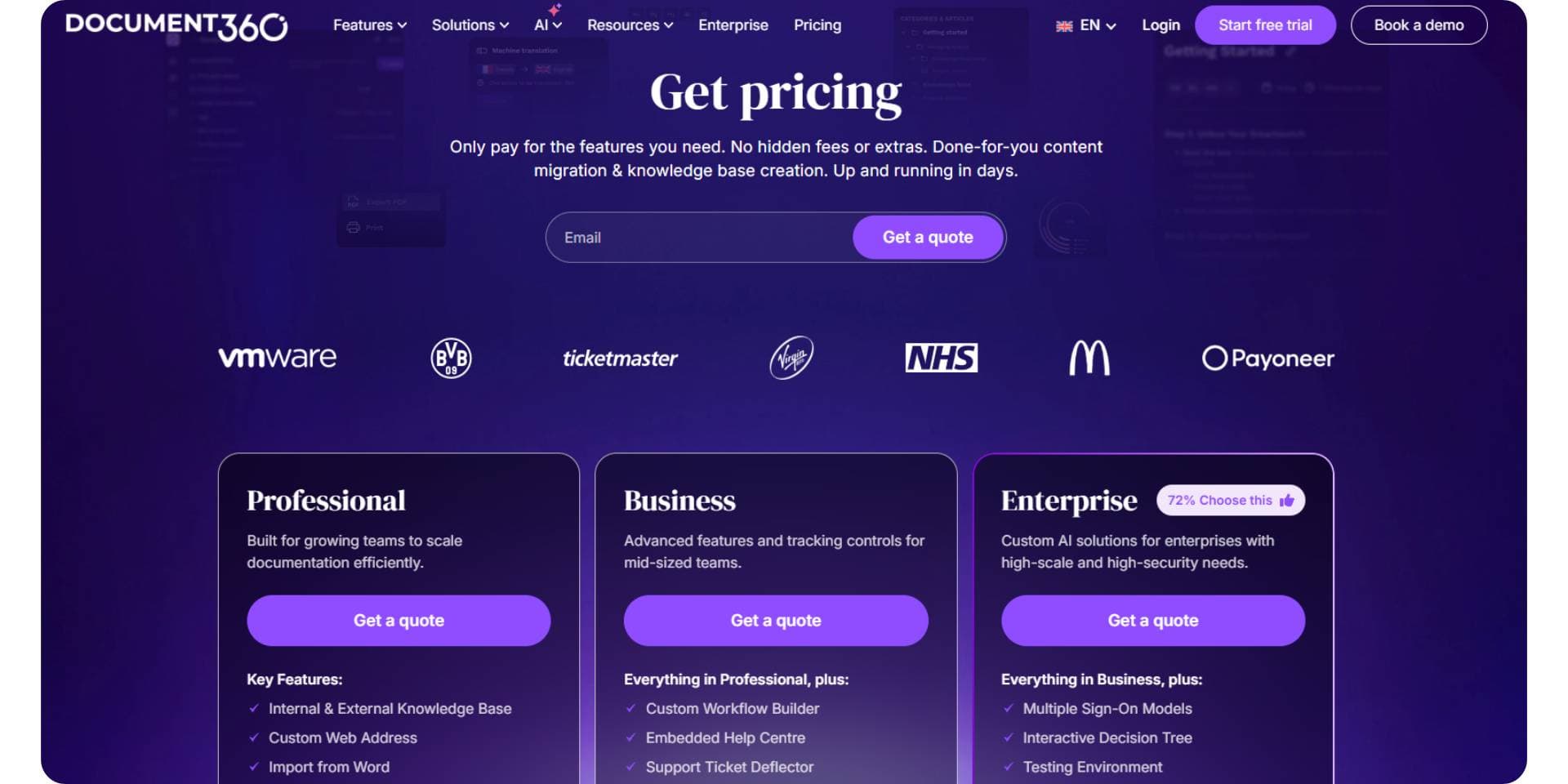
Document360 does not publish transparent self-serve pricing for most advanced use cases. While a trial is available, meaningful production usage typically requires engaging with the sales team. Pricing is positioned toward mid-sized and enterprise teams, and costs depend on factors such as the number of users, features enabled, and deployment requirements. As teams scale or require AI features, approvals, and advanced collaboration, pricing generally moves into higher, sales-led tiers.
Documentation.AI follows a clearly published, self-serve pricing model. It offers a free Starter plan with 5 editor seats, 1 documentation site, and 10,000 trial AI credits, suitable for getting real documentation live without a credit card. Paid plans are publicly listed and scale gradually: Standard starts at $55/month billed yearly ($69 monthly) with 10 editor seats, 2 sites, and 10,000 AI credits per month, Pro is priced at $159/month billed yearly ($199 monthly) for teams running documentation as a product, adding unlimited editor seats, 4 sites, 30,000 AI credits per month, preview deployments, and role-based permissions, and Enterprise is available via contact for organizations that need SSO, SCIM, advanced security, and custom AI limits. Pricing scales primarily by editor seats and AI usage, making long-term costs predictable as teams grow.
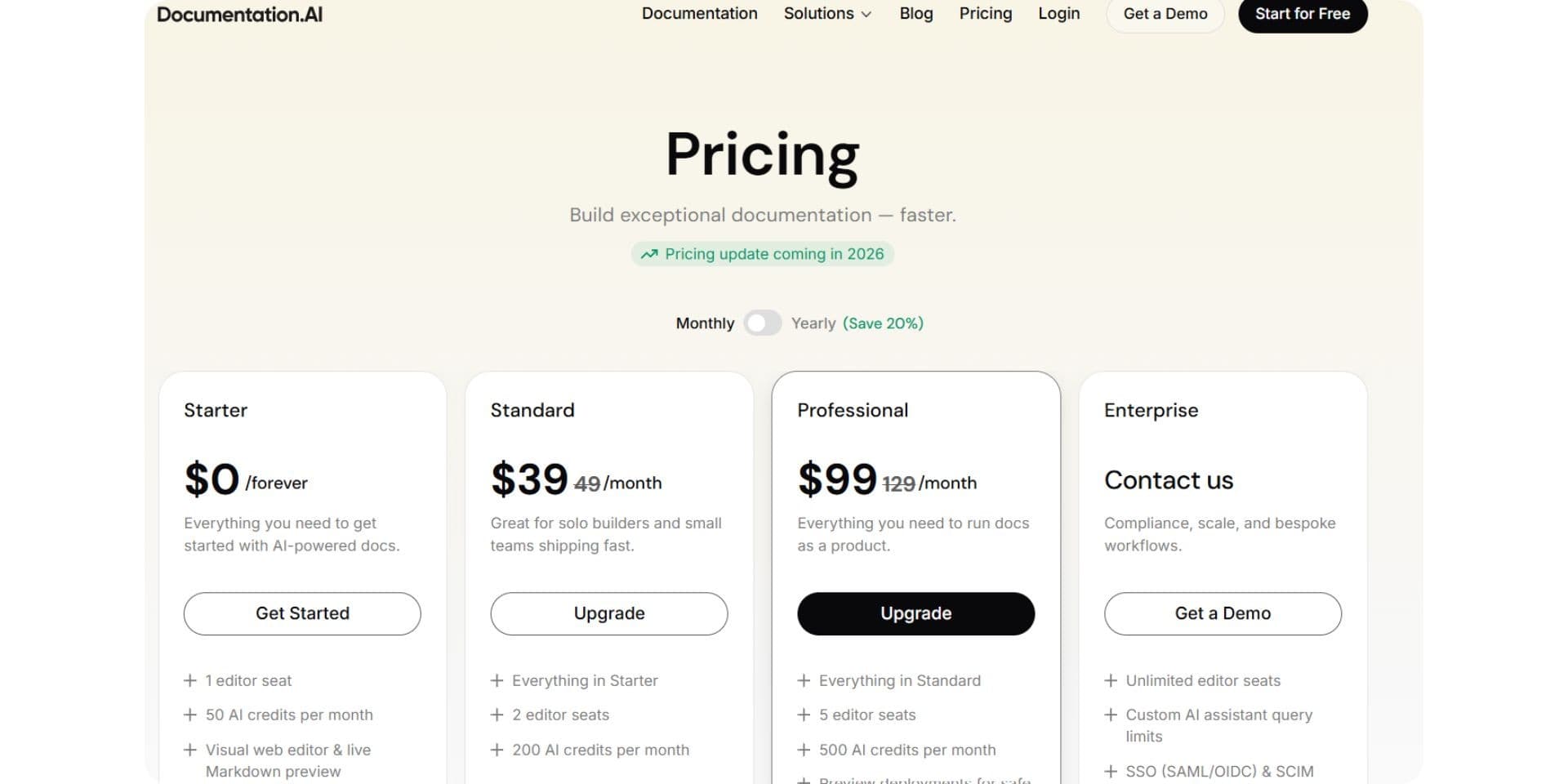
Pricing verdict: Document360 follows a sales-led, enterprise-oriented pricing approach, while Documentation.AI offers transparent, self-serve pricing with a lower entry point and more predictable scaling as teams grow.
Pros and Cons
Document360
Pros
- Strong collaboration model with approvals, permissions, and structured content ownership
- Well suited for support, operations, and enterprise teams that need governed knowledge management
- Clear separation between internal knowledge bases and external documentation
- Familiar knowledge-base style publishing that works well for support portals
Cons
- Lengthy, form-heavy onboarding with work email and phone number required
- Trial documentation remains private by default, limiting early evaluation
- Publishing is manual and must be done article by article
- AI is limited to page-level writing and editing and does not manage structure or navigation
- Not designed for developer-led or docs-as-code workflows
Documentation.AI
Pros
- AI-first, documentation-focused agent that helps create, structure, and maintain docs over time
- Very fast onboarding with Google or email signup and instant public publishing
- Visual editor makes it easy for non-technical contributors to restructure documentation
- Supports both visual workflows and optional Git-based workflows for developers
- Transparent, publicly listed pricing that scales gradually as teams grow
Cons
- AI-generated documentation still requires human review for accuracy and correctness
- Less emphasis on enterprise-style approval chains and strict governance workflows
Document360 vs Documentation.AI: Final Comparison
| Category | Document360 | Documentation.AI |
|---|---|---|
| Primary focus | Collaborative knowledge base | AI-native documentation platform |
| Typical users | Support, operations, enterprise teams | Developers, product managers, founders, support |
| Onboarding | Form-heavy, phone and work email required | Google sign-in or email, flexible setup |
| Trial behavior | Private by default | Public docs available immediately |
| Editing model | Structured editor with approvals | Visual editor with AI assistance |
| Docs-as-code support | Limited | Supported and optional |
| AI capabilities | AI writing assistant only | End-to-end AI documentation agent |
| Publishing | Manual, article-by-article | Automatic, instant publishing |
| Reader-facing AI | Limited | Built-in Ask AI |
| Pricing posture | Enterprise-oriented | Startup-friendly, scales gradually |
Document360’s Eddy AI functions as an AI writing agent, helping teams create or improve individual documentation articles and refine text at the page level. Whereas Documentation.AI is built as a documentation-focused AI agent, designed to create documentation structure, organize navigation, and maintain product documentation over time rather than only generating or editing text.
Final Take
Document360 is a strong fit for teams that prioritize structure, governance, and controlled publishing. It works best in support-led or enterprise environments where documentation changes follow approval workflows, access is tightly managed, and internal and external knowledge bases need clear separation. For organizations that value collaboration controls and formal review processes, Document360 continues to serve its intended use case well. We have also compared it one to one in GitBook vs Document360, Document360 vs Mintlify, and Document360 vs ReadMe.
Documentation.AI takes a different approach by focusing on speed, automation, and AI-driven documentation workflows. It is designed for teams where documentation ownership is shared across developers, product managers, founders, and support teams. With lightweight onboarding, instant publishing, and a documentation-focused AI agent, it reduces the ongoing effort required to create, maintain, and evolve documentation as products change.
As documentation needs scale and teams look to reduce manual work, speed up publishing, and rely more on AI to manage structure and updates, Documentation.AI emerges as a viable Document360 alternative in 2026. It offers a more flexible model for teams that want documentation to move faster, stay continuously up to date, and operate with lower operational overhead, while still supporting both technical and non-technical contributors.
Need help migrating from Document360 or another documentation platform?
If your setup includes large knowledge bases, approval-based workflows, custom navigation, or legacy documentation that needs restructuring, Documentation.AI offers hands-on migration support.
Documentation.AI Slack channel: Join here
Frequently Asked Questions
1) What are the best alternatives to Document360 in 2026?
Teams comparing Document360 alternatives usually look at platforms across product documentation, help centers, and long-term maintenance. Commonly evaluated options include Documentation.AI, Mintlify, GitBook, and other modern documentation tools. Documentation.AI is often chosen when teams want faster setup, AI-driven maintenance, and broader collaboration beyond support teams. The same page-by-page test as this comparison has been run for Mintlify vs Documentation.AI, GitBook vs Documentation.AI, ReadMe vs Documentation.AI, Theneo vs Documentation.AI, Archbee vs Documentation.AI, Redocly vs Documentation.AI, and Fern vs Documentation.AI.
2) Why do teams look for alternatives to Document360?
Teams typically look for alternatives due to long onboarding flows, private-by-default trials, manual publishing steps, and enterprise-style pricing that increases quickly. Many teams now prefer documentation platforms that publish instantly and rely on AI to reduce ongoing maintenance, where Documentation.AI fits better.
3) Is Document360 mainly a knowledge base or a documentation platform?
Document360 is widely used as a structured knowledge base with strong approval workflows and controlled publishing. Teams looking for faster-moving product documentation and continuous updates often explore alternatives that feel less rigid and more automation-friendly.
4) Does Document360 support AI-driven documentation workflows?
Document360 includes AI features focused on writing and editing individual articles. However, documentation structure, navigation, and publishing still require manual management. Teams searching for end-to-end AI-driven documentation often evaluate platforms like Documentation.AI instead.
5) Why is Documentation.AI considered a strong Document360 alternative in 2026?
Documentation.AI is built as an AI-native documentation platform that generates, updates, and maintains documentation continuously. Unlike traditional knowledge bases, it focuses on reducing long-term documentation work while keeping content live and usable at all times.
6) Which platform works better for mixed teams, not just support or enterprise users?
Document360 is optimized for support and operations teams that require approvals and governance. Documentation.AI is designed for mixed teams, allowing developers, product managers, founders, and support teams to collaborate using a visual editor with embedded AI assistance.
7) How do Document360 and Documentation.AI differ in publishing and maintenance?
Document360 relies on manual, article-by-article publishing and approval workflows. Documentation.AI publishes instantly and applies updates automatically, making it easier to keep documentation accurate as products evolve.
8) How does pricing compare between Document360 and Documentation.AI as teams scale?
Document360 typically follows a sales-led, enterprise-oriented pricing model. Documentation.AI offers transparent, self-serve pricing that starts lower and scales gradually based on editor seats and AI usage, making long-term costs more predictable in 2026.
Reading our side of it?
Judge it on your own docs
Import your knowledge base on the free tier and read your own articles.
No credit card required