GitBook vs Documentation.AI: Which Scales Better Across Multiple Docs Sites in 2026?
Both platforms publish good documentation. The difference shows up on your second product, when GitBook starts charging again and Documentation.AI does not. We ran both through the same build and priced what four docs sites really cost.

Roop Reddy · Co-Founder, Documentation.AI
Last updated
On this page
- GitBook vs Documentation.AI: Quick Verdict
- How We Tested Both Platforms
- Setup and Onboarding
- Editing and Restructuring Docs: GitBook Blocks vs Markdown and MDX
- AI Features Compared: What GitBook Puts Behind Higher Tiers
- Published Docs Experience: Design, Search, and Reader Limits
- GitBook Per-Site Pricing vs Documentation.AI Pricing at Scale
- GitBook Pros and Cons
- Feature-by-Feature Breakdown: Where Each Platform Wins
- Who GitBook Is Best for and Who Should Look Elsewhere
- Final Verdict: Which Platform Should You Choose?
- FAQs
- Sources
Documentation stopped being a folder of pages some time ago. It is now the surface your product presents to readers, to search engines, and to the coding agents that read docs on a developer's behalf, so the platform underneath it has to keep content current, not just render it.
GitBook is one of the most established platforms in that category, with a block editor, two-way Git sync, and a publishing pipeline that rarely gets in the way. Documentation.AI is the newer entrant, built so that AI documentation means the AI creates and maintains the docs rather than sitting beside them as a writing aid.
This comparison is about the question most GitBook evaluations skip: what happens when you have more than one set of docs. Every number here comes from each vendor's published pricing and product documentation, with review-site evidence marked as such.
GitBook vs Documentation.AI: Quick Verdict
GitBook is the better buy for a single, polished documentation site owned by a team that already works in Git. Documentation.AI is the better buy for almost everything past that, and the gap widens with each additional docs site you run. If neither shape is yours, it is worth pricing the GitBook alternatives before you commit to either.
GitBook has earned its position, and our full GitBook review scores it on eight criteria. Git Sync is two-way and reliable, the block editor is one of the best in the category, and site variants for versions and translations are included on every plan including the free one. It rates 4.5 out of 5 across 23 reviews on Capterra, where the recurring praise is a clean interface and a GitHub integration that keeps developer docs current without manual work. [1]
Documentation.AI is still the better choice for most teams, for five reasons:
- Cost does not multiply per site. GitBook bills $65 or $249 per site per month plus $12 per user per month. Documentation.AI Pro is $159 a month flat and includes four documentation projects with unlimited editor seats. [3] [4]
- Reader-facing AI is not a $249 decision. GitBook's Assistant sidebar is Ultimate only. Documentation.AI includes the AI Assistant on the free Starter plan. [3] [4]
- The agent restructures rather than only drafting. GitBook Agent handles scoped changes well. Reorganizing a documentation set is still yours to do page by page.
- The docs update themselves. AI Workflows run on a schedule or on pull request merge, pulling context from your repositories, Jira, and Confluence. [5]
- Nothing is metered against you. There is no overage billing on any Documentation.AI plan. If credits run out the AI pauses, your docs stay live, and the bill does not move. [4]
Bottom line: if you run one docs site and Git is your workflow, GitBook is a defensible choice. If you run several, or expect to, GitBook's pricing model will eventually push you off it.
How We Tested Both Platforms
We built the same documentation on each platform and compared the same six things:
- Signup and onboarding
- Importing and Git syncing an existing repository
- Editing and restructuring content
- The AI features in real use
- The published reading experience
- Total cost at the tier a growing team would actually buy
Both platforms were tested at their current versions. GitBook's own documentation site is built on GitBook, which makes it a fair sample of what the platform produces at scale.
No winner is declared per category. Each section reports what GitBook did, then what Documentation.AI did, then a verdict on what the difference means in practice. Several of those verdicts go GitBook's way. Documentation.AI gets the same side-by-side treatment in Mintlify vs Documentation.AI, ReadMe vs Documentation.AI, Document360 vs Documentation.AI, Theneo vs Documentation.AI, Archbee vs Documentation.AI, Redocly vs Documentation.AI, and Fern vs Documentation.AI.
Setup and Onboarding
Both platforms get you to a live site without difficulty. GitBook asks more questions up front and takes longer as a result. Documentation.AI asks fewer and generates faster.
GitBook
Signup offers three routes: email, Google, or GitHub. Nobody is forced through a Git provider to create an account.
GitBook does what follows better than anyone else in this comparison. Onboarding asks a real set of questions about your documentation: what kind of docs you are building, whether they need to stay private, and what you want to connect them to. It reads as configuration, not a progress bar, and neither Mintlify nor Documentation.AI asks anything comparable.
The cost is time. More questions means a longer path to a live site, and the Git sync itself was not instant. Connecting the repository was straightforward, but the first sync took long enough to step away from before the docs were up and running.
Documentation.AI
Signup follows the same shape and does not require GitHub authorization. You can use a Google account or your own email, then confirm your company name.
Setup then splits into two paths. Quick setup is built for non-technical users and product teams: no GitHub, straight into the visual editor. The markdown path is the developer flow, connecting a GitHub repository for teams that want docs-as-code.
Once a path is chosen, the platform generates a full documentation structure with navigation configured, and publishes it to a live URL immediately.
Verdict: GitBook's onboarding is the more thoughtful of the two, and teams that want their documentation shaped correctly from the first screen will prefer it. Documentation.AI trades those questions for speed and gets to a published site faster, with a non-GitHub route that matters when the person setting up documentation is a product manager, not an engineer. Neither will trouble a technical team.
Editing and Restructuring Docs: GitBook Blocks vs Markdown and MDX
Both platforms let developers work in Markdown and let everyone else work visually. They diverge on what happens when a change stops being one page and becomes a reorganization.
GitBook
The editor is a block-based WYSIWYG with a Notion-like feel, and it is very good. Elements come from a toolbar, a slash command menu, or drag and drop, and the drag-and-drop handling of blocks is smooth enough that non-technical writers stop noticing the tool.
The Markdown view sits alongside it for developers who want the underlying source, and merging back into a Git branch from there felt synchronous, not bolted on. Git Sync is two-way in practice and not just on the feature list: developers can write in their own editor, open a pull request, and never visit the GitBook UI for content work.
Editing happens inside change requests, which mirror Git-style review. That brings real editorial control and it also brings formality to small updates. Reusable content and real-time collaboration both require Premium, so the free plan's single user gets none of it. [3]
The limits are structural, not cosmetic. Page layout cannot be changed beyond the theme options, and custom CSS or JavaScript cannot be injected into a published site. [6] Capterra reviewers raise the same point unprompted, describing customization options for layout and design as "somewhat limited", along with media storage that is "difficult to manage". [1]
Documentation.AI
The editing layer is comparable: a visual editor with slash commands, or a Git-native workflow in your own IDE with bidirectional sync, live preview, and the structure expressed in documentation.json. [5]
Where it diverges is the layer above the page. Documentation.AI has a named model for structure, with dimensions as separate top-level documentation spaces for different audiences or products, and views as the tab and dropdown containers inside them. That model comes with documented rules for changing it without breaking your site: move pages between groups instead of renaming paths, stage a redesign with unpublished pages, and use redirects when a path has to change.
The AI agent then operates on that structure, not on individual files. It drafts pages, applies components correctly, refactors navigation, and can read code files and recent commits from connected repositories. [5]
Verdict: for writing and editing a page, these are close, and GitBook's block editor is arguably the nicer object to use. The gap opens on reorganization. GitBook gives you good tools to do that work yourself, one page at a time, which is exactly the complaint that surfaces in its own reviews when documentation grows. Documentation.AI gives you a model for the structure and an agent that can carry out the change against it. On a small or settled docs set, that difference is theoretical. On a migration or a growing site, it is a week of manual work against a reviewed proposal.
AI Features Compared: What GitBook Puts Behind Higher Tiers
Both platforms ship an authoring agent and a reader-facing assistant. Capability is not what separates them. The plan that opens them is.
GitBook
GitBook Agent works inside the editor and works well. It writes, interprets a request accurately, helps you find your way around the platform, and responds without stalling. On a single-page change it produces a clean result that needs little cleanup. Ask it to restructure a whole documentation set and it becomes the wrong tool, because the work is scoped through change requests that a human opens, reviews, and merges. It is a strong assistant, not an autonomous maintainer. On the free plan it is capped at 10 messages a week. [3]
For readers, GitBook splits AI across two products, and the split matters more than the feature list. AI search puts inline answers next to keyword results and is available on Premium. GitBook Assistant, the full chat sidebar, is Ultimate only, as are the ability to embed it outside your docs, customize it, and connect external sources such as Zendesk, Intercom, Front, Linear, and Jira as answer sources. [3] [6] Those connectors are a real strength and no other platform in this comparison matches the breadth of support-desk sources GitBook can answer from.
Analytics is one of GitBook's best areas and deserves credit. Traffic analytics covers page views split by country, language, and browser, separating total events from unique visitors, and it is on every plan. Search analytics shows your top-performing keywords and the ones worth improving, from Premium. [6]
Then there is AI insights. It reports estimated effort saved, the count of unique questions readers asked, the percentage the Assistant successfully answered, and topics that group related questions so you can watch a theme move over time. Drill into a question and you see whether the Assistant answered it fully, partially, or not at all, along with the sources it cited. [6] That is a documentation gap list built from what readers actually asked, and it is good. It is also Ultimate only, at $249 per site per month. [3]
Correct one claim that follows GitBook around, and that earlier versions of this comparison repeated: GitBook does meter reader AI. The Ultimate Assistant includes 500 successful answers a month, which the pricing page labels a soft limit and annotates "contact us beyond", and GitBook's billing documentation states that it keeps the feature running past the allowance and bills the extra usage on your next invoice. [3] [6] The rate it bills at is not published anywhere. Authoring AI genuinely is not metered: AI writing, editing, and GitBook Agent are gated by plan rather than counted per action. [3]
Documentation.AI
The AI Assistant answers reader questions with citations and confidence scoring, and it is included on the free Starter plan along with the authoring agent. [4]
GitBook has no answer to AI Workflows. They run on a schedule or after a pull request merges, and the built-in templates cover broken link audits, grammar and style guide enforcement, changelog generation, API sync from code, and documentation updates driven by code changes. A trigger repository fires the run and additional context repositories widen what the agent can read. [5]
Self-Heal shows the difference most clearly. It reads the last 30 days of page ratings, user comments, and AI Assistant confidence scores, identifies where documentation is failing readers, researches the answer, and proposes fixes as commits you review. [5] GitBook's AI insights tells you which questions went unanswered. This closes the loop and drafts the fix.
Jira and Confluence connect as live context sources. The agent queries Jira with JQL through OAuth at runtime, not from a synced snapshot, so generated release notes and migration guides reflect what engineering shipped. [5]
Usage is metered in credits, and the arithmetic is deliberately readable. One reader question costs 10 credits whatever the answer length. One agent task runs from about 5 credits for a quick edit to 320 for a large restructure, with a single page edit averaging 35. Half of what you do not spend rolls over, up to 1.5 times your allowance. Critically, there is no overage billing on any plan: if you run out, the AI pauses until the next cycle while your documentation stays published and fully editable. [4]
Verdict: GitBook's AI is well built and its analytics are better than most of the category. The problem is the price of admission. The reader Assistant, AI insights, external sources, and Slack and Linear channels are all Ultimate features, which makes GitBook's AI story a $249 per site per month story. Documentation.AI includes the Assistant and the agent at $0 and adds the automation layer at $55. On automation depth the answer is not close, because scheduled and merge-triggered workflows that rewrite documentation from code and feedback have no counterpart on GitBook at any tier.
Adding a second site?
Four docs sites, one price
Projects are bundled, not billed per site. Import your GitBook content free and check it.
No credit card required
Published Docs Experience: Design, Search, and Reader Limits
Both platforms publish fast, responsive, accessible documentation with light and dark modes. GitBook's output is clean and professional. It is also the most constrained of the two.
GitBook
The reading experience is solid. Pages render as clean responsive layouts, OpenAPI integrations produce interactive API explorers, full-text search is on every plan, and the built-in SEO handling covers meta information and sitemaps without configuration.
Preview and publish deserve their own mention. Live preview shows exactly what a change will look like before it ships, so you can see how an edit turned out, decide whether you want it, and publish. For teams shipping documentation continuously, that loop is reassuring.
The constraints are real. Customization is theme-driven: logos, fonts, footer, colors, code themes, and icon styles. You cannot change the layout of page elements and you cannot inject custom CSS, HTML, or JavaScript into a published site. [6] The "Powered by GitBook" link cannot be removed on any plan, including Enterprise. [6] GitBook's editor and content are also cloud only. Its open-source renderer lets you self-host the published site, unsupported, but only the rendering moves, which still rules it out for air-gapped or strict data-residency environments.
The design is good but reads as developer-first, and Capterra reviewers say the same thing in their own words. [1]
Documentation.AI
Published docs get clean typography, fast loads, automatic light and dark mode, a left navigation tree, an in-page table of contents, and global search. Readers can copy any page as Markdown or open it directly in ChatGPT or Claude.
Customization goes further: custom navigation, custom system CSS and JavaScript on every plan, a built-in components library, and footer branding that can be removed on Enterprise. [4] Interactive API playgrounds let readers send real requests, and the AI Assistant answers from live content with citations.
For machine readers, both platforms are well equipped. Both publish llms.txt and both host an MCP server on every plan including free, a point in GitBook's favor since many competitors gate that. Documentation.AI adds a second, authoring MCP server so your team can write documentation from Cursor or Claude Code. [4] A third layer, WebMCP, is emerging in the reader's browser itself; it is in origin trial and complements an MCP server rather than replacing it.
Verdict: GitBook's published output is good and its preview-to-publish loop is one of its strongest features. But your site will look like a GitBook site, carry a GitBook link in the footer, and stay inside a theme system you cannot code around. Documentation.AI gives you the CSS and JavaScript escape hatch, removable branding, and an assistant readers can use without a $249 plan.
GitBook Per-Site Pricing vs Documentation.AI Pricing at Scale
For most teams the decision is made here, and GitBook's model works against growing ones. Its pricing has two multipliers, per site and per user, and both of them move in the wrong direction.
GitBook
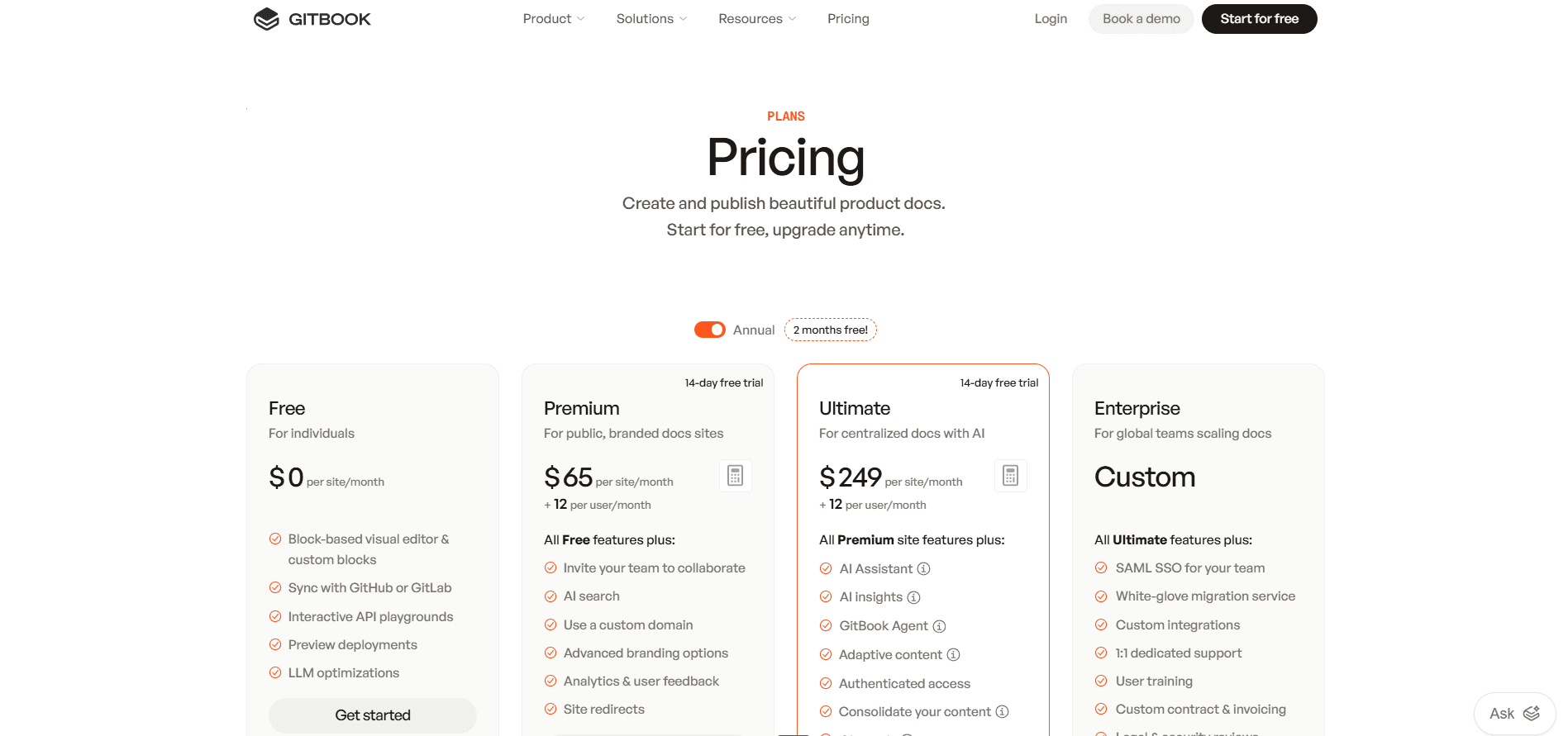
GitBook's Free plan is one user, no custom domain, no AI search, and no real-time collaboration. Premium is $65 per site per month plus $12 per user per month. Ultimate is $249 per site per month plus $12 per user per month. Enterprise is quoted. [3]
Documentation.AI
Documentation.AI charges per plan, not per site or per person. Starter is free with 5 editor seats and one documentation project. Standard is $55 a month with 10 seats and two projects. Pro is $159 a month with unlimited seats and four projects. Enterprise is quoted with a custom project count. [4]
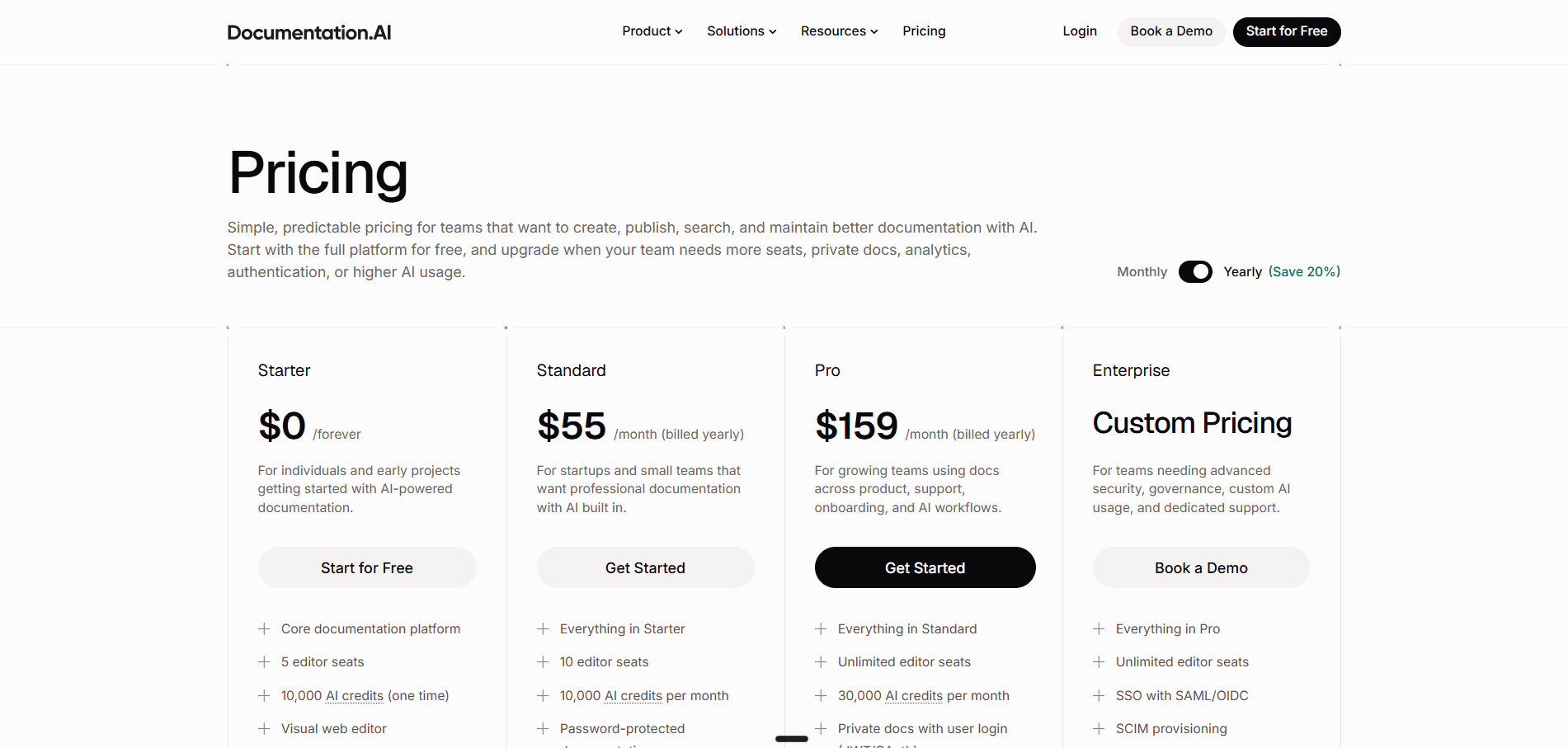
Both platforms bound how many documentation sites you get. The difference is that Documentation.AI bundles them into a flat price while GitBook prices each one separately, and readers are never counted as seats on either. [4]
What Four Docs Sites Cost
Take a company with four products, four documentation sites, and 10 people who edit documentation. GitBook's own guidance for this situation is to consolidate into one centralized Ultimate site using site sections, one section per product, which also turns on search across all of them. [6] Site sections are an Ultimate feature. [3]
| Setup | Monthly cost | What the reader gets |
|---|---|---|
| GitBook Premium, four separate sites | $380 | No Assistant sidebar, no sections, no cross-site search, no authenticated access |
| GitBook Ultimate, one site with four sections | $369 | Everything, but four products collapsed under one site and one domain |
| GitBook Ultimate, four separate sites | $1,116 | Four independent sites with full AI |
| Documentation.AI Pro | $159 | Four projects, unlimited seats, 30,000 credits, Assistant on all four |
Sit with the middle row. GitBook's recommended answer to multiple products costs $369 a month for this team, and it is only cheaper than the four-site option because it stops being four sites. If your products need separate domains, separate branding, or separate access rules, that consolidation is not available to you and the number is $1,116.
That number compounds. Site URL paths must be unique across your entire organization, so slug collisions between products are a real migration problem. [6] And auto-updating translations are billed separately on Premium at $25 for the first 50,000 words and $0.20 per 1,000 after that, included only once you reach Ultimate. [3]
Where GitBook's Model Is Better
Authoring AI is not counted. AI writing, editing, and GitBook Agent are gated by plan rather than metered per action, so a heavy writing month costs a GitBook team exactly what a quiet one does, where Documentation.AI spends credits on every agent task. [3] [4] For a single site with a small team, $65 a month plus a few seats is also genuinely cheap.
What does not hold is the wider predictability claim. Reader AI is metered on both platforms, and the difference is what happens at the limit. GitBook keeps answering past its 500 monthly answers and bills the excess on your next invoice at a rate it does not publish, so a documentation site that goes viral produces a number you cannot forecast. Documentation.AI pauses the AI instead and never bills an overage. [3] [4] [6]
Verdict: GitBook is competitive at one site and stops being competitive at two. The complaint shows up verbatim in its own reviews, where one Capterra reviewer writes "I'd rather pay for everything per month, not per site" and another describes a pricing shift "that denies you access to updates to your site, unless you upgrade to a paid plan that costs over $70/month per website". [1] At four sites and 10 editors, Documentation.AI Pro is between 2.3 and 7 times cheaper depending on which GitBook path you take, and it includes reader AI on all of them.
GitBook Pros and Cons
The pros below come from testing. The cons combine testing with what reviewers report on Capterra and Trustpilot, and the source is marked in each case.
Pros
- Two-way Git Sync that works. Developers write in their own editor, open pull requests, and never touch the UI for content. It was the most reliable part of the build in our testing, and Capterra reviewers describe GitBook as "well integrated with GitHub". [1]
- An excellent block editor. Drag and drop, slash commands, and a Notion-like feel that non-technical writers adopt without training.
- Onboarding that asks real questions. What kind of docs, how private they need to be, what they connect to. No other platform in this comparison asks.
- Strong preview and publish loop. Live preview shows the change before it ships, and change requests bring Git-style review to visual editing.
- Analytics that go deeper than traffic. AI insights reports which reader questions went fully, partially, or entirely unanswered, and groups them into topics. [6]
- Authoring AI is not metered. AI writing, editing, and GitBook Agent are gated by plan rather than counted per action, so the people writing your documentation never watch a balance. [3]
- Free-tier generosity in places competitors gate. MCP server, llms.txt, preview deployments, and site variants for versions and translations are on every plan. [3]
Cons
- Per-site plus per-user pricing compounds fast. Two multipliers, and the second site costs as much as the first. Reviewers raise this more than any other issue. [1]
- The reader Assistant is a $249 per site decision, and it is metered on top. Premium gets inline search answers. The chat sidebar, AI insights, external sources, and Slack and Linear channels are Ultimate only, and Ultimate includes 500 answers a month before GitBook bills the excess at a rate it does not publish. [3] [6]
- The agent does not restructure. Fine on a single page, wrong tool for reorganizing a documentation set, and every change needs a human to open, review, and merge it.
- No custom CSS or JavaScript, and no layout control. Theme options only, and the "Powered by GitBook" link cannot be removed on any plan. [6]
- Not a comfortable fit for non-technical owners. Git is not optional so much as deferred, and the model underneath stays branches and merges. Capterra reviewers split hard on this, some calling the platform "very intuitive and easy to use, even for people without a technical background" and another calling it an "overcomplicated tool, difficult for beginners", which is roughly what you would expect from a tool whose editing surface is easy and whose review model is not. [1]
- Performance and reliability complaints. Capterra reviewers describe the backend as "clunky and slow at times" and report merge errors across multiple owners that "lead to lost of some data". [1] Trustpilot is harsher, with sync failures, login loops, and support that "takes weeks to reply", though that sample is 21 reviews and skews negative. [2]
- Media management is weak. "Difficult to manage and find uploaded media files", per Capterra. [1]
- Cloud only, apart from the renderer. You can self-host the published site from GitBook's open-source renderer, without support, but the editor and content stay on GitBook, which rules it out for air-gapped or strict data-residency requirements.
A fair reading of the review data matters here. GitBook scores 4.5 out of 5 on Capterra across 23 reviews. [1] Trustpilot's 3.4 out of 5 is lower, but it rests on 21 reviews with only six in the past year, so it should not carry the same weight. [2] The signal running through both is pricing structure, not product quality. GitBook is a good product with a cost model that punishes growth.
Feature-by-Feature Breakdown: Where Each Platform Wins
| Category | GitBook | Documentation.AI |
|---|---|---|
| Free plan | 1 user, no custom domain, no AI | 5 seats, custom domain, Assistant and agent included |
| Entry paid price | $65 per site per month plus $12 per user | $55 per month, 10 seats, no per-site fee |
| Documentation sites included | One per plan purchased | 1 on Starter, 2 on Standard, 4 on Pro |
| Editor seats | $12 each, every plan | 5, 10, then unlimited on Pro |
| Onboarding | Configuration questions, slower to live | Two paths, faster to live |
| Visual editor | Block-based, best in class | Visual with slash commands |
| Docs-as-code | Two-way Git Sync, excellent | Bidirectional Git sync, optional |
| Restructuring | Manual, page by page | Agent operates on the structure model |
| Authoring agent | Scoped change requests, human-initiated | End-to-end generation and restructuring |
| Automated maintenance | None | Scheduled and merge-triggered AI Workflows |
| External context sources | Zendesk, Intercom, Front, Linear, Jira (Ultimate) | Jira, Confluence, repositories, user feedback |
| Reader AI chat | Ultimate only, $249 per site | Included from the free plan |
| Reader AI search | Premium and above | Included from the free plan |
| AI answer analytics | AI insights, Ultimate only | AI answer analytics, Pro |
| Reader AI metering | 500 answers/mo on Ultimate, then billed at an unpublished rate | 10 credits per question, no overage billing |
| Authoring AI metering | Not metered, gated by plan | Credits per task, no overage billing |
| Custom CSS and JavaScript | Not supported | Supported |
| Footer branding | Cannot be removed on any plan | Removable |
| MCP server | Reader, all plans | Reader and authoring, all plans |
| Versions and localization | Site variants, all plans | Versions and localization included |
| Authenticated access | Ultimate | Password on Standard, JWT and OAuth on Pro |
| SSO and SCIM | Enterprise | Enterprise |
| Self-hosting | Published-site renderer only, unsupported | Not available |
GitBook wins on the block editor, onboarding depth, support-desk context connectors, free-tier site variants, and unmetered authoring AI. Documentation.AI wins on price at any scale above one site, reader AI availability, automation depth, restructuring, and customization freedom.
Who GitBook Is Best for and Who Should Look Elsewhere
GitBook Is the Right Choice If
Your documentation is one site and likely to stay that way. The per-site multiplier only hurts when it multiplies, and a single Premium site with a handful of editors is good value.
Your team lives in Git and wants it to stay visible. Two-way sync is the product here, not a compatibility layer, and developers who want to write documentation in their own editor and open a pull request will be happy.
You want authoring AI nobody has to count. Writing, editing, and GitBook Agent are gated by plan rather than metered per action, so the people producing your documentation never watch a balance. Price the reader Assistant separately, because that half is metered and its overage rate is unpublished. [3] [6]
Your readers arrive from support tooling. If your answers need to draw on Zendesk, Intercom, Front, or Linear alongside your docs, no other platform here connects to as many of them, provided you are on Ultimate.
Look Elsewhere If
You run documentation for more than one product. This is the clearest signal in the whole comparison. Every additional site is another $65 or $249 a month, and GitBook's own recommended workaround requires collapsing your products into one site on the $249 plan.
You want reader-facing AI without an enterprise-shaped budget. On GitBook that is Ultimate. On Documentation.AI it is free.
Documentation is owned across product, support, and engineering instead of by one team. Git is deferred on GitBook, not removed, and Capterra reviewers split on whether beginners find it approachable. [1]
You need documentation that maintains itself. Nothing on GitBook runs on a schedule or on merge to update docs from code, feedback, or Jira.
You need design control or unbranded output. No custom CSS or JavaScript, no layout changes, and a "Powered by GitBook" link you cannot remove. [6]
If more than one of those applies, the shortlist is wider than this page. Our GitBook alternatives guide ranks the field, including Mintlify, Document360, Archbee, and Docusaurus. The top two have their own head-to-heads against GitBook: GitBook vs Mintlify, GitBook vs Document360, and Archbee vs GitBook. For API portals, see ReadMe vs GitBook, or Mintlify vs GitBook vs ReadMe for all three side by side.
Final Verdict: Which Platform Should You Choose?
GitBook is a good documentation platform with a pricing model built for a different era of documentation. Everything it does, it does competently, and several things it does better than Documentation.AI: the block editor, the onboarding questions, the support-desk connectors, and authoring AI that is never counted per action. If you are one team publishing one site, buy it without much agonizing.
The case against it has nothing to do with features. It is arithmetic. Two multipliers, per site and per user, applied to a category where teams increasingly run separate documentation for separate products and audiences. Four sites and 10 editors is $380 a month with no reader chat assistant, $369 if you collapse everything into one Ultimate site, or $1,116 if the products need to stay apart. Documentation.AI covers the same four projects with unlimited seats and the Assistant enabled everywhere for $159. [3] [4]
The second gap is what the AI is for. GitBook's AI helps a person write faster and tells you which reader questions went unanswered, both of which are useful. Documentation.AI's workflows read those same signals, along with your repositories, Jira, and Confluence, and propose the fixes as commits on a schedule you set. [5] One platform reports the gap. The other closes it.
Documentation.AI is the stronger choice for teams that expect documentation to grow across products, roles, and audiences without the bill growing with it. Import your existing GitBook content on the free plan, run the agent over your own pages, and judge it on your documentation instead of ours.
Migrating from GitBook?
Content moves as files, since docs are Markdown and MDX with bidirectional Git sync and OpenAPI specs import directly. Pro includes priority migration support and Enterprise is white-glove. [4]
Documentation.AI Slack channel: Join here
FAQs
1. How Much Does GitBook Cost in 2026?
GitBook has four plans. Free is $0 for one user with no custom domain and no AI features. Premium is $65 per site per month plus $12 per user per month on annual billing. Ultimate is $249 per site per month plus $12 per user per month. Enterprise is a custom quote adding SAML SSO, migration support, IP allowlisting, and legal and security reviews. [3]
2. Does GitBook Charge per Documentation Site?
Yes. Both paid plans are billed per site, so a company running four documentation sites pays four times the site fee, plus $12 per user per month on top. Documentation.AI does not price per site: Pro is $159 a month and includes four documentation projects with unlimited editor seats. [3] [4]
3. Is GitBook's AI Assistant Available on All Plans?
No. AI search, which shows inline answers alongside keyword results, requires Premium. GitBook Assistant, the full chat sidebar readers interact with, is available only on Ultimate at $249 per site per month, along with AI insights, external sources, and the ability to embed or customize the Assistant. The free plan has neither. [3] [6]
4. What Do GitBook Users Complain About Most?
Pricing structure, consistently. GitBook rates 4.5 out of 5 on Capterra across 23 reviews, so the product itself reviews well. [1] The recurring cons are per-site billing, limited layout customization, media file management, and performance, with one Capterra reviewer writing "I'd rather pay for everything per month, not per site" and another criticizing a "$70/month per website" model. Trustpilot is more negative at 3.4 out of 5, but from only 21 reviews. [1] [2]
5. Can You Customize the Design of a GitBook Site?
Within limits. You can change logos, fonts, colors, icon styles, code themes, and the footer. You cannot change the layout of page elements, you cannot inject custom CSS, HTML, or JavaScript, and the "Powered by GitBook" link cannot be removed on any plan. [6] Documentation.AI supports custom system CSS and JavaScript on every plan, and removes footer branding on Enterprise. [4]
6. Does GitBook Meter AI Usage or Charge Overages?
Yes on the reader side, despite what most comparisons say. The Ultimate Assistant includes 500 successful answers a month, which GitBook's pricing page labels a soft limit and annotates "contact us beyond", and its billing documentation states that GitBook keeps the feature running past the allowance and bills the extra usage on your next invoice. The rate is not published anywhere, so get it in writing before you sign. Auto-updating translations work the same way, with a monthly word allowance billed in arrears. Authoring AI is not metered: AI writing, editing, and GitBook Agent are gated by plan, and the free plan caps the Agent at 10 messages per week. Documentation.AI meters in credits at 10 credits per reader question, but has no overage billing on any plan: if the allowance runs out the AI features pause until the next 30-day cycle while documentation stays published and editable. [3] [4] [6]
7. Which Platform Is Better for Non-Technical Teams?
Documentation.AI, on two counts. Setup offers a quick path that skips GitHub entirely, and structural changes happen visually or through the agent, not through Git-shaped review. GitBook's block editor is excellent and non-technical writers do use it happily, but the model underneath stays branches and change requests, and Capterra reviewers are split on how beginners find it. [1]
8. Can Either Platform Update Documentation Automatically?
Only Documentation.AI. Its AI Workflows run on a schedule or after a pull request merges, using built-in templates for broken link audits, style guide enforcement, changelog generation, API sync from code, and a Self-Heal workflow that reads 30 days of page ratings, comments, and AI confidence scores to propose fixes. Workflows require the Standard plan and a connected Git repository. [5] GitBook has no equivalent at any tier.
Sources
- Capterra. "GitBook Reviews." Capterra. Accessed September 2026. https://www.capterra.com/p/197183/GitBook/reviews/
- Trustpilot. "GitBook Reviews." Trustpilot. Accessed September 2026. https://www.trustpilot.com/review/gitbook.com
- GitBook. "Pricing." GitBook. Accessed September 2026. https://www.gitbook.com/pricing
- Documentation.AI. "Pricing." Documentation.AI. Accessed September 2026. https://documentation.ai/pricing
- Documentation.AI. "Documentation.AI Docs." Documentation.AI. Accessed September 2026. https://documentation.ai/docs
- GitBook. "GitBook Docs." GitBook. Accessed September 2026. https://gitbook.com/docs
Adding a second site?
Four docs sites, one price
Projects are bundled, not billed per site. Import your GitBook content free and check it.
No credit card required