Mintlify vs Documentation.AI: Full Feature and Pricing Comparison (2026)
Mintlify and Documentation.AI both offer docs-as-code workflows, but they differ in editor scope, what the AI agent maintains, and how credits are priced. Documentation.AI suits mixed teams that need structural changes without config edits, a far larger credit allowance, and an assistant that reports back the questions your documentation failed to answer.

Roop Reddy · Co-Founder, Documentation.AI
Last updated
On this page
- Mintlify vs Documentation.AI: Quick Verdict
- How We Tested Both Platforms
- Setup and Onboarding
- Editing and Restructuring Docs
- AI Features Comparison: How Each Platform Differs
- Published Docs Experience: Speed, Design, and Search
- Mintlify vs Documentation.AI Pricing in 2026
- Is Mintlify Worth It? Pros and Cons
- Feature-by-Feature Breakdown: Mintlify vs Documentation.AI
- Related Mintlify Comparisons
- The Verdict
- FAQs
- Sources
Documentation has become the layer where product knowledge actually lives. It is read by customers, internal teams, and increasingly by AI agents answering on their behalf.
Mintlify is the more established player in this category. It publishes fast, polished documentation, and its editor has improved sharply over the past year.
Documentation.AI is the newer entrant, and it competes on three things: AI documentation built into the workflow rather than bolted onto an editor, pricing that small and mid-sized teams can actually clear, and a product that works for developers and non-developers without asking either group to change how they work.
Both platforms now do most of the same jobs. This comparison is about where they stop being the same.
Mintlify vs Documentation.AI: Quick Verdict
Mintlify is the stronger fit when your primary reader is an engineer and your budget clears $450 per month. Documentation.AI is the stronger fit when documentation is owned across several teams and you need AI to carry real weight at a lower monthly cost. If neither profile is yours, the wider field of Mintlify alternatives is worth a scan before you commit.
Mintlify makes sense if:
- Your primary reader is an engineer, and your docs are mostly API and SDK reference built from an OpenAPI spec
- Your team is committed to a docs-as-code workflow and wants the Git model front and center
- You have the budget for Pro, and AI usage on your public docs is predictable
Documentation.AI makes sense if:
- Documentation is owned across product, support, and engineering rather than by one team
- You want AI doing the heavy lifting: drafting, restructuring, and answering
- Page traffic is not predictable, and cost per reader question matters
- You want an assistant that scores its own answers, so the questions your documentation failed to answer arrive as a list, where Mintlify groups conversations by topic and reader rating
How We Tested Both Platforms
We built the same documentation on both platforms and compared the same six things:
- Signup and setup
- Importing an existing repository
- Editing and restructuring content
- The AI features in real use
- The published reading experience
- Total cost at the tier a growing team would actually buy
There is no winner declared per category here. Each section reports what each platform did, then a verdict on what that difference means in practice.
Where a claim involves pricing or credit consumption, the numbers come from each vendor's own published pricing and latest credit documentation, not from our estimates.
Setup and Onboarding
Both platforms get you to a live documentation site quickly and neither setup is difficult. Documentation.AI splits setup by who is doing it, while Mintlify runs every contributor through a single flow built around its docs-as-code model. What separated them in testing was generation speed.
Mintlify
Signup was straightforward. You can use a Google account or create an account with your own email address, then add your organization name. From there you choose whether to connect a GitHub repository or start docs from scratch. We connected an existing repository.
Generation took a while. Not painfully long, but long enough to notice. What came out was good: the structure was sensible and the navigation bar was configured properly, with no manual cleanup needed before the site was usable.
Documentation.AI
Signup follows the same shape and does not require GitHub authorization. You can use a Google account or your own email, then confirm your company name.
Setup then splits into two paths, which Mintlify does not offer. Quick setup is built for non-technical users and product teams: no GitHub, straight into the visual editor. The markdown path is the developer flow, connecting a GitHub repository for teams that want docs-as-code.
Once a path is chosen, the platform generates a full documentation structure. Generation was noticeably faster than Mintlify's.
Verdict: Both produce a well-organized site with a correctly configured navigation bar, and neither setup will trouble a technical team. Documentation.AI generated faster and offers a genuine non-GitHub route, which matters when the person setting up documentation is a non-technical contributor rather than an engineer.
Editing and Restructuring Docs
Both platforms let developers and non-developers in, but the editors differ in scope. Mintlify puts its strength into the local toolchain around the editor. Documentation.AI puts its strength inside the editor itself, and the difference shows once a change stops being one page and becomes a reorganization.
Mintlify
The editor is genuinely good, and it is the area where Mintlify has improved most. It runs in the browser with two modes: a visual mode with a slash command menu for inserting components, and a source mode that gives you the underlying MDX. Collaboration is properly built in, with live cursors, comments, suggestions, and a visual diff view. Navigation is drag-and-drop, so reordering the site no longer means editing a configuration file.
Publishing stays Git-native. You work on a branch, open a pull request, and publishing writes a commit to your repository.
For developers, the local toolchain carries the product. The mint CLI runs a local preview server, scaffolds projects, and formats MDX across the tree, with docs.json as the single configuration entry point. It catches build errors before they ship, detects broken links, and warns when your local preview has drifted from the deployed site. Extensions cover VS Code, Cursor, and JetBrains.
What stayed manual in testing was judgment at scale: deciding where content belongs, keeping to a structure your readers can follow, and working through a reorganization page by page.
Documentation.AI
The editor covers the same ground and then extends past it. There is a visual editor with slash commands and a Notion-style feel, or a Git-native code editor in your IDE, with the same structure expressed in documentation.json, and an AI agent working inside both.
The developer path is a conventional Git workflow. Connect GitHub or GitLab, clone the repo, edit .mdx in VS Code, Cursor, or Windsurf, and push, with every branch able to carry its own preview build. Mintlify supports both providers too, though connecting GitLab there means issuing a project access token and creating the webhook by hand rather than installing an app. Because these are ordinary MDX files in an ordinary repository, project-wide search and replace, scripted bulk edits, linting, and CI all work unchanged. Cursor, Copilot, and Claude Code can also maintain docs through the MCP server, so a docs change rides along with the code change that caused it.
Both editors write to the same source, which is what matters for a mixed team. A support lead publishing from the browser and an engineer merging a pull request are not maintaining two versions of the truth.
Above the page sits a named structure model of dimensions, views, groups, and pages. Its value shows the first time one site serves two audiences. Ship an API alongside your product and your end users want tasks and concepts while your integrators want endpoints and authentication. On most platforms that becomes one sidebar with a section bolted on, or a second site to maintain. Dimensions make them separate trees in the same project, so switching audience swaps the whole navigation rather than expanding a folder.
Changing that structure is documented as a discipline: move pages between groups instead of renaming paths, use unpublished pages to stage a redesign while the live site stays intact, and use redirects only when a path genuinely has to change. All of it protects the same thing, which is that your URLs keep working. The AI agent then operates on that structure, refactoring it while respecting your site configuration, and reading code and recent commits from connected repositories.
Verdict: Mintlify is ahead on local development, with a real CLI, a local preview server, and link validation before anything ships. The gap opens on reorganization. Both editors now carry an agent that can move pages and rewrite navigation on request. Documentation.AI adds a named structure model and documented rules for changing it without breaking URLs, so the agent's change has something to respect by the time it reaches review. Which matters depends less on team size than on how settled your docs are. A stable site rarely tests either approach, while a site absorbing a new product or a migration tests it constantly.
AI Features Comparison: How Each Platform Differs
Both platforms are AI-native today, but they arrived from opposite directions. Mintlify built a documentation platform and added AI to it. Documentation.AI was built around the AI from the start, and that shows in two places: what the AI is allowed to do, and what it costs to run.
Mintlify
The Ask AI assistant is embedded in the published docs and it is good. It retrieved what we asked for quickly, answered accurately against internal documentation, and turnaround time was consistently fast.
The wider AI surface is broad. There is an Agent that opens pull requests with documentation improvements from prompts, pull requests, and Slack threads. Automations run the agent on a schedule or on a push to a repository. Every docs site gets an auto-hosted MCP server with no configuration, plus llms.txt, llms-full.txt, and a skill.md capabilities file. A contextual menu lets readers copy a page as context or send it to an AI tool in one click, and content is served to agents as Markdown rather than HTML to cut token usage. One layer sits outside all of this: WebMCP, a browser API in origin trial that lets a page hand tools to an agent directly. It complements an MCP server rather than replacing it. Agent analytics identifies AI traffic by matching known agent signatures and reports which agents visited and what they searched through MCP.
What you get free, and what you do not. Read this part twice. The free Starter plan carries the machine-readable layer: the MCP server, llms.txt, llms-full.txt, skill.md, and Markdown served to agents. All of that helps other people's AI tools read your documentation.
The AI that helps your own team is not on it. The Assistant, the Agent, and automations all require Pro at $450 per month, and analytics is absent from the free tier entirely. Advanced insights sit higher still, on Enterprise. So a team evaluating Mintlify as an AI documentation platform cannot evaluate its AI without buying it first.
Documentation.AI
The assistant matched Mintlify's on speed and accuracy, then went further. It expanded and shortened content on request rather than only returning the passage it found, which makes it useful to the person writing the docs as well as the person reading them.
The AI documentation agent works in the editor, drafting, editing, and restructuring, and it pulls context from connected sources. Jira and Confluence are both supported, so the agent can search issues with JQL, read sprint and release detail, and use wiki pages as source material. Documentation gets written from where the product work actually happened.
Analytics is where the daylight is. Traffic splits three ways across People, AI Agents, and Bots and Crawlers, each with page views over time, top pages, and agent-level breakdowns. More useful than the split is the confidence scoring on assistant answers. Filter for low confidence and you get a list like "how do I rotate an API key?" answered with "I could not find anything about rotating keys in the documentation." That is a documentation gap list written by your own readers, and it is available through a read-only REST API.
What you get free, and what you do not. The free Starter plan includes 10,000 one-time AI credits, so both the Assistant and the documentation agent are fully usable before you pay anything. Standard at $55 per month moves that to 10,000 credits every month and adds external sources for the assistant. Pro at $159 per month raises it to 30,000 and unlocks advanced analytics. Nothing about the AI is hidden behind a sales call.
Verdict: Documentation.AI is the clear winner here, and not on feature count. Mintlify has the broader outward-facing AI, and if your goal is to feed coding agents and answer engines, its machine-readable layer is genuinely ahead.
The win is on access and economics. Every AI feature Documentation.AI ships can be tried on the free plan, a reader question costs 10 credits against 25 on Mintlify, and the assistant reports back the questions it failed to answer so the docs improve on evidence rather than guesswork. On Mintlify the equivalent features start at $450 per month, which means most teams comparing the two are judging Mintlify's AI from a description while they are judging Documentation.AI's from use.
Docs missing something?
Let readers show you the gaps
Ask AI scores its own answers, so the questions it could not answer become your list of missing pages.
No credit card required
Published Docs Experience: Speed, Design, and Search
Both platforms publish fast, polished sites with light and dark modes and a reader-facing AI assistant. Mintlify has the better design out of the box. Where it gives ground is on how far that design can be pushed, and on how much of the reading experience sits behind a paid plan.
Mintlify
Publishing was smooth and quick, with no issues worth reporting. Design quality is a real strength and the output looks polished without configuration.
The live preview is the standout. You see how the docs look, check the structure, and make changes before anything goes out. Preview deployments sit on the Pro plan.
The limits are about who can read what, and what the free tier publishes. Access control works at the page level, so a page can be restricted to a user group but an individual endpoint or content block inside it cannot. Mintlify does offer content personalization, which shows different content to different readers, but that is a display feature rather than a restriction: an unauthorized reader still reaches the page. For documentation serving several tiers of customer on shared pages, that distinction matters.
The free tier also publishes a quieter site than the demos suggest. Ask AI is a Pro feature, so a Starter site ships without the reader-facing assistant, and preview deployments sit on Pro as well. Self-hosting and EU hosting, which regulated buyers often need before they can ship at all, exist only on Enterprise.
It is worth saying how far this has come. When we last compared these platforms in January, Mintlify's published docs had no reader-facing AI at all and readers navigated manually. That gap has closed completely, and Ask AI on the published site is now one of the better implementations available.
Documentation.AI
Publishing was equally smooth, and the structure of the published document was immediately legible.
Preview sites work through branches, where each non-live branch gets its own preview URL, and developers can save and open a pull request while non-developers save and merge after reviewing. Preview sites start at the Standard plan, so on the free tier the flow is publish and check rather than preview and publish.
The published site carries the same essentials: Ask AI on the page and light and dark modes. An assistant that answers on the page is also the cheapest way to keep questions out of your support queue. The difference for readers is what that assistant costs to run, since every question draws 10 credits rather than 25, so a busy documentation site is not quietly rationing answers as the month goes on.
Verdict: On design, speed, and reading experience this is a tie, and both are genuinely good. Mintlify surfaces preview earlier in the workflow and looks better with no configuration. Documentation.AI is the more flexible of the two once your docs serve several audiences, and it puts previews at $55 per month rather than $450.
Mintlify vs Documentation.AI Pricing in 2026
This is where the two platforms stop resembling each other: Mintlify Pro is $450 per month while Documentation.AI Pro is $159 per month with three times the AI credits. All figures are the annual billing rate on both platforms, taken from their published pricing pages in September 2026.
Mintlify
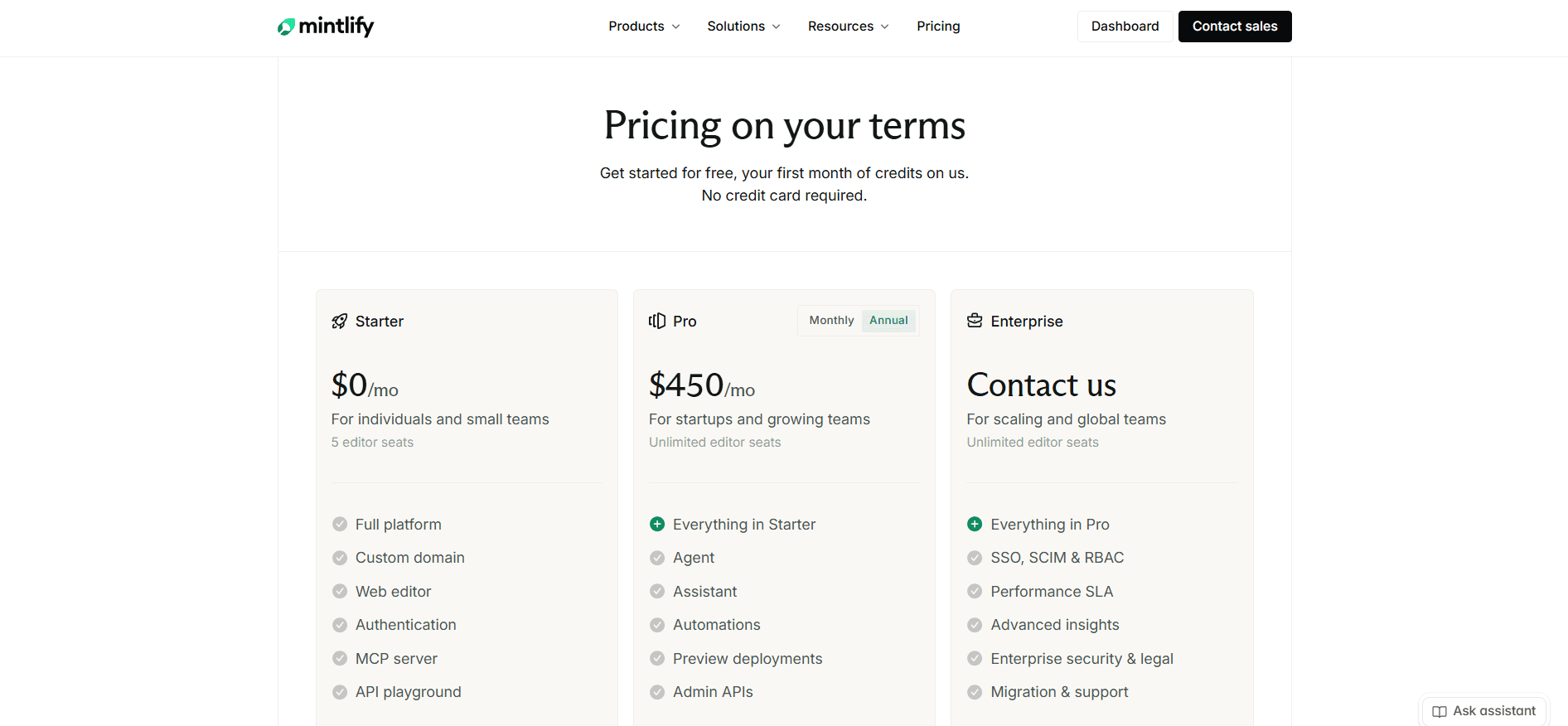
Starter is free and includes five editor seats, the full platform, a custom domain, the web editor, an MCP server, and an API playground. Authentication is listed too, but it is worth reading closely: on Starter it gates your docs to members of your own Mintlify organization, while password protection needs Pro and OAuth or JWT login needs Enterprise. What Starter leaves out is everything intelligent. The Agent, the Assistant, automations, preview deployments, admin APIs, and analytics all sit behind the paywall, so a team evaluating Mintlify as an AI documentation platform cannot evaluate its AI without buying it first.
Pro is $450 per month with unlimited editor seats and 10,000 AI credits per month, adding the Agent, the Assistant, automations, preview deployments, and admin APIs. Since 8 September 2026 only two things spend those credits: each assistant answer costs a fixed 25, and each automation run that updates your docs costs 250. The Agent, in the editor and in Slack, draws none. Overage runs at one cent per credit, and prepaid packages work out cheaper at 15,000 extra credits for $145, 40,000 for $370, and 90,000 for $800.
Above that you are into an Enterprise contract, which is custom and requires a sales conversation, and which carries SSO, SCIM and RBAC, a performance SLA, advanced insights, enterprise security and legal terms, and migration support. There is nothing between the two paid tiers, so the upgrade path runs straight from a free plan with no AI to $450 per month.
Documentation.AI
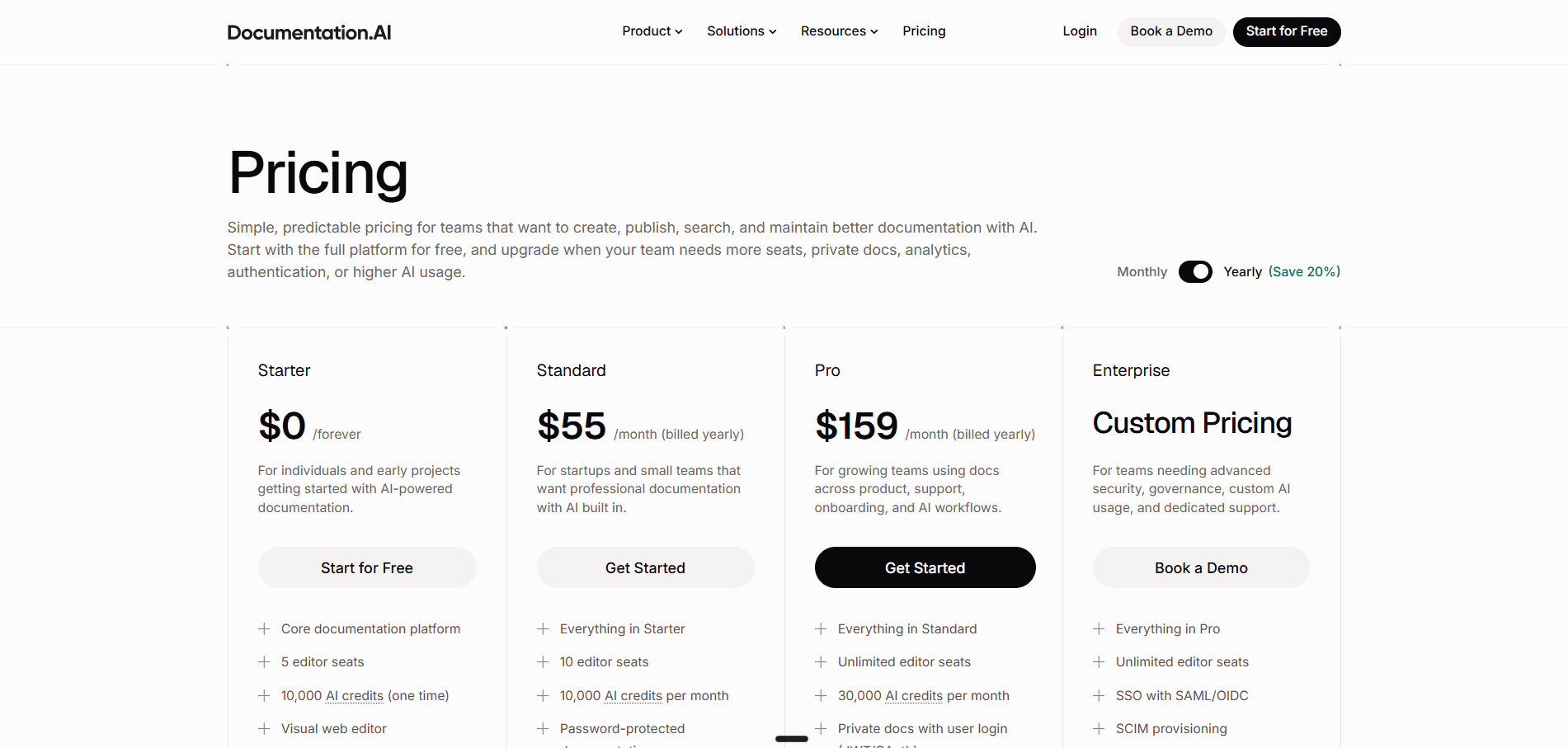
The free Starter plan does more than most in this category, which is why the comparison starts differently. It carries five editor seats, one documentation project, the visual web editor, an API playground, a custom domain, standard analytics, and 10,000 one-time AI credits. The credits matter most here: both the AI Assistant and the documentation agent are fully usable before any card is entered, so the AI can be judged on your own docs rather than on a demo.
Standard at $55 per month is where a small team lands. It doubles the seats to 10, allows a second documentation project, and replaces the one-time credit grant with 10,000 credits every month. It also adds password-protected documentation and external sources for the AI Assistant so it can answer from material beyond your docs.
Pro at $159 per month is the tier that competes directly with Mintlify's $450. Editor seats become unlimited, projects rise to four, and the monthly allowance triples to 30,000 credits. It adds private docs with user login through JWT or OAuth, role-based permissions, advanced analytics, PDF export, and priority support with migration services. Enterprise is custom on top of that, bringing SSO with SAML or OIDC, SCIM provisioning, dedicated support, and white-glove implementation.
Pricing verdict: The allowances look similar until you price an action. A reader question costs 10 credits here and 25 on Mintlify, so the same 10,000 credits answer 1,000 questions rather than 400. That turns a traffic spike into a capacity question rather than a billing surprise, and it decides whether you are paying for documentation or paying to be read. Our Mintlify pricing guide covers their credit system, overages, and rollover in full.
Is Mintlify Worth It? Pros and Cons
Mintlify is worth it when your documentation is engineering-owned, your reader is a developer, and the cost is a line item you can clear without argument. Outside those conditions the value case gets harder, and the reasons are consistent across published reviews and across the wider field of AI documentation tools. Our full Mintlify review scores it on eight criteria.
Pros
- Publishing is fast, smooth, and reliable, with genuinely polished output
- Design quality is a real differentiator and needs almost no configuration
- The API playground generates directly from an OpenAPI spec, which is excellent for API-first products
- The editor has closed most of the accessibility gap: visual mode, real-time collaboration, comments, suggestions, and drag-and-drop navigation
- The local toolchain is excellent, with a CLI, local previews, formatting, and link validation
- A strong docs-as-code workflow for teams that want the Git model
Cons
- Pricing is steep, and the jump from free to the paid tier has no middle step
- None of the AI ships on the free plan, so the capability the platform is sold on cannot be tested until you have already bought it
- Credits were the most common complaint, and the 8 September repricing fixed the price of each action rather than the volume, so public traffic you cannot forecast still decides the bill
- Analytics are limited compared to what documentation teams increasingly want
- The editor has improved a great deal, but the product underneath it is still shaped for developer documentation, so writers who avoid Git meet friction and support knowledge bases are not what it is built for
Feature-by-Feature Breakdown: Mintlify vs Documentation.AI
| Category | Mintlify | Documentation.AI |
|---|---|---|
| Best for | Engineering-owned developer docs | Docs owned across product, support, and engineering |
| Paid entry | $450/mo | $55/mo |
| Free tier AI | None | 10,000 one-time credits, agent and assistant both usable |
| Ask AI on published docs | Pro and above | Every plan, including free |
| Cost per reader question | 25 credits | 10 credits |
| Visual editor | Visual and MDX source modes | Visual and Markdown modes |
| Local CLI and preview | mint CLI, local dev server, formatting, link validation | No CLI, previews build per branch in the cloud |
| Git providers | GitHub, or GitLab via an access token and a manually created webhook | GitHub or GitLab |
| Navigation editing | Drag and drop | Drag and drop, plus a dimensions and views model |
| Structural reorganization | Editor agent reorganizes navigation and docs.json on request | Agent-assisted, with documented safe-restructure rules |
| AI context sources | Repos, pull requests, Slack, plus Jira, Confluence, Linear, and more on Enterprise | Repos, plus Jira and Confluence |
| Answer confidence scoring | Not available | Yes, with a low-confidence gap report |
| Agent analytics | Agent vs human | People, AI Agents, Bots and Crawlers |
| Analytics REST API | Admin APIs on Pro | Read-only analytics endpoints |
| Advanced analytics | Enterprise, custom | Pro, $159/mo |
| Preview deployments | Pro, $450/mo | Standard, $55/mo |
| Password protection | Pro, $450/mo | Standard, $55/mo |
| User login (JWT/OAuth) | Enterprise, custom | Pro, $159/mo |
| Role-based permissions | Enterprise, custom | Pro, $159/mo |
| Access control granularity | Page level, set in page frontmatter | Any navigation node, with role inheritance |
| API playground | From the free plan, generated from OpenAPI | From the free plan |
| MCP server | Auto-hosted, zero configuration | Included, and coding agents can edit docs through it |
Related Mintlify Comparisons
Weighing Mintlify against more than one tool? These cover the rest of the field:
- GitBook vs Mintlify, collaborative visual editing against Git-first docs-as-code
- Mintlify vs ReadMe, developer docs sites against API-first developer portals
- Document360 vs Mintlify, a knowledge base platform against a docs-as-code one
- Archbee vs Mintlify, AI sold as add-ons against AI bundled into one paid plan
- Mintlify vs Fern, a thin free plan with a published step against a generous one with only a quote above it
- Mintlify vs Redocly, one plan per site against seats multiplied by modules
- Mintlify vs GitBook vs ReadMe, three billing shapes priced on the same documentation
- Mintlify pricing guide, a full breakdown of credits, overages, and rollover
Comparing Documentation.AI against something other than Mintlify? We have run the same tests against GitBook, ReadMe, Document360, Theneo, Archbee, Redocly, and Fern.
The Verdict
Mintlify remains a capable platform and still suits teams whose documentation is API reference written and read by engineers who live in GitHub. For everyone else, Documentation.AI is the stronger buy.
It costs a fraction of what Mintlify charges, and the features a growing team actually reaches for arrive far earlier. Advanced analytics, password protection, user login, and role-based permissions all sit one or two tiers down, most of them without a sales call. The free plan ships working AI rather than a preview of it, so the product can be judged on your own documentation before anything is spent.
What separates it is how much the AI is trusted to do. The agent pulls context from Jira and Confluence, so pages are written from where the product work actually happened. It restructures rather than only drafting, moving pages and reorganizing navigation while respecting the rules that keep your URLs intact. Reader questions cost a single credit, so a busy documentation site is not rationing answers by the end of the month. And the assistant scores its own confidence, which means the questions it could not answer come back as a list of the pages you are missing.
That last part is the argument in miniature. Documentation.AI does not just help you write documentation faster. It tells you what your documentation is failing to say, and then helps you fix it.
Switching is less painful than it sounds, and it is worth knowing before price enters the conversation. Both platforms store pages as MDX in a Git repository, so the writing itself moves across intact. The real work is navigation and URLs: rebuilding the site structure in documentation.json rather than docs.json, and keeping your existing paths alive so inbound links and search rankings survive. Documentation.AI includes migration services from the Pro plan, while Mintlify's migration support is an Enterprise line item, so the help you get with the move tracks the same pattern as everything else here.
Both platforms offer a free tier, though only one of them lets you test the AI before you decide.
Need help migrating from Mintlify or another documentation platform?
If your setup involves large MDX repositories, custom navigation, or mixed Git and editor workflows, you can connect directly with our team and talk through it on Slack.
Documentation.AI Slack channel: Join here
FAQs
1. Should You Evaluate Other Platforms Before Choosing Between These Two?
Worth it if neither profile above fits yours. Both platforms keep MDX in Git with a visual editor over the top, so a team that needs a support knowledge base with approval workflows, or an API portal that reports usage per key, is weighing the wrong pair. Our Mintlify alternatives guide ranks the wider field, and our Mintlify pricing guide covers what each Mintlify plan costs.
2. Is Documentation.AI Cheaper Than Mintlify?
Yes, substantially. Documentation.AI Standard is $55 per month and Pro is $159 per month on annual billing, against $450 for Mintlify Pro. Documentation.AI Pro also includes 30,000 AI credits per month against Mintlify Pro's 10,000.
3. Why Does the Cost per Ask AI Question Matter?
Because public documentation traffic is unpredictable. On Mintlify each reader question draws 25 credits, so 10,000 credits cover 400 answers per month. On Documentation.AI each question costs exactly 10 credits, so the same allowance covers 1,000 questions and a traffic spike does not become a billing problem.
4. Which Platform Works Better for Non-Developers?
Documentation.AI, though the gap is narrower than it was. Mintlify's editor has a visual mode, real-time collaboration, comments, suggestions, and drag-and-drop navigation, so a product manager can publish without opening a terminal. What sits underneath is still shaped around docs-as-code and an engineering reader, where Documentation.AI treats the visual editor and the MDX repository as two equal ways into the same source.
5. How Does Documentation.AI Make Documentation Maintenance Easier Than Mintlify?
Its AI agent generates and updates documentation from connected sources, including code repositories, Jira, and Confluence, and it can reorganize structure rather than only editing single pages. Mintlify has an agent as well, which since 8 September draws no credits on Pro, but it needs the Pro plan and its Jira and Confluence connections need an Enterprise contract.
6. How Hard Is It to Migrate From Mintlify to Documentation.AI?
Less work than most teams expect, because both platforms keep pages as MDX in a Git repository, so the content itself transfers without rewriting. The effort sits in rebuilding navigation, since Mintlify configures it in docs.json and Documentation.AI in documentation.json, and in preserving your existing URLs so inbound links and rankings are not lost. Documentation.AI includes migration services from the Pro plan, and its team will work through larger setups with you directly.
7. Can You Try Both Platforms for Free?
Both offer a free tier, but they differ in an important way. Mintlify's Starter plan includes no AI features at all, so the assistant and agent cannot be evaluated without upgrading. Documentation.AI's Starter plan includes 10,000 one-time AI credits, so the AI can be tested before paying.
Sources
Every figure and capability in this comparison was checked against the vendors' own current documentation in September 2026.
Mintlify
- Pricing
- Mintlify Docs
- Simpler, outcome-based AI pricing, 8 September 2026
Documentation.AI
Docs missing something?
Let readers show you the gaps
Ask AI scores its own answers, so the questions it could not answer become your list of missing pages.
No credit card required