Comparisons · · 22 min read
Mintlify vs. Fern: Detailed Comparison (2026)
Both platforms keep your docs in a Git repository, ship a reader assistant, and target the same engineering-owned API team. They diverge on what the free plan does, what the second plan costs, and whether you need generated SDKs at all.

Monika B.
GTM Engineer, Documentation.AI
On this page
- Quick Decision Guide
- How These Platforms Were Compared
- Onboarding: Why Both Mintlify and Fern Need GitHub, But Differently
- Writing and Maintaining Docs: Mintlify's MDX vs Fern's PR-Backed Visual Editor
- AI Capabilities in Real Usage: Ask AI, Agents, and MCP Servers on Both
- Pricing: What Mintlify and Fern Actually Cost
- Public Documentation Experience
- Pros and Cons
- Head to Head Comparison: Mintlify vs Fern
- Final Take
- FAQs: Mintlify vs Fern
- Sources
Most comparisons in this category pit a visual editor against docs-as-code. That framing is useless here, because Mintlify and Fern sit on the same side of it. Both store pages as Markdown in a repository, both publish through a pull request, and both hand writers a block editor that commits on their behalf.
The real decisions are narrower and more expensive to get wrong. Fern gives away a reader-facing assistant and charges Enterprise rates to style your own site. Mintlify reverses that exactly, putting custom CSS on the free plan and the assistant behind its Pro plan. Fern publishes no second price at all, where Mintlify publishes one. And only Fern generates the client libraries your customers install, which settles the choice outright for some teams.
Every price and limit below comes from each vendor's current pricing page and product documentation. Where we describe how something behaved, that is our own build on both platforms, and we say so. For each platform assessed on its own, see our Mintlify review and Fern review.
Quick Decision Guide
The answer turns on one number: how many questions your readers ask in a month. Fern answers 125 of them for nothing and publishes no way to buy the 126th, where Mintlify's cheapest assistant sits on Pro and scales past it. [1] [3] The rest of this page matters most to teams sitting near that line.
Mintlify is the better fit when:
- Your reader traffic is real. Pro answers 400 questions a month at a published rate, and you can buy more without a sales call [3] [5]
- The published site has to match a design system, because custom CSS and JavaScript are on every plan including the free one [3]
- Your editing team is large or growing, since Pro seats are unlimited and Fern quotes you for an eleventh [1] [3]
- You want documentation updated by merged code rather than by a person remembering, which automations do on four triggers [4]
- You work on Windows, where Fern's local preview needs long-path support or WSL, or you want a local preview loop that is documented and maintained [2] [4]
Fern is the better fit when:
- Your customers install a package rather than copy a snippet, because Fern generates SDKs in nine languages and publishes them to the registries [2]
- Your API is not plain REST. gRPC, GraphQL, AsyncAPI, OpenRPC, Protobuf, and server-sent events are all read on the free plan [1] [2]
- Your reader volume is genuinely small, because that is the one case where Fern gives away what Mintlify charges Pro rates for [1] [3]
- You need password-protected docs, versions, product switching, and PDF export without paying, all of which Fern includes free and Mintlify gates [1] [3]
- Ten people need logins and a paid plan is not in the budget this quarter [1]
Bottom line: Fern's free plan is the most capable in this category and has nothing above it short of Enterprise. Mintlify's is thinner but has a real, published second rung. You are choosing between a generous floor with no ceiling you can price, and a thin floor with a published step you can. If neither fits, Mintlify vs Documentation.AI and Fern vs Documentation.AI run each against an AI-native option.
Budget reader AI as a line of its own, separate from the plan.
Both models cap the assistant, and only Mintlify publishes a way to raise the cap. Documentation.AI includes the assistant on its free plan at 10 credits a question, with no overage billing on any tier. Start free.
How These Platforms Were Compared
We built the same documentation set on each platform, using the same OpenAPI specification and the same page tree, and compared the same six things:
- Signup, and the route from a new account to a published page
- Connecting a repository, and what the editor needs before it opens
- Editing a page, then restructuring the site around it
- The AI in real use, on both the authoring and the reader side, and how each meters it
- The published reading experience, including the API reference
- Total cost at the tier a growing team would actually buy
No winner is declared per category. Each section reports what Mintlify did, then what Fern did, then what the difference costs you in practice. Every price is the vendor's own published figure rather than an estimate, and where something below is documented rather than something we saw ourselves, the article says which.
Onboarding: Why Both Mintlify and Fern Need GitHub, But Differently
Neither platform makes you sign up with a Git provider, and both will hand you a live site from a starter template. The requirement arrives later, and it arrives at a different moment on each, which is what decides whether a non-developer on your team can maintain docs unsupervised.
Mintlify
Signup takes Google or email, then asks one question: connect a GitHub repository, or start from a template. We connected an existing repository, and what came back held together: the navigation bar was configured and the page tree survived intact, so there was no cleanup phase before the site was worth showing anyone.
What you cannot do is escape the repository afterwards. Pages are MDX files, docs.json describes the site, creating a branch opens a draft pull request, and publishing writes a commit. A writer can compose a page without knowing any of that, but the mechanism underneath is a Git workflow and it surfaces the moment something goes wrong [4].
GitLab is supported with a setup tax worth knowing about before you schedule it. There is no app to install. You issue a project access token and create the webhook by hand [4].
Fern
Signup offers Google, GitHub, or Postman, which has owned Fern since January 2026 [2]. Onboarding then asks a longer and more useful set of questions: site name, branding, colors, components, and whether you want docs, SDKs, or both.
Nothing else in this category does what the panel on the right does. As you answer, Fern renders a live preview of the site you are describing, so the theme and the components land in front of you before you commit to anything. It turns onboarding from a form into a configuration session.
Fern's Git requirement is the harder of the two in one specific way. Fern Editor will not open at all until a Git provider is connected, so the visual editor that non-technical contributors are meant to use is gated behind a repository, the Fern GitHub app, and somebody who merges [2]. Individual contributors do not need their own GitHub accounts, which softens it, but the organization does.
Verdict: Fern's onboarding is better designed and its live preview is the nicest thing either product does in the first ten minutes. Mintlify gets to a decision faster and puts less between a new account and a published page. If your contributors already merge pull requests daily, neither requirement costs you anything and this section is a tie. If they do not, note that Fern's editor stays shut until the repository exists, while Mintlify's opens on a template site you can hand over the same afternoon.
Writing and Maintaining Docs: Mintlify's MDX vs Fern's PR-Backed Visual Editor
Editing one page looks close to identical here. Both give you a visual surface, a source view beside it, and a commit at the end. The two products diverge on either side of that page: Mintlify spends its effort on catching problems before a change ships, and Fern spends its on the review step after.
Mintlify
The browser editor runs a visual mode and a source mode over the same MDX, with live cursors for several people at once, comments, suggestions, and a visual diff. Navigation is drag and drop, so reordering the site no longer means hand-editing configuration [4].
On local tooling Mintlify pulls ahead of most of this category, Fern included. The mint CLI runs a preview server, scaffolds projects, formats MDX across the tree, surfaces build errors before they ship, detects broken links, and warns when your local copy has drifted from what is deployed. Editor extensions cover VS Code, Cursor, and JetBrains [4].
Because pages are ordinary MDX in an ordinary repository, everything you already do to code works on your docs: project-wide find and replace, scripted bulk edits, linting, and CI. That is also the exit. Leaving Mintlify means moving files rather than extracting them.
It gives up ground on governance. Role-based access control and audit logs are Enterprise, so on Pro every editor who can open the repository can publish to your live site [4].
Fern
Fern Editor is a good block editor with a Notion-like feel and a dev mode panel beside it, so a writer works in components while an engineer edits Markdown in the same tab. The component set covers callouts, cards, accordions, code blocks, tabs, steps, tables, parameter fields, tooltips, embeds, and endpoint request and response snippets. Some are still marked coming soon, including asides, frames, icons, and sticky tables, so a page using those gets finished in source [2].
Every save opens a pull request. That is real editorial control and a real tax at the same time: a typo fix carries the same ceremony as a rewrite, and nothing reaches readers until someone merges.
Two limits are worth knowing before you plan around the editor. Fern Editor is Chromium desktop only, with other browsers and mobile listed as coming [2]. And Fern Agent, the piece meant to carry structural work, edits documentation in GitHub repositories only, so a GitLab team reorganizes by hand [2]. The agent was also the weakest part of our build. Given one clearly scoped instruction it returned a tidy pull request. Asked to chain a structural change together with another AI feature, it stalled and came back having skipped part of the request.
The useful extras are free. The dashboard keeps an edit history of everything published, and the broken link checker found what it should when we pointed it at a site with dead paths.
Verdict: Fern has the more pleasant editing surface and gives you an edit log and a link checker at zero. Mintlify has the better loop around the editor, and that matters more as the site grows: link validation and build errors before a merge, and a preview server a writer can open without installing anything. Pick Fern's editor if writers are the constraint, and Mintlify's toolchain if breakage is. If the constraint is that some contributors will never touch a repository at all, neither model bends: Documentation.AI publishes without one and syncs two ways with GitHub or GitLab for the people who want it, on a free plan that carries five seats and a custom domain.
AI Capabilities in Real Usage: Ask AI, Agents, and MCP Servers on Both
Yes to both, on both. Ticking features off a list will not separate these platforms: each ships an authoring agent, a reader-facing assistant, an MCP server, and machine-readable output. The separation is in what the AI is allowed to see, what triggers it, and how much of it your plan actually buys.
Mintlify
The assistant reads your OpenAPI specs directly, so it returns method, parameter, and schema detail with cited links rather than paraphrasing prose. Two caveats before you demo it: draft branches and preview deployments are not indexed, and hidden pages stay out unless you set seo.indexing: "all" in docs.json [4].
The authoring agent never writes to the live site. It drafts, checks its own output through the CLI, and leaves a pull request for a person to merge, taking work from a prompt, a pull request, a Slack thread, or an attached file [4]. Automations then run that agent on four triggers, covering content updates, code changes, a schedule, and integration events, the last held for Enterprise [4]. A merge can update the documentation it just invalidated, which is the capability Fern only partly matches.
The credit model was repriced recently, and many comparisons still quote the old numbers. Only two actions spend credits now: an assistant answer costs a fixed 25, and an automation run that actually changes your docs costs 250. Questions the assistant cannot answer are free, automations that find nothing are free, and the editor and Slack agents draw no credits at all on Pro [5].
Fern
Ask Fern is on every plan, free included, and it shows more careful design than either vendor's other AI features. It answers only from pages the reader's role is allowed to see, masks emails, phone numbers, and card numbers in the browser before anything leaves it, and supports guidance rules that override its answers on billing or legal questions. You can extend it past your docs by pointing it at public URLs to crawl or pushing private content in through an API [2].
Its reporting is honest in a way vendors rarely allow. Every conversation is scored Resolved, Unresolved, or Pending, you get a resolution rate across a week, month, or year, and you can filter to the failures and export them [2]. Fern Agent then acts on that: automations run daily or on a chosen weekday, and one of Fern's own example prompts is to read reader feedback and open a pull request fixing the pages people complained about.
Settle the allowance question before you rely on it. The rates are cheap per action, at two credits an Ask Fern message and 50 for a Slack docs-update session, but the pool is small and shared: 250 credits a month is 125 reader answers, and nothing published says what happens when it empties or whether credits roll over [1] [2].
What Each Plan Actually Buys
| AI capability | Mintlify | Fern |
|---|---|---|
| Reader assistant | Pro only | Every plan, free included |
| Authoring agent | Pro, and it costs no credits | Every plan, GitHub repositories only |
| Reader answers included | 400/mo on Pro, at 25 credits each | 125/mo on free, at two credits each |
| Buying more | Three published packs, or overage at $0.01 per credit | Not published |
| At zero balance | Assistant stops unless overage is enabled | Not documented |
| Rollover | 50% of unused credits, capped at 1.5x the allowance | Not documented |
| Update triggers | Content changes, code changes, schedule, integrations on Enterprise | Daily or a chosen weekday |
| Answer analytics | Conversations grouped by topic and rating, on Pro | Resolved, Unresolved, Pending, with resolution rate and export, free |
| External knowledge | 21 integrations including Jira, Confluence, Linear, and Zendesk, on Enterprise | Crawled public URLs or private content pushed in by API |
| Free-plan AI | None, beyond a 14-day trial with 5,000 credits | The assistant and the agent, on 250 credits |
| Machine-readable output | llms.txt, llms-full.txt, skill.md, MCP server, all plans | llms.txt and MCP server, all plans |
Verdict: Fern is the only one of the two that will put a reader assistant on your documentation for nothing, and its answer reporting is better than Mintlify's out of the box. Mintlify is the only one of the two whose assistant survives contact with real traffic, because Fern's monthly allowance is roughly a week of a modestly trafficked docs site and the next one is not for sale. Read it as a demo budget rather than an operating one. Between an allowance that empties in a week and one that lives behind a 14-day trial clock, neither platform lets you judge reader AI on your own content for as long as a real evaluation takes. Documentation.AI runs both the assistant and the authoring agent on its free plan at 10 credits a question, with credits that pause instead of billing, so you can import your docs and ask it your users' ten hardest questions this afternoon and see what comes back.
Still deciding between the two?
Send us your OpenAPI spec and the pages you care about, and we will show you what the same docs look like with the assistant already answering. Book a demo or start free, no credit card required.
Pricing: What Mintlify and Fern Actually Cost
The two pricing pages are not shaped alike, so comparing headline numbers produces a wrong answer. Mintlify has one flat paid tier per documentation site with seats included. Fern has a free plan and a quote. The cheaper platform therefore flips on volume and headcount rather than on features, and it flips earlier than most teams expect.
Mintlify
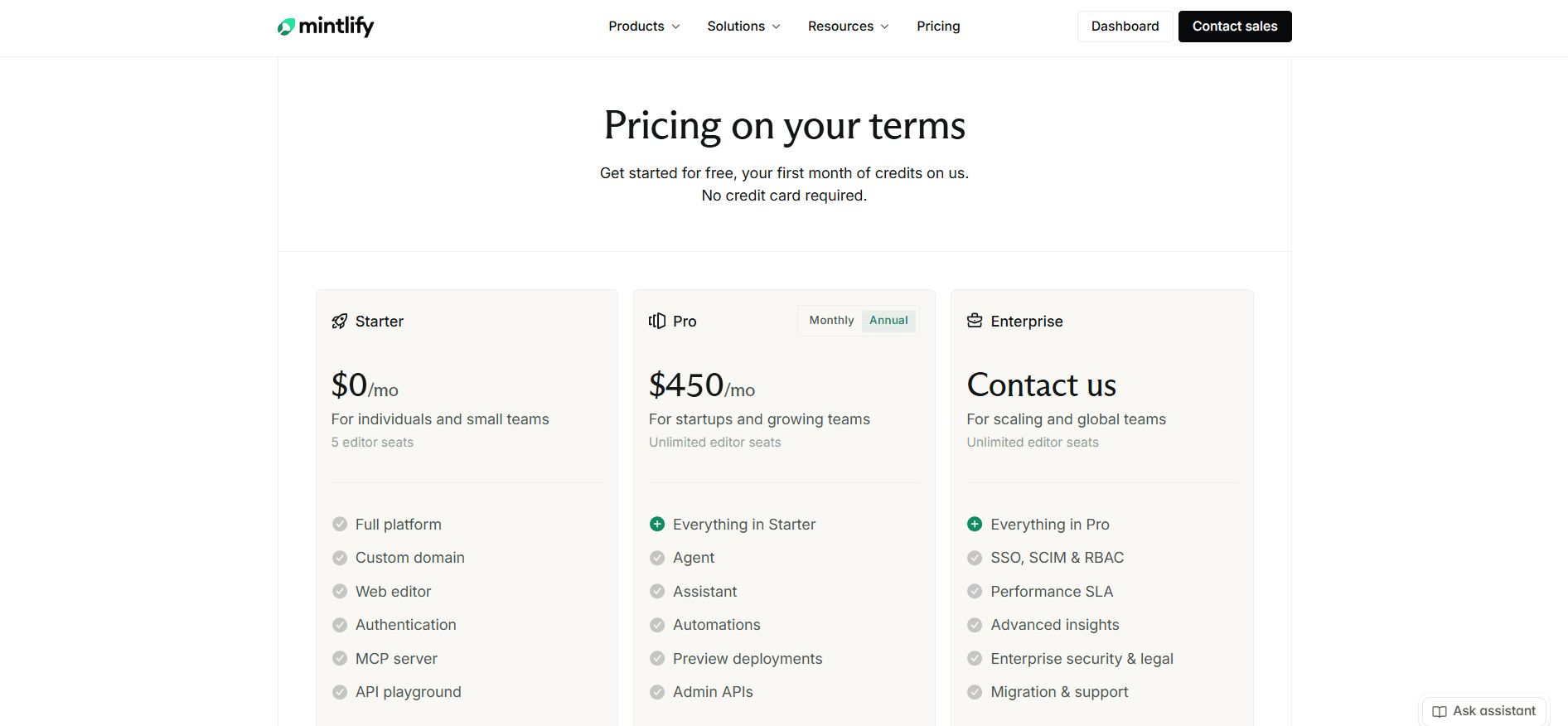
Starter is free: five editor seats, a custom domain, the web editor, the API playground, an MCP server, and the full machine-readable layer. There is no AI on it at all, beyond a 14-day trial carrying 5,000 credits [3].
Pro is $450 per site per month on the annual rate, with unlimited editor seats and 10,000 credits pooled across your organization. That is the plan the product is really sold on, since it is where the assistant, the agent, automations, analytics, password-protected docs, and preview deployments live [3].
Enterprise is custom, and it holds more than most: SSO, SCIM, RBAC, audit logs, PDF export, personalization, white labeling, self-hosting, EU hosting, the integration trigger for automations, and migration services [3] [4]. Without RBAC, remember, every editor on Pro can publish to production. Our Mintlify pricing guide covers credits, packs, and rollover in full.
Credits top up at $145 for 15,000, $370 for 40,000, or $800 for 90,000, and overage runs at $0.01 per credit but is off by default, with a spending cap and alerts when you switch it on. Half of what you do not spend rolls over, capped at 1.5 times your allowance [3] [5]. Worth holding that against a plan priced the other way round: Documentation.AI's Standard plan covers 1,000 reader questions at 10 credits each, two and a half times Mintlify Pro's answer allowance, for roughly an eighth of the price.
Fern
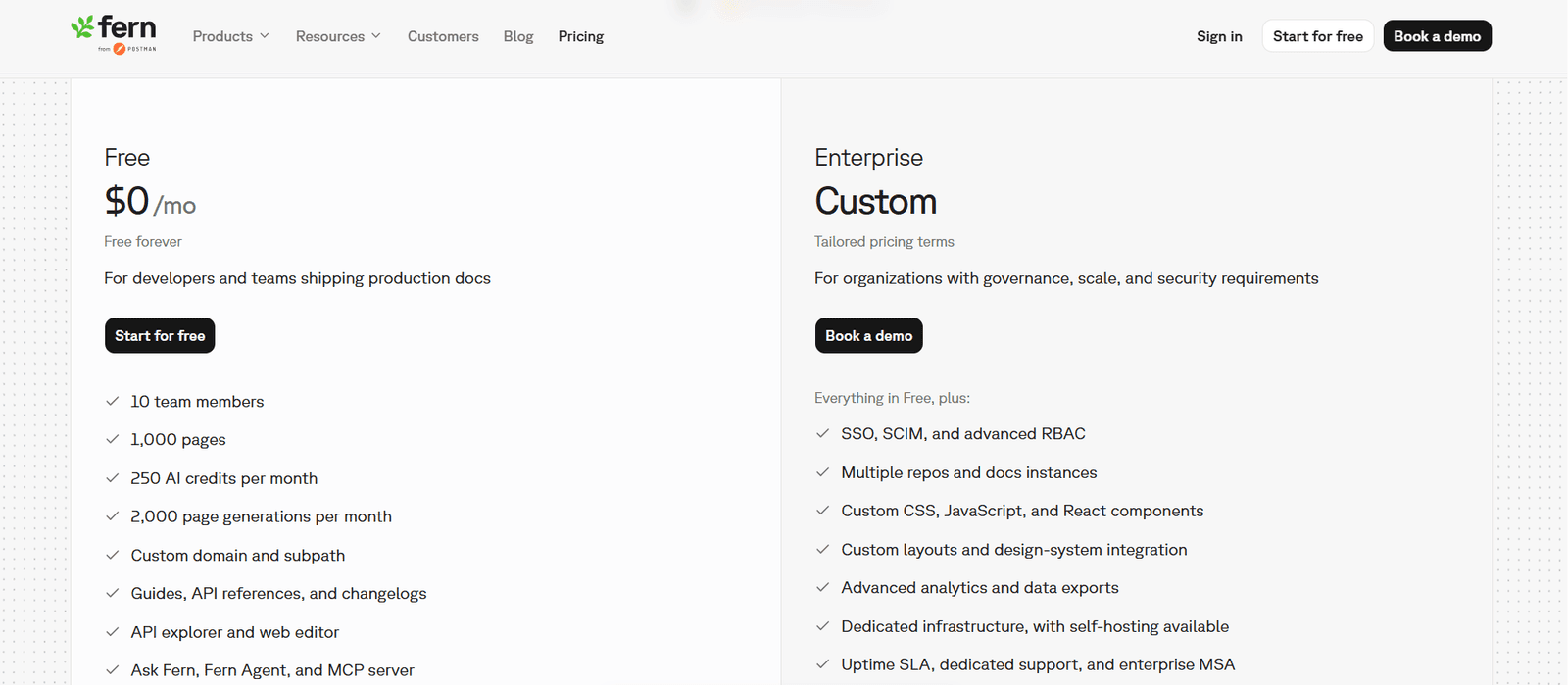
Free, forever is the entire self-serve ladder, and it does more than several paid plans in this category: 10 team members, one site, 1,000 pages, 2,000 page generations a month, 250 AI credits a month, a custom domain and subpath, password-protected docs, the API explorer, the web editor, Ask Fern, Fern Agent, an MCP server, llms.txt, AI translations, PDF export, preview links, version and product switching, and an analytics dashboard [1]. Editor and Viewer roles are Enterprise, so every free-plan member is an Admin [2]. Signing in through Postman raises the credit grant to 500 and the member cap to 25.
Enterprise is custom and holds everything else: SSO, SCIM, RBAC, JWT visitor authentication, multiple repository sources, multiple docs instances, custom CSS, JavaScript and React, custom layouts, design-system integration, localization, self-hosting, removal of Fern branding, advanced analytics, data exports, Slack and Teams support, and an uptime SLA [1].
There is nothing between the two. SDK generation is not on the documentation pricing page at any figure, so if that is what you are buying, budget for the docs plan plus a sales conversation and ask for the SDK rate rather than assuming it is included [1]. Our Fern pricing guide walks through the free plan and the Enterprise gate in full.
What the Same Requirements Cost
Comparing $0 against $450 settles nothing. Pricing a set of requirements does.
| What you need | Mintlify | Fern |
|---|---|---|
| One docs site, custom domain, five editors, no AI | Free | Free |
| Ten editors on that site | $450/mo on Pro | Free |
| A reader assistant answering 125 questions a month | $450/mo on Pro | Free |
| A reader assistant answering 1,000 questions a month | $595/mo, Pro plus a credit pack | Not published, Enterprise conversation |
| An eleventh editor | Included on Pro | Enterprise, quoted |
| A second documentation site | A second Pro subscription, $900/mo total | Enterprise, quoted |
| Docs styled to your design system | Custom CSS and JavaScript on every plan | Enterprise, quoted |
| Generated SDKs in nine languages | Not available | No published price |
If your requirements sit in the rows ending in a quote, price a third option before you open that conversation. Every one of them is published on Documentation.AI's pricing page: four documentation projects and unlimited editor seats on its Pro plan, reader login and role-based permissions included rather than quoted, custom CSS on every plan, and no overage billing on any tier. Migration services come with Pro, so bringing an existing Mintlify or Fern repository across is a supported move rather than a weekend.
Public Documentation Experience
Both platforms publish fast, responsive, accessible sites with light and dark modes, working search, and a reader assistant on the page. The split is in direction. Mintlify spends its effort on how the site looks and how quickly you can see a change. Fern spends its on the API reference itself, and specifically on making the code on the page the same code your customers install.
Mintlify
Nothing about Mintlify impresses faster than the design it ships with no configuration. A default site arrives with clean typography, working dark mode, sensible syntax highlighting, and components for tabs, callouts, cards, steps, and code groups that you never have to build.
The playground is generated from OpenAPI 3.0 or 3.1, or AsyncAPI 3.0 for WebSocket channels, and regenerates when your spec changes. Authentication fields come from securitySchemes, an x-default extension can prefill test credentials so a reader's first request succeeds, and code samples generate in 18 languages [4].
Customization is unusually open for a hosted platform: custom CSS and JavaScript on every plan including the free one, with only white labeling reserved for Enterprise [3] [4]. Access control works at page level only, so a restricted block inside an otherwise public page is not possible [4].
Fern
Fern's reference is ahead of Mintlify's, and the reason is structural rather than cosmetic. The samples on the page are generated from the same specification as the SDKs Fern publishes to npm, PyPI, Maven Central, NuGet, Packagist, and RubyGems, in TypeScript, Python, Go, Java, .NET, PHP, Ruby, Swift, and Rust, regenerated on every spec change [2]. Snippet and package cannot drift apart. Square and Twilio ship libraries built this way.
Fern also reads more of your API surface than anything else here. WebSockets, server-sent events, gRPC, GraphQL, OpenRPC, Protobuf, webhooks, and Overlays are all on the free plan alongside OpenAPI [1]. If your API is not plain REST, this section alone can decide your purchase.
Two costs sit on the published side. Custom CSS, JavaScript, React, custom layouts, and removing Fern's branding are all Enterprise, so a free-plan site ships someone else's name on a stock theme [1]. And seeing a build before it goes out means the Fern CLI, Node 22, and a global pnpm install, with search, SEO, and authentication switched off while you look [2].
Verdict: if your customers install a package, Fern's reference outweighs everything in Mintlify's column. If they copy a snippet instead, you are buying a single stock-themed site with a vendor footer, and Mintlify's playground covers the same reader need on a design you are allowed to change. Worth knowing that branded output and a preview per branch are not inherently premium features: Documentation.AI takes custom CSS and JavaScript on every plan and builds a preview site for every branch from its entry tier, with nothing to install locally. Publish one section of your docs and you can send a reviewer a link in the time it takes to get Fern's CLI running.
Pros and Cons
Both platforms are competent, so the table stakes every documentation tool now ships are left out in favour of what would stop a purchase.
Mintlify
Pros
- Published output that looks designed with essentially no configuration
- An OpenAPI and AsyncAPI playground with code samples in 18 languages [4]
- Custom CSS and JavaScript on every plan including free, which Fern reserves for Enterprise [1] [3]
- Unlimited editor seats on Pro, so a growing team is not billed for growing [3]
- A maintained local loop: CLI, preview server, build errors, and link checking before merge [4]
- Automations on four triggers, so a merge can update the documentation it invalidated [4]
- Published credit rates, top-up packs, and overage off by default, so the AI bill is forecastable [3] [5]
Cons
- No AI at all on the free plan, so the capability the product is sold on is only visible during the 14-day trial [3]
- Nothing between free and Pro, which is a steep first step for a team of six [3]
- 10,000 credits cover 400 reader answers, so traffic you do not control becomes a monthly capacity question [3] [5]
- Billed per deployment, so four documentation sites means four Pro subscriptions [3]
- RBAC and audit logs are Enterprise, so every Pro editor can publish to your live site [4]
- Page-level access control only, and GitLab setup means building the webhook by hand [4]
Fern
Pros
- SDK generation in nine languages, published to the major registries and regenerated on every spec change [2]
- The widest specification support in the category, covering gRPC, GraphQL, AsyncAPI, OpenRPC, Protobuf, and SSE on the free plan [1]
- A free plan that does real work: 10 seats, custom domain, password protection, versions, PDF export, and reader AI [1]
- A reader assistant scoped to the reader's role, with browser-side PII masking [2]
- Answer reporting that admits failure, with a resolution rate and exportable unresolved conversations [2]
- A block editor with a dev-mode source panel beside it, plus a free edit history and link checker [2]
Cons
- One published plan and then a quote, so an eleventh editor, a second site, reader login, or custom styling are all the same sales call [1]
- The monthly credit grant is shared with every agent run, and there is no published way to buy more [1] [2]
- Nothing documents what happens at zero credits, or whether anything rolls over [1] [2]
- Custom CSS, JavaScript, React, and footer branding removal are Enterprise [1]
- Fern Editor will not open until a Git provider is connected, and every save is a pull request someone merges [2]
- Fern Agent edits GitHub repositories only, so GitLab teams get the reporting and none of the fixing [2]
- No preview inside the dashboard, so seeing a build means a local CLI install [2]
Head to Head Comparison: Mintlify vs Fern
Only the rows that would change a decision.
| Category | Mintlify | Fern |
|---|---|---|
| Best for | Engineering-owned docs with real reader traffic and a brand to match | API products shipping client libraries from the same spec |
| Free plan | Five seats, custom domain, playground, no AI | 10 seats, one site, password protection, versions, reader AI |
| Paid entry | $450 per site per month | Not published |
| Editor seats | Five free, unlimited on Pro | 10 free, then quoted |
| Docs sites | One per subscription, billed per deployment | One on the free plan, more on Enterprise |
| SDK generation | Not offered | Nine languages, published to registries, priced separately |
| Specification support | OpenAPI 3.0 and 3.1, AsyncAPI 3.0 | OpenAPI, AsyncAPI, gRPC, GraphQL, OpenRPC, Protobuf, SSE |
| Reader assistant | Pro only | Every plan |
| Reader answers included | 400 a month on Pro, about $1.13 each | 125 a month on free |
| Buying more AI | Three published packs, plus $0.01 overage | Not published |
| Automated maintenance | Four triggers including merged code | Scheduled daily or weekly, GitHub only |
| Visual editor prerequisites | Opens on a template site, no repo required to start | Requires a connected Git provider |
| Local development | mint CLI, preview server, link validation | CLI with Node 22 and global pnpm, no in-dashboard preview |
| Custom CSS, JavaScript, and React | CSS and JavaScript on every plan, no React | All Enterprise |
| Reader authentication | Password on Pro, OAuth and JWT on Enterprise | Password free, JWT and SSO on Enterprise |
Mintlify takes the rows that describe operating a documentation site at volume. Fern takes the rows that describe publishing an API product, and the free-plan rows outright.
Final Take
Start with one question: do your customers install a package, or copy a snippet?
Pick Fern if they install a package. Nine languages generated from your spec and published to the registries replaces work you are probably doing by hand, and Mintlify does not offer it at any price. Just know that the SDK side carries no published price, so the real number arrives in a conversation, and so does every docs feature past a shared password.
Worth raising in that same conversation: SDK generation is priced separately from the docs plan, so the two are not necessarily one purchase. If the libraries are what you want and the single-site, quote-for-everything docs ladder is what you do not, ask what Fern charges for generation on its own, then host the documentation wherever the pricing suits you. Buying the SDK pipeline does not oblige you to buy the docs site attached to it.
Pick Mintlify if they copy a snippet. The second plan decides it. Mintlify publishes a price for more traffic, more editors, more sites, and a site styled like your product; Fern publishes a price for none of those. The cost is a cliff from free to Pro with no step before it, and a 14-day trial as the only look at the AI before you pay.
If the shortlist is wider, the same test runs through GitBook vs Mintlify, Mintlify vs ReadMe, and Archbee vs Mintlify.
Pick Fern's free plan if your reader volume is small and will stay small. Few free tiers in this category do as much. Price the exit first, because 125 answers a month is a ceiling you can hit by accident.
Both also leave the same job half done. Writing help is solved on each, and maintenance is not. Mintlify runs its agent when code changes, which is the right trigger, and Fern reads its own resolution data to fix the pages that failed, which is the right input. Neither does both, and neither closes the loop for readers who are increasingly AI agents answering on a customer's behalf.
Documentation.AI is the third option worth pricing against both. It publishes a price for the things these two quote for. The reader assistant and the authoring agent are on the free plan rather than the top tier, a reader question costs 10 credits instead of 25, and one plan covers four documentation projects with unlimited editor seats where Mintlify bills per site and Fern quotes you. Reader login, role permissions, and custom CSS are listed rather than negotiated, and no plan bills an overage, so credits run out by pausing while your docs stay published. Import your existing Mintlify or Fern repository free and run the agent over your own pages, or weigh it against the wider field in Mintlify alternatives and Fern alternatives.
Try it on your own repository.
Start free, no credit card required, or book a demo and we will import your Mintlify or Fern docs for you.
FAQs: Mintlify vs Fern
1. Which Is Cheaper, Mintlify or Fern?
Fern, until you outgrow its free plan, and then the question stops having an answer. Fern's documentation product is free for 10 team members and one site with the reader assistant switched on, where the equivalent on Mintlify costs $450 because its free Starter plan carries no AI and caps at five seats. Past that point Mintlify publishes prices for more traffic, more editors, and more sites, and Fern publishes none, so every increase becomes an Enterprise quote [1] [3].
2. Do Mintlify and Fern Both Require GitHub?
Neither requires a GitHub account to sign up, and both keep your documentation in a repository. The difference is when the requirement bites. Mintlify lets you start from a template and connect a repository afterwards, though publishing always writes a commit. Fern Editor, the visual editor non-technical contributors are meant to use, will not open until a Git provider is connected, and Fern Agent can only edit documentation stored in GitHub, so GitLab teams lose automated editing entirely [2] [4].
3. Does Fern Have Better AI Than Mintlify?
They are better at different halves of the problem. Fern's assistant is on every plan including free, scopes answers to the reader's role, masks personal information in the browser, and reports which conversations it failed to resolve. Mintlify's agent is the more autonomous one, opening pull requests and running on merged code rather than only on a schedule, and its allowance is large enough to serve real traffic. Fern gives you better reader AI you can barely afford to run. Mintlify gives you AI you can run, but only on the $450 plan [2] [4].
4. How Many Reader Questions Does Each Plan Include?
Mintlify Pro includes 10,000 credits a month and an assistant answer costs a fixed 25, which is 400 answers, or about $1.13 each. You can add 15,000 credits for $145, 40,000 for $370, or 90,000 for $800, or enable overage at $0.01 per credit. Fern's free plan includes 250 credits a month and an Ask Fern message costs two, which is 125 answers, shared with every agent run, with no published way to buy more and no documentation of what happens when the balance reaches zero [1] [2] [3] [5].
5. Can Mintlify Generate SDKs Like Fern?
No, and nothing separates the two more clearly. Mintlify generates copyable code samples in 18 languages from your OpenAPI specification, which serves a reader who wants working code on the page. Fern generates full client libraries in TypeScript, Python, Go, Java, .NET, PHP, Ruby, Swift, and Rust, publishes them to npm, PyPI, Maven Central, and other registries, and regenerates them when your spec changes. If your customers install a package, that difference is the whole decision [2] [4].
6. Which Platform Lets You Customize the Published Site More?
Mintlify, and comparisons often report this backwards. Mintlify supports custom CSS and JavaScript on every plan including the free one, reserving only white labeling for Enterprise. Fern holds custom CSS, custom JavaScript, custom React components, and custom layouts for Enterprise, so a free-plan Fern site ships on a stock theme with Fern's branding in the footer [1] [3] [4].
7. Which One Handles Non-REST APIs Better?
Fern, on specification coverage alone. It reads OpenAPI, AsyncAPI, gRPC, GraphQL, OpenRPC, Protobuf, server-sent events, webhooks, and Overlays, all on the free plan. Mintlify covers OpenAPI 3.0 and 3.1 plus AsyncAPI 3.0 for WebSocket channels. If your API surface includes gRPC or GraphQL, the shortlist narrows to roughly one option [1] [4].
8. What Happens When You Run Out of AI Credits?
Mintlify documents this and Fern does not, which is the practical difference. On Mintlify the assistant stops until the balance resets, because overage is off by default, and you can turn it on at $0.01 per credit with a spending cap and alerts, while half of anything unused rolls over up to 1.5 times your allowance. Fern publishes its per-action rates but not its behavior at zero, whether credits roll over, or how to buy more, so ask before you depend on it [1] [2] [3] [5].
Sources
Every figure and capability above comes from each vendor's current published pricing and product documentation.
- Fern. "Pricing." Fern. https://buildwithfern.com/pricing
- Fern. "Fern Docs." Fern. https://buildwithfern.com/learn
- Mintlify. "Pricing." Mintlify. https://www.mintlify.com/pricing
- Mintlify. "Mintlify Docs." Mintlify. https://www.mintlify.com/docs
- Mintlify. "Simpler, Outcome-Based AI Pricing." Mintlify Blog. https://www.mintlify.com/blog/outcome-based-ai-pricing
Priced both and stalled?
Reader AI sized for real traffic
Import your MDX, keep the repo, and get the assistant and the agent on the free plan.
Start freeNo credit card required