

AI Assistant
AI Assistant helps users get docs-aware answers with citations, follow-up prompts, customization controls, analytics, and bot protection.
Overview
The AI Assistant helps readers, customers, and internal teams get fast, accurate answers based on your published documentation. When someone clicks Ask AI, the assistant searches your docs and returns grounded answers with citations to the relevant pages and sections.
Unlike a generic chatbot, the assistant is:
- Docs-aware – it relies on your published documentation as its source of truth.
- Cited – it shows where each answer came from in your docs.
- Configurable – you can enable it, control how it appears, and tailor how it responds from a dedicated settings area.
The AI Assistant (Ask AI) is separate from the AI Documentation Agent. The Assistant answers questions for end users and internal teams. The Documentation Agent helps you write and edit content. See AI Documentation Agent for details.
How it works
Users open Ask AI, enter a question in natural language, and get an answer grounded in your documentation. The assistant can also suggest starter questions to help users begin and follow-up questions to help them continue after each answer.
When the assistant cannot confidently answer from your docs, you can route users to another support channel instead of leaving them at a dead end. You can send them to a support email address or a support URL, depending on how you want your fallback experience to work.
Citations: how they work and why they matter
Every answer from the assistant can include citations back to your documentation.
What users see:
- A short answer and explanation in the chat
- One or more citations linked to specific pages or sections
- The ability to click through to read the full context
Why this is important:
- Trust – users can verify information against your canonical docs.
- Reusability – support and account teams can safely reuse answers with links in tickets, chats, or emails.
- Maintainability – updating your docs improves future answers automatically, and you can trace weak answers back to specific content.
If an answer cannot be strongly supported by your docs, the assistant can ask for clarification or fall back to the support path you configured.
Customization
Configure the AI Assistant from its dedicated settings area. You can control whether it appears, how it opens, how it is positioned, and how it guides users through a conversation.
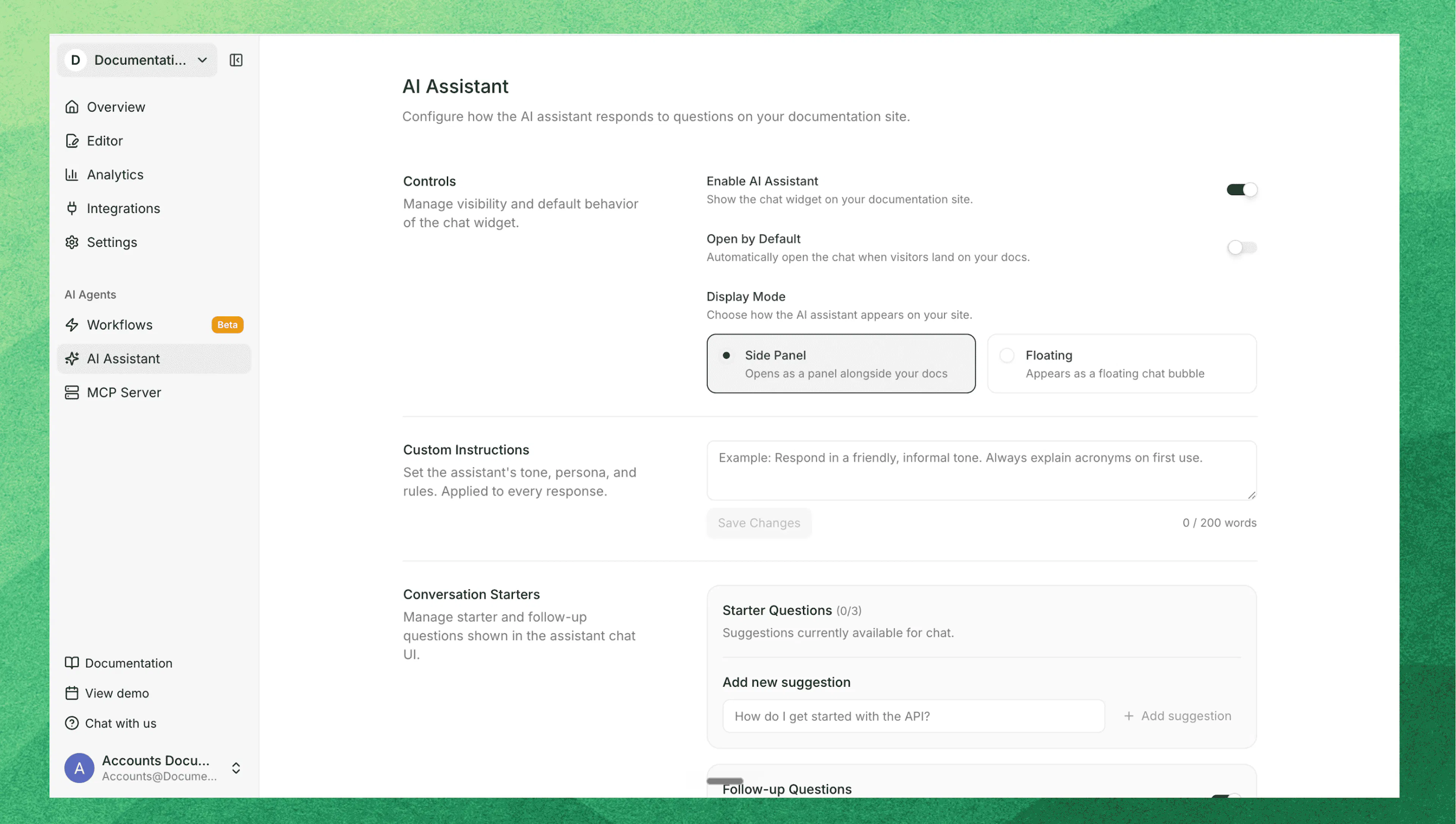
Availability and display
- Enable AI Assistant – turn the assistant on or off for your site.
- Open by Default – choose whether the assistant starts open when a page loads.
- Display Mode – show the assistant as either:
- Side Panel
- Floating
- Floating position – when you use Floating mode, position the assistant at the bottom and add extra bottom spacing when needed.
Conversation behavior
- Custom Instructions – add assistant-specific guidance to shape tone, scope, or response behavior. Custom instructions are limited to 500 words.
- Starter Questions – add up to 3 suggested questions to help users begin. Each starter question can be up to 200 characters.
- Follow-up Questions – show 3 suggested follow-up prompts after each answer to help users continue the conversation.
Fallback and protection
- Fallback to support – route users to support when the assistant cannot answer confidently. You can configure fallback to a support email address or a support URL.
- Invisible CAPTCHA bot protection – protect the assistant from automated abuse without adding a visible challenge for most users.
Strict dimensions
Control whether the AI assistant searches across all dimensions or stays scoped to the reader's current context.
- When enabled – the assistant only answers from the reader's current product, version, and language, preventing cross-dimension answers that could confuse readers.
- When disabled or omitted – the assistant searches across all dimensions and indicates where the answer came from.
- When to use it – enable strict mode when your content varies significantly across dimensions and cross-dimension answers may be misleading or incorrect.
- How to enable:
- Via dashboard – go to Editor → Site Config → Dimensions (Layers icon) → toggle "Strict mode" on.
- Via documentation.json – if you are editing via Code editor, set
search.strict-dimensionstotrueindocumentation.json:{ "search": { "strict-dimensions": true } }
Learn more about how dimensions work in Dimensions.
Where users access the assistant
The assistant appears as an Ask AI entry point in your documentation when enabled.
- Users click Ask AI.
- They type a question in natural language or choose a starter question.
- The assistant responds with:
- A concise answer or explanation
- Citations and links to relevant pages or sections
- Suggested follow-up questions after the answer
How the assistant opens depends on the settings you choose. You can present it as a side panel or as a floating interface, and you can decide whether it opens by default.
Analytics
Admins can review Ask AI Analytics to understand how people use the AI Assistant and where your documentation may need improvement.
Available analytics include:
- Total questions – overall question volume
- Unique sessions – how many distinct assistant sessions users started
- Recent questions – the latest questions asked through the assistant
- Page context – where users were in the docs when they asked
- Export capability – export analytics data for deeper review and reporting
Benefits for admins and doc owners
The AI Assistant helps teams do more than answer one-off questions. It can:
- Help users reach answers faster – readers can ask natural-language questions instead of hunting across multiple pages.
- Improve onboarding and adoption – new users can get quick, cited guidance while learning your product or API.
- Reduce repetitive support volume – common documentation questions can be answered directly inside your docs.
- Support customer-facing teams – support, success, and sales teams can reuse grounded answers with citations during live conversations.
- Highlight content gaps – repeated questions and weak answer coverage show where your docs need clearer explanations or new pages.