ReadMe Review 2026
ReadMe offers an exceptionally strong interactive API reference, surrounded by capabilities reserved for higher tiers. This review assesses the editor, AI tools, seat and role model, and the upgrade to ReadMe Refactored through hands-on use, and explains what teams should expect to pay.

Roop Reddy · Co-Founder, Documentation.AI
Last updated
On this page
ReadMe is free for one person, $250 a month for five, and worth buying if you are documenting a single API for the developers who consume it. Past five people or a second product, the price of that decision moves faster than the requirement does, which is when teams start pricing the ReadMe alternatives against it.
What you are paying for is the interactive API reference and the per-key usage metrics. The content management wrapped around them is ordinary, and it is priced as though it were not.
Know this before you evaluate: ReadMe rebuilt itself in 2025 as ReadMe Refactored, a Git-backed platform with MDX, branching, and an AI suite. New projects start there and get the better product. Existing projects face a one-way upgrade, covered in full further down.
Everything below comes from building on the platform and from ReadMe's own pricing page, product documentation, and upgrade guide, with an access date on every citation.
ReadMe Review: The Verdict
ReadMe earns its price on one job and charges ordinary-platform rates for the rest. A second person on your team, a second product, a read-only reviewer, and most of the AI all sit above the tier where its real strength lives.
Our overall score is 3.6 out of 5, the unweighted average of the eight scores below, rounded to one decimal. Every review in this series is scored on the same eight criteria, so the rows compare directly from one platform to the next.
| What we rated | Score | Why |
|---|---|---|
| Editing and structuring | 4.3 | Visual and MDX modes in one editor, inline agent with a reviewable diff |
| API reference and explorer | 4.8 | Sends real requests with the reader's own key, generates snippets in several languages |
| Published output and design | 3.5 | Clean and fast, custom CSS at Pro, custom JavaScript and logo removal at Enterprise |
| AI authoring and the agent | 3.6 | Linter, Agent, and Docs Audit are all real, and each stops short of where you want it |
| Reader AI and search | 2.8 | Ask AI works, and it is a $150 per month add-on with no published question volume |
| Analytics and reader insight | 4.2 | Per-key endpoint metrics nothing else reports, sold as a $100/month add-on |
| Governance and collaboration | 2.6 | One seat on Starter, five on Pro, and no role below Admin until Enterprise |
| Pricing and value | 2.8 | One free seat, then a $250/month jump and two add-ons to match what rivals include |
Buy ReadMe if your documentation is an API reference, your readers are developers integrating against it, and you want to know which endpoints they call and where they fail.
Look elsewhere if you document more than one product, you need people who can review without changing settings, or your brand team owns the published design.
That second list catches more teams than it looks like it should, because all three are plan boundaries rather than missing features. Documentation.AI puts editor and viewer roles on a $159 per month plan (billed annually) rather than an Enterprise contract, includes four documentation projects instead of one, and starts reader AI on the free tier rather than a $150 per month add-on. That is why it is the platform most teams end up comparing this against, and the full comparison is further down.
If you are already a ReadMe customer on the legacy platform, there is a separate decision waiting for you in Where ReadMe Slows Down. The upgrade to Refactored cannot be undone.
What Is ReadMe Built For?
ReadMe is built for a developer portal rather than a documentation site. The distinction is that a portal knows who is reading it, and ReadMe's product decisions consistently follow from that: personalized API keys in the docs, request history per user, and metrics tied to real traffic.
That shows up most clearly in the Developer Dashboard, which ingests your production API logs and reports which endpoints each key actually calls. Nothing else in this comparison reports that. For a team whose roadmap depends on knowing which parts of the API get adopted and where integrations fail, it is the single best reason to choose ReadMe, and it is the one thing on this list a competitor cannot quickly copy.
The trade is that everything is organized around one API definition. Guides, changelog, recipes, and discussion forums all hang off that spine, and the product gets noticeably less comfortable when you have two products to document.
What ReadMe is not is a general knowledge base. It has no ticketing workflow, no support deflection reporting, and the content model assumes a spec sits underneath. If your documentation is mostly prose about a product that has no API, you are buying the wrong half of the tool. Our Document360 vs ReadMe comparison sets it against a platform built for that job.
ReadMe Features: What Stands Out
Four things carry the product: the interactive API reference, the dual-mode editor, the AI suite, and the published output. This section is about what each one is worth and where each one stops.
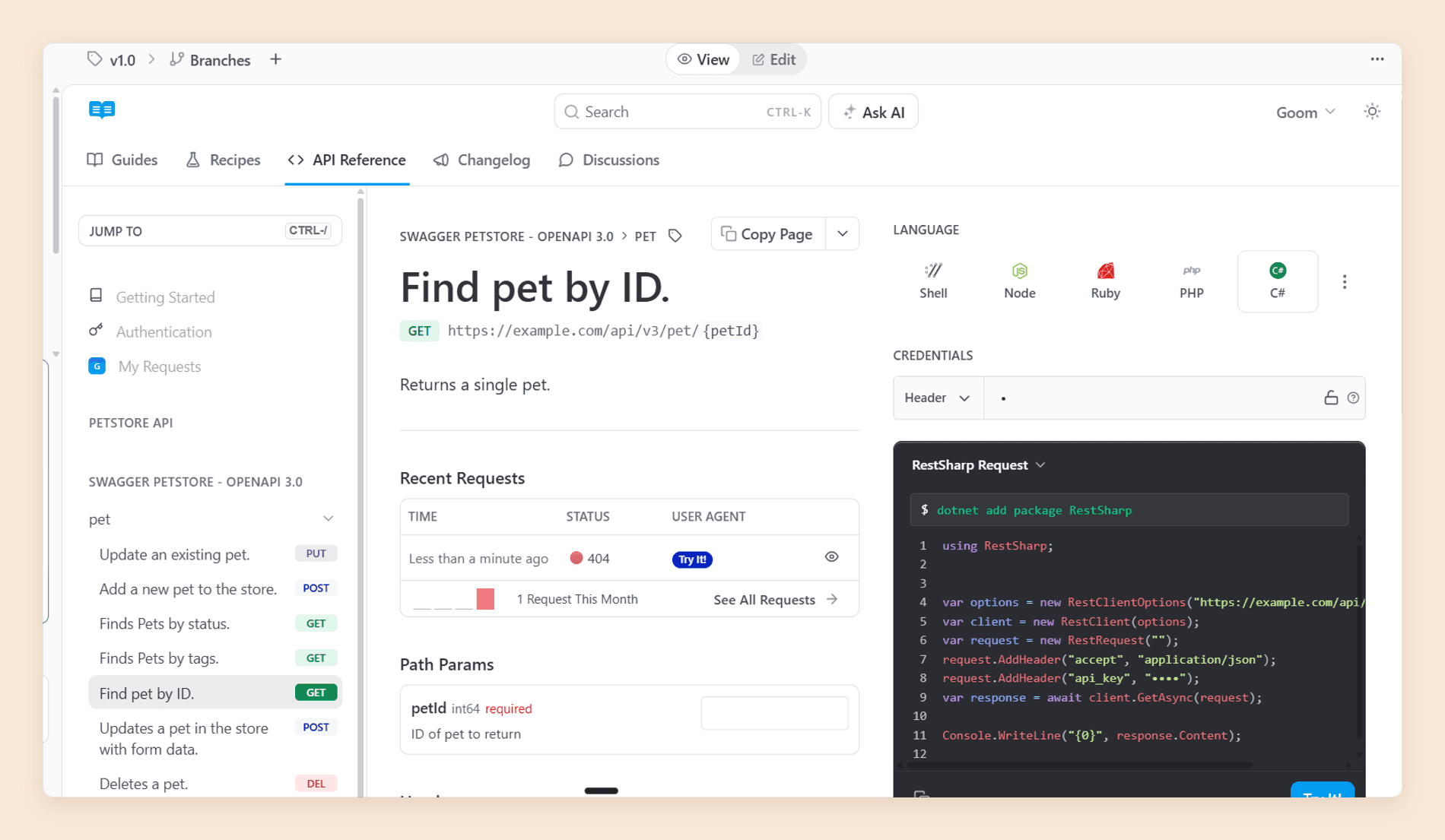
Buy ReadMe for the interactive API reference. Readers send real requests against your API from the documentation page, with their own key filled in, and get back generated snippets in the language they work in. It removes the step where a developer copies an endpoint into a separate HTTP client before trying anything, and that step is where a lot of integrations stall. Nothing else in this comparison does it as well.
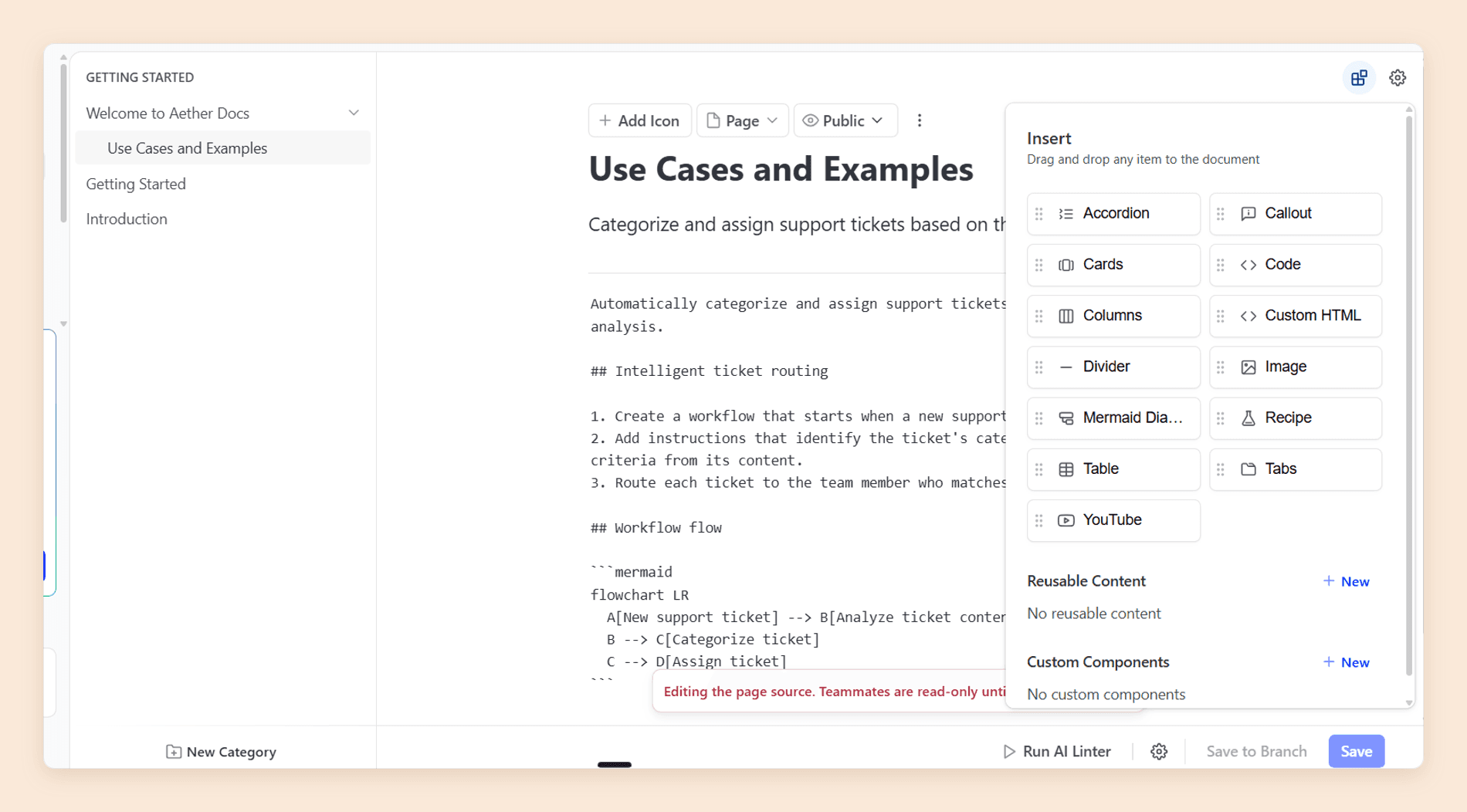
The dual-mode editor is worth more than it sounds. Most platforms make you choose an audience: a block editor that treats Markdown as an export format, or a source workflow that treats the visual editor as a courtesy. ReadMe keeps both authoritative over the same file, which is why a writer and an engineer can share a page without either losing anything. They take turns rather than typing at once, though: while someone is editing the raw source, ReadMe makes the page read-only for every other teammate.
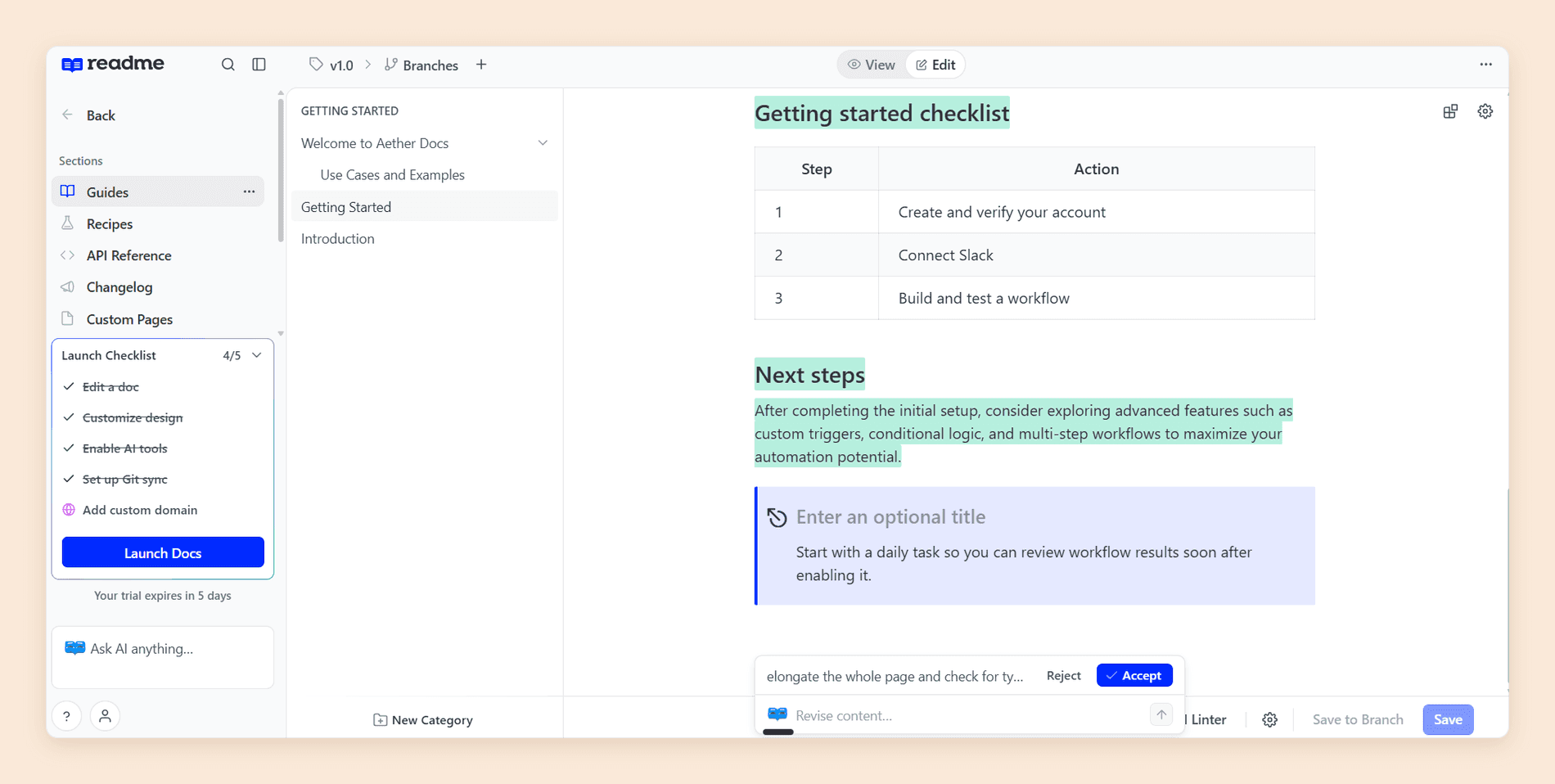
The Agent comes in two sizes. The inline agent works on a selection and shows the result as a diff you accept or reject, so nothing changes without you agreeing to it. Its reach is narrow: it cannot select text inside tables, cannot generate new MDX components, and caps selections at 10,000 characters. The Agent panel goes much further. It works across the whole site, editing many pages from one prompt, fetching URLs, and changing project settings. [1] Documentation.AI's AI Agent also works site-wide, and it is on every plan including the free Starter, with connectors to GitHub, Jira, Confluence, Linear, Notion, HubSpot, and Plain for pulling in context.
The Linter does something no other AI feature here tries. You write your style guide in prose, split into a style guide, hard errors, and soft warnings, and it turns that into a rubric, scores each page against it, and offers a Fix All that hands the work to the Agent. Broken links are caught without any rule configuration. Most competitors ship an AI writer; almost nobody ships an AI editor. [1]
Docs Audit runs those same rules across every page at once. It returns a scored list of the whole site, so you find the 12 pages still using an old product name without reading them. Enterprise customers can schedule it weekly or monthly and export results. [1]
Ask AI answers reader questions inside the published hub, grounded in your content, with links to the source pages, plus an analytics view of what people asked. Those questions are the most useful output: a query that keeps recurring is a page you have not written. [1]
The published site is clean, fast, and readable on a phone, with light and dark modes out of the box. It is not a design tool, and it does not pretend to be.
Outgrown one seat?
Roles that arrive before Enterprise
Editor and viewer roles come with the plan instead of a sales call, and reader AI starts on the free tier.
No credit card required
Where ReadMe Slows Down
Six things slow ReadMe down, and almost none of them are missing features. Four are plan boundaries, on seats, roles, design, and how far each AI feature reaches. One is a migration you cannot undo. The last is a pair of older complaints worth testing yourself.
The upgrade to Refactored is a one-way door. ReadMe states plainly that it cannot be reversed. [1] Suggested Edits is not supported afterwards, including existing ones you have not merged, and projects still using it are not eligible to upgrade at all and go on a waitlist. That matters more than the feature list suggests, because Suggested Edits is the single most-praised collaboration feature in public user reviews of ReadMe. Its replacement, Suggest Edits in GitHub, requires Git sync to a public repository. [1]
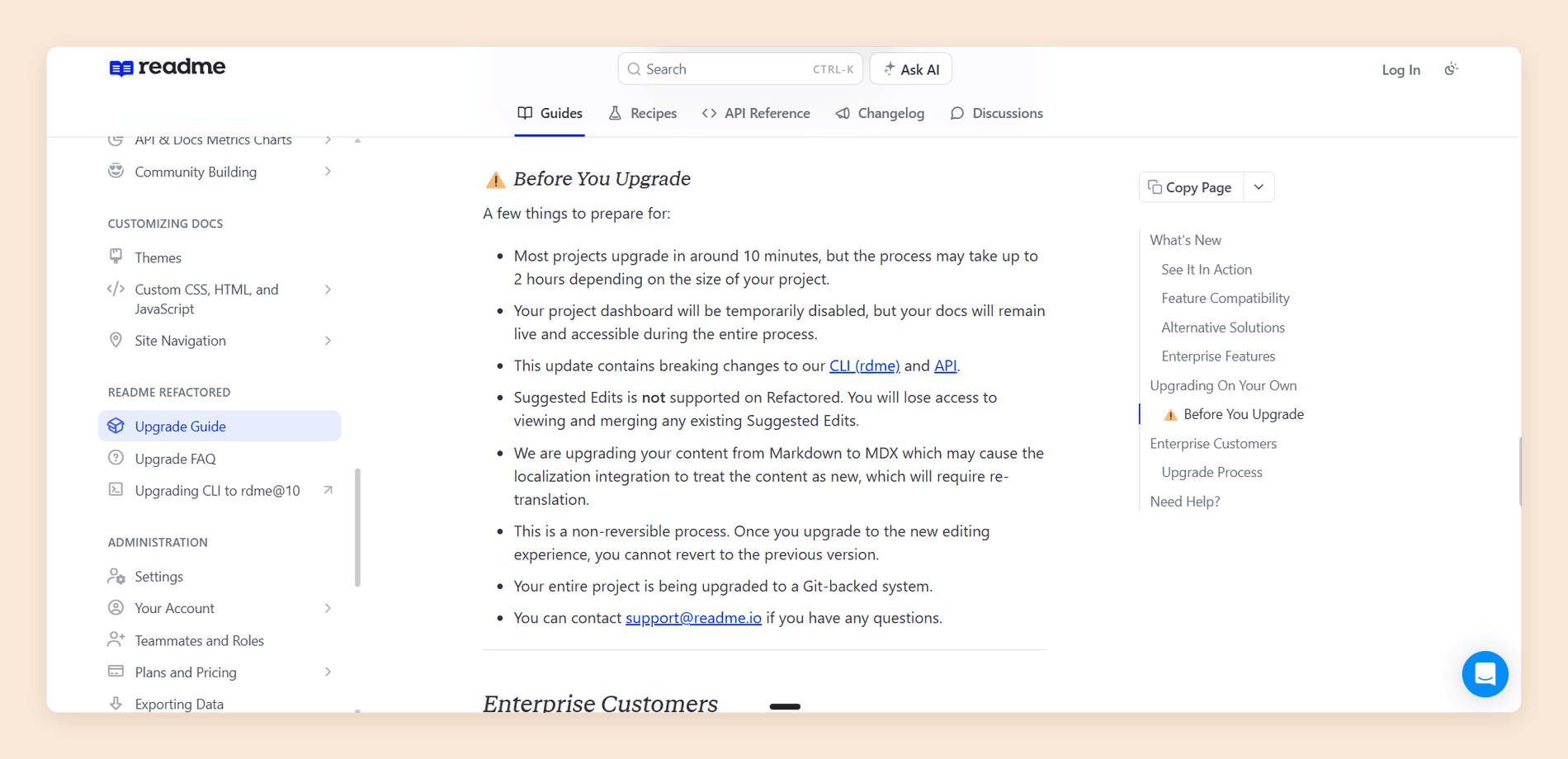
Enterprise customers give up more. Staging and Translations are both unavailable after the upgrade, and ReadMe's own guidance is that customers who rely on those functions should not upgrade. [1] The AWS Gateway integration is gone for everyone, and converting Markdown to MDX can make localization treat your content as new and require re-translation. [1] If you are on the legacy platform today, read the feature compatibility table before you schedule anything.
The seat model is the sharpest constraint. Starter is one teammate, which makes the free tier a solo plan rather than a small-team plan. Pro is five, then $20 for each additional. [1]
There is no role between full Admin and nothing. Every teammate on Starter and Pro can change settings, billing-adjacent controls, and any page on the site. Editor and Viewer roles exist only on Enterprise. [1] For a documentation set that a support lead or a product manager needs to read and comment on but not administer, there is no correct seat to give them.
Design has a hard ceiling that moves with your plan. Custom CSS and HTML arrive at Pro. Custom JavaScript, landing page templates, and removing ReadMe's own logo from your site are Enterprise only. [2] Reviewers describe visual customization as requiring developer help, and the more specific version is that meaningful theming requires overrides ReadMe does not document well.
Each AI feature stops just short of where you want it. The Linter covers Guides and API Reference pages, but API Reference endpoints are excluded from linting, which is an odd gap in a tool built for API documentation. [1] Docs Audit is Enterprise only, with a preview on Pro. [1] [2] Ask AI re-indexes every two hours, so a correction you publish is not reflected for readers immediately, retains logs for 60 days, and CSV export is Enterprise. [1]
Two older complaints belong on your trial checklist. Keyword search ranking quality, and image handling, specifically the absence of an image library and no image upload through the docs-as-code CLI. Both recur in public reviews and both predate the rebuild, so check them against the current platform rather than taking either on faith.
ReadMe Pricing
ReadMe publishes three plans and two add-ons, and the gap between the first two plans is the widest in the category. Starter is free and real. Pro is $250 per month billed annually. Enterprise is custom and annual only. [1] [2]
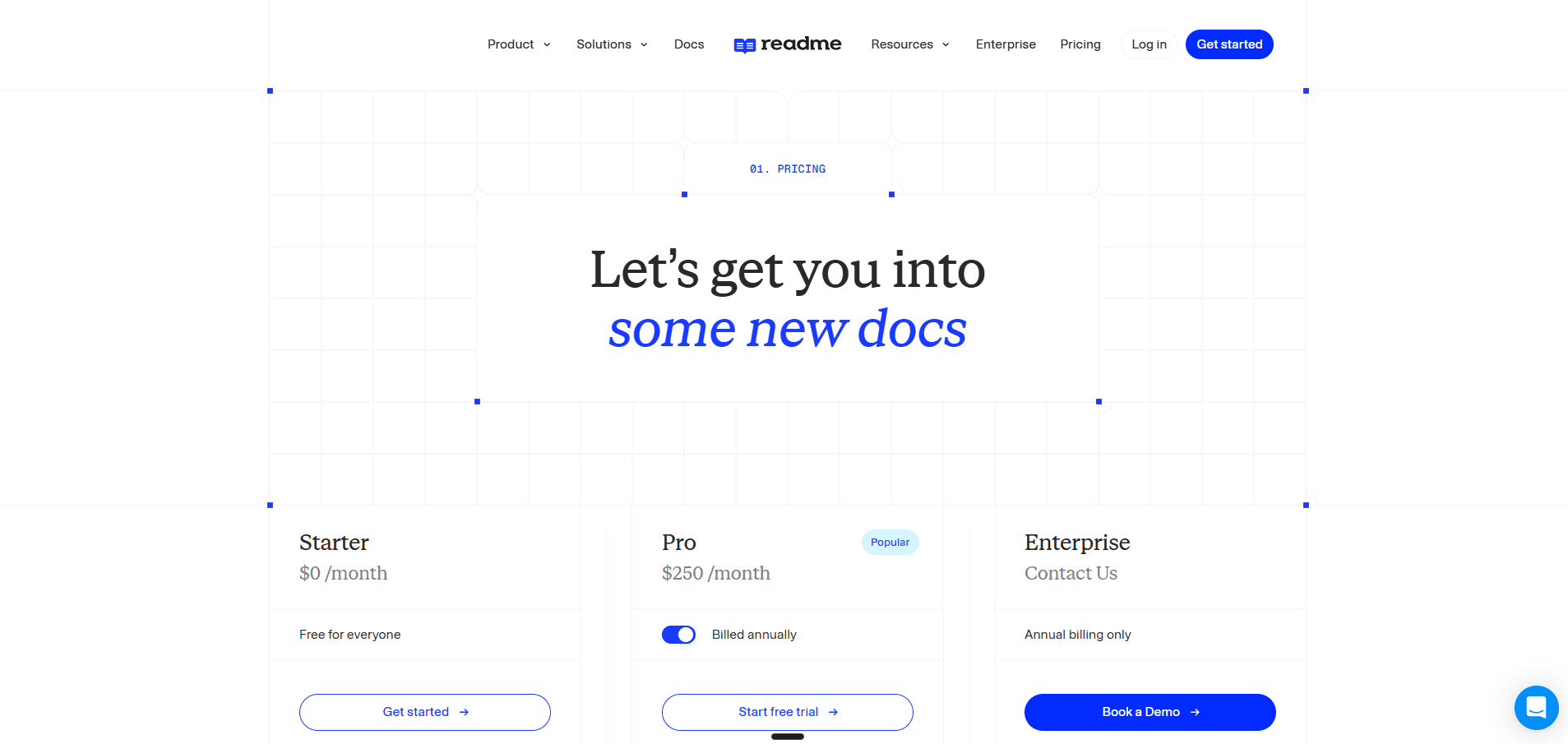
| Plan | Price | Teammates | What you actually get |
|---|---|---|---|
| Starter | $0/month | 1 | Guides, interactive API reference, bi-directional sync, custom domain, usage metrics, llms.txt, MCP server |
| Pro | $250/month, annual | 5, then $20 each | Everything above plus branching and reviews, custom CSS and HTML, reusable content, changelog, recipes, forums, PDF export, AI Linter, AI Writer, Ask AI Lite |
| Enterprise | Custom, annual only | Contact sales | Everything above plus Editor and Viewer roles, multi-project management, SAML, audit logs, AI Translations, full Docs Audit, Ask AI API |
Two add-ons sit on top. Ask AI is $150 per month and includes tone controls, model selection, and analytics. The Ask AI API is not part of the add-on; it is Enterprise only. Pro and Enterprise instead get Ask AI Lite at no extra cost, which puts the assistant on your hub without customization or analytics. [1] [2] The Developer Dashboard is $100 per month for 5 million API logs, then $10 per additional million. [2]
The number to plan against is not $250. A five-person team that wants reader AI with analytics and endpoint metrics is at $500 per month before anyone counts a sixth seat.
Raise one inconsistency with sales rather than assuming either way. ReadMe's plans page says add-ons require a step up from Trial or Starter, its Ask AI documentation says the add-on is available to any customer, and the pricing table prices Ask AI in the Starter column. [1] [2] Get the answer in writing if a free tier plus Ask AI is your intended setup.
Our ReadMe pricing guide prices the add-ons, the 24-hour API history limit, and four real team configurations in full.
Does It Fit Your Team?
Fit comes down to two questions: how many people need to touch the docs, and how many products you document. ReadMe answers the first with a seat count and the second with an Enterprise contract.
| Your situation | Fit | What decides it |
|---|---|---|
| One API, one developer advocate writing docs | Excellent | Starter is $0 and includes a custom domain |
| Public API where adoption metrics drive roadmap | Excellent | The Developer Dashboard has no direct equivalent here |
| Small team, five or fewer writers, one product | Good | Pro covers it, and everyone gets Admin whether you want that or not |
| Docs owned across product, support, and engineering | Mixed | No editor or viewer role below Enterprise |
| Several products or several API portals | Poor | Multi-project management is Enterprise only |
| Marketing or brand owns the published design | Poor | Custom JavaScript, templates, and logo removal are Enterprise only |
Ask these before you sign:
- How many people will need to edit, and should all of them hold Admin rights?
- Will you document a second product within 18 months?
- Do your readers need AI answers, or do you need to read what they asked?
- Is your API instrumented well enough to feed the Developer Dashboard?
- If you are on the legacy platform, do you rely on Suggested Edits, Staging, or Translations?
Want to see what roles without a sales call look like?
Import your OpenAPI spec on the free tier and hand a reviewer read-only access in about five minutes. No credit card, no call.
Documentation.AI Slack channel: Join here
Is ReadMe Worth It in 2026?
Yes, if you are documenting one API and your team is small enough to fit the seats. Three things decide whether that answer holds as you grow, and none of them is about whether the software works. It does.
The value is front-loaded. ReadMe gives you more on day one than any competitor here, because a spec import produces most of a working portal before you write a word. That curve flattens. As documentation grows past the API surface into concepts, tutorials, and troubleshooting, more of your site sits in the ordinary half of the product, and the premium you are paying starts covering less of what you actually maintain.
The bill grows on headcount, not on traffic. Most of this category now meters AI usage, so cost tracks how many readers you have. ReadMe meters people who write, at $20 per Admin past five. A 10-person documentation team wanting reader AI and endpoint metrics lands near $600 a month, and that number does not move whether 100 or 100,000 developers read the docs. Whether that is good news depends entirely on which side of your business is growing.
The direction of travel is toward Enterprise. Roles, multi-product support, translations, full audit tooling, and the Ask AI API are all on the far side of a sales call. If your documentation will be owned by more than five people or cover more than one product within 18 months, price that conversation now rather than after you have migrated content in.
Our verdict stands at 3.6 out of 5. The score is low relative to how good the core is, and that gap is the review: an exceptional API reference attached to a platform that charges for ordinary things other platforms include.
Best ReadMe Alternative
The closest alternative on capability is Documentation.AI, and the difference is where the boundaries sit rather than what the tools can do. Both run a visual editor with a Git workflow, an authoring agent, and an assistant on published documentation. What differs is which of those you have to change plans to get.
Three differences account for most switches. Role-based permissions, so a reviewer can read without holding Admin over your settings, come with the plan rather than an Enterprise contract. Pro is $159 per month billed annually and includes four documentation projects with unlimited editor seats, against $250 for one project and five Admins. [3] And reader AI is included from the free tier instead of arriving as a $150 per month add-on or a stripped Lite version. [2] [3]
Three counts still go to ReadMe, and they deserve naming plainly. Its interactive API explorer is the best in this comparison. Its Developer Dashboard reports per-key endpoint usage that no competitor here matches. And its free tier gives one person a published site on a custom domain, which is more than most paid platforms offer for free. [2]
If neither fits, the field splits cleanly, and our roundup of ReadMe alternatives prices all five side by side. Mintlify is the pick for API-first documentation with a generated playground and a docs-as-code team. GitBook is the pick for a single collaborative site where the block editor matters most. Docusaurus is the pick when you want to self-host and pay in engineering time rather than subscription. Our hands-on Mintlify review and full GitBook review score both on the same eight criteria as this one, and our Theneo review does the same for an API portal billed per workspace rather than per seat. Our Archbee review applies the same criteria to a knowledge portal that puts customer guides, internal docs, and an API reference in separate spaces, and our Redocly review does the same for a Git-native OpenAPI toolchain, as does our Fern review for a platform that generates docs and SDKs from one spec.
| Platform | Pricing model | Roles below Enterprise | Best for |
|---|---|---|---|
| ReadMe | $250/mo Pro, one project, five Admins [2] | None, Admin only | One API, with usage metrics |
| Documentation.AI | $159/mo Pro billed annually, four projects, unlimited seats [3] | Included | Several docs sets, and shared ownership |
| Mintlify | $450/mo Pro, unlimited editor seats [4] | Limited | API-first developer docs |
| GitBook | $65 or $249 per site/mo, plus $12 per user/mo [5] | Included | One collaborative docs site |
| Docusaurus | Free, self-hosted | You build it | Full control, paid in engineering time |
All rates are the annual figures each vendor publishes.
Working out what a migration off ReadMe would cost you?
Book a demo and we will look at your spec, your page count, and your contributor list before you move anything.
Documentation.AI Slack channel: Join here
For more detail:
- ReadMe vs Documentation.AI, seat limits and roles against bundled projects
- Mintlify vs ReadMe, docs-as-code against the developer portal model
- ReadMe vs GitBook, API portals against collaborative knowledge bases
- Mintlify vs GitBook vs ReadMe, three billing shapes priced on the same documentation
FAQs
1. How Much Does ReadMe Cost in 2026?
ReadMe has three plans. Starter is $0 for one teammate, Pro is $250 per month billed annually for five, and Enterprise is a custom quote on annual billing only. Two add-ons sit on top: Ask AI at $150 per month and the Developer Dashboard at $100 per month. [1] [2]
2. Is ReadMe Free?
Yes. The Starter plan is $0 per month and includes guides, an interactive API reference, bi-directional Git sync, usage metrics, and a custom domain. The limit is one teammate, so it is a solo plan rather than a small-team plan. [1] [2]
3. Is There a ReadMe Free Trial?
Yes, 14 days of full Pro access with no credit card. Build the trial site with features your intended plan can render, because dropping back to Starter removes Pro features such as reusable content. [1]
4. Can You Undo a ReadMe Refactored Upgrade?
No. ReadMe states the upgrade is non-reversible. It also removes Suggested Edits, including existing ones you have not merged, and Enterprise projects lose Staging and Translations. Read the feature compatibility table before you schedule it. [1]
5. How Much Does Ask AI Cost?
The full add-on is $150 per month on any plan and includes tone and model configuration and analytics, but not the Ask AI API, which is Enterprise only. Pro and Enterprise get Ask AI Lite included, which puts the assistant on your hub without the configuration or the analytics. [1] [2]
6. Can You Document More Than One Product on ReadMe?
Not below Enterprise. You can run several separate projects on separate plans, but hosting multiple projects on one domain, searching across them, and managing them together are Enterprise features. [2]
7. Does ReadMe Lock In Your Content?
Less than it used to. Projects on the current platform are Git-backed with bi-directional sync on every plan including the free one, so your Markdown and MDX live in your repository. The parts that do not travel are MDX components, theme configuration, and anything built with custom HTML. [1] [2]
8. How Many People Can Edit on Pro?
Five, then $20 per month for each additional Admin. Everyone on Pro is a full Admin, because Editor and Viewer roles only exist on Enterprise. [1]
Sources
- ReadMe. "ReadMe Docs." ReadMe. https://docs.readme.com/main/docs
- ReadMe. "Pricing." ReadMe. https://readme.com/pricing
- Documentation.AI. "Pricing." Documentation.AI. https://documentation.ai/pricing
- Mintlify. "Pricing." Mintlify. https://mintlify.com/pricing
- GitBook. "Pricing." GitBook. https://www.gitbook.com/pricing
Outgrown one seat?
Roles that arrive before Enterprise
Editor and viewer roles come with the plan instead of a sales call, and reader AI starts on the free tier.
No credit card required