GitBook vs Document360: Collaboration vs Governance in Documentation (2026)
Compare GitBook and Document360 to understand how collaborative documentation and governed knowledge bases differ. This hands-on comparison examines ownership models, editing and publishing workflows, AI assistance, and where each platform fits as documentation scales across teams in 2026.

Roop Reddy · Co-Founder, Documentation.AI
Last updated
On this page
- TL;DR - Quick Decision Guide
- How were these platforms compared?
- Which is easier to set up, GitBook or Document360?
- Writing & Maintaining Documentation
- AI Capabilities in Real Usage
- Publishing & Public Documentation Experience
- GitBook vs. Document360: Which is more cost-effective?
- Pros & Cons
- GitBook vs Document360 - Final Comparison
- How are teams using AI documentation platforms in 2026?
- Final Take
- Frequently Asked Questions
The hardest part of documentation in 2026 is deciding who owns it. Some teams keep documentation tightly controlled by engineers, while others need writers, product managers, and support teams to contribute without friction. As documentation has become central to onboarding, support, and internal tooling, ownership models matter more than ever.
Documentation platforms tend to optimize for one of these models, not both.
GitBook and Document360 represent two very different approaches to this problem. In 2026, GitBook emphasizes fast setup, visual editing, and shared ownership across technical and non-technical teams. Document360 is positioned as a structured knowledge base platform built around governance, approvals, and controlled publishing for more regulated environments.
This comparison is based on hands-on testing of both documentation platforms across real documentation workflows and practical usage scenarios.
TL;DR - Quick Decision Guide
Choose GitBook if:
- You want to get documentation live quickly with minimal setup
- Non-technical contributors need to write and maintain docs
- You prefer a visual editor with optional Git workflows
- You want clean, modern public documentation by default
Choose Document360 if:
- You need strict governance, approvals, and controlled publishing
- Documentation is primarily owned by support or enterprise teams
- You’re comfortable with private-by-default docs and manual publishing
- Structure and permissions matter more than speed
Bottom line: GitBook optimizes for speed and accessibility. Document360 optimizes for structure and control. If you want both collaboration and governance kept current automatically, an AI-native platform is worth a look.
How were these platforms compared?
I have evaluated both the platforms using the same end-to-end workflow:
- Account signup and onboarding
- Creating documentation structure
- Writing and restructuring content
- Using built-in AI features
- Publishing and reviewing the public documentation experience
The goal is not to declare a winner, but to show where each tool fits naturally and where friction appears as documentation scales.
Which is easier to set up, GitBook or Document360?
GitBook
GitBook’s onboarding is designed to get teams writing as quickly as possible. On signup, users are taken directly into creating a documentation space without being required to connect a Git repository. This makes GitBook immediately accessible to non-technical contributors.
Once inside the product, writing can begin right away using the block-based editor. Navigation and structure are managed from the sidebar, and very little configuration is required before content becomes visible. The flow is short, clear, and optimized for momentum rather than setup.
Document360
Document360’s onboarding is noticeably more enterprise-oriented. Signup requires a work email and additional details, and documentation created during the trial remains private by default. Before reaching the editor, users go through multiple setup steps related to workspace and knowledge base configuration.
This approach establishes structure, roles, and governance early, which is valuable for controlled environments. Compared to GitBook, however, it introduces more friction before teams can publish or experiment with live documentation.
Onboarding verdict: GitBook prioritizes fast time-to-first-page. Document360 prioritizes upfront structure and control.
Writing & Maintaining Documentation
For Non-Technical Contributors
GitBook is easier for both technical and non-technical contributors to work with. The block-based editor allows writers, PMs, and support teams to add and format content without learning Markdown. Pages can be rearranged from the sidebar, and most everyday edits don’t require developer involvement.
Document360 is more structured and rigid. Content is organized into categories and articles, and changes often flow through review or approval steps. This works well in governed environments, but it slows down quick edits and restructuring for non-technical users.
For Developers
GitBook supports optional two-way Git sync. Developers can work in Markdown or MDX from their IDE, but navigation and many configuration changes still require the GitBook UI.
Document360 is not designed around docs-as-code workflows. Most configuration, publishing, and structural changes happen through the web interface rather than directly from an IDE.
Editing verdict: GitBook is more flexible for mixed teams. Document360 fits formal, support-led documentation ownership.
AI Capabilities in Real Usage
In GitBook, AI is available both as an assistant and as an AI Agent (GitBook Agent). The assistant helps with rewriting, summarizing, and improving clarity, while the AI Agent can generate new pages, add subsections, and propose broader documentation changes through change requests. In practice, this works well for accelerating content creation and handling scoped updates. Our full GitBook review looks at where the agent stops.
In Document360, AI focuses on article-level generation and refinement. It can help draft or improve individual pages, but it does not maintain structure, reorganize navigation, or automate publishing.
AI verdict: GitBook and Document360 (via Eddy) both offer assistive AI for writing and reader Q&A, but neither maintains documentation automatically. We cover that gap in how GitBook's AI compares to an agent that maintains docs and the same breakdown for Document360. AI-native platforms like Documentation.AI adds an agent that detects product changes and drafts updates, shifting AI from writing help to ongoing upkeep.
Still weighing the two?
Docs that update themselves
Both leave maintenance to a human with other work. An AI agent does not.
No credit card required
Publishing & Public Documentation Experience
When published, GitBook documentation feels modern and product-focused. Pages load quickly, typography is clean, and the overall experience emphasizes readability rather than heavy navigation or filters.
Document360 follows a more controlled publishing model. Articles must be published manually, and documentation is private by default during trials. The public experience feels closer to a traditional support knowledge base with category-driven navigation.
Publishing verdict: GitBook favors speed and presentation. Document360 favors control and governance.
GitBook vs. Document360: Which is more cost-effective?
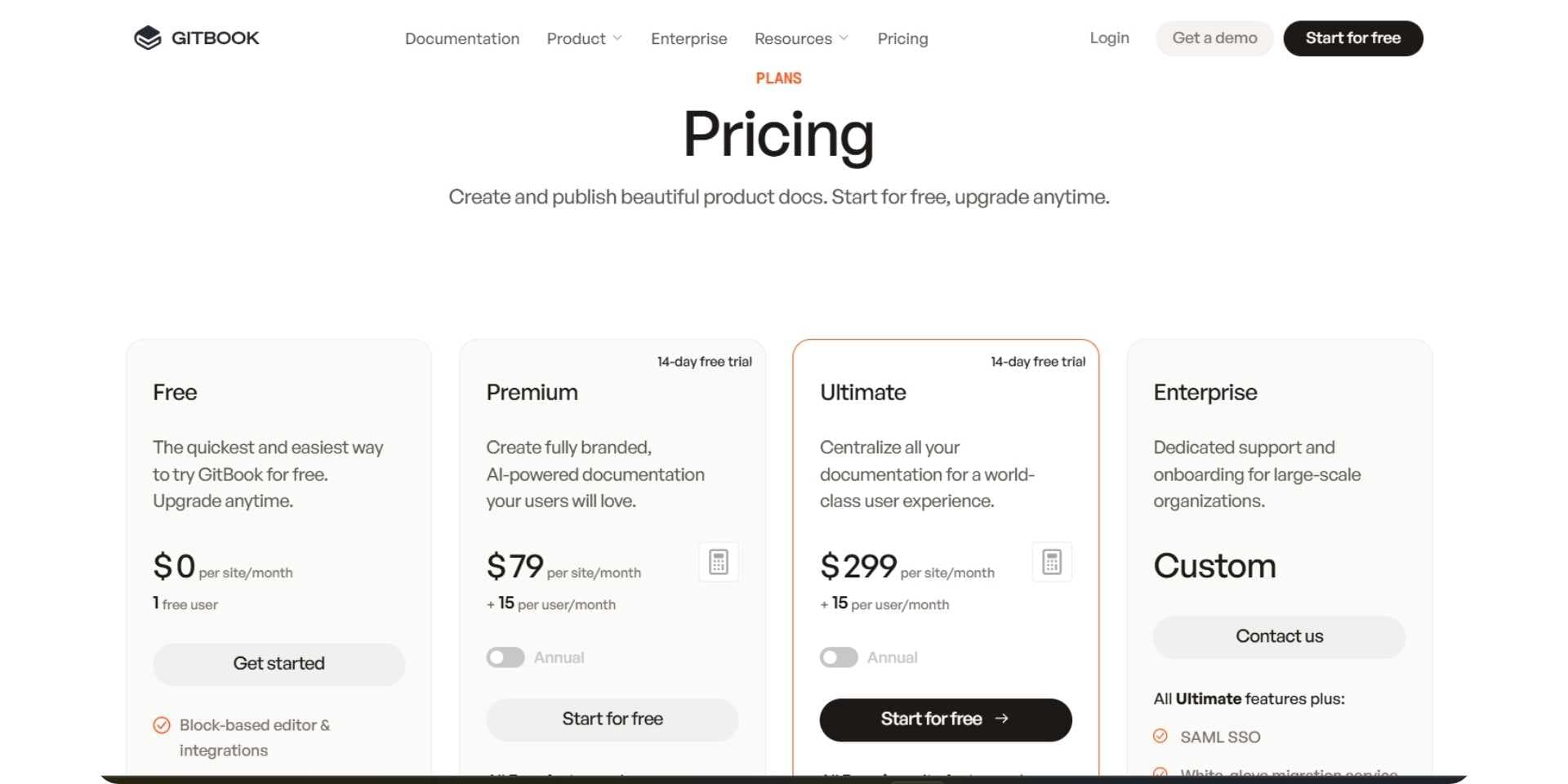
GitBook follows a per-site plus per-user pricing model. There is a free plan for one site and one user, mainly suitable for evaluation. Paid plans start at $65 per site per month plus $12 per user, with higher tiers reaching $299 per site per month and an additional $12/user. Pricing is transparent, but costs rise as teams add multiple sites and contributors, and the reader Assistant carries a monthly answer allowance on top. Our GitBook pricing breakdown prices an eight-person team publishing three products three different ways.
Document360 does not publish transparent self-serve pricing for most production use cases. While a trial is available, real usage typically requires engaging with sales. Pricing is positioned toward mid-market and enterprise teams and varies based on users, workflows, and features.
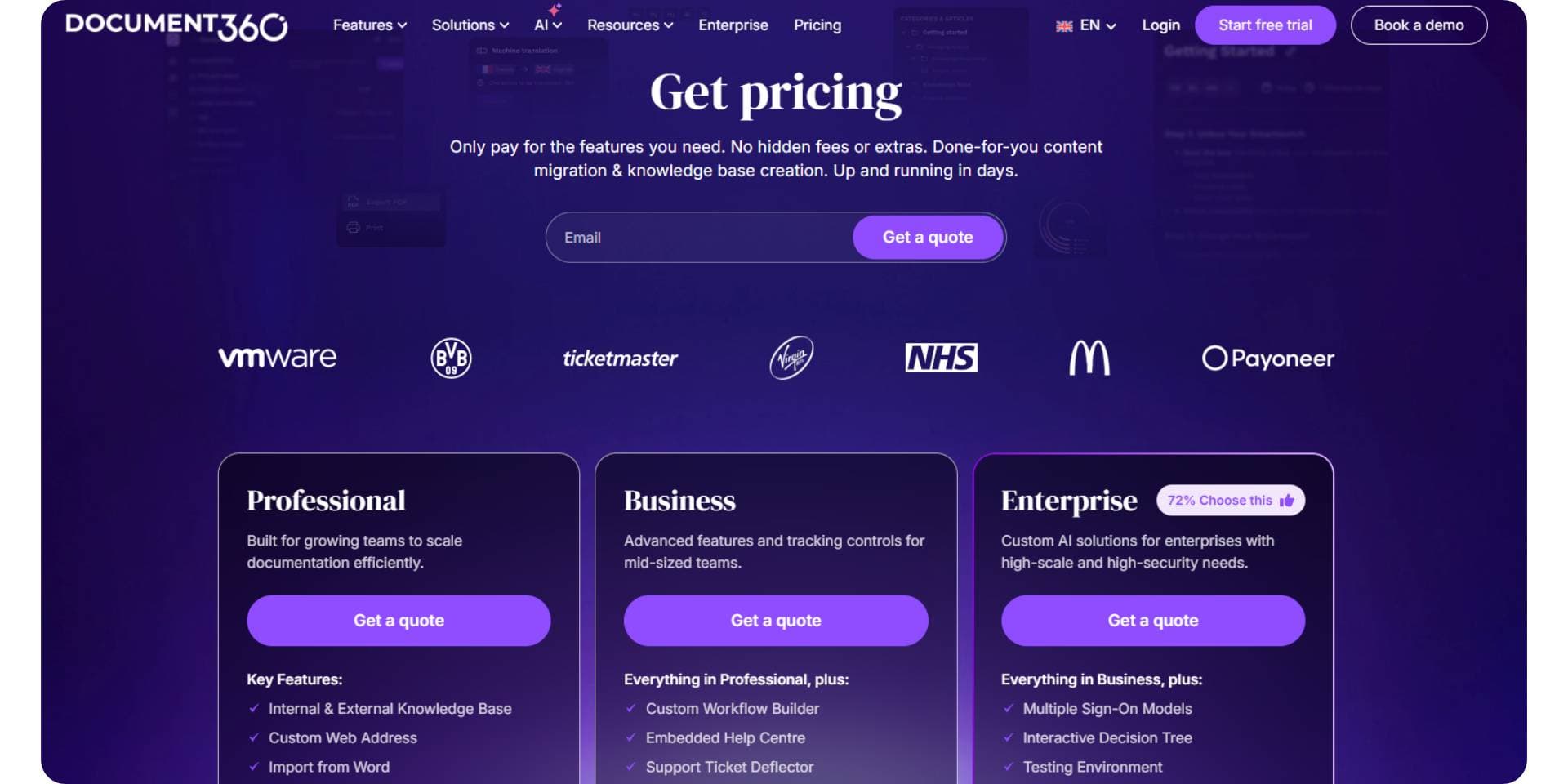
Pricing verdict: GitBook is predictable but scales quickly. Document360 is sales-led and less transparent upfront. Documentation.AI publishes flat pricing (free, $55, and $159) excluding custom enterprise plans with the AI assistant included from the free tier. This is a more predictable cost path than GitBook's per-site model or Document360's quote-only plans.
Pros & Cons
GitBook
Pros
- Fast onboarding and quick setup
- Strong editor for non-technical contributors
- Clean, modern public documentation
Cons
- Structural changes often require UI interaction
- Less suitable for strict governance workflows
For teams that hit these limits as documentation scales, it's worth comparing other GitBook alternatives built for less manual upkeep.
Document360
Pros
- Strong governance, approvals, and permissions
- Well suited for enterprise and support knowledge bases
- Clear separation between internal and external docs
Cons
- Slower, form-heavy onboarding
- Manual publishing and private-by-default trials
- Not designed for docs-as-code workflows
If a faster, more code-friendly publishing workflow matters to your team, it's worth exploring alternatives to Document360.
GitBook vs Document360 - Final Comparison
| Category | GitBook | Document360 |
|---|---|---|
| Best for | Mixed teams, product documentation | Governed knowledge bases |
| Onboarding | Fast and lightweight | Form-heavy, enterprise-style |
| Non-technical friendly | Yes | Yes, but more rigid |
| Docs-as-code | Optional | Not core |
| Editing model | Block-based editor | Structured KB workflows |
| AI role | Writing assistance + AI Agent | Writing assistance |
| Publishing | Fast, modern docs | Manual, KB-style |
| Public docs feel | Product documentation | Support knowledge base |
| Pricing model | Per site + per user | Sales-led, not public |
Need help migrating from GitBook, Document360, or another documentation platform?
If your setup includes large knowledge bases, approval-driven workflows, custom navigation, or mixed visual and Git-based editing, Documentation.AI offers hands-on migration support.
Documentation.AI Slack channel: Join here
How are teams using AI documentation platforms in 2026?
In 2026, documentation is no longer owned by a single role. Product teams, support, customer success, and even internal AI tools rely on documentation to onboard users, explain features, and answer questions at scale. Teams now care less about one-time setup and more about how documentation stays accurate over time.
Across platforms like GitBook and Document360, AI is increasingly used to speed up writing, improve clarity, and help users find answers. However, in real workflows, humans still manage structure, navigation, publishing, and long-term consistency. As documentation grows, this ongoing maintenance becomes the most time-consuming part of the process.
Teams evaluating documentation platforms in 2026 are therefore looking beyond basic AI writing assistance toward tools that reduce long-term operational effort and help documentation evolve alongside the product.
GitBook and Document360 offer AI-assisted writing and discovery, but as documentation scales, teams still spend significant time and cost maintaining structure and accuracy. Newer platforms like Documentation.AI stand apart by using AI-driven, agent-based workflows to continuously organize content, flag outdated sections, and reduce long-term documentation overhead.
Final Take
GitBook and Document360 solve different documentation problems.
GitBook is a strong choice for teams that want to move fast, share documentation ownership across roles, and publish clean, readable docs with minimal friction. It works best in environments where flexibility, collaboration, and speed matter most.
Document360 is better suited for organizations that require strict governance, approval workflows, and controlled publishing. It fits support-led or enterprise teams where structure, compliance, and permissions take priority over rapid iteration.
In 2026, the right choice depends on who owns documentation, how frequently it changes, and how much ongoing manual effort your team is willing to invest as documentation grows in size and complexity.
If that ongoing maintenance is the part you'd rather not scale, see what AI-native documentation feels like on your own content: book a demo or start free in under five minutes, no credit card required.
Frequently Asked Questions
1. What is the main difference between GitBook and Document360?
GitBook is built for fast setup and collaborative documentation using a visual editor that works well for mixed technical and non-technical teams. Document360 is built as a governed knowledge base with approvals, permissions, and controlled publishing, making it better suited for enterprise and support-led documentation.
2. Which platform is easier for non-technical contributors to use?
GitBook is generally easier for non-technical contributors because of its block-based editor and simple page restructuring. Document360 supports non-technical users as well, but its approval workflows and structured publishing model introduce more process and friction for quick updates.
3. Is GitBook or Document360 better for enterprise documentation?
Document360 is typically preferred in enterprise environments where documentation must follow strict governance, approval flows, and access controls. GitBook is less rigid and better suited for teams that prioritize speed and shared ownership over formal governance.
4. Do GitBook and Document360 support AI features?
Yes. Both platforms offer AI features that help with writing, refining content, and assisting readers. However, their AI is mainly focused on page-level assistance and does not automatically manage documentation structure, navigation, or long-term maintenance.
5. Why do teams compare GitBook vs Document360 in 2026?
In 2026, documentation supports onboarding, support, and internal AI systems, not just publishing. Teams compare GitBook and Document360 to decide whether speed and accessibility or governance and control better match how their documentation is owned and maintained over time.
6. Which platform becomes harder to maintain as documentation scales?
As documentation grows, GitBook can require more manual effort to manage structure across multiple spaces and sites, while Document360 introduces operational overhead through approvals and manual publishing. Both rely heavily on human effort to keep documentation organized and current.
7. How do GitBook and Document360 compare to AI-native documentation platforms?
GitBook and Document360 use AI mainly for writing assistance and reader Q&A. They do not continuously manage structure, detect outdated content, or reorganize large documentation sets automatically. For a deeper head-to-head, see a full GitBook vs Documentation.AI comparison and the Document360 equivalent, where an AI agent maintains structure and flags outdated content instead of only assisting with writing. For GitBook against another block editor, see Archbee vs GitBook, and for GitBook priced against Mintlify and ReadMe on the same documentation, Mintlify vs GitBook vs ReadMe.
8. When should teams look beyond GitBook or Document360?
Teams often look beyond GitBook or Document360 when documentation is shared across developers, product managers, founders, and support teams and when keeping documentation accurate over time becomes more challenging than initial setup. At that point it's worth scanning the best GitBook alternatives in 2026 or top Document360 alternatives to see which model fits how your team owns documentation.
Still weighing the two?
Docs that update themselves
Both leave maintenance to a human with other work. An AI agent does not.
No credit card required