Mintlify vs ReadMe: Docs Site vs API Portal (2026)
Mintlify sells a documentation site. ReadMe sells a developer portal that knows which reader called which endpoint. Neither one includes the assistant your readers talk to in the price it advertises. We built the same documentation on each and priced what a working team actually pays.

Roop Reddy · Co-Founder, Documentation.AI
Last updated
On this page
- Quick Decision Guide
- How These Platforms Were Compared
- Onboarding: Which Is Faster to Set Up?
- Writing and Maintaining Docs: Local Toolchain vs Hosted Editor
- AI Capabilities in Real Usage: What's Included and What Costs Extra
- Public Documentation Experience
- Mintlify Pricing vs ReadMe Pricing
- Pros and Cons
- Head to Head Comparison: Mintlify vs ReadMe
- Final Take
- FAQs: Mintlify vs ReadMe
- Sources
Mintlify and ReadMe are usually compared as two takes on the same product. They are not. Mintlify publishes documentation. ReadMe publishes documentation and instruments the API underneath it, so a logged-in developer reads their own keys and their own failed requests on the page.
That difference decides more evaluations than the feature lists do, and it shows up in the pricing. ReadMe charges for people who write. Mintlify charges for sites you publish and questions your readers ask. For each platform assessed on its own, see our Mintlify review and ReadMe review.
Every figure below comes from each vendor's latest published pricing and product documentation. Where we describe how something behaved, that is our own testing, and we say so.
Quick Decision Guide
Neither platform is cheaper or better across the board, and the honest answer depends on three things: whether you need to know which developer called which endpoint, how many people hold an editor seat, and how many products you document.
ReadMe may be the better fit when:
- Your product is an API and adoption data drives the roadmap, because the Developer Dashboard reports per-key endpoint usage that Mintlify has no equivalent for [3]
- Your readers need to send real requests with their own credentials rather than a sample key [3]
- Your editing team is five people or fewer, where ReadMe's entry plan undercuts Mintlify's even after the reader AI add-on [1] [4]
- You want a working site free for one person, including a custom domain and an interactive API reference [4]
- You publish a changelog, recipes, or a discussion forum alongside the docs, all of which are first-class content types inside a ReadMe project [4]
Mintlify may be the better fit when:
- Your editing team is eight or more, because Pro includes unlimited seats where ReadMe bills per admin past the fifth [1] [4]
- You have five editors or fewer and no need for AI, because Mintlify's free tier covers that and ReadMe's free plan allows only one teammate [1] [4]
- Design quality out of the box matters and nobody is going to build a theme [2]
- Your writers work locally and want a CLI, a preview server, and link validation before anything merges [2]
- You want scheduled or merge-triggered documentation updates, which ReadMe does not offer at any tier [2]
Bottom line: ReadMe is the cheaper way to publish one API reference with a small team, Mintlify is the cheaper way to run a large editing team, and ReadMe is the only one of the two that can tell you which developer called which endpoint. Both bill per documentation project, so if you publish for several products, price that before comparing features. If neither model fits, Mintlify vs Documentation.AI and ReadMe vs Documentation.AI run each against an AI-native option.
Documenting more than one product?
Documentation.AI bundles four documentation projects into one plan with unlimited editor seats, and puts the reader assistant on the free plan rather than beside it. See the pricing or start free.
How These Platforms Were Compared
We built the same documentation on each platform and compared the same six things: signup and onboarding, importing a spec and syncing a repository, editing and restructuring content, the AI features in real use, the published reading experience, and total cost at the tier a growing team would actually buy.
No winner is declared per category. Each section reports what Mintlify did, then what ReadMe did, then what the difference means in practice. Pricing claims come from each vendor's own pricing page and billing documentation rather than from estimates.
Onboarding: Which Is Faster to Set Up?
ReadMe, if your product is an API. It offers the OpenAPI import during signup rather than after it, so a generated interactive reference exists before you write anything. Mintlify reaches a published site just as fast, but that site starts as template content you then replace.
Mintlify
Signup takes Google or email, then asks whether to connect a GitHub repository or start from scratch. We connected an existing repository. Generation took long enough to notice, and what came out was sensible: the structure held together and the navigation bar needed no manual cleanup.
Git does not become optional afterwards. Pages are MDX files in a repository, docs.json describes the site, and every new branch opens a draft pull request that publishes as a commit. A writer who has never merged anything can still produce a page, but a Git workflow is running underneath whether or not they know the words for it. [2]
GitLab works, with a caveat worth pricing into your setup. Rather than installing an app, you generate a project access token and wire up the webhook yourself. [2]
The free plan is decent at this stage: five editor seats, a custom domain, the web editor, the API playground, and an MCP server, all at zero, though no AI of any kind. [1] Documentation.AI's free plan goes further, carrying the reader assistant and the documentation agent as well.
ReadMe
Signup is Google or email, then you name the documentation, upload a logo, and choose an organization. The OpenAPI import sits inside that flow. Upload or link a spec and you have an interactive reference with endpoints, parameters, and a working request console before the first guide exists.
GitHub sync comes after and was quick to connect. Bi-directional sync then keeps the spec and the published reference in step, and it is on every plan including the free one. [3]
Publishing then does something no other platform here does: it routes you through the pricing page, because you select a plan before docs go live. That is not a paywall, since the free plan is one of the choices, but a billing screen does sit between a finished draft and a public URL. [4]
The harder constraint is the seat count. The free plan includes one teammate, so inviting a technical writer into an evaluation means moving to Pro rather than changing a setting. The 14-day Pro trial with no card is the only practical way to test collaboration. [3] [4]
Verdict: ReadMe, if your documentation starts from a spec. Offering the OpenAPI import at signup is the right instinct for an API product, and nothing here gets you to a working reference faster. Choose Mintlify instead when more than one person has to be inside the tool during the evaluation, because ReadMe's free plan seats one and Mintlify's seats five.
Writing and Maintaining Docs: Local Toolchain vs Hosted Editor
Both platforms now run a visual editor over MDX with a source mode underneath, so the old docs-as-code split has narrowed to almost nothing on a single page. It reopens around the page: what tooling exists outside the browser, what one project is allowed to contain, and what happens when maintenance falls behind.
Mintlify
The current editor runs in the browser with visual and source modes, several people can edit a page with live cursors, and comments, suggestions, and a visual diff are built in. Navigation is drag and drop, so reordering the site no longer means hand-editing a configuration file. [2]
Developers get a real local loop, which ReadMe does not offer. The mint CLI runs a preview server, scaffolds projects, and formats MDX across the tree. Build errors, broken links, and drift between the local preview and the deployed site all surface before a merge, and extensions cover VS Code, Cursor, and JetBrains. [2]
Because pages are ordinary MDX in an ordinary repository, project-wide search and replace, scripted bulk edits, linting, and CI all work unchanged. That doubles as the exit: moving off Mintlify means moving files rather than extracting them.
ReadMe
The editor is better than its reputation. The default mode is visual rather than raw, restructuring is straightforward, and a source mode gives you the MDX when you want it. A writer who has never used Git is not blocked. One quirk to know: while someone edits the raw source, the page goes read-only for every other teammate.
ReadMe's content model is richer than it gets credit for. Guides, API reference, recipes, a changelog, and discussion forums are all first-class inside a project, and recipes in particular have no real equivalent in this category. Branching and reviews arrive on the paid plan, along with reusable content. [3] [4]
The constraint is the project boundary. The free and paid self-serve plans each cover one project. Two products means two plans, and putting them on one domain, searching across them, or administering them together is Enterprise. [4]
Migration runs both ways, and both directions have teeth. ReadMe's upgrade to its current platform, ReadMe Refactored, cannot be reversed and drops Suggested Edits. Mintlify publishes a ReadMe migration guide, though migration services are an Enterprise line item. [1] [2] [3]
Verdict: ReadMe takes the editor and the content model, Mintlify takes everything around the editor. If your docs are written in a browser by a small group, recipes, a changelog, and forums are worth more than a CLI. If your docs ship through CI and you want broken links caught before a merge, the reverse holds. On a second product neither helps you, because both bill it as a second subscription.
AI Capabilities in Real Usage: What's Included and What Costs Extra
Both ship a competent authoring agent and a reader-facing assistant. Neither includes the reader assistant in its headline price. Mintlify bundles it into its top self-serve plan and meters it in credits that stop. ReadMe sells it as an add-on that is not bundled at any tier, Enterprise included.
Mintlify
The assistant sits on your published site, uses tool calling rather than plain retrieval, cites sources with navigable links, and returns method, parameter, and schema detail from your OpenAPI specs. Indexing is immediate on publish. Before you demo it, know that draft branches and preview deployments are not indexed, so the version you are proudest of is often the version it cannot read. [2]
The authoring agent researches, plans, writes, and validates with the CLI, then opens a pull request instead of writing to your live site, so its worst output costs you a review rather than a rollback. It takes work from prompts, pull requests, Slack threads, or file attachments, and reads source from any repository with the Mintlify GitHub App installed. The panel still labels it beta. [2]
ReadMe has no equivalent to automations at any price. Merge a change to your API and the agent can open the documentation update behind it without anyone remembering to file a ticket. Four triggers cover content changes, code changes, a schedule, and integration events, the last of those on Enterprise, and each automation runs up to 500 times a day. [2]
The credit system was repriced recently and most articles still have it wrong. Credits now attach to two actions only: 25 for an assistant answer and 250 for an automation run that changes your docs. Unanswerable questions and empty automation runs are free, and on Pro the editor and Slack agents draw no credits at all. [1] [5]
ReadMe
Ask AI answers reader questions inside the published hub, grounded in your content, with links back to the source pages. Pro and Enterprise include Ask AI Lite at no extra cost, which puts the assistant on the page and stops there. Tone, answer length, forbidden topics, model choice, API access, and analytics all sit on the paid add-on. [3] [4]
The full add-on is mostly an analytics purchase. The dashboard lists every question asked, the answer given, and a thumbs up or down on each, which amounts to a gap report written by your readers. Logs are kept 60 days either way, CSV export is Enterprise, and content re-indexes every two hours, so a correction you publish is not what readers see for a while. [3]
On the authoring side, the inline Agent works on a selection and shows a diff you accept or reject, so nothing reaches the page without your agreement. The cost of that design is reach: it will not touch text inside tables, cannot generate new MDX components, and caps a selection at 10,000 characters. [3]
Few platforms ship an AI editor rather than an AI writer, and ReadMe's Linter is one. You write a style guide in prose, split into rules, hard errors, and soft warnings; it becomes a rubric, scores every page against it, and offers a Fix All that hands the work to the Agent. Docs Audit runs the same rules across the whole site at once, though a preview is all the paid plan gets and history, scheduling, and export are Enterprise. The gap, odd in a tool built for API documentation, is that API Reference endpoints are excluded from linting altogether. [3] [4]
What Each Tier Actually Unlocks
| AI capability | Mintlify | ReadMe |
|---|---|---|
| Authoring agent | Pro only, and it costs no credits | Inline Agent on Pro, scoped to a selection |
| AI style linter | Not available | Pro, excluding API Reference endpoints |
| Reader chat assistant | Pro only | Ask AI Lite on Pro, full version a paid add-on at any tier |
| Reader answers included | 400 a month, at 25 credits each | No published volume, cap, or overage rate |
| Past the allowance | Stops, unless you turn on overage | Unknown, because no allowance is published |
| Scheduled or triggered doc updates | Automations on four triggers, 500 runs a day each | Not available at any tier |
| Answer analytics | Conversations grouped by topic and rating, on Pro | Only on the paid add-on, logs kept 60 days, export Enterprise |
| Site-wide content audit | Not available | Preview on Pro, full version Enterprise |
| Machine-readable publishing | llms.txt, llms-full.txt, skill.md, and an MCP server on every plan | llms.txt, a custom llms.txt, and an MCP server on every plan |
| Free-plan AI | None, beyond a 14-day trial | The machine-readable layer and AI change summaries, no assistant |
Read the assistant rows twice. Mintlify shows you its assistant for 14 days and then invoices, and ReadMe shows it only after the add-on is bought, so the capability both companies lead with is on a clock or a card from the start. Their metering philosophies are opposites too. Mintlify publishes a per-answer price and switches the assistant off at the limit. ReadMe publishes a flat fee and no volume at all, which is comfortable until traffic arrives and there is nothing in writing about what happens next. If you want a reference point for what reader AI costs when it is neither an add-on nor a tier, Documentation.AI's plans carry the assistant from the free tier at 10 credits a question.
Verdict: Mintlify if you want AI that maintains documentation, ReadMe if you want AI that inspects it. Nothing on ReadMe updates a page on a schedule or on merge, and nothing on Mintlify scores the pages you have already written against a style guide. Neither leaves a working reader assistant in front of you past a trial without payment, and they fail in opposite directions: Mintlify stops answering unless you switch overages on, while ReadMe keeps answering against a limit it has never published. [1] [3] [5]
Neither quite fits?
Reader AI on the free plan
One sells it as an add-on, the other locks it behind its top plan. Ours is on the free tier.
No credit card required
Public Documentation Experience
Both publish fast, responsive, accessible sites with light and dark modes and full-text search. Mintlify's looks better with no configuration. ReadMe's does something Mintlify's cannot, which is recognize the reader.
Mintlify
Mintlify's default site needs no designer. A default Mintlify site arrives with clean typography, working dark mode, sensible syntax highlighting, and components for tabs, callouts, cards, steps, and code groups that you never have to build.
The API playground generates from OpenAPI 3.0 or 3.1, or AsyncAPI 3.0 for WebSocket channels, and updates itself when the spec changes. The detail that matters for adoption is the prefilled credential: an x-default value means a reader's first request succeeds rather than returning a 401, and the snippet they copy comes out in whichever of 18 languages they work in. [2]
Watch for one silent failure. A spec with no servers field degrades to a copyable endpoint with no playground at all, and nothing warns you it happened. An auth display mode can also hold the playground back for signed-in readers only. [2]
What the free tier publishes is quieter than the demos suggest. Ask AI is a Pro feature and so are preview deployments, so a free site ships without either. Access control is page level, set in frontmatter, so a restricted block inside a public page is not possible. [1] [2]
ReadMe
The published site is clean, fast, readable on a phone, and carries light and dark modes with an Ask AI search bar. Design is not ReadMe's strong suit, and the ceiling moves with your plan: custom CSS and HTML on the paid plan, then custom JavaScript, landing page templates, and removing ReadMe's own logo at Enterprise. [4]
No other platform in this comparison knows who is reading. ReadMe fills a logged-in developer's own API keys into the reference and shows them their own request history on the page, so debugging a failed integration happens inside the documentation rather than in a separate HTTP client. Admins get a My Developers view filtered by key, email, company, endpoint, method, and status. [3]
That capability is an add-on and an engineering project, not a toggle. The Developer Dashboard is billed per volume of API logs, and it requires deploying the Personalized Docs Webhook and integrating the Metrics SDK into your production API. [3] [4]
Retention catches teams out. Every plan keeps 24 hours of API request history by default, Enterprise included, and extending that to 30 days of detailed logs and a year of request history is exactly what the Developer Dashboard add-on buys. [4]
Verdict: Mintlify, unless your readers log in. Its output looks better untouched and anything driven by a spec file is stronger. The exception is decisive rather than marginal: when your support load is developers asking why their own call returned a 401, ReadMe answers that on the page and Mintlify structurally cannot. Both hold design back at the top, since Mintlify reserves white labeling for Enterprise and ReadMe reserves custom JavaScript and logo removal for the same place. Documentation.AI accepts custom CSS and JavaScript on every plan and builds a preview per branch, if a removable footer is part of what you are buying.
Mintlify Pricing vs ReadMe Pricing
The headline numbers are not comparable, which is why this section settles most evaluations. Mintlify's $450 is close to a total. ReadMe's $250 is a starting point with two add-ons attached. All figures below are annual billing rates.
Mintlify
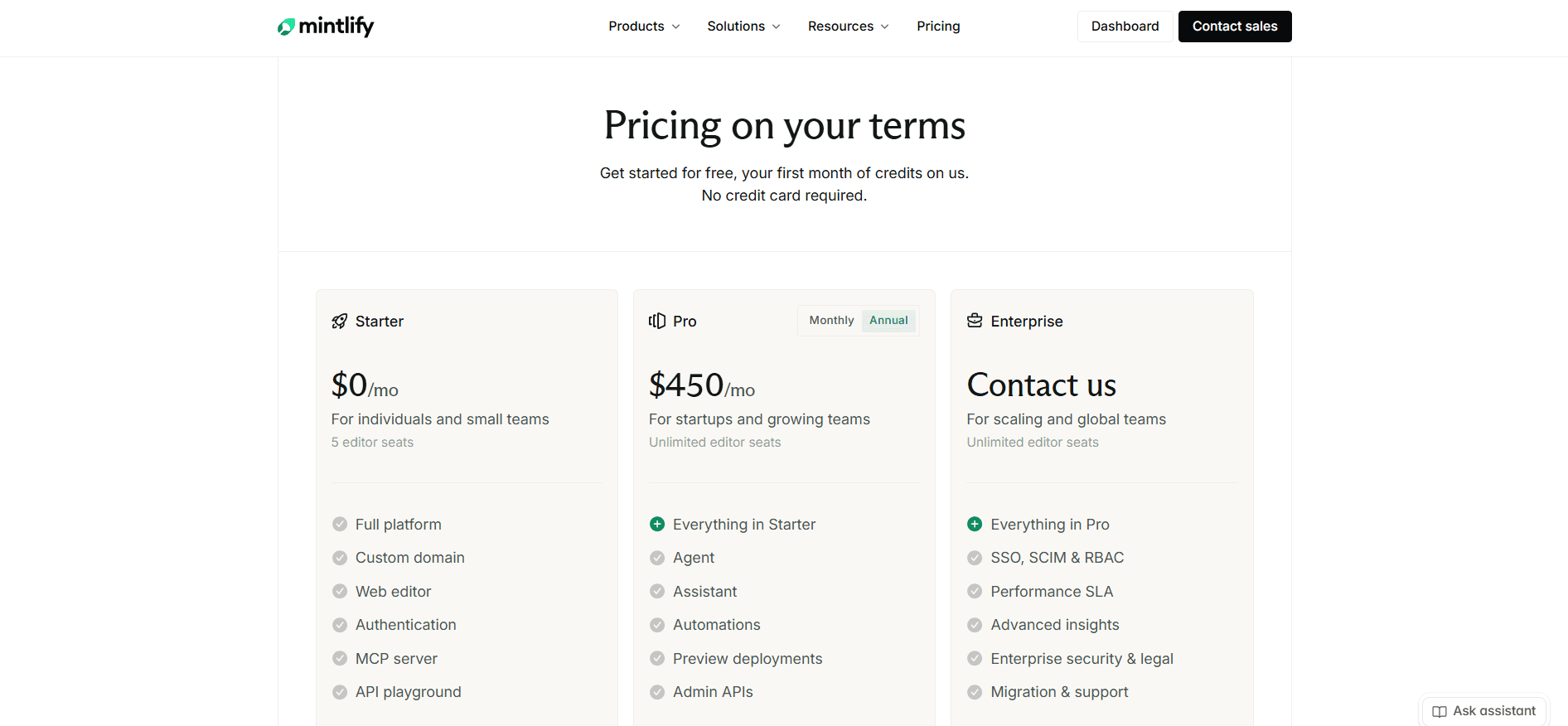
Starter is free. It carries five editor seats, a custom domain, the web editor, the API playground, the MCP server, and the machine-readable output, and leaves out everything intelligent: the Agent, the Assistant, automations, preview deployments, and analytics. [1]
Pro is $450 a month per site on annual billing, with unlimited editor seats and 10,000 AI credits a month pooled across your organization. ReadMe bills every teammate past the fifth, so that seat policy carries more weight than it looks. [1]
Enterprise is custom, adding SSO, SCIM and RBAC, audit logs, self-hosting and EU hosting, reader login through OAuth or JWT, and migration support. There is nothing between free and Pro. [1] [2] Our Mintlify pricing guide covers credits, packs, and rollover in full.
ReadMe
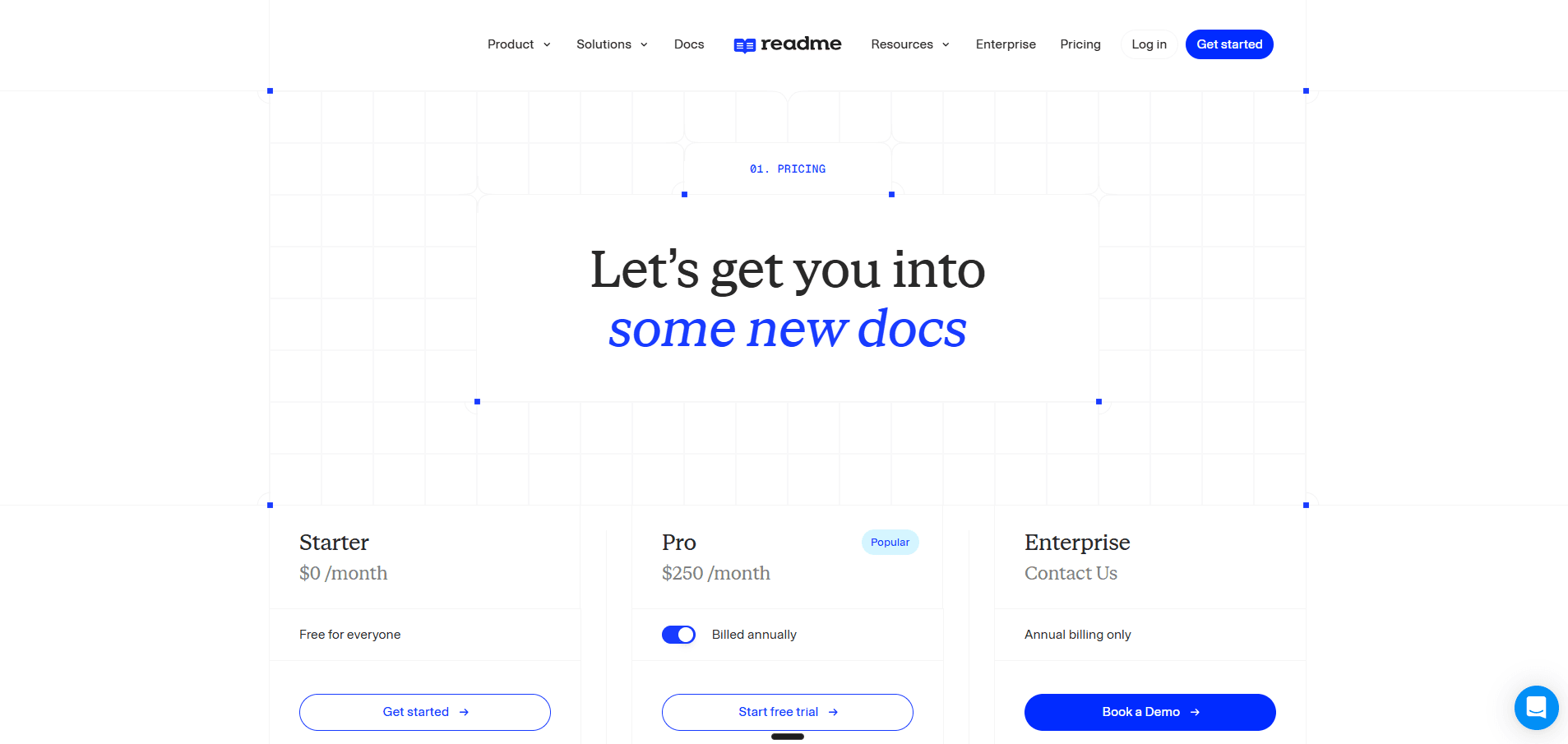
Starter is free with one teammate, one project, and one published version, and it is a real plan rather than a preview: an interactive API reference, a custom domain, bi-directional Git sync, usage metrics, and an MCP server. [4]
Pro is $250 a month with five teammates, then $20 a month each, still capped at one project. It adds branching and reviews, custom CSS and HTML, reusable content, changelogs, recipes, forums, PDF export, the AI Linter, and Ask AI Lite. [4]
Enterprise is custom on annual billing only, and it is where the governance lives: Editor and Viewer roles, multi-project management, SAML, audit logs, AI Translations, the full Docs Audit, and the Ask AI API. [4]
Then there are the two add-ons, and they need pricing before you commit. Ask AI is $150 a month on all three tiers, Enterprise included, so no contract bundles it. The Developer Dashboard is $100 a month for 5 million API logs, then $10 per additional million. [3] [4] Our ReadMe pricing breakdown works through every add-on and what the stack costs together.
What a Working Setup Actually Costs
| Your setup | Mintlify | ReadMe | Cheaper |
|---|---|---|---|
| One site, one writer, custom domain, no AI | $0, Starter | $0, Starter | Tie |
| One site, five editors, no reader AI | $0, Starter | $250, Pro | Mintlify |
| One site, five editors, reader AI | $450, Pro | $400, Pro plus Ask AI | ReadMe |
| One site, seven editors, reader AI | $450, Pro | $440, Pro plus Ask AI | ReadMe |
| One site, eight editors, reader AI | $450, Pro | $460, Pro plus Ask AI | Mintlify |
| One site, 10 editors, reader AI, per-key API metrics | $450, no equivalent capability | $600 | Mintlify |
| Two products, reader AI on both | $900, two deployments | $800, two plans plus Ask AI twice | ReadMe |
The crossover is eight editors. Below it, ReadMe with the Ask AI add-on undercuts Mintlify Pro. At eight and above, the $20 per admin charge overtakes it and Mintlify's unlimited seats win.
The reader assistant is worth pricing on its own, because only one of the two publishes a rate. Mintlify's 10,000 credits cover 400 answers at 25 credits each, which is about $1.13 per included answer. ReadMe's $150 buys an unstated number, so it is the cheaper assistant past roughly 130 questions a month and an open question after that. Ask for the limit in writing before you sign. [1] [4] [5]
Two seat rules compound the ReadMe figure: every teammate on the self-serve plans is a full Admin, and add-ons are billed for the whole year upfront. Our ReadMe pricing breakdown covers both, along with a contradiction in ReadMe's own documentation about whether the free plan can buy Ask AI at all. [3] [4]
There is one team this table fails twice. Eight or more editors, two products to document, and public docs whose traffic you do not control. On ReadMe that is two Pro plans, two Ask AI add-ons, and per-head billing on top of both. On Mintlify it is two Pro deployments and an assistant that goes quiet at 400 answers. Neither vendor has a plan for that team, because neither sells one.
That is the case Documentation.AI is priced for: four documentation projects, unlimited editor seats, editor and viewer roles, and the reader assistant in a single plan, with no overage on any tier. Start free with no credit card, or book a demo and we will price your setup against both of these before you commit to either.
Pros and Cons
Both platforms are competent, so the lists below skip the table stakes every documentation tool now ships. What remains is what tends to end an evaluation.
Mintlify
Pros
- Published output that looks designed with almost no configuration [2]
- A playground generated from OpenAPI and AsyncAPI, with code samples in 18 languages and prefilled credentials [2]
- Unlimited editor seats on Pro, which beats ReadMe from eight editors upward [1]
- A genuinely usable free tier: five editor seats, a custom domain, the web editor, an MCP server, and the API playground [1]
- A local toolchain with a CLI, preview server, MDX formatting, and link validation before anything ships [2]
- Automations that run the agent on a schedule or a code change, which ReadMe has no equivalent for [2]
- Fixed credit prices, so each action's cost is predictable even when the volume is not [5]
Cons
- No AI on the free plan, so the capability the platform is sold on cannot be tested without buying it or starting a 14-day trial [1]
- No middle tier. The upgrade path runs from free straight to Pro, which is a steep first step for a team of six [1]
- 10,000 credits cover 400 reader questions, so public docs with traffic you do not control run out, and the assistant switches itself off unless you enable overage [1] [5]
- Billed per deployment, so two documentation sites means two Pro subscriptions [1]
- RBAC, audit logs, PDF export, SSO, SCIM, white labeling, self-hosting, and EU hosting are all Enterprise. Without RBAC, every editor on Pro can publish to your live site [2]
- No equivalent to ReadMe's per-key API usage reporting at any price
- GitLab setup means issuing an access token and creating a webhook by hand [2]
If the free-to-Pro jump is the blocker, our Mintlify alternatives guide prices the rest of the field.
ReadMe
Pros
- An interactive API reference that sends real requests with the reader's own credentials [3]
- Per-key endpoint analytics through the Developer Dashboard, which nothing else in this comparison reports [3]
- A free plan that publishes a real site on a custom domain with bi-directional Git sync [3] [4]
- OpenAPI import offered during signup rather than as a step you configure afterwards [4]
- Richer content types, with recipes, a changelog, and discussion forums first-class inside a project [4]
- An AI Linter that scores pages against a style guide you write in prose, which few competitors ship [3]
- Cheaper than Mintlify for any editing team of seven or fewer, even with reader AI switched on [1] [4]
Cons
- One teammate on the free plan, so a team cannot evaluate it without committing to a paid plan [4]
- Reader AI is a paid add-on at every tier including Enterprise, and no question volume, cap, or overage rate is published anywhere [3] [4]
- No role below full Admin until Enterprise, so a reviewer holds the same keys as the domain owner [3] [4]
- One project per plan, so a second product is a second subscription or a sales call [4]
- Custom JavaScript, landing page templates, and removing ReadMe's logo are Enterprise only [4]
- 24 hours of API request history on every plan by default, extended only by the Developer Dashboard add-on [4]
- The upgrade to ReadMe Refactored cannot be reversed, and it drops Suggested Edits, plus Staging and Translations for Enterprise projects [3]
- Nothing updates documentation on a schedule or on merge
Teams that hit the one-project ceiling usually start with our ReadMe alternatives guide.
Head to Head Comparison: Mintlify vs ReadMe
Neither platform sweeps the table. ReadMe takes the API reference, reader identity, content types, and price at small scale. Mintlify takes published design, seat economics, tooling, and automated maintenance. Only rows that would change a decision made the cut.
| Category | Mintlify | ReadMe |
|---|---|---|
| Best suited to | Developer docs a larger team edits and a designer never has to fix | One API, with the usage data behind it |
| Free plan | Five editor seats, custom domain, playground, no AI | One teammate, one project, interactive reference, Git sync |
| Entry paid price | $450 per site per month, seats included | $250 per month, five teammates, then $20 each |
| Projects included | One deployment per subscription | One project per plan |
| Reader chat assistant | Pro, metered at 25 credits per answer | $150 per month add-on, Lite version on Pro |
| Reader answers included | 400 a month, then off unless overage is on | No published volume |
| Cost per reader question | About $1.13 per included answer | Not published |
| Authoring agent | Document scope, opens a pull request | Selection scope, 10,000 character cap, diff you approve |
| Automated maintenance | Four triggers, 500 runs a day each | Not available |
| Content audit and linting | Not available | Linter on Pro, full Docs Audit Enterprise |
| API reference | Generated playground, 18 languages, spec-driven | Real requests with the reader's own key, request history per user |
| API usage analytics | Not available | $100 per month plus $10 per million logs |
| Local development | mint CLI, preview server, link validation | Git sync and the rdme CLI, no local preview server |
| Roles below Enterprise | None, every Pro editor can publish | None, every teammate is an Admin |
| Custom CSS and JavaScript | Every plan, white labeling Enterprise | CSS and HTML on Pro, JavaScript Enterprise |
| Versioning | Branch-based, through Git | One version on the free plan, unlimited on Pro |
| Machine-readable output | llms.txt, llms-full.txt, skill.md, MCP server, all plans | llms.txt, custom llms.txt, MCP server, all plans |
| Migration help | Enterprise line item, ReadMe guide published | Not published |
Final Take
The comparison resolves itself once you answer one question: do you need to know which developer called which endpoint?
Pick ReadMe if the answer is yes. The interactive reference, the personalized keys, and the Developer Dashboard are built for documentation that exists to get integrators onto an API, and it is the cheaper platform for any editing team of seven or fewer even after the reader AI add-on. The catch is everything priced beside the plan, and that roles, multi-project support, and design freedom all sit behind a sales call.
Pick Mintlify if the answer is no. The local development loop, the published design, the playground, and automations that update pages when code changes are ahead of what ReadMe offers, and unlimited seats mean a growing team is not billed for growing. The catch is the jump from free to Pro with nothing in between.
If the shortlist is wider, the same test runs through GitBook vs Mintlify, ReadMe vs GitBook, Document360 vs Mintlify, Document360 vs ReadMe, Mintlify vs Redocly, and Mintlify vs GitBook vs ReadMe.
Neither platform tells you which pages failed. Mintlify's automations fire on a trigger and ReadMe's Linter scores pages against a style guide you wrote, but a reader who asked a question and got nothing useful back leaves no mark on either system. That is the maintenance problem both are still one step away from.
What they share commercially is worth arguing with. Neither includes the assistant your readers talk to in the price it advertises, neither leaves it switched on past a trial without payment, and neither helps you move: Mintlify's migration services are an Enterprise line item and ReadMe publishes no migration support at all. Documentation.AI includes migration services from its Pro plan, and nothing on your current hub has to come down until the new site answers on your own domain. Start free with no credit card, or book a demo and we will scope the move against your spec and your page count.
FAQs: Mintlify vs ReadMe
1. Which Is Cheaper, Mintlify or ReadMe?
ReadMe, up to seven editors. One site with five editors and a reader assistant is $400 a month on ReadMe, counting Pro at $250 and the $150 Ask AI add-on, against $450 on Mintlify Pro. At eight editors the $20 per admin charge overtakes it and Mintlify's unlimited seats are cheaper from there. Both bill per project, so two products is $800 on ReadMe and $900 on Mintlify. [1] [4]
2. Is Mintlify or ReadMe Better for API Documentation?
ReadMe, if the reader is integrating against your API. Its reference sends real requests with the reader's own credentials and logs their request history on the page, and the Developer Dashboard reports which endpoints each key calls. Mintlify's playground is generated from your spec, supports AsyncAPI as well as OpenAPI, and produces code samples in 18 languages, but it does not know who is reading. [2] [3]
3. Does Mintlify or ReadMe Have a Free Plan?
Both. Mintlify's Starter gives five editor seats, a custom domain, the API playground, and an MCP server, with no AI at all. ReadMe's Starter gives one teammate a published site with an interactive API reference, a custom domain, and bi-directional Git sync. Mintlify's free plan suits a team evaluating together, ReadMe's suits one person shipping something real. [1] [4]
4. How Much Does the Reader-Facing Assistant Cost on Each Platform?
Mintlify's is included on Pro at $450 per site per month, metered at 25 credits per answer, which is 400 answers from the included 10,000 credits and about $1.13 each. ReadMe's full Ask AI is a $150 per month add-on on any plan, including Enterprise, with no published question volume, cap, or overage rate. Pro and Enterprise include a Lite version with no customization, analytics, or API. [1] [3] [4] [5]
5. What Happens When You Run Out of AI Usage?
On Mintlify the assistant stops until the balance resets, because overages are off by default, though you can enable them with a spending cap and alerts. On ReadMe there is nothing published to run out of, which is not the same as unlimited. Ask for the limit in writing before you sign. [1] [3] [5]
6. Can You Migrate From ReadMe to Mintlify?
Yes. Mintlify publishes a ReadMe migration guide and its pricing FAQ claims automated migration from ReadMe, though migration services are an Enterprise line item and the two pages do not fully agree on scope. Content on either platform is MDX in a Git repository, so pages travel more easily than components, themes, and anything built in custom HTML. [1] [2]
7. How Many People Can Edit on Each Platform?
Mintlify Pro includes unlimited editor seats and its free plan includes five. ReadMe Pro includes five teammates and charges $20 a month for each additional one, and its free plan includes one. On ReadMe every teammate on the self-serve plans is a full Admin, because Editor and Viewer roles are Enterprise only. Mintlify reserves RBAC for Enterprise as well, so every Pro editor can publish. [1] [2] [3] [4]
8. Which Platform Handles Documentation for Several Products?
Neither, without paying twice. Mintlify bills per deployment, so a second site is a second Pro subscription, though credits pool across the organization. ReadMe caps its self-serve plans at one project, and putting several projects on one domain, searching across them, or administering them together requires Enterprise. [1] [4]
Sources
- Mintlify. "Pricing." Mintlify. https://www.mintlify.com/pricing
- Mintlify. "Mintlify Docs." Mintlify. https://www.mintlify.com/docs
- ReadMe. "ReadMe Docs." ReadMe. https://docs.readme.com/main/docs
- ReadMe. "Pricing." ReadMe. https://readme.com/pricing
- Mintlify. "Credit Pricing." Mintlify Docs. https://www.mintlify.com/docs/credits
Neither quite fits?
Reader AI on the free plan
One sells it as an add-on, the other locks it behind its top plan. Ours is on the free tier.
No credit card required