ReadMe vs Documentation.AI: Is an API-Only Docs Platform Enough in 2026?
ReadMe sells one project per plan and charges separately for reader-facing AI and API metrics. Documentation.AI sells one project that holds several products. We built the same API documentation on both, and the difference turned out to be almost entirely in the pricing model rather than the product.

Roop Reddy · Co-Founder, Documentation.AI
Last updated
On this page
- ReadMe vs Documentation.AI: The Short Answer
- How We Tested Both Platforms
- Setup and Onboarding for Developers and Technical Writers
- Structuring Docs Beyond the API Reference
- AI Features Compared: What ReadMe Gates Behind Paid Plans
- Published Docs Experience: API Explorer, Search, and Analytics Limits
- ReadMe Pricing vs Documentation.AI Pricing in 2026
- ReadMe Pros and Cons
- Feature-by-Feature Breakdown: Where Each Platform Wins
- Who ReadMe Is Best for and Who Outgrows It
- Final Verdict: Which Platform Should You Choose?
- Related ReadMe Comparisons
- FAQs
- Sources
ReadMe has been the default for API-first companies for more than a decade. If your product is an API and your reader is the developer integrating it, ReadMe's interactive reference, request logs, and developer portal are a coherent answer that few tools match. Our hands-on ReadMe review scores each part of it on its own.
Documentation.AI, an AI documentation platform, starts from a different premise: that guides, reference, and support content are one system, maintained by an AI agent rather than by whichever engineer last touched the endpoint.
Here is the finding that shaped this comparison. We expected the gap to be in the product, and it mostly is not. ReadMe's onboarding is smooth, its editor is a modern visual editor with a raw MDX mode, and its AI features work well. The gap is in what each platform charges for, and in what a single plan is allowed to contain. Every price and limit below was checked against each vendor's own pricing page and documentation in September 2026.
ReadMe vs Documentation.AI: The Short Answer
ReadMe is the stronger fit when your documentation is one API product and you want readers to see their own API keys and request logs inside the docs. Documentation.AI is the stronger fit when documentation spans several products or audiences, when more than one person edits it, and when reader-facing AI is a requirement rather than an add-on. If neither profile is yours, it is worth scanning the wider field of ReadMe alternatives first.
ReadMe makes sense if:
- Your product is a single API, and the developer integrating it is your primary reader
- You want the Developer Dashboard, where logged-in readers see their own credentials and their own API request logs
- You need recipes, a changelog, and discussion forums as first-class content types
- Your budget clears roughly $400 a month, because Pro plus reader-facing Ask AI is the realistic configuration
- Five admin seats is a ceiling your team will not hit
Documentation.AI makes sense if:
- You document more than one product, version, or language, and you do not want to buy a separate plan for each
- More than one person edits the docs, and paying $250 a month to invite the second one is not appealing
- You want reader-facing AI included and metered per question rather than sold as a flat add-on with no published volume
- You want analytics that name the reader questions your documentation failed to answer
- Design quality of the published site is something you are judged on
The honest split is not API reference quality, editor quality, or AI quality. Both platforms render an interactive playground from an OpenAPI spec, both have a capable visual editor, and both have AI that does real work. The split is the unit each platform scales by. ReadMe scales by the project. Documentation.AI scales by the credit.
One correction worth making up front, because older comparisons still repeat it: ReadMe's signup offers Continue with Google alongside email, and onboarding will import an OpenAPI spec for you before you have written anything. The claim that ReadMe is email-only and unguided is out of date. [1]
How We Tested Both Platforms
We built the same documentation on each platform and compared the same six things:
- Signup and setup
- Importing an OpenAPI spec
- Editing and restructuring content
- The AI features in real use
- Preview and publishing
- Total cost at the tier a growing team would actually buy
No winner is declared per category. Each section reports what each platform did, then a verdict on what the difference means in practice. Several of those verdicts favor ReadMe, and one of them favors ReadMe decisively. We ran the same test for GitBook vs Documentation.AI, Mintlify vs Documentation.AI, Document360 vs Documentation.AI, Theneo vs Documentation.AI, Archbee vs Documentation.AI, Redocly vs Documentation.AI, and Fern vs Documentation.AI.
Where a claim involves pricing, seat counts, or feature gating, the source is the vendor's own published pricing page or documentation rather than our estimate. Where a vendor does not publish a number, we say so instead of filling the gap.
Setup and Onboarding for Developers and Technical Writers
Both platforms get you to a documentation site quickly, and both onboardings are genuinely good. ReadMe's is the more opinionated of the two and does something no other platform in this category does at signup. The difference is not the experience. It is who else is allowed into it.
ReadMe
Signup offers Continue with Google or Continue with Email, and the flow that follows is straightforward: name your documentation, upload a logo, and choose an organization. [1]
The step worth calling out is the OpenAPI import, offered during onboarding itself. Most platforms treat the spec as something you connect after setup. ReadMe puts it in the initial flow, so an API team can arrive at a generated, interactive reference before doing anything else. If your product is an API, this is the fastest path to a real reference of any tool we tested.
GitHub sync comes after, and it was smooth and quick. Connect the repository, and bi-directional sync keeps the spec and the published reference in step from then on. At the end of onboarding you have working documentation.
The constraint is not the experience, it is the seat count. Starter includes one admin. Inviting teammates is a Pro feature, and Pro is $250 a month billed annually with five admins, then $20 per additional admin. [1] A technical writer joining an evaluation is not a settings change, it is a $250 monthly commitment. There is a 14-day trial with full Pro access, which is the practical way to evaluate collaboration before paying. [1]
Documentation.AI
Signup follows the same shape, Google or email, then a company name. Setup then splits into two paths: a quick setup that goes straight into the visual editor with no repository connection, and a markdown path that connects a GitHub repository for a docs-as-code workflow.
The OpenAPI route is equivalent to ReadMe's, though it happens after setup rather than during it. Import an OpenAPI 3.0 or newer specification, reference it from documentation.json, and the interactive playground appears automatically alongside the request and response components. [2]
The free Starter plan includes five editor seats and 10,000 one-time AI credits. [2][3] Standard raises that to 10 seats, and Pro removes the seat limit entirely.
Verdict: ReadMe wins the onboarding itself. Offering an OpenAPI import at signup is the right instinct for an API-first product, and it gets a developer to a working reference faster. Documentation.AI's advantage is who can follow them in. ReadMe asks $250 a month before a second person can edit, so a solo engineer sets up ReadMe faster and a team of three evaluates Documentation.AI at all.
Structuring Docs Beyond the API Reference
Editing is close to parity, and anyone expecting ReadMe to feel dated will be surprised. Both platforms have a Notion-style visual editor with a raw markup mode underneath. The divergence is not how you edit a page. It is what a single project is permitted to hold.
ReadMe
The editor is a modern visual editor and the default mode is the common format rather than the developer one, which is not how ReadMe is usually described. Editing was easy in testing, restructuring was simple, and a raw mode gives you the underlying MDX when you want it. A writer who does not use Git will not be blocked here.
There is an AI agent inside the editor that acts on a prompt, and its response time was good.
Content types are a genuine strength and richer than most competitors offer. Guides, API reference, recipes, a changelog, and discussion forums are all first-class inside a project. Recipes in particular are a well-designed format that most of this category has no answer for.
Versioning is handled inside the project. Starter publishes one version; Pro publishes unlimited versions, which covers the v1 and v2 case cleanly. [1]
Multiple products is where it gets expensive. Starter and Pro are both limited to one project, and ReadMe's own pricing FAQ is explicit: you may run multiple projects on separate plans, but hosting them on a single domain, setting up global search across them, and using multi-project administration all require Enterprise. [1] Two products means two Pro plans at $250 each, or a sales conversation. Aggregated documentation metrics across projects are Enterprise as well, so the moment you have more than one project you also lose the ability to see them as one system. [1]
Documentation.AI
The editing layer is comparable: a visual editor with slash commands, or a Git-native code editor with the same structure expressed in documentation.json.
Where it diverges is the layer above the page, through a three-layer model of dimensions, views, and content. [2]
Dimensions are top-level context selectors that split documentation into parallel variants, and the documented use cases are exactly the ones that force a second ReadMe project: Product A against Product B, cloud against on-premise, v1 against v2, English against Spanish. Readers switch context from a dropdown at the top of the site, and the system filters content to what belongs to that context. [2]
Views sit beneath dimensions and control how navigation is presented, as tabs or dropdowns. A common pattern is a Guides tab and an API Reference tab inside one dimension, each with its own sidebar. [2]
The documentation is notably restrained about it. The guidance is to start with no dimensions and add one only when the variants are stable and long-lived, and to avoid them when only a few pages differ or when the difference is audience-based rather than a true variant. [2] That is advice against using the feature, which is not what a marketing page would say.
Verdict: For editing a page, these are close enough that editor quality should not decide your choice. ReadMe's content types are richer, and if your developer community lives in a forum attached to your docs, that alone may settle it.
For more than one product, the models diverge on cost rather than capability. A second product on ReadMe is a second plan or an Enterprise contract. On Documentation.AI it is a dimension inside the plan you already have. This is the concrete answer to whether an API-only platform is enough: it is, right up until your company ships a second thing.
AI Features Compared: What ReadMe Gates Behind Paid Plans
ReadMe's AI is better than its reputation and it performed well in testing. This section is not an argument that ReadMe's AI is weak. It is an accounting of which tier each piece of it sits on, because the answer is three different tiers plus a paid add-on.
ReadMe
The in-editor agent responded quickly and did what it was asked. Agent Owlbert rewrites for clarity and can suggest and implement ReadMe's built-in MDX components. [4]
The AI Linter was the most interesting feature we used on either platform. You write style guide rules in natural language, it flags errors and warnings across a page, and it proposes the changes. Owlbert can then apply what the linter finds. [4] Nothing in Documentation.AI is shaped quite like it.
GitHub AI Writer is the third piece and it fits how engineering teams already work. It watches your codebase, detects changes that affect the docs, analyzes the diff, identifies new endpoints or changed setup steps, and drafts the update on a review branch. Published docs are never modified directly. You review a side-by-side diff and merge it like a pull request from a teammate. [4]
All three are Pro. Docs Audit, which gives a site-wide view of gaps and inconsistencies, is Enterprise, as are Private AI Context and Global Lint Rules. [1][4]
Reader-facing AI is where the cost lands. Ask AI is a $150 per month add-on, and the pricing table lists that same $150 against all three tiers, so it is an add-on at Starter, Pro, and Enterprise alike. Pro and Enterprise include Ask AI Lite, which puts the assistant on the page but excludes customization, analytics, and the Ask AI API. [1][5] Tone, answer length, forbidden topics, model selection, and any visibility into what readers actually asked all sit behind the paid version.
ReadMe does not publish a question volume for Ask AI. The comparison table notes that additional usage is available on the Ask AI plan, which implies usage tiers the public pricing does not describe. [1] For a team modeling cost against public traffic, that is a gap.
The free tier's MCP server is labeled "Limited," and the pricing page states that adding Ask AI is what lets agents search and read your full documentation over MCP. [1] That server is the remote layer; a newer in-page one, WebMCP, is in origin trial in Chrome and Edge and sits alongside it rather than replacing it.
Documentation.AI
Two features consume credits, and nothing else does. The AI Documentation Agent is editor-facing, and the AI Assistant powers the Ask AI widget for readers. Browsing, editing, and publishing are free. [2]
Reader-facing AI costs exactly 10 credits per question, regardless of answer length or which page it was asked from. [2] Standard's 10,000 monthly credits are 1,000 reader questions, and Pro's 30,000 are 3,000.
Agent work is metered by task rather than by token: roughly five credits for a quick edit, 35 for a single page edit, 30 for a navigation change, 50 to create a page, 60 for a structural reorganization, and 320 for a large import or full restructure. The documentation is specific about what drives the number: the count of steps, the volume of content processed, the type of operation, and task complexity. [2]
Credits reset on a 30-day cycle, and 50 percent of unused credits carry forward up to a cap of 1.5 times the monthly allocation. [2]
The agent pulls context from connected repositories, Jira, and Confluence, so documentation can be generated from where the product work happened rather than from the diff alone.
Verdict: On authoring AI these are genuinely close, and the AI Linter is a feature Documentation.AI answers rather than beats. On reader-facing AI they are not comparable. ReadMe's is a $150 monthly add-on at every tier with no published question volume, and the version bundled into Pro strips out the analytics. Documentation.AI's is 10 credits per question at every paid tier with the analytics included. If you want to know what your readers asked, ReadMe charges $150 a month for it and Documentation.AI does not charge for it at all.
Outgrowing one project?
Reference and guides in one
Import your OpenAPI spec and see the playground, the guides, and Ask AI on one free project.
No credit card required
Published Docs Experience: API Explorer, Search, and Analytics Limits
Preview is good on both. The three differences worth knowing are what stands between you and a published site, how the published site looks, and what data each platform gives back to you afterwards.
ReadMe
Preview was one of the better parts of the experience. A live preview runs alongside the editor and expands into a full preview, so you can check a page as a reader will see it before committing. The published site carries light and dark modes and an Ask AI search toolbar.
Publishing has a step other platforms do not have. Choosing to publish redirects you to the pricing page, where you enroll in a plan, free or paid, before the docs go live. ReadMe's own FAQ confirms this is by design: you choose a plan in billing settings to launch your docs. [1] It is not a paywall, since Starter is free, but it does put a billing screen between a finished draft and a public URL.
The published design was decent without being the platform's strongest suit. It is clean and professional, and it is not where ReadMe is competing hardest.
The Developer Dashboard is where ReadMe is competing hardest, and no honest comparison skips it. It combines personalized documentation, where logged-in developers see their own API credentials in the hub, with real-time request logs, so a developer debugging an integration reads their own failed calls without leaving the docs. Admins get My Developers, which surfaces usage patterns, endpoint trends, error spikes, new users, and cohort filtering. [5]
It is not free and it is not only a billing question. Setup has two phases: deploy the Personalized Docs Webhook to authenticate users and surface credentials, then integrate the Metrics SDK, available for Node, PHP, Python, and others, into your API so request data reaches ReadMe. [5] That is engineering work on your production API, not a toggle.
Pricing is volume-based and separate from your plan: $100 per month for 5 million API logs, then $10 per additional 1 million. [1] Retention is the detail most teams miss. Request history is 24 hours on Starter, Pro, and Enterprise alike, and extended history is another $100 per month for one year of request history and 30 days of detailed logs. [1] Ask AI logs are retained for 60 days. [5]
Documentation.AI
Preview sites work through branches, where each non-live branch gets its own preview URL. Developers can save and open a pull request, and non-developers save and merge after reviewing. Preview sites start at the Standard plan. Publishing goes live from the editor without a billing step.
The published site carries the interactive playground, Ask AI, and light and dark modes. The playground supports server URL selection and variable substitution from the OpenAPI spec, so readers can pick from multiple defined servers and override variables, and their choice persists across sessions. [2]
Page-level control is finer than a straight spec dump. An openapi-mode of custom injects only the playground and the request and response examples, leaving the rest of the page for content you write yourself, which matters when the generated parameter descriptions are not good enough. [2]
Analytics is aimed at a different question than ReadMe's. Traffic splits into People, AI Agents, and Bots and Crawlers. The AI Assistant tab reports total questions, unique sessions, low confidence answers, and answer satisfaction, with confidence graded High at 80 percent and above, Medium from 50 to under 80, and Low below 50. [2]
You can filter sessions by confidence and read the full conversation, and the same data is available through a read-only REST API. Filtering for low confidence returns entries like "how do I rotate an API key?" answered with "I could not find anything about rotating keys in the documentation." [2] That is a documentation gap list written by your readers. A single API request covers at most 90 days.
Verdict: Preview is a tie, and both are good. Design goes to Documentation.AI, though the margin is one of polish rather than a deficiency on ReadMe's side. Publishing is simpler on Documentation.AI, since ReadMe routes you through plan selection first.
Analytics is not a tie in either direction, because the two measure different things. ReadMe measures your API. Nothing in Documentation.AI tells you which endpoint is throwing 401s for a specific customer, and if that is the problem you are solving, ReadMe wins outright and you should stop comparing. Documentation.AI measures your documentation, and tells you which reader questions your content failed to answer, which ReadMe will only tell you if you buy the $150 add-on.
ReadMe Pricing vs Documentation.AI Pricing in 2026
ReadMe Pro is $250 a month and it is not the number you will pay. Ask AI is $150 more, the Developer Dashboard is $100 more, and extended log retention is $100 more again. Documentation.AI Pro is $159 a month with the AI and the analytics already in it. All figures below are the annual billing rate.
ReadMe
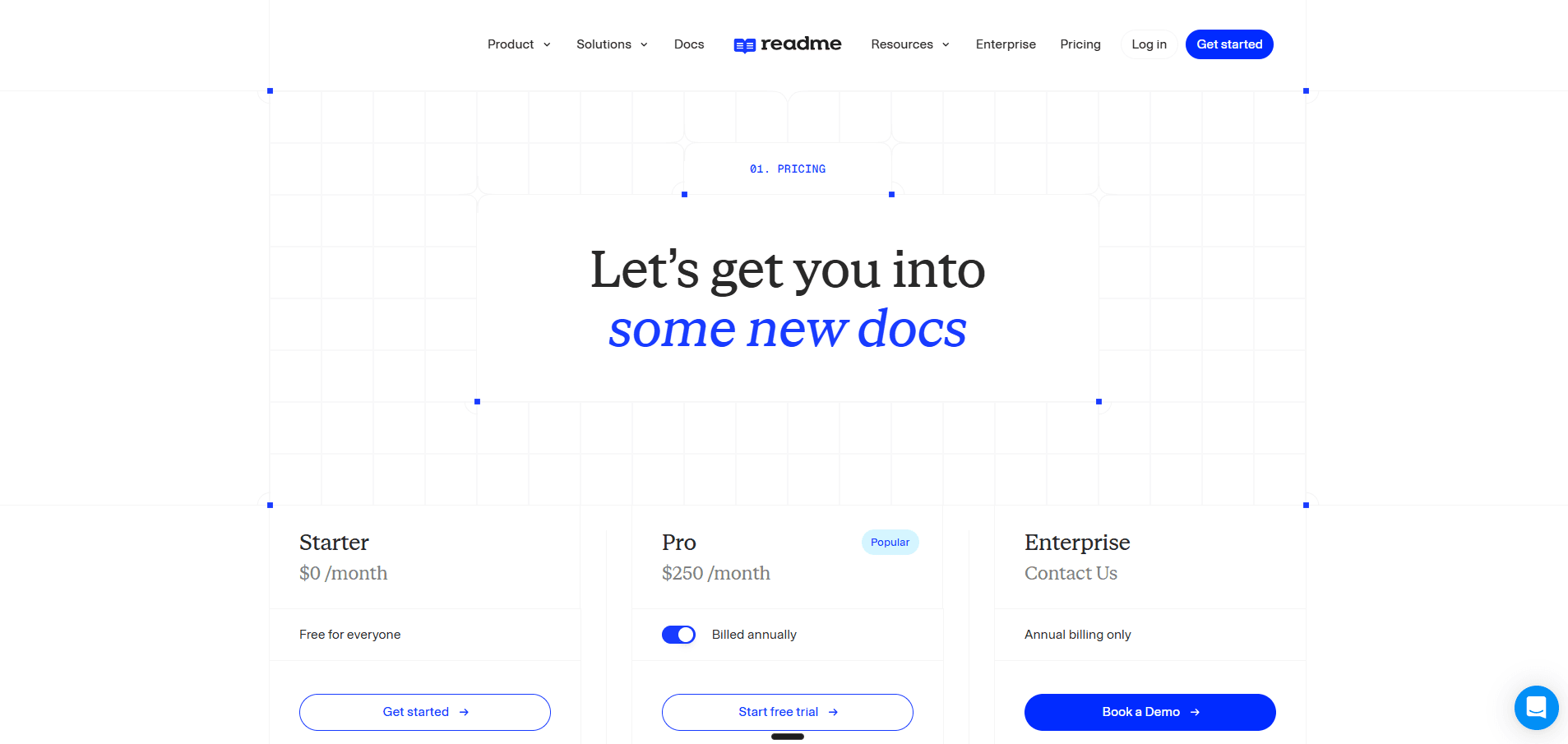
Starter is free: one project, one published version, one admin, a custom domain, bi-directional sync, the interactive API reference, usage metrics, and the markdown editor. AI at this tier is the AI dropdown, llms.txt, and a limited MCP server. [1]
Pro is $250 a month billed annually. It brings five admins at $20 per additional admin, unlimited published versions, multiplayer editing, branching and reviews, private docs, a landing page, changelog, recipes, forums, custom MDX components, reusable content, and custom CSS and HTML. The AI additions are Ask AI Lite, Agent Owlbert, the AI Linter, and GitHub AI Writer. It is still one project. [1]
Enterprise is custom and annual only. It is what you buy for multiple combined projects, aggregated metrics, user roles and access control, audit logs, SSO and OAuth, and the Enterprise-only AI features: Docs Audit, Private AI Context, and Global Lint Rules. [1]
The add-ons are the part to model carefully, because each is priced per month on top of any tier:
- Ask AI: $150. Reader-facing AI with customization, analytics, and API access.
- Developer Dashboard: $100 for 5 million API logs, then $10 per additional 1 million.
- Extended history and logs: $100. One year of request history and 30 days of detailed logs, against a 24-hour default.
A team running an API product with reader-facing AI and real metrics is at $250 plus $150 plus $100, so $500 a month, before extended retention and before a sixth admin. Payment is credit card in USD. [1]
Documentation.AI
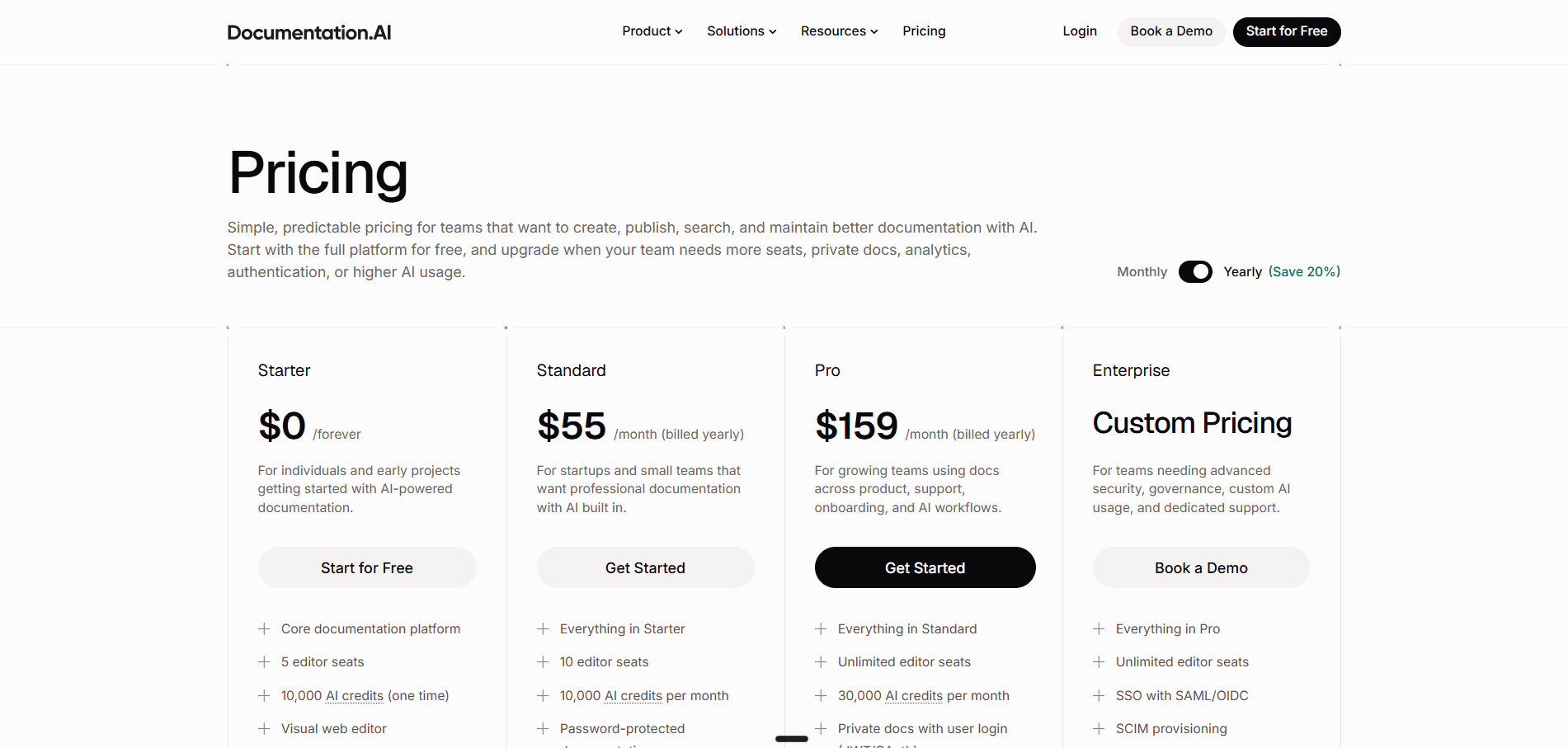
Starter is free with five editor seats, the visual web editor, a custom domain, and 10,000 one-time AI credits, which means the AI is testable before any payment. [3]
Standard is $55 a month for 10 editor seats, 10,000 AI credits a month, preview sites, and password-protected documentation. [3]
Pro is $159 a month with unlimited editor seats, 30,000 AI credits a month, and private docs with user login through JWT or OAuth. [3]
Enterprise is custom, adding SSO through SAML or OIDC and SCIM provisioning. [3]
What the Two Bills Actually Look Like
Take a five-person docs team on one API product who want reader-facing AI and want to see what readers asked.
On ReadMe that is Pro at $250 plus the Ask AI add-on at $150, so $400 a month, and the analytics you wanted are the reason the add-on is not optional. Add the Developer Dashboard and it is $500.
On Documentation.AI that is Pro at $159 a month, with 3,000 reader questions, unlimited editors, and the assistant analytics included.
Now add a second product. On ReadMe, Pro is one project, so it is a second Pro plan at $250, taking the total to $650, or an Enterprise contract if you want the two on one domain with global search. On Documentation.AI it is a dimension, and the bill does not move.
Pricing verdict: ReadMe's list price is competitive and its free tier is better than most, since an interactive API reference at $0 is not something the category hands out. The problem is that the list price is not the price. Reader-facing AI, API metrics, and log retention are three separate line items that a team wanting a modern documentation experience will buy all three of, and none of them appear in the $250 headline. Documentation.AI's headline includes the AI, which is the whole reason the comparison is being made.
If you are building the number rather than choosing between two tools, our ReadMe pricing breakdown covers every add-on in detail, and we have priced the rest of the shortlist the same way: Mintlify, GitBook, Redocly, Theneo, Archbee, and Fern.
ReadMe Pros and Cons
ReadMe is worth it when your product is one API, your reader is the developer integrating it, and you want that developer to see their own keys and their own failed requests inside the documentation. Outside those conditions the value case gets harder, and the reasons are structural rather than a matter of missing features.
Pros
- The Developer Dashboard is genuinely differentiated. Personalized credentials plus real-time request logs in the hub is a capability the rest of this category does not have
- Onboarding offers an OpenAPI import at signup, which is the fastest route to a working interactive reference we tested
- GitHub sync was quick and unfussy, and bi-directional sync keeps the spec and the published reference aligned
- The interactive API reference is mature, and it is on the free tier
- The visual editor is modern and defaults to the common format rather than the developer one. Restructuring was simple, and a raw MDX mode is there when you want it
- The AI Linter is the standout AI feature on either platform: natural-language style rules, flagged errors, and proposed fixes
- GitHub AI Writer produces reviewable branch diffs from code changes, which fits how engineering teams already work
- Live preview alongside the editor, expanding to a full preview
- Content types are richer than competitors: recipes, changelog, and discussion forums are first-class
- A 14-day trial with full Pro access, which is enough to evaluate collaboration properly
Cons
- Starter is a single-admin plan. The second editor costs $250 a month
- One project on both Starter and Pro. A second product means a second plan or Enterprise
- Reader-facing Ask AI is a $150 monthly add-on at every tier, including Enterprise
- Ask AI Lite, the version bundled with Pro, has no analytics, no customization, and no API
- No published question volume for Ask AI, which makes the cost of public traffic hard to forecast
- Publishing routes you to plan selection before the docs go live, even on the free tier
- Request history is 24 hours by default, and extending it is another $100 a month
- The Developer Dashboard is metered on API log volume, so your documentation bill scales with your API traffic
- Docs Audit, the site-wide gap analysis, is Enterprise only
- Metrics setup requires deploying a webhook and integrating an SDK into your production API
- The published design is competent but not the strongest in the category
Most of these are not feature gaps. ReadMe does what it does well, and the parts of it we used worked. They are consequences of a pricing model built around one project and a product built for one API, and both get more expensive as the company around the API grows.
Feature-by-Feature Breakdown: Where Each Platform Wins
Parity is common on the things people assume are differentiators, so the rows that actually differ are the ones worth reading twice.
| Category | ReadMe | Documentation.AI |
|---|---|---|
| Best for | One API product, developer readers | Docs spanning products, audiences, and teams |
| Signup | Google or email | Google or email |
| OpenAPI import at onboarding | Yes | After setup |
| Setup paths | One, project-based | Two: visual quick setup, or GitHub markdown flow |
| GitHub sync | Bi-directional, quick to connect | Yes, docs-as-code |
| Interactive playground | Yes, free tier | Yes |
| Per-endpoint page control | Reference-driven | Auto or custom injection mode |
| Visual editor | Modern, default mode, raw MDX available | Modern, slash commands, code editor available |
| Editor seats, free tier | 1 admin | 5 editors |
| Editor seats, main paid tier | 5, then $20 each | Unlimited |
| Projects on paid tier | 1 | 1, with dimensions inside it |
| Multiple products | Second plan or Enterprise | Dimensions, no extra cost |
| Versioning | Unlimited versions on Pro | Dimensions |
| Recipes and forums | Yes | Not available |
| Changelog | Yes | Yes |
| In-editor AI agent | Yes, responsive in testing | Yes |
| AI linting | Yes, natural-language rules | Not as a named feature |
| Code-change drafting | GitHub AI Writer | Repo-aware agent and workflows |
| AI context sources | Codebase via GitHub | Repos, Jira, Confluence |
| Reader-facing AI | $150/mo add-on at every tier | Included, 10 credits per question |
| Reader AI analytics | Ask AI add-on only | Included |
| Answer confidence scoring | Not available | Yes, with a low-confidence gap report |
| Analytics REST API | Ask AI API on the add-on | Read-only analytics endpoints |
| Site-wide docs audit | Enterprise | Agent-assisted |
| Live preview | Yes, expands to full preview | Yes, per-branch preview URLs |
| Publishing | Requires plan selection first | Direct from the editor |
| Published design | Clean and professional | Stronger out of the box |
| API request logs | Yes, the Developer Dashboard | Not available |
| Personalized docs with reader keys | Yes | Not available |
| API log retention | 24 hours, or $100/mo for 1 year | Not applicable |
| Traffic segmentation | Documentation metrics | People, AI Agents, Bots and Crawlers |
| Free tier AI | Dropdown, llms.txt, limited MCP | 10,000 one-time credits |
| Paid entry | $250/mo | $55/mo |
| Main paid tier | $250/mo plus add-ons | $159/mo, 30,000 credits |
| Realistic configured cost | ~$400 to $500/mo | $159/mo |
| SSO and SCIM | Enterprise | Enterprise |
| Free trial | 14 days of Pro | Free tier, no expiry |
Who ReadMe Is Best for and Who Outgrows It
ReadMe is best for a company whose product is an API, whose documentation has one audience, and whose main documentation problem is time to first successful call. It is not a weaker product than the alternatives for that job. It is the strongest one.
ReadMe is the right call when:
- Your product is an API and the integration experience is the thing you are optimizing
- Support tickets are about failed requests, not about missing guides, so reader-visible request logs solve your actual problem
- You want a developer community attached to your docs, and forums matter
- One team owns the documentation and five admins covers it
- Your API traffic is predictable enough that log-volume pricing is not a risk
Teams outgrow ReadMe at four specific points, and they are all structural rather than a matter of taste:
- The second product. Pro is one project. A second product is $250 more a month, or Enterprise if you want them on one domain with shared search. [1]
- The second editor. Starter has one admin, so adding a technical writer to a free project is not possible. Evaluation and early collaboration both start at $250. [1]
- The non-API audience. Once support content, onboarding guides, or internal documentation need somewhere to live, ReadMe's model wants another project for them.
- Reader-facing AI as a requirement. When Ask AI stops being a nice extra and becomes something the docs are expected to have, it is $150 a month on top of whatever you already pay, and the bundled Lite version will not tell you what readers asked. [1][5]
If none of those four apply to you, this article is not an argument for switching. If two or more do, the gap stops being a preference and starts being arithmetic.
Final Verdict: Which Platform Should You Choose?
Choose ReadMe if your documentation problem is the API itself and you want readers holding their own credentials and reading their own logs on the page. Choose Documentation.AI if your documentation problem is everything around the API, and if you want the AI and the analytics in the plan rather than beside it.
The most useful thing we can report is that this was not a product gap. ReadMe's onboarding is smooth, its OpenAPI import at signup is the best in the category, its editor is modern, and its AI linter is a feature we would like to see elsewhere. Anyone telling you ReadMe is a dated developer-only tool has not opened it recently.
The question in the title still has a real answer, and it is conditional. An API-only documentation platform is enough for as long as your company is an API-only company. What changes is that most companies stop being that shape. A second product ships, a support team starts writing, a technical writer joins, and each of those is a line item on ReadMe and a configuration change on Documentation.AI. At $159 a month against a realistically configured $400 to $500, with unlimited editors against five, and with reader-facing AI included rather than sold separately, the case for Documentation.AI is not that it does more. It is that it charges differently for the things a growing documentation team ends up needing anyway.
The honest test is your own content, not our table. Both platforms have a free path: ReadMe's Starter publishes an interactive API reference at $0, and Documentation.AI's free tier includes five editors and 10,000 AI credits. Import the same OpenAPI spec into both and see which one you would rather maintain in a year.
Related ReadMe Comparisons
Weighing ReadMe against more than one tool? These cover the rest of the field:
- Mintlify vs ReadMe, developer docs sites against API-first developer portals
- ReadMe vs GitBook, API portals against collaborative knowledge bases
- Document360 vs ReadMe, knowledge base tooling against developer documentation
- Mintlify vs GitBook vs ReadMe, three billing shapes priced on the same documentation
FAQs
1. What Does ReadMe Cost Against Documentation.AI?
ReadMe Pro is $250 a month billed annually, and the number most teams actually pay is higher, because reader-facing Ask AI is a $150 monthly add-on and the Developer Dashboard starts at $100 a month for 5 million API logs. Documentation.AI is $55 on Standard and $159 on Pro with reader AI included at both. Our ReadMe pricing breakdown works through every ReadMe plan and add-on on its own. [1]
2. Is Documentation.AI Cheaper Than ReadMe?
At a configured comparison, yes. Documentation.AI Pro is $159 a month with unlimited editors, 30,000 AI credits, and assistant analytics included. The equivalent ReadMe configuration is Pro at $250 plus the Ask AI add-on at $150, which is $400 a month for five admins. [1][3]
3. Does ReadMe Include Ask AI in Its Paid Plans?
Partly. Pro and Enterprise include Ask AI Lite, which puts the assistant on your published docs but excludes customization, analytics, and API access. The full Ask AI is a $150 monthly add-on, and the pricing table lists that price against all three tiers. [1][5]
4. How Many People Can Edit ReadMe Documentation?
Starter includes one admin, so free ReadMe is effectively a single-person plan. Pro includes five admins and charges $20 a month for each one after that. Documentation.AI includes five editor seats on its free tier and removes the limit entirely on Pro. [1][3]
5. Can ReadMe Host Documentation for More Than One Product?
Not on Starter or Pro, which are limited to one project each. You can run multiple projects on separate plans, but hosting them on a single domain, searching across them, and administering them together all require Enterprise. Documentation.AI handles parallel products, versions, and languages as dimensions within one project. [1][2]
6. Does Documentation.AI Support OpenAPI and an Interactive API Playground?
Yes. It imports OpenAPI 3.0 and newer specifications and generates an interactive playground automatically, with server URL selection, variable substitution, and a custom injection mode that keeps the playground while letting you write the rest of the page yourself. [2]
7. Which Platform Tells You What Your Documentation Is Missing?
Documentation.AI scores every AI assistant answer for confidence and lets you filter for the low-confidence ones, which surfaces the reader questions your content failed to answer, through the dashboard or a read-only REST API. ReadMe's Docs Audit does site-wide gap analysis but is Enterprise only, and Ask AI analytics require the $150 add-on. [1][2]
8. Can You Try Both Platforms for Free?
Yes, in different shapes. ReadMe offers a free Starter plan with an interactive API reference and a 14-day trial of Pro features, though publishing requires choosing a plan in billing settings first. Documentation.AI's free tier has no expiry and includes five editor seats and 10,000 one-time AI credits. [1][3]
Sources
- ReadMe. "Pricing." ReadMe. Accessed September 2026. https://readme.com/pricing
- Documentation.AI. "Documentation.AI Docs." Documentation.AI. Accessed September 2026. https://documentation.ai/docs
- Documentation.AI. "Pricing." Documentation.AI. Accessed September 2026. https://documentation.ai/pricing
- ReadMe. "ReadMe Blog." ReadMe. Accessed September 2026. https://readme.com/blog
- ReadMe. "ReadMe Docs." ReadMe. Accessed September 2026. https://docs.readme.com/main/docs
Outgrowing one project?
Reference and guides in one
Import your OpenAPI spec and see the playground, the guides, and Ask AI on one free project.
No credit card required