Comparisons · · 21 min read
Archbee vs Mintlify: Which One Is Better?
Archbee is a block editor with a knowledge portal attached. Mintlify is a Git repository with a docs site attached. Both sell AI separately, and they meter it in opposite directions. We built the same documentation on each and priced what a working team actually pays.

Monika B.
GTM Engineer, Documentation.AI
On this page
- Quick Decision Guide
- How These Platforms Were Compared
- Onboarding: Publishing With and Without Git
- Writing and Maintaining Docs: 2-Way GitHub Sync vs MDX and Pull Requests
- AI Capabilities in Real Usage: Paid Add-Ons vs Credit-Metered Runs
- Archbee Pricing vs Mintlify Pricing: Add-Ons vs Credits
- Public Documentation Experience
- Pros and Cons
- Head to Head Comparison: Archbee vs Mintlify
- Final Take
- FAQs: Archbee vs Mintlify
- Sources
Archbee and Mintlify are usually shortlisted together, and they have almost nothing in common underneath.
Archbee is a block editor with a knowledge portal attached. You write in a Notion-style surface, drag pages into a tree, and a repository is something you connect afterwards if you want one. Mintlify is the reverse: a Git repository with a documentation site attached, where the editor is a window onto MDX files and publishing means merging a pull request.
That difference decides who on your team can contribute. The pricing decides almost everything else, because these two platforms charge for AI in opposite ways, and which one is cheaper flips depending on what you need.
Every figure below comes from each vendor's latest published pricing and product documentation. Where we describe how something behaved, that is our own testing, and we say so. For each platform assessed on its own, see our Archbee review and Mintlify review.
Quick Decision Guide
The answer turns on one question: can the people who write your documentation open a pull request? If not, Archbee is the shortlist, and it stays cheaper until you want review workflows, analytics, and reader login together. If they can, Mintlify is, and it becomes the cheaper of the two from the 12th editor onwards, because Archbee bills every editor past the fifth and Mintlify bills none. [1] [3]
Archbee is the better fit when:
- The people writing documentation are not developers, and a block editor with drag-and-drop structure is the whole requirement [2]
- You want one portal holding product docs, internal runbooks, and onboarding material rather than a developer docs site
- You publish to several audiences and need guest accounts, magic links, or per-group links you can revoke one customer at a time [1] [2]
- You want a reader assistant without a large jump in plan cost, and your traffic is predictable enough to forecast token usage [1]
- In-product help matters, because the embeddable widget has no Mintlify equivalent [1]
Mintlify is the better fit when:
- Documentation is owned by engineers, written in MDX, and reviewed through pull requests
- Your reference documentation is generated from an OpenAPI spec, and an API playground is a core feature rather than a nice one
- You want a local development loop: a CLI, a preview server, link validation, and build errors caught before they ship
- You want your documentation readable by coding agents and answer engines out of the box [4]
- Editor headcount grows, because seats are unlimited on the paid plan rather than billed per head [1] [3]
Bottom line: Price the capabilities you actually want rather than the tiers, because the headline numbers point the wrong way. Archbee's entry price buys a plan and a menu. Mintlify's Pro price is close to a total. If neither model fits, Archbee vs Documentation.AI and Mintlify vs Documentation.AI run each against an AI-native option.
The one thing to take from this page.
Neither platform includes AI at its entry price, and the two bill it in opposite directions. Archbee sells it as a low-cost add-on and bills the tokens you go over. Mintlify holds it inside its Pro plan and switches the assistant off rather than billing. Budget for reader AI as a separate line from the plan, whichever you choose. [1] [3]
Documentation.AI puts the assistant and the agent on its free plan instead, at 10 credits per question. Start free.
How These Platforms Were Compared
We built the same documentation on each platform and compared the same six things: signup and the route to a live site, editing and restructuring content, the Git workflow on each, the AI features in real use, the published reading experience, and total cost at the tier a growing team would actually buy.
No winner is declared per category. Each section reports what Archbee did, then what Mintlify did, then what the difference means in practice. Pricing claims come from each vendor's own pricing page and billing documentation rather than from estimates.
Throughout, we flag which kind of gap you are looking at. Something can be missing because the product does not do it, or missing because it sits on a higher plan or behind a paid add-on. On these two platforms, most of what looks like a capability gap is the second kind.
Onboarding: Publishing With and Without Git
Signup takes about two minutes on both. What separates them is the first question each one asks, and what you are allowed to keep afterwards.
Archbee
Archbee asks who you are and what kind of document you are making, then hands you a template for it. There is a personal space for your own drafts, prebuilt templates for user manuals, API reference documentation, and internal documentation, and department templates across engineering, sales, marketing, and executive. You can preview a template before committing to it, and save custom ones so the next person starts from the same shape.
No repository is required at any point. For a support lead or a product manager setting documentation up alone, this is the shortest path to a first page that anyone in this category offers.
There is no free plan. Archbee is a 14-day trial, then a paid plan or nothing, so the site you build while evaluating is not a site you get to keep. Open source software qualifies for a free Growing plan, and the startup program halves the price for two years. [1]
Mintlify
Mintlify asks whether to connect a GitHub repository or start from scratch. We connected an existing repository. Generation took a while, long enough to notice, but what came back was good: a sensible structure and a correctly configured navigation bar, with no cleanup needed before the site was usable.
The setup assumes the docs-as-code model from the first minute, which is exactly right if your team already works that way and a real barrier if it does not. Publishing is tied to a repository, so the people who can ship documentation are the people who have access to it. [4]
Verdict: Archbee gets a non-technical contributor to a finished first page faster, from a structure rather than a blank file. Mintlify gets an engineering team to a repo-backed site with a working configuration and no manual navigation work.
The more useful difference is what evaluation looks like. Archbee gives you 14 days and nothing to keep. Mintlify's free plan has no clock but ships no AI, so the full product is only visible during its own 14-day Pro trial, which carries 5,000 credits and needs no card. On both, the complete product is a trial rather than a plan you can stay on. [3] Documentation.AI has no trial clock and no AI held back: five editor seats, a custom domain, analytics, the reader assistant, and the documentation agent are all on the free plan, so you can start free and evaluate the whole product rather than a quieter version of it.
Writing and Maintaining Docs: 2-Way GitHub Sync vs MDX and Pull Requests
Both platforms now have a visual editor and both support Git. The difference is which one is the source of truth, and what each charges before anyone can review a change.
Archbee
The editor is a block surface driven by slash commands, grouped into basic, media, developer, and embedded elements, with a shortcuts reference at the bottom of the screen that saves a new contributor from hunting through help docs. Restructuring is drag and drop: documents nest into trees, spaces group into folders, and moving pages around took no thought.
Docs-as-code is included on every paid plan, and it is better than Archbee's block-editor reputation suggests. GitHub, GitLab, and Bitbucket all sync two ways, standard Markdown is supported alongside Archbee's own MDX components, and Markdown files in a connected repository are processed as MDX, so tabs, callouts, and API endpoint blocks survive a repo-based workflow. Connecting GitHub took a few minutes and needed no correction afterwards. [1] [2]
Two things are worth knowing before you plan around it:
- The repository stays the source of truth. An edit made in the Archbee editor opens a pull request, and whether it lands is up to whoever reviews it.
- In-editor branching is beta. Archbee recently added Git-style branches that need no external repository, but an existing space cannot be moved onto them.
Price the review workflow before you commit. Suggested changes, approvals, and user groups with read, write, review, and publish permissions all sit on the Scaling plan. On the entry plan, whoever hits publish is publishing to production. [1]
Mintlify
The editor has improved sharply and is no longer the weak half of the product. It runs in the browser with a visual mode and a slash command menu, a source mode showing the underlying MDX, live cursors, comments, suggestions, a visual diff, and drag-and-drop navigation, so reordering the site no longer means hand-editing a configuration file.
Publishing stays Git-native throughout. Every change lives on a branch, goes through a pull request, and lands as a commit in your repository. Nothing about that changes because you used the visual editor.
Archbee has nothing like the local toolchain. With docs.json as the single configuration file, the mint CLI previews the site locally, scaffolds projects, and formats MDX across the tree, and it flags build errors, broken links, and drift between the local preview and the deployed site before anything merges. Extensions cover VS Code, Cursor, and JetBrains. [4]
What stayed manual in testing was judgment at scale: deciding where content belongs, holding to a structure readers can follow, and working through a reorganization page by page.
Verdict: Archbee takes the editor for anyone who has never opened a terminal, and it is the only one of the two that ships an approval workflow at all. Mintlify takes the toolchain around the editor, and it is the only one with a local development loop and link validation before anything ships.
Both put the safety net behind a paid tier, they just picked different ones. Archbee's review system and permissions are on its upper plan, and Mintlify's preview deployments are on Pro. On the entry tier of either platform, a change goes out without a rehearsal. [1] [3]
AI Capabilities in Real Usage: Paid Add-Ons vs Credit-Metered Runs
Neither platform includes AI at its entry price. Archbee sells it as a low-cost add-on metered in tokens that bills you when you exceed it. Mintlify bundles it into a plan that costs several times more, metered in fixed credits that stop rather than bill.
AI does not have to be the thing you pay extra for.
On Documentation.AI the reader assistant and the documentation agent are on the free plan, metered in credits that pause rather than bill, so you can judge the AI on your own pages before any card is entered. Start free or book a demo.
Archbee
The AI add-on has to be purchased and enabled before any of it exists. Once it is on, Archbee builds vector representations of your documents and you get four things: Ask AI in the search box for internal and published portals, an AI Write Assistant in the block menu, Generate Summary, and External Sources for feeding the assistant material from outside Archbee.
Of the two, the Write Assistant held up better in our testing. From a chat box attached to the current paragraph it shortened, expanded, rewrote, translated, and shifted tone without lag, and the replace-and-continue flow is well judged.
Ask AI was less consistent. Inside project documents it struggled to retrieve our own content reliably, while the same feature answered well on template-based documents, and it was slow in both. Archbee's own documentation still describes its AI as beta and asks readers to rate answers to help improve the model, which matches what we saw.
Nothing in Mintlify does what Shadow Docs does. A Shadow Docs folder holds documents readers never see but the assistant indexes. Point the shadowDocs field in .archbee.yaml at parts of a synced repository and the assistant can answer questions about code that is never published. [2]
Mintlify
Ask AI on the published docs is good. It retrieved what we asked for quickly, answered accurately against our documentation, and turnaround was consistently fast.
The wider AI surface is broader than Archbee's. An Agent opens pull requests with documentation improvements from prompts, from pull requests, and from Slack threads. Automations run that agent on a schedule or on a push to a repository, so a docs update can follow a merged change rather than waiting for someone to notice. Agent analytics identifies AI traffic by matching known agent signatures and reports which agents visited and what they searched. [4]
Archbee has no answer to the machine-readable layer, and Mintlify gives it away. Every docs site gets an auto-hosted MCP server with no configuration, plus llms.txt, llms-full.txt, and a skill.md capabilities file, with content served to agents as Markdown rather than HTML to cut token usage. A contextual menu lets a reader copy a page as context or send it to an AI tool in one click. [3] [4]
All of that machine-readable output is on the free Starter plan, because it helps other people's AI tools read your documentation. The AI that helps your own team, meaning the Assistant, the Agent, and automations, requires Pro. A team evaluating Mintlify as an AI platform gets the 14-day trial to judge it, then a Pro invoice. [3]
What Each Tier Actually Unlocks
| Archbee | Mintlify | |
|---|---|---|
| What is metered | Tokens consumed | Fixed credits per action |
| Included | 20M tokens on Growing, 40M on Scaling | 10,000 credits per Pro plan, pooled across the organization |
| A reader answer costs | Whatever tokens the answer uses | 25 credits, and nothing if it cannot answer |
| An automated docs update costs | Not offered | 250 credits, and nothing if it finds no change to make |
| Editor AI costs | Counts against the same token pool | Nothing, the editor and Slack agents are free on Pro |
| When the allowance runs out | Billed at $1.20 per 1M tokens | Nothing happens, unless you switch overages on |
| Buying more | Overage only | Credit packs, all cheaper per credit than the overage rate |
| Unused allowance | Does not carry forward | Up to 50% rolls over, capped at 1.5 times your monthly balance |
Verdict: Mintlify's AI is the more autonomous of the two, because nothing on Archbee updates documentation on a schedule or on merge, and its machine-readable layer is free where Archbee has no equivalent. Archbee's is the more affordable and the more editorial, since the Write Assistant is the stronger of the two writing tools and Shadow Docs lets private code inform reader answers without being published. Neither puts a working reader assistant in front of you without payment, and the failure modes are opposites: Archbee keeps answering and bills the tokens, while Mintlify stops unless you switch overages on. [1] [3] [5]
Archbee Pricing vs Mintlify Pricing: Add-Ons vs Credits
Most of these evaluations are settled here, because the headline numbers are not comparable. Archbee's $80 is a starting point with a menu attached. Mintlify's $450 is close to a total. All figures below are annual billing rates.
Archbee
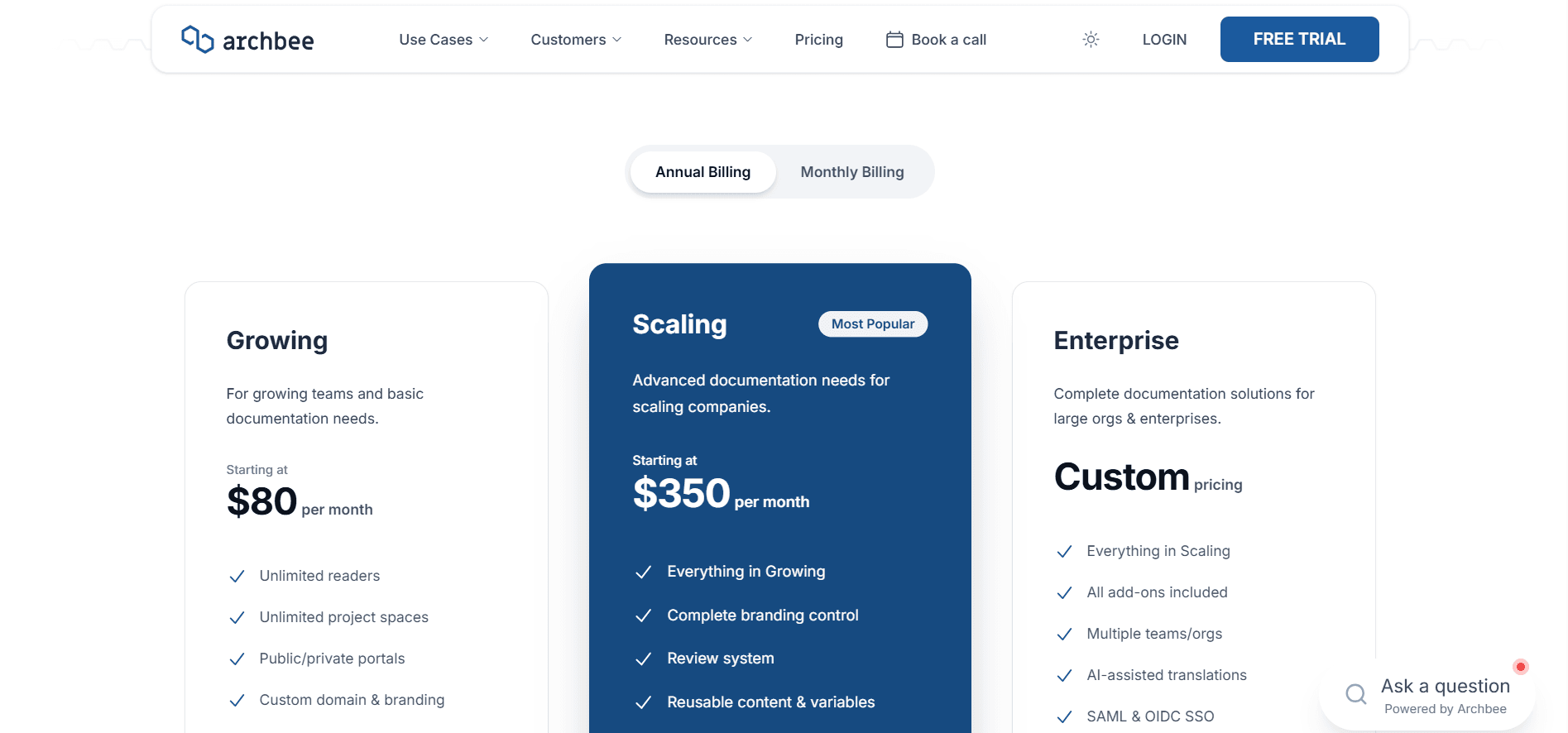
Archbee has no free plan. The 14-day trial needs no credit card, and nothing built during it survives without a paid plan. [1]
Growing is $80 a month with five team members included and $5 a month per extra member. You get unlimited spaces and documents, public and private portals, one custom domain, custom branding and JavaScript, password protection, full-text search, SEO and LLM output, document verification, two-way sync with GitHub, GitLab, and Bitbucket, OpenAPI import with a working try-it console, and the Jira and Slack integrations.
Scaling is $350 a month. Five members are included again, and each extra member is $10 a month. It adds the review system, user groups with read, write, review, and publish permissions, reusable variables, versioning and localization, search analytics, custom CSS, custom SEO settings, landing pages, logo removal, and reader authentication through guest accounts, magic links, and JWT.
Enterprise is custom, adding multiple organizations, SAML and OIDC SSO, AI-assisted translations, conditional content, the Intercom and Zendesk integrations, and every add-on included. [1]
Then there is the add-on menu, and it needs pricing before you commit. AI is the cheap one, from $16 a month. Analytics, public API access, the in-product widget, reader Q&A, PDF export, and static HTML export are each $80 a month, on a plan that costs $80 a month. Extra domains are billed separately again. [1]
Insights catches people out, because it is the full analytics layer rather than an extra: views, time on site, unique visitors, bounce rate, reader feedback, search queries, and a log of Ask AI conversations with ratings. It is a competent dashboard, and it is also why teams on a trial report that Archbee has no analytics. Our Archbee pricing breakdown works through every add-on and what the stack costs together.
Mintlify
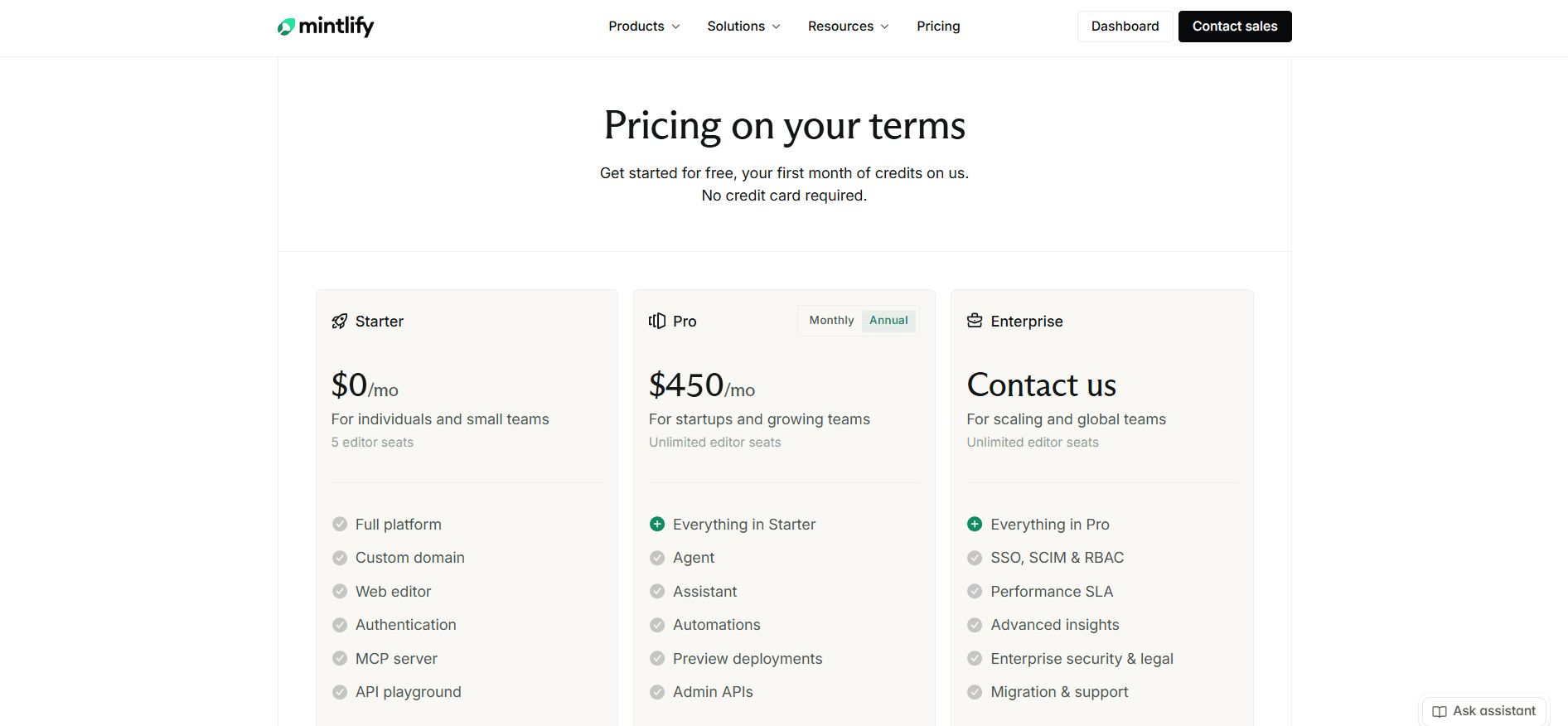
Starter costs nothing and includes five editor seats, a custom domain, the web editor, the API playground, the MCP server, and the machine-readable output. What it leaves out is everything intelligent: the Agent, the Assistant, automations, preview deployments, admin APIs, and analytics. [3]
Pro is $450 a month on annual billing, or $540 monthly, with unlimited editor seats and 10,000 AI credits a month. Archbee bills every editor past the fifth on both paid tiers, so the seat policy matters more than it looks.
Enterprise is custom, adding SSO, SCIM and RBAC, a performance SLA, advanced insights, self-hosting and EU hosting, reader login through OAuth or JWT, and migration support. There is nothing between free and Pro, so the upgrade path runs straight from a plan with no AI to $450 a month. [3] Our Mintlify pricing guide covers credits, packs, and rollover in full.
What a Working Setup Actually Costs
The same capability set priced on both, at annual rates, for a team of five editors. Each row adds to the one above it.
| What you need | Archbee | Mintlify | Cheaper |
|---|---|---|---|
| A public docs site, no AI, no analytics | $80, Growing | $0, Starter | Mintlify |
| Add a reader-facing AI assistant | $96, plus the AI add-on | $450, Pro | Archbee |
| Add analytics | $176, plus the Insights add-on | $450, Pro | Archbee |
| Add review workflows and preview builds | $470, now on Scaling | $450, Pro | Mintlify |
| Add programmatic API access | $550, another add-on | $450, Pro | Mintlify |
| Grow to a 20-person editing team | $700, 15 seats at $10 each | $450, seats unlimited | Mintlify |
Pricing verdict: Archbee is substantially cheaper at the low end. A portal with a reader assistant on it is $96 a month against $450, and that is not a close call. The lines cross on the fourth row, once review workflows and analytics are both in play. On headcount alone they cross at the 12th editor, taking Scaling plus the AI add-on by itself, which is $390 for five editors and $10 a head after that. The table's last row runs higher than that because it is cumulative and keeps the analytics and API add-ons from the rows above it. On the leanest path, Growing plus AI, Archbee stays cheaper until the 76th editor. Work out which side of those two crossovers you are on before you compare headline prices, because $80 and $450 will tell you the wrong thing. [1] [3]
Priced both and still not convinced?
Analytics, the reader assistant, the documentation agent, and a custom domain are all on the Documentation.AI free plan, with unlimited readers and no trial clock.
Start free or book a demo and bring your existing docs across.
Public Documentation Experience
Both publish fast, branded sites with light and dark modes. They differ on who is allowed to read what, and on how much of the reading experience the entry plan actually ships.
Archbee
Preview is where Archbee slowed down for us. It takes a beat to load, but the render is accurate, with light and dark modes and Ask AI available inside the document you are previewing. Publishing gave us no trouble, and the live site matched the preview exactly.
The portal itself is well built, and most of it is on the entry plan: a custom domain, brand colors and logo, custom JavaScript, full-text search, SEO output including sitemap and structured data, and unlimited readers with no traffic cap. [1]
Reader access control is where Archbee is genuinely deeper than Mintlify. It covers password protection, guest accounts, magic links, JWT and JWKS, and per-group private links that can be revoked one team at a time. If you publish partner documentation where each customer sees a different portal, nothing in Mintlify's self-serve range matches this. Note the plan boundary: password protection is on Growing, while guest accounts, magic links, and JWT are Scaling features. [1] [2]
Two more things sit on Scaling that affect how the site looks: custom CSS, and removing the Archbee logo. On the entry plan, the vendor's branding stays on your documentation.
Mintlify
Publishing took seconds and raised nothing worth reporting. The output looks polished with no configuration at all, which is where Mintlify separates from Archbee on the published page.
Preview deployments let you check structure and appearance before anything goes out, though they sit on Pro. The API playground generates from an OpenAPI spec and is one of the better implementations available, which matters if your documentation is mostly reference.
The limits are about readers. Access control works at the page level, set in page frontmatter, so a page can be restricted to a user group but an individual endpoint or content block inside it cannot. Mintlify does offer content personalization, but that shows different content to different readers rather than restricting it, so an unauthorized reader still reaches the page. Reader login through OAuth or JWT is an Enterprise feature, as are self-hosting and EU hosting. [3] [4]
Verdict: Mintlify takes design quality, preview, and anything driven by an OpenAPI spec. Archbee takes reader access control outright, and it is the only one of the two whose entry plan can password-protect a portal. Both keep something back: Archbee holds custom CSS and logo removal for its upper plan, and Mintlify holds the reader assistant and previews for Pro.
Name that gap, because a published docs site is where the money actually goes to work. Documentation.AI puts the reader assistant on every plan including the free one, accepts custom CSS and JavaScript everywhere, builds a preview site for every branch, and reports which reader questions came back with low confidence, so the pages you are missing arrive as a list rather than a hunch. Start free and let it read the docs you already have.
Pros and Cons
Archbee
Pros
- A template library covering user manuals, API references, and internal documentation, with no repository needed to use it [2]
- A block editor you can hand to a non-developer with no training
- Two-way sync with GitHub, GitLab, and Bitbucket on every paid plan, with Markdown and MDX both supported [1] [2]
- Reader access control is deeper than anything in Mintlify's self-serve range [1] [2]
- Shadow Docs lets private code and internal notes inform reader answers without being published [2]
- The in-app widget and reader Q&A have no Mintlify equivalent [1]
- AI is a low-cost add-on rather than a plan upgrade, so switching it on is not a budget conversation [1]
Cons
- No free plan, so a 14-day trial is the whole evaluation and you keep nothing [1]
- Seven add-ons priced at or near the cost of the entry plan itself, so the capabilities most teams want arrive as line items [1]
- Token overage is billed by default, so set the soft and hard limits yourself before public traffic reaches the assistant [1]
- Ask AI struggled to retrieve our own content inside project documents and was slow in both places we tried it, and Archbee's own docs still call it beta
- Review workflows, custom CSS, logo removal, and reader login all require the upper plan [1]
- Five editors on both tiers, so every extra contributor is billed per head [1]
If the add-on menu is the blocker, our Archbee alternatives guide prices five replacements.
Mintlify
Pros
- Published design is polished with no configuration, and the API playground generates from an OpenAPI spec [4]
- A real local development loop: CLI, preview server, MDX formatting, build errors, and broken-link detection [4]
- Unlimited editor seats on the paid plan, so adding contributors costs nothing [3]
- Automations run the agent on a schedule or on a push, so docs updates can follow merged code, which Archbee has no equivalent for [4]
- The machine-readable layer is on the free plan: MCP server,
llms.txt,llms-full.txt, andskill.md[4] - Credits are fixed per action, overages are off by default, and unused credits partly roll over [5]
Cons
- No middle tier. The upgrade path runs from free straight to Pro, which is a steep first step for a small team [3]
- No AI at all on the free plan, so the capability the platform is sold on cannot be tested without buying it or starting a 14-day trial [3]
- 10,000 credits cover 400 assistant answers, so public docs with traffic you do not control run out, and the assistant switches itself off unless you enable overage [3] [5]
- Publishing is tied to a repository, so contributors without repo access cannot ship [4]
- Page-level access control only, so a restricted block inside a public page is not possible, and reader login is Enterprise [3] [4]
- No in-product widget, no reader Q&A, and no equivalent to Shadow Docs
If the jump from free to Pro is the blocker, our Mintlify alternatives guide covers the rest of the field.
Head to Head Comparison: Archbee vs Mintlify
Neither platform sweeps the table. Archbee takes the editor, reader access control, and price at small scale. Mintlify takes published design, API tooling, seat economics, and automated maintenance. The table keeps only the rows that would change a decision.
| Category | Archbee | Mintlify |
|---|---|---|
| Best suited to | Branded portals maintained by non-developers | Engineering-owned developer and API docs |
| Free plan | None, 14-day trial | Free forever, five seats, no AI |
| Paid entry | $80/mo, before add-ons | $450/mo |
| Editor seats | 5 on both tiers, then $5 to $10/mo each | Unlimited on Pro |
| Primary authoring surface | Block editor, no repo required | MDX in a Git repository |
| Source of truth | The connected repo, if you connect one | Always the repo |
| Git providers | GitHub, GitLab, Bitbucket, two-way | GitHub and GitLab |
| Local CLI and preview | Not offered | mint CLI, local server, link validation |
| Review and approvals | Scaling, $350/mo | Pull requests on any plan, preview builds on Pro |
| Reader AI | AI add-on, from $16/mo | Pro, $450/mo |
| AI metering | Tokens, overage billed at $1.20 per 1M | Fixed credits, overage off by default |
| AI that updates docs after a merge | Not offered | Automations on Pro |
| Machine-readable output for AI agents | LLM output on every plan | MCP, llms.txt, llms-full.txt, skill.md, all free |
| Analytics | Insights add-on, $80/mo | Pro, with advanced insights on Enterprise |
| Reader authentication | Password on Growing, guest accounts and magic links and JWT on Scaling | Org members on Starter, password on Pro, OAuth and JWT on Enterprise |
| Access control granularity | Per group, with revocable links | Page level, set in frontmatter |
| API playground | OpenAPI import with try-it console | Generated from OpenAPI, from the free plan |
| In-product widget | Add-on, $80/mo | Not offered |
| Reader Q&A | Add-on, $80/mo | Not offered |
| Custom CSS and logo removal | Scaling, $350/mo | CSS on every plan, logo removal on Enterprise |
| Programmatic API access | Add-on, $80/mo | Admin APIs on Pro |
| Self-hosting | Cloud-Prem, Enterprise | Enterprise |
Final Take
The comparison usually resolves itself once you answer one question: can the people who write your documentation open a pull request?
Pick Archbee if the answer is no. The template library, the block editor, and the portal are built for contributors who will never touch a repository, reader access control is the deepest here, and switching the assistant on is an add-on rather than a plan upgrade. The catch is the add-on menu: analytics, the public API, the widget, Q&A, PDF export, and static HTML export are each priced at or near the cost of the plan underneath them, review workflows and reader login need the upper tier, and every editor past the fifth is billed per head.
Pick Mintlify if the answer is yes. The local development loop, the OpenAPI playground, the published design, and the free machine-readable layer are all ahead of what Archbee offers, and unlimited editor seats mean a growing team does not get billed for growing. The catch is the jump from free to Pro with nothing in between, and a 14-day trial as the only look at the AI before you pay for it.
If the shortlist is wider, the same test runs through GitBook vs Mintlify, Mintlify vs ReadMe, and Document360 vs Mintlify.
What they share is the part worth arguing with. Neither includes AI at its entry price, and the failure modes are opposites: Archbee keeps answering and bills the tokens, while Mintlify stops answering unless you opt into overage. One failure is an invoice you cannot forecast, the other is an assistant that quietly goes dark.
There is also a question neither platform answers. Both use AI to help you write a page, and Mintlify goes further by running that agent on a schedule, but once a documentation set is more than a few dozen pages the bottleneck stops being writing help and becomes maintenance: knowing which pages went wrong when the product changed. Archbee's AI does not look at that at all, and Mintlify's automations fire on a trigger rather than on evidence that a page is now inaccurate.
That is what Documentation.AI was built around. The reader assistant and the documentation agent are both on the free plan, a reader question costs 10 credits rather than 25, analytics and the API are in the plan rather than beside it, and no plan bills an overage, so if credits run out the AI pauses while your docs stay published. Its workflows update pages from merged code and changelogs, and its assistant scores its own answers, so the questions your documentation failed to answer come back as a list of the pages you are missing. Import your existing Archbee or Mintlify content free and run the agent over your own pages before you decide.
Run it over your own pages.
Start free, no credit card required, or book a demo and we will import your Archbee or Mintlify content for you.
FAQs: Archbee vs Mintlify
1. Is Archbee or Mintlify Cheaper?
Archbee, until you need the full stack. A portal with a reader assistant is $96 a month on Archbee against $450 on Mintlify. The lines cross once you want review workflows, analytics, and reader login together, which puts you on Archbee's $350 Scaling plan with add-ons attached, at $470 or more against Mintlify's $450 with unlimited seats. [1] [3]
2. Does Archbee Support Markdown and Git?
Yes, and it is easy to miss behind the block editor. Two-way sync with GitHub, GitLab, and Bitbucket is on every paid plan, standard Markdown works alongside Archbee's own MDX components, and Markdown files in a connected repository are processed as MDX. The repository stays the source of truth: an edit made in Archbee opens a pull request. [1] [2]
3. Can Non-Developers Use Mintlify?
They can edit. The web editor has a visual mode, comments, suggestions, and drag-and-drop navigation, so writing a page needs no Markdown fluency. Publishing is the constraint, because it commits to a repository, so a contributor without repo access cannot ship a change alone. Archbee has no such requirement. [2] [4]
4. How Much Does Mintlify Cost?
Starter is free with five editor seats and no AI features. Pro is $450 a month on annual billing, or $540 monthly, with unlimited editor seats and 10,000 AI credits. Enterprise is custom and adds SSO, SCIM, RBAC, an SLA, self-hosting, and reader login. There is no plan between free and Pro. [3]
5. Is Archbee's AI Included in the Price?
No, it is a paid add-on. It is $16 a month on Growing with 20M tokens included and $40 a month on Scaling with 40M, and it is bundled into Enterprise with 100M. Usage past the allowance is billed at $1.20 per 1M tokens, so set the soft and hard limits in settings before you point it at public traffic. [1]
6. How Do Archbee and Mintlify Meter AI Differently?
Archbee meters tokens and bills overage by default. Mintlify charges fixed credits per action, 25 for an assistant answer and 250 for an automation run that updates your docs, with overages off unless you enable them. The practical difference is what happens when you run out: Archbee keeps serving and invoices you, Mintlify stops. [1] [3] [5]
7. Which Platform Is Better for API Documentation?
Mintlify, in most cases. Its API playground generates from an OpenAPI spec, the docs-as-code workflow keeps reference alongside the code that produces it, and the machine-readable output makes the docs easy for coding agents to read. Archbee imports OpenAPI with a working try-it console, which is enough for a product where reference is one section rather than the whole site. [2] [4]
8. What Are the Alternatives to Archbee and Mintlify?
The field includes Documentation.AI, GitBook, Document360, ReadMe, and Fern, and the right shortlist depends on whether your constraint is contributor access, AI cost, or reader authentication. Documentation.AI ships the reader assistant, the documentation agent, and analytics on a free plan with five editor seats, which makes it the one you can evaluate against your real docs before paying. Start free, no credit card required.
Sources
- Archbee. "Pricing." Archbee. https://www.archbee.com/pricing
- Archbee. "Archbee Docs." Archbee. https://www.archbee.com/docs
- Mintlify. "Pricing." Mintlify. https://www.mintlify.com/pricing
- Mintlify. "Mintlify Docs." Mintlify. https://www.mintlify.com/docs
- Mintlify. "Credit Pricing." Mintlify Docs. https://www.mintlify.com/docs/credits
Neither model fits?
Docs that keep themselves current
Bring your pages across and get the assistant, the agent, and analytics on one plan.
Start freeNo credit card required