GitBook Pricing 2026: Plans, AI Credits & Real Cost
GitBook charges for sites and for people separately, and meters its reader AI in credits on top of both. This guide explains how those charges combine, where each AI feature begins, and how to estimate the cost of a single documentation site or several before you commit.

Roop Reddy · Co-Founder, Documentation.AI
Last updated
On this page
- GitBook Pricing at a Glance
- How Does GitBook's Pricing Work?
- Per-Site and Per-User: How GitBook's Pricing Adds Up
- What Do GitBook's AI Features Cost?
- What Does GitBook Actually Cost for a Real Team?
- GitBook Enterprise Pricing
- Things to Consider Before Choosing GitBook
- Is GitBook the Right Choice for You?
- Related GitBook Comparisons
- FAQs
- Sources
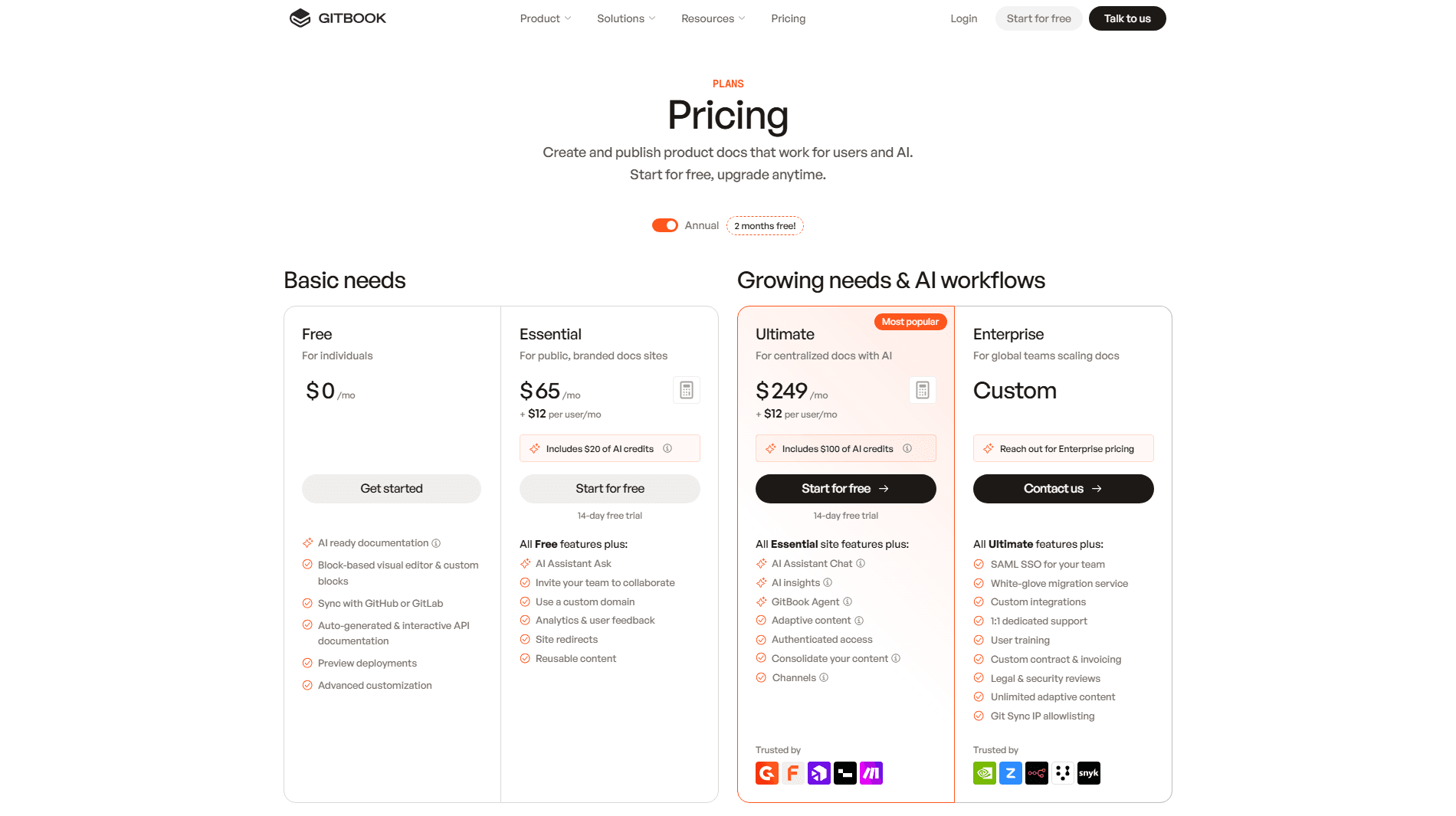
GitBook costs $0, $65, or $249 per site per month, plus $12/month for every person who can log in. That is the plan price list. It is not the entire bill.
At $65 a site GitBook looks like the cheapest serious documentation platform on the market, and for one configuration it is: a single docs site, a small team, light reader-facing AI. Outside that shape the per-site multiplier is what sends teams to price a GitBook alternative on total cost rather than on list price. The third meter is the one that catches teams out. Every reader answer now spends AI credits from a monthly allowance, and once the allowance is gone GitBook either pauses the AI or bills $0.20 an answer on your next invoice, depending on how you set it up. All figures here come from GitBook's pricing page and billing documentation.
GitBook Pricing at a Glance
| Plan | Site price | Users | What it unlocks |
|---|---|---|---|
| Free | $0 per site/month | One | Block editor, Git Sync, API playground, preview deployments, custom fonts, LLM optimizations, MCP server, unlimited traffic |
| Essential | $65 per site/month | $12 per user/month | Custom domain, advanced branding, AI Assistant Ask in the search box, 2,000 AI credits a month, analytics, page ratings, redirects, PDF export |
| Ultimate | $249 per site/month | $12 per user/month | AI Assistant Chat sidebar, 10,000 AI credits a month, AI insights, channels, site sections, authenticated access, adaptive content, translations |
| Enterprise | Custom quote | Custom | SAML SSO, Git Sync IP allowlisting, team owners, unlimited adaptive content, migration service, account manager, invoicing |
Essential was called Premium until recently. The price and features carried over unchanged; only the name and the AI billing moved.
Reader AI and translations are metered in AI credits rather than included, and the plan table only hints at it:
| Metered item | Free | Essential | Ultimate | Enterprise |
|---|---|---|---|---|
| AI credits included per site, per month | None | 2,000 | 10,000 | Custom |
| AI Assistant Ask, answers in the search box | Not available | 20 credits per answer | 20 credits per answer | 20 credits per answer |
| AI Assistant Chat, the sidebar | Not available | Not available | 20 credits per answer | Included |
| Auto-updating translations | Not available | 30 credits per 1,000 words | Included on the pricing table, 30 credits per 1,000 words in the docs | Included |
| Credits past the allowance | Not available | $0.01 each, or a prepaid bundle | $0.01 each, or a prepaid bundle | Custom |
| GitBook Agent | 10 messages per week | Included | Included | Included |
| Page views | Unlimited | Unlimited | Unlimited | Unlimited |
GitBook does not charge for traffic on any plan, which is useful if your documentation gets read. Reader questions are where volume comes back into the bill, and four other details change the arithmetic before you start, none of them on the plan cards:
- The prices quoted here are the annual rates. Annual billing is described as two months free. Paying monthly costs $79 for Essential, $299 for Ultimate, and $15 a member.
- The first user is free only on the Free plan. Basic includes one member at no cost. On Essential and Ultimate every member is $12, including the first, which the pricing calculator confirms: one Ultimate site with one user totals $261 a month.
- AI is split across two plans, and one wallet. Inline answers in the search box start at Essential. The chat sidebar readers actually use is Ultimate. Both draw on the same credits, and so do translations.
- AI is billed monthly, even on an annual plan. Credit bundles and any usage past your credits are charged every month, so an annual contract does not fix the AI line of the bill.
On an older GitBook plan? These are not your numbers. GitBook moved to this per-site model recently and still runs legacy Pro and Organization plans, which tied features to different tiers and charged Pro a monthly platform fee that no longer exists. Legacy organizations also keep the old Translations add-on, which current plans replaced with credits. If your invoice shows a platform fee, treat this guide as a quote for switching rather than a reading of your current bill.
If a predictable flat number matters more to you than any single feature on those tables, it is worth seeing the other shape this can take. Documentation.AI bundles documentation projects and editor seats into the plan price rather than billing them one at a time, and the reader Assistant is included from the free tier, so your monthly cost does not move when your traffic does.
How Does GitBook's Pricing Work?
Three meters on two different clocks. Sites are charged individually, members are charged once across your organization rather than once per site, and AI usage is charged monthly against a pool of credits. Your bill is (sites × site plan price) + (members × $12) + AI credits used past your allowance. GitBook's own calculator models the first two terms and prepaid credit bundles, but not pay-as-you-go usage.
Before any of it, you get 14 days of every Ultimate feature with no payment method required. The trial starts the moment you publish a site to an audience or invite a second member, and nothing charges automatically when it ends.
One line on those cards reads differently from the table beneath them. GitBook Agent is listed as an Ultimate highlight, but the full comparison on the same page includes it on Essential and Enterprise as well, and on Free with a 10-message weekly cap.
Per-Site and Per-User: How GitBook's Pricing Adds Up
The two multipliers do not behave the same way, and the asymmetry is what decides your bill.
Add a second documentation site and you pay another $65 or $249, because site plans are billed per published site. Add a second variant of a site you already have and you pay nothing, because variants count as one published site for billing. Add a person and you pay $12 a month, charged once for the whole organization rather than once per site.
That last one holds regardless of what the person does. Access permissions do not change member pricing, so a stakeholder who logs in twice a month to leave a comment costs exactly what your lead technical writer costs. Grow in headcount and you pay a little more. Grow sideways into more products and you pay a lot more.
The Consolidation Lever
Site sections group several products under one site, and they are Ultimate only. This is GitBook's own answer to per-site pricing, and the saving is substantial. Take an eight-person team publishing documentation for three products: three Essential sites cost $291 a month, three Ultimate sites cost $843, and one Ultimate site carrying all three as sections costs $345. That last option is the same feature set as the second, $498 a month cheaper.
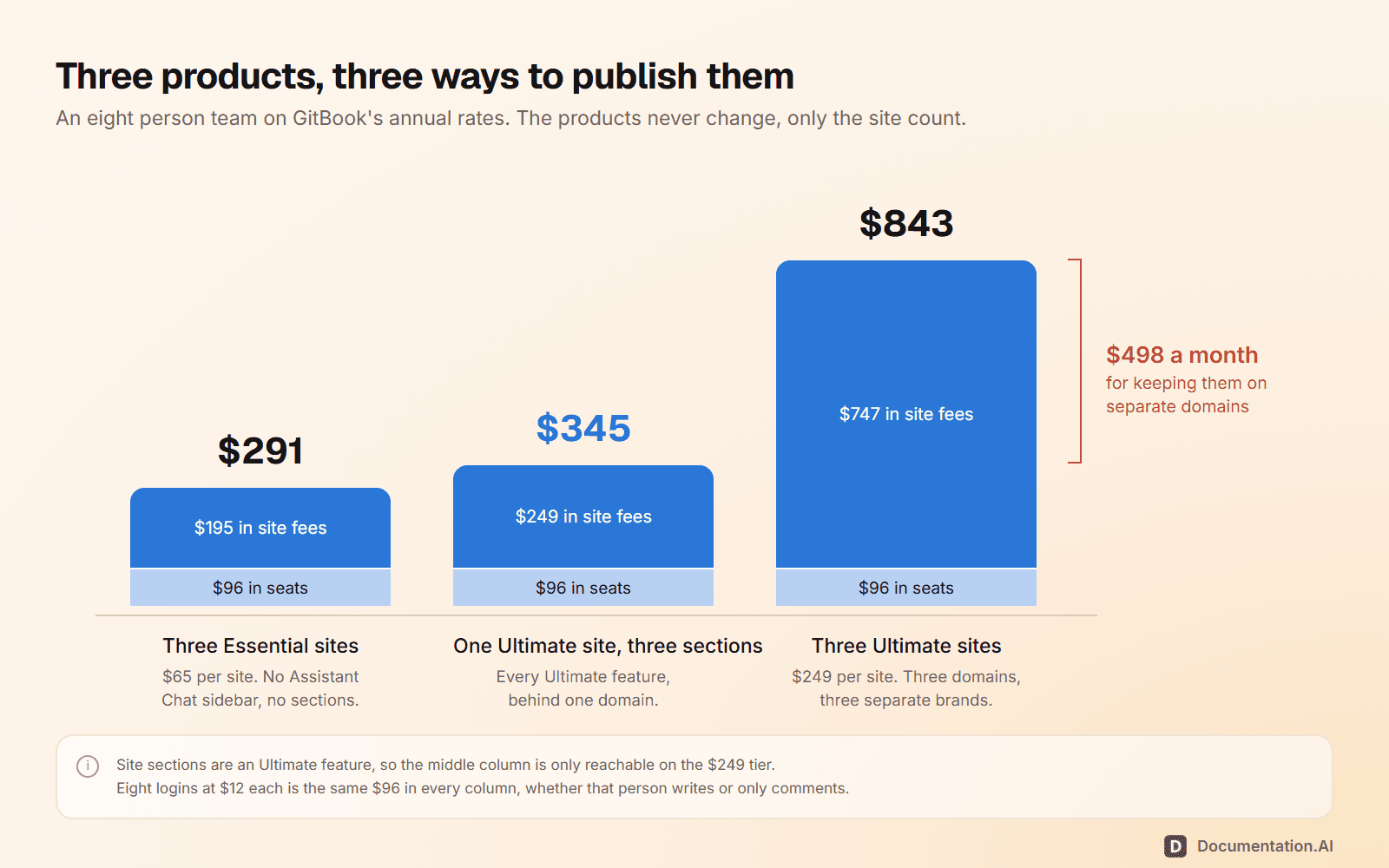
What consolidation costs you is not only money. It is one domain, one brand, one set of access rules, and one site's 10,000 AI credits shared by three products instead of the 30,000 that three Ultimate sites would pour into the wallet. If your products need to look like separate properties, the lever is gone and you are paying $843.
Two Billing Details to Plan For
- Adding people mid-term triggers its own invoice. On an annual plan, a subscription increase is billed as a true-up that can arrive before renewal rather than waiting for it.
- Removals become credit, not refunds. GitBook does not refund at all. Unused fees sit on the account for future use.
Pricing a second site?
Sites bundled, seats included
Projects come with the plan instead of being billed one at a time, and reader AI starts on the free tier.
No credit card required
What Do GitBook's AI Features Cost?
Nothing, $65, or $249 per site per month, plus $0.20 for every answer past the credits your plan includes. "GitBook has AI" is true on every plan and means something different on each one.
| Plan | What the AI actually does |
|---|---|
| Free | LLM optimizations (llms.txt, llms-full.txt, .md pages) and an MCP server, so outside AI tools can read your docs. GitBook Agent capped at 10 messages a week. No reader AI. |
| Essential, $65/site/month | Adds AI Assistant Ask, an inline answer beside keyword results, and 2,000 credits a month to pay for it, about 100 answers. GitBook Agent loses its cap. The cheapest tier where a reader gets a generated answer. |
| Ultimate, $249/site/month | Adds the Assistant chat sidebar with agentic retrieval, 10,000 credits a month (about 500 answers), AI insights, connections to sources like GitHub and Slack, MCP servers the Assistant can call, embedding it in your product, and the Slack, GitHub, and Linear channels. |
AI Credits: About 100 or 500 Answers per Site
Every paid site adds credits to one organization-wide wallet each month: 2,000 for an Essential site and 10,000 for an Ultimate site. Any site can draw on the pool. A relevant answer costs 20 credits whether it comes from the search box or the chat sidebar, and a question the Assistant cannot answer costs nothing. That works out to about 100 answers for an Essential site and 500 for an Ultimate site.
Past the allowance, every answer is $0.20. Extra credits cost $0.01 each and arrive on your next invoice. Prepaid monthly bundles bring the price down, from $47.50 for 5,000 credits to $300 for 40,000. If you would rather the AI stop than spend, GitBook lets you auto-pause AI usage when credits run out and set a low-balance alert before that.
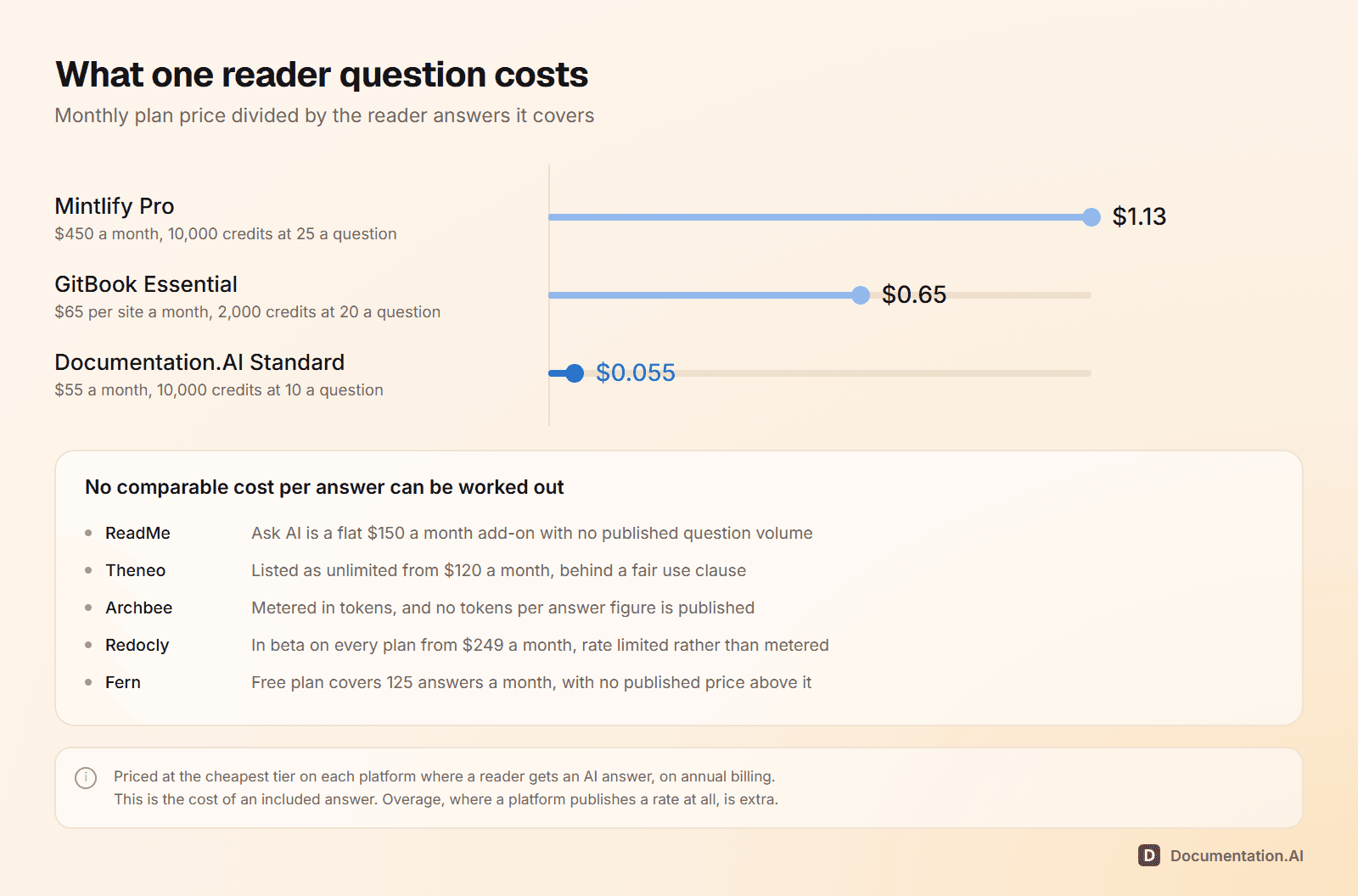
At the included allowance, an Ultimate site works out at just under 50 cents per answered question, and an Essential site at about 65 cents. Both are higher than the $0.20 overage rate, so the included credits are the expensive part and extra volume is cheap. 500 answers a month is about 17 questions a day: comfortable for an internal knowledge base, gone in the first week on public docs with real support volume. Essential's 100 is closer to three a day.
Carry that number into any comparison, because it moves with traffic you do not control. Here is where it lands against the rest of the category:
Translations, Priced in Credits
Auto-updating translations spend 30 credits per 1,000 words, from the same wallet as reader answers. A 300-page site averaging 600 words a page runs to about 180,000 words, so a first pass into one language is about 5,400 credits and five languages about 27,000. At the $0.01 overage rate that is roughly $54 and $270 before your included credits are subtracted, and less on a prepaid bundle. Only changed pages are re-translated afterwards, so the recurring cost is far smaller than the first run.
On Ultimate the picture is less clear than it should be. The pricing table marks translations as included, while GitBook's AI credits documentation lists them as spending credits on both Essential and Ultimate. Plan on the documentation's reading until GitBook confirms otherwise, because a translation run and a busy month of reader questions compete for the same 10,000 credits.
GitBook's AI failure mode is a setting. You choose whether usage auto-pauses when credits run out or keeps going and lands on the next invoice. Documentation.AI's is fixed: plans bundle a monthly credit allowance, an Ask AI question costs 10 credits, and there is no overage billing at all, so AI features stop until the next cycle or a manual top-up. Neither is automatically better, but on GitBook someone has to own that setting and the alert threshold, and on Documentation.AI there is no invoice path to manage.
What Does GitBook Actually Cost for a Real Team?
Between $0 and a sales conversation. Four setups, priced at GitBook's published annual rates:
| Your setup | Plan | Per month | The catch |
|---|---|---|---|
| One docs site, one person | Free | $0 | No custom domain, no collaborators, no reader AI |
| One branded site, four collaborators | Essential, one site | $113 | Search-box answers only, about 100 a month, no sidebar, no sections |
| One site with reader AI, 10 logins | Ultimate, one site | $369 | 500 Assistant answers, then $0.20 each |
| Two products with reader AI, 12 logins | Ultimate, two sites | $642 | $393 if you collapse both into one site with sections |
Most of the movement comes from two figures. Every login is $12 whether that person writes or only comments, so 10 logins is $120 a month before a single feature. And a second product is a second site fee, which is the whole distance between rows three and four.
Past that, the AI line takes over. A help center fielding 150 questions a day runs 4,500 Assistant answers a month, nine times the Ultimate allowance. The 4,000 extra answers are 80,000 credits: $800 a month at the overage rate, or $600 on two of the largest prepaid bundles. On that traffic the AI costs more than the site.
The Same Team, Priced Against Documentation.AI
| GitBook | Documentation.AI | |
|---|---|---|
| Entry paid price | $65 per site/month plus $12 per user | $55/month billed annually, all in |
| Editor seats | $12 each, on every plan | 10 on Standard, unlimited on Pro |
| Documentation sites | Billed one at a time | 2 on Standard, 4 on Pro, bundled |
| Reader AI chat | Ultimate only, $249 per site | Included from the free plan |
| AI usage | Credits per site, then $0.20 an answer or an auto-pause | Fixed monthly credits, no overage billing |
| Four products, 10 editors, reader AI on all | $1,116/month | $159/month, billed annually |
Linger on that last row. Same four products, same 10 people, reader AI live on every site. GitBook gets you there for $1,116 a month, or $369 if you are willing to collapse four products into one site behind one domain and one brand. Documentation.AI documents all four for $159 a month on annual billing, with the Assistant on by default.
Sizing this for your own team? Join the Documentation.AI Slack community and ask. It is a fast way to compare notes on documentation tooling and what it really costs at your size.
GitBook Enterprise Pricing
No published price and no reliable third-party figure, so treat any number you find elsewhere as a rumor. What matters is which requirements push you off the self-serve tiers:
- SAML SSO, plus Git Sync IP allowlisting for a fixed outbound IP range
- Team owners for delegated team management, and unlimited adaptive content, where Ultimate applies segment limits it does not publish
- Payment by invoice and wire transfer, a custom contract, and legal and security reviews run with your infosec team
- A dedicated account manager, 1:1 support, user training, custom integrations, and white-glove migration
- AI on contract terms: the Enterprise column lists the Assistant sidebar and translations as included rather than priced per credit, with the details set in the quote
For many organizations, SAML alone is what ends the self-serve path. Not feature depth, not traffic.
The best deal GitBook offers is not on its pricing page. The Community plan gives non-profits, open source organizations, and small education groups every Ultimate feature except SAML SSO, free. The criteria are enforced: cryptocurrency and gaming projects are excluded, and open source repositories need a real license, a contributing guide, and a code of conduct. If you qualify, that is $249 a month you should not be paying.
Things to Consider Before Choosing GitBook
Five things to settle before you put a card in, none of which the plan cards answer.
- Decide what happens when the credits run out. Choose between auto-pause and pay-as-you-go, set a low-balance alert, and price a prepaid bundle if your question volume is steady. Left alone, AI usage scales with traffic you do not control.
- Decide sites or sections before you buy. Consolidating three products into one Ultimate site later means moving domains, redirects, and access rules. Splitting one site into three means tripling the site fee.
- Count logins, not writers. Reviewers, product managers, and support staff cost the same $12 as your technical writers, so the seat number you budget is usually larger than the team you pictured.
- Watch the toggles that trigger upgrades. Publishing a site with paid features enabled, or adding a custom domain, brings up a charge modal mid-task rather than at budgeting time.
- Plan the import. GitBook caps a single import at 20 pages and 20 files and says it cannot raise that. Anything larger goes through Git Sync, which handles up to 5,000 Markdown pages. There is no per-page charge, only time.
Is GitBook the Right Choice for You?
One site, a small team, modest reader AI needs: GitBook is one of the better values in the category. It stops being one at your second site, your eleventh login, or the month your readers outrun the included credits.
GitBook fits well if you:
- Publish one documentation site, or several that can honestly live as sections of one
- Have a small, defined group of people who need accounts
- Want a visual block editor with two-way Git sync rather than a pure docs-as-code pipeline
- Qualify for the Community plan
- Expect heavy reader traffic but light AI usage, since page views cost nothing
Look elsewhere if you:
- Run documentation for more than one product and need those sites to stay separate
- Need accounts for reviewers, stakeholders, or support staff who will never write a page
- Want reader-facing AI chat without committing to $249 per site per month
- Need a monthly number you can defend to finance without watching a credit balance
- Require SAML SSO but do not otherwise need an enterprise contract
If two or more of those are yours, compare your whole documentation footprint rather than the site price. On Documentation.AI the same four products, the same 10 people, and reader AI on every site come to $159 a month on annual billing, because projects and seats are bundled into the plan instead of billed one at a time. Our GitBook vs Documentation.AI comparison runs both through the same build.
GitBook's pricing page shows you one number. Your bill is made of three, and the third moves with your readers' questions. If that third number is what is stopping you from signing, book a demo and we will price your real site count, seat count, and question volume against both platforms before you commit to either.
Related GitBook Comparisons
Pricing is one input. These put GitBook against the rest of the field on features and workflow as well as cost:
- GitBook review 2026, the hands-on assessment of the editor, Git Sync, agent, and reader AI, with scores
- GitBook vs Mintlify, a collaborative block editor against docs-as-code
- ReadMe vs GitBook, API portals against collaborative knowledge bases
- GitBook vs Document360, collaborative docs against a governed knowledge base
- Archbee vs GitBook, one plan with add-ons against per-site and per-user multipliers
- Mintlify vs GitBook vs ReadMe, three billing shapes priced on the same documentation
- ReadMe pricing, a flat plan with add-ons rather than per-site fees
- Mintlify pricing, per-deployment plans with AI metered in credits
- Theneo pricing, billed per workspace with seats included and endpoints capped by plan
- Archbee pricing, $80 to start, with seven capabilities sold beside the plan
- Redocly pricing, flat plans at $249 or $729 a month with unlimited seats
- Fern pricing, free for 10 members on one site, with the next step a sales call
FAQs
1. How Much Does GitBook Cost?
GitBook has four plans, all quoted at the annual billing rate. Free is $0 per site per month for one user. Essential, formerly called Premium, is $65 per site per month plus $12 per user per month. Ultimate is $249 per site per month plus $12 per user per month. Enterprise is a custom quote. A five-person team on one Essential site pays $125 a month, not $65, before any AI usage past the included credits.
2. Is GitBook Free?
Yes, genuinely. You can publish unlimited Basic sites at $0 with unlimited traffic, the block editor, Git Sync, API playgrounds, preview deployments, custom fonts, and LLM optimizations, with no credit card and no time limit. The limits are real though: one user, no custom domain, no AI credits, no reader Assistant, and GitBook Agent capped at 10 messages a week.
3. What Are GitBook's Hidden Costs?
Three of them. Every login costs $12 whether that person writes or only comments. A second documentation site is a second full site fee. And reader answers and translations spend AI credits: 20 credits an answer and 30 credits per 1,000 translated words, so once the included 2,000 or 10,000 credits a site are gone, each extra answer costs $0.20 unless you have set AI usage to pause.
4. Does GitBook Charge Extra for AI?
Yes, in two ways. Reader-facing AI is gated by plan: answers in the search box start at Essential and the Assistant chat sidebar requires Ultimate at $249 per site per month. On top of that, every answer spends 20 AI credits. Essential includes 2,000 credits a site each month, about 100 answers, and Ultimate includes 10,000, about 500. Past that, credits cost $0.01 each on your next invoice, or less in a prepaid bundle, and you can choose to auto-pause instead.
5. Is GitBook Expensive Compared to Other Documentation Tools?
It depends entirely on your shape. For one site and a handful of people it is one of the cheaper options in the category. For several products it is one of the more expensive, because both the site fee and the seat fee multiply. Four products with 10 editors and reader AI on every site costs $1,116 a month on GitBook Ultimate, against $159 a month billed annually on Documentation.AI, where projects and seats are bundled into the plan.
6. Is GitBook Free for Open Source Projects?
Often, yes, and it is the most underused offer on the page. GitBook's Community plan gives non-profits, open source organizations, and small education groups every Ultimate feature except SAML SSO at no cost. Open source repositories must be genuinely public and carry a real license, a contributing guide, and a code of conduct. Cryptocurrency and gaming projects are excluded.
7. How Much Is GitBook Enterprise?
GitBook does not publish Enterprise pricing and the quote depends on your requirements, so treat any figure you find elsewhere as a rumor. Enterprise is what you need for SAML SSO, Git Sync IP allowlisting, team owners, unlimited adaptive content, payment by invoice, legal and security reviews, and AI usage set by contract rather than by the credit meter.
8. Is GitBook the Same as GitHub?
No. GitHub is a code hosting service, and GitBook is a separate company's documentation platform with its own plans and billing. The two connect through Git Sync, which keeps a GitBook site or section in two-way sync with a GitHub or GitLab repository, and it is included on every plan, Free among them. A GitHub account costs nothing extra on the GitBook side, but every person who logs in to GitBook still counts as a $12 member on a paid plan.
Sources
- GitBook. "Pricing and plans." GitBook. Accessed October 2026. https://www.gitbook.com/pricing
- GitBook. "GitBook Docs." GitBook. Accessed October 2026. https://gitbook.com/docs
- Documentation.AI. "Pricing." Documentation.AI. Accessed September 2026. https://documentation.ai/pricing
Pricing a second site?
Sites bundled, seats included
Projects come with the plan instead of being billed one at a time, and reader AI starts on the free tier.
No credit card required