ReadMe Pricing 2026: Plans, Add-Ons & Real Cost
ReadMe's plans each cover a single project, and several of its most useful capabilities are billed beside them. This guide sets out what each plan includes, how the add-ons and additional admins change the total, and when an Enterprise contract becomes unavoidable.

Roop Reddy · Co-Founder, Documentation.AI
Last updated
On this page
- ReadMe Pricing at a Glance
- How Does ReadMe's Pricing Work?
- ReadMe Add-Ons: Ask AI, API Logs, and Extra Admins
- ReadMe's 24-Hour API History Limit
- What Does ReadMe Cost for a Real Team?
- ReadMe Enterprise Pricing
- What to Consider Before Choosing a ReadMe Plan
- Is ReadMe Worth the Cost?
- Related ReadMe Comparisons
- Pricing Guides for the Rest of the Category
- FAQs
- Sources
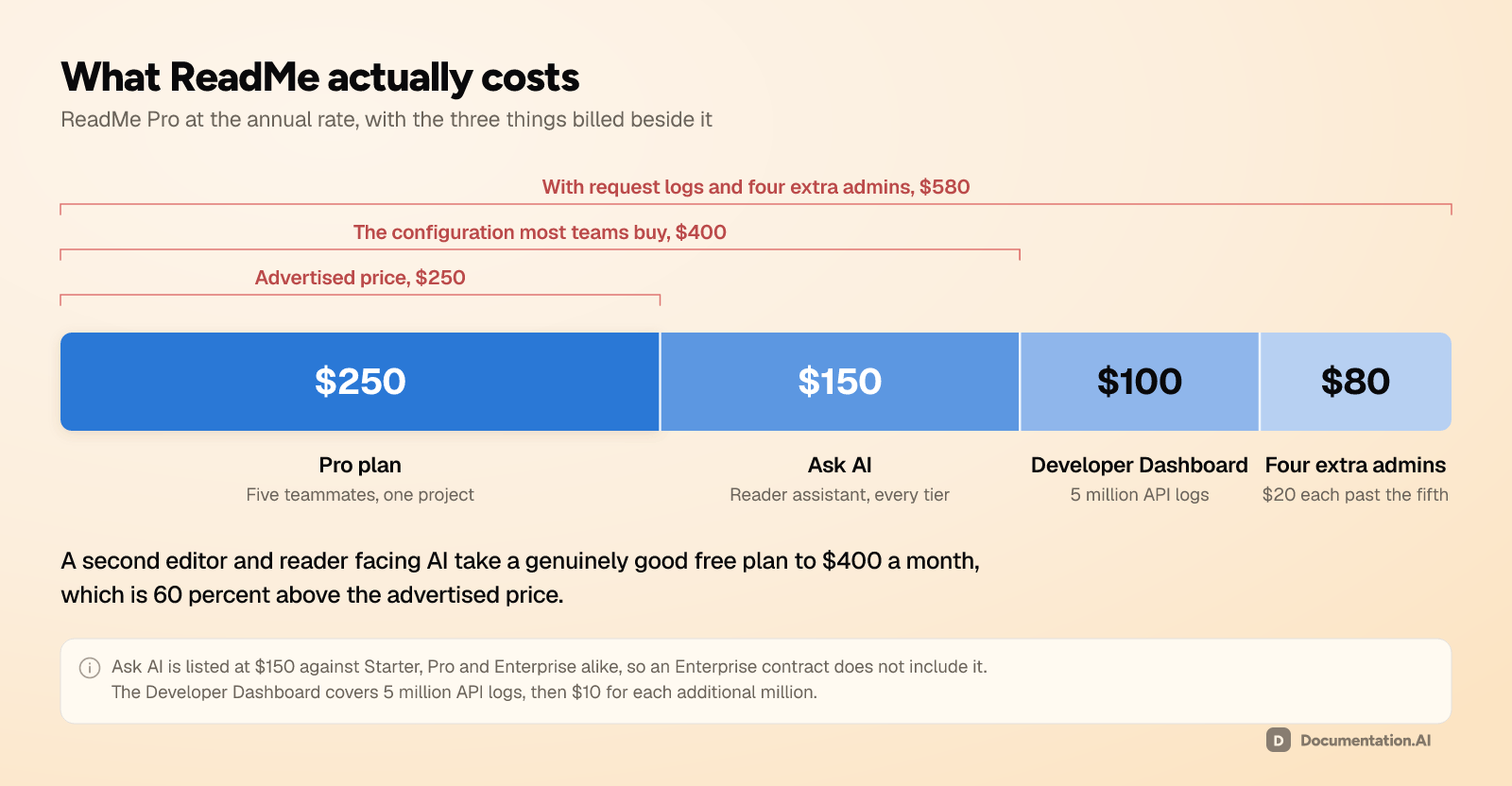
ReadMe advertises $250 a month. The configuration most teams actually buy is $400, because reader-facing AI is a separate $150 add-on that is not included at any tier, Enterprise included. Add API request logs and four more editors and the bill reaches $580. That gap between the advertised price and the real one is what sends teams to price the ReadMe alternatives beside it.
This guide prices the plans, then prices everything that sits beside them. Every figure comes from ReadMe's own pricing page and documentation.
ReadMe Pricing at a Glance
| Plan | Price | Projects | Admins | Published versions |
|---|---|---|---|---|
| Starter | $0 | 1 | 1 | 1 |
| Pro | $250/mo billed annually | 1 | 5, then $20 each | Unlimited |
| Enterprise | Custom quote, annual billing only | Custom | Custom | Unlimited |
The add-ons sit on top of any plan and are where a predictable subscription turns into a variable bill: [1]
| Add-on | Price | What it covers |
|---|---|---|
| Ask AI | $150/mo | Reader-facing assistant with customization, model choice, and analytics |
| Developer Dashboard | $100/mo | 5 million API logs, extended retention, then $10 per additional 1 million logs |
Four things about those two tables are easy to miss:
- Ask AI is listed at $150 against all three tiers, so buying Enterprise does not include it.
- The Developer Dashboard price scales with the traffic your API serves, which is a meter your documentation team does not control.
- Starter is a genuine free tier, for exactly one person. It publishes an interactive API reference on a custom domain, with bi-directional Git sync, the markdown editor, customizable themes, usage metrics, and ReadMe API access. The AI you get is the machine-readable layer: an AI dropdown,
llms.txt, a customllms.txt, an MCP server, AI change summaries, and a limited taste of Agent Owlbert, capped at a small number of complimentary answers. - One admin is Starter's hard limit. A technical writer joining a free project is not a settings change, it is a $250 monthly commitment. Recipes, changelogs, forums, landing pages, branches, reusable content, custom CSS, and the AI linter all start at Pro as well.
How Does ReadMe's Pricing Work?
You buy a plan for one project, then you buy the rest separately. The plan sets the features and the editor headcount, while reader-facing AI, API logs, and every editor past the fifth are priced on their own. Only the plan is a fixed number.
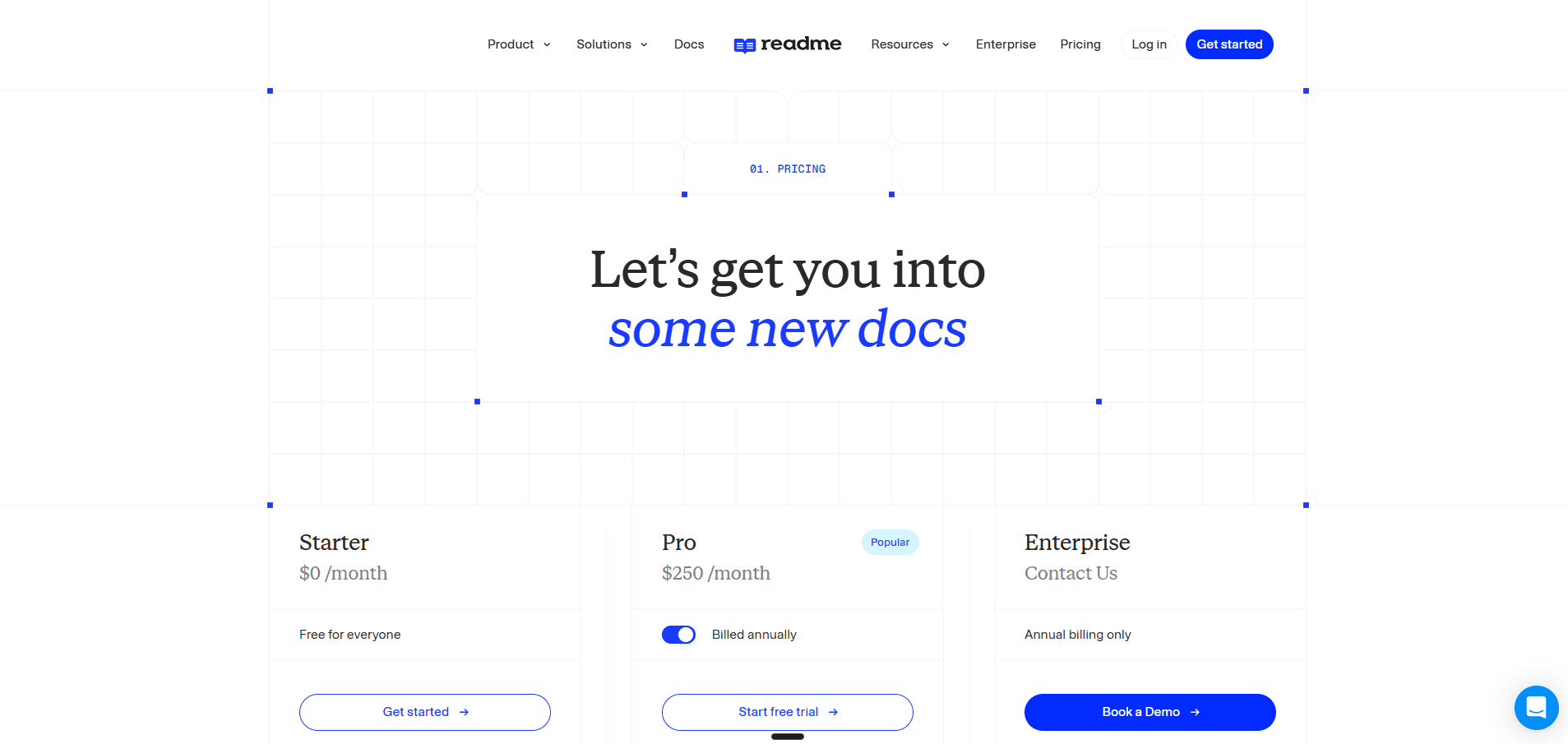
The structural detail most buyers miss is that a plan buys one project, not one company. Starter and Pro are both capped at a single project, and ReadMe's pricing FAQ is explicit about the consequence: you can run several projects on separate plans, but putting them on one domain, searching across them, aggregating their metrics, and administering them together all require Enterprise. [1]
Two billing rules are worth knowing before you commit. Only the project owner can select a plan, change it, or open an invoice, and transferring ownership wipes the billing details and leaves the new owner 14 days to add payment before access lapses. Annual billing also charges add-ons for the whole year upfront, so adding Ask AI in month two is not a $150 decision. [2]
The trial is 14 days of full Pro with no card, and it is the only way to test collaboration, because Starter holds one person. Plan the exit as well as the entry: downgrading to Starter drops Pro features including reusable content, so do not build the trial site out of blocks the free plan cannot render. [2]
ReadMe Add-Ons: Ask AI, API Logs, and Extra Admins
Three add-ons, three different parts of your organization. Ask AI is $150 flat and tracks your readers. The Developer Dashboard is $100 plus volume and tracks your API traffic. Extra admins are $20 each and track your headcount. None of the three are in the $250 headline.
Ask AI at $150 a Month
Ask AI is the assistant embedded in your published documentation, answering reader questions from your content with links back to the source pages. The pricing table lists it at $150 a month against Starter, Pro, and Enterprise alike, so an Enterprise contract does not include it.
Pro and Enterprise do include Ask AI Lite at no extra cost, and the gap between Lite and the paid version is the whole decision. Lite puts the assistant on the page and stops there. Tone, answer length, forbidden topics, model choice, and analytics all sit on the $150 version. The Ask AI API is not part of it at any price; ReadMe keeps that for Enterprise. [2]
Analytics is the part you are really buying. The paid dashboard lists every question asked, every answer given, and thumbs up or down on each, which amounts to a gap report written by your readers. Lite has none of it, logs are kept 60 days either way, and CSV export of them is Enterprise only. [2] The number ReadMe does not publish anywhere is a question volume: no cap, no overage rate, and no per-question price, so there is nothing to model a traffic spike against. Get that in writing before you sign.
That absence is easier to see against the platforms that do publish one. Divide each plan price by the reader answers its allowance covers and four of the eight give you a number:
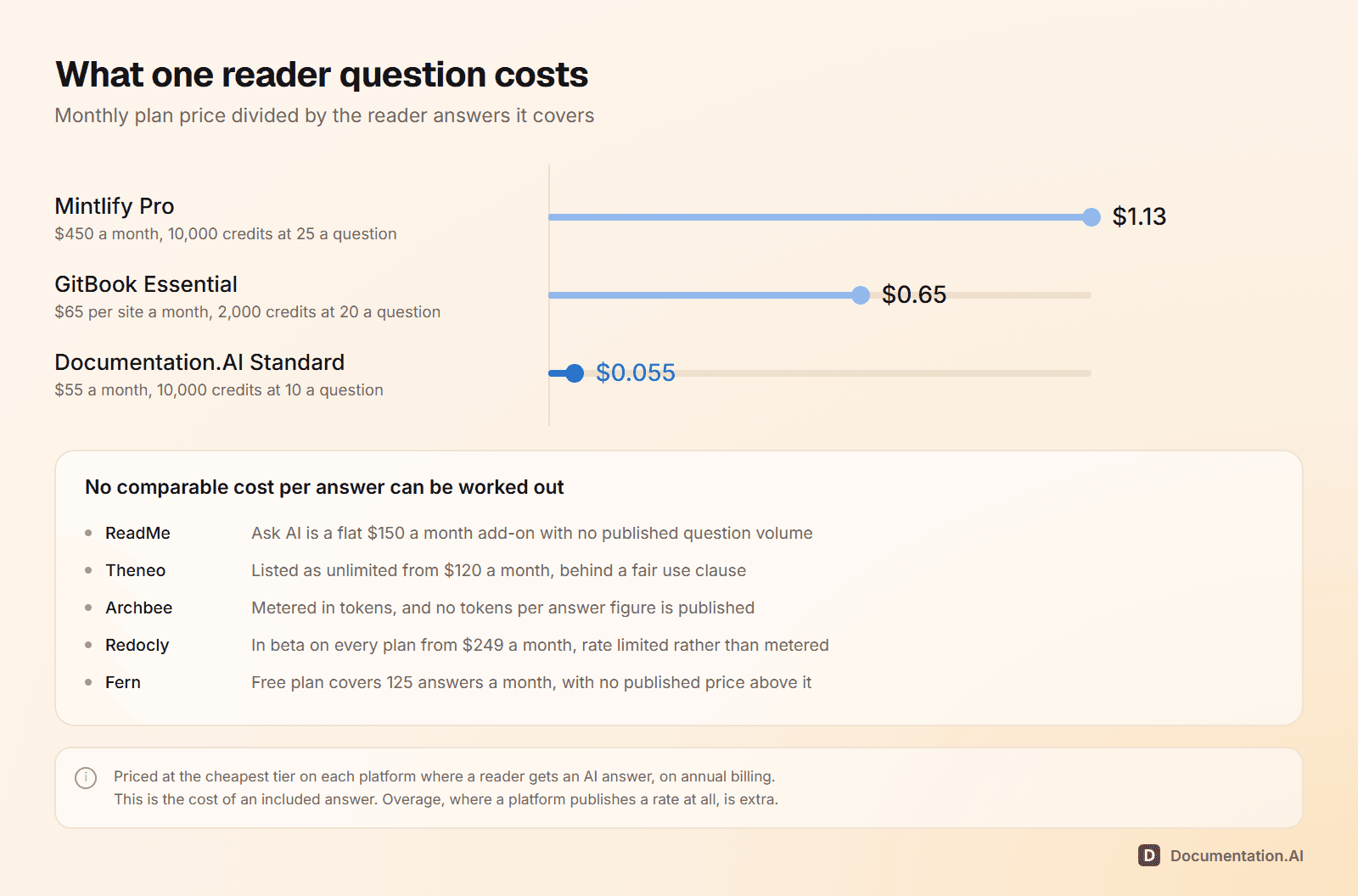
Each of those platforms is priced in full elsewhere on this blog. Mintlify pricing and GitBook pricing explain the two published allowances the chart divides. Theneo pricing, Archbee pricing, Redocly pricing, and Fern pricing each set out what their vendors do publish in place of one.
For contrast, Documentation.AI includes its Ask AI assistant from the free plan rather than selling it beside one. Answers are cited back to the page they came from and scored for confidence, high at 80 percent and above, low below 50, and you can filter for the low-confidence ones to get the same gap report ReadMe charges $150 for. Reader questions cost 10 credits each whatever the answer length, and CSV export over a date range you choose is included rather than gated to Enterprise.
Extra Admins at $20 a Month Each
Pro includes five teammates and charges $20 a month for everyone after that, so a documentation team of 10 pays $100 a month, or $1,200 a year, just to have its own writers in the tool.
The governance point matters more than the price. On Starter and Pro every teammate is an Admin, with full access to settings and content, so a subject matter expert fixing one paragraph holds the same keys as the person who owns the domain, the theme, and the navigation. There is no read-only role and no content-only role at either tier. [2]
Editor and Viewer roles are Enterprise. Editors change pages, reusable content, components, the glossary, and the landing page but no settings, and Viewers see docs, branches, and staging. If engineers or support agents need to write without touching the theme or the domain, least-privilege access is a sales call rather than a seat purchase. [2]
The Developer Dashboard at $100 a Month Plus Volume
This is ReadMe's strongest feature and its most variable line item. Logged-in developers see their own API keys in your hub and read their own request logs there, so debugging happens inside the docs, and admins get a My Developers view filtered by API key, email, company, endpoint, method, and status. [2]
Pricing is $100 a month for 5 million API logs, then $10 for each additional million, and past your allowance you either buy capacity or wait for the monthly reset. [1] That meter scales with your product's traffic rather than your documentation's, which makes it the one line on the invoice your docs team cannot forecast.
It costs engineering time as well as money. You deploy the Personalized Docs Webhook to authenticate users and surface their credentials, then integrate the Metrics SDK into your production API, with SDKs for Node, PHP on Laravel, Python on Django and Flask, Ruby on Rails, and .NET, or post to the Metrics API directly. Scrub your payloads before you do: request data is visible to anyone with admin access to the project and to end users in the history widget, and ReadMe's Try It flow has no allow list yet.
Building the number?
One plan, add-ons included
Reader AI, analytics, and every editor seat sit inside the plan. Import your docs and check the arithmetic.
No credit card required
ReadMe's 24-Hour API History Limit
Every ReadMe plan, including Enterprise, keeps 24 hours of API request history by default. That is not a free-tier restriction. Paying $250 a month does not extend it, and neither does an Enterprise contract. Extending it is what the $100 Developer Dashboard add-on buys. [2]
| Default, every plan | With the Developer Dashboard add-on | |
|---|---|---|
| Request history in your project dashboard | 24 hours | 1 year |
| Detailed logs in the dashboard and hub | 24 hours | 30 days |
| Export of request history | Not available | Up to 1 year, Pro and Enterprise only |
| Included log volume | Try It data | 5 million per month, then $10 per million |
The pattern worth naming is that ReadMe meters retention. API history is 24 hours until you pay, Ask AI logs are kept 60 days, and exporting either one needs a higher tier. On Documentation.AI, the equivalent reader data comes with the plan: every assistant answer scored for confidence, the low-confidence ones filterable as a list of what your documentation failed to answer, and CSV export over whatever date range you pick.
What Does ReadMe Cost for a Real Team?
Between $0 and a sales conversation. Four setups, priced at ReadMe's published annual rates: [1]
| Your setup | Plan | Per month | The catch |
|---|---|---|---|
| One API, one person | Starter | $0 | One admin, one version, no reader AI |
| One API, four editors, reader AI | Pro plus Ask AI | $400 | 24 hours of API log history |
| One API, nine editors, reader AI, request logs | Pro, four extra admins, Ask AI, Developer Dashboard | $580 | $10 per million logs past the first 5 million |
| Two products, reader AI on both | Two Pro plans, Ask AI twice | $800 | Separate domains, no search across them |
The distance between the first two rows is the whole story. A second editor and reader-facing AI take a genuinely good free plan to $400 a month, which is 60 percent above the advertised price and the configuration most teams actually buy.
After that, the number stops being arithmetic you control. API log volume is billed against your product's traffic, not your documentation's, and Ask AI has no published question volume at all, so a busy month has no forecastable cost.
The Same Team, Priced Against Documentation.AI
| ReadMe | Documentation.AI | |
|---|---|---|
| Entry paid price | $250/month | $55/month, billed annually |
| Editor seats | 1 on Starter, 5 on Pro, then $20 each | 5 free, 10 on Standard, unlimited on Pro |
| Documentation projects | 1 per plan, always | 1 free, 2 on Standard, 4 on Pro |
| Reader AI | $150/month add-on on every tier | Included from the free plan |
| Reader AI analytics | Add-on only, CSV export Enterprise | Included, with confidence scoring |
| Two products, reader AI on both | $800/month | $159/month, billed annually |
Migration is the cheap part on ReadMe, and worth saying plainly because most pricing guides imply otherwise. Importing an OpenAPI specification happens during onboarding, bi-directional Git sync keeps it current, and neither costs extra. Only Enterprise-level content migration services carry a fee.
Working out what a move would actually involve? Join the Documentation.AI Slack community and ask the people who have done it. It is a fast way to compare notes on OpenAPI imports, redirects, and what documentation tooling really costs at your size.
ReadMe Enterprise Pricing
No published price, annual billing only, and no reliable third-party figure. Numbers around $3,000 a month circulate on comparison sites, but ReadMe confirms nothing and those same pages still list plans it no longer sells, so treat any Enterprise figure you find as a rumor rather than a rate card.
What matters is which requirements push you off the self-serve tiers: [1]
- Multiple projects as one product, with a shared domain, search and navigation across them, a global landing page, a shared reusable content library, and aggregated documentation metrics
- Editor and Viewer roles, plus branch review permissions, the only way to give someone less than full admin access
- SAML and OAuth 2.0, audit logs, and a vendor security review, against site-wide password as the ceiling on Pro
- AI translations, Docs Audit with history, private AI context, and the Ask AI API, none of which exist below Enterprise
- Procurement fit: paying with AWS marketplace funds, managed onboarding, content migration services, and a dedicated customer success manager
For most teams it is the first two that end the self-serve path, not traffic and not feature depth. A second product or a contributor who should not hold the keys to the domain will both do it.
What to Consider Before Choosing a ReadMe Plan
Five questions settle your number, and four of them are not answered on the pricing page.
- How many people touch the docs? Past five, add $20 each. Past the point where everyone can be trusted with the domain and the theme, you need Enterprise, because Pro has no lesser role to give them.
- How many products do you document? Each one needs its own $250 plan, and those plans cannot share a domain, a search index, or a metrics view. Joining them up is an Enterprise contract, not a bigger self-serve tier.
- Do your readers need AI, or do you need to read what they asked? Lite comes free with Pro and shows you nothing. The $150 version is what buys the question log.
- Are your support tickets failed requests or missing pages? Failed requests justify the $100 Developer Dashboard and the engineering work to feed it. Missing pages do not.
- How far back do you need to look? 24 hours is the answer on every tier until you pay.
One trap that is not a question: annual billing charges add-ons for the full year upfront, so the month you add Ask AI decides how much of it you pay for.
Is ReadMe Worth the Cost?
Yes, if your product is an API and the developer integrating it is the reader you are optimizing for. Nothing else in this category lets a developer read their own failed request inside your documentation, and the recipes, changelog, and forums around it are content types most competitors have no answer for. For one API, a team of five or fewer, and API traffic you can forecast, ReadMe earns its price.
It is the wrong shape when you document more than one product, when contributors need anything less than full admin rights, or when you have to defend a single flat number to a budget owner. Four meters is not a flat number.
If that second description is yours, compare your whole documentation footprint rather than the plan price. On Documentation.AI, reader-facing AI, assistant analytics, and every editor seat are inside the plan instead of beside it, and one plan holds several projects rather than one, which is why the same two products with reader AI come to $159 a month on annual billing against $800. Our ReadMe vs Documentation.AI comparison builds the same documentation on both platforms and prices the result.
ReadMe's pricing page shows you one number. Your bill is made of four, and one of them has no published rate at all. If it is that last number stopping you from signing, book a demo and we will price your real project count, seat count, and reader question volume against both platforms, or start free and put your own OpenAPI spec through ours this afternoon. Either way, do the arithmetic before the sales call rather than after the invoice.
Related ReadMe Comparisons
Pricing is one input. These put ReadMe against the rest of the field on features and workflow as well as cost:
- Mintlify vs ReadMe, developer docs sites against API-first developer portals
- ReadMe vs GitBook, API portals against collaborative knowledge bases
- Document360 vs ReadMe, knowledge base tooling against developer documentation
- Mintlify vs GitBook vs ReadMe, three billing shapes priced on the same documentation
- ReadMe review, the platform scored on features and workflow, not just cost
Pricing Guides for the Rest of the Category
Same method as this guide, applied to the platforms a ReadMe shortlist usually carries. Every figure comes from the vendor's own pricing page and documentation:
- Mintlify pricing, $450 a month and a shared AI credit balance that your reader traffic spends
- GitBook pricing, charged per site and per user at once, with a metered Assistant above both
- Redocly pricing, one flat price per plan, with seats and pages unlimited
- Theneo pricing, billed per workspace with seats included and your endpoint count capped by plan
- Archbee pricing, $80 to start and seven capabilities sold beside it, six of them at $80 each
- Fern pricing, free for 10 people and one site, with the ladder ending there
FAQs
1. How Much Does ReadMe Cost?
ReadMe has three plans. Starter is $0 with one project, one published version, and one admin. Pro is $250 a month billed annually with five admins and unlimited versions. Enterprise is a custom quote on annual billing only. Most teams pay more than $250, because reader-facing Ask AI is a $150 monthly add-on and the Developer Dashboard starts at $100.
2. Is ReadMe Free?
Yes, and the free plan is better than most. Starter publishes an interactive API reference on a custom domain with bi-directional Git sync, the markdown editor, customizable themes, usage metrics, an MCP server, and llms.txt. The limit is people rather than features: one admin, so adding a second editor means moving to Pro at $250 a month.
3. Does ReadMe Charge per User or per Project?
Both. Each plan covers exactly one project, so a second documentation site is a second subscription. Seats are counted inside that: Starter includes one admin, Pro includes five, and every teammate after the fifth is $20 a month. There is no self-serve way to run two projects under one plan.
4. What Are ReadMe's Hidden Costs?
Four of them. Ask AI is $150 a month on every tier including Enterprise. Extra admins are $20 each past the fifth. The Developer Dashboard is $100 a month for 5 million API logs and $10 per million after that. And a second product is a second $250 plan, because a plan covers one project.
5. Does ReadMe Charge Extra for AI?
For the AI your readers see, yes. Ask AI is a $150 monthly add-on at every tier. Pro and Enterprise include Ask AI Lite free, but Lite has no customization and no analytics, so it will not tell you what your readers asked. Authoring AI is different: Agent Owlbert is on the free plan in limited form, with a set number of complimentary answers, and the AI linter and GitHub AI Writer come with Pro.
6. Is ReadMe Expensive Compared to Other Documentation Tools?
It depends on your shape. For one API with a small team it is competitive, and the Developer Dashboard has no real equivalent. For several products it is one of the more expensive options, because the plan covers one project and reader AI is charged separately. Two products with reader AI cost $800 a month on ReadMe against $159 a month billed annually on Documentation.AI.
7. How Long Is ReadMe's Free Trial?
Fourteen days with full access to every Pro feature and no credit card required. If you downgrade to Starter afterwards you lose Pro features including reusable content, so build the trial site the way the plan you intend to buy can render it.
8. How Much Is ReadMe Enterprise?
ReadMe does not publish Enterprise pricing and sells it on annual billing only, so treat any figure you find elsewhere as a rumor. Enterprise is what you need for multiple projects under one domain, Editor and Viewer roles, SAML and OAuth, audit logs, a vendor security review, AI translations, and the Ask AI API.
Sources
- ReadMe. "Pricing." ReadMe. Accessed September 2026. https://readme.com/pricing
- ReadMe. "ReadMe Docs." ReadMe. Accessed September 2026. https://docs.readme.com/main/docs
Building the number?
One plan, add-ons included
Reader AI, analytics, and every editor seat sit inside the plan. Import your docs and check the arithmetic.
No credit card required