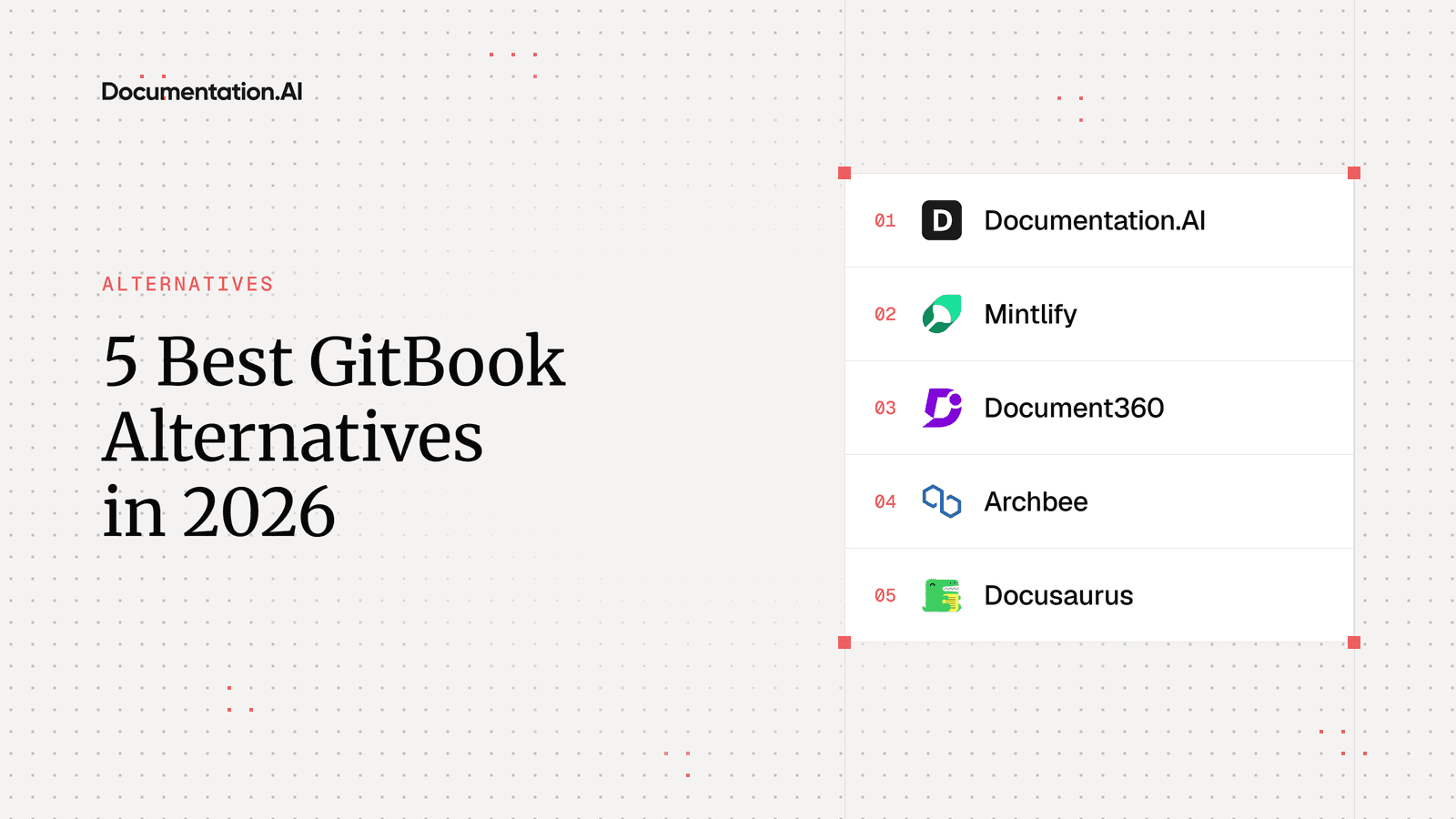
5 Best GitBook Alternatives in 2026
GitBook still sets the standard for block editing, and its pricing is still built around one site at a time. This guide compares the strongest alternatives on the questions that usually end a GitBook contract: the cost of adding docs sites, reader-facing AI, control over the published design, and how your content gets out.

Roop Reddy · Co-Founder, Documentation.AI
Last updated
On this page
GitBook is where documentation ends up when the people writing it are not all engineers. A writer opens a page and types, a developer commits Markdown from their own editor, and two-way Git Sync keeps the two versions honest. Most teams pick it for the editor, and most of them stay for the editor.
What sends them looking for a GitBook alternative is almost never the writing. It is what happens when one documentation site becomes three, or when readers start expecting to ask the docs a question and get an answer.
This guide ranks the five GitBook competitors worth shortlisting for teams in that position. Prices are the annual rates each vendor publishes. Documentation.AI, Mintlify, and Archbee are assessed from hands-on builds for our review series, and Document360 and Docusaurus from their own documentation and pricing pages.
Quick Verdict (TL;DR)
Documentation.AI is the best GitBook alternative for most teams in 2026. It keeps what makes GitBook pleasant, a visual editor over a real Git workflow, and removes the two multipliers that make GitBook expensive: it prices per plan rather than per site, and reader AI is included from the free plan. The other four each win a narrower job:
- Documentation.AI: best overall, and the pick when several docs sites are owned by more than engineering
- Mintlify: best published design, for API-first developer docs
- Document360: best for support-led knowledge bases that need approval workflows
- Archbee: best for customer guides, internal knowledge, and in-product help on one platform
- Docusaurus: best free, open-source, self-hosted option
Stay on GitBook if one collaborative docs site is the whole job and reader AI is not yet a requirement.
Why Look for Alternatives to GitBook?
Most teams leave when the documentation outgrows one site or starts needing reader AI, because that is where GitBook's pricing and design limits start to bite.
What GitBook Does Well
Teams pick GitBook for its editor. The block editor is fast and Notion-like, drag and drop works across the page tree, and non-technical writers adopt it without training. Our GitBook review scores its editing 4.7 out of 5, the top mark on that row across the series.
Git Sync is the other strength. It is genuinely two-way, so developers commit Markdown from their own editor while writers work in the app, and change requests bring pull-request review to people who have never opened a terminal.
The free plan is also more generous than most. It includes preview deployments, page view analytics, interactive API blocks, site variants for versions and translations, llms.txt, and an MCP server for your docs. [1] Open source projects, non-profits, and education groups can apply for the Community plan, which gives them nearly everything on Ultimate at no cost.
Where GitBook Falls Short
Four GitBook decisions account for most switches, and GitBook documents all four itself.
Every site is billed again. Premium is $65 per site per month and Ultimate is $249, with $12 per user per month on top of either. [1] Members are counted once across the organization, which helps, but a second product still means a second site fee. GitBook's suggested fix for several products is to merge them into one Ultimate site with sections, which saves money by giving up separate domains, branding, and access rules.
Reader AI sits at the top tier. Premium gets short AI answers in the search box. The Assistant sidebar, AI insights, and external knowledge sources are Ultimate only. Ultimate includes 500 successful answers a month, the pricing page says to contact GitBook beyond that, and no overage rate is published. [1]
The published site stays inside the theme. Logos, fonts, colors, and the footer can change. Page layout cannot, custom CSS and JavaScript are not supported, and the "Powered by GitBook" link stays on every plan, Enterprise included. [3]
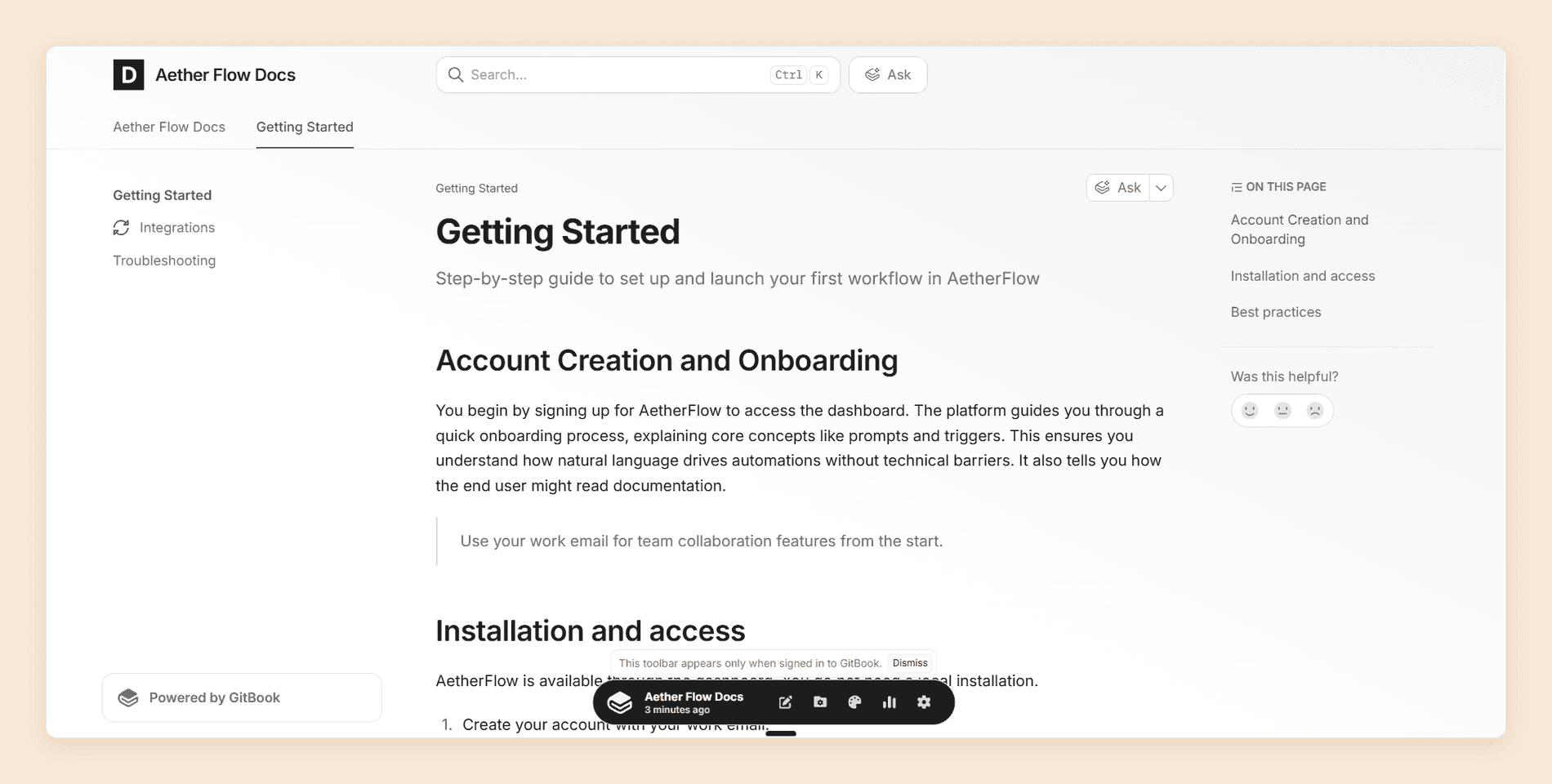
The agent edits pages, not the structure. GitBook Agent handles a scoped change inside a change request well. Reorganizing a documentation set is still manual, and nothing runs on a schedule or on merge to keep pages current.
Leaving also takes more work than arriving. There is no Markdown download: the documented route is syncing each section to an empty Git repository, and blocks with no Markdown equivalent come out as HTML. [3] If none of this applies to you, stay put, and use our GitBook pricing guide to check where your own bill turns.
You can test this list before you price it. Start free carries five editors and the reader Assistant, a Git Sync export imports as Markdown, and your GitBook site keeps serving readers while you try it.
1. Documentation.AI
Documentation.AI removes both multipliers on a GitBook invoice. Projects come bundled into the plan rather than billed per site, editors are unlimited on Pro rather than $12 each, and the reader Assistant sits on the free plan rather than the $249 tier.
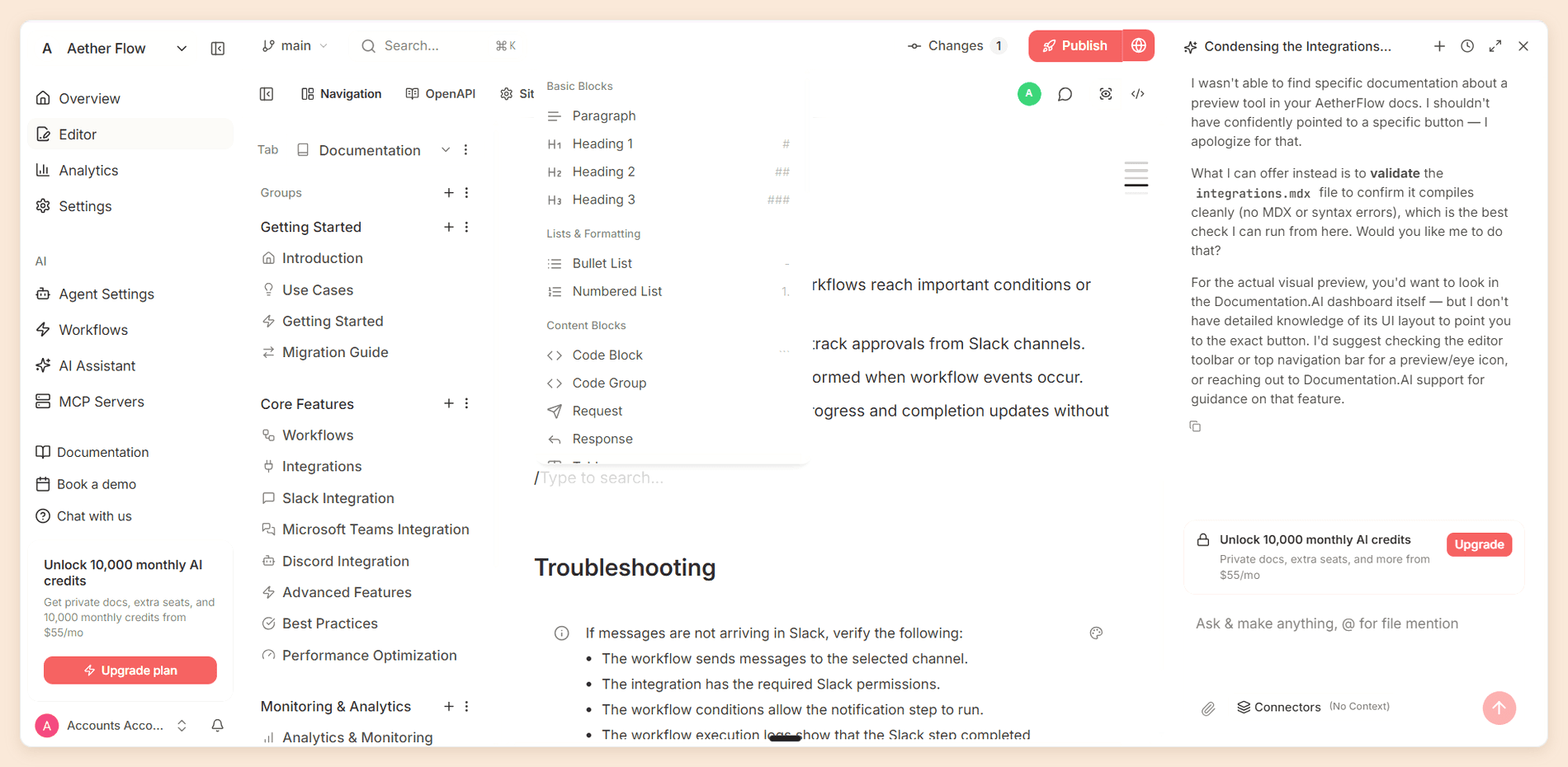
Its agent also works on structure rather than single pages, and runs on a schedule or after a pull request merges, which is the half GitBook leaves manual. The way your team writes does not change: a visual editor and two-way Git sync sit over the same Markdown.
Features
- Two ways to write. A visual web editor with live collaboration, inline comments, and mentions, or docs-as-code with bidirectional GitHub and GitLab sync, branches, pull requests, and live preview.
- An agent that works on structure. Beyond drafting pages, the AI Documentation Agent refactors navigation and reads code and recent commits from connected repositories.
- AI Automations. The agent runs on a schedule or after a pull request merges, with templates for broken links, style enforcement, changelogs, and API sync. The Self-Heal automation reads page ratings, reader comments, and Assistant confidence scores, then proposes fixes as commits for review.
- Live context. Jira, Confluence, repositories, and user feedback connect as sources the agent reads at runtime.
- A cited AI Assistant. Answers come from your published docs with citations and a confidence score, and AI answer analytics shows which questions it answered with low confidence.
- API documentation. OpenAPI import generates reference pages with an interactive playground.
- Publishing for people and agents. Custom domains, versions and localization, custom CSS and JavaScript,
llms.txt, a reader MCP server, and an authoring MCP server for writing docs from Cursor or Claude Code.
Pricing
| Plan | Price | What it includes |
|---|---|---|
| Starter | Free | Five editor seats, one project, 10,000 one-time credits, with the Assistant, agent, and custom domain |
| Standard | $55/mo | 10 seats, two projects, 10,000 credits a month, password-protected docs, external sources for the Assistant |
| Pro | $159/mo | Unlimited seats, four projects, 30,000 credits a month, private docs with JWT or OAuth login, role-based permissions, advanced analytics, PDF export, priority migration support |
| Enterprise | Custom quote | SAML or OIDC SSO, SCIM, footer branding removal, white-glove migration |
A reader question costs 10 credits whatever the length of the answer, and an agent task costs 5 to 320 depending on its size. Half of unused credits roll over, and no plan carries overage billing, so running out pauses the AI until the next cycle. The Documentation.AI pricing page lists every plan in full. [2]
Pros and Cons
Pros
- Reader AI and the agent on the free plan
- Projects bundled into the plan, with unlimited editors on Pro
- Scheduled and merge-triggered automations that keep docs current
- Custom CSS and JavaScript on every plan
- No overage invoices, because the AI pauses instead
- Setup does not require a GitHub account
Cons
- Agent tasks draw credits, where GitBook's authoring AI is not counted per action
- Removing footer branding requires Enterprise
- GitBook's block editor is the more polished writing surface
Why Choose Documentation.AI Over GitBook
Projects come bundled into the plan rather than billed one at a time, and readers are never counted as seats, so launching another product does not reopen the budget conversation. [1] [2]
The second reason is upkeep. GitBook's AI insights tells you which reader questions went unanswered. Documentation.AI's automations read the same kind of signal and draft the fix as a commit, on a schedule you set.
Moving across is a repository job. Export each GitBook section with Git Sync, bring that Markdown into a Documentation.AI project, and give the agent the work of rebuilding navigation around it. Pro includes priority migration support for the larger sites.
Verdict
Documentation.AI is the best GitBook alternative for teams running more than one docs site, documentation owned by product and support as well as engineering, and anyone who wants reader AI without a top-tier plan. Our GitBook vs Documentation.AI comparison builds the same docs on both platforms and prices four sites side by side, and our Slack channel is the quickest place to sanity-check a move before you start one.
2. Mintlify
Mintlify is the alternative to pick when the reader is a developer and the docs site is part of the product. Content is MDX in a Git repository, a docs.json file describes the site, and a default Mintlify site looks designed without anyone designing it.
It is no longer a developer-only tool. The browser editor has visual and source modes, and branches open pull requests behind the scenes, so writers can publish without running Git themselves. The model underneath is still Git, and people who have never used it do notice. We wrote a full Mintlify review by building a sample documentation site on it and testing every part of the platform.
Features
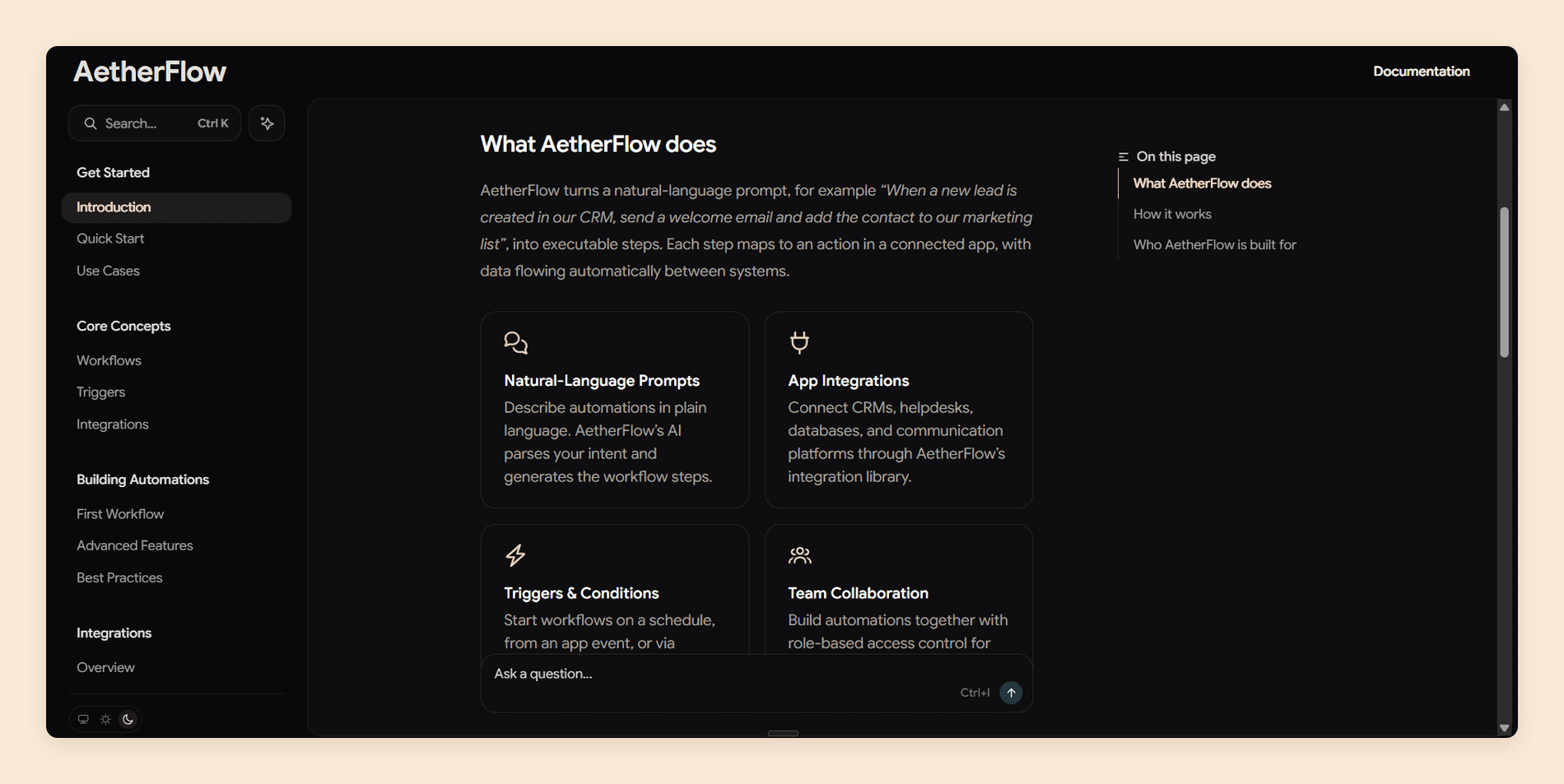
- Published design. Typography, dark mode, and components for tabs, callouts, cards, and steps work out of the box. Published output scored 4.8 in our review series, the highest mark on that row.
- A collaborative editor. Visual and source modes, live cursors, comments, and suggestions, with GitHub pull requests and GitLab merge requests syncing into editor branches.
- API playground. Interactive pages generated from OpenAPI 3.0, OpenAPI 3.1, or AsyncAPI that send real requests and refresh when the spec changes.
- Assistant and agent. The assistant cites its sources, and the agent opens pull requests rather than writing to your live site. Automations run it on content changes, code changes, or a schedule.
- Publishing for agents. Every site gets
llms.txt, Markdown versions of pages for agents, and an MCP server, and analytics separates human traffic from agent traffic.
Pricing
| Plan | Price | What it includes |
|---|---|---|
| Starter | Free | Five editor seats, with no assistant, agent, or analytics |
| Pro | $450/mo per deployment | Unlimited editor seats, 10,000 AI credits a month |
| Enterprise | Custom quote | Role-based permissions, audit logs, SSO, SCIM, PDF export, white labeling |
Credits pool across the organization, so two Pro deployments share 20,000. Since 8 September 2026 an answered reader question costs a fixed 25 credits and a docs update from an automation costs 250, while the editor agent draws none. If you would like to read more about the full structure, read our Mintlify pricing guide. [4] [5]
Pros and Cons
Pros
- Published design that needs almost no configuration
- An API playground that justifies the platform for API-first products
- Unlimited editor seats on Pro
- A dedicated GitBook migration guide
Cons
- Nothing between a free plan with no AI and $450 a month
- Each additional docs site is another Pro plan
- Pro's credits cover about 400 answered questions a month
- Role-based permissions and audit logs need Enterprise
Why Choose Mintlify Over GitBook
Choose Mintlify when the API reference and the published design are what your readers judge you on. GitBook's API blocks are competent, and its "Test it" playground is built on Scalar. Mintlify's playground is the product's centerpiece, and its sites look more finished with less configuration.
Seats also work differently. GitBook Ultimate with seats costs more than one Mintlify Pro plan once you reach 17 editors, and GitBook Premium does at 33, because Mintlify never charges per editor. [1] [4] That advantage holds for one site and reverses quickly across several.
Migration is documented. Mintlify's GitBook guide offers a Git Sync export for complete content, or a scraper for public sites that cannot reach private sections, comments, or revision history. [5]
Verdict
Mintlify is the premium pick for API-first products with engineering-owned docs and a budget where $450 a month per site is easy to approve. GitBook vs Mintlify puts the two head to head.
Leaving GitBook?
Bring your GitBook content with you
Bring in your Git Sync export and watch the agent work on your own pages before you pay.
No credit card required
3. Document360
Document360 comes at documentation from the support desk rather than the repository. It is a hosted knowledge base for help centers, internal knowledge, SOPs, and API references, built around editorial control and a support-facing AI layer called Eddy.
Features
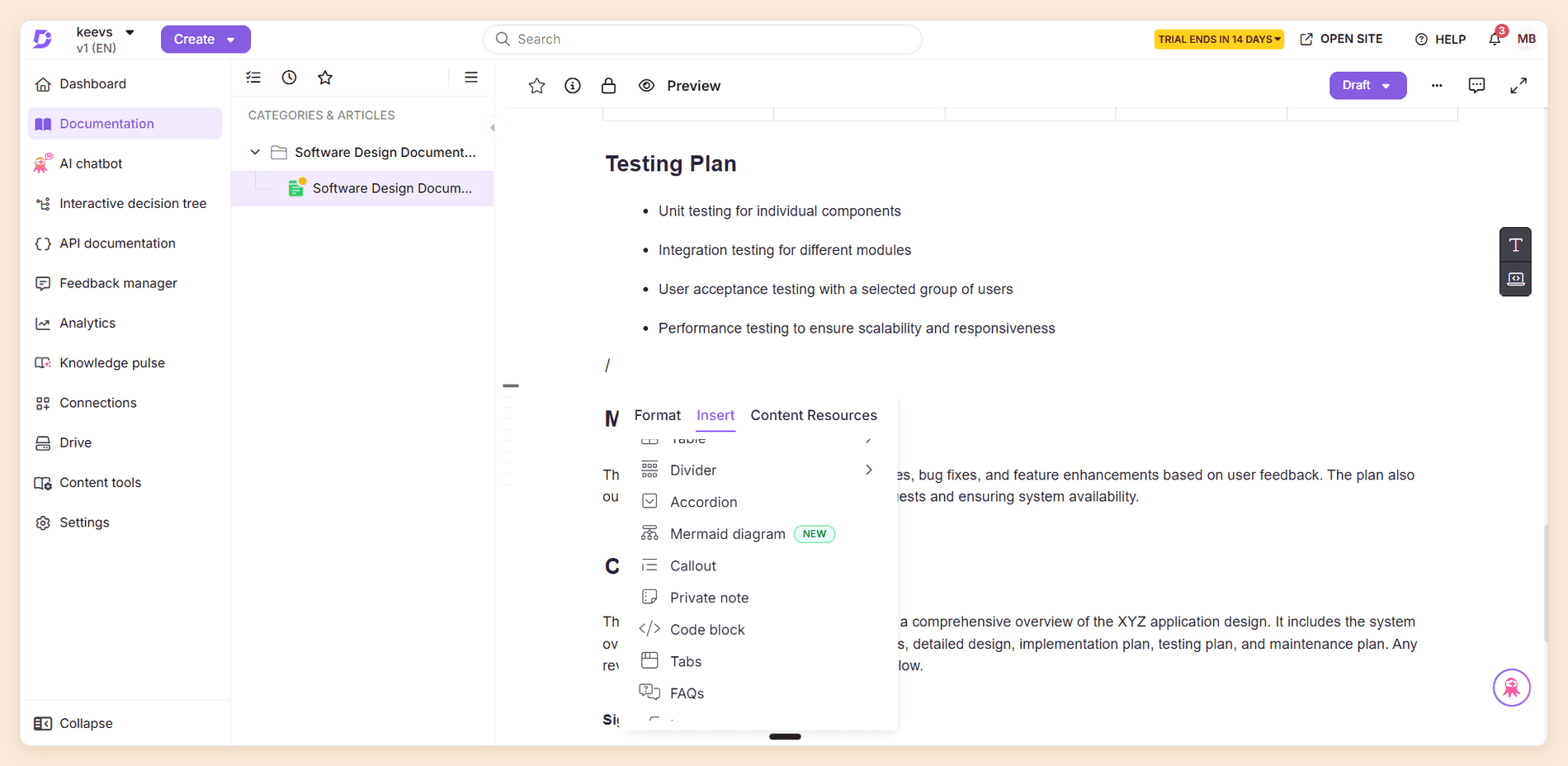
- Two editors. Writers choose a Markdown editor or an Advanced WYSIWYG editor, with revision history on every article.
- Workflow and governance. A workflow designer assigns stages to writers, reviewers, and subject experts, articles pass through approval before they publish, and review reminders keep audits on schedule.
- Reusable content. Snippets and variables update everywhere they appear, alongside glossary management and global find and replace.
- Eddy AI. A writing agent, AI search and answers, glossary generation, duplicate content detection, and an MCP server.
- AI chatbot. Answers from your knowledge base, websites, files, and past Zendesk or Freshdesk tickets, and can raise a support ticket when it cannot help.
- API documentation. Reference pages generated from an uploaded spec, with a CLI for syncing from CI/CD.
- Security and hosting. SSO, SCIM, JWT reader login, IP restriction, a choice of datacenter region, and SOC 2 Type II compliance on every plan.
Pricing
| Plan | Price | What it includes |
|---|---|---|
| Every plan | Quote only | No published prices and no plan names since mid-2026, with a 14-day trial and no free plan |
| AI chatbot add-on | Quote only | Ticket-aware answers with escalation, priced separately from the plan |
| AI Premium Suite add-on | Quote only | Screen capture, step-by-step guides, interactive demos, video recording |
The pricing page is a short questionnaire that routes every buyer to sales, so an evaluation starts with a call rather than a number.
Pros and Cons
Pros
- The deepest approval and workflow tooling of the five
- A chatbot built for ticket deflection, with escalation
- Data residency choice and SOC 2 Type II on every plan
- Custom CSS and JavaScript on the published site
Cons
- No published prices, so every evaluation starts with a sales call
- No free plan
- GitHub sync runs one way, from the repository into Document360, and synced articles are read-only
- The chatbot and visual authoring suite cost extra
Why Choose Document360 Over GitBook
Choose Document360 when documentation is a governed support asset rather than a developer artifact. GitBook's change requests review content, while Document360's workflow designer models who writes, who checks, and who signs off, which matters in regulated industries and large support teams.
The support loop is the other difference. GitBook's Assistant can read Zendesk and Intercom as sources on Ultimate, but Document360's chatbot is designed around deflecting and escalating tickets.
Migration is a service rather than a tool. Document360's team moves articles, images, internal links, redirects, and custom CSS for you. GitBook is not on its list of named source platforms, although the page says the team imports from "pretty much any platform".
Verdict
Document360 fits support and operations teams running governed knowledge bases, particularly where review trails and data location matter. It is a harder fit when developers and writers need to edit the same pages, because articles synced from GitHub are read-only inside Document360. GitBook vs Document360 compares the two directly.
4. Archbee
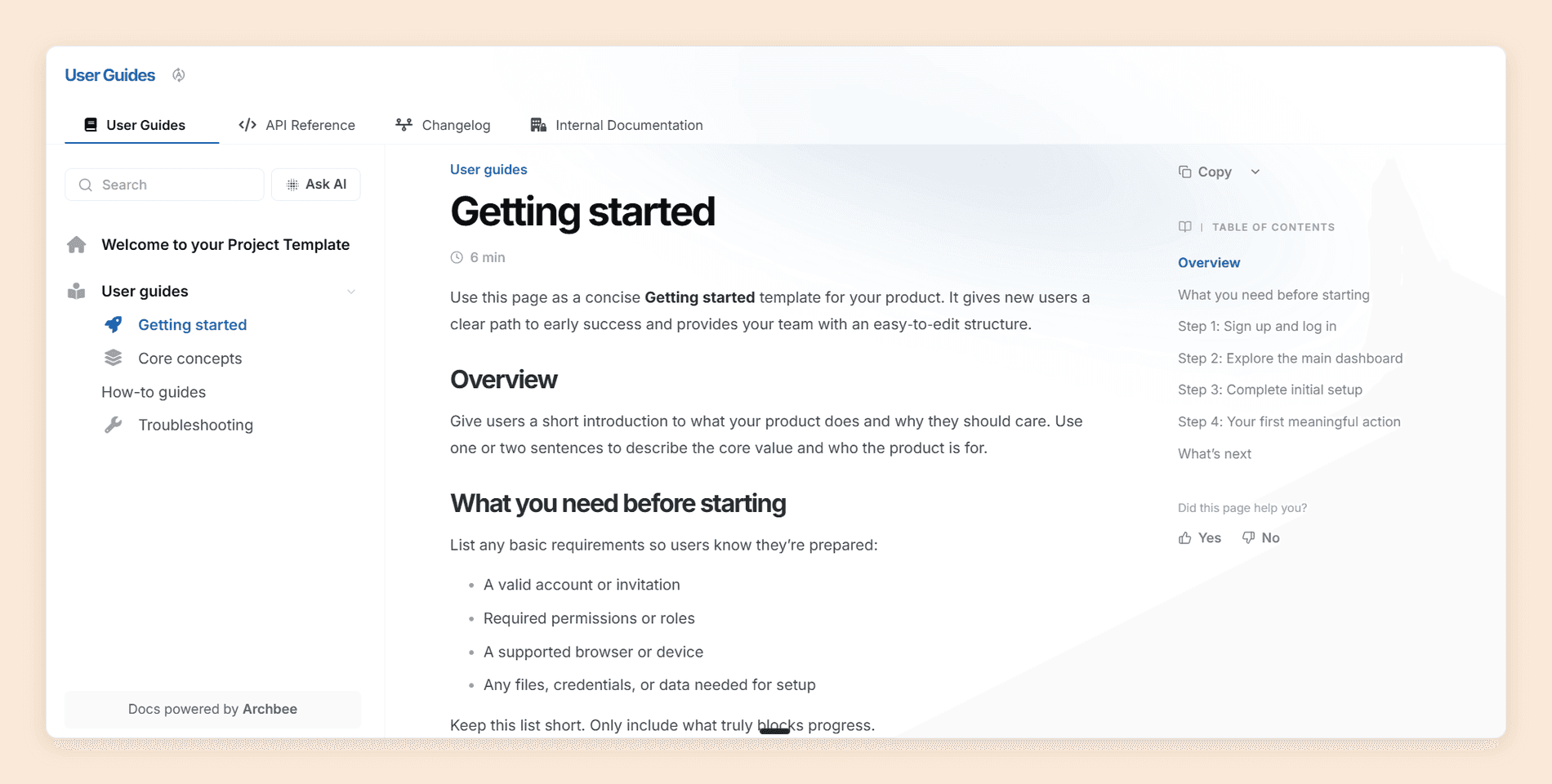
Archbee calls itself a knowledge portal, and the label fits. Spaces keep customer guides, the API reference, support content, and internal runbooks apart while sharing one editor, and spaces are unlimited on both paid plans, so serving several audiences does not multiply the plan price the way GitBook sites do. [6] We wrote a full Archbee review by building a portal on it and testing the editor, the assistant, and the add-ons.
Features
- Block editor. More than 30 blocks, including a Developer tab with tabbed code, Mermaid diagrams, an API endpoint block, OpenAPI with a Try It console, and GraphiQL.
- Git sync. Two-way sync with GitHub, GitLab, and Bitbucket, with the repository as the source of truth and edits in Archbee opening a pull request.
- Shadow docs. Source files from a connected repository that Ask AI can answer from without ever appearing on the portal.
- Spaces and space links. Separate spaces per audience, joined into one navigable site on Scaling.
- App documentation widget. Contextual help inside your own product through a script tag or a React package, sold as an add-on.
- Machine-readable publishing. An MCP server,
llms.txt, and a Markdown version of every published page on both paid plans.
Pricing
| Plan | Price | What it includes |
|---|---|---|
| Growing | $80/mo | Five members included, then $5 each, with unlimited spaces and a custom domain |
| Scaling | $350/mo | Five members, then $10 each, adding the review workflow, snippets and variables, versioning, and search analytics |
| Enterprise | Custom quote | Every add-on included |
The add-ons are where the bill grows: AI is $16 a month on Growing and $40 on Scaling, and page analytics, reader Q&A, the app widget, public API access, whole-portal PDF export, and static HTML export cost $80 a month each. There is no free plan, only a 14-day trial. Our Archbee pricing guide prices the full set. [6]
Pros and Cons
Pros
- An editor non-technical contributors pick up quickly
- Unlimited spaces and a custom domain on the entry plan
- Shadow docs, which no other platform here offers
- Git sync across three providers
Cons
- No free plan
- Ask AI was slow in our testing and is still labeled beta
- Page analytics and API access are separate $80 add-ons
- No raw Markdown view inside the app
Why Choose Archbee Over GitBook
Choose Archbee when one company needs several kinds of documentation in one tool. GitBook bills each site, while Archbee lets you add spaces for guides, the API reference, and internal knowledge without changing the plan price, and its app widget brings documentation into your product.
Migration is simple on paper. GitBook is one of Archbee's listed import types, alongside Markdown, OpenAPI, ReadMe, and Notion. Ask AI can also index a public GitBook site as an external source, which helps if you move in stages.
Verdict
Archbee suits SaaS companies that want product docs, internal knowledge, and in-app help in one place, written mostly by non-technical contributors, provided reader AI is not the priority. Archbee vs Documentation.AI compares the two directly, and our Archbee alternatives guide ranks the field for teams leaving Archbee instead. Archbee vs GitBook puts the two head to head.
5. Docusaurus
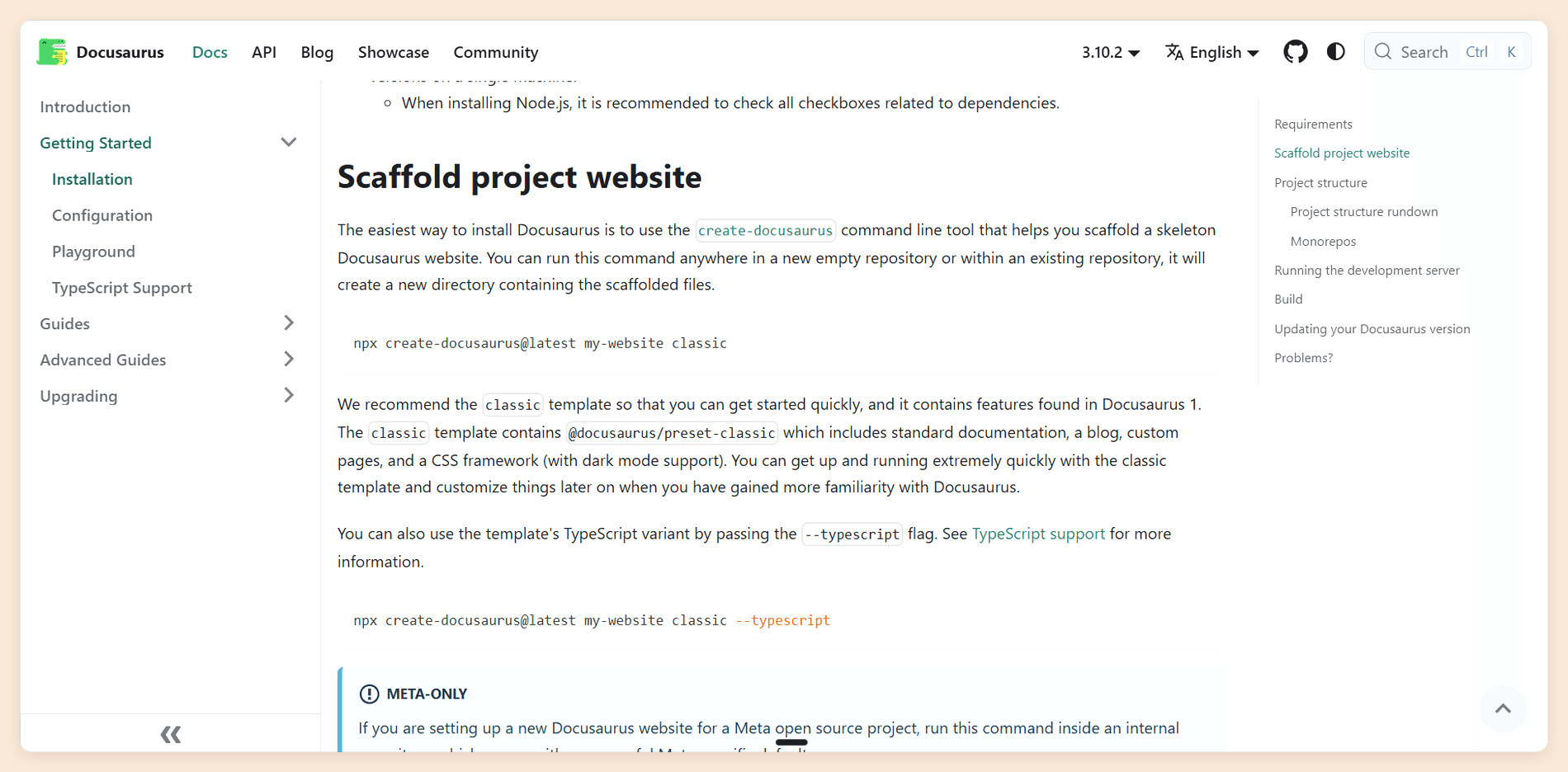
Docusaurus is the answer when the problem with GitBook is paying anyone at all. It is an open-source static site generator maintained by Meta, MIT licensed, with more than 66,000 GitHub stars and version 3.10.2 released in July 2026. You write Markdown and MDX in your own repository, Docusaurus builds a React site, and you host the output wherever you like.
Features
- Markdown and MDX. Content lives in your repository, and React components can sit inside any page.
- Versioning and internationalization. Both are built into the framework rather than bolted on.
- Themes you can override. The default theme is made of React components you can replace, so there is no ceiling on layout.
- Search. Algolia DocSearch is officially supported and free for developer documentation, with community local-search plugins as the alternative.
- Plugins. A large ecosystem, including the community
docusaurus-openapi-docsplugin for API reference pages.
Pricing
| Plan | Price | What it includes |
|---|---|---|
| Open source | Free under the MIT license | The whole framework, hosted wherever you like |
The real costs are hosting, which is cheap for a static site, and the engineering time to build, upgrade, and maintain it.
Pros and Cons
Pros
- Free and open source, with no vendor lock-in
- Complete control over design and behavior
- No vendor branding, site fee, or seat count
- A large, active community
Cons
- No hosted service or visual editor for non-developers
- No AI assistant, agent, or analytics unless you build or buy them
- API reference depends on a community plugin
- Upgrades and maintenance fall on your team
Why Choose Docusaurus Over GitBook
Choose Docusaurus when you would rather own the whole stack than rent it. Everything GitBook locks down, from page layout to the footer, is yours to change, and the price does not move as you add sites or contributors.
The move itself is manual, but the starting point is friendly: a GitBook Git Sync export is already Markdown in a repository. The work is turning SUMMARY.md into a Docusaurus sidebar and rebuilding any GitBook blocks that exported as HTML. [3]
Verdict
Docusaurus fits open-source projects and engineering teams with the time to own their docs stack, and it is the wrong choice for anyone who needs writers outside engineering. Our roundup of developer documentation tools covers the other self-hosted options.
GitBook Alternatives Compared
Plan prices sit with each platform above, so this table covers what you can actually do once you are on one. The two columns that decide most GitBook evaluations are where reader AI lives and what a second docs site costs you structurally.
| Platform | Visual editor | Git workflow | Interactive API reference | Reader AI | A second docs site |
|---|---|---|---|---|---|
| GitBook | Yes, the best here | Two-way Git Sync | Yes, on a Scalar panel | AI search on Premium, Assistant on Ultimate | A second site fee |
| Documentation.AI | Yes | Two-way, GitHub or GitLab | Yes, every plan | Yes, from the free plan | Included, up to four projects |
| Mintlify | Yes | Two-way, GitHub or GitLab | Yes, every plan | Metered in credits, on Pro | A second deployment |
| Document360 | Yes | One-way import, read-only | Yes, paid plans | In the plan, chatbot as an add-on | Another workspace, by quote |
| Archbee | Yes, blocks only | Two-way, three providers | Yes, both paid plans | Add-on, metered in tokens | A space on the same plan |
| Docusaurus | No | Native, it is a repository | Community plugin | None built in | You host it |
What Three Docs Sites Cost
GitBook's per-site fee stays invisible until you count sites, so here is one team priced across the whole list: three documentation sites, 10 people who edit, and about 1,000 reader questions a month. All figures are annual rates, shown per month.
| Platform and setup | Monthly cost | What decides it |
|---|---|---|
| GitBook Premium, three sites, 10 users | $315 | Search-box answers only, no Assistant at this tier |
| GitBook Ultimate, three sites, 10 users | $867, plus overage | 500 answers included, the rest billed at an unpublished rate |
| Documentation.AI Pro | $159 | Four projects and unlimited seats, using 1,000 of 30,000 credits |
| Mintlify Pro, three deployments | $1,350 | Each deployment billed again, using 25,000 of 30,000 pooled credits |
| Document360 | Quote only | Priced by sales, with the chatbot quoted separately |
| Archbee Growing, 10 members, AI add-on | $141 | Spaces are unlimited, but the second and third domains cost extra |
| Docusaurus | $0 in licenses | Three sites to host and maintain, and no reader AI to meter |
Read down the middle column and the multiplier does the work. GitBook and Mintlify charge for each site again, Archbee charges for the extras around it, and Documentation.AI holds flat until the fourth project.
Which GitBook Alternative Is Right for You?
| Your situation | Best fit | What decides it |
|---|---|---|
| Two or more products, each with its own docs site | Documentation.AI | Projects bundled into the plan instead of billed per site |
| Docs written by product, support, and engineering together | Documentation.AI | Visual editor, Git optional, and an agent that handles restructuring |
| A public API with a developer audience and the budget to match | Mintlify | The strongest published design and a generated playground |
| A support knowledge base with approvals and audit needs | Document360 | Workflow stages, data residency, and a ticket-aware chatbot |
| Product docs, internal wiki, and in-app help in one tool | Archbee | Spaces, space links, and the app widget |
| An open-source project with engineers to maintain it | Docusaurus | Free, self-hosted, and fully customizable |
| One docs site, a Git-first team, and no need for reader AI | Stay on GitBook | Premium is fair value at that size |
What Moving Off GitBook Involves
Whichever platform you choose, the first step is the same, because GitBook has no Markdown download.
- Create an empty GitHub or GitLab repository, or an empty branch, for the export.
- In each GitBook section, set up Git Sync and choose GitBook as the starting direction. Choosing the repository as the starting direction replaces the section's content with the empty branch.
- Run the first sync, then leave that repository untouched as your snapshot.
- Repeat for every section, language, and version on the published site. [5]
What arrives is a README.md home page, a SUMMARY.md table of contents, uploaded files under .gitbook/assets, and reusable content under .gitbook/includes. [5] Budget time for the blocks GitBook exports as HTML, and for redirects from your old URLs so the pages you rank for keep ranking. [3] If you would rather see that priced against your real site count, seat count, and reader traffic before you move anything, book a demo.
Migrating a large GitBook site?
Pro includes priority migration support, and we can go through your structure with you before anything moves.
Documentation.AI Slack channel: Join here
Final Verdict
What pushes teams off GitBook is the pricing model, not the editor. It assumes one site, bills per user on top of that, and keeps the reader Assistant on the $249 tier, so the invoice grows on two axes at once as the company does.
The choice then follows the job. Mintlify is the premium pick for API-first developer docs. Document360 fits governed support knowledge bases. Archbee is the cheapest way to put several audiences on one platform, provided reader AI is not the priority. Docusaurus swaps the subscription for engineering time. GitBook itself stays the right answer for one collaborative site, where nothing on this list types better.
Documentation.AI is the best GitBook alternative for the widest range of teams. It removes the per-site and per-user multipliers, puts the Assistant on the free plan, and adds automations that keep documentation current after it ships.
The fastest way to check that claim is on your own documentation. Start free and import your GitBook export, then run the agent over your own pages.
Weighing individual matchups? These go deeper:
- GitBook vs Documentation.AI, the two platforms built and priced side by side
- GitBook pricing, every plan, add-on, and answer allowance worked through
- Mintlify alternatives, the same question for teams leaving Mintlify
- Theneo alternatives, the same question for teams leaving an API-first portal builder
- Redocly alternatives, the same question for teams leaving a Git-native OpenAPI toolchain
- Fern alternatives, the same question for teams leaving a docs-and-SDK generator
- ReadMe vs GitBook, API portals against collaborative docs
- Mintlify vs GitBook vs ReadMe, three billing shapes priced on the same documentation
- Document360 alternatives, for teams already on a knowledge base platform
FAQs
1. What Is the Best GitBook Alternative in 2026?
Documentation.AI, for most teams. It bundles four documentation projects and unlimited editors into its $159 Pro plan and includes reader AI from the free plan. Mintlify is the stronger choice for API-first developer docs, Document360 for governed support knowledge bases, Archbee for multi-audience portals, and Docusaurus for self-hosting.
2. Is There a Free Alternative to GitBook?
Yes, of two kinds. Docusaurus is free and open source, but you host it and add any AI yourself. Documentation.AI's Starter plan is free with five editor seats, a custom domain, and the AI Assistant with 10,000 one-time credits. [2] Mintlify's free plan has no AI, Archbee has no free plan, and Document360 offers a 14-day trial.
3. Which GitBook Alternative Is Best for API Documentation?
Mintlify, if the budget allows, because its playground generates from OpenAPI or AsyncAPI and sends live requests. Documentation.AI generates OpenAPI reference pages with a playground from its free plan. Document360 builds references from an uploaded spec and can sync them from CI/CD, and Docusaurus relies on a community OpenAPI plugin.
4. How Do I Export My Content From GitBook?
With Git Sync. Connect each section to an empty GitHub or GitLab repository, choose GitBook as the starting direction, and the repository becomes your export. There is no direct Markdown download, and blocks without a Markdown equivalent come out as HTML. [3]
5. Which Platforms Here Charge per Documentation Site?
Yes. Premium is $65 and Ultimate $249 per site per month, plus $12 per user per month, with users counted once across the organization. [1] Among these alternatives, Mintlify also prices per deployment, Archbee includes unlimited spaces in each plan, and Documentation.AI includes one, two, or four projects depending on the plan.
6. Which Alternative Is Easiest for Non-Technical Writers?
Documentation.AI and Archbee, both of which let a writer work visually without dealing with branches. Document360 is approachable too, with a WYSIWYG editor and workflow stages designed for editorial teams. Mintlify's editor is visual now but sits on branches and pull requests, and Docusaurus has no visual editor at all.
7. Is Document360 Cheaper Than GitBook?
There is no way to tell from the outside. Document360 no longer publishes plan prices, and its pricing page routes every request through sales after a 14-day trial. If reader AI matters, ask for the quote with the chatbot add-on included, because it is not part of the base plan.
8. Who Are GitBook's Main Competitors?
Beyond the five here, teams comparing GitBook often look at ReadMe for API portals built around per-key usage metrics, Fern for SDKs and reference docs generated from one API spec, and Redocly for an OpenAPI toolchain priced by seats and modules. Each is strong at its own job, and none is a like-for-like replacement for a general documentation site. Teams leaving ReadMe itself face a different shortlist, covered in our ReadMe alternatives roundup.
Sources
- GitBook. "Pricing." GitBook. Accessed September 2026. https://www.gitbook.com/pricing
- Documentation.AI. "Pricing." Documentation.AI. Accessed September 2026. https://documentation.ai/pricing
- GitBook. "GitBook Docs." GitBook. Accessed September 2026. https://gitbook.com/docs
- Mintlify. "Pricing." Mintlify. Accessed September 2026. https://www.mintlify.com/pricing
- Mintlify. "Mintlify Docs." Mintlify. Accessed September 2026. https://www.mintlify.com/docs
- Archbee. "Pricing." Archbee. Accessed September 2026. https://www.archbee.com/pricing
Leaving GitBook?
Bring your GitBook content with you
Bring in your Git Sync export and watch the agent work on your own pages before you pay.
No credit card required