5 Best Theneo Alternatives in 2026
Theneo turns an API specification into a designed portal, then puts review workflows, design control, and its documentation agent on the upper tiers. This guide compares the leading alternatives, free and open-source options included.

Monika B. · GTM Engineer, Documentation.AI
Last updated
On this page
Theneo takes an OpenAPI file and hands back a developer portal with the endpoint descriptions already written. For a team that has a specification and nobody to write against it, that removes most of the first week of work, and it is why Theneo wins a lot of first evaluations.
The second year is where teams start looking for a Theneo alternative. The AI that wrote your descriptions at import is not the AI that keeps them true six releases later, and the features you reach for as documentation matures, a reviewer who signs off before publishing, a stylesheet your brand team approves, a third public API reference, each sit one tier up or behind a sales call.
This guide ranks five alternatives in the order most teams should look at them, then covers the free and open-source options, a side-by-side comparison, and how to decide. Prices are the annual rates each vendor publishes.
Quick Verdict (TL;DR)
Documentation.AI is the best Theneo alternative for most teams in 2026. It generates the same API reference from your specification, then runs an agent that maintains the whole documentation set rather than drafting it once. Standard starts at $55 a month billed annually, and the AI works on the free plan. The other four each win a narrower job:
- Documentation.AI: best overall, and the pick when the API reference is one part of a larger documentation set
- Mintlify: best for a docs-as-code team that wants a polished site and a local CLI
- Redocly: best for API governance, where the specification is linted and reviewed before it ships
- Fern: best free tier, and the only option here that generates client SDKs from the same spec
- ReadMe: best for a developer portal where per-key usage data matters
Why Look for Alternatives to Theneo?
The complaints are consistent. Your tier is set by what you publish rather than by how many people work there, review and approval sit behind an Enterprise contract, endpoints are metered across the workspace, and the AI is at its strongest on the day you import. Those are some of the reasons teams leave. What Theneo does well is worth setting out first.
What Theneo Does Well
Autofill writes the first draft of your reference. Hand Theneo an OpenAPI file and its Autofill pass writes descriptions across the section header, parameters, request body, and response, which you apply in bulk or only where a description is missing.
The format support is the broadest here. OpenAPI and Swagger 2.0 and 3.x, Postman collections, GraphQL, gRPC proto files, SOAP and WSDL, and AsyncAPI all import. [2] If a SOAP service somewhere still has paying customers, Theneo is one of very few modern platforms that renders it properly.
Billing is per workspace, not per seat. Starter holds up to 20 team members, Business 50, and Growth 100, with Admin, Publisher, Editor, and Guest roles on every plan at no extra charge. [1] Adding a stakeholder to the account costs nothing, which is not true of ReadMe or GitBook.
Analytics turn on when you publish, on every plan. They include a verbatim log of what readers typed into Ask AI. [2] That log is a list of the pages your documentation is missing, written by the people who needed them. Re-imports go through Merge 2.0, which updates only what changed and preserves your section IDs and menu order.
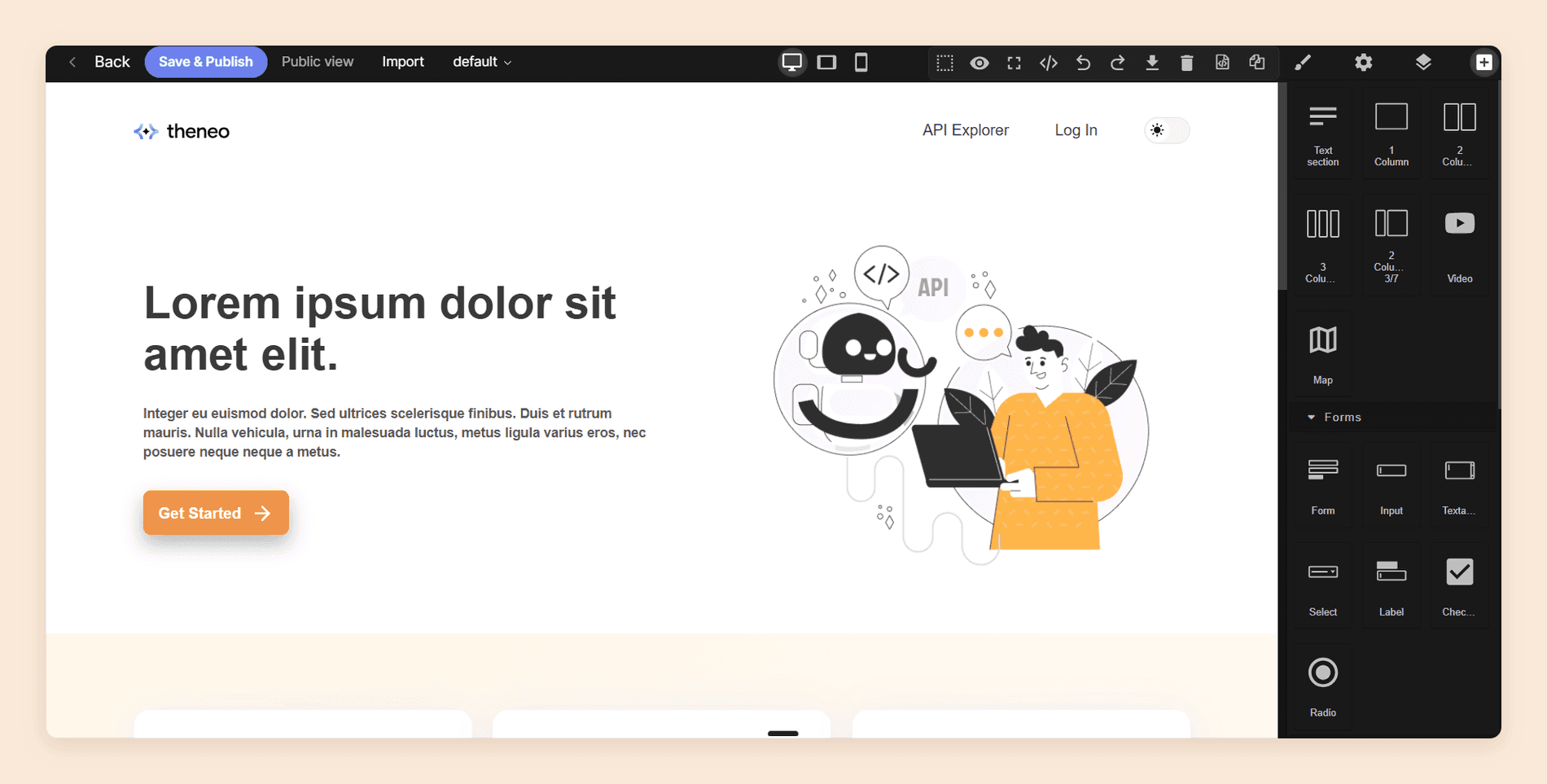
It publishes for machines as well as readers. Theneo generates llms.txt and llms-full.txt, produces an MCP server from your docs, and puts a one-click Markdown export on every page of a public project. [2] The file and the server are the two layers agents read a docs site through today; a third, in-page one called WebMCP is in origin trial and replaces neither. Our guide to AI documentation for agents and LLMs covers what each layer needs to work. Its developer portal is a genuine low-code page builder rather than a theme.
Where Theneo Falls Short
The free plan's AI is a demonstration. Starter gives you 100 GPT-powered search results for readers and 2,000 AI doc-builder assists, with no period stated on either figure. [1] It is enough to watch the features work and not enough to run them, so reader AI cannot really be judged without paying for a month.
Unlimited AI carries a clause the pricing page leaves out. From Business up, reader search and the AI doc builder are listed as unlimited, with no answer allowance and no overage rate. [1] Theneo's terms still allow it to throttle usage, require an upgrade, invoice for excess usage, or suspend the affected functionality if you place a disproportionate load on the platform, and no threshold for any of that is published.
Your tier is decided by publishing, not by people. Business advertises seven projects, but only two of them can be public, so a third public API reference moves you to Growth at $400. [1] Custom CSS and JavaScript sit on Growth too. Neither of those is a usage increase, and our Theneo pricing guide works through every tier boundary in full.
The plan caps your product, not just your team. Endpoints are metered across the workspace: 2,000 on Starter, 5,000 on Business, and 10,000 on Growth. [1] One REST API will never see that ceiling. A platform team running a dozen versioned services can, and it is the only limit here that grows with your engineering roadmap.
Review and approval is an Enterprise feature. Branches, assigned approvers, merge rules, and inline review comments all require an Enterprise contract. [2] Below that you get live collaboration, a setting for who may publish, and unlimited preview deployments, including one for every pull request, but a preview is not the same thing as a named reviewer signing off.
The agent that maintains docs is in beta. The Theneo Agent reads what a pull request changed, checks it against the whole project, comments on the PR with what is now outdated, and drafts updates for a human to approve. It is the most interesting thing in the product and it is labeled beta in Theneo's own documentation. [2]
Git sync overwrites rather than merges. Sync with GitHub, GitLab, and Bitbucket is included, and whichever direction runs next wins: inbound overwrites the project, outbound overwrites the folder. [2] The failure mode is specific. Somebody edits in Theneo, does not sync out, an engineer pushes to the docs folder, and that work is gone.
Several capabilities have no published price. The MCP API, Ask AI export and embedding, and AI translation are all available on request rather than on a plan. [1] For a platform positioned on AI, three of its AI surfaces are a conversation instead of a line item.
The Theneo review scores the whole product.
You can test this list before you price it. Start free carries five editors and the AI Assistant, your OpenAPI file imports as it is, and your Theneo project keeps serving readers while you try it.
1. Documentation.AI
Documentation.AI is built for the part Theneo's AI stops at. Theneo writes your endpoint descriptions at import, which is a one-time benefit; the agent here keeps a documentation set true six releases later, running on a schedule or after a pull request merges and handing back low-confidence reader answers as a list of pages nobody has written yet.
The tier boundaries sit differently too. Role-based permissions, custom styling, and additional projects carry published prices, where Theneo puts each of them a tier up or behind a sales call. The writing workflow is the familiar one: a visual editor for writers, MDX through two-way Git sync for engineers, both on the same source.
Features
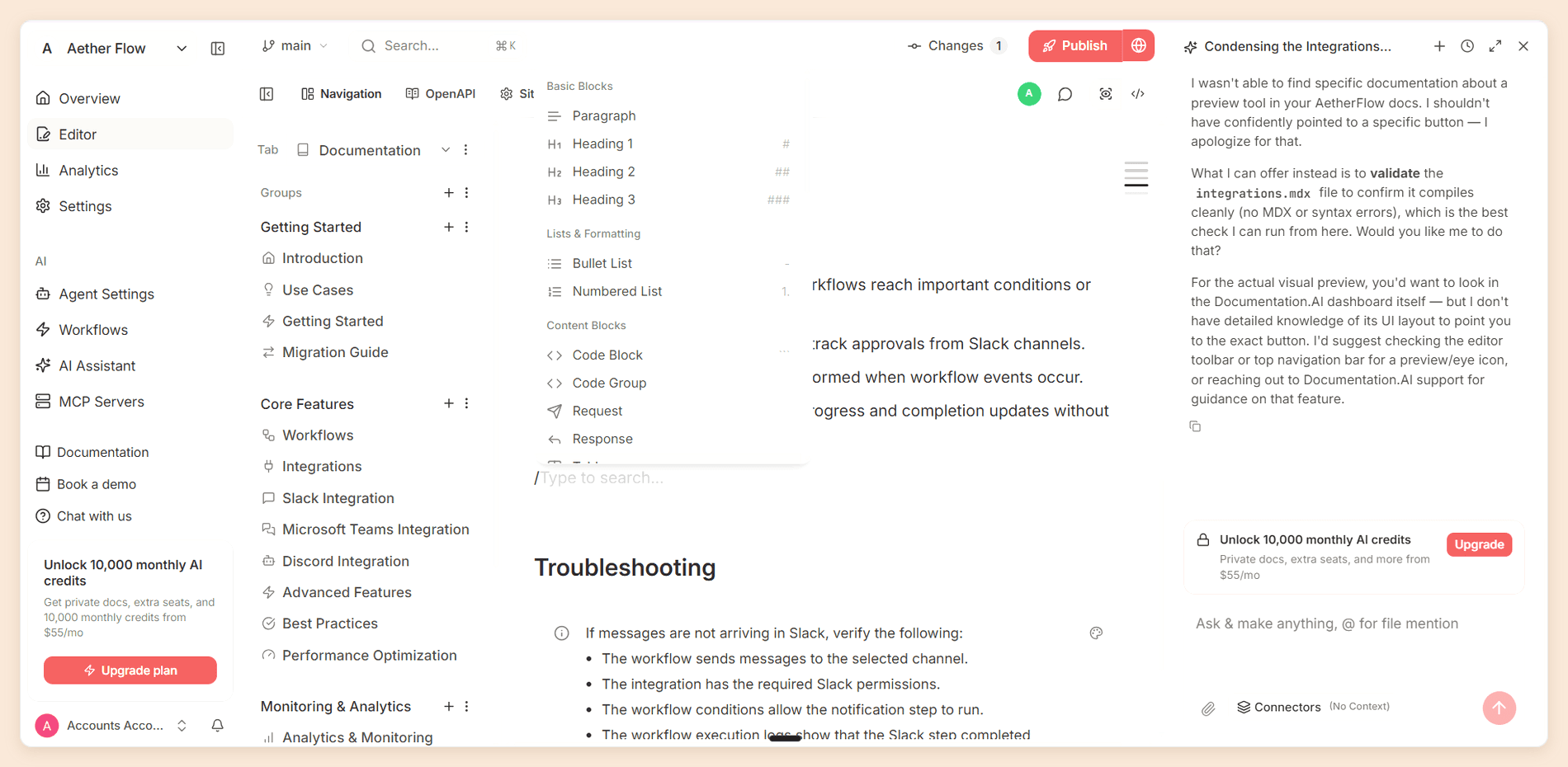
- An agent that maintains rather than drafts once. The AI Documentation Agent edits existing pages and restructures navigation while keeping URLs working, running on a schedule or after a pull request merges. It pulls context from GitHub, Jira, Confluence, Linear, Notion, HubSpot, and Plain, so pages get updated from where the product work happened.
- Review on every plan. Changes go through Git branches and pull requests on every tier, so a named approver signing off before publishing does not need an Enterprise contract. Theneo puts branches, assigned approvers, and merge rules on Enterprise. [2]
- Two-way sync that merges. Bidirectional sync with GitHub or GitLab reconciles through Git, rather than letting whichever direction ran last overwrite the other side.
- Nothing counts your endpoints. Four projects on Pro, none of them split into public and private quotas, where Theneo meters endpoints across the workspace and caps public projects at two on Business. [1]
- AI Assistant with confidence scores. Answers readers with citations and scores each answer, at 10 credits a question with 10,000 one-time credits on the free plan, so it can face real traffic before you pay anything. The low-confidence questions become a list of pages your documentation is missing.
- Custom CSS, JavaScript, and React components on every plan, including the free one, where Theneo puts a stylesheet on Growth at $400. [1]
- One source, two ways in. A visual editor with slash commands in the browser, or MDX in Cursor or VS Code. Setup does not require a Git provider at all.
Pricing
| Plan | Price | What it includes |
|---|---|---|
| Starter | Free | Five editor seats, one project, 10,000 one-time credits |
| Standard | $55/mo billed annually, $69 monthly | 10 seats, two projects, 10,000 credits a month, password-protected docs |
| Pro | $159/mo billed annually, $199 monthly | Unlimited seats, four projects, 30,000 credits a month, reader login, role-based permissions, PDF export, migration services |
| Enterprise | Custom quote | SSO with SCIM, and branding removed from the footer |
A reader question costs 10 credits whatever the length of the answer, and an agent task costs between five and 320. Unused credits carry forward up to 1.5 times your monthly allowance. There is no overage billing, so running out pauses the AI until the next cycle instead of adding to your invoice. [3]
Pros and Cons
Pros
- The assistant and the agent both work on the free plan
- The agent restructures navigation, not only single pages
- Role-based permissions and reader login arrive at $159 a month, billed annually, rather than on an Enterprise contract
- No cap on how many API endpoints you may document
- Custom CSS, JavaScript, and React components on every plan
- PDF export, which Theneo has deliberately chosen not to build
Cons
- No local CLI, so previews build in the cloud
- AI-drafted pages still need human judgement and a check before they publish
- Removing the footer branding requires Enterprise
- No SOAP or gRPC import, where Theneo handles both
Why Choose Documentation.AI Over Theneo
You can judge the AI on real traffic before you pay for it. Theneo's free plan allows 100 reader answers with no stated period. This one carries 10,000 credits and charges 10 credits a question, which is enough to put the assistant in front of readers for a month and read the analytics afterwards.
The gates fall in different places. Reader login and role-based permissions arrive on Pro at $159 a month billed annually, where Theneo puts end-user JWT login, private portals, and custom roles on Enterprise. [1] Four projects come with Pro, none of them split into public and private quotas, so a third public API reference is not a $400 decision.
Nothing here counts your endpoints. That Theneo limit moves with your engineering roadmap rather than your documentation team, and it is the limit a platform team running a dozen versioned services hits first.
Review does not need a contract. Changes go through Git branches and pull requests on every plan, so a named approver signing off before publishing is not an Enterprise feature, and sync merges through Git rather than one side overwriting the other. Pro includes migration services, and our Slack channel is the quickest place to sanity-check a move.
Verdict
Documentation.AI is the most complete Theneo alternative and the one that stays useful longest after the import. Choose it when the API reference is one part of a documentation set that also holds guides, concepts, and release notes, when somebody has to approve a page before it publishes, or when you want to see the AI work on your own docs first. Theneo keeps the edge on legacy format support and on its portal page builder.
The Theneo vs Documentation.AI comparison runs both platforms through the same tests.
2. Mintlify
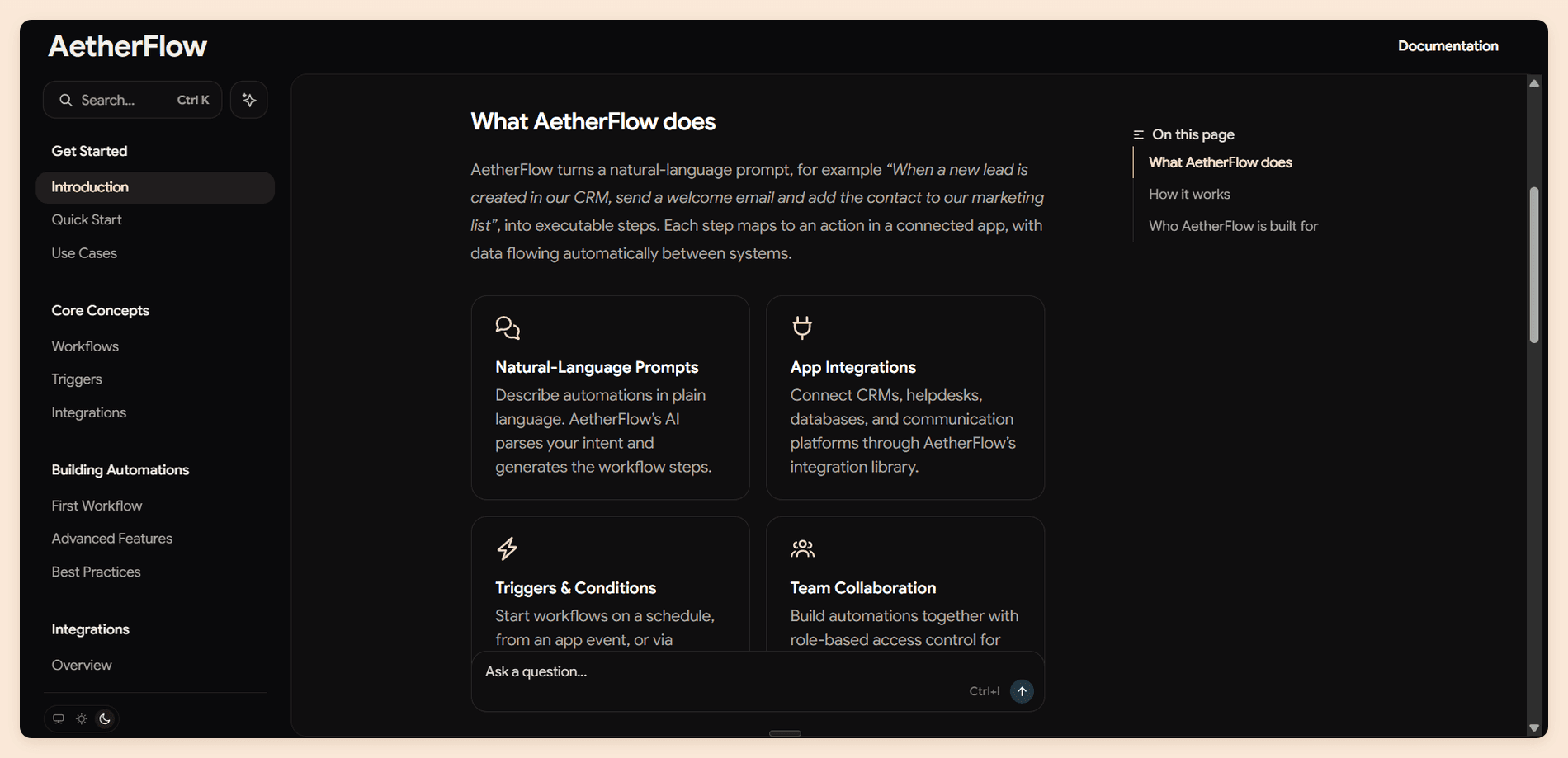
Mintlify publishes the best-looking documentation in the category without anyone having to design it, and it is built for teams that want their docs in a repository. Where Theneo asks you to work in its editor and sync out, Mintlify assumes the repository is the source of truth and gives you a CLI to prove it.
It is the natural move for a team that liked what Theneo generated and disliked working inside it.
Features
- Published design that needs no designer. Clean typography, a working dark mode, and ready-made components for tabs, callouts, cards, and steps.
- API playground from OpenAPI 3.0, 3.1 and 3.2, or AsyncAPI 3.0 for WebSocket channels, with code samples in 18 languages and prefilled test credentials.
- A real local toolchain. The
mintCLI runs a preview server and catches broken links before they ship. - Web editor with a visual mode and a source mode, live cursors, comments, suggestions, and drag-and-drop navigation.
- Automations that open a pull request when your code changes, plus an editor agent and a Slack agent that consume no credits on Pro.
- Publishing for AI tools.
llms.txtand an MCP server on every plan, including the free one.
Pricing
| Plan | Price | What it includes |
|---|---|---|
| Starter | Free | Five editor seats, a custom domain, the web editor, the API playground, and no AI |
| Pro | $450/mo | Unlimited editor seats, 10,000 credits a month per deployment, pooled across your organization |
| Enterprise | Custom quote | Role-based permissions, audit logs, PDF export, reader login, self-hosting, and EU hosting |
| Credit add-ons | $145, $370, or $800/mo | 15,000, 40,000, or 90,000 extra credits a month |
Each assistant answer costs 25 credits and each automation that updates your docs costs 250, while the editor and Slack agents cost nothing. [4] Pro therefore covers about 400 reader questions a month. Overage runs at $0.01 a credit and is off by default, so the usual failure is an assistant that stops answering rather than a surprise invoice.
Pros and Cons
Pros
- The best out-of-the-box published design available
- A local CLI with a preview server and broken-link checking, where Theneo's CLI validates a project with
theneo auditbut checks no links - Unlimited editor seats on Pro, so headcount never moves the bill
- Branch-and-pull-request review on every paid plan
llms.txtand an MCP server even on the free plan
Cons
- The free plan has no AI at all, not even a capped allowance
- Nothing sits between free and $450
- Reader answers are metered at 25 credits each
- Role-based permissions and audit logs wait for Enterprise
- Every deployment is its own $450 subscription
Why Choose Mintlify Over Theneo
Choose Mintlify when the problem with Theneo is that your documentation lives inside it. Pages are MDX in your own repository, previews run locally, and review is a pull request on any paid plan rather than an Enterprise feature. Design lands the other way round too: Mintlify looks finished on day one, where Theneo gives you colors at Business and a stylesheet only at Growth.
The arithmetic is where it hurts. Mintlify Pro is nearly four times Theneo Business, the free plan has no AI where Theneo at least lets you watch it work, and a second documentation site is a second $450 against Theneo's second project on the same workspace. Our Mintlify pricing guide works through the credit meter, and the Mintlify review scores the product.
Verdict
Mintlify is the right Theneo alternative for a team that writes docs the way it writes code and can defend the line item. The thing to be honest about is that you are paying a large premium for design and tooling while accepting a tighter reader-AI budget than Theneo gave you, so it suits teams whose readers are developers counted in hundreds rather than a public portal counted in thousands.
If you want the repository without the premium, Documentation.AI syncs two ways with GitHub or GitLab, keeps a visual editor over the same MDX, and starts at $55 a month billed annually with the assistant included. The plans are listed in full.
Leaving Theneo?
Docs that keep up with the spec
Import the same OpenAPI file, run the agent on your own pages, and keep reader AI on the free plan.
No credit card required
3. Redocly
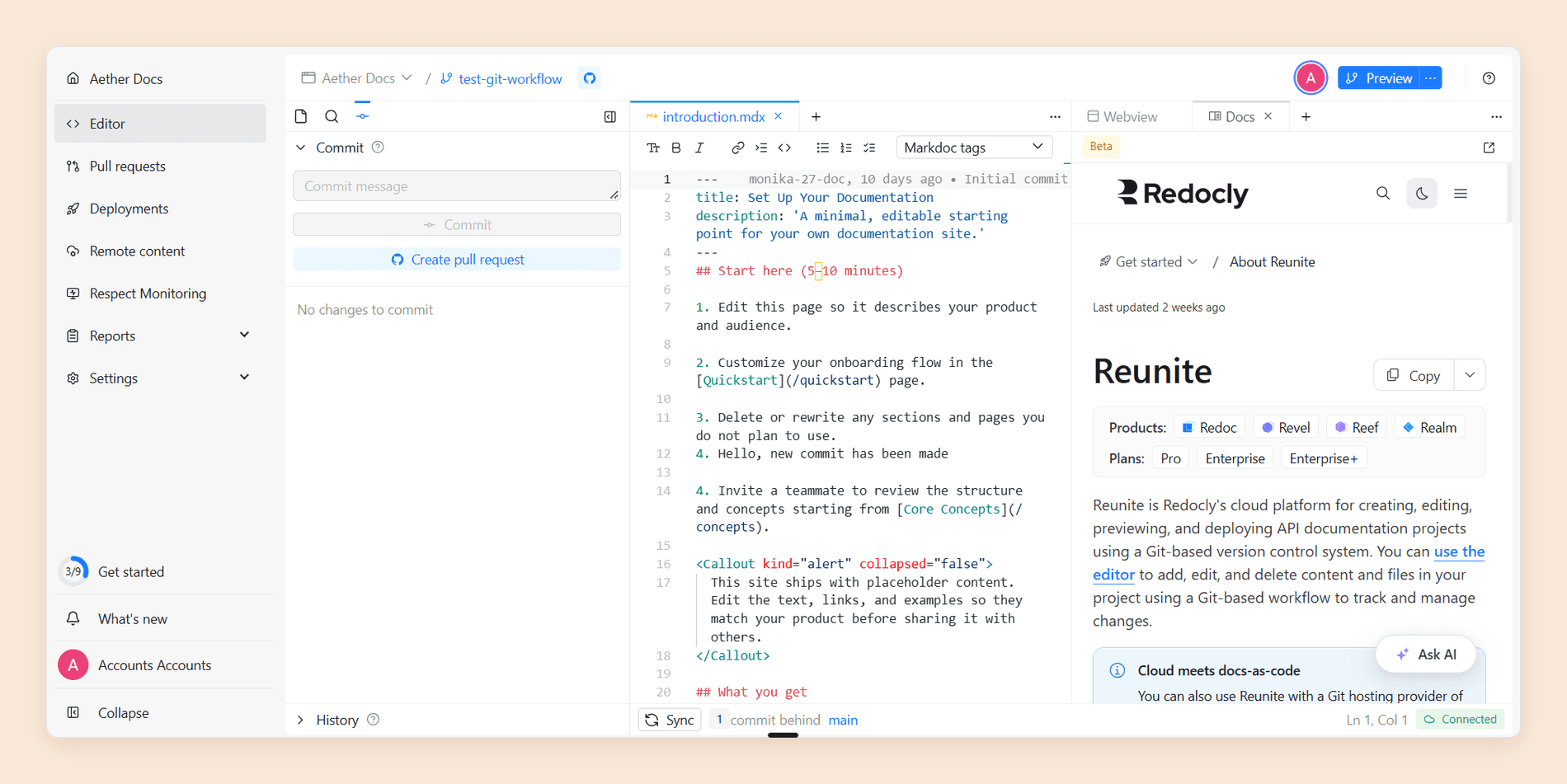
Redocly treats an API specification as something to be linted, scored, and reviewed rather than rendered and forgotten. It is the commercial platform behind Redoc, the open-source OpenAPI renderer, and it is built around Reunite, a Git-native workspace with a real editor and real pull request previews.
If Theneo's appeal was speed, Redocly's is discipline. It is the only platform here that will tell you your specification is bad before your readers do.
Features
- One flat plan. Interactive API docs with a mock server, Markdown, Markdoc, and React pages, and Reunite hosting and editing all come on Pro, with an API catalog and scorecards added on Scale.
- API governance. Linting against configurable rule sets through the open-source CLI, plus scorecards that grade each API in the catalog, which nothing else on this list offers.
- Git-native review. Branches, commits, and pull requests with per-branch preview deployments, on every plan.
- Respect Monitoring. Contract testing that runs your published specification against your live API and reports where they disagree, on Enterprise.
- Reader AI and an MCP server on Pro. The AI assistant and a docs MCP server are on every plan while they are in beta.
- An open-source on-ramp. Redoc itself is MIT licensed with more than 25,900 stars, so you can render a spec for free before buying anything.
Pricing
| Plan | Price | What it includes |
|---|---|---|
| Pro | $249/mo, billed annually | Unlimited seats and pages, three projects, and the AI assistant and docs MCP server in beta |
| Scale | $729/mo, billed annually | 10 projects, SSO, role-based access, the API catalog and scorecards, analytics, and the embeddable assistant widget |
| Enterprise | Custom annual contract | Unlimited projects, SCIM, audit logs, data residency, and Respect Monitoring |
| Extra project | $390/yr | One docs site with its own Git repository and domain |
Those are annual rates, $2,988 a year for Pro and $8,748 for Scale. Seats are never billed, so owners, members, committers, and viewers are free in any number, and so are your readers. Nothing is metered: pages are unlimited under fair-use rate limits, and the AI features carry no charge while they are in beta, with usage pricing promised at general availability. There is no free hosted plan, and the trial runs 30 days without a card. [6]
Pros and Cons
Pros
- One flat price per plan, so adding a teammate never changes the bill
- Reader AI and a docs MCP server on the entry plan
- API governance through linting and scorecards, which nothing else here does
- Pull request previews and review on every plan, where Theneo previews every pull request but keeps approvals on Enterprise
- Unlimited pages, so a large specification never meets a page meter
Cons
- The AI features are free only while in beta, and Redocly has said usage pricing follows at general availability
- Pro at $249 a month is a high floor for a small team
- SSO, role-based access, analytics, and the embeddable widget all need Scale at $729
- Three projects on Pro, and each extra is $390 a year
- Redocly Agent is in beta, reviewing pull requests on every plan and drafting fixes only on Enterprise
Why Choose Redocly Over Theneo
Choose Redocly when the specification is the asset and its quality is somebody's job. Linting and scorecards catch the problems that Theneo's Autofill will happily write around, and branches with pull request review give you the approval step Theneo reserves for Enterprise contracts, on a flat plan that never counts seats or pages.
Be clear-eyed about the trade. Pro costs roughly twice Theneo Business, and a team that came to Theneo for AI is buying an assistant whose long-term price is not yet set: Redocly includes it on every plan while it is in beta, rate limited rather than metered, where Theneo's is unmetered from $120 as a published part of the plan.
Verdict
Redocly is the best Theneo alternative for platform teams who treat API documentation as an engineering deliverable with a quality bar. It is a harder sell if reader AI is why you are shopping, and that tension is worth naming before a trial: Redocly will improve your specification first, and its assistant for readers is still a beta with no settled price.
If you want review and reader AI from the same plan, changes go through Git branches and pull requests on every Documentation.AI tier, and the assistant runs on the free one at 10 credits a question. Start free and put it in front of real reader traffic before you decide.
4. Fern
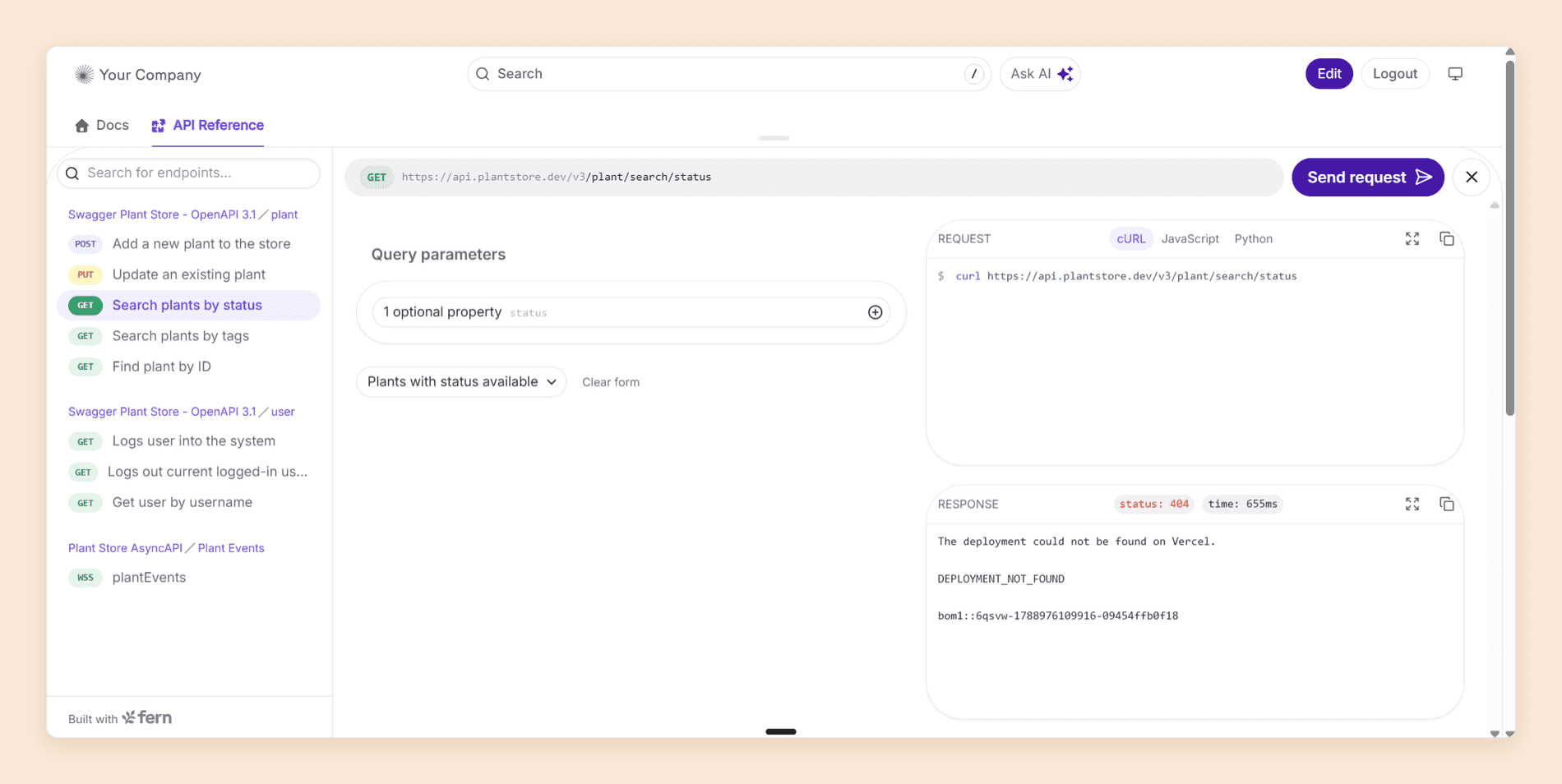
Fern generates documentation and client SDKs from one API definition, which is a job nothing else on this list does.
It also has the most generous free tier in the category, and that is recent enough that most comparisons of Theneo and Fern on the web are now wrong.
Features
- SDKs in nine languages from the same specification that builds your docs, which is Fern's real differentiator.
- Wide specification support. OpenAPI and Overlays, AsyncAPI, gRPC, GraphQL, OpenRPC, Protobuf, plus REST, webhooks, WebSockets, and server-sent events.
- Fern Agent, which writes docs from inside Fern and opens a pull request with the change you describe, on request or on a schedule.
- Ask Fern in your docs, in Slack, through an API, or through an MCP server, with a
fern-docsskill so your coding agent can build Fern sites. - API Explorer and web editor, with docs-as-code underneath and PDF export included.
- Published credit rates, which almost nobody else does: Ask Fern costs two credits a message, an AI-generated example costs one, and a docs-update session in Slack costs 50. [5]
Pricing
| Plan | Price | What it includes |
|---|---|---|
| Free | Free forever | 10 team members, one site, 1,000 pages, 250 AI credits a month, 2,000 page generations a month |
| Enterprise | Custom quote | Custom CSS, JavaScript and React, localization, SSO, SCIM, RBAC, reader login, self-hosting, multiple repositories, and removal of Fern branding |
There is nothing in between. The free plan carries the AI agent, Ask Fern, AI translations, the MCP server, llms.txt, the API Explorer, the web editor, PDF export, password protection, a custom domain, preview links, and the analytics dashboard, all at $0. [5] Teams on a Postman plan get 500 credits a month instead of 250.
Pros and Cons
Pros
- The most capable free plan in the category, with the agent, reader AI, and PDF export included
- 10 team members at no cost, against one on ReadMe's free plan
- Client SDKs in nine languages, which no other platform here generates
- Published per-action credit rates, the cheapest reader answers of any vendor on this list
- Imports OpenAPI, AsyncAPI, gRPC, GraphQL, and OpenRPC, though not SOAP
Cons
- One site, and a second one means an Enterprise conversation
- 250 credits covers about 125 reader answers a month, or five agent sessions in Slack
- Custom CSS, JavaScript, React, and localization are all Enterprise
- No published step between free and a sales call, so there is no way to buy past a single limit
- Its public issue tracker has an open bug, filed as P0 by the reporter, about Ask AI answering from access-controlled content, with no reply from Fern since March 2026
Why Choose Fern Over Theneo
If what attracted you to Theneo was AI-written API documentation at a low price, Fern now does it for nothing. Ten editors, a custom domain, reader AI, an authoring agent, an MCP server, and PDF export cost $0, against $120 a month for the Theneo tier that gives you a custom domain at all, and the SDKs are the part Theneo has no answer to.
The ceiling is the catch, and it is harder than Theneo's. Theneo publishes a $120 tier and a $400 tier, so you can see what growth costs; Fern publishes nothing between free and a quote, and everything about how your site looks sits on the far side of it.
Verdict
Fern is the cheapest thing on this list to try, and the obvious first trial for an API-first team, particularly one already paying Postman. Treat the free plan as the whole offer rather than an on-ramp, because the next published price is a conversation, and test Ask Fern against your credit allowance early rather than after your readers find it.
5. ReadMe
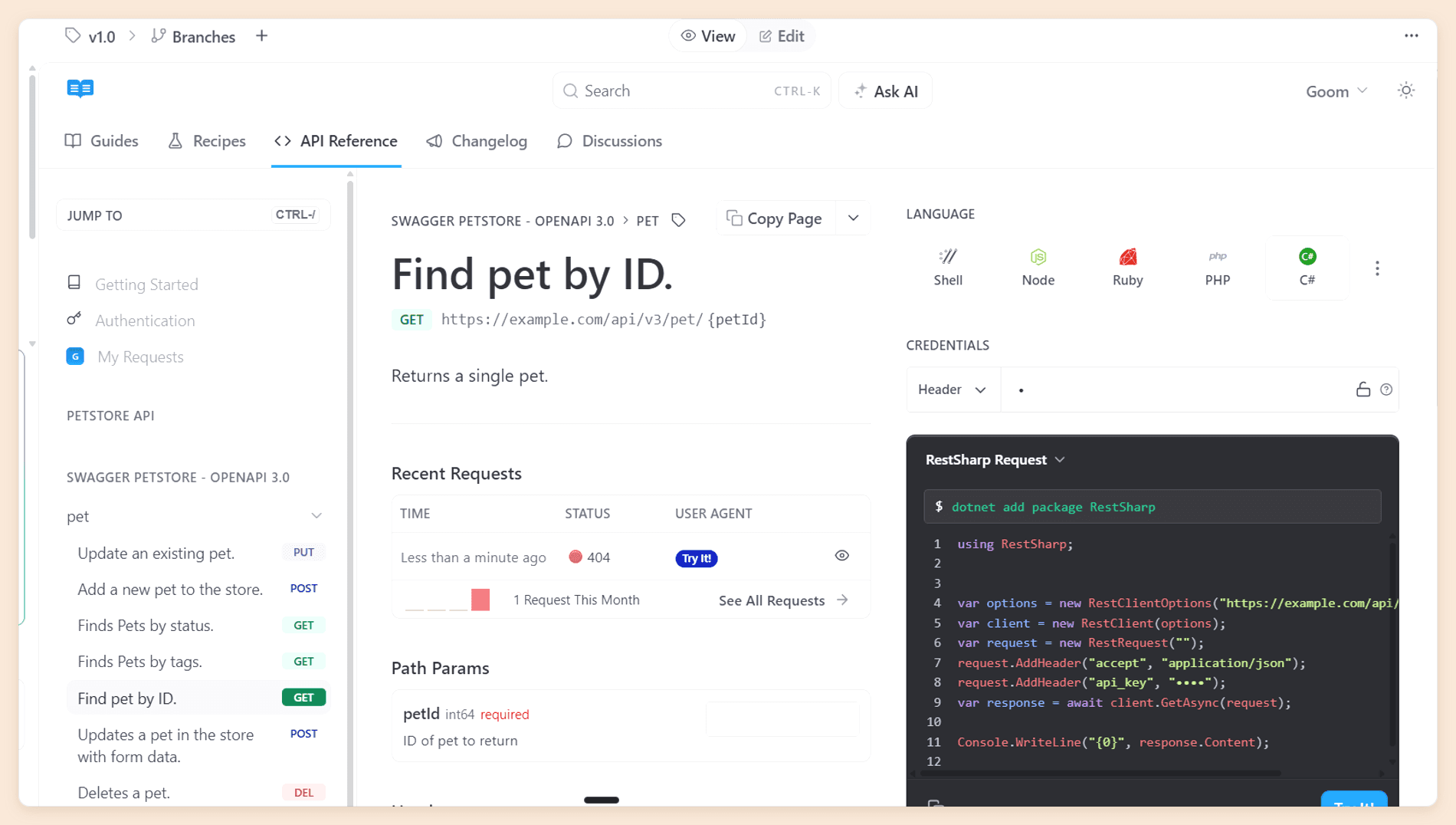
ReadMe builds developer portals rather than documentation sites. The difference is that a portal knows who is reading: readers see their own API keys in the docs, and their requests feed usage data back to you.
New projects are created on ReadMe Refactored, a Git-backed platform with MDX, branching, and an integrated AI suite. The API definition stays at the center, with guides, changelogs, and recipes organized around it.
Features
- Interactive API reference. Readers send real requests with their own key filled in, get snippets in the language they work in, and see a log of recent requests.
- Developer Dashboard. Ingests your production API logs and reports which endpoints each key calls and where integrations fail.
- Dual-mode editor. A visual surface and raw MDX over the same file, with drag-and-drop page ordering.
- AI suite. An inline agent that returns edits as an accept-or-reject diff, a Linter that turns a style guide written in prose into scored rules, Docs Audit across the site, and Ask AI for readers.
- Developer community content. Changelogs, recipes, and discussion forums on Pro.
- Free plan publishing. A custom domain, bi-directional Git sync,
llms.txt, and an MCP server from the Starter plan.
Pricing
| Plan | Price | What it includes |
|---|---|---|
| Starter | Free | One teammate, one project, one published version |
| Pro | $250/mo | Five teammates, then $20 for each additional one, still one project |
| Enterprise | Custom quote | Roles narrower than Admin, full Docs Audit, AI translations, and the Ask AI API |
| Ask AI add-on | $150/mo | The full reader AI, with Ask AI Lite included on Pro |
| Developer Dashboard add-on | $100/mo | Five million API logs, then $10 for each additional million |
Both add-ons sit on top of any plan, and the figures are published on ReadMe's pricing page.
Pros and Cons
Pros
- The strongest interactive API explorer in the category
- Per-key endpoint metrics no other platform here reports
- A free plan that publishes to a custom domain with Git sync
- The AI Linter, which checks every page against your own style guide
Cons
- The free plan holds one person, where Theneo's holds 20
- Every teammate is a full Admin until Enterprise
- One project per plan, so a second API means a second plan
- Full reader AI and usage metrics are both paid add-ons
- The upgrade to Refactored cannot be undone and removes Suggested Edits
Why Choose ReadMe Over Theneo
Pick ReadMe when you need to know how developers actually use your API. The Developer Dashboard answers a question Theneo's analytics cannot: which endpoints each customer key calls, and where their integration breaks. Seats are where it turns, though. Theneo puts 20 people on a free workspace and 50 on $120 with roles included; ReadMe puts one on free and five on $250, then $20 a head, all of them Admins until Enterprise. The reader AI Theneo includes from $120 is a $150 add-on here, and usage metrics are another $100. Our ReadMe review prices the plan boundaries in full.
Verdict
ReadMe is the right Theneo alternative for one API whose adoption you need to measure, with a team small enough that per-seat billing stays invisible. Past five editors or a second product the cost climbs faster than the requirement does, and the honest question is whether usage data is worth more to you than the 45 extra seats Theneo would have given you for half the price.
If ReadMe's seat counting is what gives you pause, Pro drops the editor cap entirely at $159 a month billed annually, with four projects and no endpoint limit. Book a demo and we will price it against your current workspace.
Open-Source and Free Theneo Alternatives
Cost is usually what brings teams to this section, and it comes down to three questions: which free plans include AI, which open-source renderers come closest, and whether Theneo can be self-hosted. The open-source tools answer the second one the same way every time: they will render your specification well and write nothing.
Free Theneo Alternatives
Five platforms here have a free plan, and 2026 has pulled them apart. Fern's is now the most capable, and Theneo's is the most generous on seats.
| Platform | Free plan | Editors | Custom domain | AI included |
|---|---|---|---|---|
| Fern | Free forever | 10 | Yes | Ask Fern, the agent, and an MCP server, 250 credits a month |
| Documentation.AI | Starter | Five | Yes | Assistant and agent, 10,000 one-time credits |
| Theneo | Starter | Up to 20 | No, Business and up | 100 reader answers and 2,000 AI assists |
| Mintlify | Starter | Five | Yes | None |
| ReadMe | Starter | One | Yes | No reader AI without the $150 add-on |
| Redocly | None | A 30-day trial only |
Open-Source Theneo Alternatives
Theneo is not open source, and the open-source field here is strong on rendering and empty on authoring. Each of these will turn a specification into a good reference site, and none of them will write a description or answer a reader.
- Redoc is the most direct swap for Theneo's API reference: MIT licensed, more than 25,900 stars, and the renderer underneath Redocly's commercial platform.
- Scalar is an MIT-licensed API reference with a built-in client, at 16,100 stars, and the closest open-source match for Theneo's API Explorer.
- Swagger UI is Apache-2.0 and the most widely deployed OpenAPI renderer there is, at 29,000 stars, and the safest choice when something has to work everywhere.
- Docusaurus is Meta's MIT-licensed framework at 66,200 stars, and the right answer for the guides half of the job, with OpenAPI handled by a plugin.
- Starlight is Astro's MIT-licensed documentation framework at 9,200 stars, with
starlight-openapifor references.
Is Theneo Open Source, and Can It Be Self-Hosted?
No to the first, and only on Enterprise for the second. Theneo is a commercial hosted platform, and self-hosting sits alongside SAML SSO, SCIM, end-user JWT login, private portals, custom roles, and Theneo API access in the Enterprise column. [1] Teams that must host their own documentation on a smaller budget generally end up on Redoc, Scalar, or Docusaurus with a reference plugin.
Theneo Alternatives Compared
Plan prices sit with each platform above, so this table covers what you can actually do once you are on one. The two columns that decide most Theneo evaluations are review before publishing, which Theneo puts on Enterprise, and whether reader AI is usable on a free plan.
| Platform | Editing model | Review before publishing | Reader AI on the free plan | Design control | Roles below Enterprise |
|---|---|---|---|---|---|
| Theneo | Visual editor, two-way sync that overwrites | Approvals on Enterprise, pull request previews on every plan | 100 answers | Colors at Business, CSS at Growth | Yes, four roles on every plan |
| Documentation.AI | Visual editor and two-way Git sync | Git branches and pull requests, every plan | Yes, 10,000 credits | Custom CSS and JS on every plan | Yes, on Pro |
| Mintlify | Web editor plus a local CLI | Branches and pull requests, paid plans | None | Custom CSS on every plan | No |
| Redocly | Git-native editor in Reunite | Branches with preview deploys, every plan | No free plan | Full, it is your own React | Yes, four roles on Scale |
| Fern | Docs-as-code plus a web editor | Pull requests through the repository | Yes, 250 credits a month | Enterprise only | No, Enterprise only |
| ReadMe | Dual-mode editor, bi-directional sync | Branching and reviews from Pro | A $150 add-on | Custom CSS on paid plans | No, everyone is an Admin |
What a Growing Team Pays
Headline prices hide most of the difference, so here is one team priced across the list: 10 people who edit, two public API references, and about 1,000 reader questions a month. All figures are annual rates, shown per month.
| Platform and setup | Monthly cost | What decides it |
|---|---|---|
| Documentation.AI Standard | $55 | 10 seats, two projects, and 1,000 questions use the full 10,000 credits |
| Theneo Business | $120 | Two public projects is exactly the Business ceiling, and 50 members are included |
| Redocly Pro | $249 | Seats are free and two projects fit in Pro's three, with the assistant included while in beta |
| ReadMe two Pro plans plus Ask AI | $650 and up | One project per plan, then $20 for each teammate past five on each |
| Mintlify two Pro deployments plus credits | $1,045 | 1,000 answers cost 25,000 credits against 20,000 pooled |
| Fern Free, then Enterprise | $0, then a quote | Free covers 10 editors, but 1,000 answers need 2,000 credits against 250 |
Theneo genuinely wins this scenario on price, and that is worth saying plainly. What it costs you is not on the invoice: two public projects is the ceiling rather than the allowance, a stylesheet triples the bill, and a reviewer who signs off before publishing is an Enterprise contract. Redocly's figure covers reader AI only until the beta ends and usage pricing begins, and Fern's $0 stops the moment traffic arrives.
Which Theneo Alternative Is Right for You?
Match the platform to the thing that is pushing you off Theneo, not to the longest feature list. If it is the endpoint cap, the public-project split, or review sitting on Enterprise, Documentation.AI is the default. If it is working inside Theneo's editor rather than your repository, Mintlify. If your specification needs governing, Redocly. If you want SDKs or you want to pay nothing, Fern. If you need to know which customer calls which endpoint, ReadMe.
When to Stay on Theneo
Stay if you are documenting one or two APIs, your team is larger than your budget for seats, and nobody needs to approve a page before it publishes. Theneo is the fastest route from a specification to a portal that looks designed, its 50-member Business plan undercuts every per-seat platform here, and its support for SOAP, gRPC, and AsyncAPI is something you will not easily replace. If a legacy format is in your estate, that alone can settle it.
What Moving Off Theneo Involves
The specification moves in minutes and the prose takes the work. Every platform here imports your OpenAPI, Swagger, or AsyncAPI file directly, so the reference rebuilds itself. Here is what each piece becomes:
| What you have on Theneo | Documentation.AI | Mintlify | Redocly | Fern | ReadMe |
|---|---|---|---|---|---|
| Pages (in Theneo's editor) | MDX in Git, editable in the visual editor | MDX in your repository | Markdown or Markdoc in Git | MDX in a Git repository | MDX on Refactored, or the visual editor |
| Navigation (section tree and menu order) | documentation.json | docs.json | sidebars.yaml | docs.yml | Categories and pages in the dashboard |
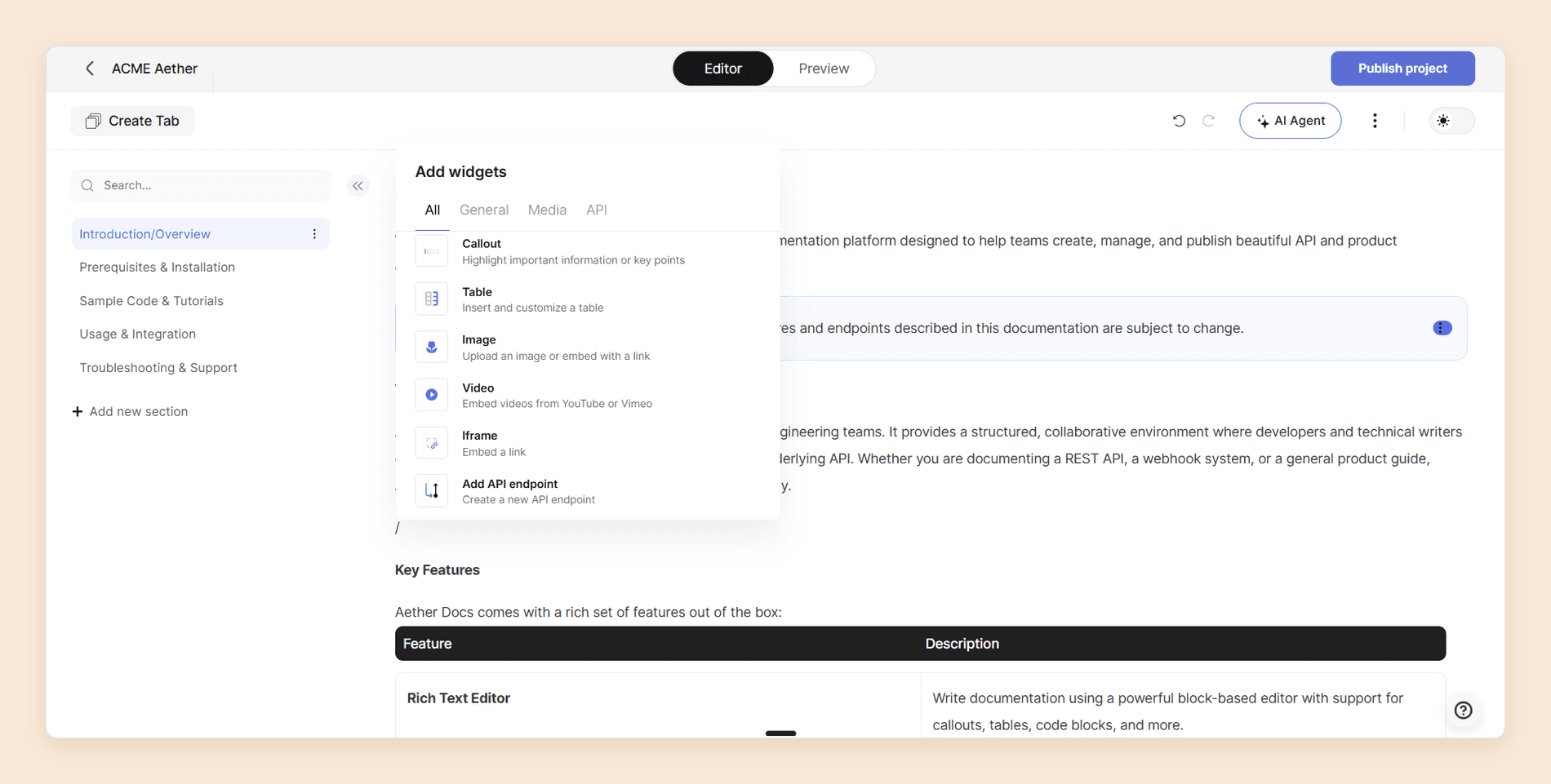
| Widgets (callout, table, image, video, iframe, endpoint) | Card, Columns, Steps, Tabs, Callout, CodeGroup, ParamField, ResponseField, Mermaid, plus custom React components | Mintlify's component set, plus custom CSS on every plan | Markdoc tags and React components, every plan | MDX components, custom React on Enterprise | Cards, Tabs, Accordion, and Columns built in, custom components otherwise |
| Developer portal (low-code page builder) | Rebuilt as MDX pages with cards and columns | Rebuilt as MDX landing pages | Rebuilt as Markdown or React | Rebuilt as MDX, custom layouts on Enterprise | Rebuilt as a landing page and guides |
| API spec (OpenAPI, Swagger, GraphQL, gRPC, SOAP, AsyncAPI) | OpenAPI imports and generates the playground | OpenAPI and AsyncAPI import | OpenAPI native, plus linting and scorecards | OpenAPI, AsyncAPI, gRPC, GraphQL, OpenRPC, and Protobuf | OpenAPI imports and generates the reference |
Read the last row if a legacy format is in your estate. Fern covers the most of what Theneo covers, and SOAP is the one nothing on this list replaces, so a WSDL service with paying customers can settle the decision on its own.
The table misses three things. Export before you cancel: Theneo has no PDF export and its one-click Markdown export works on public projects only, [2] so a private project's guides come out through an outbound Git sync or page by page. Find out where Autofill's descriptions live, because they are written into your Theneo project and may not exist in the specification file you imported; syncing out to Git first is the difference between moving them and regenerating them. And URLs are yours to protect on the way out, so map every path that changes before launch and check inbound links afterwards.
Documentation.AI keeps pages as MDX in Git and includes migration services on Pro. Fern and Mintlify both expect a repository, so an outbound sync from Theneo is the natural first step for either. Redocly wants your specification more than your prose, which makes it the easiest reference migration and the largest guides migration.
If you would rather see the move priced against your own project count, seat count, and endpoint volume before anything shifts, book a demo.
Planning a move off Theneo?
If your setup involves several projects, a portal built in the page builder, or AI-written descriptions you have never synced out, talk it through with our team before you cancel anything.
Documentation.AI Slack channel: Join here
Final Verdict
Theneo is a good product sold on a promise that expires. Generating descriptions from a specification is genuinely the fastest start in the category, and it is a one-time benefit, while the tier boundaries that follow are permanent: two public projects, an endpoint count, a stylesheet at $400, and a reviewer only on Enterprise.
For most teams on this list the choice follows the job. Mintlify is the pick when the repository should be the source of truth and design cannot wait. Redocly is the pick when the specification itself needs a quality bar. Fern is the pick for SDKs or for spending nothing, and ReadMe is the pick when adoption data matters more than seats.
Documentation.AI is the best Theneo alternative for the widest range of teams, because it answers the part Theneo's AI does not. The agent maintains the documentation set as the product changes rather than writing it once at import, reader login and role-based permissions arrive at $159 a month billed annually instead of on a contract, and nothing counts your endpoints.
The fastest way to check that is on your own documentation. Start free, import the same OpenAPI file, and run the agent over your own pages, or read the full Theneo vs Documentation.AI comparison if you want both platforms run through the same tests. API documentation tools covers the wider category if you are still drawing up a shortlist, and the same series ranks the alternatives to GitBook, Mintlify, ReadMe, and Document360.
FAQs
1. What Is the Best Alternative to Theneo?
Documentation.AI, for most teams. It generates an API reference from your specification, adds an agent that maintains the whole documentation set, and puts reader login and role-based permissions on a plan at $159 a month billed annually rather than an Enterprise contract, with AI usable on the free plan. Mintlify is the better pick for docs-as-code teams, Redocly for API governance, Fern for SDKs or a free tier, and ReadMe for per-key usage data.
2. Does Theneo's Free Plan Include AI?
Yes, but as a demonstration. Starter includes one public project, two private ones, up to 20 team members, the API explorer, and analytics, with 100 GPT-powered search results for readers and 2,000 AI doc-builder assists. Neither AI figure carries a stated period on the pricing page, and both run out quickly enough that reader AI cannot be evaluated properly without paying for a month. [1]
3. How Much Does Theneo Cost in 2026?
Starter is free. Business is $120 per workspace per month on annual billing, or $150 monthly, and Growth is $400 per workspace per month annually, or $450 monthly. Enterprise is a custom quote and is the only tier with self-hosting, SAML SSO, custom roles, and review workflows. Billing is per workspace rather than per seat, with member allowances of 20, 50, and 100. [1]
4. Which Theneo Alternative Is the Cheapest?
Fern, which is now free forever for 10 team members, one site, and 250 AI credits a month, with the agent, reader AI, an MCP server, and PDF export included. Among paid plans, Documentation.AI Standard at $55 a month billed annually is the lowest that includes reader AI at a usable volume, and Redocly Pro is a flat $249 a month with unlimited seats and its assistant included while in beta.
5. Is There a Free Theneo Alternative With Working AI?
Two of them. Fern's free plan carries Ask Fern, the Fern Agent, AI translations, and an MCP server with 250 credits a month, which at two credits a message is about 125 reader answers. Documentation.AI's Starter plan carries the assistant and the agent with 10,000 one-time credits at 10 credits per reader question. Mintlify's free plan has no AI, and ReadMe's needs a $150 add-on.
6. Does Theneo Support Review and Approval Before Publishing?
Only on Enterprise. Documentation Review, which covers branches, assigned approvers, merge rules, and inline comments, is an Enterprise feature. [2] Below it you get live collaboration, unlimited preview deployments including one for every pull request, and a setting controlling who may publish, which restricts access rather than creating an approval step. Every other platform in this guide puts branch-based review on a self-serve plan.
7. Can You Migrate Off Theneo Without Losing Your API Reference?
Yes, because the reference rebuilds from the same file. Your OpenAPI, Swagger, or AsyncAPI specification imports into every platform here. The parts that need care are hand-written guides, since Theneo has no PDF export and its Markdown export covers public projects only, AI-written descriptions that may exist only inside Theneo, and any developer portal built in its page builder, which does not transfer.
8. Who Are Theneo's Main Competitors?
Beyond the five here, teams comparing Theneo often look at GitBook for one collaborative site with the best block editor, Archbee for multi-audience knowledge portals, Redocly for a Git-native OpenAPI reference, and Document360 for governed support knowledge bases. Scalar and Redoc are the open-source options most often shortlisted alongside it. Teams leaving Archbee, Redocly, or Fern rather than Theneo have their own shortlists in our Archbee alternatives, Redocly alternatives, and Fern alternatives guides.
Sources
- Theneo. "Pricing." Theneo. https://www.theneo.io/pricing
- Theneo. "Theneo Docs." Theneo. https://docs.theneo.io
- Documentation.AI. "Pricing." Documentation.AI. https://documentation.ai/pricing
- Mintlify. "Mintlify Docs." Mintlify. https://www.mintlify.com/docs
- Fern. "Pricing." Fern. https://buildwithfern.com/pricing
- Redocly. "Pricing." Redocly. https://redocly.com/pricing
Leaving Theneo?
Docs that keep up with the spec
Import the same OpenAPI file, run the agent on your own pages, and keep reader AI on the free plan.
No credit card required