Theneo Review 2026
Theneo turns an API specification into a designed developer portal quickly, and bills per workspace rather than per seat. This review assesses the editor, API reference, AI features, analytics, portal builder, and Git sync through hands-on use, and explains how plan limits determine the tier a team needs.

Monika B. · GTM Engineer, Documentation.AI
Last updated
On this page
Theneo is the most direct answer in this category to one question: how fast can you get from an API spec to a published documentation site that does not look generated? On that question it is very good. We had a site up and readable in under half an hour, and the AI-written endpoint descriptions needed less editing than we expected.
Everything below comes from building on the platform and from Theneo's own pricing page and product documentation, with an access date on every citation.
Theneo Review: The Verdict
Theneo is the fastest route from a spec to a good-looking developer portal, and it is priced for teams rather than for seats. The free plan is real but thin on AI, and the two things most teams ask for next, custom CSS and a review workflow, sit on the $400 tier and on Enterprise respectively.
Our overall score is 3.8 out of 5, the unweighted average of the eight scores below, rounded to one decimal. Every review in this series is scored on the same eight criteria, so the rows compare directly from one platform to the next.
| What we rated | Score | Why |
|---|---|---|
| Editing and structuring | 4.2 | Slash commands that explain themselves, drag and drop navigation |
| API reference and explorer | 4.3 | Real authenticated calls in the docs, versioning, and a clean changelog |
| Published output and design | 3.8 | A real page builder for the portal, with colors at Business and CSS at Growth |
| AI authoring and the agent | 3.6 | Good first drafts, and the repository agent is still in beta |
| Reader AI and search | 3.8 | Unlimited answers from $120 a month, and a free tier that runs out early |
| Analytics and reader insight | 4.5 | Per-project traffic plus the questions readers actually typed, on every plan |
| Governance and collaboration | 3.0 | Branches, approvers, and merge rules are Enterprise only |
| Pricing and value | 3.5 | Flat per workspace, with the useful ceiling at $400 |
Buy Theneo if you are documenting one or more APIs, you want a portal that looks designed without hiring a designer, and your team is larger than your budget for seats.
Look elsewhere if you need a review-and-approval workflow without an Enterprise contract, your brand team needs custom CSS at a normal price, or your published docs will take enough reader questions to matter.
If that second list is your team, the closest alternative on capability is Documentation.AI, where reader AI runs on the free plan and reviewer roles arrive without a sales call. There is a fuller comparison at the end of this review.
What Is Theneo Built For?
Theneo is built for the team where engineers own the spec and somebody else owns the words. That split runs through every product decision: the AI writes the first draft from your spec, a visual editor lets a product manager fix it without touching a repository, and the CLI lets an engineer push the same content from CI.
The format support is the broadest we have seen in this category. OpenAPI and Swagger 2.0 and 3.x, Postman collections, GraphQL, gRPC proto files, SOAP and WSDL, and AsyncAPI all import. [1] If you have a SOAP service somebody still pays for, Theneo is one of very few modern platforms that will render it properly.
A second project type covers plain documentation, the same editor with the endpoint machinery removed. What Theneo is not is a support knowledge base: no ticketing, no deflection reporting, and the content model assumes a developer is reading.
Theneo Features: What Stands Out
The Editor
The editor is Notion-shaped. Type a slash and an Add widgets menu opens, sorted into General, Media, and API tabs: callouts, tables, images, video, iframes, and API endpoints. Each item in the menu carries a short line explaining what it does, so somebody who has never structured documentation before can work out what a widget is for without leaving the page. No competitor we have tested bothers with that.
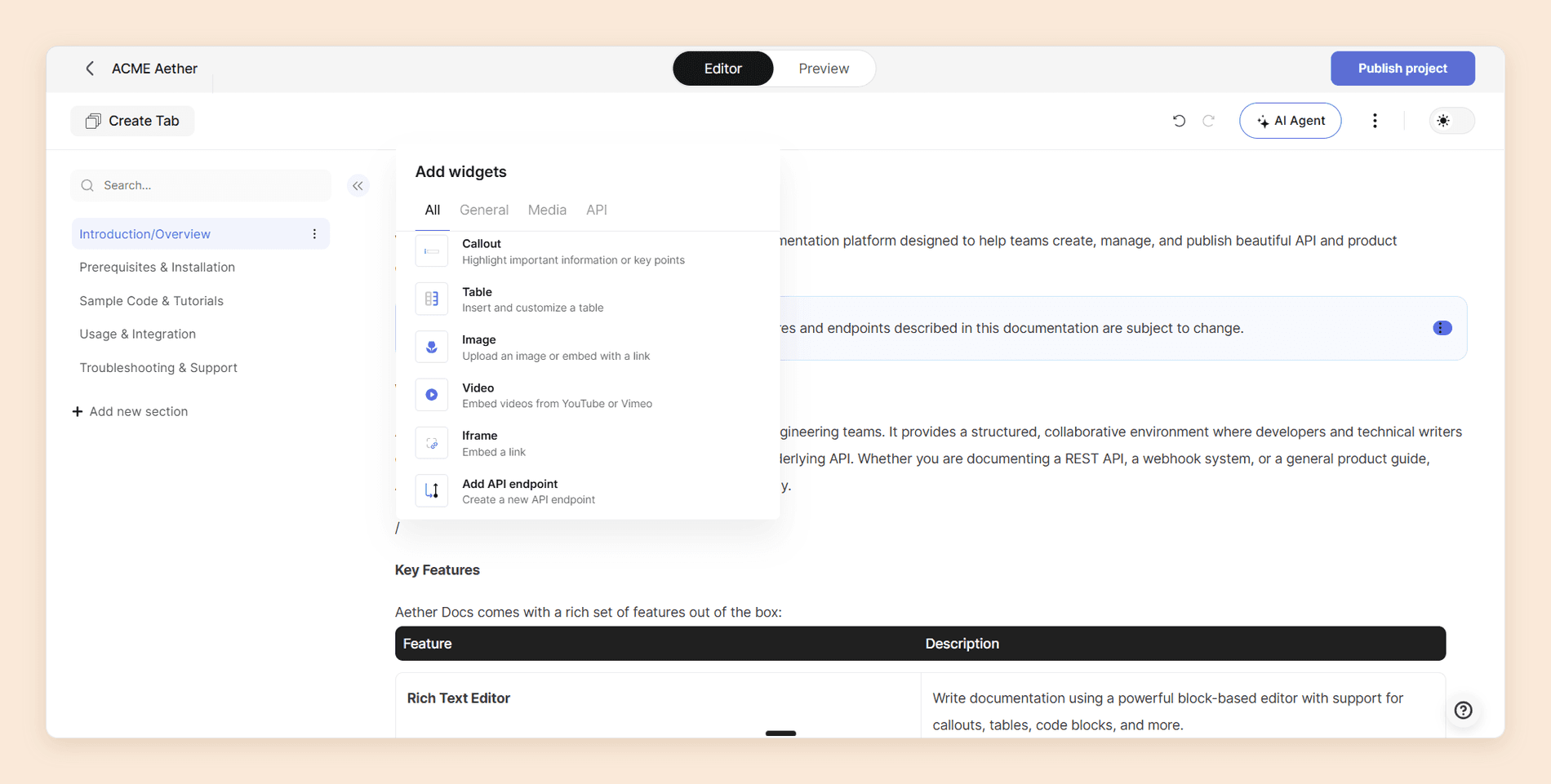
Restructuring is drag and drop, in the page tree and across the top-level tabs, and it behaved. Live collaboration shows cursors and who is editing which section, on whatever plan you are on.
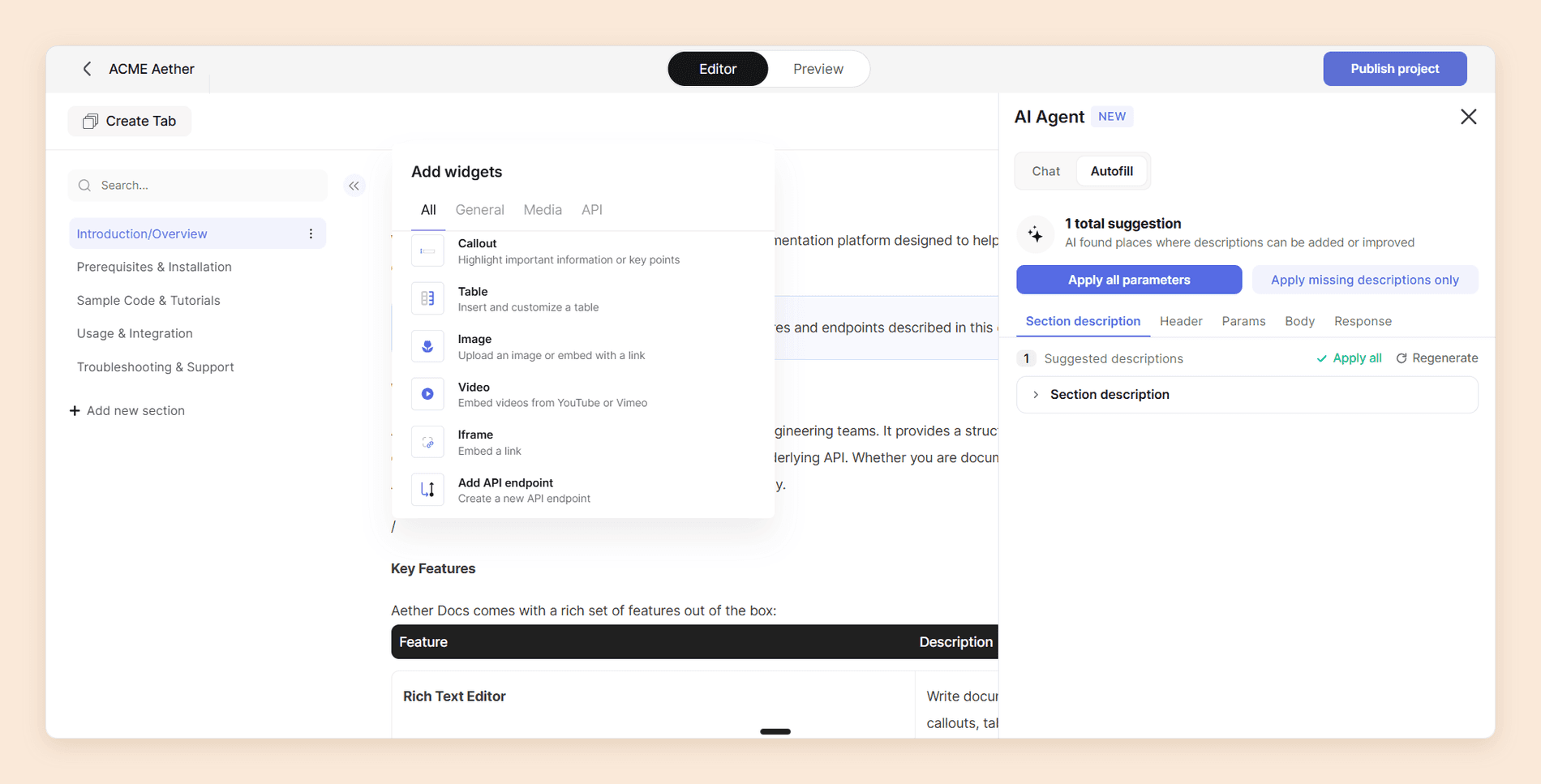
The AI Agent panel, labeled new, works in two modes. Chat drafts, expands, and simplifies prose, and Autofill scans a section for missing or weak descriptions across its header, parameters, body, and response, which you apply all at once or only where one is missing. It is fast, and the drafts are worth editing rather than throwing away.
API Reference, Versioning, and History
The API Explorer is a testing console inside the docs. Readers send real authenticated calls with their own key or through OAuth rather than copying an endpoint into another tool.
Versioning is proper: multiple versions, status labels for active, beta, and deprecated, per-version access and SEO, and a version-level changelog. [2] Every project also keeps a history of changes you can walk back through, which is the feature people miss most when they move off a wiki.
Re-imports go through Merge 2.0, which updates only what changed and preserves your section IDs, menu order, and per-section settings. Anyone who has had a re-import flatten a week of editing will know why that matters.
Analytics
Analytics turn on when you publish, with no setup. You get views, sessions, active users, engagement time, traffic acquisition, and geography, per project and rolled up across the workspace, with a leaderboard ranking projects side by side. [2]
The two rows that earn their place are reader feedback per section and a verbatim log of everything readers typed into Ask AI. That is a list of what your documentation is missing, written by the people who needed the answer.
The Developer Portal
Theneo builds a developer portal separately from your documentation: a branded landing hub in front of your references, guides, and changelogs, with templates to start from, its own analytics, SEO management, and end-user authorization for gated content.
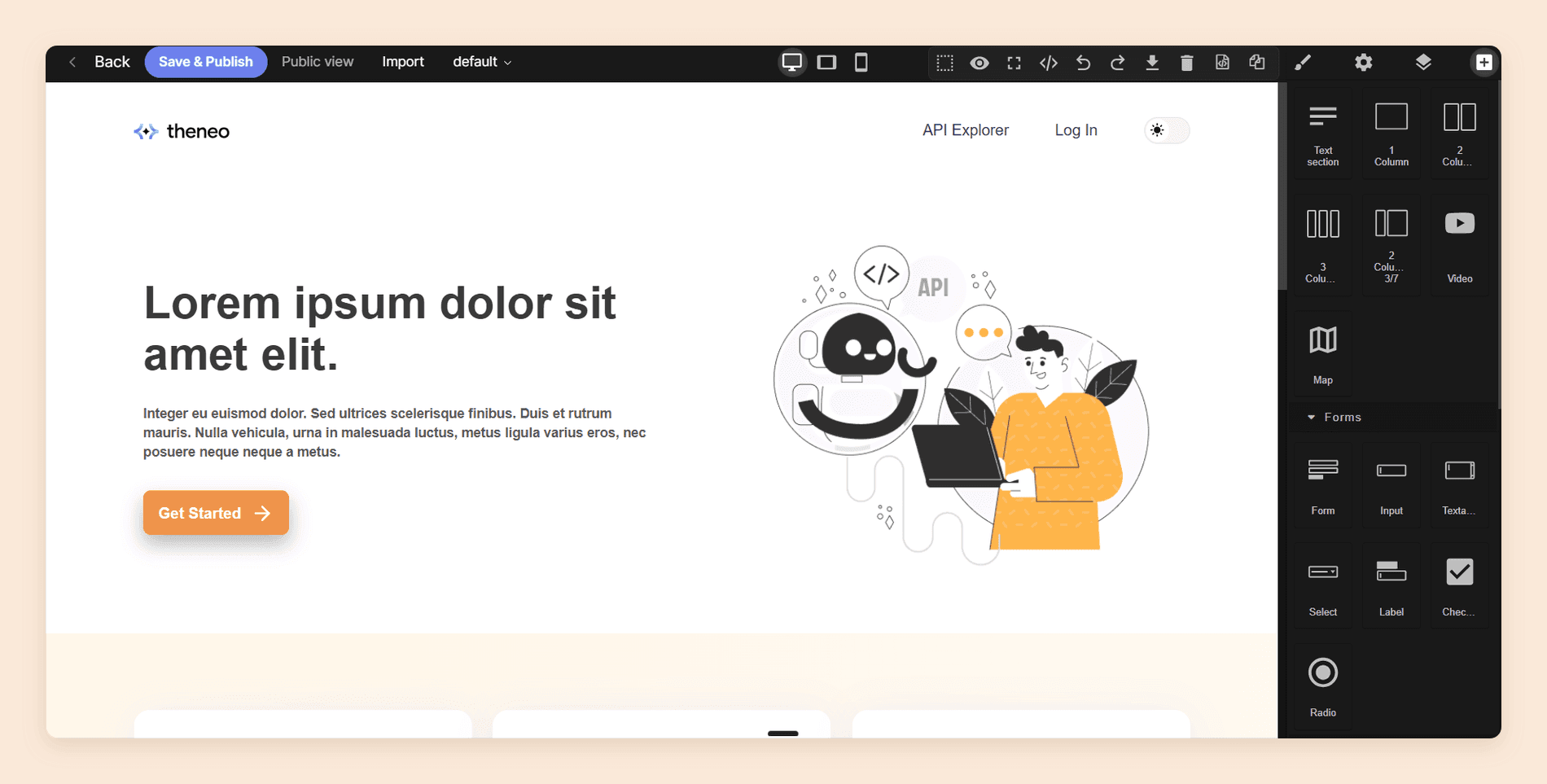
The portal editor is a different tool from the documentation editor, a low-code HTML page builder where you double-click elements to edit them or import your own markup.
Preview, Publish, and Handing Docs to an LLM
Live preview shows the published result while you edit, and you can switch to a Markdown view and change things there. That is a better bridge between visual editing and docs-as-code than most platforms manage.
Publishing leans hard into machine readers. Theneo generates llms.txt and llms-full.txt automatically, produces an MCP server from your docs, and puts a one-click Markdown export on every page so a reader can drop it into Claude, ChatGPT, or a coding assistant. That export works on public projects only, and there is no PDF export at all, which Theneo says is a deliberate preference for formats that cannot go stale. [2] Each of those serves an agent outside the page. WebMCP, a proposed browser API now in origin trial, is for the agent running inside the reader's browser, and it sits alongside llms.txt and an MCP server rather than replacing them.
Where Theneo Slows Down
Seven things to weigh. Five are plan boundaries, and two are behavior you have to design around.
Review and Approval Is Enterprise
Branches, approvers, merge rules, and inline review comments are Enterprise features. [2] Below that you get live collaboration and a setting for who is allowed to publish, and preview deployments are unlimited on every plan, with a preview for every pull request.
If two people write and a third signs off, that is either an Enterprise contract or a review process you run somewhere else.
Design Control Is Priced in Two Steps
Color customization across your published docs starts at Business. Custom CSS and JavaScript start at Growth, which is $400 per workspace per month on annual billing. [3]
Check the footer before you promise anyone a clean one. Branding settings carry a toggle that removes the "Powered by Theneo" attribution, while the pricing page scopes removing it to Enterprise. [2] [3]
The Free Plan's AI Is a Demo
Ask AI is good. It holds multi-turn conversations rather than answering one question at a time, either in the search box or in a side panel beside the page. What you get on Starter is 100 GPT-powered search results for readers and 2,000 AI doc-builder assists. [3]
Enough to see how it behaves, not enough to run it. We hit the ceiling quickly, and the assistant started asking us to break questions into smaller ones. Budget a paid month if reader AI is the thing you are shopping for.
Unlimited AI Sits Behind a Fair Use Clause
From Business up, the pricing page lists reader search and the AI doc builder as unlimited, with no answer allowance and no overage rate. [3] Theneo's terms add the qualifier the pricing page leaves out. If your usage exceeds your plan or places a disproportionate load on the platform, Theneo may throttle it, require an upgrade, invoice for excess usage, or suspend the affected functionality, and it can adjust plan limits over time. [4]
No threshold for any of that is published. Most teams will never meet it. A public portal with heavy traffic should treat it as the one AI cost it cannot model before signing.
The Plan Caps Your API, Not Only Your Team
Theneo meters two things most of this category leaves alone. Business advertises seven projects, but only two of them can be public, so a third public API reference means Growth. [3] Endpoints are capped too: 2,000 on Starter, 5,000 on Business, and 10,000 on Growth, counted across the workspace. [3]
One REST API will never see that ceiling. A platform team running a dozen versioned services can, and it is the only limit on the pricing page that grows with your engineering roadmap rather than your documentation team.
The Repository Agent Is in Beta
The Theneo Agent reads what a pull request changed, checks it against your whole project rather than only the spec diff, comments on the PR with what is now outdated, and drafts the updates for you to approve. Nothing publishes without a human. It is also labeled beta in Theneo's own documentation. [2]
Nothing in the product is more interesting, and nothing is weaker to sign a contract on.
Git Sync Is Two-Way, and It Overwrites
Sync with GitHub, GitLab, and Bitbucket is included, and the two directions do not behave the same way. A push to your synced branch and folder imports into Theneo and republishes the project automatically. Going the other way is a button somebody has to remember to click.
Neither direction merges. Theneo's own FAQ says whichever runs next wins: inbound overwrites the project, outbound overwrites the folder. [2] So the failure mode is specific. Somebody edits in the Theneo editor, does not sync out, an engineer pushes to the docs folder, and that unsynced work is gone and the site republishes without it. Decide where each page is edited before you connect the repository.
Weighing this against another platform right now? Our Slack channel is where teams working through the same shortlist compare what their trials actually turned up.
Priced per workspace?
Projects and reader AI in one plan
Reader AI runs on the free plan, and projects come with the tier rather than deciding which tier you need.
No credit card required
Theneo Pricing
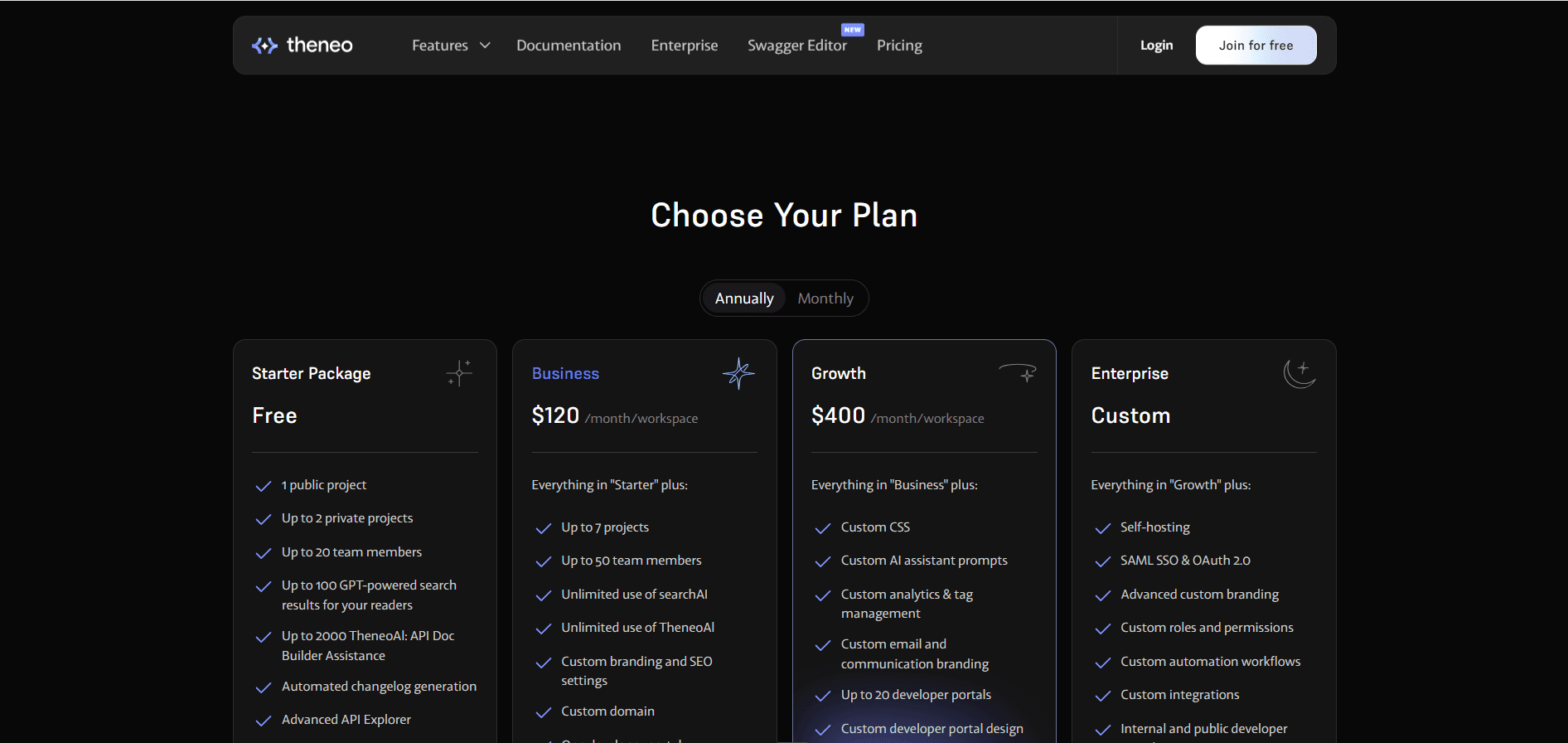
Theneo has four plans and bills per workspace rather than per seat, which is the fact that decides most evaluations. Every figure below is the annual rate, which is what Theneo publishes by default. Paying monthly costs more. [3]
| Plan | Price | Projects and people | The catch |
|---|---|---|---|
| Starter | $0 | 1 public and 2 private projects, up to 20 members | 100 reader AI answers, 2,000 AI assists, no color customization |
| Business | $120 per workspace/mo | Up to 7 projects, only 2 of them public, up to 50 members | Unlimited AI, custom domain, one developer portal, no custom CSS |
| Growth | $400 per workspace/mo | Up to 20 projects, up to 100 members, 10,000 endpoints | Custom CSS and JS, custom AI prompts, up to 20 portals |
| Enterprise | Custom | Unlimited | Self-hosting, SAML SSO, custom roles, review workflows |
Twenty people on the free plan and 50 on Business is more generous than the per-seat plans Theneo competes with, so adding a stakeholder to the account costs nothing.
The number to plan against is not $120. It is $120 if you can live inside the theme, and $400 the moment your brand team asks for custom CSS or you need more than one developer portal.
What a Real Team Pays
Three setups, priced at Theneo's published annual rates. [3]
One public API reference and a 20-person team. Starter covers it at $0, on a Theneo URL rather than your own domain, with 100 reader AI answers. It is a real published site and a thin trial of the AI.
One product on your own domain, 50 people, reader AI for all of them. Business at $120 a month. This is the configuration where Theneo is hardest to beat, because a per-seat platform would bill every one of those 50 logins.
Three public API references with your own stylesheet. Growth at $400 a month, and not because anything about your usage grew. The third public project and the custom CSS each sit a tier above Business on their own.
Our Theneo pricing guide takes every tier apart in more detail, including the endpoint caps, the public and private project split, the fair use clause behind "unlimited" AI, and the four capabilities Theneo prices only on request.
Does It Fit Your Team?
Ask two questions: who has to approve a change before it publishes, and how much of your design is negotiable.
| Your situation | Fit | What decides it |
|---|---|---|
| One or several APIs, engineers plus a writer | Excellent | AI drafts from the spec, and a writer can fix it without a repository |
| Large team, small budget, many stakeholders | Excellent | Per-workspace billing, 50 members on Business |
| SOAP, gRPC, or AsyncAPI in the estate | Excellent | Almost nothing else in the category renders these |
| Public docs with heavy reader traffic | Good | Ask AI is unmetered from Business up, subject to fair use |
| Brand or marketing owns the published design | Mixed | Colors at Business, custom CSS at Growth |
| Formal review and sign-off before publishing | Poor | Branches, approvers, and merge rules are Enterprise |
| Evaluating reader AI on the free plan | Poor | 100 answers is a demo allowance |
| Air-gapped or strict data residency | Good | Self-hosting exists, at Enterprise |
Two or three of those rows describe your team? Start free on Documentation.AI and import what you already have. Reader AI runs on the free plan, and reviewer roles do not wait for an Enterprise contract.
Is Theneo Worth It in 2026?
Yes, for a team documenting APIs that wants a good site quickly and does not want to count seats. Setup is quick, the format support is the broadest in the category, and the analytics tell you what readers asked rather than only what they clicked.
Whether that answer holds as you grow turns on three things, and none of them is about whether the software works. It does.
The tier you need is set by publishing, not by people. A third public project, a custom stylesheet, or a second developer portal each move you from $120 to $400, and none of them is a usage increase. Price the plan you will be on in a year rather than the one that gets you published this week. [3]
Review is an Enterprise feature. If a page needs a named approver before it goes live, you are either signing an Enterprise contract or running that review somewhere Theneo cannot see it. [2]
The most interesting AI is still a beta. The repository agent that catches documentation drift from pull requests is the best idea in the product and the weakest thing to sign a contract on. Reader AI is unlimited from Business, with a fair use clause behind the word. [2] [4]
Our verdict stands at 3.8 out of 5. Theneo is the fastest route we have tested from a spec to a portal that looks designed, and its pricing moves you up a tier for reasons that have nothing to do with traffic.
Best Theneo Alternative
The closest alternative on capability is Documentation.AI. Both run a visual editor, a Git workflow, an AI agent that keeps content in step with the code, and an assistant on published documentation, so the differences are about where the boundaries fall rather than what the tools can do. Our Theneo vs Documentation.AI comparison runs both through the same tests on onboarding, editors, AI, analytics, and pricing.
Three of them drive most switches. Reader AI is on the free Starter plan with 10,000 credits rather than a 100-answer allowance. Role-based permissions arrive with the Pro plan at $159 per month billed annually, which also includes four projects and unlimited editor seats. And PDF export exists, which Theneo has deliberately chosen not to build.
Theneo still wins on three counts worth naming. Its format support, particularly SOAP, gRPC, and AsyncAPI, is broader. Its developer portal builder is a real page builder rather than a theme. And per-workspace billing with 50 members on a $120 plan is cheaper than any per-seat model for a large team.
If neither fits, the field splits cleanly. Mintlify is the pick for API-first documentation with a docs-as-code team and a generated playground. GitBook is the pick for one collaborative site where the block editor matters most. ReadMe is the pick for developer portals that need per-key usage metrics. Redocly is the pick for an OpenAPI reference that engineers own in Git. Fern is the pick for docs and SDKs generated from one API spec. Each links to our full review, scored on the same eight criteria as this one. Our Archbee review scores a knowledge portal for guides, internal docs, and an API reference on the same scale.
| Platform | Pricing model | Reader AI | Review before publishing | Best for |
|---|---|---|---|---|
| Theneo | $120 or $400 per workspace/mo, seats included [3] | 100 answers free, unlimited from $120 | Enterprise only | API portals for large teams |
| Documentation.AI | $159/mo Pro billed annually, four projects, unlimited seats [5] | Included from the free plan | Git branches and pull requests, every plan | Mixed teams keeping several docs sets current |
| Mintlify | $450/mo Pro, unlimited editor seats | Pro and above | Branch-backed review | API-first developer docs |
| GitBook | $65 or $249 per site/mo, plus $12 per user/mo | Search-box answers from Essential, chat on Ultimate, both on credits | Change requests, every plan | One collaborative docs site |
| ReadMe | $250/mo Pro, one project | $150/mo add-on, Lite on Pro | Branching and reviews from Pro | Developer portals with usage metrics |
All rates are the annual figures each vendor publishes.
Working out which tier you would actually land on?
Book a demo and we will price your real spec: how many public projects, how many endpoints, and who has to approve a page before it ships.
Our Theneo alternatives guide ranks five replacements, free and open-source options included. For the rest of the field, our API documentation tools roundup compares the whole category, and developer documentation tools widens it to guides and product docs.
FAQs
1. How Much Does Theneo Cost in 2026?
Theneo has four plans, billed per workspace rather than per seat. Starter is $0 with one public project and two private ones. Business is $120 per workspace per month on annual billing. Growth is $400 per workspace per month. Enterprise is a custom quote and is the tier with self-hosting and SAML SSO. [3]
2. Does Theneo Charge per User?
No. Theneo bills per workspace, and each plan includes a member allowance instead of a per-seat charge: up to 20 people on Starter, 50 on Business, and 100 on Growth. A second brand or business unit that needs its own workspace pays for the full plan again. [3]
3. Is Theneo's Free Plan Usable?
For building and publishing, yes. You get one public project, two private ones, up to 20 team members, automated changelog generation, and the API explorer. The limit is AI: 100 GPT-powered search results for readers and 2,000 AI doc-builder assists, which is enough to try the features and not enough to run them.
4. Is Theneo's AI Really Unlimited?
On Business and Growth the pricing page lists reader search and the AI doc builder as unlimited, with no answer allowance and no overage rate. Theneo's terms still let it throttle usage, require an upgrade, or invoice for excess usage if you exceed your plan or place a disproportionate load on the platform, and no threshold is published. [3] [4]
5. Does Theneo Support a Review and Approval Workflow?
Only on Enterprise. Documentation Review, which covers branches, assigned approvers, merge rules, and inline comments, is documented as an Enterprise feature. Below it you have live collaboration and publishing rights that restrict who can push a change live.
6. Can You Customize the Design of Theneo Docs?
In two steps. Logos, fonts, and favicons are in branding settings, color customization across the published site starts at Business, and custom CSS and JavaScript start at Growth. Removing the "Powered by Theneo" attribution is a branding toggle, but the pricing page lists it against Enterprise, so confirm it for your plan before you promise a clean footer.
7. How Many API Endpoints Does Theneo Allow?
Up to 2,000 on Starter, 5,000 on Business, and 10,000 on Growth, with Enterprise unlimited, counted across the workspace. It is the one Theneo limit tied to the size of your product rather than your team, so check it against your real spec before you choose a tier. [3]
8. Does Theneo Work With GitHub?
Yes, with two-way sync through a native GitHub App, and with GitLab and Bitbucket as well. Read the sync direction carefully: each direction overwrites the other, so whichever sync runs next wins for that content. Decide where each page is edited rather than editing both sides between syncs.
The Questions to Take Into Your Trial
Whether Theneo works for your team comes down to five things, and every one has an answer you can get inside a two-week trial rather than a quarter.
| Ask yourself | The answer that should worry you |
|---|---|
| Who signs off before a page publishes? | A named reviewer, because approvals put you on the Enterprise path |
| How much of the published design is fixed by brand? | A stylesheet requirement, because that is Growth rather than Business |
| How many of your projects have to be public? | More than two, because Business only allows two |
| How many reader questions do you expect a month? | Anything past 100, because the free allowance is a demo |
| Where does each page get edited? | Two different answers, because that is how Git sync loses work |
Bring that filled in and we will price it for you. Book a demo and we will run your answers against Theneo's tiers and ours, so you know which plan you actually land on before you commit to either.
Sources
- Theneo. "API Documentation FAQ." Theneo. Accessed September 2026. https://www.theneo.io/faq
- Theneo. "Theneo Docs." Theneo. Accessed September 2026. https://docs.theneo.io
- Theneo. "Pricing." Theneo. Accessed September 2026. https://www.theneo.io/pricing
- Theneo. "Privacy Policy and Terms of Service." Theneo. Accessed September 2026. https://www.theneo.io/privacy-terms
- Documentation.AI. "Pricing." Documentation.AI. Accessed September 2026. https://documentation.ai/pricing
Priced per workspace?
Projects and reader AI in one plan
Reader AI runs on the free plan, and projects come with the tier rather than deciding which tier you need.
No credit card required