Archbee Review 2026
Archbee positions itself as a knowledge portal rather than a documentation tool, and much of its capability is sold as add-ons. This review assesses the editor, content reuse, Git workflow, shadow docs, reader AI, and analytics through hands-on use, and explains how those add-ons shape the total cost.

Monika B. · GTM Engineer, Documentation.AI
Last updated
On this page
Archbee calls itself a knowledge portal platform rather than a documentation tool, and after building on it that wording turns out to be accurate rather than positioning. It is very good at taking scattered product knowledge, giving it structure, and putting a fast, branded, searchable site in front of readers. The AI layer on top is where it falls behind, and it is sold as an add-on rather than included.
Everything below comes from building on the platform and from Archbee's own pricing page, product documentation, and its most recent product update.
Archbee Review: The Verdict
Archbee is a strong knowledge portal with a weak AI layer and no free plan. The editor, the templates, and the published site are all better than the price suggests. The AI is the part that lags, and reader analytics arrive as a separate purchase rather than with the plan.
Our overall score is 3.7 out of 5, the unweighted average of the eight scores below, rounded to one decimal. Every review in this series is scored on the same eight criteria, so the rows compare directly from one platform to the next.
| What we rated | Score | Why |
|---|---|---|
| Editing and structuring | 4.5 | Block editor with a slash menu, 30+ blocks, and a shortcut panel that teaches itself |
| API reference and explorer | 3.8 | OpenAPI import, Try It, GraphiQL, Mermaid, and a code block that earns its keep |
| Published output and design | 4.4 | Fast site, light and dark modes, feedback voting, custom domain on the entry plan |
| AI authoring and the agent | 3.5 | The writer is quick and produces text you edit rather than rewrite |
| Reader AI and search | 2.8 | Ask AI is slow, thin, still labeled beta, and sold as an add-on |
| Analytics and reader insight | 3.4 | The query logs are useful, page analytics is a separate $80 line item |
| Governance and collaboration | 3.7 | A real Reviewer role and a branching beta, both above the entry plan |
| Pricing and value | 3.3 | No free plan, five seats included, and seven add-ons the headline price hides |
Buy Archbee if you want one place for product documentation, internal knowledge, user guides, and an API reference, published to your own domain by a team whose non-technical contributors will never open a repository.
Look elsewhere if reader AI is the reason you are shopping, if you expect analytics and API access to come with the plan, or if you need to evaluate properly before paying. There is no free tier here, so Documentation.AI, which has one, is worth testing on real content first.
What Is Archbee Built For?
Archbee is built for the company where documentation is not one website but four audiences: customers reading guides, developers reading an API reference, support agents searching for an answer, and the internal team looking for its own runbooks. The product's core unit, the space, exists to keep those apart while sharing one editor.
A space groups documents under a single scope, a team, a project, or a topic, and each space can stay private to your team or publish externally to its own custom domain. [1] It is a different mental model from the platforms that assume one site per company, and it is why Archbee handles a multi-product estate more calmly than most.
What Archbee is not is a docs-as-code product with a web interface bolted on. It is a hosted application with a Git workflow attached, and writers who live in a terminal will feel that ordering inside a day.
Archbee Features: What Stands Out
Five parts of Archbee are worth your attention on a trial: the editor, content reuse, the Git workflow, shadow docs, and the published portal. All five are finished software rather than betas.
The Editor and the Block Library
The editor sells the product. Blocks are grouped into Basic, Media, Developer, and Embed tabs, and the Developer tab is what separates Archbee from a general wiki: a multi-language code editor with tabs, Mermaid diagrams, TeX, an API endpoint block, OpenAPI and Swagger import with a working Try It console, and a GraphiQL explorer. [2]
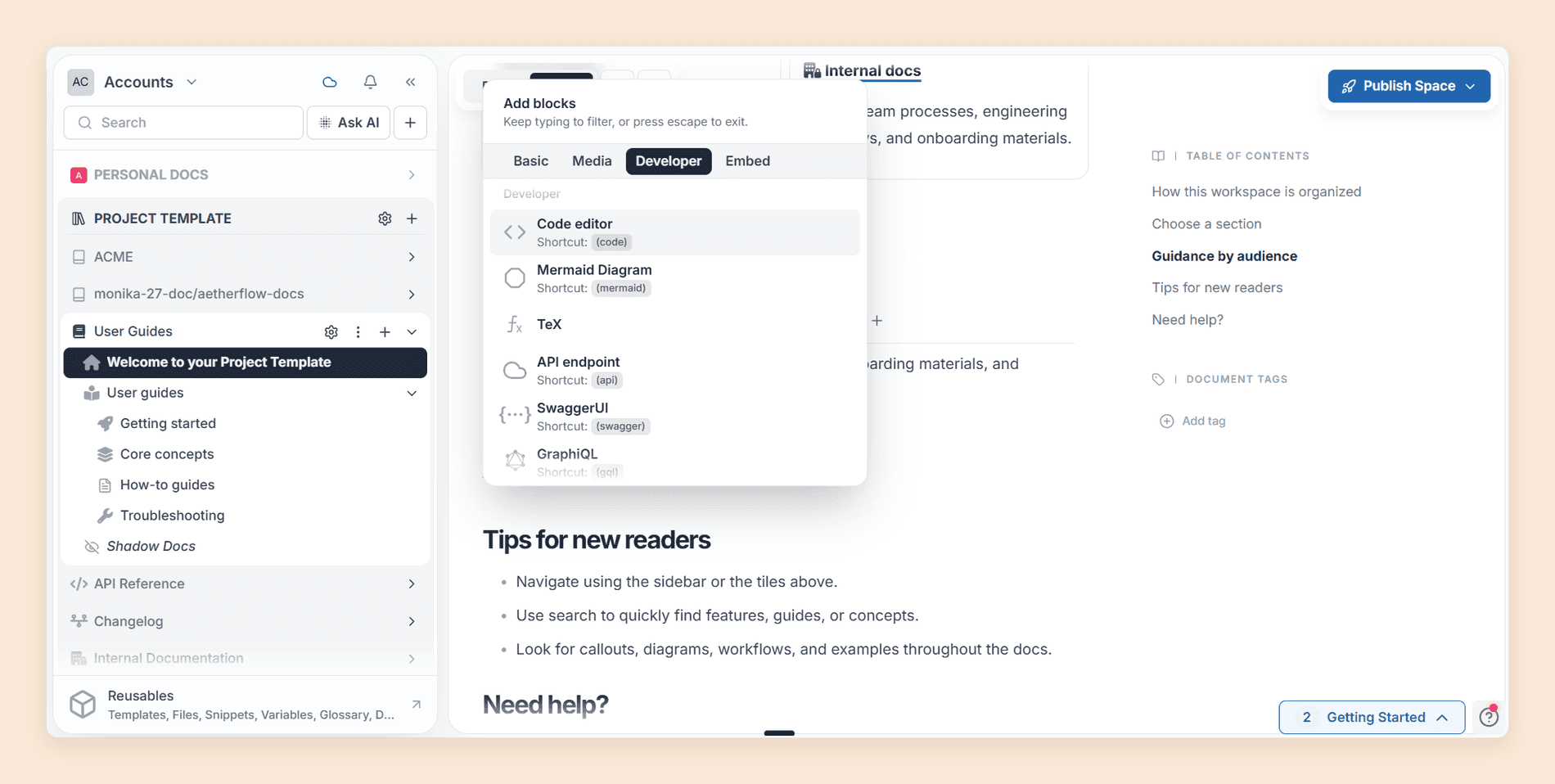
Markdown shortcuts work inside the editor, and pasting Markdown prompts you to convert it into Archbee blocks rather than dumping raw syntax into the page. [2] Inline comments, @ mentions, and dynamic links that survive a rename or a move round it out, and the dynamic links quietly prevent the most common form of documentation rot.
The thing we kept noticing is how little the editor got in the way. Public reviews do report one specific bug, the cursor jumping mid-sentence after switching windows. We could not reproduce it through a lot of restructuring, which does not mean it is fixed, so type in the editor for an hour during your trial to see whether your setup triggers it.
Templates, Snippets, and Variables
Content reuse is where Archbee starts behaving like a documentation platform rather than a wiki. Content snippets let you define a block once and update it everywhere it appears, and reusable variables do the same for values like a product name or a version number. Find and replace works inside snippets, so a change propagates without you hunting for every page that used it. [2]
Snippets and variables live in the Reusables panel at the foot of the sidebar, beside templates, files, and the glossary. All of it sits on the Scaling plan. [1] On Growing you get templates and nothing else, and a template only helps you on the day you create a page.
Git Sync, Branches, and the Docs-as-Code Half
Git sync was the smoothest part of the evaluation. Two-way sync with GitHub works, and the direction is documented: GitHub is the source of truth, and an edit made in Archbee opens a pull request instead of writing to the repository. [2] You merge it or you do not.
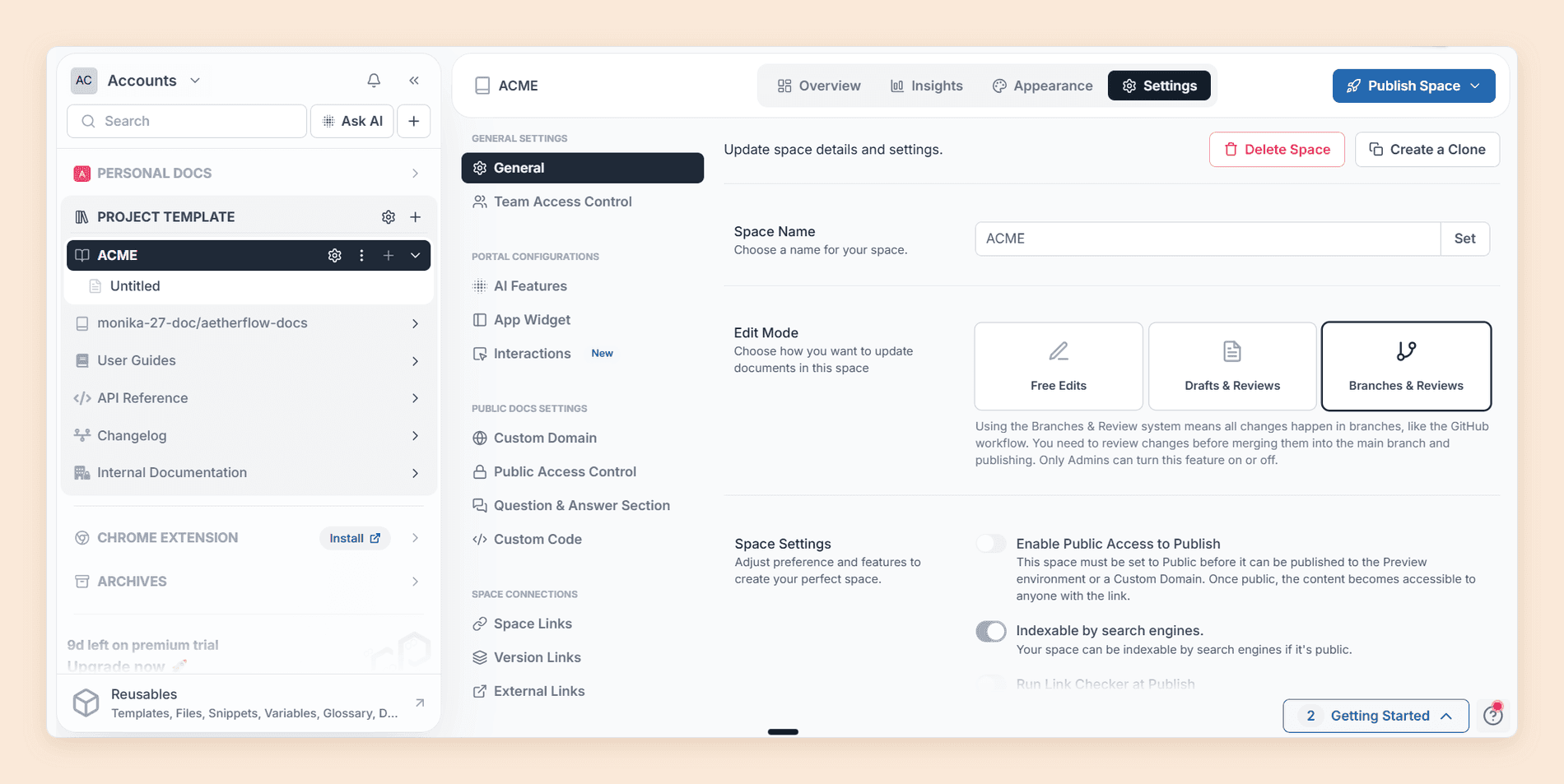
In its most recent product update, Sync with Git arrived for spaces that already exist, in beta, across GitHub, GitLab, and Bitbucket. [2] Archbee also has a branching system in beta, documented since February 2026, which brings Git-style branches, conflict resolution, and a diff view into Archbee itself with no external repository. [2] It works on newly created spaces only. [2] The switch is a per-space Edit Mode setting with three choices, Free Edits, Drafts and Reviews, or Branches and Reviews, and only Admins can change it.
Archbee gets one thing said about it that is simply wrong, including in our own first notes: it does support Markdown, fully, and extends it with MDX components, so files in a Git-connected repository keep rendering. [2] What it lacks is an in-app source view. Writers can work in Markdown in their own editor and sync it, but they cannot toggle a page into raw Markdown inside Archbee.
Shadow Docs
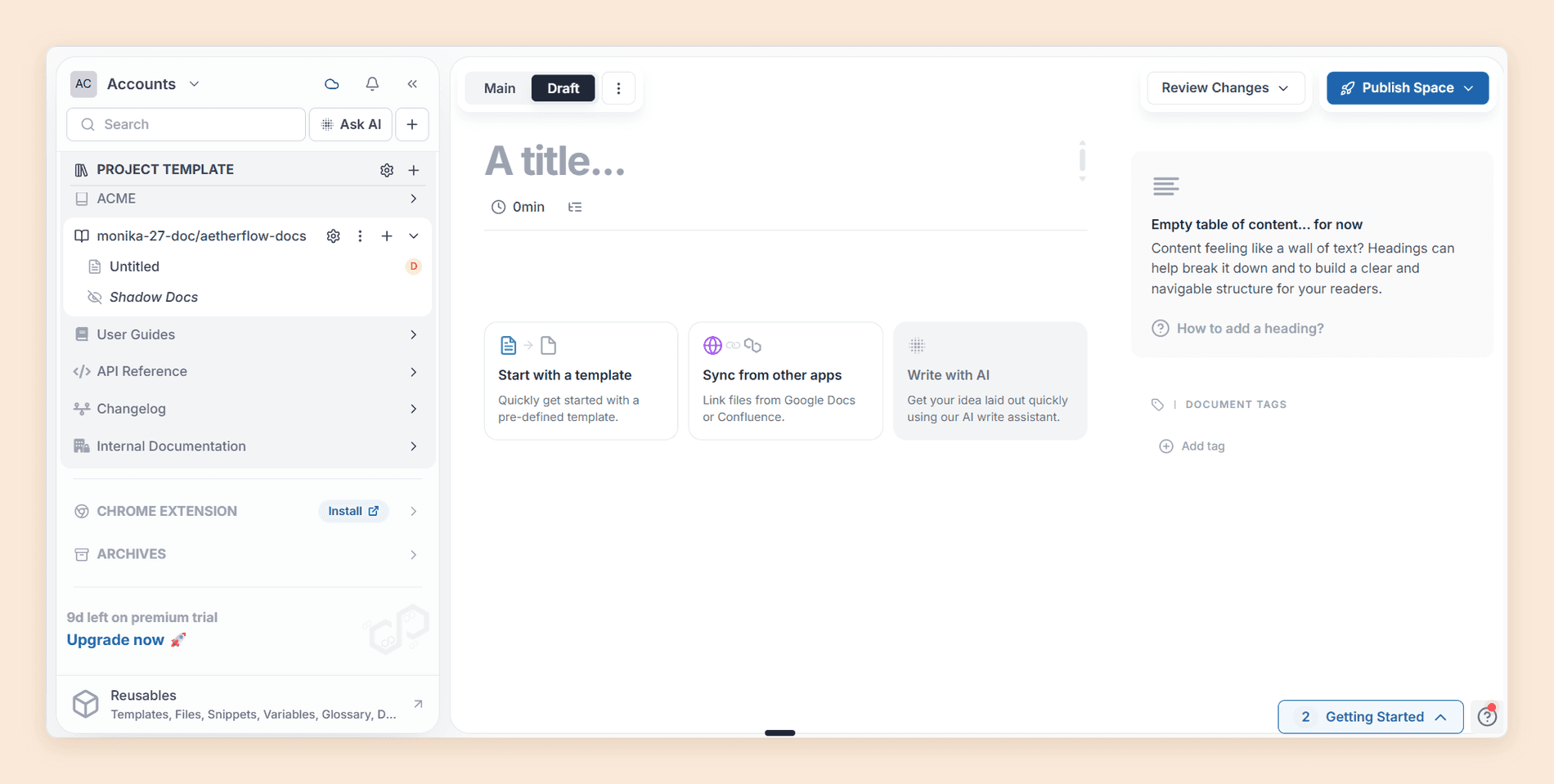
Shadow docs were the feature we had wrong going in. Point a shadowDocs field in an .archbee.yaml file at parts of a synced GitHub repository, and Archbee indexes those files for Ask AI without ever showing them on the published portal. [2] Used well, your assistant answers from the SDK itself rather than from whatever somebody remembered to write down, on an internal portal or a public one.
The Published Portal
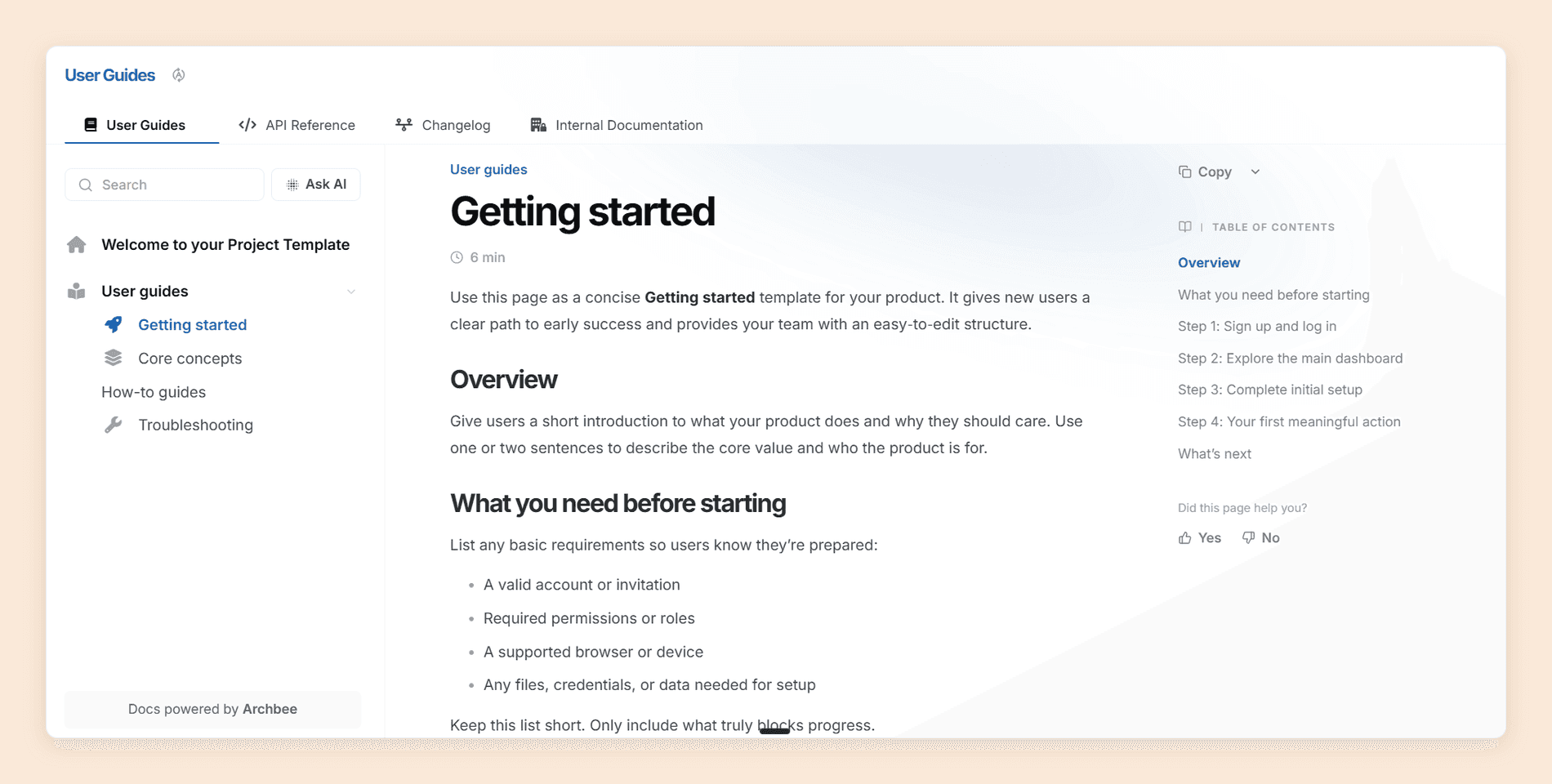
Publishing is the other place Archbee is clearly ahead of its price. The output is fast, comes with light and dark modes, carries an Ask AI box in the reader interface, and sits on a custom domain from the entry plan onward. [1] Document Feedback puts a "Did this page help you?" vote in the right-hand column of every page, with a comment box behind it, though it is hidden by default and you have to switch it on per space. [2]
For a multi-product estate, these matter: [1]
- Space Links join separate published spaces into one navigable site. Scaling.
- Version Links do the same across versions. Scaling.
- Search plumbing covers per-space sitemaps, SEO meta controls, and URL aliases. Both paid plans.
- Machine-reader support covers an MCP server,
llms.txt,llms-full.txt, and a Markdown version of every published page. Both paid plans, not an add-on.
Archbee's own documentation runs on that last one, which is how we checked: append .md to any docs URL and clean Markdown comes back.
The Integrations That Matter
- Code: GitHub, GitLab, and Bitbucket
- Migration: Confluence import
- Workflow: Jira issue embeds, Slack notifications and search, Zapier
- Support: Intercom article search inside a conversation, Zendesk federated search
- Embeds: Figma, Miro, Lucidchart, Loom, CodePen
Two more capabilities sit outside the plans as add-ons. The app documentation widget puts contextual documentation inside your own product through a script tag or a React package, and for a SaaS company that wants in-app help without building a help center it may be reason enough to pick Archbee. [2] QnA turns portal pages into a question board whose answers accumulate into their own knowledge base. [1]
Paying extra for AI?
Reader AI in the plan, not the add-on
Ask AI, the agent, and analytics come with the tier instead of arriving as separate line items on the invoice.
No credit card required
Where Archbee Slows Down
The friction came from two directions. Some of it is software that needs work, and some is decisions Archbee has made about which plan holds what.
Ask AI Is the Weakest Part of the Product
The AI writer is good. Fix grammar, rewrite, make it shorter, expand, summarize, all of it responded quickly and produced text we edited rather than rewrote. [2]
Ask AI is a different story. Inside a working project space it was slow and thin, frequently returning less than the search box would have. Against a template-built space it behaved much better, which points at indexing rather than the model: Archbee builds vector representations of your documents in the background, and a space that is still being restructured is still being indexed. [2] Archbee's own documentation still labels the AI beta. [2] The writer you can plan around. The assistant you should test on your own content during the trial.
Analytics Are Split in Two, and Only Half Is in the Plan
On first use it feels like Archbee has no analytics at all. It does. They are split in two and priced differently.
- Query logs. A Search tab records what readers typed and how many documents came back. An Ask AI tab records the questions, the answers, and the votes on each. Document Feedback adds per-page votes and comments. [2] Search Analytics starts on Scaling. [1]
- Page analytics. Views, average time, visits, and bounce rates live in the Insights add-on at $80 a month. [1] Pasting a Google Analytics script into Custom Code is the documented alternative, on Scaling and Enterprise. [2]
So the entry plan publishes a site and tells you nothing about how it is read until you buy Insights. That is the single biggest value gap in the pricing.
There Is No Free Plan
Archbee runs a 14-day trial with no credit card and states plainly that a free offering is not available at the moment. [1] Two weeks is enough to judge the editor but not whether the AI answers your customers' questions, so budget the first paid month as part of the evaluation. Archbee offers a no-questions refund within it. [1]
Want longer than 14 days?
Documentation.AI's Starter plan is free with no time limit, five editor seats, and 10,000 AI credits, so the assistant gets tested on your own content before anyone approves a budget. [3]
The Step From $80 to $350
There are two published prices, and the gap between them holds most of what a growing documentation team asks for next: the review system, reusable content and variables, versioning and localization, search analytics, space groups, space links, and complete branding control. [1] That is a fair bundle for $350, and an awkward staircase if you need exactly one thing out of it, which is what most teams outgrowing Growing need first.
Credit where it is due on the review system. A dedicated Reviewer role, drafts that never publish by accident, and a Review Space view that merges all outstanding drafts at once add up to a proper governance workflow, and it lands at $350 rather than behind a sales call. [2]
The Plan Price Is Half the Bill
Seven capabilities are sold as add-ons, included on Enterprise and charged on every plan below it. AI, covering Ask AI, Write Assist, and external sources, is $16 a month on Growing and $40 on Scaling. Insights, QnA, the app widget, Public API & CMS MCP access, whole-portal PDF export, and static HTML export are $80 a month each on both plans, and extra custom domains cost $10 or $20 a month each. [1]
Note where the money actually sits. AI looks cheap until you count token overage at $1.20 per million rather than the sticker. And API access being a line item is strange, when programmatic access to your own content is usually a plan feature. The same add-on carries Archbee's authoring MCP server, which lets AI agents create and edit content, so agent-driven editing is a line item too.
A Block Editor Is a Trade, Not a Win
Archbee's editor is a genuine advantage for a product manager, a support lead, or a founder writing the first 40 pages. It is a mild irritation for an engineer who thinks in Markdown files and wants a source view, and the Git workflow only partly answers that, because it moves them out of the tool rather than making the tool comfortable.
We hit two more pieces of friction, both small and both real. Preview loads noticeably slower than the editor it renders, though the preview itself is clean. And there is no mobile app, only a responsive site plus desktop applications for macOS, Windows, and Linux. [1]
Archbee Pricing
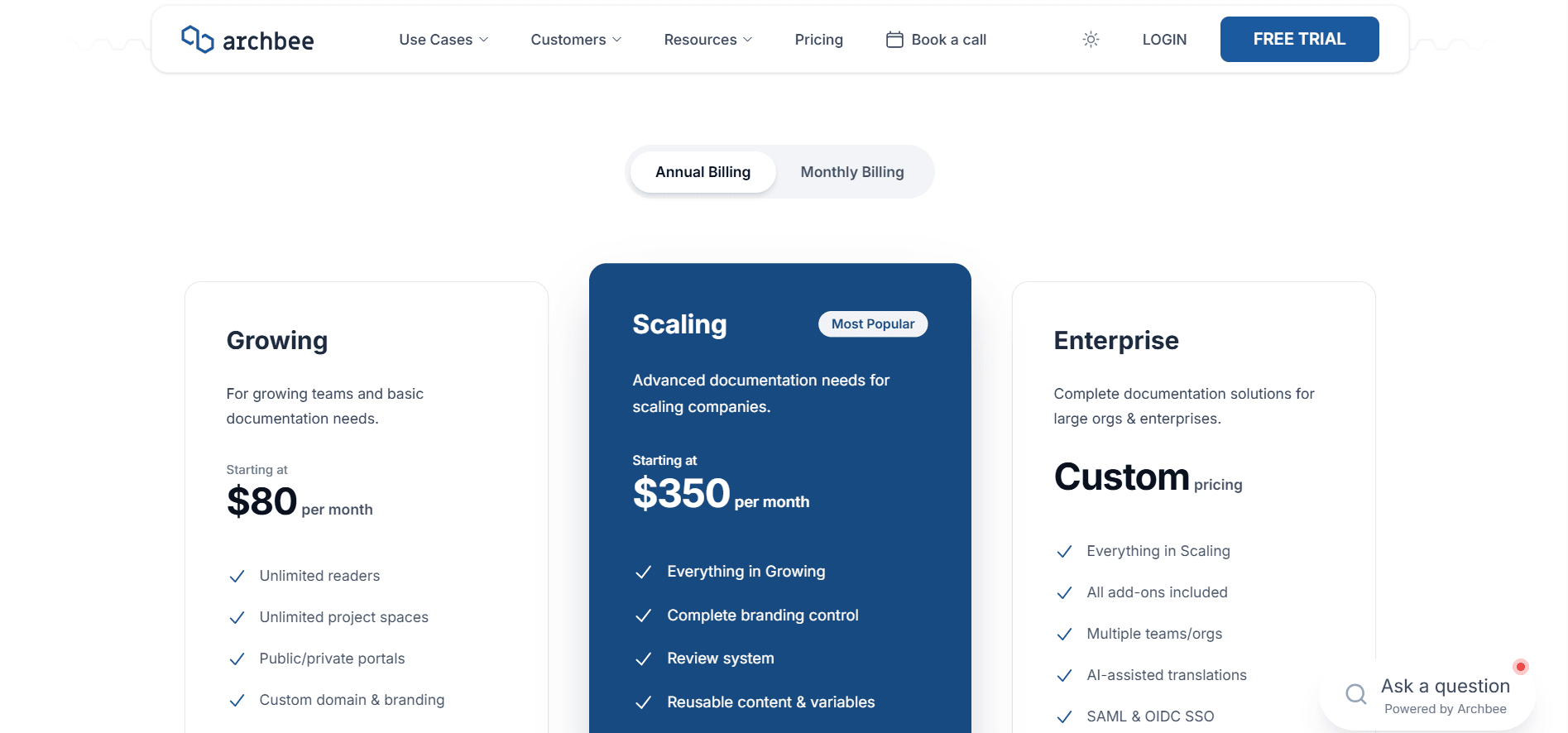
Archbee publishes two prices and a phone number, all on annual billing: [1]
| Plan | Price | Seats | What you get | The catch |
|---|---|---|---|---|
| Growing | $80/mo | 5, then $5 each | Unlimited spaces and readers, public and private portals, one custom domain, custom JavaScript, password protection, GitHub, API docs | No search analytics, no review system, no content reuse |
| Scaling | $350/mo | 5, then $10 each | Everything above, plus review system, snippets and variables, versioning and localization, space and version links, search analytics, space groups, guest accounts | Still one custom domain, no display rules |
| Enterprise | Custom | Per contract | Everything above, plus all add-ons, multiple orgs, AI translations, SAML and OIDC SSO, priority support | Annual contract, and Cloud-Prem starts at $100K a year on a three-year minimum |
The add-ons above sit on top of either plan, so price them first and pick the plan second. On portability, Archbee is SOC 2 Type II and GDPR certified and exports documents or your whole organization as Markdown or PDF, so the door out is real. [1] [2]
For seat math, token consumption, and worked cost scenarios, see our Archbee pricing guide.
Does It Fit Your Team?
Two questions settle it: how many of your contributors will refuse to open a repository, and whether reader AI is a requirement or a nice-to-have. Archbee wins clearly on the first and loses on the second.
| Your situation | Fit | What decides it |
|---|---|---|
| Mixed team, product managers and engineers writing together | Excellent | The block editor is genuinely usable by non-technical contributors |
| Several products, several audiences, one platform | Excellent | Spaces, space groups, and space links, at Scaling |
| Internal knowledge base plus public docs | Excellent | Private and public portals with hybrid SSO access |
| In-product help content | Excellent | The app documentation widget, with a React package |
| Formal review and sign-off before publishing | Good | A real Reviewer role, at $350 |
| Docs-as-code team living in Markdown | Mixed | Full Markdown and MDX over Git sync, no in-app source view |
| Reader AI as the primary purchase reason | Poor | Ask AI is slow, still beta, and sold as an add-on |
| Analytics without extra line items | Poor | Search analytics starts at Scaling, page analytics is an $80 add-on |
| Evaluating properly before you pay | Poor | 14 days, no free tier |
Questions worth asking before you sign:
- Which of our contributors will need a source view, and are they willing to work through Git sync?
- How many AI tokens will our reader traffic consume, and what is the overage exposure?
- Do we need search analytics, content reuse, or a review workflow in year one, and does that put us on Scaling immediately?
Is Archbee Worth It in 2026?
Yes, if you are buying a knowledge portal. Archbee gets a multi-audience documentation estate structured, branded, and published faster than most of the category, and for that job it is priced fairly.
No, if you are buying reader AI. The writer works, the assistant does not yet, and it arrives with a token meter attached. [2]
Our verdict stands at 3.7 out of 5. Archbee is a well-built documentation platform carrying an AI layer that has not caught up with it yet, and the platform underneath is good enough that we would happily revisit this score in a year.
Best Archbee Alternative
The closest alternative on capability is Documentation.AI. Both run a visual editor, a Git workflow, a multi-space content model, and an assistant on published documentation. The difference is what arrives with the plan and what arrives as a line item.
| What you are buying | Archbee | Documentation.AI |
|---|---|---|
| Reader AI | Add-on: $16/mo Growing, $40/mo Scaling, plus token overage [1] | In every plan, 10,000 credits on the free tier [3] |
| Page analytics | Insights add-on, $80/mo [1] | Standard, search, and AI answer analytics on every plan, free included, advanced analytics on Pro [3] |
| API access | $80/mo add-on [1] | API keys from Standard, OpenAPI import on every plan [3] |
| PDF export | Per document in the plan, whole portal is an $80/mo add-on [1] | From Pro [3] |
| In-product help | App widget add-on, $80/mo [1] | Embedded Docs and help links on every plan, free included [3] |
| Free plan | None. 14-day trial [1] | Starter, free forever, five seats [3] |
| Editor seats | 5 included, then $5 or $10 each [1] | 5 on Starter, 10 on Standard, unlimited on Pro [3] |
Read the first three rows together. A team that wants reader AI, analytics, and API access adds $176 a month to an Archbee Growing plan and nothing to a Documentation.AI plan from Standard up, because those are tier features rather than separate purchases.
Archbee wins on two counts worth naming. Its block library is richer, particularly the Developer tab. Its space model handles a sprawling multi-product estate more gracefully than a project model does. In-product help is not one of them: Documentation.AI embeds docs pages and its assistant inside your app on every plan, which is the job Archbee's widget does for $80 a month. [1] [3] Shadow docs remain a genuine Archbee original as well: indexing your codebase for the assistant without exposing it to readers is not something the other platforms we have reviewed offer. [2]
Our Archbee vs Documentation.AI comparison builds the same documentation on both platforms and prices the result, our Archbee alternatives guide ranks five replacements, and our Archbee vs Mintlify comparison sets it against the docs-as-code platform it is most often shortlisted with. Our Archbee vs GitBook comparison sets it against the block editor it most resembles. For the wider field, our reviews of Mintlify, GitBook, ReadMe, Theneo, Redocly, and Fern use the same eight criteria, and we compare the rest of the category in our roundup of API documentation tools.
Working out which plan you would actually land on?
Book a demo and we will price your real team: how many writers, how many reviewers, how many products, and what each platform charges for them.
Documentation.AI Slack channel: Join here
FAQs
1. How Much Does Archbee Cost in 2026?
Growing is $80 per month and Scaling is $350 per month on annual billing, each with five team members, then $5 or $10 per extra member. Readers are free on every plan, Enterprise is a custom quote, and seven capabilities are add-ons on top. [1]
2. Does Archbee Have a Free Plan?
No. There is a 14-day trial with no credit card and a refund within your first paid month. Open source projects get Growing free, and non-profits, education groups, and qualifying startups get 50% off. [1]
3. Is Archbee's AI Included in the Price?
No. The AI add-on is $16 a month on Growing and $40 on Scaling, with 20M and 40M tokens, overage at $1.20 per million, and soft and hard limits. Only Enterprise includes it. Archbee runs OpenAI models on Azure OpenAI and does not train on customer data. [1]
4. What Are Shadow Docs in Archbee?
Files, usually source code, that Archbee ingests from a connected GitHub repository and indexes for Ask AI without showing them on your published portal. You configure them with a shadowDocs field in an .archbee.yaml file. [2]
5. Does Archbee Support Markdown?
Yes. Archbee supports standard Markdown, extends it with MDX components, and processes Markdown files in a Git-connected repository as MDX. Markdown shortcuts work in the editor, but there is no raw source view inside the app. [2]
6. Does Archbee Have Analytics?
Yes, in two parts. Search queries, Ask AI questions, and page feedback are logged, with Search Analytics on Scaling. Page analytics, meaning views, time on page, visits, and bounce rates, is the Insights add-on at $80 a month. [1] [2]
7. Does Archbee Work With GitHub?
Yes, with two-way sync in which GitHub stays the source of truth and edits in Archbee open a pull request. GitLab and Bitbucket are supported too, and a branching system with conflict resolution is in beta for newly created spaces. [2]
8. Does Archbee Have a Review and Approval Workflow?
Yes, on Scaling. The Draft and Reviews System adds a Reviewer role, one draft per document, and merge rights reserved for Reviewers, and a recent update added a view for merging all outstanding drafts at once. [1] [2]
Sources
- Archbee. "Pricing." Archbee. https://www.archbee.com/pricing
- Archbee. "Archbee Docs." Archbee. https://www.archbee.com/docs
- Documentation.AI. "Pricing." Documentation.AI. https://documentation.ai/pricing
Paying extra for AI?
Reader AI in the plan, not the add-on
Ask AI, the agent, and analytics come with the tier instead of arriving as separate line items on the invoice.
No credit card required