Theneo vs Documentation.AI: The Definitive 2026 Comparison
Theneo builds an API reference fast. The questions worth asking before you commit are what happens to the documentation that is not reference, and what Theneo's per-plan caps on endpoints, projects, and reader AI cost you as you grow. We built the same docs on both platforms and priced what a growing team really pays.

Monika B. · GTM Engineer, Documentation.AI
Last updated
On this page
- Theneo vs Documentation.AI: Quick Answer
- How We Tested Both Platforms
- Setup and Onboarding
- Editing and Restructuring Docs: No-Code Editing on Both Platforms
- AI Features Compared: AI Writers, Ask AI, and MCP Support
- Published Docs Experience
- Theneo Pricing vs Documentation.AI Pricing: Flat Workspace Tiers vs Per-Team
- Theneo Pros and Cons
- Feature-by-Feature Breakdown: Theneo vs Documentation.AI
- Who Theneo Is Best for and Who Needs More Than API Docs
- Final Verdict: Which Platform Should You Choose?
- Related Theneo Comparisons
- Frequently Asked Questions
- Sources
Most documentation platforms are shaped by the thing they were built to publish first. Theneo was built around the API spec, and it shows, to Theneo's credit: hand it an OpenAPI file and you have a working reference in minutes.
Documentation.AI was built around the documentation set, where the API reference is one part of something larger that also holds guides, concepts, troubleshooting, and release notes.
The two platforms now cover a lot of the same ground. Each generates from a spec, ships a no-code editor, answers reader questions with AI, and exposes an MCP server. Compared feature by feature they look close, which is exactly why teams pick one and discover the difference later.
That difference shows up as limits. Theneo meters what most platforms do not: how many endpoints you can document, how many projects can be public, and how many questions your readers may ask the AI. None of those bite on day one. All of them bite in the same quarter your product grows, and by then the docs are already there.
Every figure here comes from vendor-published pricing and product documentation, checked against the pages listed in the sources at the end of this article. Where we describe how something behaved, that is our own testing, and we say which plan we tested it on.
Theneo vs Documentation.AI: Quick Answer
Answer one question and this sorts itself quickly. Is your documentation an API reference, or does it contain one?
If it is a reference and a portal for integrators, Theneo may be the better fit. If the reference is one section of something larger, Documentation.AI may be the better fit, and the rest of this article is about why the gap widens rather than closes as you grow.
Theneo has earned its position in the API category. It supports more spec formats than almost anyone, including OpenAPI, Postman collections, GraphQL, gRPC proto files, SOAP and WSDL, and AsyncAPI. [2] Its API Explorer makes real authenticated calls, and its free plan carries 20 team members, which other platforms in this category do not offer. [1]
Theneo may be the better fit when:
- Your documentation starts from a spec and stays close to it
- You need private developer portals where each partner sees only their own APIs
- You want an interactive explorer with environment switching and generated code samples
- You have a large team and want seats included rather than billed per head
Documentation.AI may be the better fit when:
- Guides and concepts carry as much weight as endpoints, rather than sitting around the reference
- Documentation is owned across product, support, and engineering
- AI capabilities matter to you. You want an agent that reorganizes a documentation set instead of only drafting pages in it, and reader-facing AI and analytics on the free plan rather than at the first paid tier
- Your API is large because Theneo caps endpoints by plan, as our Theneo pricing guide breaks down in full
How We Tested Both Platforms
We built the same documentation on each platform and compared the same seven things:
- Signup and onboarding
- Generation from an API spec
- Editing and restructuring content
- The AI features in real use
- The published reading experience
- Analytics and what they report
- Total cost at the tier a growing team would actually buy
We tested Theneo on the free Starter plan, so some of what we hit was a plan limit rather than a product limit. Where that is the case, we say so, because the difference matters when you are deciding what to buy.
There is no winner declared per section. Each one reports what Theneo did, then what Documentation.AI did, then a verdict on what the difference means in practice.
Setup and Onboarding
Each platform gets you to a generated documentation site in minutes, and neither setup is difficult. Theneo asks more questions before it starts and forks by the kind of document you are making. Documentation.AI asks fewer and forks by the kind of contributor you are.
Theneo
You can sign in with Google, Microsoft, or SSO, or create an account with your own email. What follows is a short personalization pass, roughly four questions covering your name, your organization, whether this is a personal or a company document, and a first pass at customization.
It is a small thing, but it lands well. The questions are quick and the generated project comes back feeling like it belongs to you rather than like a template you have been dropped into.
Then comes the fork that defines the product: API documentation or non-API documentation. Pick a path and you get customization options for layout and colors, plus a toggle that lets ChatGPT read your published docs and answer from them. You can connect an MCP server at this stage too.
Generation was fast and the output was good. The structure held together and the navigation was configured without cleanup.
Documentation.AI
Signup follows the same shape, with a Google account or your own email and a company name, and no GitHub authorization required to get started.
Setup then splits by contributor rather than by content type. Quick setup skips Git entirely and goes straight into the visual editor, which is the path for product and support teams. The markdown path connects a GitHub or GitLab repository for teams that want docs-as-code.
Generation was fast here as well, and the resulting structure was immediately legible.
Verdict: Theneo's onboarding is the more considered of the two, and asking about API versus non-API first is a smart move because it changes what the rest of the product shows you. But that question is answered once, at signup, and it commits you. Documentation.AI forks by who is editing instead, which is the choice you keep making as writers, engineers, and support people join. Take Theneo's onboarding if your content type is settled. Take Documentation.AI's if your contributor list is not.
Editing and Restructuring Docs: No-Code Editing on Both Platforms
Neither platform requires Markdown fluency, and each one gives you a Notion-style editor with slash commands. The difference is not ease of use, because both are genuinely easy. It is what each editor assumes you are building.
Theneo
Theneo calls its building blocks widgets, and typing / opens the widget menu. What is useful about it is the grouping: the menu sorts widgets into structure and layout, rich content, and API documentation, so a writer who does not yet know the vocabulary can find a callout, a steps list, or an endpoint block by category rather than by guessing its name. Once you know what you want, typing the name after the slash, /steps or /card, drops it straight in.
Navigation across the top tabs was simple, and structure can be rearranged by dragging. Version history and rollback are present on every plan, including the free one, and having a full record of changes available without paying for it is a genuine strength.
An API project also shows the endpoints the document covers alongside that history, which is useful when you are checking coverage against a spec. Real-time co-editing is built in, with live cursors and comments, and engineers can work in Markdown while everyone else stays in the visual view of the same document.
The non-API project is the same editor with the endpoint layer removed, which is exactly right. We took a sample document through it and found nothing that would stop a writer who has never used an editor like this before.
Documentation.AI
The web editor is a WYSIWYG surface with slash commands and no Git or local tooling required, and every structural change you make there lands in documentation.json, the single file that describes your navigation. Engineers who prefer their own IDE edit that same file and the same MDX pages through the code editor, so neither group is working on a copy.
Real-time collaboration goes further than most. Teammates see each other's cursors and selections, leave inline comments as threads that stay attached to the highlighted text, and work through them in a Comments panel. What is unusual is the scope: navigation changes, documentation.json edits, custom CSS, and script settings sync live too, so two people can reorganize a site together rather than taking turns. Sessions are per branch, so a feature branch and main keep separate conversations.
Reusable snippets are the other practical difference. A snippet lives as a file under snippets/, in Markdown or as a React component, and a page stores a reference to it rather than a copy. Edit the source once and every page that imports it updates. Theneo's Reuse Content duplicates a section into another project instead, which means a change to shared content is a change you make in several places.
Structure itself is a three-layer model of dimensions, views, and content, where dimensions are optional and simple sites skip them entirely. The agent works on that structure directly, so reorganizing a docs set is something you can ask for rather than do by hand, and the documented practice is to move pages between groups instead of renaming paths so your URLs survive the change.
Verdict: Both editors are genuinely easy, so day one is a tie. Day 300 is not. Theneo's editor assumes you are documenting an API, and its widget menu reflects that. Documentation.AI assumes the docs will keep changing shape, which is why shared content lives in one file that updates everywhere and why reorganizing is something you can hand to the agent. If your docs are still finding their structure, or you maintain the same warning across 30 pages, that assumption is worth more than any feature in this section.
AI Features Compared: AI Writers, Ask AI, and MCP Support
Theneo and Documentation.AI are AI-native and each ships an MCP server, but they point their AI at different jobs. Theneo aims it at the spec and at the developer asking questions about your API. Documentation.AI aims it at the documentation set and at the person maintaining it.
Theneo
TheneoAI generates the reference from your spec, writing endpoint and parameter descriptions from your schema. The in-editor agent then helps you write and suggests what a page is still missing.
It answered fast. On the free plan it would not accept a long compound prompt and asked us to break the question into smaller ones, which we ran into repeatedly. That cap lifts on the paid tiers, so it is a plan boundary rather than a product ceiling, but it does shape what a free evaluation tells you.
Ask AI on the published site answers developer questions with source citations. Free-plan readers get a capped number of those answers, and control over how the assistant behaves on your docs is a higher-tier setting.
Theneo's MCP work points two ways. One command turns your spec into an MCP server, with token access control and selective endpoint exposure, so Claude, Cursor, and other clients can call your API directly. A second, documentation MCP server lets Claude or Cursor browse, search, read, edit, add, and delete sections of your docs, with everything past browsing enabled on request. Theneo publishes llms.txt as well. [2]
Documentation.AI
The assistant answers reader questions and also works for the person writing, expanding or shortening content on request rather than only returning the passage it found. The documentation agent drafts, edits, and restructures inside the editor, and pulls context from connected GitHub repositories, Jira, Confluence, Linear, Notion, HubSpot, and Plain, so pages get written from where the product work actually happened.
There are two MCP servers rather than one. The Reader MCP Server gives AI tools read-only access to your published documentation. The Authoring MCP Server lets an MCP client inspect files, update pages, edit documentation.json, manage branches, and deploy, all under the same project permissions your team already has. [4] A docs change can ride along with the code change that caused it.
AI access is metered in credits rather than gated by plan. The free Starter plan includes 10,000 one-time credits, so the assistant and the agent are both fully usable before anything is paid. Standard replaces that with 10,000 credits every month, Pro raises it to 30,000, and a reader question costs 10 credits. There is no overage billing on any plan: if credits run out the AI pauses, the docs stay live, and the bill does not move. [3]
Verdict: Both platforms now let agents into the docs, on different terms. Theneo's spec-generated server makes your API callable by agents, which is right if the API is the product, and its docs server can edit sections once Theneo switches that on for you. Documentation.AI's authoring server edits pages, navigation, and branches self-serve, which matters if the problem is that docs go stale. Neither is WebMCP, the in-page browser API now in origin trial, which sits alongside a remote MCP server rather than replacing it. The clearer gap is access: Documentation.AI's reader assistant and authoring agent are both fully usable on the free plan, while Theneo's reader search is capped until you pay.
Judge the AI on your own docs, not on a demo.
The free plan includes 10,000 AI credits, so the reader assistant and the documentation agent both run against your real content before you enter a card.
Start free, no credit card required.
More than API docs?
One platform for the whole docs set
Guides, concepts, and endpoints in one project, with an agent that restructures instead of only drafting.
No credit card required
Published Docs Experience
Each platform publishes a fast, well-designed site with an AI assistant on the page. Theneo offers more publishing surfaces than Documentation.AI does, which follows from the use case: it is built around API exploration and developer portals, while Documentation.AI is a knowledge-based documentation platform where the reference is one part of the site.
Theneo
Publishing was smooth and the output looks right with no configuration. Live preview is better than most, because alongside the rendered view you can see the document in Markdown and edit it there.
The API Explorer is the standout. Developers make real authenticated calls with their own keys or OAuth, switch between production, staging, and sandbox, and copy generated code samples in several languages without leaving the page.
Theneo's other surface, and the one it is really selling, is the developer portal. You pick a template, customize it, and get a branded hub for your APIs, SDKs, and guides, with SEO management and user authorization. Portals can be private and per-customer, so each partner signs in and sees only the APIs they pay for.
Analytics separates by project and by page, reporting views, total users, new users, and time spent, presented as a clear dashboard rather than a list of counters. It also reports what readers searched for and how the docs perform in search.
Documentation.AI
Publishing was equally smooth, and the structure of the published site was immediately legible. Preview sites work through branches, where every non-live branch gets its own URL, so a developer can open a pull request while a non-developer saves and merges after review.
Design configuration is the strong part here. Colors and typography are set from the theme rather than by writing CSS, and the site ships with light and dark modes handled for you. When you need to go past the theme, custom stylesheets load after it so your rules win, with stable class names exposed on 60 or so components and CSS variables for the navbar, sidebar, footer, and table of contents. Dark-mode rules scope cleanly, so you are not fighting the default theme to make a brand fit.
The published site carries Ask AI on every plan including the free one, and readers can open any page in Claude, ChatGPT, or another model to keep working with it. An assistant that answers on the page is also the cheapest way to keep questions out of your support queue.
That assistant, and the docs behind it, can also live in your product. Embedded Docs adds a docs panel, a floating Help button, or an Ask AI bar to your app, and help links open the right page from any button. It is self-serve on every plan. Theneo can embed its chatbot in your product too, but only on request, with no published price.
Analytics is organized into five tabs. Traffic splits three ways across People, AI Agents, and Bots and Crawlers. Search reports total searches, no-result rate, click-through rate, a per-page breakdown of where searches fail, and a table of individual queries showing whether the reader gave up and escalated to the assistant. The AI Assistant tab scores answer confidence, so filtering for low confidence returns a list of questions your documentation could not answer. All of it is available through a read-only REST API and exports to CSV.
Verdict: Theneo gives you more places to publish, and if you genuinely need a partner-facing portal and a live API console, it is built for that breadth. Most teams do not, and end up paying for surfaces they never light up. Documentation.AI covers one site properly instead, with deeper design control and analytics that name the questions readers asked and did not get answered. Count the surfaces you would actually launch this year. If it is one, depth may be the better fit.
Theneo Pricing vs Documentation.AI Pricing: Flat Workspace Tiers vs Per-Team
Theneo bills per workspace with large seat allowances included. Documentation.AI bills per plan with credits for AI. Neither charges per seat, which puts the pair ahead of most of the category, and the real difference is what each one meters: Theneo counts projects, endpoints, and portals, while Documentation.AI counts projects and AI usage.
All figures below are annual billing rates.
Theneo
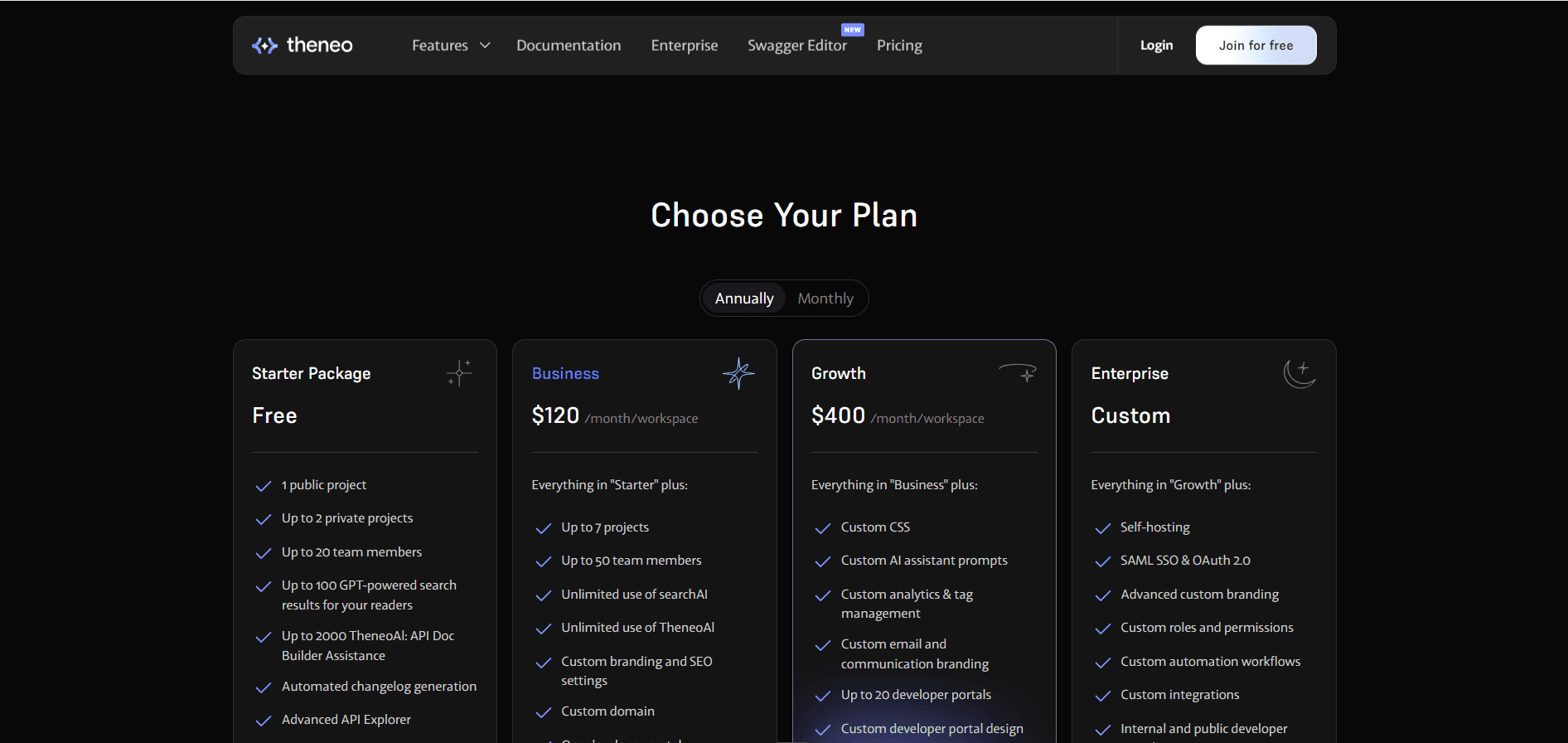
The free Starter package is more generous than most on seats. It carries one public project and up to two private ones, up to 20 team members, automated changelog generation, the advanced API Explorer, project access controls, and project analytics with reader feedback. AI is included in a metered form: up to 2,000 TheneoAI doc builder assists and up to 100 AI-powered search results for your readers. [1]
Business is $120 per month per workspace. It raises you to seven projects and 50 team members, and this is where the AI caps come off: unlimited searchAI for readers and unlimited TheneoAI for writers. It also adds custom branding and SEO settings, a custom domain, one developer portal, and portal templates, plus advanced user and content access controls.
Growth is $400 per month per workspace. It adds custom CSS, custom AI assistant prompts, custom analytics and tag management, up to 20 developer portals with custom portal design, advanced security with IP allowlisting, and 1:1 support over Slack and Teams. Enterprise is custom on top of that, bringing self-hosting, SAML SSO and OAuth 2.0, custom roles and permissions, custom automation workflows, and internal as well as public portals.
Signup hides two limits that get expensive later, because they track your product rather than your team.
The first is endpoints, capped at 2,000 on Starter, 5,000 on Business, and 10,000 on Growth, with Enterprise unlimited. The second is public projects: Business advertises seven, but only two of them can face the public. [1]
Neither matters when you are documenting one API. Both matter the quarter you ship a second product, version an existing API, or split a monolith into services, because that is when the ceiling arrives at the same time as the work. The upgrade is not the painful part. The painful part is that it is not a pricing decision by then, it is a migration decision, made about documentation you have already written, indexed, and linked to. Our Theneo pricing guide covers the project splits, endpoint caps, and unpublished prices in full.
Documentation.AI does not meter endpoints at all, and projects go to four on Pro with no public and private split, so growth changes your plan rather than your platform.
Documentation.AI
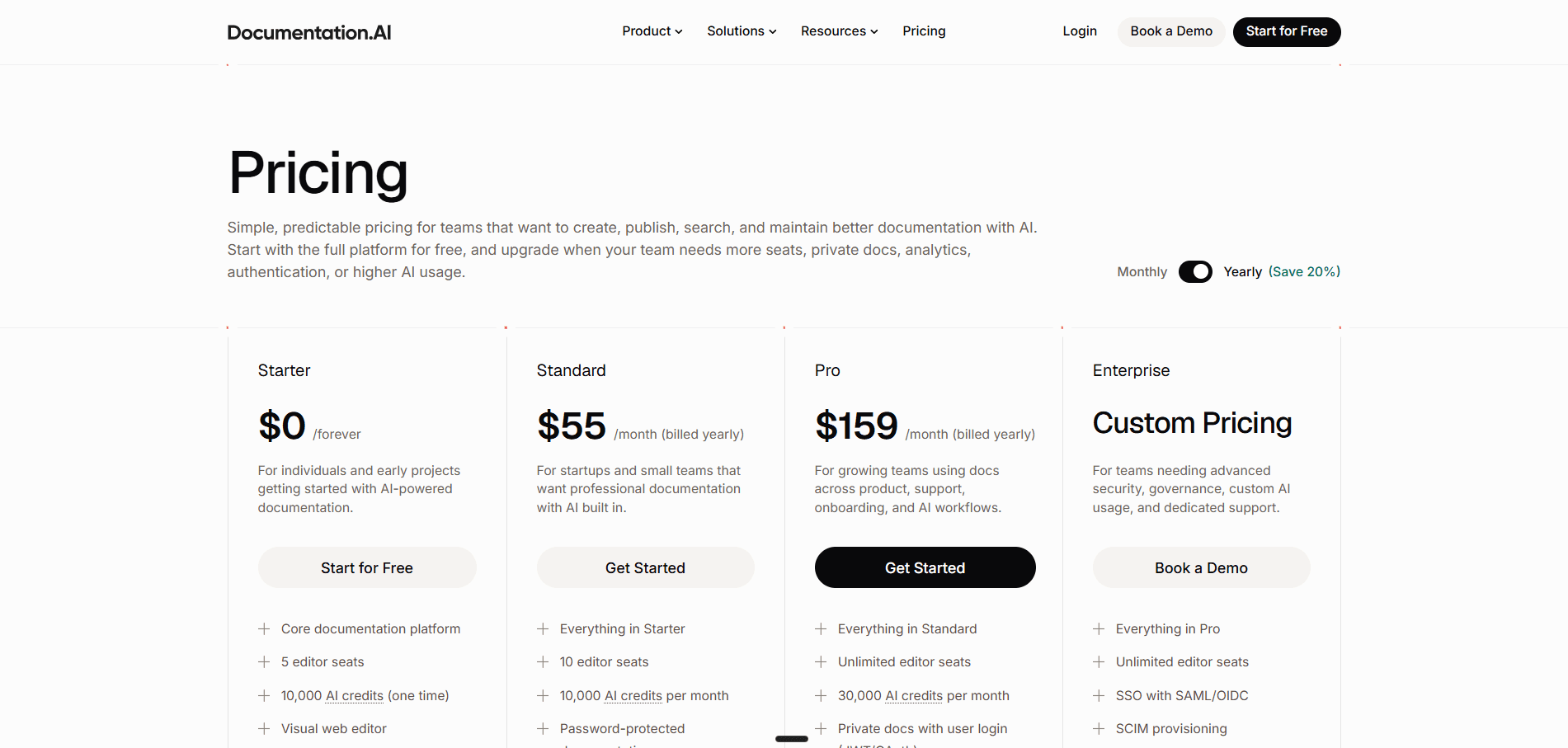
The free Starter plan carries five editor seats, one documentation project, the visual web editor, an API playground, a custom domain, standard analytics, and 10,000 one-time AI credits. [3] The custom domain on the free tier is worth noting against Theneo, where it starts at Business.
Standard is $55 per month billed annually, or $69 billed monthly. It doubles seats to 10, allows a second project, and replaces the one-time credit grant with 10,000 credits every month. It adds password-protected documentation and external sources for the AI Assistant.
Pro is $159 per month billed annually, or $199 billed monthly. Editor seats become unlimited, projects rise to four, and the monthly allowance triples to 30,000 credits. It adds private docs with user login through JWT or OAuth, role-based permissions, advanced analytics, PDF export, and priority support with migration services. Enterprise is custom, adding SSO with SAML or OIDC, SCIM provisioning, and dedicated support. The current plans and what each includes are on the Documentation.AI pricing page.
Pricing verdict: Compare the tier each team actually buys and the gap is wide. A small team that wants a custom domain and reader AI past Theneo's 100 free answers pays $120 on Theneo. On Documentation.AI the custom domain is free, and $55 a month billed annually buys 10,000 credits a month at 10 credits per reader question. A team that wants custom CSS and custom AI prompts pays $400 on Theneo and $159 on Documentation.AI, both on annual billing, where that tier also brings JWT and OAuth login and role-based permissions, both of which sit on Theneo's Enterprise plan behind a sales call.
Theneo's model is better in one specific way, and it is not a small one. Twenty seats on a free plan and 50 on Business is more headroom than anyone else in this category gives you, so a large team with a modest docs set may find Theneo cheaper per person. The pricing question is really a question about shape: pay Theneo for seats and portals, or pay Documentation.AI for AI capacity and projects.
Not sure which tier you would actually land on?
A custom domain, standard analytics, the visual editor, and an API playground are all on the Documentation.AI free plan, with no trial clock counting down while you evaluate.
Start free or book a demo and we will price your setup with you.
Theneo Pros and Cons
Theneo is worth it when your product is an API and your documentation problem is keeping that reference current and testable. The further your docs sit from that shape, the more of the platform you are paying for and not using.
Pros
- Generation from a spec is fast and the output is polished with no configuration
- Format support to fit almost any stack: OpenAPI and Swagger, Postman collections, GraphQL, gRPC, SOAP and WSDL, and AsyncAPI
- Automated changelog generation that flags breaking changes on its own
- The API Explorer is a full testing console with real authenticated calls, environment switching, and generated code samples
- Private per-customer developer portals, which is a genuinely differentiated capability for B2B and partner ecosystems
- Seat allowances are unusually generous and seats are not billed individually
- Version history and rollback are on every plan, including the free one
- Reader analytics are strong, reporting views, users, time on page, and what readers searched for
Cons
- The free plan caps reader AI search at 100 results, so a public docs site cannot really run on it
- Endpoints are capped by plan, which is a limit tied to how large your API is rather than how large your team is
- Custom CSS, custom AI assistant prompts, and more than one developer portal are all gated on the more premium plans
- The product is shaped around API reference, so guides, concepts, and support content sit beside the thing it was built for rather than at the center of it
Feature-by-Feature Breakdown: Theneo vs Documentation.AI
| Category | Theneo | Documentation.AI |
|---|---|---|
| Best suited to | API reference and developer portals | Full docs sets owned across teams |
| Paid entry | $120/mo per workspace | $55/mo billed annually |
| Team members on free plan | 20 | 5 editor seats |
| Projects at paid entry | 7 | 2 |
| Endpoint limits | 2,000 free, 5,000 Business, 10,000 Growth | Not capped by plan |
| Custom domain | Business, $120/mo | Every plan, including free |
| Reader AI on free plan | 100 AI search results | 10,000 credits, 10 per question |
| Docs and AI inside your product | Chatbot embed on request, no published price | Embedded Docs and help links, every plan |
| AI writer on free plan | 2,000 assists, long prompts refused | Agent fully usable |
| Overage billing | Not applicable, caps are hard | None, AI pauses and docs stay live |
| Spec formats | OpenAPI, Postman, GraphQL, gRPC, SOAP, AsyncAPI | OpenAPI and JSON Schema |
| API playground | Advanced Explorer, free plan | Interactive playground, free plan |
| Changelog | Automated from spec diffs, flags breaking changes | Update components, written by you or the agent |
| Structural reorganization | Drag and drop, page by page | Agent-assisted, with safe-restructure rules |
| AI context sources | Your API spec and repository | GitHub, Jira, Confluence, Linear, Notion, HubSpot, and Plain |
| MCP server | Spec-generated server for calling your API, plus a docs server that edits sections on request | Reader and Authoring servers, agents edit and deploy docs |
| Answer confidence scoring | Not available | Yes, with a low-confidence gap report |
| Developer portals | One on Business, up to 20 on Growth | Not a separate product |
| Custom CSS | Growth, $400/mo | Included |
| User login (JWT/OAuth) | Enterprise, custom | Pro, $159/mo billed annually |
| Role-based permissions | Enterprise, custom | Pro, $159/mo billed annually |
| Self-hosting | Enterprise, custom | Not offered on the published plans |
| Version history and rollback | Every plan | Git-backed, every plan |
Who Theneo Is Best for and Who Needs More Than API Docs
Theneo is the right platform when the API is the product. A moving spec and an audience of integrators who need to test against it is the exact problem it was built for. The question to ask before buying is what share of your documentation is not reference.
Theneo Is the Right Choice If
- Your documentation is primarily an API reference generated from a spec
- You publish in a format other than OpenAPI, such as gRPC, SOAP, or AsyncAPI
- You need private developer portals where each customer or partner sees only their APIs
- Your team is large and you want seats included rather than metered
- Breaking-change detection and automated changelogs would save you real work
- You want reader analytics and SEO performance in the same dashboard
Look Elsewhere If
- Guides, tutorials, and concepts make up most of your documentation, with the reference as one section
- Your API is large enough that a 5,000 or 10,000 endpoint cap is a live constraint
- You need reader AI beyond 100 answers before you are ready to move to Business
- You want custom CSS or control over your AI assistant's behavior without stepping up to Growth
- You want an agent that reorganizes the docs, not just writes in them
Most of these point the same way.
If your docs are wider than a reference, Documentation.AI covers guides, concepts, and endpoints in one project, with unlimited endpoints and reader-facing AI from the free plan.
Start free and import what you already have.
Final Verdict: Which Platform Should You Choose?
The choice comes down to how your documentation is shaped, not which product is stronger in the abstract.
Theneo suits teams that want a clear line between API documentation and everything else, with the reference generated from a spec and a developer portal wrapped around it for integrators. Documentation.AI suits documentation that serves several audiences at once, where endpoints, concepts, and support content share one structure and the navigation switches by reader rather than by section. It also costs less at every comparable tier, and the things a growing team reaches for arrive earlier: a custom domain on the free plan, password protection on Standard, and user login and role-based permissions on Pro.
Migration is less painful than it sounds. The spec moves across as it is, and Theneo's one-click Markdown export covers public projects, so a private project's pages come out through an outbound Git sync instead. [2] The real work is rebuilding navigation while preserving your existing URLs. Documentation.AI includes migration services from the Pro plan.
Need help migrating from Theneo or another documentation platform?
If your setup involves large OpenAPI specs, multiple developer portals, or a mix of reference and hand-written guides, you can connect directly with our team and talk it through on Slack. Migration services are included from the Pro plan.
Start free · Book a demo · Join the Slack channel
Related Theneo Comparisons
Weighing more than one platform? These cover the rest of the field:
- Mintlify vs Documentation.AI, docs-as-code against an AI-first workflow
- GitBook vs Documentation.AI, per-site billing against bundled projects
- ReadMe vs Documentation.AI, API-first developer hubs against full docs sets
- Document360 vs Documentation.AI, a knowledge base platform against an AI-native one
- Archbee vs Documentation.AI, one portal for several audiences against an AI-native platform
- Redocly vs Documentation.AI, a Git-native OpenAPI platform against a full docs set
- Fern vs Documentation.AI, Git-required SDK-first docs against Git-optional publishing
- Theneo pricing, every tier, cap, and unpublished price broken down on its own
- Theneo review, the whole product scored on the same eight criteria as every review in the series
- Theneo alternatives, five platforms ranked for teams moving off Theneo
- API documentation tools, the whole category compared at once
Frequently Asked Questions
1. How Much Does Theneo Cost in 2026?
Theneo has four plans. Starter is free with one public project, two private projects, and 20 team members. Business is $120 per month per workspace on annual billing, adding seven projects, 50 team members, unlimited reader and writer AI, and a custom domain. Growth is $400 per month per workspace, adding custom CSS, custom AI prompts, and up to 20 developer portals. Enterprise is custom.
2. Does Theneo Charge per Seat?
No, and this is one of its better decisions. Seats are included in the plan, with 20 team members on the free tier and 50 on Business. For a large team with a modest documentation set, that can make Theneo cheaper per person than platforms that bill per editor.
3. Is Theneo's AI Available on the Free Plan?
Partly. The free plan includes up to 2,000 TheneoAI doc builder assists and up to 100 AI-powered search results for readers, which is enough to judge the quality of the writer and the reader assistant. In our testing the free-plan writer would not take long compound prompts and asked for them to be split. Unlimited use starts on the Business plan.
4. Can Theneo Handle Documentation That Is Not API Reference?
Yes. Theneo offers a non-API project type, and it is the same editor with the endpoint layer removed, so writing guides in it is straightforward. The product is still built around the API reference, so a docs set that is mostly narrative content will feel like it is using the smaller half of the platform. If guides and concepts are the bulk of your documentation, start free on Documentation.AI and compare the two on your own content.
5. Does Theneo Limit How Many API Endpoints You Can Document?
Yes, and it is easy to miss. Endpoints are capped at 2,000 on Starter, 5,000 on Business, and 10,000 on Growth, with Enterprise unlimited. Most teams will never reach it, but a platform with several large versioned APIs should check the number before committing. Documentation.AI does not cap endpoints on any plan, so if that number worries you, start free and import your spec to see it hold.
6. Which Platform Has Better Analytics?
They answer different questions. Theneo reports views, users, time on page, reader searches, and SEO performance, broken out by project and page, which is a strong audience picture and better than most competitors offer. Documentation.AI reports the same traffic split three ways across people, AI agents, and crawlers, and adds no-result search rates and confidence scoring on assistant answers, which turns reader behavior into a list of missing pages.
7. Which Is Better for Non-Technical Contributors?
Neither one requires code, and Theneo's editor is the friendlier introduction because its widget menu is grouped by purpose, so a writer can find the block they want without knowing what it is called. Documentation.AI pulls ahead once several teams are contributing, because the visual editor and the code editor write to the same source, so a support lead publishing from the browser and an engineer merging a pull request are not maintaining two versions of the truth.
8. Can You Try Both Platforms for Free?
Yes, and the free tiers are genuinely usable rather than trials. Theneo's free plan gives you 20 team members, project analytics, the API Explorer, and metered AI. Documentation.AI's free plan gives you a custom domain, standard analytics, and 10,000 one-time AI credits, which makes the reader assistant and the documentation agent fully usable before anything is paid. There is no card and no trial clock, so you can start free and run both against the same docs this afternoon.
Sources
- Theneo. "Pricing." Theneo. https://www.theneo.io/pricing
- Theneo. "Theneo Docs." Theneo. https://docs.theneo.io
- Documentation.AI. "Pricing." Documentation.AI. https://documentation.ai/pricing
- Documentation.AI. "Documentation.AI Docs." Documentation.AI. https://documentation.ai/docs
More than API docs?
One platform for the whole docs set
Guides, concepts, and endpoints in one project, with an agent that restructures instead of only drafting.
No credit card required