How to Create AI Documentation for AI Agents and LLMs: A Step-by-Step Guide
AI agents already read your documentation, usually one fetched passage at a time. A seven-step guide to agent-ready documentation, organized around the three measures of agent readiness: access, freshness, and answerability.

Prince Eze Onyeanuna · Technical Writer
Last updated
On this page
- What Is AI Documentation for AI Agents and LLMs?
- How Do AI Agents Read Documentation?
- How Is Agent Readiness Measured?
- Step 1: Audit What Agents See Today
- Step 2: Remove the Blockers
- Step 3: Serve Markdown Agents Can Discover
- Step 4: Publish an llms.txt That Stays Accurate
- Step 5: Write Pages That Survive Chunking and Truncation
- Step 6: Keep Content Fresh
- Step 7: Add an MCP Server and Agent Skills
- How Do You Measure Whether Your Docs Work for AI Agents?
- AI Documentation Checklist
- FAQs
- Sources
A growing share of documentation readers never open a browser. They are assistants and coding agents that fetch a page in the middle of a conversation, read whatever portion of it survives retrieval, and answer from that portion; when it is incomplete, they fill the gap with an inference. AI documentation for AI agents and LLMs is the discipline of ensuring that the portion an agent retrieves is sufficient.
Most of the failures involved can be diagnosed with standard tooling, such as curl and server access logs. They differ considerably in severity: a page rendered only by JavaScript denies an agent all of its content, whereas an ambiguous heading reduces the quality of a single answer.
What Is AI Documentation for AI Agents and LLMs?
AI documentation for AI agents and LLMs is documentation that an agent can locate, read without a browser, and answer from without the surrounding pages. It forms one half of what AI documentation means in 2026; the other half, using AI to write documentation, is a separate subject.
Agent-ready documentation has four properties:
- Reachable: the text is present in the served HTML rather than rendered by JavaScript, and no login wall or bot challenge stands in front of it.
- Discoverable: an
llms.txtindex and a Markdown version of each page exist, and every page indicates where an agent can find them. - Self-contained: each section carries its own context, and each page is short enough to arrive in a single fetch.
- Current: links resolve, the Markdown and HTML versions agree, and the documentation matches the product, because a stale page gives an agent no signal that it is stale.
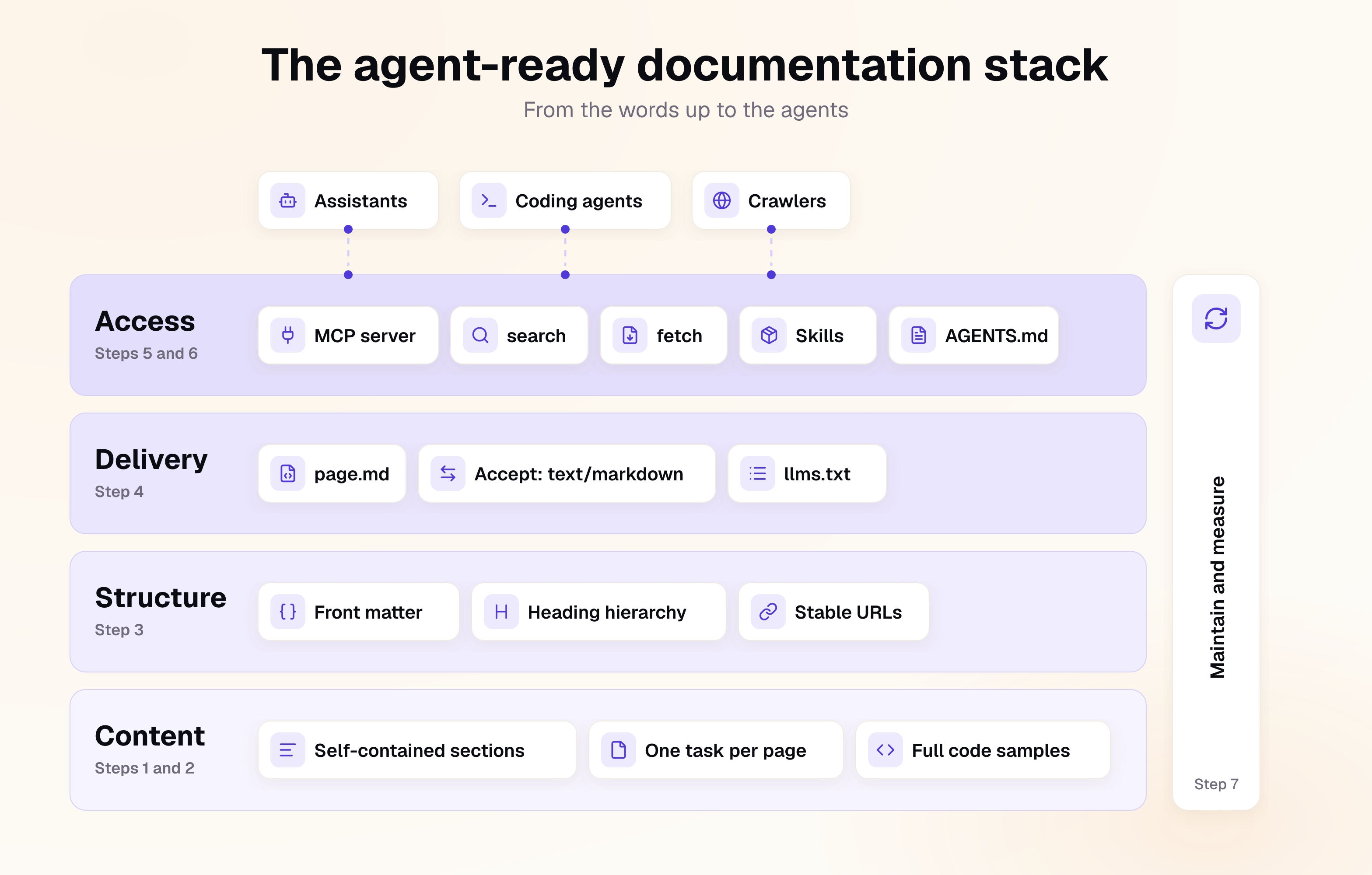
These properties apply equally to help centers, product guides, and internal knowledge bases. A support assistant that retrieves a passage dependent on another article produces an answer with a hole in it, in the same way a coding agent does with an incomplete API reference.
How Do AI Agents Read Documentation?
An agent retrieves a page with a plain HTTP request. The response is converted to text, truncated to a size budget, and frequently divided into passages before the model processes any of it, and no other page on the site is available unless the agent fetches it separately.
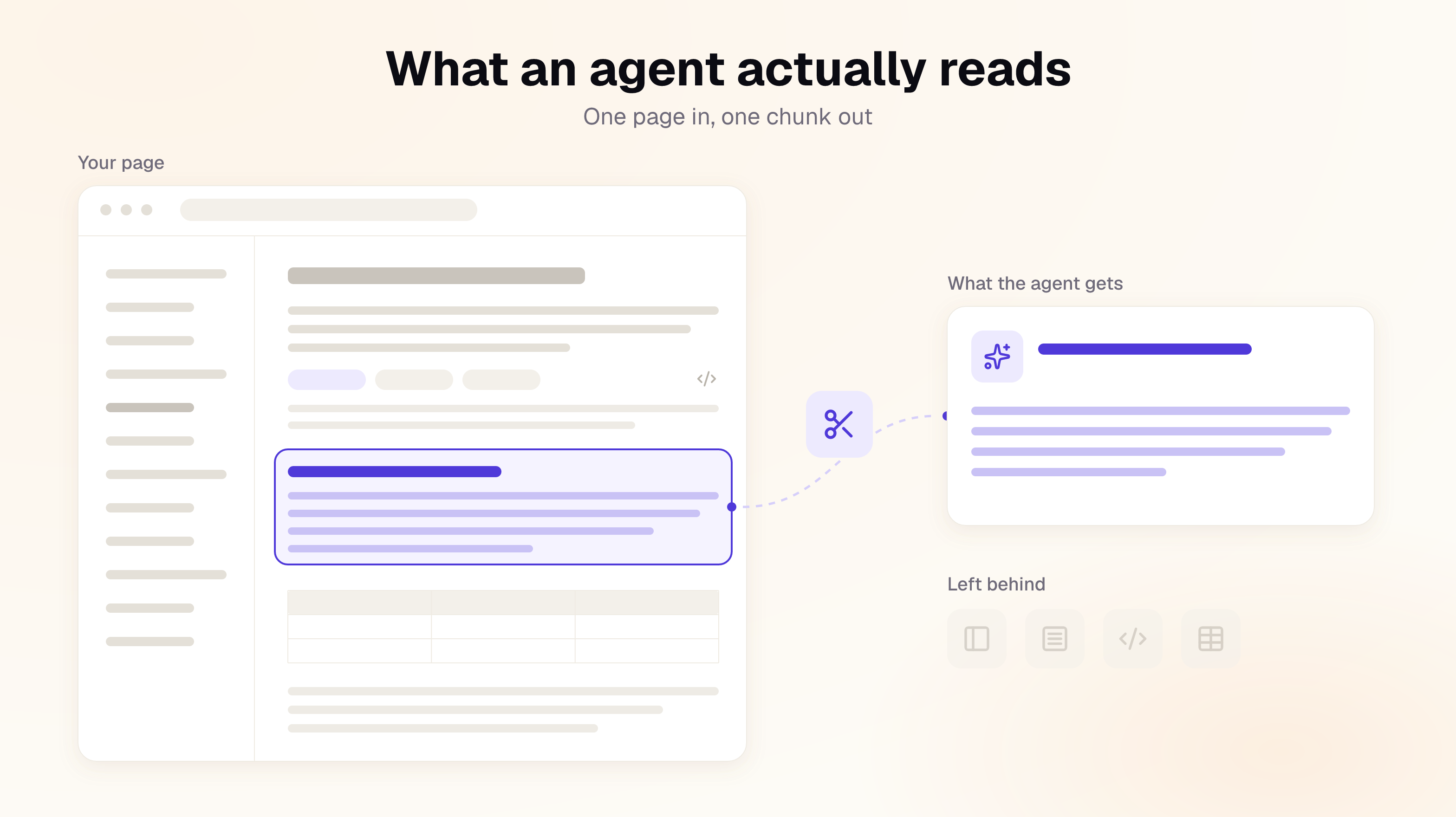
- No JavaScript execution: a page rendered on the client delivers an empty shell to the agent.
- Token cost: Cloudflare measured one of its blog posts at 16,180 tokens as HTML and 3,150 as Markdown, an 80% reduction with no change to the text. [1]
- Size limits: fetch tools truncate responses beyond a fixed length, so any content past the limit is lost, including content displaced by lengthy navigation markup.
- Loss of context: retrieval divides pages into passages of a few hundred tokens, and a passage that refers to "the steps above" reaches the agent without those steps.
- Search before fetch: ChatGPT's connector requirements for documentation specify two read-only tools,
searchandfetch. A poor search result leads the agent to read, and answer from, the wrong page.
How Is Agent Readiness Measured?
Agent readiness is assessed across three parameters: access, freshness, and answerability. Access carries the greatest weight, since no other property matters if the content never reaches the agent; freshness and answerability determine whether the content that does arrive produces a correct answer.
| Parameter | Question | What is assessed |
|---|---|---|
| Access | Can an agent find and read the content? | llms.txt presence, size, format, and link validity; server rendering; login and bot-protection barriers; Markdown availability and discoverability; page size and content start position; tab serialization; code fence validity; HTTP status codes; redirects; cache headers |
| Freshness | Is the content accurate and maintained? | Working links and section anchors; parity between Markdown and HTML versions; last-updated dates; changelog recency; agreement between documented endpoints and the API specification |
| Answerability | Can an agent answer real questions from it? | Questions derived from the documentation, answered by an agent using only what it can fetch without JavaScript, and graded on source page, correctness, and citation |
Access failures vary widely in their consequences. Three of them, a missing llms.txt, content rendered only by JavaScript, and documentation behind a login, are severe enough to cap an assessment regardless of how the site performs elsewhere.
| Severity | Failure | Consequence for the agent |
|---|---|---|
| Blocking | No llms.txt; pages rendered by JavaScript; docs behind a login or bot challenge | Receives no content, or no map of the site |
| High | Missing .md pages; llms.txt links that return 404 or point to HTML; pages too long for one fetch; soft 404s | Receives a heavier copy, a dead end, or a truncated page |
| Medium | No content negotiation; content buried beneath navigation; bloated tabs; unclosed code fences; relative links; redirects to another host | Receives degraded content that still arrives |
| Low | Unlabeled headings inside tabs; cache headers that delay corrections | Misses a refinement |
Several further signals improve agent access but are not yet adopted widely enough to serve as pass or fail criteria: an llms-full.txt file, a discoverable MCP server, published agent skills, a robots.txt that admits AI assistants, and a complete sitemap. The steps below follow the parameters in order, with Steps 1 to 5 addressing access, Step 6 addressing freshness, and the final section describing how to test answerability.
Step 1: Audit What Agents See Today
Begin by retrieving an important page as an agent would and inspecting the result as plain text:
curl -s -A "ClaudeBot" https://docs.example.com/webhooks/verify | sed 's/<[^>]*>//g' | grep -v '^\s*$' | head -40
Output that consists of navigation labels surrounding an empty container is precisely what agents receive. Next, export 30 days of access logs from the documentation host or CDN and filter them on the following user agents:
| User agent | Operator | Purpose | Follows robots.txt |
|---|---|---|---|
| GPTBot | OpenAI | Training | Yes |
| OAI-SearchBot | OpenAI | ChatGPT search index | Yes |
| ChatGPT-User | OpenAI | Fetches on a user's behalf | May not |
| ClaudeBot | Anthropic | Training | Yes |
| Claude-SearchBot | Anthropic | Search quality | Yes |
| Claude-User | Anthropic | Fetches on a user's behalf | May not |
| PerplexityBot | Perplexity | Search index | Yes |
| Perplexity-User | Perplexity | Fetches on a user's behalf | May not |
Coding agents identify themselves with their own user agents, and Cloudflare reports that Claude Code and OpenCode already send a Markdown-preferring Accept header, so request headers containing text/markdown are worth recording as well. [1] From the filtered logs, identify the pages agents request most often, the volume of 404 responses on .md URLs, and the proportion of user-directed fetches, since those represent a person awaiting an answer. For documentation hosted on Documentation.AI, the Traffic analytics already divide page views into People, AI Agents, and Bots & Crawlers, with top pages for each, which removes the need for a log export.
Step 2: Remove the Blockers
Resolve JavaScript rendering, login walls, and bot challenges first, since each of them leaves an agent with no content at all. Status codes and redirects follow; they seldom stop an agent outright, but they mislead it without returning any visible error.
- Server-render documentation pages: static generation or server-side rendering places the prose and code in the initial HTML, while interactive components can still hydrate on the client.
- Remove login walls from public documentation: documentation that must remain private requires an authenticated route for agents, such as an MCP server behind OAuth, so that an agent the user has authorized can still reach it. Documentation.AI provides this for gated sites through an authenticated
/_mcp/authendpoint. - Review bot protection: a challenge page intended to stop scrapers also stops ChatGPT-User from fetching a page on a customer's behalf, so verified AI user agents should be permitted on documentation paths.
- Return genuine 404 responses: an unknown URL should return status 404 rather than a 200 "page not found" page, which an agent may otherwise quote as an answer.
- Keep redirects on the same host: relocated pages should return a 301 within the documentation domain, because redirects through JavaScript, a marketing site, or a login service frequently lose the agent.
- Set cache headers that allow corrections through: long CDN cache lifetimes continue to serve the superseded page for weeks after a fix is published.
Docs for agents
Readable by Cursor and Claude
llms.txt and an MCP server from the free tier, so assistants cite your docs.
No credit card required
Step 3: Serve Markdown Agents Can Discover
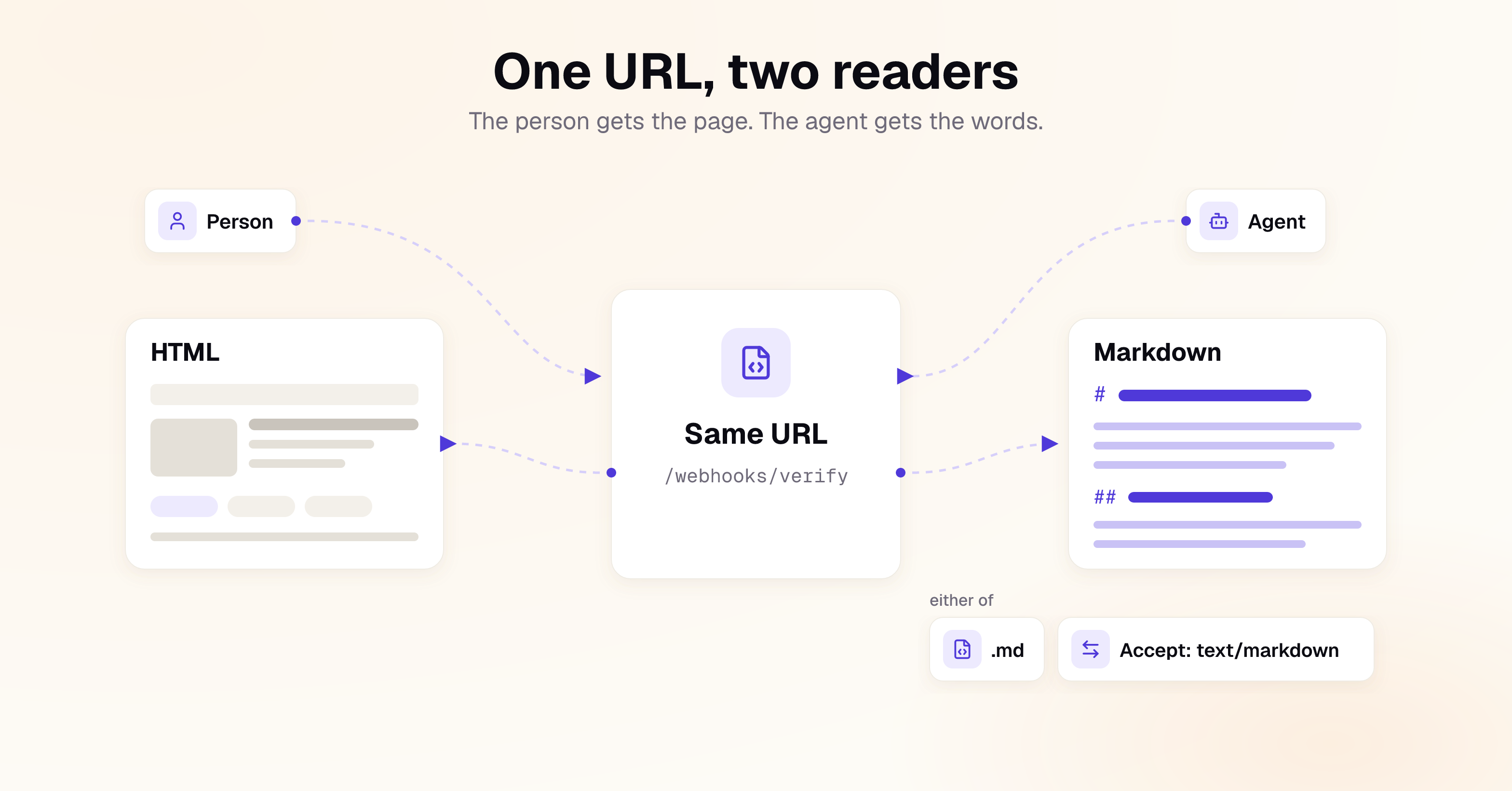
Serve a Markdown version of every page, and build the discovery path at the same time as the files. An agent that is never told the Markdown exists will read the HTML instead and spend its token budget on markup.
| Discovery path | Mechanism | Reliability |
|---|---|---|
| Content negotiation | The page URL returns Markdown when the request sends Accept: text/markdown, with Vary: Accept set so caches store the two versions separately | Highest, as no additional request is needed |
| Page directive | A short, visually hidden line near the top of every HTML and Markdown page that points to llms.txt | High, although agents occasionally disregard it |
.md links in llms.txt | The index links to each page's .md URL rather than its HTML | Effective only once the agent has located llms.txt |
The directive can be a single line at the top of the page body:
> For AI agents: a documentation index is available at /llms.txt
The Markdown itself then requires three checks:
- Parity: generate the Markdown from the same source as the HTML, since exports that omit tab contents, callouts, or code blocks produce a version that contradicts the page.
- Completeness in one fetch: split any Markdown page too long to return in full, or declare its continuation at the top with an absolute URL.
- Portable links: use absolute URLs, because a relative link that resolves in the browser fails once the file is read outside the site.
Documentation.AI serves every published page as Markdown at its own URL with .md appended, so no separate copy needs to be maintained.
Step 4: Publish an llms.txt That Stays Accurate
Publish llms.txt at the documentation root as a Markdown index of the site, with every link pointing to a .md page, and regenerate it automatically on every publish.
# Example Payments

> Example Payments is a card and bank payments API. These docs cover the REST API v3, the hosted checkout, and the dashboard.

## Getting started

- [Quickstart](https://docs.example.com/quickstart.md): Take a first test payment in 10 minutes
- [Authentication](https://docs.example.com/auth.md): API keys, scopes, and rotating credentials

## Webhooks

- [Verify webhook signatures](https://docs.example.com/webhooks/verify.md): Check the signature header before processing an event
Beyond its presence, four attributes determine whether an llms.txt file is useful to an agent:
- Size: agents truncate a long index like any other response and never reach the final links, so the file should remain under approximately 50,000 characters; larger sites should divide it into nested
llms.txtfiles per section, with one-line descriptions. - Link targets: an index that links to HTML pages when Markdown versions exist directs agents to the heavier representation of every page.
- Coverage: a file written by hand at launch omits every page added afterwards, so it should be generated from the same source as the site navigation. Documentation.AI builds
llms.txtin this way on every publish, grouped by navigation section. - Format: the file should open with an H1 containing the site name and a one-line blockquote summary, followed by H2 sections of links, as the
llms.txtproposal specifies. [2]
Step 5: Write Pages That Survive Chunking and Truncation
Write every section so that it answers a question when extracted and read in isolation, and keep every page short enough to arrive in a single fetch. The structural requirements below can be verified automatically; the writing requirements depend on editorial review.
Structural requirements:
- Page size: divide long references by resource and long guides by task, so that both the HTML and Markdown versions fall within an agent's fetch limit.
- Content start position: place the H1 and opening paragraph early in the HTML source, ahead of navigation, banners, and cookie notices.
- Tabs: tabbed content is flattened on retrieval, so a section with eight language tabs arrives as eight copies. Limit tabs to the variants readers use, and name the variant in each heading, as in "Install with npm".
- Code fences: a single unclosed fence renders the remainder of the Markdown page as code.
- Embedded data: large JSON payloads, such as a serialized OpenAPI specification inlined in the page, push the prose beyond the size limit and should be loaded separately.
Writing requirements:
- One page per task or concept: a "Webhooks" page covering setup, verification, retries, and a changelog is divided into passages that lack one another's context. The Diátaxis framework provides a practical basis for deciding where to divide it.
- Descriptive headings: a heading such as "Verify a webhook signature in Node.js" matches the question a user asks, whereas "Security" matches very little. The same fundamentals make a user manual easier for people to use.
- Self-contained opening sentences: name the product, feature, and version at the start of each section, so that a retrieved passage identifies its own subject, and use one name for each concept throughout, as our product manual guide recommends.
- No relative references: replace "as shown above" and "the previous example" with the referenced content or a descriptive link. Our instruction manual guide applies the same rule to procedures, where a reader may arrive at step 6 without steps one to five.
- Complete code samples: include imports, client initialization, and authentication in every sample.
- Machine-readable front matter: give every page a title, description, canonical URL,
lastModifieddate, and version, so that an agent can confirm it holds the correct and current version.
Step 6: Keep Content Fresh
An agent reproduces outdated instructions with the same confidence as current ones, and the error is rarely visible to the documentation team. The preceding steps also make outdated pages easier to retrieve, which raises the importance of freshness rather than reducing it. Stale answers delivered at scale are the main reason documentation matters more once agents are part of the audience.
| Freshness signal | Failure mode | Control |
|---|---|---|
| Links and section anchors | Renaming a heading silently breaks every #anchor link to it | Validate links, including anchors, on every publish |
| Markdown and HTML parity | A manually edited .md copy diverges from the page within weeks | Generate the Markdown from the page source; never edit it by hand |
| Last-updated dates | A date that changes on every deployment conveys nothing to an agent | Update lastModified only when the content changes materially |
| API specification match | Removed endpoints remain documented, and deprecated ones go unmarked | Compare the documentation against the OpenAPI file in CI, and mark deprecation on the deprecated page itself |
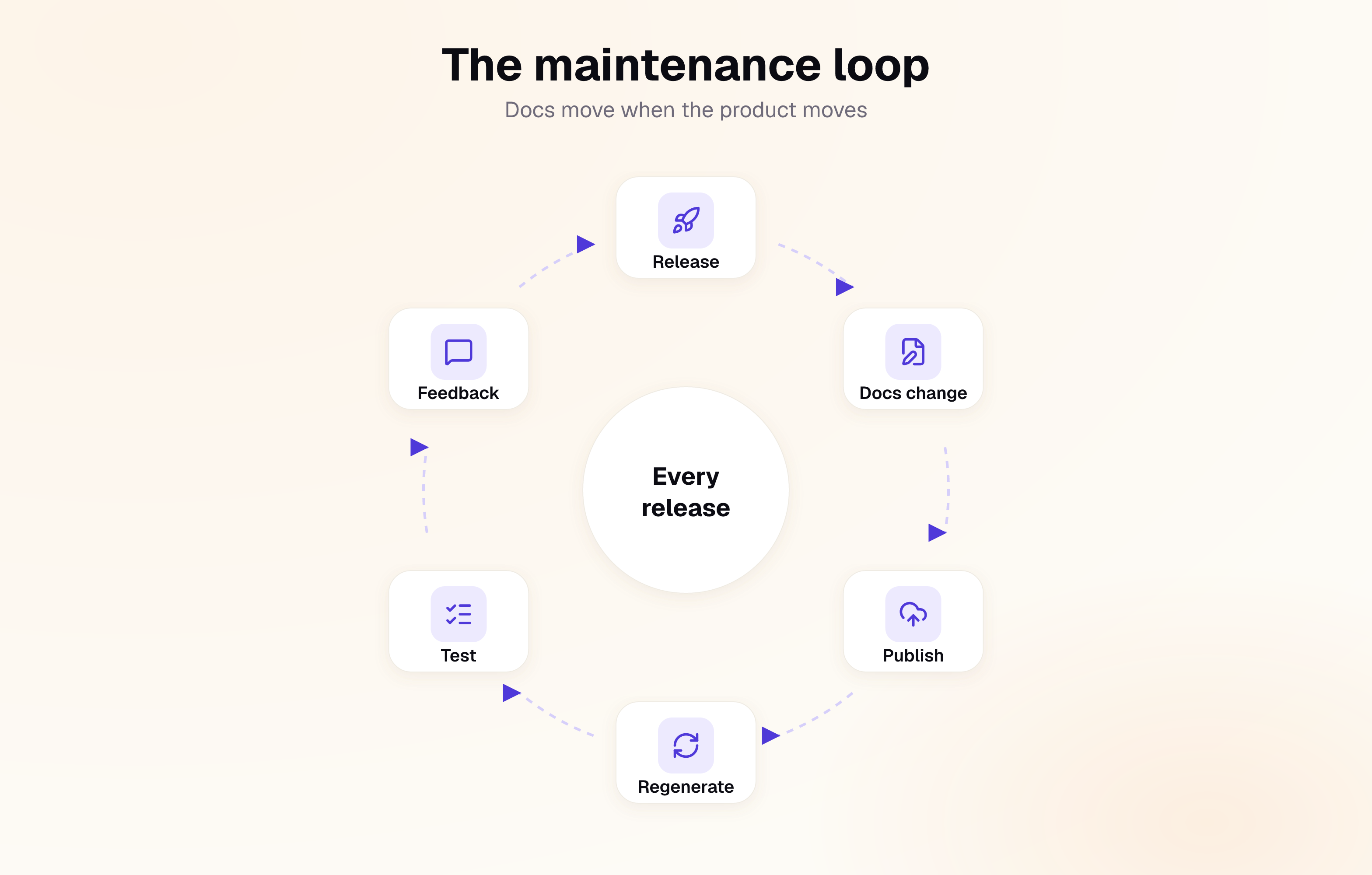
The most dependable control is to include the documentation change in the same pull request, or at minimum the same release checklist, as the code change, since documentation tickets raised after launch tend to remain in the backlog. Automation can address much of the remaining gap: Documentation.AI's Documentation Update from Code and API Sync from Code workflows monitor a connected repository and draft the corresponding documentation change, which is held for human review rather than published automatically.
Step 7: Add an MCP Server and Agent Skills
MCP servers and agent skills extend agent access beyond the baseline requirements. An MCP server allows an agent to query the documentation directly instead of crawling it, and a skill guides an agent through a specific task with the product.
The Model Context Protocol is an open standard for connecting AI applications to external systems, now governed by the Agentic AI Foundation under the Linux Foundation. A documentation server typically exposes the search and fetch tools described earlier: search returns titles, URLs, and excerpts for a query, and fetch returns the full Markdown of a single result. The 28 July 2026 specification removed the session handshake, so each call is now a plain HTTP request to a single endpoint. [3]
claude mcp add --transport http example-docs https://docs.example.com/mcp
The endpoint URL should be published on the documentation site and in llms.txt, as an agent has no other means of discovering it. Documentation.AI sites receive a Reader MCP server at /_mcp on publication, together with a page action that allows readers to copy the server URL into their own tools. A third, in-page layer, WebMCP, lets a page register tools for an agent in the reader's browser; it is in origin trial and replaces neither llms.txt nor a remote MCP server.
| Agent skill | AGENTS.md | |
|---|---|---|
| Definition | A folder containing a SKILL.md that guides an agent through one task | A Markdown file at a repository root that describes how the project works |
| Standard | Agent Skills | agents.md |
| Loading behavior | Name and description at startup; the body only when a task matches | Every session, in full |
| Size guidance | Body under 5,000 tokens, file under 500 lines | Concise; some agents stop reading at 32 KiB |
| Content | One task, such as "migrate from v2 to v3", referring back to the Markdown documentation | Build commands, conventions, and project rules |
An initial set of three to five skills, each covering a task customers frequently delegate to an agent, provides a reasonable starting point.
How Do You Measure Whether Your Docs Work for AI Agents?
Measurement should establish whether agents can use the documentation, whether they are using it, and whether their answers are correct. Time on page and other engagement metrics designed for human readers capture none of these.
| Question | Metric | Source |
|---|---|---|
| Can agents use the documentation? | Failing access checks, run after each release | Crawl script in CI |
| Is the documentation current? | Broken links and anchors, Markdown and HTML mismatches, endpoints absent from the API specification | Link checker and specification diff in CI |
| Are agents visiting? | Requests by AI user agent, divided into training, search, and user-directed | CDN or documentation host logs |
| Can agents find the Markdown? | 404 responses on .md URLs, llms.txt fetches, responses served as Markdown | CDN logs |
| Are the answers correct? | Pass rate on a fixed set of real user questions | Test run against an assistant or MCP server |
Answerability warrants automation before any other measure. Compile 20 to 30 questions that customers genuinely ask, record the correct answer and source page for each, and run the set after every release; a question that begins to fail identifies the page that has become outdated.
Referral traffic from chatgpt.com or claude.ai understates actual use, because an agent that answers from a page sends no visit back. User-directed fetches and searches that return no results are more informative indicators of unmet demand. On Documentation.AI, the Analytics dashboard reports the questions readers put to the AI Assistant and the pages where searches fail, and the Self-Heal by User Feedback workflow converts ratings, comments, and low-confidence answers into proposed fixes.
AI Documentation Checklist
Access: blockers
- Page text is present in the served HTML without JavaScript
- Public documentation is readable without a login or bot challenge
-
llms.txtexists at the documentation root
Access: delivery
- Every page has a Markdown version at a
.mdURL - Every page carries a directive pointing to
llms.txt -
llms.txtlinks resolve and point to.mdpages, and the file remains under 50,000 characters - HTML and Markdown pages fit within a single fetch
- Unknown URLs return a genuine 404
Access: structure
- Markdown returned on
Accept: text/markdown, withVary: Accept -
llms.txtfollows the standard format and is regenerated on publish - Content begins near the top of the HTML source
- Tabs kept to a minimum, with variant names in their headings
- Code fences closed and code samples complete
- Absolute links in Markdown; redirects on the same host
- Cache headers allow corrections to reach agents promptly
Freshness and answerability
- Links and anchors validated on every publish
- Markdown and HTML generated from a single source
- Documentation compared against the API specification in CI
- A fixed question set run after every release
FAQs
1. What is AI documentation for AI agents and LLMs?
It is documentation written with agents as a primary audience. In practice, that means server-rendered pages with Markdown versions, an llms.txt index, sections that stand on their own, and content kept consistent with the product.
2. Why does llms.txt matter so much?
It provides an agent with a map of a documentation site without requiring a crawl; without one, the agent must guess URLs or work outward from the homepage. A generated file with one line per page is sufficient to begin.
3. Do I need an MCP server if I already have llms.txt?
llms.txt gives an agent a list of pages from which to choose, whereas an MCP server gives it a search tool that returns the relevant passage for a question, ranked by the site's own index. The value of that search tool increases with the size of the site.
4. Should I block AI crawlers from my documentation?
Training crawlers can be blocked where policy requires it, but the effect is limited. robots.txt rules for GPTBot and ClaudeBot stop bulk collection, yet user-directed fetchers such as ChatGPT-User may not follow them, and blocking a search crawler such as OAI-SearchBot removes the documentation from that assistant's answers entirely.
Sources
- Cloudflare. "Markdown for Agents." Cloudflare Blog, 12 February 2026. https://blog.cloudflare.com/markdown-for-agents/
- Answer.AI. "The /llms.txt file." https://llmstxt.org
- Model Context Protocol. "Specification, 2026-07-28." https://modelcontextprotocol.io/specification/2026-07-28/changelog
Docs for agents
Readable by Cursor and Claude
llms.txt and an MCP server from the free tier, so assistants cite your docs.
No credit card required