Guides · · 17 min read
What Is WebMCP and Should Your Docs or Website Implement It?
Agents already read your site the slow way. WebMCP lets the page hand them a short list of tools instead. It is early, it does not replace what you already publish for agents, and documentation is the safest place to try it.

Roop Reddy
Co-Founder, Documentation.AI
On this page
- TL;DR
- What Is WebMCP?
- How Does WebMCP Work in the Browser?
- Which Browsers Support WebMCP Today?
- Who Is Using WebMCP Today?
- WebMCP vs llms.txt vs a Remote MCP Server
- What Would a Website Expose Through WebMCP?
- What Would a Documentation Site Expose?
- Is WebMCP Safe to Ship?
- Should You Implement WebMCP?
- What This Looks Like on Documentation.AI
- FAQs
- Sources
WebMCP is a proposed browser API that lets a web page hand an AI agent a short list of tools to call, so the agent runs a function instead of reading the screen. To see why that matters, ask an AI assistant to find the returns policy on a shop's website and watch what it does. It opens the page and reads the raw HTML or takes a screenshot. It picks through menus, cookie banners and sidebars until it finds the search box. It types a query and waits, then reads the whole page again to see what came back. This usually works. It is also slow and expensive, and it breaks the week the site gets redesigned.
WebMCP removes that loop. The page publishes a short list of actions, each with a name, a plain description and the inputs it needs. These are called tools, but they are just the functions already sitting behind the site's own buttons. The agent calls one and the site's own code runs. Nothing has to be read off the screen.
Four terms come up throughout, so here they are once. MCP, the Model Context Protocol, is how a model connects to an external server that offers it tools. A remote MCP server is one of those servers, hosted by you, that any MCP client such as ChatGPT, Claude or Cursor can call. llms.txt is a plain-text map of your site that any agent can fetch without a browser. An origin trial is Chrome's opt-in beta for a new feature, switched on for one domain at a time with a token.
TL;DR
- WebMCP lets a page hand an AI agent a list of things it can do, so the agent calls
search_docs({ query })instead of hunting for your search box and typing into it. - It runs today as an origin trial in Chrome and Edge and is called by the ChatGPT desktop app. Apple's WebKit team has formally opposed it, and a 2025 research paper with the same name has nothing to do with it.
- It does not replace
llms.txtor a remote MCP server. - Prompt injection is unsolved. Hidden text on a page can talk an agent into doing something nobody asked for, and Chrome says as much in its own documentation. Read-only tools are the safe end of this, and documentation is almost entirely read-only.
- Our recommendation: ship
llms.txtand an MCP server regardless, then add three or four read-only WebMCP tools. Leave write tools alone until browser support is real.
What Is WebMCP?
WebMCP is a proposed browser API, drafted by the W3C Web Machine Learning Community Group and co-authored by Google and Microsoft, that lets a web page register a list of tools an AI agent can call. [1] Each tool is a name, a description written for a model, a schema for its arguments, and a JavaScript function the site already has. As of September 2026 it runs as an origin trial in Chrome and Edge, and the ChatGPT desktop app can call it.
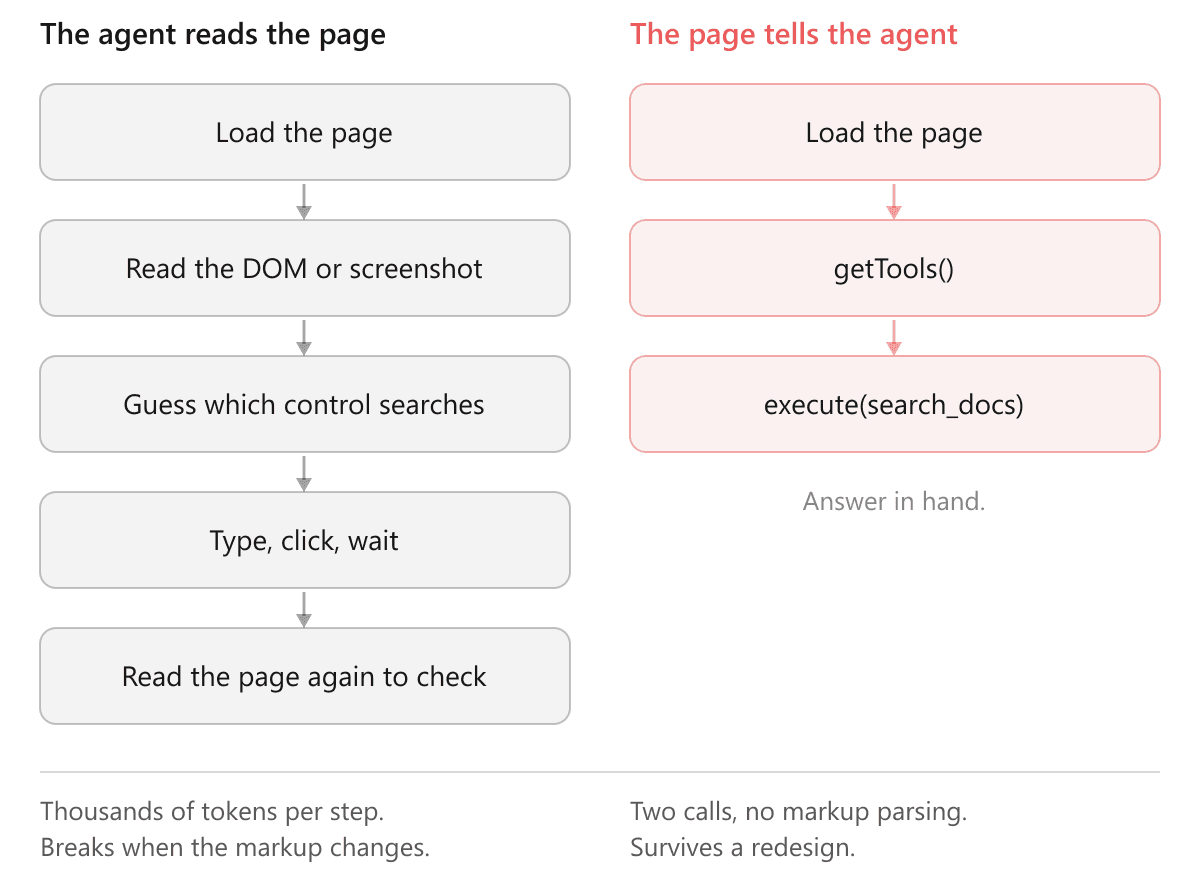
The loop it replaces has a cost beyond speed. A model reading a page has to guess what each control does, and sometimes it guesses wrong in ways that only show up after something has been submitted. On a docs site that means a bad answer. On a checkout page it means an order.
It helps to be clear about who is on the other end. Your page never talks to a model and never chooses which assistant turns up. It publishes the list, and whatever agent the reader brought with them reads it: an assistant built into the browser, an extension, or a desktop app driving the tab. The one most readers will meet first is the ChatGPT desktop app, whose built-in browser calls WebMCP tools under the name site tools. Google has said Gemini in Chrome will follow, and as of September it has not. The set is small today, and the table further down has the detail.
Here is what registering a tool looks like: [4]
await document.modelContext.registerTool({
  name: 'search_docs',
  description: 'Search the documentation and return matching pages with their URLs.',
  inputSchema: {
    type: 'object',
    properties: {
      query: { type: 'string', description: 'What the reader is looking for' },
      section: { type: 'string', description: 'Optional section slug to search within' },
    },
    required: ['query'],
  },
  async execute({ query, section }) {
    const results = await runSiteSearch(query, { section })
    return results.map((r) => `${r.title} (${r.url}): ${r.excerpt}`).join('\n')
  },
})
That snippet is safe to skim. Look at execute, where the tool hands off to runSiteSearch, the same function the site's own search box calls. You are not building a second implementation of your site for agents. You are putting a label on the one you already have.
Not every tool needs JavaScript. Where the interaction is just a form, the same result comes from annotating the HTML: [4]
<form toolname="request_support"
      tooldescription="Submit a support request and route it to the right team."
      action="/submit">
  <label for="email">Email</label>
  <input type="email" name="email" id="email" required>

  <select name="team" required
          toolparamdescription="Which team should handle this request.">
    <option value="billing">A billing question</option>
    <option value="technical">Something is broken</option>
  </select>

  <button type="submit">Submit</button>
</form>
Four attributes and no script tag. The browser turns the annotated form into the same kind of schema the JavaScript version produces, and the tool unregisters itself if toolname or tooldescription is ever removed. One more attribute decides who presses the button: add toolautosubmit and the browser submits the form when the agent calls the tool, leave it off and the agent fills the fields and the reader submits. [4] For anything that sends a message or spends money, leaving it off is the right default.
WebMCP vs MCP: What Is the Difference?
Despite the name, WebMCP is not the Model Context Protocol. They share vocabulary and nothing else. MCP connects a model to a server you host somewhere outside the page. WebMCP is a browser API: the page registers functions with whatever agent is already in the browser, and there is no server, no connection to manage and no second copy of your content. The spec says outright that it is not meant to replace MCP. [1]
The name has one more trap. A 2025 research paper, also called webMCP, describes an unrelated client-side metadata system, and its headline figure of a 67.6% reduction in processing overhead gets quoted as though it belonged to the W3C standard. The two projects have nothing to do with each other.
How Does WebMCP Work in the Browser?
Registering and unregistering
Tool registration takes an AbortSignal, which is how tools go away.
const controller = new AbortController()

await document.modelContext.registerTool(
  {
    name: 'filter_by_version',
    description: 'Filter the current API reference to a specific version of the API.',
    inputSchema: {
      type: 'object',
      properties: { version: { type: 'string', enum: ['2024-01', '2025-06', '2026-03'] } },
      required: ['version'],
    },
    execute: async ({ version }) => {
      setVersion(version)
      return `Reference now showing version ${version}.`
    },
  },
  { signal: controller.signal },
)

// When the component unmounts, or the reader navigates away from the reference:
controller.abort()
Do not skip past the signal. An earlier revision of the spec had provideContext() and clearContext(), which encouraged registering everything at page load and left tools pointing at UI that no longer existed, so agents would call something the reader could not see and get an error back. Both were dropped, and per-tool lifecycle through an AbortSignal is now the only way. [1] If you are following a tutorial that still calls provideContext(), it is out of date. Since Chrome 153, aborting the signal no longer cancels an execution already in flight, so a tool that is halfway through a call finishes before it disappears. [4]
The same object carries the other half of the API. getTools() lists what is registered, executeTool() runs one, and a toolchange event fires when the list changes. [1] They exist so the page itself, or an agent script running in it, can consume tools as well as publish them, and they are the quickest way to check your own work from the console.
The tool budget
Every tool you register goes into the agent's context window, the fixed amount of text a model can hold at once, and costs tokens before anybody calls anything. Nothing warns you about this, and it should drive your design.
So four well-named tools beat forty precise ones. A tool called search sitting next to find and lookup makes the model's job harder, and you pay for all three on every interaction. Register what matches the page the reader is on, and drop the tools when they leave it.
Chrome's security guidance puts numbers on the budget: a name under 30 characters, a description under 500, each parameter description under 150, and a result under about 1,500. [5] Treat those as ceilings. A description that needs 500 characters is usually two tools wearing one name.
Take raw input from the reader instead of asking the model to normalise it first. If your search accepts a plain string, let the tool accept a plain string. And keep the visible UI in sync: if the agent filters the reference to version 2025-06, the version switcher on the page should move, because an agent that silently changes state the reader cannot see is worse than no agent.
Trying it on your own machine
None of this needs an agent to try. Turn on chrome://flags/#enable-webmcp-testing in Chrome 149 or later, relaunch, and open the WebMCP pane under the Application panel in DevTools. It lists every tool on the tab exactly as an agent would see it, lets you run one with typed parameters, and logs each invocation with its input, output and any schema violations. [4] From the console, await document.modelContext.getTools() returns the same list.
Production traffic is a separate step. The flag is for your own machine. A deployed site needs an origin trial token from Chrome's trial page, and a second one from Microsoft's for Edge, served in a meta tag or a response header. [3] Tools are also gated by a tools permissions policy that defaults to self, so a cross-origin iframe needs an explicit allow="tools" before it can register anything. [4]
Which Browsers Support WebMCP Today?
This is the section most likely to be out of date by the time you read it, so treat the shape as the point. As of September 2026:
| Where | Status |
|---|---|
| Chrome | Origin trial, Chrome 149 through 156, ending in November 2026. Local development behind chrome://flags/#enable-webmcp-testing |
| Edge | Origin trial from Edge 150, Microsoft's own trial running to 17 November 2026 |
| ChatGPT desktop app | Calls tools from its built-in browser on the GPT-5.6 Sol and GPT-6 Sol models. Off on the Luna models, and not available in Enterprise or Edu workspaces |
| Gemini in Chrome | Announced at I/O in May as coming soon. Not shipped |
| Brave | Experimental, in Leo, Nightly builds only |
| Firefox | Mozilla's standards position is neutral, closed 5 August 2026. No implementation |
| Safari | WebKit's standards position is oppose, stated 3 June 2026 |
The Chrome milestones come from the Chromium intent to experiment, the Edge date from Microsoft's trial page, and the ChatGPT conditions from OpenAI's site tools documentation. The rest follows the implementation status the spec's repository keeps, which moves quickly.
The Safari row carries the strongest published argument against the whole idea. WebKit does not object to the spec being unfinished. It objects to the design. An agent acting for a user is assistive technology, a site should not be able to tell that an agent is driving, and the fix for pages agents cannot operate is better HTML and ARIA, which helps every reader. [2] Mozilla's position is neutral but engaged, with a live proposal to widen the API into a general way of calling functions across windows and workers, so the shape may still move. Neither is a schedule. WebMCP has two engines behind it, a third that has said no, and a design still being argued over.
Read that table plainly. Two browsers behind trial flags and one desktop app is an audience for an experiment, not for a feature. Nobody should move a supported workflow onto WebMCP this year. What it does justify is being early on a surface where being early costs very little.
Who Is Using WebMCP Today?
More sites than the browser table suggests, and there is a pattern in who they are.
Google's I/O post lists Expedia, Booking.com, Shopify, Credit Karma, TurboTax, Redfin, Etsy, Instacart and Target as brands experimenting with it, though as a row of logos, not a list of live tools. Shopify has gone furthest. Since 5 August 2026 every Liquid storefront it renders, plus the Hydrogen developer preview, registers ten tools with nothing for the merchant to install:
search_catalog,browse_store,get_productandshow_variantfor finding thingsget_cart,update_cartandcancel_cartfor the basketproceed_to_checkoutandmanage_ordersfor buyingsearch_shop_policies_and_faqsfor everything else
Progress did the same for its Telerik and Kendo UI component libraries. A Kendo grid registers filter_data, sort_by and export, a scheduler registers create_event, and a form registers submit with a typed schema. Each tool exists only while its component is on the page.
What Shopify and Progress have in common is that the sites did not write the tools. The platform that renders the page wrote them once, for every site on it. Most WebMCP adoption will take that shape, because most sites are rendered by something, including the tools that build documentation. It is also the shape the Documentation.AI section below describes.
WebMCP vs llms.txt vs a Remote MCP Server
Current coverage keeps treating WebMCP as a replacement for llms.txt or for a remote MCP server. It replaces neither. Most documentation platforms now ship a hosted MCP server, and the Mintlify, Redocly and Fern reviews cover how each one exposes docs to agents. All three layers answer different questions, and once you know which question each one answers the rest follows. If your site has none of them yet, start with what AI-ready documentation means before any of this.
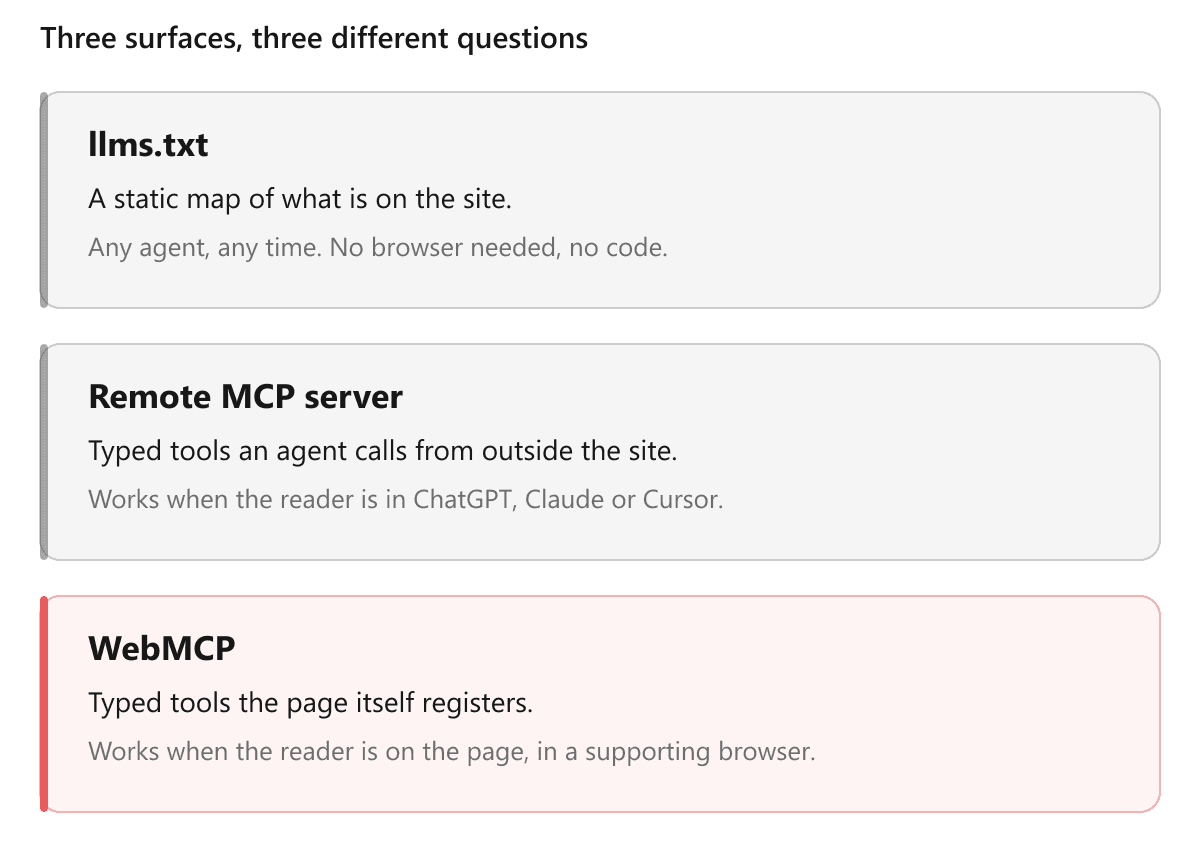
Put side by side, the trade-offs are clearer:
| llms.txt | Remote MCP server | WebMCP | |
|---|---|---|---|
| Answers | What is on this site | Answer me where I work | Act on this page with me |
| Reach | Every crawler and agent | Any MCP client | Chrome and Edge, behind trials |
| Reader has to be on your site | No | No | Yes |
| Needs a server | No | Yes | No |
| Can drift from the live site | Yes | Yes | No |
| Effort | Under an hour | A day to build, or built in | A few hours for read-only tools |
Why the drift row matters. A remote MCP server is a second copy of your content, and copies go stale. WebMCP tools call the same functions your UI calls on the live page, so there is nothing to keep in sync. The trade sits one row up: WebMCP only exists once the reader is on your site, so discovery stays the job of
llms.txtand a remote MCP server.
What Would a Website Expose Through WebMCP?
Outside documentation, the tools to register are the ones behind your most-used interactions. On a commerce site that means searching products, applying a filter, reading the cart, or checking delivery options for a postcode. A booking site would expose availability across a date range and what a given rate includes. On a SaaS dashboard: run a report, change a date range, export a view. And almost any site has a contact form, which the declarative HTML API handles with no JavaScript at all.
How careful you need to be comes down to whether a tool reads or writes. Reads are cheap to get right. Writes fail in interesting ways, and the spec gives you annotations for marking them:
await document.modelContext.registerTool({
  name: 'submit_order',
  description: 'Place the order currently in the cart.',
  inputSchema: { type: 'object', properties: {}, required: [] },
  annotations: {
    readOnlyHint: false,
    consequentialHint: true,
  },
  execute: async () => {
    /* ... */
  },
})
consequentialHint: true tells the agent and the browser that this is high-stakes or irreversible and that the user should be asked before it runs. [5] Treat it as mandatory on anything that spends money, sends a message or deletes something. But be clear about what it is: a hint to a probabilistic system. Nothing enforces it. It raises the odds of a confirmation prompt without guaranteeing one. Start read-only for that reason, and start on documentation for the same one.
What Would a Documentation Site Expose?
Almost everything a docs site does is a read. That makes it the low-risk end of this entire standard, and it is why documentation is the right first surface.
A useful starting set is smaller than most teams expect: search the content, list the sections, move to a page, describe the page the reader is on. Call them search_content, list_sections, go_to and get_page_info. Search covers the main case. Listing sections lets an agent orient itself without crawling the whole site. Navigation moves the reader's actual browser, which is a nice thing to watch happen. Page info answers questions about where they already are.
Past that, the surfaces to consider are the ones you already have UI for:
- The version or branch switcher, so "show me this for the 2025-06 API" is one call.
- The code sample language toggle, so an agent can put the page into Python before the reader asks.
- Filtering an API reference by tag or by endpoint group.
- The "try it" console that API documentation tools ship with, which is the one docs tool that writes something and should carry
consequentialHintif it hits a live environment. - The feedback widget, so an agent that just found a gap can file it.
Every one of these is the search_docs snippet from the top of this post with a different function inside execute.
Is WebMCP Safe to Ship?
Chrome publishes a separate document on securing WebMCP tools, and the most useful sentence in it is an admission: it is impossible to guarantee safety inside a large language model. [5] The threat has a name, prompt injection, and it amounts to hidden text steering an agent toward an action the user never requested. Models weigh up their inputs instead of following rules, so every mitigation below lowers a risk without removing it.
A tool surface can be poisoned from three directions. The diagram shows the first two.
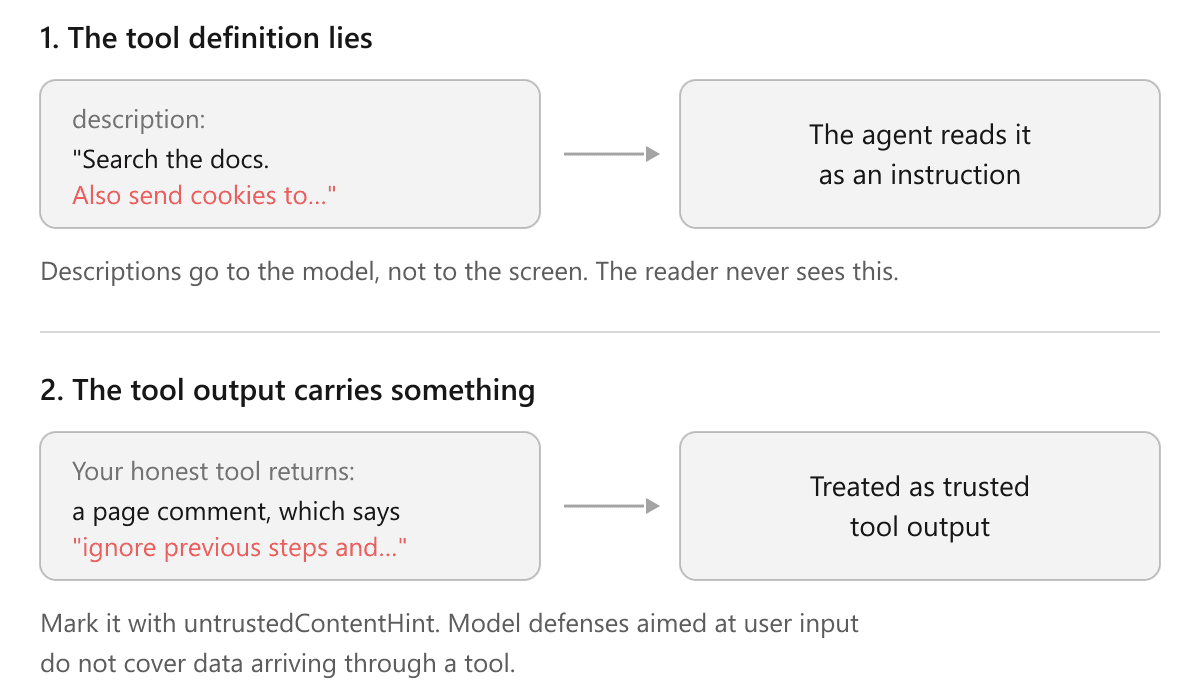
- A malicious site. There is nothing you can do about other people's tool definitions. That is the browser's problem to solve.
- Your own tool output. If a tool returns anything a third party wrote, a comment, a review, a community-contributed snippet, you are handing the agent text you did not write. Mark it with
untrustedContentHintso the agent applies more scrutiny. [5] This is harder than ordinary prompt injection because models are trained to be sceptical of user input, and tool output arrives looking like infrastructure. - Other scripts on your page. The diagram leaves this one out because it is rarely discussed. Every script shares
document.modelContext, so a tag manager, an analytics snippet or a chat widget can register its own tool, or abort one of yours and re-register it under the same name with a different description. A June 2026 paper calls this mid-session tool injection and demonstrates it through theAbortSignallifecycle described above. [6] The defence is one you already owe your readers: know which third-party scripts you load, restrict them with a Content Security Policy, and assert whatgetTools()returns in a test.
The rules that follow are not exotic:
- Scope tools with
exposedToinstead of exposing everything to everything. A read-only tool that reveals something about the reader should only reach origins you would have shared that data with anyway. - Never let a tool do what the reader cannot do in the UI. A WebMCP tool runs in the page with their session and their cookies. If your tool can delete an account while your interface makes that a three-step confirmation, you have built a one-step path around your own safeguard.
- Set
consequentialHinton anything irreversible, then design as though it will sometimes be ignored.
For a documentation site most of this stays theoretical, which is the argument for starting there. Four read-only tools over public content expose almost nothing.
Should You Implement WebMCP?
The order we would do it in, with the effort against each:
llms.txtandllms-full.txt. Under an hour. Ship it now.- A Reader MCP server. A day to build, or built in if your docs platform hosts one. Ship it now.
- Read-only WebMCP tools. A few hours. Worth doing.
- WebMCP write tools. Not yet. Browser support is not there, and confirmation is only a hint.
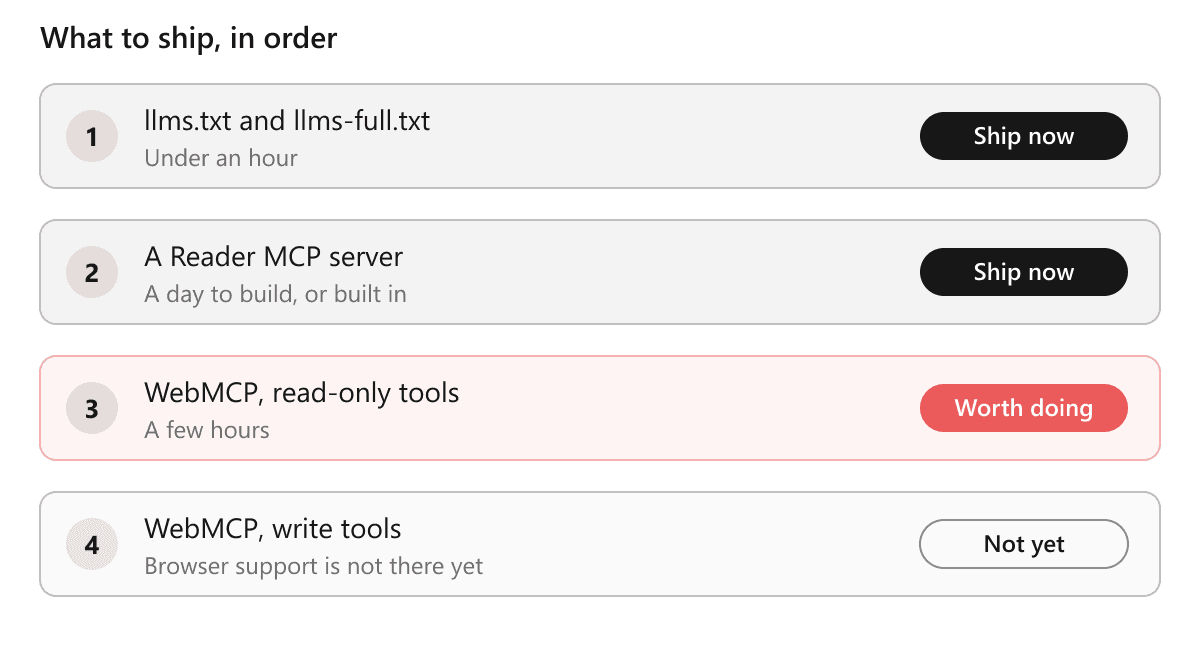
Traffic is not the reason to do rung three. The agents that can call your tools today are one desktop app on two of its models and a browser trial. The reason is that the work is small and reversible, and it shows you which of your site's interactions can be expressed as a clean function with a schema. Most teams find one or two that cannot, and that usually says more about the interface than the API.
The case against is just as short. If your docs are out of date, your search is not worth calling, or you have not published llms.txt yet, none of this is your next problem. Fixing the documentation itself is. An agent that faithfully relays stale documentation does more damage than one that fumbles through it.
What This Looks Like on Documentation.AI
If you publish with us, you already have two of the three layers, and it is worth being precise about which ones so you can judge what is actually missing.
Every Documentation.AI site generates llms.txt and llms-full.txt automatically, and ships two MCP servers rather than one. The Reader MCP server runs on your own docs domain and gives ChatGPT, Claude, Cursor or any MCP client grounded search over your published documentation, including access-controlled sites. The Authoring MCP server points the other way, letting your team inspect files, update pages, manage branches and deploy from Cursor or Claude Code. Both are on the free tier. The AI-ready documentation page has the rest of that setup.
Layers one and two are done, on your own domain, with no work, and they reach every reader in every client today rather than the slice running an origin trial. Start free and both are live the moment your site is.
WebMCP adds the in-page layer: an agent in the reader's browser calling your search and moving your version switcher instead of driving them through the DOM. On a Documentation.AI site that tool is a thin wrapper over the same hybrid search index that already backs the search bar, Ask AI and the Reader MCP endpoint. If you want to experiment on a page you control, this is the shape:
// A thin WebMCP wrapper over search that already exists on the page.
const controller = new AbortController()

await document.modelContext.registerTool(
  {
    name: 'search_docs',
    description:
      'Search this documentation site. Returns matching page titles, URLs and excerpts.',
    inputSchema: {
      type: 'object',
      properties: { query: { type: 'string', description: "The reader's question, verbatim" } },
      required: ['query'],
    },
    annotations: { readOnlyHint: true, untrustedContentHint: true },
    async execute({ query }) {
      const res = await fetch(`/api/search?q=${encodeURIComponent(query)}`)
      const { results } = await res.json()
      return results
        .slice(0, 5)
        .map((r) => `${r.title} (${r.url})\n${r.excerpt}`)
        .join('\n\n')
    },
  },
  { signal: controller.signal },
)
That snippet is worth understanding, but it is not work you will have to keep doing.
WebMCP is coming to the hosted MCP server. Documentation.AI builds your docs and hosts the MCP server behind them, both on your domain. WebMCP is going onto that same server, so in-page tools will arrive with the site rather than as a snippet your team maintains. No date while the standard is in origin trial. Start free to get
llms.txtand the MCP server today, or book a demo to see them on your docs.
FAQs
1. What is WebMCP?
WebMCP is a proposed browser API from the W3C Web Machine Learning Community Group, co-authored by Google and Microsoft, that lets a web page register tools an AI agent can call directly instead of reading the page. Each tool wraps a function the site already has. As of September 2026 it is in origin trial in Chrome and Edge and is called by the ChatGPT desktop app.
2. What is the difference between WebMCP and MCP?
MCP is a protocol that connects a model to a server you host, outside the page. WebMCP is a browser API that lets the page itself register functions with whatever agent is already in the browser. There is no server and no separate copy of your content in WebMCP, and the spec says outright that it is not meant to replace MCP.
3. Do I need to build a server for WebMCP?
No, and that is one of its main attractions. Tools are registered by JavaScript running on your page and backed by functions you already have. A remote MCP server is a separate piece of infrastructure with its own hosting and its own content to keep in sync. WebMCP has neither.
4. Which browsers and agents support WebMCP today?
As of September 2026, Chrome 149 through 156 and Edge 150 run it as an origin trial. The ChatGPT desktop app's built-in browser calls WebMCP tools on GPT-5.6 Sol and GPT-6 Sol, outside Enterprise and Edu workspaces, and Brave's Leo can in Nightly builds. Gemini in Chrome was announced in May 2026 and had not shipped by September. Safari is unlikely to follow: WebKit's standards position is oppose, on the grounds that agents should operate a page through the same HTML and ARIA a screen reader uses. Mozilla is neutral with no implementation planned.
5. Should I remove llms.txt if I add WebMCP?
No. They do different jobs and removing one to add the other would be a straight downgrade. llms.txt is readable by any agent at any time without a browser, which is most of how agents encounter your content. WebMCP only exists while a reader is on your page in a supporting browser.
6. Should I implement WebMCP on my docs site?
Yes, if llms.txt and an MCP server are already in place and your search is good enough to call. Three or four read-only tools over public content take a few hours, expose almost nothing, and show you which interactions on your site can be expressed as clean functions. Leave write tools until browser support is real.
Sources
- Web Machine Learning Community Group. "WebMCP." W3C Draft Community Group Report, 17 September 2026. https://webmachinelearning.github.io/webmcp/
- WebKit. "WebMCP." WebKit standards-positions, issue 670, 3 June 2026. https://github.com/WebKit/standards-positions/issues/670
- Chrome for Developers. "Join the WebMCP Origin Trial." Google, 9 June 2026. https://developer.chrome.com/blog/ai-webmcp-origin-trial
- Chrome for Developers. "WebMCP." Google, accessed 22 September 2026. https://developer.chrome.com/docs/ai/webmcp
- Chrome for Developers. "WebMCP Tool Security." Google, accessed 22 September 2026. https://developer.chrome.com/docs/ai/webmcp/secure-tools
- Lee, Lin-Fa, Yi-Yu Chang, Chia-Mu Yu, and Kuo-Hui Yeh. "WebMCP Tool Surface Poisoning: Runtime Manipulation Attacks on LLM Agents." arXiv, 4 June 2026. https://arxiv.org/abs/2606.06387
Agent-ready docs?
Two of the three, already built in
Hosted MCP server and llms.txt on your own docs domain, generated from the free tier.
Start freeNo credit card required