Comparisons · · 13 min read
Fern Review 2026
Fern generates documentation and SDKs from a single API specification, and it now gives the documentation half away. This review assesses the editor, API explorer, Fern Agent, analytics, and preview through hands-on use, and explains what the free plan does not cover.

Roop Reddy
Co-Founder, Documentation.AI
On this page
Fern's documentation platform is free. Not free for one person on a subdomain, but free for 10 people on your own domain, with the API explorer, the web editor, reader AI, and an MCP server included. [2] The only plan above it is an Enterprise quote.
That shape is the whole evaluation, because the software underneath it is very good. Fern treats your OpenAPI spec as one input with three outputs: a documentation site, SDKs in nine languages, and now a command-line tool. Nothing else in this comparison does all three from one source of truth.
Everything below comes from building on the platform, from Fern's own pricing page and product documentation.
Fern Review: The Verdict
Fern turns one API spec into more finished output than anything else in this category, and it is the best value at the entry tier. It also runs out of published pricing sooner than anything we have tested. The generated half of the product is excellent. The half you operate daily, meaning preview, analytics depth, and the plan you grow into, is not.
Our overall score is 3.8 out of 5, the unweighted average of the eight scores below, rounded to one decimal. Every review in this series is scored on the same eight criteria, so the rows compare directly from one platform to the next.
| What we rated | Score | Why |
|---|---|---|
| Editing and structuring | 4.0 | A visual editor that opens pull requests, with a Markdown view for people who prefer it |
| API reference and explorer | 4.7 | OpenAPI, overlays, Arazzo, AsyncAPI, gRPC, GraphQL, and OpenRPC, with a real explorer |
| Published output and design | 3.4 | Global themes on every plan, but custom CSS, JavaScript, React, and unbranded output are all Enterprise |
| AI authoring and the agent | 3.7 | The widest reach of any agent here, across Slack, MCP, and schedules, on a tight credit budget |
| Reader AI and search | 3.9 | Cited answers, resolution scoring, and 125 answers a month to spend on them |
| Analytics and reader insight | 3.9 | Traffic, search, feedback, bot traffic, and every question readers asked the assistant |
| Governance and collaboration | 3.4 | Every edit lands as a pull request, but no role below Admin until Enterprise |
| Pricing and value | 3.2 | The most generous free tier in the category, and the only plan above it is a quote |
The number that decides your bill: Ask Fern costs two credits a message and one agent session costs 50, so the free plan's 250 monthly credits are 125 reader answers, and every agent run you make spends 25 of them. [1]
Buy Fern if your API is the product, you want the docs and the SDKs generated from one source of truth, and your documentation team fits inside 10 people and one site.
Look elsewhere if you need an eleventh editor, a second documentation site, custom CSS, single sign-on for readers, or a local preview on a Windows machine. Skip to the alternative if that is you.
Already know you will pass 10 editors?
See what unlimited seats cost on a plan that publishes its price all the way up.
What Is Fern Built For?
Fern is built for the company whose API is the product, and where the same engineers own the spec, the SDKs, and the docs. Everything downstream is generated from one API definition, so a merged pull request against the spec regenerates the reference, the client libraries, and the CLI together.
Most teams shortlist it for the specification support. OpenAPI with overlays and Arazzo, AsyncAPI, gRPC, GraphQL, and OpenRPC all import, and GraphQL references now generate a page for every named type in your schema. [1] [2]
The boundary here is the spec rather than the audience. Take the API definition away and what remains is the least distinctive part of Fern: a competent Markdown site whose reference, explorer, SDKs, and CLI all have nothing to generate from.
Fern Features: What Stands Out
The Editor, and the Two Ways Into It
Fern Editor is a visual WYSIWYG surface for people without Git access, and the detail that makes it credible is that every edit opens a pull request. [1] Your history, code review, CI checks, and branch protections all still apply.
Beside it sits a Markdown view, and you can switch to dev mode to edit the source directly. That combination, a block surface for one person and raw Markdown for another on the same page, is the thing the platform gets most obviously right. Structuring a site through it was smooth and predictable in a way that surprised us.
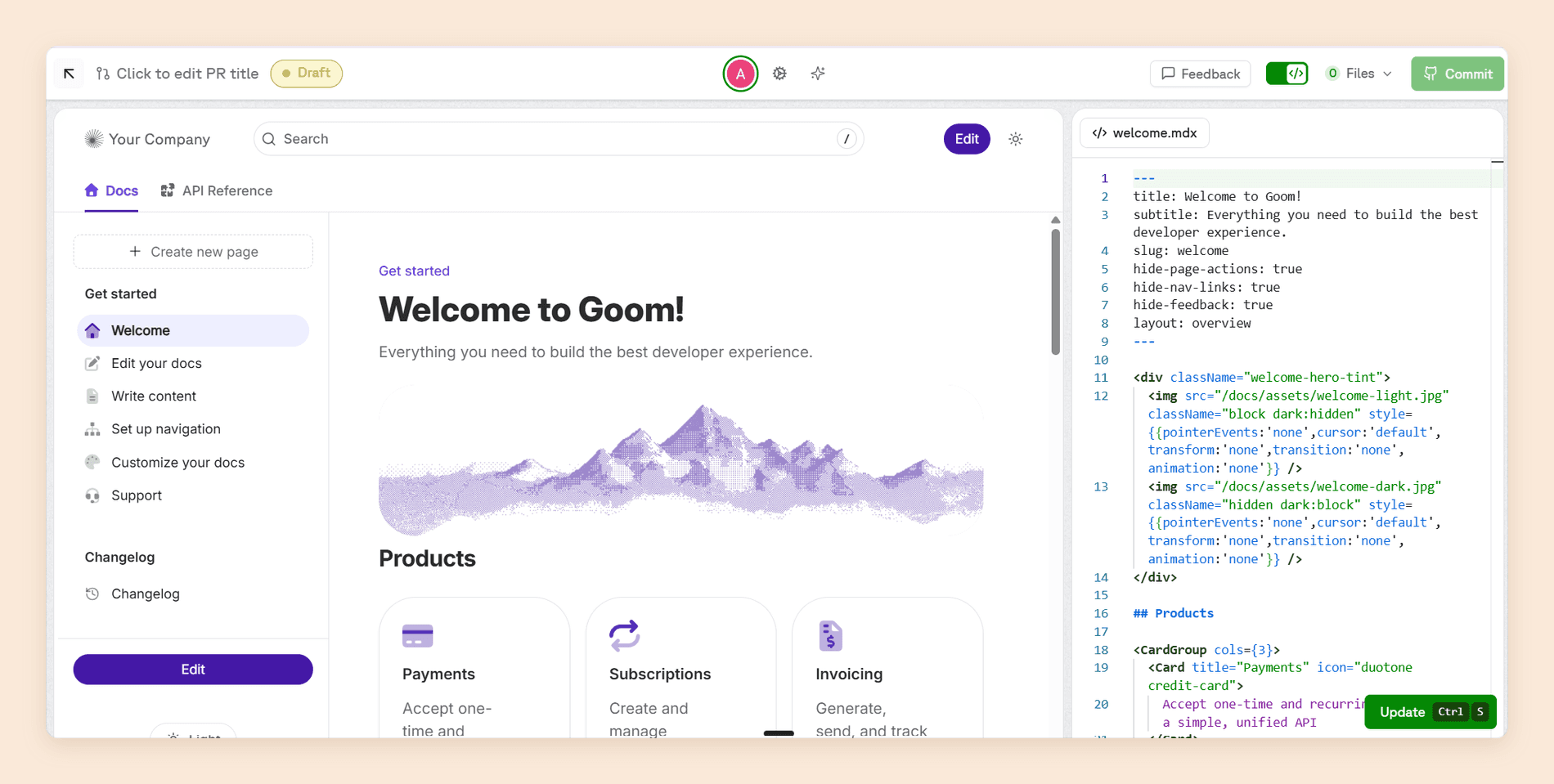
Two limits before you promise it to anyone: the Editor runs on desktop Chromium only, and components like Aside, Frames, and Icons still cannot be created from the UI. [1]
The API Reference and Explorer
Fern exists to do this. Fern generates a reference from any of six specification formats, and the API Explorer lets readers send real authenticated requests with prefilled credentials rather than copying an endpoint into another tool. [2]
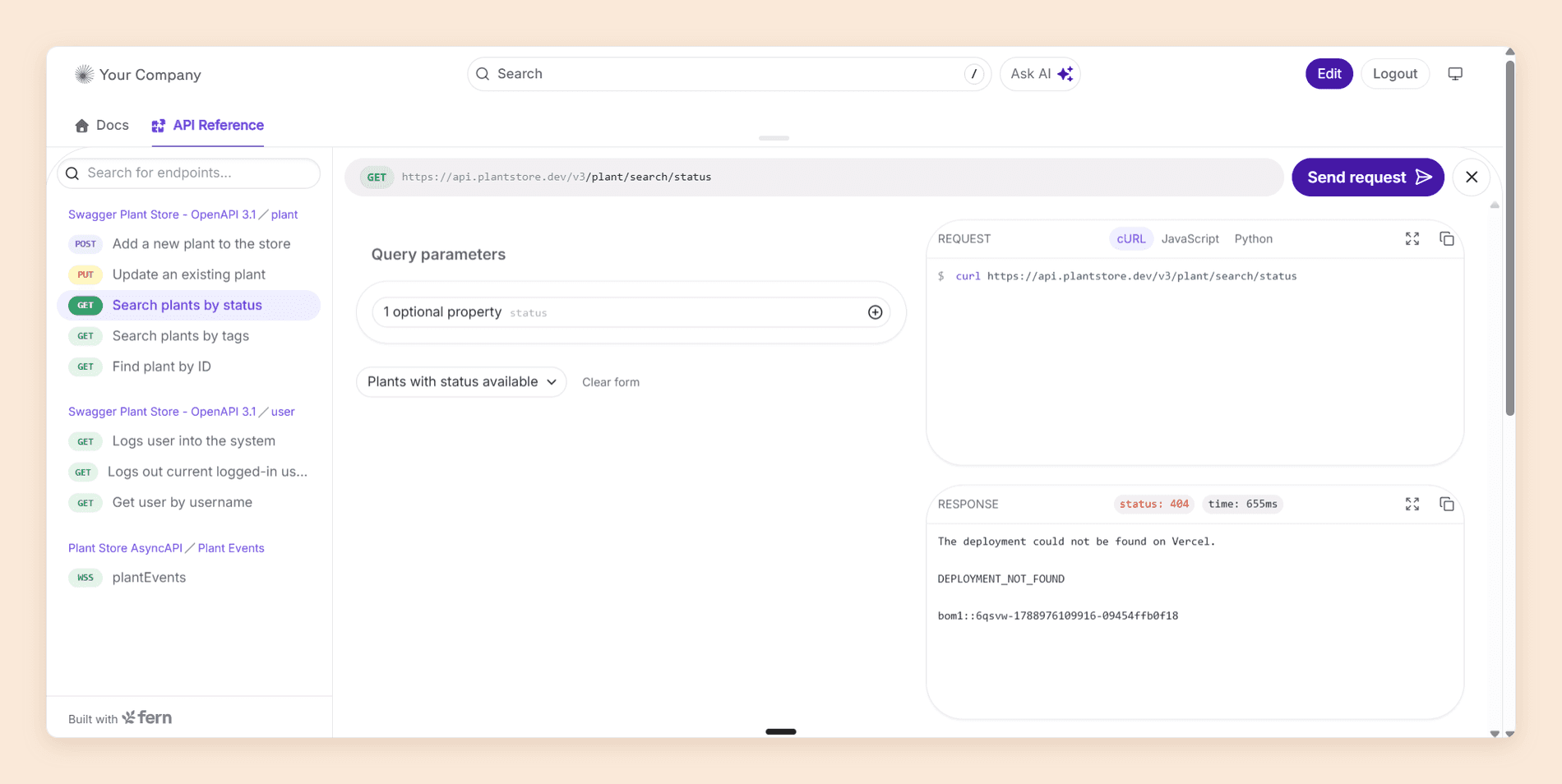
Version and product switching are on the free plan, so one site can carry several products at several versions. [2] The same reference is published for machines too: every page is served as Markdown on request, llms.txt is hosted automatically, and Fern generates an MCP server so a reader's coding agent can query your docs directly. [1] Those are the two established routes for agents; a third, WebMCP, runs inside the reader's browser and is still in origin trial.
Fern Agent, and the Analytics It Reads
Fern Agent does more than the writing assistants its competitors ship. It edits your docs and opens pull requests, and it also reads the analytics Fern collects on every published site with no setup: traffic, 404s, search queries, reader feedback, API Explorer request volume, AI bot traffic by provider, and every Ask Fern conversation, each one scored Resolved, Unresolved, or Pending. [1] Filtering that last list to Unresolved is the fastest read available on what your documentation is missing.
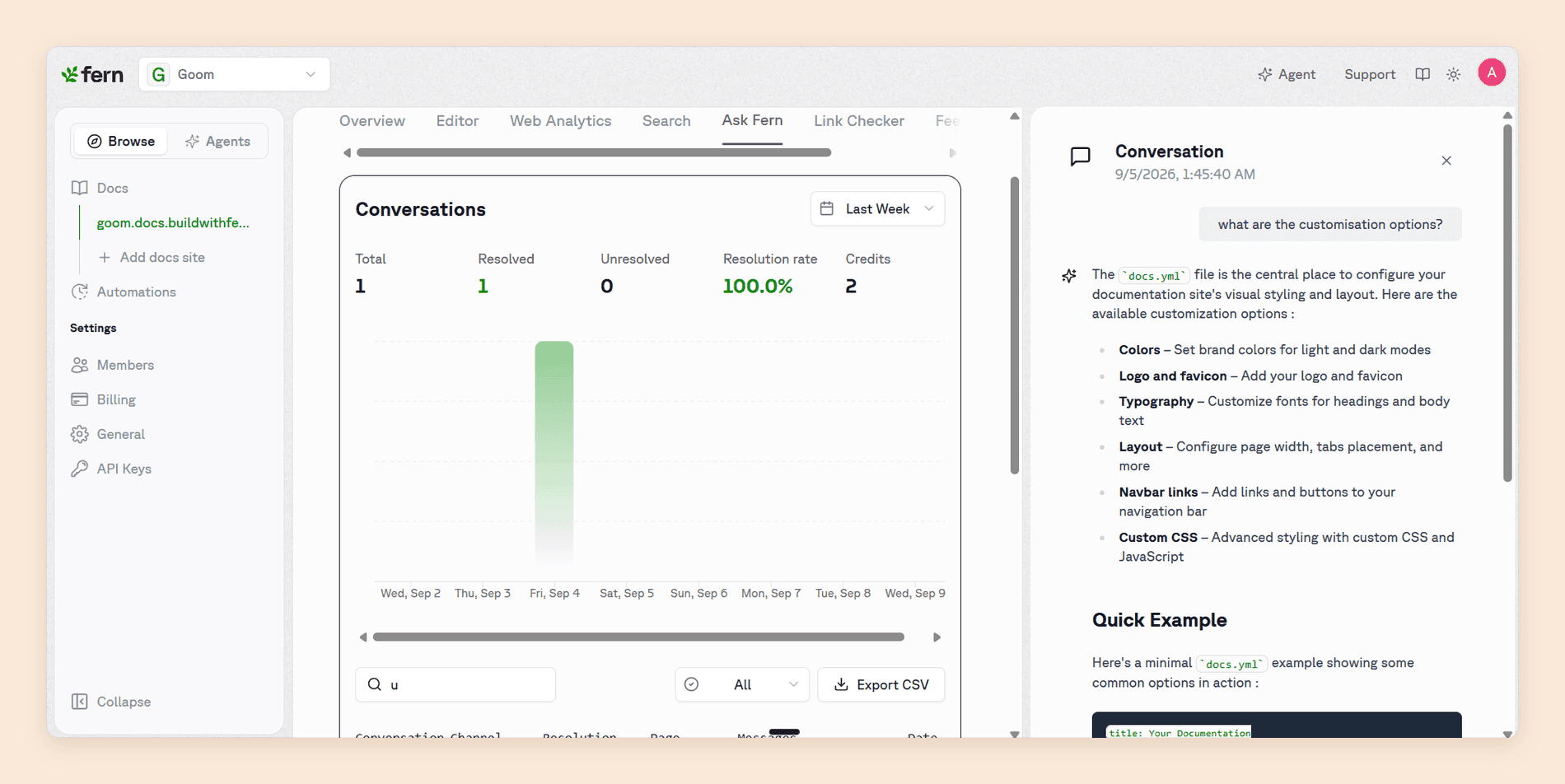
It comes tempered. The analytics stop shallower than you would like, with top pages reported as a ranked subset and the data lagging three to four hours. [1] [3] And the agent was mixed in our testing: alone it did what it was asked, but chained with the other AI features it slowed noticeably and dropped parts of longer requests.
Where Fern Slows Down
Nothing below is a missing feature. Fern's weak spots are narrower and stranger than that: a pricing page with one price on it, a preview surface that is slow everywhere and broken on Windows, and a set of open defects that buyers usually meet after signing rather than before.
Preview Is Outside the Product, and It Is Slow
There is no preview inside the dashboard. The two supported routes are a local development server, fern docs dev, and shareable preview links generated by fern generate --docs --preview, and both need Node 22, the Fern CLI, and pnpm on your path. [1] Coming from a platform where preview is a button, this is a real adjustment rather than a preference.
Speed is the sharper problem. Preview builds are slow to load and slower to navigate, a complaint that is open and unresolved on Fern's public tracker with more than one team reporting it, and local builds run on the same servers so they behave identically. [3]
We saw the same shape on the dashboard itself, where the analytics view was consistently the slowest screen in the product.
Local Development Is Broken on Windows
fern docs dev fails on Windows during install, on sharp and esbuild postinstall scripts, across more than 20 CLI versions and multiple Node releases. [3] Fern's own documentation asks Windows users to enable long path support or fall back to WSL.
If your writers are on Windows and you were counting on local preview, budget for WSL or accept that preview links are the only route.
The Pricing Page Has One Price on It
The free plan carries 10 people, one site, 1,000 pages, and 2,000 page generations a month. Above that, Fern publishes nothing at all. [2] Traced against a team that grows normally, the bill looks like this:
- Ten writers, one product. Free. Custom domain, password protection, versions, products, and PDF export included.
- An eleventh writer. No published price. Enterprise quote.
- A second product, or a second docs site. No published price. Enterprise quote.
- Docs that match your design system. Custom CSS, JavaScript, and React are all Enterprise. [2]
- Readers who sign in with SSO. No published price. Enterprise quote.
Four of those five steps are a sales call, and the first one costs nothing. Most teams do not outgrow Fern's software. They outgrow its pricing page, and they do it without ever having paid Fern anything.
The Credit Budget Is Tighter Than the Price Suggests
Fern meters AI, and the rates are published, which is more than most of its competitors manage. Ask Fern costs two credits per message, AI-generated examples cost one, and a docs update session in Slack costs 50. [1]
The free plan's 250 monthly credits are 125 reader answers, or five agent sessions, and every agent session you run costs you 25 reader answers. [1] Fern publishes no way to buy more, so the credit line is the first thing that turns a free plan into a sales call. A documentation site with real public traffic will clear 125 questions in a week.
Nine Languages Means Nine Sets of Edge Cases
Generating SDKs for nine languages from one spec is Fern's headline claim and it is true. The cost is that roughly a fifth of the issues raised against Fern this year are defects in generated code for one specific language, and most are still open. [3] Check your language before you commit, not after.
Fern Pricing
Fern publishes two plans, and one of them is free. There is no billing toggle and no trial, because there is nothing to bill.
| Plan | Price | What it carries |
|---|---|---|
| Free | $0, forever | 10 team members, one site, 1,000 pages, 2,000 page generations a month, 250 AI credits a month |
| Enterprise | Custom quote | Everything else, including SSO, RBAC, multiple sites, custom CSS and React, localization, and self-hosting |
The free plan deserves credit. A custom domain, password protection, the API explorer, the web editor, PDF export, version and product switching, Ask Fern, and an MCP server at $0 add up to a real published site rather than a demo, and no card is required to get one. [2] Nothing else in this category gives away as much.
The number to plan against is not the price. It is the distance between the free plan and the quote, because there is no step in between. You are free while you are 10 people on one site with a stock theme, and in a procurement conversation the moment you are 11 people, two products, a brand that needs its own CSS, or a team whose readers sign in.
Our Fern pricing guide takes the tiers apart in more detail, including the credit rates, the gates on team roles and reader login, and what Fern prices only on request.
Not sure which tier you would actually land on?
Book a demo and we will price your real team against Fern and its alternatives: how many writers, how many reviewers, how many products, and what each platform charges for them.
Does It Fit Your Team?
It comes down to two questions: how many people will edit the docs, and whether your readers need to log in. Get those right and the rest of the product rarely changes the answer.
| Your situation | Fit | What decides it |
|---|---|---|
| API is the product, docs and SDKs from one spec | Excellent | Nothing else in the category generates both this well |
| Small team, one product, public docs | Excellent | Free for 10 people, with 125 reader answers a month |
| GraphQL, gRPC, AsyncAPI, or OpenRPC in the estate | Excellent | Six specification formats, with a real reference for each |
| Solo maintainer or a side project | Excellent | Custom domain and password protection on the free tier |
| Eleven or more people editing documentation | Poor | Ten is the published ceiling, then a custom quote |
| Two products or two documentation sites | Poor | One site on every plan below Enterprise |
| Readers authenticate with SSO or JWT | Poor | Enterprise only, at a price Fern does not publish |
| Writers on Windows who need local preview | Poor | Local dev is broken there today, WSL is the workaround |
| Heavy public traffic plus daily agent use | Mixed | The same credit pool funds both |
Before you sign, ask these:
- How many people will edit documentation in 18 months, and what does the eleventh cost?
- Will you publish a second product or a second site, and what does that cost?
- How many reader questions a month do you expect, and how much agent use will share that budget?
- Which languages do your SDKs need, and what is open against those generators today?
- Who on the team is on Windows, and can they work without a local preview?
Is Fern Worth It in 2026?
Yes, if your API is the product and your documentation stays inside 10 people and one site. Fern generates a better developer reference than anything else in this comparison and now charges nothing for it. What comes with that is a short runway: the plan you start on is the last one Fern will quote you in public.
That holds only if two things line up.
The free plan is real and so is the ceiling. Ten people, one site, and 125 reader answers a month for nothing is the best value on this page. The eleventh person is not priced, and that is a budgeting problem rather than a product one.
Preview is the weakest surface, and you touch it daily. No in-product preview, a preview server with an open and unresolved slowness complaint, and a Windows path that does not work. [1] [3]
Our verdict stands at 3.8 out of 5. Fern turns a spec into more finished developer experience than anything else here, and gives you the least room to grow before a sales call.
Best Fern Alternative
Documentation.AI is the alternative to look at first, because it removes the exact constraint that ends most Fern evaluations. Nearly everything Fern reserves for an Enterprise contract, Documentation.AI puts on a published plan.
Seats stop being a ceiling. Fern's free plan is 10 people, and the eleventh is a sales call. Documentation.AI's Pro plan is $159 a month with unlimited editor seats, so the writer you hire next quarter costs nothing extra.
One site becomes four projects. Every Fern plan below Enterprise publishes a single site. Pro carries four projects, which is the difference between documenting one product and documenting a portfolio without renegotiating a contract.
Private docs arrive before Enterprise. Reader login through JWT or OAuth, and role-based permissions on top of it, are Enterprise-only at Fern. Both are included at Pro.
The AI budget stops being a rationing exercise. Fern's free plan gives 250 credits a month, which is 125 reader answers, and every agent session spends 50 of them. Documentation.AI gives Pro 30,000 credits a month with no overage billing, and its own free plan opens with 10,000 rather than 250.
| Fern Free | Documentation.AI Pro | |
|---|---|---|
| Price | $0 | $159/mo |
| Editor seats | 10, then a quote | Unlimited |
| Projects or sites | 1 | 4 |
| Monthly AI credits | 250 | 30,000 |
| Reader login (JWT, OAuth) | Enterprise | Included |
| Role-based permissions | Enterprise | Included |
| Free tier AI | 250 credits | 10,000 credits |
Annual rates, as each vendor publishes them. [2] [4]
The summary is that one of these plans costs nothing and the other $159, and only one of them still has a published price the month your team grows.
Ready to stop counting seats?
Start free on Documentation.AI and add the eleventh writer, the second product, and reader login without a sales call.
If neither fits, the field splits cleanly. Mintlify is the pick for API-first documentation where the team wants docs-as-code with a visual editor on top. GitBook is the pick for one collaborative site where a block editor matters most. ReadMe is the pick for developer portals that need per-key usage metrics. Redocly is the pick for an OpenAPI reference that engineers govern in Git. Each links to our full review, scored on the same eight criteria as this one. Our Theneo review covers an API-first portal builder billed per workspace, and our Archbee review covers a knowledge portal that keeps customer guides, internal docs, and an API reference in separate spaces.
More detail in these:
- Fern vs Documentation.AI, seat and site limits against plans that publish a price at every size
- Fern pricing in 2026, every tier and gate taken apart
- API documentation tools, the whole category compared at once
FAQs
1. How Much Does Fern Cost in 2026?
Fern's documentation platform publishes two plans. The Free plan is $0 forever and carries 10 team members, one site, 1,000 pages, 2,000 page generations a month, and 250 AI credits a month. Enterprise is a custom quote and is the tier with visitor authentication, RBAC, SSO, multiple sites, custom CSS and React, localization, and self-hosting. [2] SDK generation is not priced on the pricing page at all.
2. Is Fern's Free Plan Usable?
More than anything else in this category. The free plan gives you a published site on your own custom domain, password protection, the API explorer, the web editor, PDF export, version and product switching, Ask Fern, Fern Agent, and an MCP server, for 10 people. [2] The limits are one site, 1,000 pages, 2,000 page generations a month, and 250 AI credits, which is 125 reader answers, so it is a plan for building rather than for running reader AI at any volume. [1]
3. What Happens When You Outgrow 10 People?
You talk to sales. Fern publishes no per-seat price above the free plan and no intermediate tier, so an eleventh editor, a second site, or a second product all lead to an Enterprise quote. [2] Model this before you commit, and check whether the alternatives you are weighing publish a price at the size you expect to be. [4]
4. Does Fern Have a Visual Editor?
Yes. Fern Editor is a WYSIWYG surface for teammates without Git access, and every edit it makes opens a pull request, so review and CI still apply. [1] It needs a connected Git repository, runs on desktop Chromium browsers only, and a few components cannot yet be created from the UI.
5. How Do You Preview a Fern Site Before Publishing?
Two ways, both from the command line. fern docs dev runs a local server with hot reload, and fern generate --docs --preview publishes a shareable link that does not expire and is not indexed. [1] There is no preview inside the dashboard, and the guided setup adds a GitHub Actions workflow that comments a preview link on every pull request.
6. What Is Fern Agent?
Fern's AI agent for documentation. It edits pages and opens pull requests, and it also answers questions about your traffic, 404s, search queries, reader feedback, and Ask Fern conversations, from the dashboard, Slack, or your coding agent over MCP. [1] Editing is powered by Devin and requires GitHub. A Slack docs-update session costs 50 credits. [1]
7. How Many Languages Does Fern Generate SDKs For?
Nine: TypeScript, Python, Go, Java, .NET, PHP, Ruby, Swift, and Rust, from the same API definition that builds your documentation, published to the usual package registries, with a generated CLI as a newer output. C++ and Kotlin are behind a request form. [2] Fern's pricing page covers documentation only, so ask what SDK generation costs rather than assuming the free plan carries it, and check the tracker for your specific language before committing. [3]
8. Does Fern Support Single Sign-On for Readers?
Only on Enterprise. Password protection is on the free plan, but SSO, JWT, and OAuth authentication, the role-based access control built on them, and Editor and Viewer roles for your own team are Enterprise features. [2] If gated docs are a requirement rather than a maybe, price that in early, because several alternatives include reader login on a published tier. [4]
Still weighing it up? Ask the people who have already migrated in the Documentation.AI Slack channel.
Sources
- Fern. "Fern Docs." Fern. Accessed September 2026. https://buildwithfern.com/learn
- Fern. "Pricing." Fern. Accessed September 2026. https://buildwithfern.com/pricing
- fern-api. "fern: Input OpenAPI. Output SDKs and Docs." GitHub repository and issue tracker. Accessed September 2026. https://github.com/fern-api/fern
- Documentation.AI. "Pricing." Documentation.AI. Accessed September 2026. https://documentation.ai/pricing
Past Fern's free plan?
A published price above the free tier
Seats, projects, reader login, and role permissions sit on the plan instead of behind a quote.
Start freeNo credit card required