Archbee Pricing 2026: Plans, AI Tokens & Real Cost
Archbee's plan prices are among the lowest in the category, and much of what documentation teams expect is sold separately. This guide explains both published plans, the AI token add-on, each paid add-on, and how to estimate the full monthly cost before you commit.

Monika B. · GTM Engineer, Documentation.AI
Last updated
On this page
Archbee publishes two prices, $80 and $350 a month, and both include exactly five team members. That is among the lowest entry points of any serious documentation platform in this category, and it is real: unlimited spaces, unlimited documents, unlimited readers, and a custom domain, for $80.
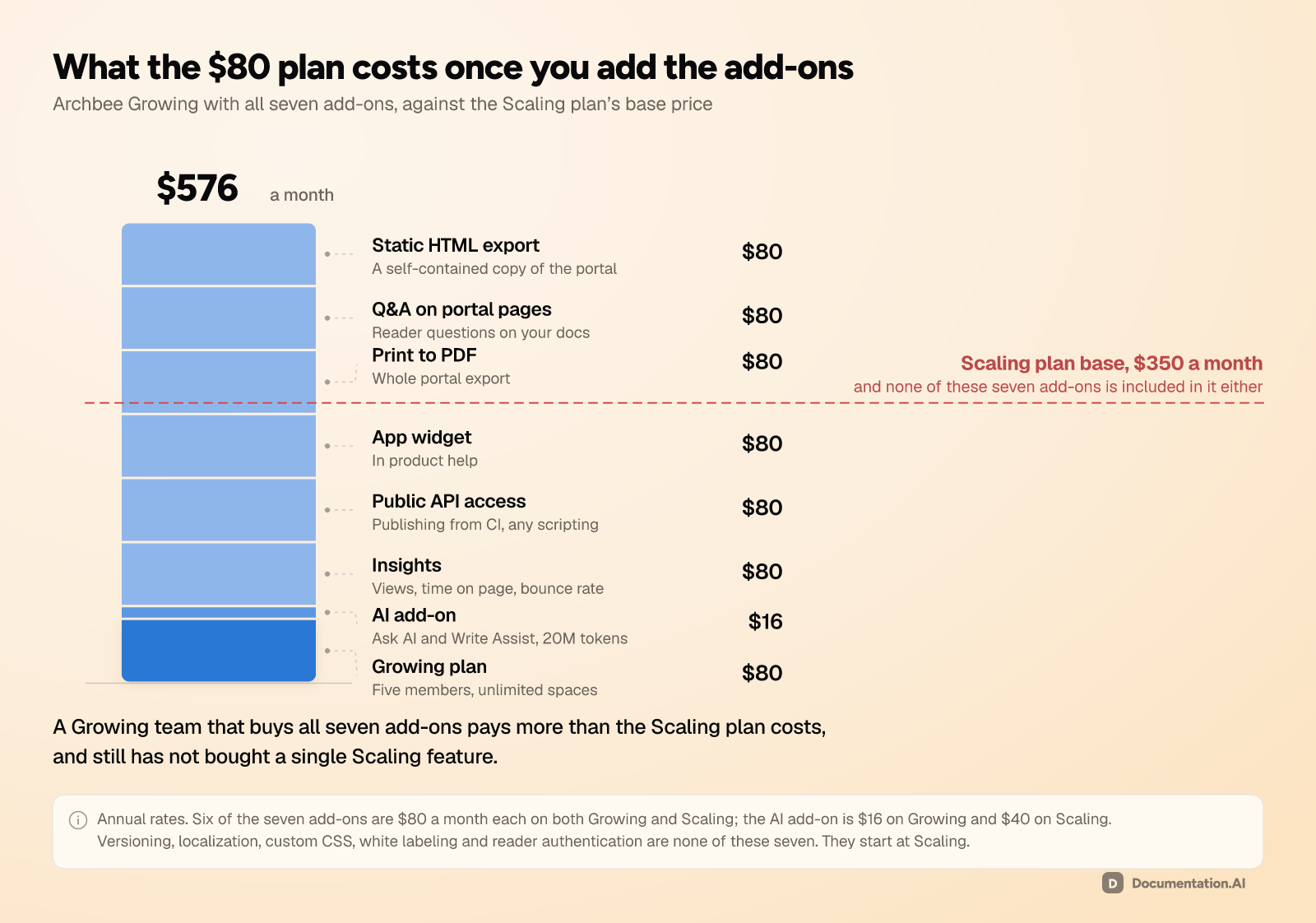
The bill is not $80. Archbee sells seven capabilities as separate add-ons, six of them at $80 a month each, so a team that wants the documentation site most buyers picture pays more in add-ons than in subscription.
This guide prices the plans, then prices everything that sits beside them. Every figure comes from Archbee's own pricing page and product documentation. [1] [2]
Archbee Pricing at a Glance
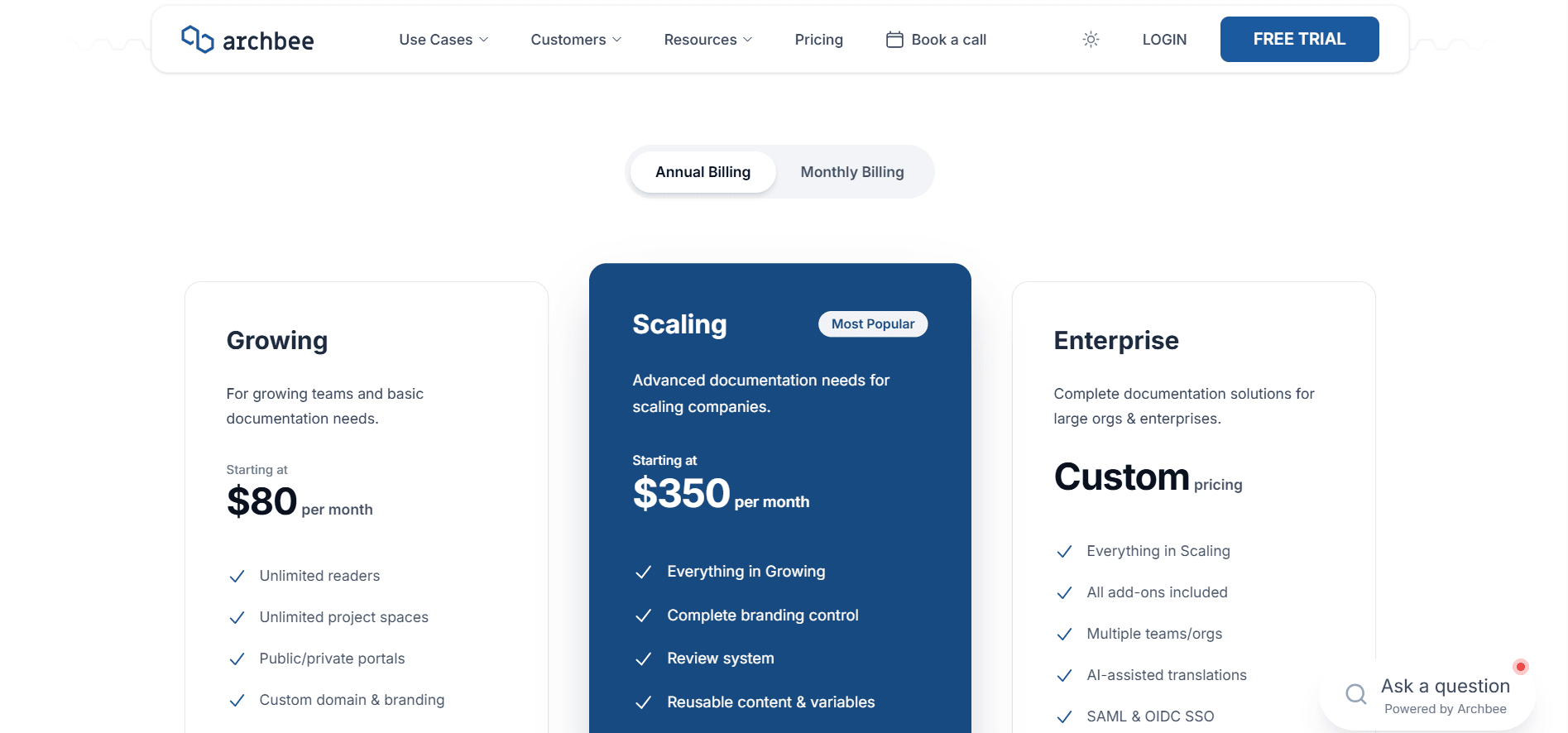
Three plans, billed per organization rather than per site or per space. The rates below are the annual ones, which is what Archbee shows by default: [1]
| Plan | Price | Team members included | Extra members | Custom domains |
|---|---|---|---|---|
| Growing | $80/month, billed annually | 5 | $5 per member/month | 1 |
| Scaling | $350/month, billed annually | 5 | $10 per member/month | 1 |
| Enterprise | Custom quote | Per contract | Per contract | Per contract |
There is no free plan. Archbee's pricing FAQ says a free offering is not available at the moment, so the only way in is a 14-day trial with no credit card. Seven capabilities are sold as add-ons on both published plans and bundled only on Enterprise: [1]
| Add-on | Growing | Scaling | Enterprise |
|---|---|---|---|
| AI (Ask AI, Write Assist, External Sources) | $16/month, 20M tokens included | $40/month, 40M tokens included | Included, 100M tokens |
| Insights (documentation analytics) | $80/month | $80/month | Included |
| Public API & CMS MCP access (includes an authoring MCP server) | $80/month | $80/month | Included |
| App widget (in-product help) | $80/month | $80/month | Included |
| Print to PDF (whole portal) | $80/month | $80/month | Included |
| Q&A on portal pages | $80/month | $80/month | Included |
| Static HTML export (a self-contained copy of the portal) | $80/month | $80/month | Included |
| Extra custom domains | $10/month each | $20/month each | $100/month each |
The arithmetic shifts before you start. Five seats is the whole allowance on both plans, so Scaling costs more than four times as much as Growing for the same number of people, at double the per-seat rate. And the published rates are the annual rates: Archbee's documentation puts the annual discount at 20%, so month-to-month billing runs higher than every figure in this guide. [2]
Documentation.AI draws that line elsewhere, putting reader AI, analytics, the API, PDF export, and the MCP servers inside the plan rather than beside it. [3]
How Does Archbee's Pricing Work?
You buy a subscription for an organization, and it covers every space, every document, every published portal, and five people who can edit them. Spaces, documents, readers, and traffic are unlimited on both paid plans, so the meters that move are seats, add-ons, domains, and AI tokens.
That is a better structure than most of the category uses, because a second product or a tenth space costs nothing until it needs its own domain. The part to plan for is that the subscription belongs to the organization. Running two organizations is an Enterprise feature, and a subscription can only be moved between organizations manually by support, so an agency or a holding company is buying separate plans or buying Enterprise. [1] [2]
What the Scaling Plan Buys
Scaling is $350 against Growing's $80, and the jump is not about volume. What the extra money buys is capability, and this is the full list: [1]
| Capability | Growing | Scaling |
|---|---|---|
| Versioning and multi-version docs | No | Yes |
| Language localization | No | Yes |
| Reusable variables | No | Yes |
| Space links for multi-product docs | No | Yes |
| Space groups | No | Yes |
| Search analytics | No | Yes |
| Review system with approvals | No | Yes |
| User groups and permissions | No | Yes |
| Guest accounts, magic links, and JWT reader login | No | Yes |
| Custom CSS | No | Yes |
| Custom SEO settings | No | Yes |
| Custom headers, landing pages, and footer HTML | No | Yes |
| Remove the Archbee logo | No | Yes |
| Document revision history | 1 year | 2 years |
| File storage | 10GB + 2GB per member | 20GB + 10GB per member |
Four of those rows decide most upgrades. Versioning, if you ship two API versions that both need live documentation. White labeling, since removing the Archbee mark starts at $350. Reader authentication through guest accounts, magic links, or JWT. And custom CSS, because Growing lets you inject JavaScript into your site but not restyle it. [1]
Revision history expires, and the limit is a tier. Archbee keeps document history for one year on Growing, two on Scaling, and five on Enterprise. [1] If you support a regulated product or ever have to show what a page said on a given date, that retention window is a buying requirement, not a footnote.
Archbee AI Tokens: What's Included and What Costs Extra?
The AI add-on costs $16 a month on Growing and $40 a month on Scaling, and Enterprise includes it. [1] Because the add-on needs a plan underneath it, the cheapest way to put Ask AI in front of your readers is $96 a month. It is also the only reader AI in this category billed in tokens, which makes it the hardest to forecast.
| Plan | AI add-on | Tokens included | Overage |
|---|---|---|---|
| Growing | $16/month | 20M per month | $1.20 per 1M tokens |
| Scaling | $40/month | 40M per month | $1.20 per 1M tokens |
| Enterprise | Included | 100M per month | $1.20 per 1M tokens |
One purchase turns on Ask AI for readers and internal spaces, AI Write Assist, Generate Summary, Shadow Docs, and External Sources. [2] Shadow Docs is the interesting one: a folder whose contents are indexed for the assistant but never shown to readers.
Tokens Are Not Questions
Reader questions and writer usage draw on the same pool, and Archbee ties consumption to the volume of text processed, so a heavy writing week and a heavy traffic week spend the same budget. [1] [2]
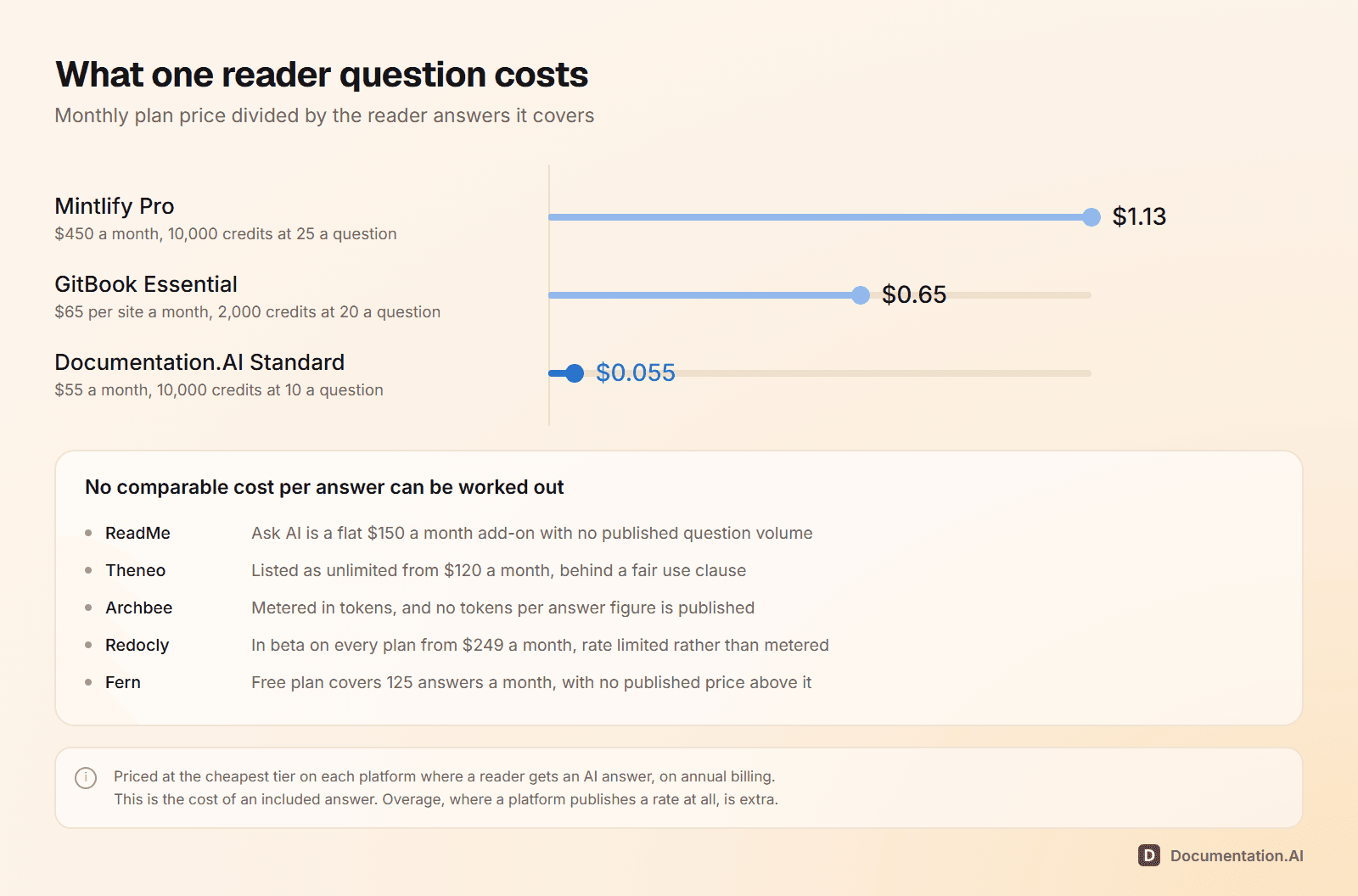
What is missing is the conversion. Mintlify prices an assistant answer at 25 credits and Documentation.AI prices a reader question at 10 credits, so both allowances divide into a number of questions. Archbee publishes no tokens-per-answer figure, so run the trial on your real documentation and read the meter. Our Archbee vs Documentation.AI comparison builds the same docs on both and reports what each one spent.
Four platforms in this category publish enough to work out what one reader question costs, and four, Archbee included, do not:
Set the hard limit on day one. Archbee shows consumption in organization settings, accepts soft and hard caps, and deactivates AI at the hard cap rather than billing onward. [1] [2] Until you set one, the meter has no natural stop: Archbee's FAQ reserves the right to invoice mid-cycle past 1.2 billion overage tokens, roughly $1,440 in a month. [1] Its documentation also still describes Ask AI as beta, so price it as a capability that is still moving. [2]
Counting the add-ons?
Analytics and API in the plan
Reader AI, analytics, the API, and PDF export are not separate line items. Import your docs and check.
No credit card required
What Does Archbee Cost for a Real Team?
Between $80 and a sales conversation, and what moves you up is almost never traffic or headcount. It is the next capability you decide you need. Five teams, priced at Archbee's published annual rates: [1]
| The team | Plan and add-ons | Per month |
|---|---|---|
| A two-person startup publishing its first help center | Growing | $80 |
| A seed-stage API company that wants Ask AI on its public docs, and wants to know whether readers are using it | Growing + AI + Insights | $176 |
| A 10-person product and support team running versioned docs on their own brand | Scaling + 5 seats + AI + Insights | $520 |
| A SaaS company embedding docs in-product, publishing from CI, and sending PDF manuals to enterprise customers | Scaling + 5 seats + all seven add-ons | $920 |
| A company with two brands, Okta sign-in, and Zendesk deflection | Enterprise | Quote |
That makes an Archbee bill easy to predict and easy to underestimate. A Growing team that buys all seven add-ons lands at $576 a month, above Scaling's base price and still without a single Scaling feature.
The Same Team, Priced Against Documentation.AI
| Archbee | Documentation.AI | |
|---|---|---|
| Free plan | None, 14-day trial only | Yes, 5 editor seats |
| Entry paid price | $80/month | $55/month, billed annually |
| Editor seats at entry | 5, then $5 each | 10 on Standard, unlimited on Pro |
| Reader AI | $16/month add-on, metered in tokens | Included from free, 10 credits per question |
| Documentation analytics | $80/month add-on | Included, advanced analytics on Pro |
| API access | $80/month add-on | API keys from Standard, OpenAPI import on every plan |
| Portal-wide PDF export | $80/month add-on | Pro, $159/month billed annually |
| Reader login over JWT or OAuth | Scaling, $350/month | Pro, $159/month billed annually |
| Versioning and localization | Scaling, $350/month | Included |
| Remove vendor branding | Scaling, $350/month | Included |
| Docs MCP server | Reader server, llms.txt, and Markdown pages from Growing; authoring server in the $80/month Public API & CMS MCP add-on | Reader and authoring servers, every plan |
Two-way Git sync and OpenAPI import are on every Archbee plan, so the $80 headline holds for one shape: a single small site with no analytics, no API, no versioning, and the Archbee mark on the footer. [1] Past that the comparison inverts. The 10-person team above pays $520 a month for a setup that sits inside Documentation.AI Pro at $159 billed annually, and the gap is not features. It is where each vendor draws the line between the plan and the invoice. [3]
Archbee Enterprise Pricing
No general published price. What matters is which requirements end the self-serve path: [1] [2]
- Identity. SAML and OIDC single sign-on, for your team and for readers of your published portals. Google and Microsoft sign-in for team members is on every plan.
- Support tooling. Intercom and Zendesk integrations. Jira and Slack start at Growing.
- Multiple organizations, which an agency or a multi-brand company needs.
- Content targeting. Display rules and conditional content based on reader attributes or roles.
- AI-assisted translations, the one AI capability the add-on does not cover below this tier. Localization itself starts at Scaling.
- All add-ons bundled, so a team already buying most of them is comparing $920 a month against a quote rather than against nothing.
- Service. A dedicated customer success manager, invoicing options, and a support response target of under 12 hours, against under 24 on Scaling and under 48 on Growing.
Archbee does publish one floor. Cloud-Prem, which deploys Archbee into an AWS subaccount you own with a dedicated DevOps engineer maintaining it, starts at $100,000 per year on a minimum three-year contract. [1] Knowing that is $300,000 of commitment before the first call is more useful than another "contact sales".
Heading into a quote conversation? Book a demo and we will price your seat count, add-on list, and AI usage across both platforms, so you walk into that call with a number to hold the quote against.
The Discounts Archbee Does Publish
Three programs sit in the pricing FAQ and none appear on the plan cards. Open source projects get the Growing plan free, non-profit and educational use gets 50% off, and the startup program gives early-stage companies 50% off any plan for two years, which puts Growing at $40 a month and Scaling at $175. [1] None is applied automatically, so ask before you sign. Archbee also refunds your first paid month with no questions asked, a meaningful safety net given there is no free tier to evaluate on.
What to Consider Before Choosing an Archbee Plan
- Which add-ons do you actually need? Total them first. They decide whether Archbee is the cheap option or an expensive one.
- Does anything on your list start at Scaling? A single item from that table sets your floor at $350, however minor it is.
- How long must you keep revision history? No other Archbee limit is this hard to undo after the fact.
- How many domains and organizations do you publish under? Extra domains are billed monthly and added through a support request, and a second organization is Enterprise. [2]
One trap: the Branches and Reviews system behind Scaling's review workflow is a beta that only works on spaces created with it enabled. [2] If review is why you are buying Scaling, turn it on before you migrate rather than after.
Is Archbee Worth the Cost?
For a small team publishing one knowledge portal, yes. Few platforms in this category start cheaper, the portal is good, and a non-technical team can run it without help. Ask for anything past that and the model turns on you, because analytics, the API, PDF export, and the in-app widget are sold one at a time, and versioning, white labeling, and reader authentication all sit a tier above.
So compare your requirements list rather than the entry price. On Documentation.AI those capabilities come with the subscription, and there is a free tier to build on rather than a 14-day window. [3] Start free and put your own docs through it this afternoon.
Related Archbee Comparisons
Pricing is one input. These put the rest of the field on the same footing, on features and workflow as well as cost:
- Archbee vs Documentation.AI, the same docs built on both platforms and priced
- Archbee review, a hands-on look at the editor, Git sync, Ask AI, and analytics
- Archbee alternatives, five platforms ranked for teams moving off Archbee
- Archbee vs Mintlify, token-metered add-ons against a credit-metered Pro plan, priced side by side
- Archbee vs GitBook, one plan with add-ons against per-site and per-user multipliers
- Mintlify pricing, where reader AI is sold in credits instead of tokens
- GitBook pricing, billed per site and per user rather than per organization
- ReadMe pricing, the other platform that sells reader AI as an add-on
- Theneo pricing, billed per workspace with seats included
- Redocly pricing, one flat price per plan, with seats and pages unlimited
- Fern pricing, a free plan for 10 members and one site, then an Enterprise quote
- Best API documentation tools, the whole category compared at once
FAQs
1. How Much Does Archbee Cost?
Growing is $80 a month and Scaling is $350 a month, both billed annually, and each includes five team members, unlimited spaces, documents, and readers, and one custom domain. Enterprise is a custom quote. Seven add-ons are priced separately on both published plans.
2. Is Archbee Free?
No. The entry point is a 14-day trial with no credit card, followed by a paid plan. Open source projects get Growing free, and non-profits, education groups, and qualifying startups get 50% off.
3. Does Archbee Charge per User or per Site?
Per organization, with a seat allowance inside it. Spaces, documents, and readers are unlimited, so publishing a second product costs nothing. Five team members are included on both plans, then $5 a month each on Growing and $10 on Scaling.
4. What Are Archbee's Hidden Costs?
The add-ons. Insights, Public API & CMS MCP access, portal-wide PDF export, the app widget, Q&A, and static HTML export are $80 a month each, AI is $16 or $40, and extra custom domains are $10 or $20. A team buying all seven on Scaling pays $520 a month in add-ons against a $350 subscription.
5. How Much Does Archbee AI Cost?
$16 a month on Growing with 20 million tokens, $40 on Scaling with 40 million, and included on Enterprise with 100 million, then $1.20 per million tokens. Because it needs a plan underneath, the cheapest way to run Ask AI is $96 a month.
6. What Is the Difference Between Archbee Growing and Scaling?
Volume is identical and capability is not. Scaling adds versioning, localization, reusable variables, space links and groups, search analytics, the review system, reader authentication, custom CSS, and removal of the Archbee logo, plus longer revision history and more storage.
7. How Much Is Archbee Enterprise?
There is no general published price, but Cloud-Prem, deployed into an AWS subaccount you own, starts at $100,000 a year on a three-year minimum. Enterprise is where SAML and OIDC single sign-on, Intercom and Zendesk, multiple organizations, AI-assisted translations, and all seven add-ons sit.
8. Is Archbee Expensive Compared to Other Documentation Tools?
It depends on how many add-ons you need. For one site with no analytics, no API, and no versioning, $80 a month for five writers is among the lowest prices in this category. With analytics, API access, PDF export, the widget, versioning, and reader authentication, the same platform costs around $920 a month.
Sources
- Archbee. "Pricing." Archbee. https://www.archbee.com/pricing
- Archbee. "Archbee Documentation and Help Center." Archbee. https://www.archbee.com/docs
- Documentation.AI. "Pricing." Documentation.AI. https://documentation.ai/pricing
Counting the add-ons?
Analytics and API in the plan
Reader AI, analytics, the API, and PDF export are not separate line items. Import your docs and check.
No credit card required