Comparisons · · 12 min read
Fern Pricing 2026: The Free Plan, Enterprise, and What Teams Really Pay
Fern retired its Hobby and Team plans and now sells documentation in two tiers: a free plan for 10 members and one site, and a custom Enterprise contract. This guide explains what the free plan includes, what moved behind the quote, and how seats, sites, and AI credits decide which tier you land on.

Monika B.
GTM Engineer, Documentation.AI
On this page
- Fern Pricing at a Glance
- What Changed in Fern's Pricing
- How Does Fern's Pricing Work?
- What Fern Meters: Members, Sites, Pages, and Credits
- What Do Fern's AI Features Cost?
- The Fern Prices That Are Not Published
- What Does Fern Cost for a Real Team?
- Fern Enterprise Pricing
- What to Consider Before Choosing a Fern Plan
- Is Fern Worth the Cost?
- Related Fern Comparisons
- FAQs
- Sources
Fern's documentation pricing now has one number on it, and the number is zero.
Earlier in 2026 Fern sold three tiers: a free Hobby plan for two people, a Team plan at $150 a month for five, and Enterprise. The pricing page now shows two. Free is $0 forever for 10 team members and one site, and everything else is Enterprise on tailored terms. [1] There is no paid plan you can buy without talking to sales.
That gives Fern one of the most generous free plans in API documentation and, at the same time, the shortest published ladder. This guide covers what the free plan includes, what changed, what the AI credits actually buy, and which requirements turn a free account into a procurement conversation.
Fern Pricing at a Glance
Fern publishes two documentation plans. Free costs nothing and has no trial clock. Enterprise is a custom quote with no published starting price, and it holds every capability the free plan leaves out. SDK generation sits on a separate tab of the pricing page and publishes no price at all. [1]
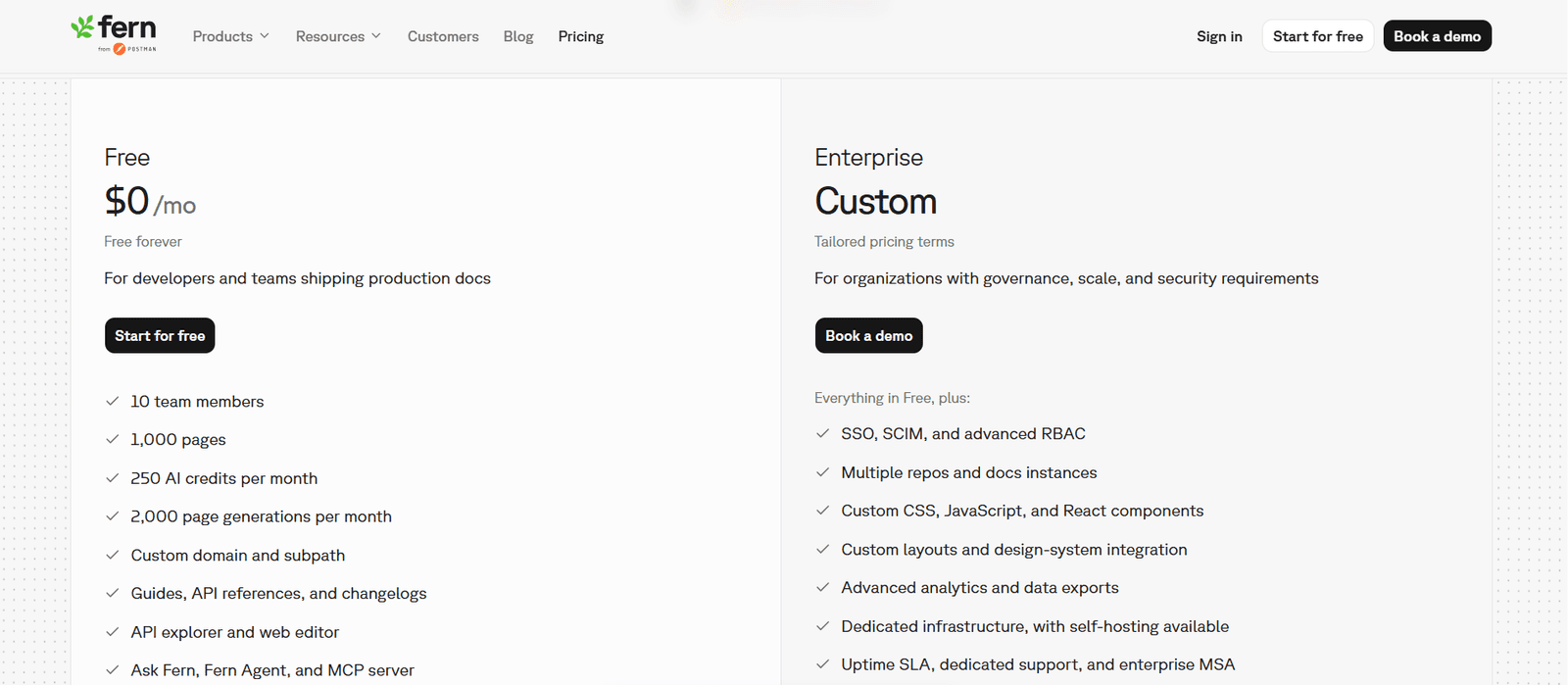
| Plan | Price | Members | Sites | Pages | AI credits |
|---|---|---|---|---|---|
| Free | $0, forever | 10 | 1 | 1,000 | 250/month |
| Postman Free | $0, forever | 25 | 1 | 1,000 | 500/month |
| Enterprise | Custom quote | Custom | Custom | Custom | Custom |
Free includes a custom domain and subpath, the web editor, the API explorer, guides, API references and changelogs, version and product switching, PDF export, password protection, preview links, Ask Fern, Fern Agent, an MCP server, llms.txt, AI translations, and an analytics dashboard. It also caps page generations at 2,000 a month. [1]
Postman Free is the same plan for Postman customers, with 25 members and 500 credits instead of 10 and 250. Fern documents both figures, and the pricing page reaches the variant through a Postman Customer toggle. [2]
Enterprise adds SSO, SCIM, and advanced RBAC, multiple repositories and docs instances, custom CSS, JavaScript, and React, custom layouts, design-system integration, localization, self-hosting, advanced analytics, data exports, an uptime SLA, and Slack and Teams support. [1]
What Changed in Fern's Pricing
The paid middle tier is gone, and most of what it held moved down into the free plan. A few things moved up, and one AI allowance shrank in the process. The comparison below sets the plans Fern published earlier in 2026 against the current page. [1] [2]
| Before: Hobby | Before: Team | Now: Free | |
|---|---|---|---|
| Price | $0 | $150/month, annual | $0 |
| Members | 2 | 5 | 10 |
| Sites | 1 | 1 | 1 |
| AI credits | 250/month | 1,000/month | 250/month |
| Versions, products, PDF export, subpath | No | Yes | Yes |
| Editor and Viewer roles | Yes | Yes | Enterprise |
What Got Better
A team of up to 10 people now gets, for nothing, the capabilities it used to pay $150 a month for: version and product switching, a custom subpath, and PDF export. The seat cap on the free plan went from two to 10. For a small API team that fits inside one site, Fern's pricing change is a straightforward gift.
What Got Worse
The largest self-serve AI allowance fell from 1,000 credits to 250. Team's 1,000 credits bought 500 reader answers a month. Free buys 125, and Fern publishes no way to add more, so a team that relied on Team's allowance now needs a quote to get it back. [1] [2]
Editor and Viewer roles moved to Enterprise. Fern's member permissions page now marks role assignment as an Enterprise feature: every plan can add members up to its limit, but assigning anyone a role below Admin requires the Enterprise plan. By default every member is an Admin, which means every member can manage settings, change the custom domain, manage API keys, and delete production sites. [2] Fern's pricing matrix still ticks "Member roles" on Free, so the two pages disagree. Treat the documentation, which spells out the restriction, as the operative answer and confirm it with Fern before you rely on either.
The SOC 2 Type II report is now Enterprise. It used to be available below Enterprise, and the current comparison matrix lists it on the Enterprise column only. The standard MSA stays on Free. [1]
How Does Fern's Pricing Work?
Fern bills per organization and caps each plan by members, sites, pages, and AI credits. On the free plan those caps are fixed, and Fern publishes no price for going past any of them. The next step up is always the same Enterprise conversation, whichever limit you reach first. [1]
The Ladder Has One Rung
Most documentation platforms let a growing team climb one paid step at a time. Fern's documentation ladder has one step, and it is free. Priced against a team that grows the way teams normally do, it looks like this:
- Up to 10 writers, one product. $0. Custom domain, versions, and PDF export included.
- An eleventh writer. No published price. Enterprise quote.
- A second docs site. No published price. Enterprise quote.
- More than 125 reader answers a month. No published price. Enterprise quote.
- Readers who sign in with SSO or JWT. No published price. Enterprise quote.
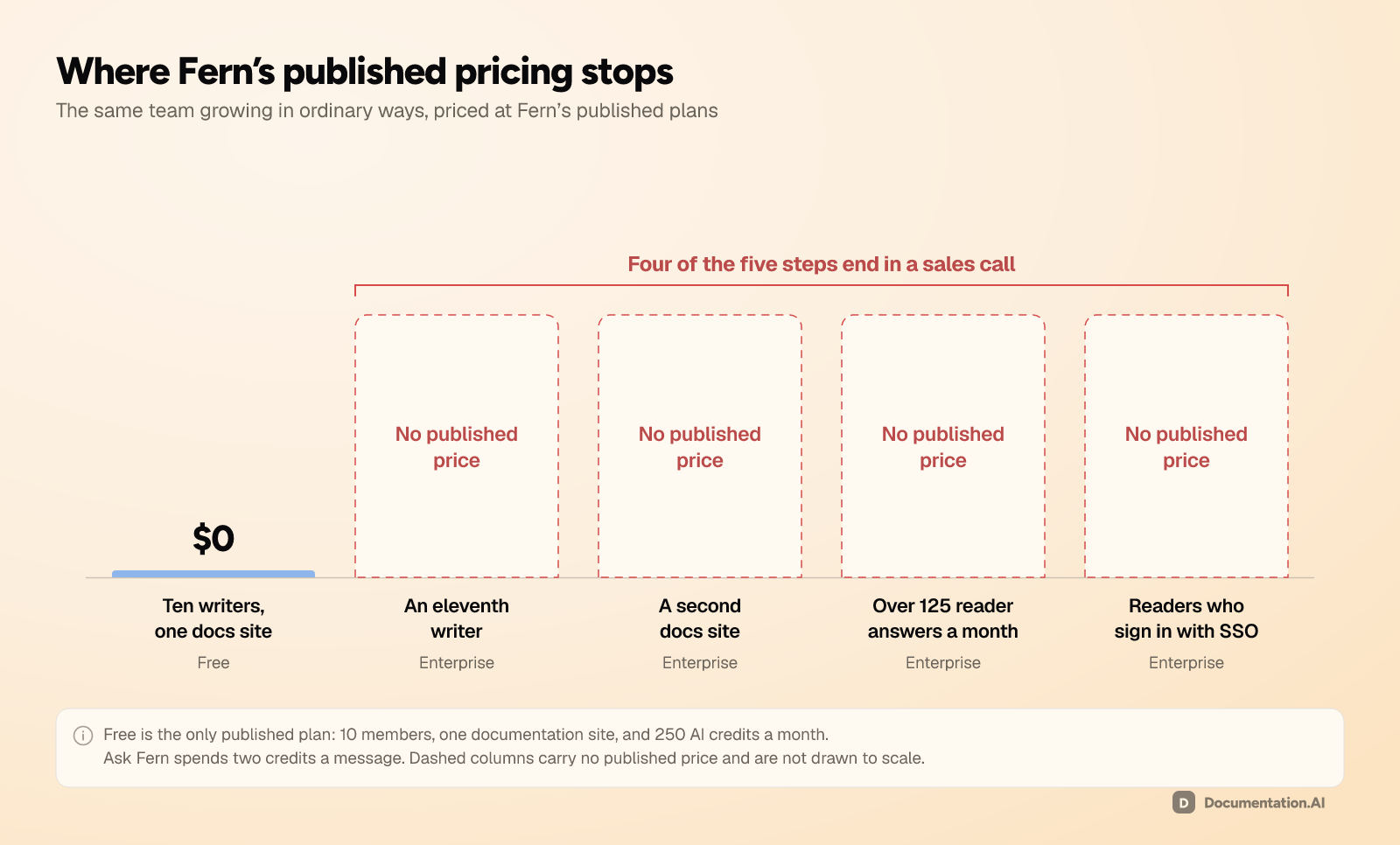
Four of those five steps end in a sales call. The old Team plan at least gave a growing team somewhere to pay before that happened. The new structure removes the step, so the distance from $0 to a contract is now one requirement long.
What Fern Meters: Members, Sites, Pages, and Credits
Four limits decide which Fern plan you are on. Members, sites, and pages are ceilings that only move when you add people or content. AI credits are the one allowance that usage drains every month, and it is the one most teams misjudge.
Team Members
Ten on Free, 25 on Postman Free, custom on Enterprise. [2] Everyone you add counts, including a stakeholder who only needs to read analytics, and without Enterprise roles that stakeholder joins as an Admin. A team that wants writers who cannot touch the custom domain or the API keys has no way to set that up on the free plan.
Sites
One, on Free. [1] Version and product switching are included, so several products and several API versions can live under one domain. Whether that satisfies the requirement depends on whether those products should share navigation, branding, and search. A second, separate documentation site is an Enterprise conversation.
Pages and Page Generations
The free plan allows 1,000 pages and 2,000 page generations a month. [1] Fern does not define a page generation on the pricing page or in its documentation, and it publishes no behavior for what happens at the limit. A large API reference can pass 1,000 pages on its own, so a team with several big specs should ask Fern how endpoints are counted before assuming the site fits.
AI Credits
The only true usage meter. Free gets 250 a month, Postman Free gets 500, and Enterprise is custom. [2] What those buy is covered next.
What Do Fern's AI Features Cost?
Fern publishes its credit rates, which is more transparency than most of this category offers. Ask Fern costs 2 credits a message, AI-generated examples cost 1, and a docs update session in Slack costs 50. All three draw on one monthly pool. [2]
| Feature | Cost |
|---|---|
| Ask Fern, the reader-facing assistant | 2 credits per message |
| AI-generated API examples | 1 credit |
| A docs update session in Slack, via Fern Agent | 50 credits per session |
Run those rates against the two free allowances:
| Free, 250/month | Postman Free, 500/month | |
|---|---|---|
| Reader answers, if you use nothing else | 125 | 250 |
| Agent sessions, if you use nothing else | 5 | 10 |
| Cost of one agent session, in reader answers | 25 | 25 |
What Runs Out First
One pool funds both features, so they compete directly. Every Fern Agent session in Slack costs 25 answers you cannot give a reader that month, and five sessions empty the free allowance on their own.
A public API reference with steady traffic will pass 125 questions quickly. At that point Fern publishes neither an overage rate nor a credit pack, so reader AI at any real volume is an Enterprise purchase. If the assistant is the capability you are actually shopping for, budget the Enterprise conversation from the start.
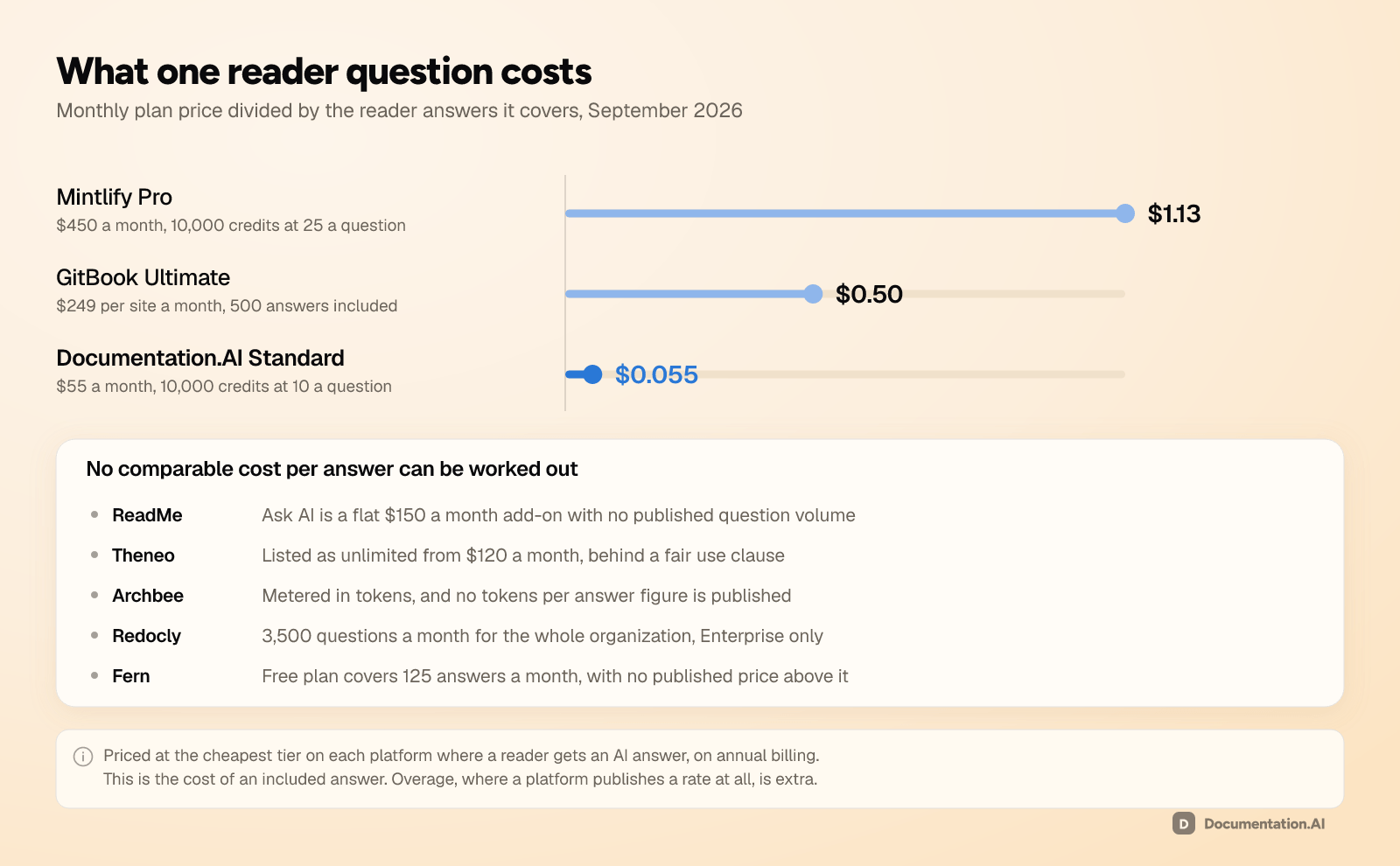
Because Fern's allowance is capped with no published way to extend it, no cost per answer can be worked out for it, which puts Fern alongside ReadMe and Redocly rather than among the platforms you can divide:
The Fern Prices That Are Not Published
No price exists above Free, and no reliable third-party figure exists either, so treat any Enterprise number you find elsewhere as a rumor. What matters is which requirements end the free path, and on Fern that list covers most of what a growing team eventually asks for. [1] [2]
- Headcount. An eleventh member, or a twenty-sixth on Postman Free.
- Roles. Any member who should be an Editor or a Viewer rather than an Admin.
- A second site. Multiple docs instances and multiple repository sources.
- AI volume. Anything past 250 credits a month, or 500 on Postman Free.
- Reader identity. RBAC, JWT, and SSO for visitors. Password protection is the only gate on Free.
- Design. Custom CSS and JavaScript, custom React components, custom layouts and navigation, and design-system integration.
- Branding. Removing Fern branding from the published site.
- Localization. Sold on Enterprise, and described in Fern's documentation as under active development, with Ask Fern,
fern checkerrors, and API Reference pages still in progress. - Self-hosting. Deploying on your own infrastructure.
- Analytics. Advanced analytics, custom dashboards, data exports, and warehouse integrations.
- Procurement and support. A custom MSA, a Business Associate Agreement, a security questionnaire, the SOC 2 Type II report, an uptime SLA, Slack and Teams support, incident creation, and migration and design services.
Flag localization rather than budgeting for it. It is marketed on the pricing page and hedged in the documentation, so ask exactly what ships today before you pay for it. [2]
What Does Fern Cost for a Real Team?
Six setups, priced at Fern's published plans: [1] [2]
| Your setup | Plan | Per month | The catch |
|---|---|---|---|
| One API, a handful of maintainers, public docs | Free | $0 | 125 reader answers, and every member is an Admin |
| One product, 10 people, versions and PDF export | Free | $0 | The eleventh person is a quote |
| Postman customer, up to 25 people, one product | Postman Free | $0 | 250 reader answers, still one site |
| One product, 10 people, 1,000 reader questions a month | Enterprise | Quote | Only the traffic grew |
| Two products on separate sites | Enterprise | Quote | Only the estate grew |
| Partner docs behind SSO, custom styled, translated | Enterprise | Quote | Every gated capability sits on this one tier |
Three of the six setups are a quote, and in two of them nothing about the team changed. Readers asked more questions, or the company shipped a second product.
The Same Team, Priced Against Documentation.AI
| Fern | Documentation.AI | |
|---|---|---|
| Entry paid price | None published | $55/month |
| Editor seats | 10 free, then a quote | 5 free, 10 Standard, unlimited Pro |
| Sites or projects | 1, then a quote | 1 free, 2 Standard, 4 Pro |
| Free tier reader answers | 125/month, from 250 credits | 1,000, from a one-time 10,000-credit grant |
| Paid tier reader answers | Enterprise quote | 1,000/month Standard, 3,000/month Pro |
| Overage billing | Not published | None on any plan |
| Custom domain | Free | Free |
| Password-protected docs | Free | Standard, $55/month |
| PDF export | Free | Standard, $55/month |
| Custom CSS and JavaScript | Enterprise | Every plan, including free |
| Reader login over JWT or OAuth | Enterprise | Pro, $159/month |
| Role-based permissions | Enterprise | Pro, $159/month |
| SDK generation | Nine languages, no published price | Not offered |
Read that honestly and it does not point one way. Fern's free plan is the better free plan: twice the seats, password protection, and PDF export at $0, where Documentation.AI charges $55 for the last two. If you need generated SDKs in nine languages, nothing in this comparison replaces Fern at any price.
The gap opens the moment the team needs one thing more. An eleventh editor, a second product, reader login, custom styling, or a busier assistant each has a published price at Documentation.AI and a quote at Fern. [1] [3]
Those rows are counted in answers rather than credits on purpose, because a credit is not the same unit on both platforms. Fern spends two credits on a reader message and Documentation.AI spends 10, so comparing raw credit allowances overstates the gap by five times. [2] [3]
Decide by asking which limit you will hit first. If it is SDK languages, Fern is the answer. If it is headcount, a second product, reader traffic, or gated docs, Fern's answer is a quote, and Documentation.AI is the better fit because none of those is a billable ceiling there.
Working out which limit you would hit?
Book a demo and we will price your real team against both: how many writers, how many products, how many reader questions a month.
Fern Enterprise Pricing
Enterprise is custom, unpublished, and now the only paid documentation plan Fern sells. Elsewhere in this category, Enterprise means SAML, audit logs, and procurement paperwork. On Fern it also means an eleventh colleague, a second product, a custom stylesheet, or more than 125 reader answers a month. [1]
That changes how you negotiate. If headcount or AI volume is the only thing pushing you upward, you are buying an enterprise contract for a reason that has nothing to do with enterprise requirements, and it is worth saying so in the conversation. Ask for the seats and credits you need rather than the package built around them.
Some Enterprise items do justify the tier on their own: self-hosting for air-gapped or strict-residency environments, visitor authentication with role-based access control for partner or tiered documentation, and design-system integration for teams whose docs must match the product exactly. [1] [2]
What to Consider Before Choosing a Fern Plan
Five questions, in the order they usually decide the outcome:
- How many people will edit documentation in 18 months? If the honest answer is more than 10, you are pricing an Enterprise contract.
- Does anyone need less than Admin access? Editor and Viewer roles are Enterprise, so on Free every member can change settings, domains, and API keys. [2]
- How many products will you document? One site is the cap on Free, and version and product switching inside it may or may not satisfy the requirement.
- How many reader questions a month do you expect? Free covers 125 if nobody runs the agent, and Fern publishes no way to buy more. [2]
- Do you need generated SDKs? If yes, this calculation changes completely, because very little else in the category generates them, and Fern publishes no SDK price to plan against.
Is Fern Worth the Cost?
For a team that fits inside it, the free plan is very hard to beat. Ten people, a custom domain, versions, PDF export, password protection, and a cited reader assistant for $0 is more than most competitors sell for a few hundred dollars a month.
What costs money on Fern is the growth that follows the first site. The month you hire an eleventh writer, ship a second product, or pass 125 reader questions, the answer is a quote rather than a price, and the pricing change removed the paid step that used to sit in between. Model that before you migrate, because the migration is the expensive part, not the subscription.
For the hands-on assessment of the editor, the agent, the analytics, and the preview workflow, read our Fern review for 2026.
Ready to stop counting seats?
Start free on Documentation.AI and add the eleventh writer, the second product, and reader login without a sales call.
Related Fern Comparisons
- Fern review 2026, the full hands-on evaluation and scores
- Fern vs Documentation.AI, a free plan with no published step above it against plans that publish a price at every size
- Fern alternatives, five platforms for the team that has outgrown the free plan
- Mintlify pricing 2026, unlimited seats priced per site
- ReadMe pricing 2026, where reader AI is an add-on rather than an allowance
- GitBook pricing 2026, billed per site and per user rather than per organization
- Archbee pricing 2026, $80 to start, with seven capabilities sold beside the plan
- Theneo pricing 2026, billed per workspace with seats included and endpoints capped by plan
- Redocly pricing 2026, seats multiplied by modules, with pages metered underneath
- API documentation tools, the whole category compared at once
FAQs
1. How Much Does Fern Cost?
Fern's documentation platform is free for up to 10 team members, one site, 1,000 pages, and 250 AI credits a month. Postman customers get 25 members and 500 credits on the same free plan. Everything beyond that is Enterprise, which is a custom quote with no published starting price. [1] [2]
2. Did Fern Get Rid of the Team Plan?
Yes. The Hobby plan for two members and the Team plan at $150 a month for five no longer appear on Fern's pricing page. They were replaced by a single Free plan for 10 members, with Enterprise above it. Team's 1,000 monthly AI credits did not carry over, so the free plan's allowance is 250. [1]
3. Is Fern Really Free?
Yes, permanently, with no trial clock. The free plan includes a custom domain and subpath, the web editor, the API explorer, version and product switching, PDF export, password protection, preview links, Ask Fern, Fern Agent, and an MCP server. The limits are 10 members, one site, 1,000 pages, 2,000 page generations a month, and 250 AI credits. [1]
4. What Happens When You Outgrow Fern's Free Plan?
You talk to sales. Fern publishes no per-seat price, no credit pack, and no intermediate tier, so an eleventh member, a second site, more AI credits, reader login, custom CSS, or Editor and Viewer roles all lead to an Enterprise quote. [1] [2]
5. Does Fern Charge Extra for AI?
Not on the free plan, where AI draws on 250 included credits a month. Ask Fern costs 2 credits per message, AI-generated examples cost 1, and a Slack docs-update session costs 50, so the allowance covers 125 reader answers. Fern publishes no overage rate or add-on, so more AI means Enterprise. [2]
6. Does Fern Support Team Roles on the Free Plan?
Not below Admin. Fern's documentation says every plan can add members up to its limit, but assigning Editor or Viewer roles requires the Enterprise plan, and members default to Admin. The pricing page's comparison matrix lists member roles on Free, so confirm the current behavior with Fern if roles matter to you. [1] [2]
7. Does Fern Charge Separately for SDK Generation?
Fern generates client libraries in nine languages from the same API definition that builds your documentation. Its pricing page presents SDKs on a separate tab from Docs, and no SDK price is published on it or in the documentation. Both plans in this guide are the documentation side, so ask Fern for the SDK rate rather than assuming the free plan covers it. [1]
8. Is Fern Cheaper Than Other Documentation Tools?
At the entry level, nothing in the category is cheaper, and few free plans carry reader AI and 10 seats. The comparison inverts at the first limit, because competitors publish prices where Fern does not. Documentation.AI Pro is $159 a month with unlimited editor seats, four projects, and 30,000 AI credits. [1] [3]
Still weighing it up? Ask the people who have already migrated in the Documentation.AI Slack channel.
Sources
- Fern. "Pricing." Fern. Accessed September 2026. https://buildwithfern.com/pricing
- Fern. "Fern Docs." Fern. Accessed September 2026. https://buildwithfern.com/learn
- Documentation.AI. "Pricing." Documentation.AI. Accessed September 2026. https://documentation.ai/pricing
Pricing your docs set?
Published prices all the way up
Seats, projects, and reader login sit on the plan, not behind a quote. Import your spec and check the math.
Start freeNo credit card required