Comparisons · · 23 min read
Fern vs Documentation.AI: Features, Pricing, and AI Compared (2026)
Fern generates SDKs in nine languages, and nothing here replaces that. It also needs a Git repository before anyone can edit a page, includes one site on both its plans, and publishes no price between free and Enterprise. We built the same docs on both and priced what each really costs.

Roop Reddy
Co-Founder, Documentation.AI
On this page
- Fern vs Documentation.AI: The Short Answer
- How We Tested Both Platforms
- Setup and Onboarding: Git-Required vs Git-Optional Publishing
- Editing and Restructuring Docs: PR-Backed Editing vs Direct Visual Editing
- AI Features Compared: Ask AI, MCP Servers, and How Usage Is Metered
- Published Docs Experience: API Reference, Generated SDK Snippets, and Search
- Fern Pricing vs Documentation.AI Pricing
- Fern Pros and Cons
- Feature-by-Feature Final Breakdown
- Who Fern Is Best for and Who Doesn't Need SDK Generation
- Final Verdict: Which Platform Should You Choose?
- Related Fern Comparisons
- Frequently Asked Questions
- Sources
If your customers install an SDK, buy Fern and stop reading. It generates client libraries in nine languages from your spec and publishes them to the registries, and Documentation.AI does not do that.
Everything else in this comparison goes the other way, and the headline prices hide it rather than showing it. Fern's documentation platform is free for 10 people, which sounds like the end of the argument until you read the next line on the pricing page, because there isn't one. It needs a Git repository before anyone can edit a page, includes one documentation site, and quotes you for an eleventh editor, reader login, role permissions, custom CSS, and removing its own branding from your footer.
We built the same documentation on both platforms. Every price and capability below comes from each vendor's published pricing and product docs, and where we describe how something behaved, that is our own build on a trial account.
Fern vs Documentation.AI: The Short Answer
Fern is the right buy when your documentation exists to drive API adoption and you also want the client libraries generated from the same specification. Documentation.AI is the right buy when the docs have to be edited by more than one kind of person, live across more than one product, and stay accurate after they ship.
Choose Fern if:
- You publish an API and want generated, publishable SDKs in TypeScript, Python, Go, Java, C#, Ruby, PHP, Swift, or Rust from the same spec that builds your reference
- Your API is not plain REST. Fern reads AsyncAPI, gRPC, GraphQL, OpenRPC, Protobuf, server-sent events, and webhooks, which is wider coverage than anything else in this category
- Your team is comfortable with a Git-backed workflow and every docs change arriving as a pull request
- You want custom React components in your published docs, which Fern supports on an Enterprise contract and most hosted platforms do not support at all
Choose Documentation.AI if:
- People who do not use Git need to publish, and you would rather not connect a repository to let them
- You publish docs for more than one product. Fern caps you at a single site on every plan short of Enterprise
- You want the reader assistant and the authoring agent on an allowance you can put in front of real traffic, rather than 125 answers a month
- You expect to pass 10 editors, and you would rather read the next price than request it
If that second list is your team, the whole of it is testable this afternoon: Documentation.AI's free plan carries five seats, a custom domain, and 10,000 AI credits, so you can publish a section of your own docs before deciding anything.
How We Tested Both Platforms
We built the same documentation set on both platforms and compared the same seven things:
- Signup and first publish
- Connecting a repository, and what happens if you do not
- Editing a page and then restructuring the site
- The AI features in real use, both the authoring side and the reader side
- The published reading experience, including the API reference
- What the dashboards report back about how the docs are performing
- Total cost at the tier a growing team would actually buy
Those seven checks group into the five sections below. Each reports what Fern did, then what Documentation.AI did, then a verdict, and all five go to Documentation.AI. The closest is the published reading experience, where Fern wins the API reference itself outright: its generated SDKs put it ahead, and nothing on the other side closes the gap.
Setup and Onboarding: Git-Required vs Git-Optional Publishing
Both platforms get you to a live site quickly, and Fern's onboarding is the more considered of the two. What they do not share is a starting requirement: Fern needs a Git repository behind the site, and Documentation.AI does not.
Fern
Signup offers Google, GitHub, and Postman. Onboarding then asks real configuration questions: your site name, your branding, your colors, and which components you want in the site it builds for you.
The best part is the panel on the right. As you answer, Fern renders a live preview of the docs site you are describing, so you can see the components land and the theme apply before you commit to anything. Nothing else we have tested in this category previews the site during onboarding, and it makes the questions feel worth answering rather than like a form standing between you and the product.
Fern also asks whether you want docs, SDKs, or both, which is the moment the product tells you what it really is. Password protection is available from the free plan.
Documentation.AI
Signup takes a Google account or your own email and a company name, with no Git authorization requested at any point.
Setup then asks you to choose a workflow rather than a document type. Quick setup skips repositories entirely and puts you straight into the visual editor, which is the path for a product manager or a support lead who is never going to open a terminal. The markdown path connects GitHub or GitLab, syncs both ways, and is the path for a team that wants docs-as-code from the first commit.
Choose deliberately, because it decides where your source of truth lives. It is reversible, though: both paths write to the same project, so you can publish from the browser now and attach a repository later without rebuilding anything.
Generation was fast, and the published site came back with navigation already configured rather than a skeleton waiting for cleanup.
Verdict: Fern's onboarding is better designed, and the live preview panel is the nicest thing either platform does in the first five minutes. Documentation.AI still takes the section, on one question: can your support lead fix a page? On Fern, only once you have a repository, the GitHub app installed, and someone to merge. On Documentation.AI, yes. If your contributors already live in GitHub, that condition costs you nothing and Fern is the better setup.
Publish a live docs site without connecting a repository, then attach one later if you want it. Start free, no credit card, no merge required.
Editing and Restructuring Docs: PR-Backed Editing vs Direct Visual Editing
Both platforms give writers a visual surface and developers raw Markdown. The gap opens when a change stops being one page and becomes a reorganization.
Fern
Start with the requirement everything else rests on. Fern Editor will not open until a Git provider is connected, and every edit it makes becomes a pull request on GitHub or a merge request on GitLab. Individual contributors do not need their own GitHub account, which is a real convenience, but the organization needs a repository, the Fern GitHub app installed, and someone who merges before anything reaches readers. Docs-as-code is the substrate here rather than one workflow among several.
Within that constraint the editor is a block editor with a Notion-like feel, and it is good. Components come from the interface rather than from memorized MDX, and the supported list covers callouts, cards, accordions, code blocks, tabs, steps, tables, parameter fields, tooltips, embeds, and the endpoint request, response, and schema snippets. Some components are still marked as coming soon, including asides, frames, icons, and sticky tables, so a page using those has to be finished in source.
The panel on the right is the developer half. Switch to dev mode and you get the underlying Markdown alongside the visual view, so an engineer can edit source in the same browser tab where a writer is working blocks. You can drag and drop media, create and delete pages, and update the logo, favicon, and title without leaving it.
Fern Editor supports Chromium browsers on desktop only, with mobile and other browsers listed as coming. The pull request per save cuts both ways as well, bringing real review discipline to visual editing and full pull request ceremony to a typo fix.
Structuring the site was smooth in our build. The interface is organized, the navigation model is legible, and moving things around did not feel like fighting the tool. Fern's dashboard also carries an edit history showing the change log of everything published, and a broken link checker, which found what it should when we pointed it at a site with dead paths.
Fern Agent handles the heavy structural work, or is meant to. It knows Fern configuration well, from docs.yml and the component library through versions, redirects, and access control, so a page it moves gets its redirect and a page it adds gets its navigation entry. In our testing it was the slowest part of the build. Asked to do one clear thing it produced a clean pull request. Asked to chain a structural change together with another AI feature it stalled and came back having missed part of what we asked. It only edits documentation held in GitHub, so a GitLab team does its restructuring by hand.
Documentation.AI
The editing surfaces are equivalent on the surface and different underneath. There is a browser editor with slash commands and a components library, or the same files open in VS Code, Cursor, or Windsurf, and both write to the same MDX. Creating a page from the sidebar updates the navigation configuration for you rather than leaving you to hand-edit JSON, and switching between the two editors mid-page is safe because the syntax is identical.
Structure is a named model rather than a folder tree. Dimensions sit at the top as separate documentation spaces, views are the tabs and dropdowns inside them, and groups and pages hang below. The value shows the first time one site serves two audiences at once. Ship an API next to a product and your end users want tasks and concepts while your integrators want endpoints and authentication. Dimensions make those separate trees in the same project, so changing audience swaps the entire navigation instead of expanding a folder.
Changing that structure is documented as a discipline rather than left to instinct. Move pages between groups instead of renaming paths, stage a redesign on unpublished pages while the live site carries on, and reach for redirects only when a path genuinely has to change. All three rules protect the same thing, which is that your URLs keep working and your rankings survive the reorganization.
Review scales to the change. Work happens on a branch, a developer can open a pull request against it when the edit warrants one, and a typo fix does not have to become a merge event to reach readers.
Verdict: Fern has the nicer editor, and its edit history and link checker are useful and free. Documentation.AI wins the section because restructuring is a modeled operation instead of a series of file moves, its agent finished the changes Fern's stalled on, and review scales to the change rather than making every typo a pull request.
AI Features Compared: Ask AI, MCP Servers, and How Usage Is Metered
Both platforms ship a reader-facing assistant and an authoring agent, and both are on every plan. On a feature checklist they look evenly matched. The separation is in what triggers the AI, what it can read, and how much of it you get for the money.
Fern
Ask Fern is on every plan including the free one, and the thoughtful parts are the ones worth paying attention to. It only answers from pages the reader's role can actually see, it masks emails, phone numbers, and card numbers in the browser before anything reaches Fern, and guidance rules let you override its answers on billing or legal questions. You can feed it material beyond your docs, either by pointing it at public URLs to crawl or pushing private content in through an API.
Its reporting is honest, which is more than most comparisons credit it for. Every conversation is scored Resolved, Unresolved, or Pending, you get a resolution rate over a week, month, or year, and you can filter to the failures and export them. Fern Agent then acts on that: automations run daily or on a chosen weekday, and one of Fern's own example prompts is to review reader feedback and open a pull request fixing the pages people complained about. The catch is that editing only works on GitHub, so a GitLab team gets the reporting and none of the fixing.
Settle this before you sign. Fern's credits are cheap per action and thin in total: Ask Fern costs two credits a message, so the free plan's 250 credits a month come to 125 reader answers, and every agent run competes with them for the same pool. Nothing in the documentation says what happens when that pool empties, or whether unused credits carry.
Documentation.AI
The reader assistant answers with citations and confidence scoring, and it also works for the person writing rather than only the person reading, expanding or condensing a passage on request. It is configurable as a side panel or a floating widget, takes custom instructions and starter questions, and has a fallback that hands the reader to your support email or URL when it cannot answer confidently. Only what the docs genuinely fail to cover reaches a human, which is the cheapest way to keep questions out of your support queue.
The authoring agent drafts, edits, and restructures, and pulls context from connected repositories, Jira, and Confluence. The Jira connection queries live through OAuth at runtime rather than reading a synced snapshot, so a release note generated from it reflects what engineering actually shipped this sprint.
Above both sit AI workflows, and this is where the trigger matters. They run on a schedule like Fern's automations, but they also run the moment a pull request merges, so documentation is corrected by the change that made it wrong. They arrive as templates rather than a prompt box: broken link audits, style guide enforcement, changelog generation, API sync from code. The Self-Heal workflow is the clearest expression of the idea, reading 30 days of page ratings, reader comments, and assistant confidence scores, working out where the docs are failing people, researching the answer, and proposing the fix as commits you review.
There are two MCP servers rather than one. The reader server gives AI tools read-only access to your published docs. The authoring server lets a coding agent inspect files, edit pages, change documentation.json, manage branches, and deploy, under the permissions your team already has, so a docs update ships alongside the code change that caused it.
Metering is documented to the task. A reader question costs 10 credits whatever the answer length. A quick edit is about five credits, a single page edit 35, a navigation change 30, a new page 50, a structural reorganization 60, and a full import or restructure up to 320. Half of whatever you do not spend rolls over, capped at 1.5 times your monthly allowance. There is no overage billing on any plan: if the balance hits zero the AI pauses until the next cycle, the docs stay published, and the invoice does not move.
Videograph migrated its product and API docs off ReadMe and uses exactly this loop. "The AI Workflows, especially with Git repository context, help us keep our product and API docs closer to the actual product without adding extra manual effort," says Anil Singh, its CTO. Datafiniti runs the reader half of it, with Customer Success Manager Leonard reporting that the platform "helps us see what users are actually asking inside our docs, so we can identify gaps and improve our documentation more regularly." Both stories are written up in full under customers.
Verdict: Documentation.AI, and by a wider margin than the feature lists suggest. Fern's assistant is good and its automations do open pull requests. But a clock is the only trigger it has, and it works from your repository and its own analytics. Documentation.AI's workflows also fire the moment a pull request merges, and read Jira and Confluence live, so the page is corrected by the change that broke it instead of up to a week later. The budgets are not comparable either: Fern's free plan buys 125 reader answers a month shared with every agent run, against 1,000 questions for $55 with rollover and no overage bill. Fern tells you a message costs two credits. Documentation.AI tells you what happens when you run out.
Run the numbers on your own traffic. If your docs field 2,000 reader questions a month, that is 16 times Fern's entire monthly allowance, and it fits inside Documentation.AI Pro at $159 with a third of the credits to spare. Check the credit rates against your own numbers before you pick either one.
Published Docs Experience: API Reference, Generated SDK Snippets, and Search
On the page itself these two tie. Both publish fast, clean, responsive documentation with light and dark modes, working search, and a reader assistant. Where they separate is direction: Fern points its effort at the API reference, and Documentation.AI points its effort at the loop between making a change and seeing it live.
Fern
No published reference in this comparison beats Fern's, because the code samples in it are the SDKs your customers actually install rather than approximations of them. Fern generates real client libraries in nine languages, publishes them to the major package registries, and regenerates them on every spec change, so the snippet on the page and the package in production cannot drift apart. Square and Twilio ship SDKs built this way.
It also reads more of your API than anything else here. If your surface includes WebSockets, server-sent events, gRPC, GraphQL, or AsyncAPI rather than plain REST, that alone may settle the purchase. The API explorer is free from the first day, and custom React components are allowed on an Enterprise contract, which most hosted platforms do not offer at any price.
Publishing comes with two costs. Fern branding stays in the footer until Enterprise, and so does custom CSS, so a free-plan site ships the vendor's name on a stock theme. And there is no preview in the dashboard at all. Previewing locally means Node 22, the Fern CLI, and a global pnpm install, with a Windows registry change or WSL on Windows, and search, SEO, and authentication all switched off while you look. For an engineer that is fifteen minutes. For the writer Fern Editor exists to serve, it is a wall. The dashboard was also slow in our build, worst on analytics, which Fern documents as lagging three to four hours behind.
Documentation.AI
The reading experience covers the same ground: clean typography, light and dark modes, a navigation tree, an in-page table of contents, and global search. Readers can copy any page as Markdown or open it in Claude or ChatGPT and keep working with it there. The API playground turns itself on when an OpenAPI spec is in the project and sends real requests, with server selection and variables read from the spec, and every endpoint carries copyable samples in tabbed languages.
Those are samples, and the distinction matters. Documentation.AI does not generate, version, and publish client libraries to package registries. If your customers install a package rather than copy a snippet, Fern does that and this platform does not.
What it does instead is remove the wait between a change and a reviewer seeing it. Every non-live branch carries its own preview URL, so a writer sends a link and nobody installs anything. Custom CSS and JavaScript are supported on every plan, and the footer branding comes off on Enterprise, the same tier as Fern.
Verdict: Documentation.AI, unless you are shipping SDKs. Fern owns the reference itself and nothing here changes that. But a reference is one part of a docs site, and everything around it goes the other way: a preview any writer can open against a local server they have to install first, and custom CSS on every plan against custom CSS on a contract. Buy Fern for the SDK column. If you are not buying that column, you are paying more for less of the site.
Fern Pricing vs Documentation.AI Pricing
This is where the two products stop resembling each other. Fern's documentation platform costs nothing and Documentation.AI starts at $55, so on the headline Fern wins outright. The comparison only becomes useful once you ask what the second plan costs, because Fern does not have one. All Documentation.AI figures below are the annual rate.
Fern
Free is the whole self-serve ladder, and it does more than most paid tiers. Ten team members, one site, 1,000 pages, 2,000 page generations a month, 250 AI credits, a custom domain and subpath, password-protected docs, guides, API references and changelogs, the API explorer, the web editor, Ask Fern, Fern Agent, an MCP server, llms.txt, PDF export, preview links, version and product switching, and an analytics dashboard. Password protection and reader AI on a free plan are both genuinely rare.
Enterprise is custom, and it holds more than most vendors put behind a quote. Visitor authentication through JWT or SSO, role-based access control, custom CSS and JavaScript, custom React, custom layouts and navigation, design-system integration, translated content and localization, self-hosting, SCIM, dedicated Slack and Teams support, removal of Fern branding, multiple repository sources and multiple docs instances, OpenAPI Arazzo, auto-populated API keys, advanced analytics and data exports, migration services, design services, a dedicated deployed engineer, and an uptime SLA.
There is nothing in between. SDK generation is billed separately and never appears on the docs pricing page at all, so budget the docs plan plus a sales call, and ask for the SDK rate rather than assuming the free plan carries it. Our Fern pricing guide breaks down both ladders in full.
Documentation.AI
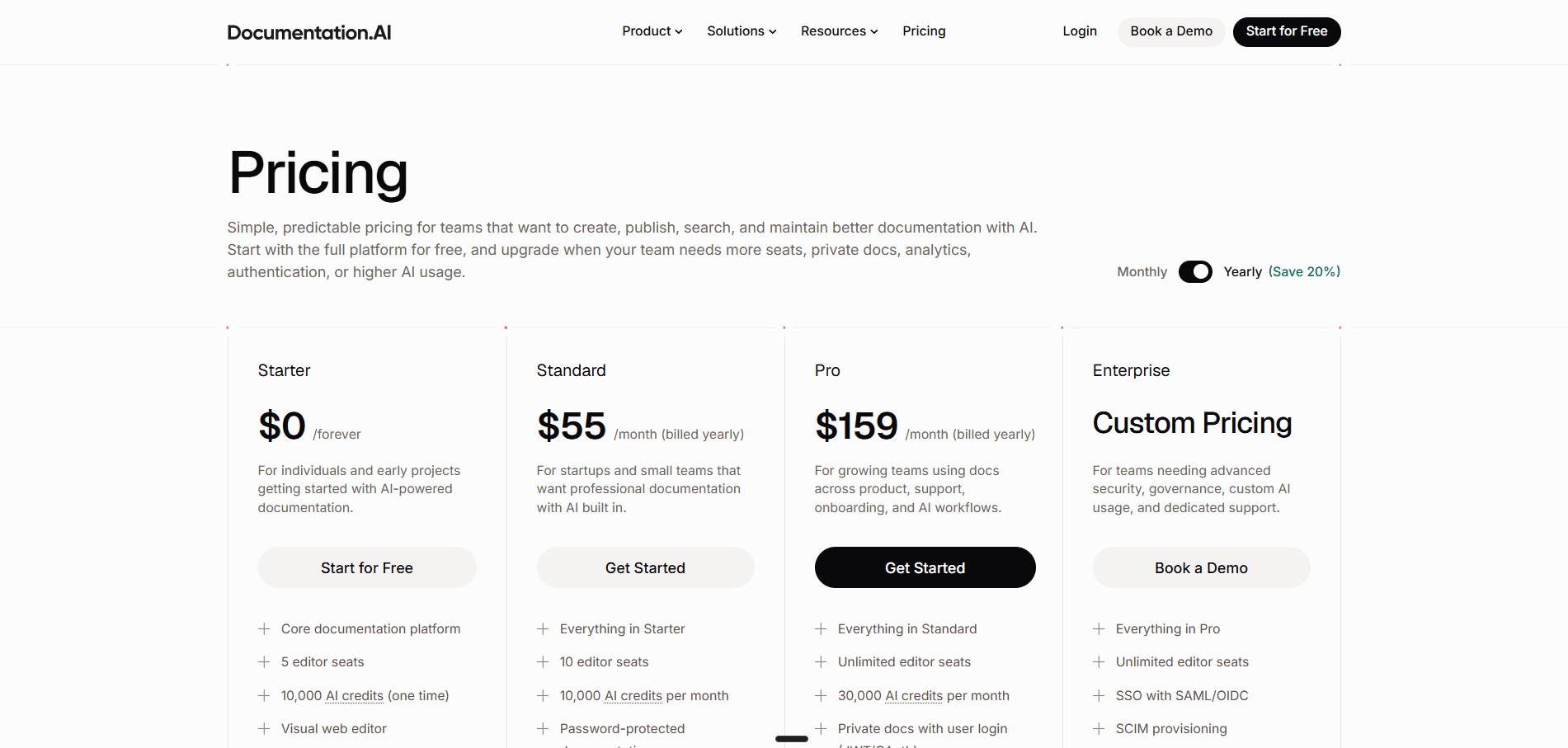
Starter is free with five editor seats, one documentation project, the visual editor, an API playground, a custom domain, the MCP server, standard analytics, and 10,000 one-time AI credits covering the assistant and the agent.
Standard is $55 a month. Seats double to 10, a second project opens up, and the one-time credit grant becomes 10,000 credits every month. It adds password-protected documentation, external sources for the assistant, embedding the assistant outside your docs, and PDF export.
Pro is $159 a month. Editor seats become unlimited, projects rise to four, and the monthly allowance triples to 30,000 credits. It adds reader login through JWT or OAuth, role-based permissions, advanced analytics, priority support, and migration services.
Enterprise is custom on top, adding SSO with SAML or OIDC, SCIM provisioning, and dedicated support.
What the Same Requirements Cost on Each
With one entry price at zero, comparing headlines settles nothing. Price a set of requirements instead of a plan.
| What you need | Fern | Documentation.AI |
|---|---|---|
| One public docs site with a custom domain and a reader assistant | Free, 10 seats | Free on Starter, 5 seats |
| The same site with 11 people editing it | Enterprise, quoted | $55/mo on Standard |
| 1,000 reader questions a month | Enterprise, quoted | $55/mo on Standard |
| A second documentation site for a second product | Enterprise, quoted | $55/mo on Standard |
| Four documentation sites | Enterprise, quoted | $159/mo on Pro |
| Reader login with JWT or OAuth | Enterprise, quoted | $159/mo on Pro |
| Role-based permissions for your team | Enterprise, quoted | $159/mo on Pro |
| Docs styled to your design system | Enterprise, quoted | Custom CSS and JavaScript on every plan |
| Your branding in the footer, not the vendor's | Enterprise, quoted | Enterprise |
| Generated SDKs in nine languages | No published price | Not available |
That table has a shape worth naming:
- Fern wins the first row outright. Ten seats and a reader assistant on your own domain for nothing is better than anything Documentation.AI gives away, and it is worth saying before the rest.
- It loses every row after it, and to the same thing. Not to a higher price, but to the absence of one. Nine of the ten rows end in a quote.
- The gap opens earlier than teams expect. A public docs site clears 125 reader questions in a week, so the AI allowance, not headcount, is usually what ends the free plan.
Pricing verdict: Fern if you stay inside the free plan, Documentation.AI the moment you do not. That is a narrower verdict than this section used to carry, and it is the honest one. Ten free seats on your own domain is the better deal at the start. What follows it is a ladder with one rung: a growing team reaches an eleventh editor, a second product, reader login, a brand that needs its own CSS, or 126 reader questions in a month, and every one of those is the same sales conversation. Documentation.AI prices all of them on a page. That structure makes sense if the SDK contract is what you are really buying. If it is not, you are negotiating for features your alternative simply lists.
Every figure above sits on the page rather than behind a quote. Compare the plans against what your team actually needs.
Fern Pros and Cons
The pros come from our build and from Fern's own documentation. The cons are the same, and we have flagged where a limit is documented rather than observed. There is no meaningful review-site corpus for Fern, so nothing below is sourced from reviewer sentiment.
Pros
- SDK generation is the real product. Nine languages, published to the major registries, regenerated on every spec change. Nothing else in this comparison does it.
- The widest specification support in the category. AsyncAPI, gRPC, GraphQL, OpenRPC, and Protobuf alongside OpenAPI, on every plan.
- A free tier that does real work. Ten seats, a custom domain, password protection, PDF export, and Ask Fern, at zero.
- A capable block editor with dev mode beside it. Writers work in blocks, engineers work in Markdown, in the same tab.
- Thoughtful reader AI. Answers scoped to the reader's role, browser-side PII masking, and a resolution rate you can filter and export.
- Custom React in published docs. Very few hosted platforms allow it at all, though Fern holds it for Enterprise.
Cons
- Git is required, not optional. Fern Editor will not open without a connected repository, and every edit becomes a pull request someone has to merge.
- One site on both plans. The free plan gets one, and a second product means an Enterprise conversation.
- Everything past a shared password is Enterprise. Reader login, RBAC, member roles, unbranded output, and localization are all quoted rather than listed.
- A small AI allowance from one shared pool. The free plan's 250 credits come to 125 reader answers a month, every agent run competes with them, and there is no published way to buy more.
- No preview inside the platform. Previewing locally needs Node 22, the Fern CLI, and a global pnpm install, and runs without search, SEO, or authentication.
- The agent is the weak part. It edits GitHub repositories only, and in our build it stalled when we chained a structural change with another AI feature.
Feature-by-Feature Final Breakdown
| What actually differs | Fern | Documentation.AI |
|---|---|---|
| Publishing without Git | Not supported | Quick setup, no repository required |
| Every edit is a pull request | Yes, always | Optional, branch-based |
| Docs sites included | 1, on both plans | 1 free, 2 at $55, 4 at $159 |
| Editor seats | 10, then quoted | 5, then 10, then unlimited |
| Entry paid price | None published | $55/mo |
| SDK generation | 9 languages, published to registries | Code samples only, no published SDKs |
| Specification support | OpenAPI, AsyncAPI, gRPC, GraphQL, OpenRPC, Protobuf | OpenAPI |
| Custom React components | Enterprise, quoted | Not supported |
| Preview | Local CLI install, nothing in-dashboard | Preview URL per branch |
| Reader AI allowance | 125 answers/mo, shared with the agent | 1,000 answers/mo at $55, 3,000 at $159 |
| What happens at zero credits | Not documented | AI pauses, no overage billing |
| Automated maintenance | Scheduled prompts, daily or weekly | Templated workflows, on a schedule or on merge |
| AI context sources | Repository and site analytics | Repositories, Jira, Confluence, reader feedback |
| Agent Git support | GitHub only for editing | GitHub or GitLab |
| Remove vendor branding | Enterprise, quoted | Enterprise |
| Reader login and RBAC | Enterprise, quoted | $159/mo on Pro |
| Localization | Enterprise, quoted | Included |
Fern wins the rows that describe an API product: SDKs and specification breadth. Documentation.AI wins the rows that describe running a docs site: who can publish, how many sites, how many seats, how much AI, and how much of it needs a sales call.
Who Fern Is Best for and Who Doesn't Need SDK Generation
Fern Is the Right Choice If
- Your customers install a package rather than copy a snippet. This is the whole case, and it is a strong one. If you are hand-maintaining client libraries today, Fern replaces a headcount.
- Your API is not plain REST. WebSockets, SSE, gRPC, GraphQL, or OpenRPC narrows the field to roughly one option.
- Engineering owns the docs outright. If every contributor already merges pull requests without thinking about it, the Git requirement costs you nothing.
You Probably Don't Need SDK Generation If
Everything turns on this question, and it is easy to answer aspirationally. Generated SDKs solve a distribution problem, so they earn their cost when strangers integrate with you at scale. They do not when your API is internal or has a handful of consumers you know by name, when your product is a SaaS application with an API on the side rather than an API product, or when the spec is still moving weekly and versioning nine libraries is a commitment you are not ready to make.
If that is you, picture the comparison without the SDK column, because that column is what carries Fern: a single site, a stock theme, vendor branding, 125 reader answers a month, and a sales call for reader login or an eleventh editor.
Look Elsewhere If
- Non-engineers need to publish and you would rather not put a repository in the loop
- You run documentation for more than one product
- Your code is in GitLab and you want the agent, which edits GitHub only
- You want docs corrected by the merge that changed the product, not by next week's scheduled run
- You want reader login, role permissions, or custom styling at a published price
Final Verdict: Which Platform Should You Choose?
Buy Fern if you are shipping SDKs. Nine languages generated from your spec and published to the registries is worth the constraints that come with it, and Documentation.AI does not offer it.
Buy Documentation.AI for everything else. It publishes without Git, so the people who write your docs do not need someone to merge for them. It gives you four projects and unlimited seats at $159 where Fern gives you one site and 10 seats, then a quote. Reader login, role permissions, and custom styling are on the page rather than behind one. And its AI fixes the page on the merge that broke it, on an allowance eight times the size.
Switching costs less than most teams assume, which is worth knowing before price enters it. Both platforms keep pages as Markdown and MDX in Git, so the writing moves as files and OpenAPI specs import directly. The real work is navigation and preserving your URLs, and Pro includes migration services for exactly that. Videograph came across from ReadMe.
The fastest way to settle it is to stop reading comparisons and run one section of your own documentation through both. Documentation.AI's free plan carries five seats and 10,000 AI credits with no card and no trial clock, so start free and point the agent at your messiest pages, book a demo if SSO or a security review is in your way, or bring a migration question to our team directly in the Documentation.AI Slack channel.
Related Fern Comparisons
Weighing more than one platform? These cover the rest of the field:
- Fern alternatives, five platforms ranked for teams that have outgrown the free plan
- Fern pricing, the free plan, the Enterprise gate, and the unpriced SDK side worked through
- Fern review, the whole product scored on the same eight criteria as every review in the series
- Mintlify vs Documentation.AI, docs-as-code against an AI-first workflow
- Redocly vs Documentation.AI, a Git-native OpenAPI platform against a full docs set
- ReadMe vs Documentation.AI, API-first developer hubs against full docs sets
Frequently Asked Questions
1. How Much Does Fern Cost in 2026?
Fern's documentation product has two plans. The Free plan costs nothing forever and carries 10 team members, one site, 1,000 pages, 2,000 page generations a month, and 250 AI credits. Enterprise is a custom quote covering reader authentication, RBAC, custom CSS and React, localization, self-hosting, unbranded output, and multiple sites. There is no tier in between. SDK generation is priced separately and does not appear on the pricing page at all.
2. Does Fern Require GitHub or GitLab?
Yes. Fern Editor, the visual editor non-technical contributors use, requires a connected Git provider before it works, and every edit it makes opens a pull request on GitHub or a merge request on GitLab. Fern Agent goes further and can only edit documentation stored in a GitHub repository, though its analytics tools work with any provider. Documentation.AI's quick setup publishes a live site with no repository at all, and lets you connect one later.
3. How Many Documentation Sites Does Fern Include?
One, on both plans. Running a second product's documentation means an Enterprise conversation. Documentation.AI includes one project on the free Starter plan, two on Standard at $55 a month, and four on Pro at $159 a month.
4. Can You Remove Fern Branding From a Published Site?
Only on Enterprise. Fern's own pricing comparison lists branding removal as a custom Enterprise item, so a free-plan site ships with Fern's name in the footer. Documentation.AI is the same on this point, with footer branding removed on Enterprise, so treat it as a wash rather than a reason to switch.
5. What Does an AI Credit Cost on Fern?
Fern publishes three rates: Ask Fern is two credits per message, an AI-generated example is one credit, and a docs update session in Slack is 50 credits. The rate is cheap and the allowance is small, so the free plan's 250 credits a month come to 125 reader answers or five agent sessions from a single shared pool, with no published way to buy more. Rollover and what happens when the balance reaches zero are not documented. Documentation.AI charges 10 credits per reader question, five for a quick edit, 35 for a single page edit, 50 for a new page, and up to 320 for a full restructure, and it does document the rest: 50 percent of unused credits roll over, and running out pauses the AI rather than generating an overage bill.
6. Does Fern Have an AI Assistant on Published Docs?
Yes, on every plan including the free one. Ask Fern runs on Claude models with retrieval over your content and returns cited answers. It respects role-based access control, can mask personal information in the browser before it is sent, and supports guidance rules that override its answers on sensitive topics. Documentation.AI also includes its assistant on every plan, adds confidence scoring on each answer, and provides a configurable fallback to your support channel.
7. Can Documentation.AI Generate SDKs Like Fern?
No, and this is Fern's clearest advantage. Documentation.AI generates copyable code samples for each endpoint from your OpenAPI specification, in multiple languages, which covers a reader who wants working code on the page. Fern generates full client libraries in nine languages and publishes them to npm, PyPI, Maven Central, and the other language registries. If your customers install a package rather than copy a snippet, that is a real difference and Fern is the correct choice.
8. Does Either Platform Update Documentation Automatically?
Both do, and Fern is often written up as though it does not. Fern Agent automations run daily or on a chosen weekday, take a prompt of up to 2,000 characters, and can review reader feedback and open a pull request fixing the pages people complained about. Documentation.AI's workflows run on a schedule too, and add a trigger Fern does not have: a pull request merging. They also ship as templates rather than prompts, covering broken link audits, style guide enforcement, changelog generation, and API sync from code, and its Self-Heal workflow reads 30 days of ratings, comments, and assistant confidence scores before proposing fixes. The practical gap is trigger and context, not whether automation exists.
Sources
Every figure and capability above was checked against each vendor's own current documentation in September 2026.
Fern
Documentation.AI
Docs without a repo?
Publish before you connect Git
Quick setup skips GitHub entirely and drops you into the editor, with the AI already switched on.
Start freeNo credit card required