Redocly vs Documentation.AI (2026)
Redocly is an API tooling company with a documentation platform inside it, giving a spec-first team linting, mock servers, five Git providers, and a reviewer that reads OpenAPI and Markdown together. It also has no free plan, no block editor, analytics a tier above its entry plan, and an Ask AI that is free only while in beta. We built the same docs on both and priced them.

Roop Reddy · Co-Founder, Documentation.AI
Last updated
On this page
- Redocly vs Documentation.AI: The Short Answer
- How We Tested Both Platforms
- Setup and Onboarding: What's Easier?
- Editing and Restructuring Docs: Spec-First Workflows vs Visual Editing
- AI Features Compared: What Each Tier Unlocks
- Published Docs Experience: Developer Portals, Search, and Page Limits
- Redocly Pricing vs Documentation.AI Pricing Comparison
- Redocly Pros and Cons
- Feature-by-Feature Breakdown: Where Each Platform Leads
- Who Redocly Is Best For?
- Final Verdict: Which Platform Should You Choose?
- Related Redocly Comparisons
- Frequently Asked Questions About Redocly vs Documentation.AI
- Sources
Redocly has been in API tooling longer than most of this category has existed. Redoc is open source with more than 25,000 stars, Redocly CLI is the linter a lot of teams already run in CI, and the commercial platform grew outward from that spec-first core rather than starting as a place to write pages.
Redocly now sells its platform as three flat-priced plans, Pro, Scale, and Enterprise, with unlimited seats and pages on each. Underneath sit the pieces it grew from: Redoc for API reference, Markdown documentation and React pages, an internal API catalog, and Reunite as the cloud workspace underneath all of them.
Documentation.AI starts somewhere else entirely. The documentation set is the product, the AI is expected to write and maintain it rather than validate what someone else wrote, and the person doing the work is as likely to be a support lead as an engineer.
Both platforms are serious. Neither pulls clear on the feature list alone. What separates them is who can contribute, what you pay before a single reader arrives, and whether the AI is there to check your work or to do some of it.
Every price and capability below comes from each vendor's published pricing page and product documentation. Where we describe how something behaved, that is our own build on a trial account, and we say so.
Redocly vs Documentation.AI: The Short Answer
Redocly is the right buy when your API description is the center of gravity and your team already lives in Git. Documentation.AI is the right buy when the docs have to be written and maintained by more than one kind of person, and when you want to see the product working before you pay for it.
Choose Redocly if:
- Your API surface is wider than REST, across OpenAPI, GraphQL, AsyncAPI, and SOAP, with mock servers and linting in the same toolchain
- Your code lives in Bitbucket Cloud, Azure DevOps, or a self-hosted provider, which almost nothing else in this category supports
- You want an internal API catalog with governance scorecards beside your public docs
- You want an AI reviewer on every pull request, reading the spec and the prose together
Choose Documentation.AI if:
- You want to evaluate on your own documentation before paying, which Redocly does not allow past 30 days
- People outside engineering need to publish, without first learning branches, commits, and Markdown syntax
- You want reader analytics and role-based access on the plan you start on, not a tier above it
- You want an AI that drafts inside the editor, and a reader assistant with a published credit price rather than a beta
The short version: Redocly is excellent infrastructure for an API program. As a documentation purchase it is thinner than it looks. There is no free plan at any level. The entry plan now includes unlimited seats and pages, the reader-facing Ask AI, and the MCP server, but the analytics dashboard, SSO, and role-based access control sit a tier up on Scale, page-level permissions sit on Enterprise, and the AI is free only while it is in beta.
Documentation.AI is the stronger buy on the three things that decide most evaluations. It can be judged before it is bought, because the free plan is permanent and the AI runs on it. It can be written in by anyone, because the visual editor does not require Git. And its AI has a price you can plan around, because every task is metered in credits at a published rate on every plan, while Redocly has not yet said what its assistant will cost after the beta. If you want to check that first claim rather than take it from us, the Starter plan costs nothing and ships with the AI switched on.
How We Tested Both Platforms
We built the same documentation set on both platforms and compared the same seven things:
- Signup, onboarding, and first publish
- Connecting an existing repository, and what happens if you do not have one
- Editing a page, then restructuring the site around it
- The AI features in real use, on the authoring side and the reader side
- The published reading experience, including search and the API reference
- What each dashboard reports back about how the documentation is performing
- Total cost at the tier a growing team would actually buy
No winner is declared per category. Each section reports what Redocly did, then what Documentation.AI did, then a verdict on what the difference means in practice. Several of those verdicts go Redocly's way, and on pull request review it is not close.
Setup and Onboarding: What's Easier?
Both platforms get you from signup to a published site inside an afternoon, and Redocly's onboarding is more considered than its reputation suggests. The difference is what the platform assumes you already have.
Redocly
Signup takes email and password, Google, or your organization's SSO, and onboarding asks who you are and what the documentation is for, then uses those answers to shape what it builds. Creating an organization starts a 30-day trial with full access and no credit card, which is worth holding onto, because it is the only free access Redocly offers.
Next comes the project, where you pick a template, Warp Multi-sidebar for moderately complex documentation down to a near-empty minimal starter, then either connect an existing repository or take a Redocly-provided one on a Redocly domain.
Git support runs wider here than anywhere else in this category: GitHub, GitLab, Bitbucket Cloud, and Azure DevOps are all first-class, alongside self-hosted providers. We connected GitHub in under a minute, and the documentation generated quickly with navigation already wired up rather than left as a skeleton.
Documentation.AI
Signup takes a Google account or your own email and a company name, and no Git authorization is requested at any point.
Setup then asks you to pick a workflow rather than a template. Quick setup skips repositories entirely and drops you into the web editor, which is the path for a product manager or a support lead who is not going to open a terminal. The Markdown path connects GitHub or GitLab, syncs both ways, and is the path for a team that wants docs-as-code from the first commit.
Both paths write to the same project, so the choice is not permanent. A team can publish from the browser this quarter and attach a repository next quarter without rebuilding anything.
Verdict: Redocly is the better setup for a team that arrives with a repository. The onboarding questions are worth answering, the templates are sensible, and the Git provider coverage reaches well past GitHub and GitLab, so a team on Azure DevOps or self-hosted GitLab may find this section decides the whole purchase.
Documentation.AI is the better setup for a team that does not arrive with one, or is not sure yet. Quick setup publishes a live site with no repository in the loop, the Markdown path is there when engineering wants it, and switching later does not mean rebuilding.
Both get you live quickly, so the question is not speed. It is whether your first contributor needs a repository, a template, and a shared understanding of docs-as-code before they can begin. On Redocly they do. On Documentation.AI that is one of two available routes.
Editing and Restructuring Docs: Spec-First Workflows vs Visual Editing
This is where the two platforms are furthest apart, and it is not a close call in either direction. Redocly's editor is built for someone who is comfortable with Markdown. Documentation.AI's is built so that comfort is optional.
Redocly
There is no block editor in Redocly. Everything is Markdown, and everything is Git.
The Reunite editor is a browser version of the workflow an engineer already has locally: a file tree, files as tabs you can split into groups, and a toolbar that inserts both Markdown formatting and Markdoc tags such as conditionals, tables, partials, and admonitions. Find and replace runs across the whole project with regular expressions, which is a serious tool and a clear signal of who the editor was built for.
The preview is better than most. The Webview tab renders uncommitted changes live at preset mobile, tablet, and desktop widths, and its status bar carries two numbers that matter: build errors, expandable into a list of broken links, and your running page count. A Documentation tab opens Redocly's own manual beside your file, and a Replay tab sends live requests to API functions without leaving the editor.
Publishing has no shortcuts. Branch, commit, open a pull request, merge to deploy, with previews triggered by a commit on a branch with an open pull request and surfaced as a GitHub check.
Restructuring is a file operation. There is no navigation model above the tree, so moving a section means moving files, updating the sidebar configuration, and handling redirects yourself. The link checker tells you what you broke, which many platforms do not, but it tells you afterwards.
Documentation.AI
The web editor is a WYSIWYG surface with slash commands for components and real-time collaboration, so a support lead can write a page without knowing that MDX exists. The code editor is the same content in VS Code, Cursor, or Windsurf, as ordinary .mdx files in an ordinary repository, where project-wide search and replace, scripted edits, linting, and CI all work unchanged.
Both write to the same source, which is what matters for a mixed team. Someone publishing from the browser and an engineer merging a pull request are not maintaining two versions of the truth.
Structure is a named model rather than a folder tree: dimensions are separate documentation spaces, views are the tabs inside them, and groups and pages sit below. The value shows the first time one site serves two audiences. Ship an API alongside a product and your end users want tasks while your integrators want endpoints, so dimensions make those separate trees in the same project and switching audience swaps the whole navigation.
Changing that structure comes with documented rules: move pages between groups rather than renaming paths, stage a redesign on unpublished pages, and use redirects only when a path truly has to change. All three protect your URLs through a reorganization. The AI agent works on that model directly, moving pages, rewriting navigation, and adding redirects in one instruction, then handing the result back for review.
Review is proportional rather than mandatory. Every non-live branch gets a preview URL a writer can share, and a pull request is there when the change deserves one.
Verdict: Redocly is better inside the editor. Regex find and replace, a live Webview, a build error pane, and a Replay tab make a workspace an engineer will enjoy, and the mandatory pull request enforces review that Documentation.AI leaves optional.
Documentation.AI is better above the page, and better for everyone else. Structural change is a modeled operation an agent can carry out, and a contributor who does not write Markdown can still publish.
The deciding question is who writes your documentation. If that is only people who already send pull requests, Redocly costs you nothing. The moment it is not, the cost is a contributor who stops contributing, and the cheapest way to test that is to hand the web editor to someone on your team who has never opened a terminal.
AI Features Compared: What Each Tier Unlocks
Both platforms have invested heavily in AI and arrived at opposite conclusions about what it is for. Redocly's own documentation states the philosophy in four words: "AI writes. Redocly verifies." That is not a limitation they are hiding. It is the design.
Redocly
Redocly's published guidance on AI writing tells you to prompt your own model outside the platform, then bring the draft back for linting and review. What it builds itself points outward, at agents rather than authors, and it is good.
Agents reading your docs. Every project ships a Docs MCP server at /mcp with nothing to host. It runs the 2026-07-28 protocol version, covers GraphQL as well as OpenAPI, exposes every version of a multi-version API, respects locales, and enforces your RBAC on every call. Opening /mcp in a browser gives a setup page with one-click configuration for VS Code and Cursor. Around it sits an llms.txt that renders OpenAPI samples and discriminator schemas properly, an MCP server card, an A2A agent card, and agent skills you drop into an @skills folder. This is serious agent-readiness work, well ahead of what most documentation platforms ship. It covers the file and the remote server; the in-page layer, WebMCP, is still in origin trial and does not replace either.
Reviewer, the agent that reads your pull requests. Redocly's most interesting AI product, and Documentation.AI has nothing like it. It comments line by line the moment a pull request opens, checking OpenAPI and AsyncAPI for breaking changes, Markdown against the spec it references, security risks framed by the OWASP API Security Top 10, contradictions between pages, and your Redocly configuration. Comments carry a severity, it reads rule files you already keep such as AGENTS.md and CLAUDE.md, it resolves its own threads when you push a fix, and it never blocks a merge. Redocly reports more than 11,900 issues surfaced across 1,700 pull requests in early access, with about 40 percent fixed.
Writer, the half that drafts. Redocly Agent has a second role that matters more to this comparison and gets less attention. Writer turns user feedback and analytics into proposed changes and opens draft pull requests, which is the same idea as Documentation.AI's Self-Heal automation.
Now the catch, and it applies to all of it. Every piece is beta. Reviewer is now listed on every plan with usage limits, as is a project initializer that scaffolds a project from your API, while Writer is Enterprise only. None of it has a published price yet: Redocly will charge for AI usage at general availability and says it will announce the rates at least 60 days ahead. The analytics Writer feeds on start on Scale.
The reader-facing assistant is now on the entry plan. Ask AI indexes OpenAPI, GraphQL, AsyncAPI, and SOAP alongside your Markdown, filters to the active API version, and takes a hidden prompt and suggested questions. In our build it answered quickly and cited sources, and it is as good as anything here.
It is now included on every plan while it is in beta, held back by fair-use rate limits rather than a meter, so nothing AI-related appears on a Redocly invoice today. That will change at general availability, at a price Redocly has not yet set. Redocly runs retrieval over pre-trained models from AWS Bedrock and Google Vertex AI and does not train on your content, which is the right answer for a security review.
So a Pro customer now gets the assistant, the MCP server, and Reviewer, with analytics a tier up and Writer at Enterprise. The open question is no longer access but cost, because none of it has a price beyond the beta.
Documentation.AI
The reader assistant is on every plan, including the free one. It answers with citations and a confidence score, expands or condenses a passage for whoever is writing, and hands the reader to your support email or URL when it cannot answer confidently, so only what the docs genuinely fail to cover reaches a human. That is the cheapest way to keep questions out of your support queue.
The authoring agent works inside the editor rather than only at the pull request, drafting, editing, and restructuring in place with context from connected GitHub repositories, Jira, Confluence, Linear, Notion, HubSpot, and Plain. The Jira connection queries live through OAuth rather than a synced snapshot, so a release note reflects what engineering shipped this sprint.
Above that sit AI automations, triggered on a schedule or after a merge. Templates cover broken link audits, style guide enforcement, changelog generation, API sync from code, and code-driven documentation updates, each leaving a run history with a report and the commits it produced. Self-Heal is the clearest of them: it reads 30 days of page ratings, comments, and assistant confidence scores, finds where the documentation is failing people, and proposes fixes as commits you review.
There are two MCP servers. The reader server gives AI tools read-only access to your published docs. The authoring server lets a coding agent edit pages, change documentation.json, manage branches, and deploy under your team's existing permissions.
Metering is documented to the task, which is what lets you build a budget. A reader question is 10 credits whatever the answer length; a quick edit about five, a page edit 35, a new page 50, a full restructure up to 320. Half of what you do not spend rolls over, capped at 1.5 times your allowance, and there is no overage billing: at zero the AI pauses, the docs stay published, and the invoice does not move.
Verdict: Redocly is better at serving your docs to other people's agents, and Reviewer has no Documentation.AI equivalent. If your worry is an engineer merging a breaking change while the tutorial keeps the old field name, Redocly built the thing that catches it.
Documentation.AI is better on the authoring side. Its assistant, authoring agent, and scheduled automations are on every plan, the free one included, running on the included credits, and each task has a published credit cost.
The gap here has narrowed. Redocly's entry plan now carries the reader assistant, the MCP server, and Reviewer, so the difference is drafting, which Redocly keeps out of the editor and reserves Writer for Enterprise, and pricing, which Redocly has not yet published for any of its AI.
Evaluate before you pay
A free plan with the AI switched on
Bring your docs across on the free plan and put the assistant in front of real readers first.
No credit card required
Published Docs Experience: Developer Portals, Search, and Page Limits
Both platforms publish fast, clean, responsive sites with light and dark modes. Redocly's published output is the more configurable of the two and the more restrained by default. The constraints worth knowing are on search, on the assistant, and on how many pages you are allowed to have.
Redocly
The API reference carries the published site, as it should, because Redoc is the product this company was built on. It renders OpenAPI, GraphQL, AsyncAPI, and SOAP, includes a mock server for endpoints that are not live yet, and pairs with Redocly CLI for linting and redocly generate-client, an open source generator producing typed clients in TypeScript, Python, Go, and PHP, with hosted SDK generation and publishing in early access on Scale. Customization goes further than most hosted platforms allow: React pages, localization, and component ejection let you take Redocly's own components and rewrite them.
Search is where the tiering starts. Every plan gets search and the AI assistant, and search facets, which let readers narrow results by product, version, or any field you define, start on Scale.
Page caps are gone. Redocly recently dropped its page allowances, so pages are unlimited on every plan and API operations no longer spend a budget, with fair-use build and hosting rate limits for very large sites. What scales with the plan is projects, each one a docs site with its own repository and domain, and reaching the project limit prompts you to add one rather than stopping your deployments.
Redocly's own site runs on its platform and is worth browsing before you decide: fast, dense, and clearly built for developers.
Documentation.AI
Published pages get clean typography, light and dark modes, a navigation tree, an in-page table of contents, and global search on every plan. Readers can copy any page as Markdown or open it in Claude or ChatGPT and carry on there.
The API playground turns on automatically when an OpenAPI description is in the project and sends real requests, with server URLs and variables drawn from the spec, plus copyable code samples per endpoint. Those are samples rather than published client libraries, and Redocly's generate-client produces installable typed clients from the same spec, which is a real difference for a team whose customers install a package.
There is no page limit; plans are counted in projects, one on Starter through four on Pro. Customization covers custom CSS and JavaScript, custom React components, and a components library on every plan, though not component ejection, and footer branding is removed on Enterprise. Previews are branch URLs with nothing to install.
The site can also reach into your product. Embedded Docs shows docs pages and the assistant inside your own app, as a panel, a Help button, or a help link on any button that opens the right page beside it. It is on every plan, free included, while Redocly's embeddable assistant widget is a beta on its Scale plan.
Verdict: Redocly is better if the site is primarily an API portal. It leads on the reference, and the spec coverage, mock servers, and component ejection are things Documentation.AI does not attempt.
Documentation.AI is better when you want to see how readers use the site from the start. Search facets and analytics start on Redocly's Scale plan, while here search, the assistant, and standard analytics are on the free plan, and neither platform counts pages.
Redocly Pricing vs Documentation.AI Pricing Comparison
Read this section carefully, because most evaluations are settled here. Redocly recently replaced its per-seat, per-module pricing with flat plans, and every Redocly figure below is the annual rate from its pricing page.
Redocly
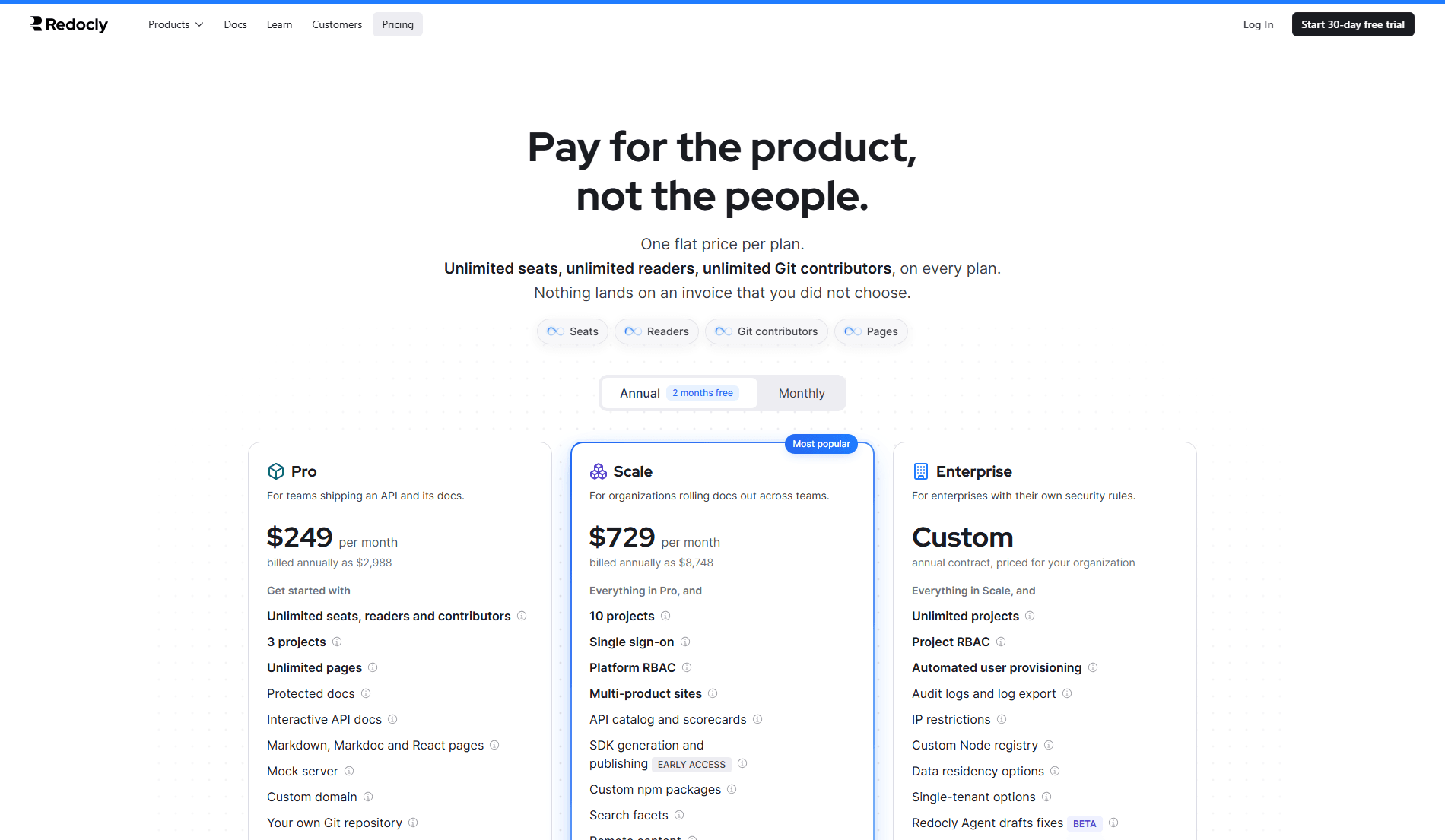
There is no free plan. There is a 30-day trial with full access to everything and no credit card required, after which you subscribe or export your data. Every competitor in this comparison has a free tier. Redocly does not.
Each plan is one flat price, with unlimited seats, readers, Git contributors, and pages. Pro is $249 a month, billed annually as $2,988, with three projects, API reference, Markdown and React pages, a mock server, a custom domain, protected docs, the reader assistant, and the MCP server. Scale is $729 a month, billed annually as $8,748, with ten projects, adding SSO, platform RBAC, analytics, search facets, the embeddable assistant widget, SDK generation in early access, and removal of the Redocly attribution. Enterprise is a custom annual contract through sales, with unlimited projects, page-level RBAC, SCIM, audit logs, and data residency.
Nothing on the invoice is metered. An extra project costs $390 a year on Pro or Scale, and reaching the project limit prompts you rather than charging you. The AI features carry no charge while they are in beta, and Redocly says usage-based AI pricing will take effect at general availability with at least 60 days' notice, so the reader assistant is the one line you cannot yet budget. Customers on the older Redoc, Revel, Reef, and Realm plans can keep them for at least a year.
Our Redocly pricing guide works through each plan in full, with worked examples for teams of different sizes.
Documentation.AI
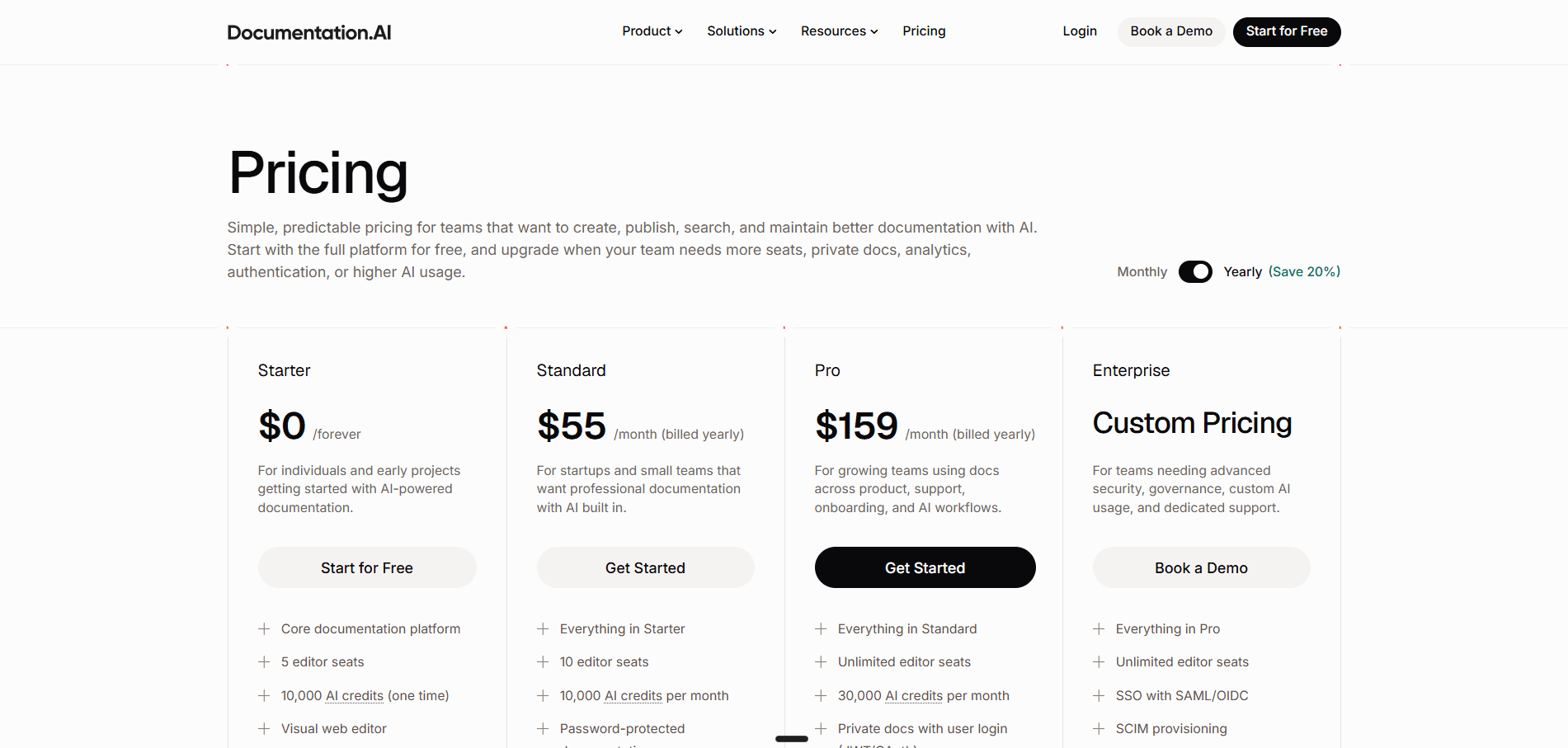
All figures are the annual rate, and the plan is priced rather than the seat.
Starter is free permanently: five editor seats, one project, the web editor, an API playground, a custom domain, the MCP server, standard analytics, and 10,000 one-time AI credits that make the assistant and the authoring agent fully usable.
Standard is $55 a month billed annually ($69 billed monthly) for 10 seats, two projects, 10,000 credits every month, password protection, and external sources for the assistant.
Pro is $159 a month billed annually ($199 billed monthly) for unlimited seats, four projects, and 30,000 credits, adding reader login through JWT or OAuth, role-based permissions, advanced analytics, PDF export, and migration services. Enterprise is custom on top, adding SSO, SCIM, and dedicated support.
What the Same Requirements Cost on Each
Both platforms now price the plan rather than the seat, and headline numbers still hide what each plan includes, so the useful exercise is to price a team. Take eight people who touch documentation, a docs site of 250 pages, and a wish for a reader assistant.
| What you need | Redocly | Documentation.AI, billed annually |
|---|---|---|
| A free plan to evaluate on | None, 30-day trial only | Starter, free permanently |
| Markdown documentation, not just API reference | Included from Pro | Included |
| 8 people editing | $249/mo on Pro, unlimited seats | $159/mo on Pro, unlimited seats |
| 250 pages, or a 120-endpoint API | No page limit on any plan | No page limit |
| Reader-facing AI assistant | Every plan, free during beta under fair-use limits | Every plan, 10 credits per question |
| Analytics dashboard | Scale, $729/mo | Free on Starter, advanced on Pro |
| MCP server | Every plan, reader-side | Every plan, reader and authoring |
| Search with facets | Scale, $729/mo | Included |
| Role-based permissions | Scale for platform roles, Enterprise for page-level | $159/mo on Pro |
| A second documentation site | Included, three projects on Pro | $55/mo on Standard |
Run the arithmetic and the Redocly column turns on one requirement. Pro at $249 a month covers the eight people, the 250 pages, the assistant, and the MCP server, with no analytics and no role-based permissions. Add either and it is Scale at $729 a month. Documentation.AI Pro covers all of it at $159 a month, and the eight people alone fit Standard at $55, both billed annually.
Pricing verdict: Redocly's flat plans have removed the per-contributor arithmetic, and Pro is a fair price for an API team that needs the reference, the assistant, and the MCP server. The step comes when you want analytics or role-based access, which takes the bill from $249 to $729 a month. Documentation.AI prices the platform the same way, and $159 a month billed annually covers unlimited seats, four projects, RBAC, advanced analytics, and reader login, with AI on a published credit rate rather than a beta.
Comparing this against a Redocly quote? Bring your plan, your project count, and the features you need, and we will put the two side by side. Book a demo.
Redocly Pros and Cons
Everything below comes from Redocly's own documentation and from our build on a trial account.
Pros
- API tooling that goes past documentation. OpenAPI, GraphQL, AsyncAPI, and SOAP, with mock servers, linting, and an open source CLI many teams already run in CI.
- Git provider coverage nobody else matches. Bitbucket Cloud, Azure DevOps, and self-hosted providers alongside GitHub and GitLab.
- Reviewer. A pull request reviewer that reads the spec and the prose together and catches what a linter cannot.
- API catalog. An internal API catalog with governance scorecards on Scale, which most documentation platforms do not attempt.
- Component ejection. You can take Redocly's own components into your project and rewrite them, which almost no hosted platform allows.
- It tells you what readers could not find. Search filtered to "most not found", assistant conversations with likes and dislikes, and CSV export throughout.
Cons
- No free plan of any kind, only a 30-day trial that starts on Pro.
- Analytics and access control sit a tier up. Analytics, SSO, platform RBAC, and faceted search start on Scale, and page-level RBAC and SCIM on Enterprise.
- Reader AI has no price yet. The assistant and MCP server are free only while they are in beta, and Redocly will set usage-based pricing at general availability.
- Projects are capped per plan, three on Pro and ten on Scale, with each extra docs site bought separately.
- No visual authoring at all. Markdown and Git, with a toolbar.
- No authoring AI in the editor. Writer, which drafts fixes as pull requests, is an Enterprise beta, and nothing drafts while you write.
- Almost no independent review coverage, so there is little third-party evidence to weigh against the vendor's own claims.
Feature-by-Feature Breakdown: Where Each Platform Leads
Only the differences that change a decision are below. Where both platforms do roughly the same thing, and they often do, there is no row for it.
| Redocly | Documentation.AI | |
|---|---|---|
| Free plan | None, 30-day trial | Permanent, 5 seats, 10,000 credits |
| Pricing model | Flat per plan, $249/mo Pro, $729/mo Scale, unlimited seats | Unlimited seats at $159/mo billed annually |
| Page limits | None on any plan, fair-use rate limits | None |
| Projects included | 3 on Pro, 10 on Scale, extras $390/yr | 1 free, 2 on Standard, 4 on Pro |
| What counts as a seat | Nothing, seats are unlimited on every plan | Editors only, readers free on both |
| Hitting a limit | The project limit prompts an upgrade, nothing is billed | AI pauses, docs stay published |
| Publishing without Git | Not supported | Quick setup, no repository |
| Git providers | Five, including Azure DevOps and self-hosted | GitHub, GitLab |
| Visual editing | None, Markdown only | WYSIWYG, or the same MDX in your IDE |
| Restructuring | Manual file moves | Agent on a dimensions and views model |
| Reader assistant | Every plan, free during beta, fair-use limits | Every plan, 10 credits per question |
| Docs and AI inside your product | Embeddable assistant widget, beta on Scale | Embedded Docs and help links, every plan |
| Authoring AI | Writer, Enterprise beta, unpriced | Every plan, including free |
| Automated maintenance | Writer, Enterprise beta | Scheduled and merge-triggered automations, every plan |
| AI pull request review | Reviewer, beta on every plan | Not available |
| Analytics | Scale and up | Free on Starter, advanced on Pro |
| MCP server | Every plan, reader-side | Every plan, reader and authoring |
| Spec support | OpenAPI, GraphQL, AsyncAPI, SOAP | OpenAPI |
| Mock server, API catalog, monitoring | Mock server on every plan, catalog on Scale, Respect on Enterprise | Not available |
| SDK generation | generate-client, open source, hosted generation in early access on Scale | Code samples per endpoint |
| Custom React components | Supported | Every plan |
| Component ejection | Supported | Not supported |
Redocly leads on spec breadth, Git coverage, pull request review, and the tooling either side of the docs site. Documentation.AI leads on evaluation before purchase, visual authoring, drafting AI, and reader analytics on its entry plans.
Who Redocly Is Best For?
Redocly is the right choice if the OpenAPI file is the center of the operation, driving the reference, the mock server, the linting rules, and the monitoring as one system rather than a docs site with a spec attached. It is also the answer when your code sits in Bitbucket Cloud, Azure DevOps, or a self-hosted provider, when you need an internal API catalog with governance scorecards, or when you want breaking changes caught before a human reads the pull request. And if engineering owns the documentation outright, Markdown-only editing costs you nothing, because everyone contributing already commits and merges without thinking about it.
Look elsewhere if anyone outside engineering needs to publish, because there is no block editor and their first page means learning Markdown, branches, and pull requests at once. Or if you want reader analytics and role-based access without moving up a tier, or an AI that drafts without an Enterprise contract. Or if you need to know today what reader AI will cost next year, since Redocly has not priced it beyond the beta.
A deeper look at the product on its own terms, rather than against an alternative, is in our Redocly review.
Final Verdict: Which Platform Should You Choose?
Buy Redocly if the API description is the product. Nothing here replaces its mock servers, its pull request reviewer, or four spec formats across five Git providers. Buy Documentation.AI for everything else, because the real difference is who can write and how early you see what readers need. Redocly's entry plan now carries the assistant and the MCP server, but there is no free plan, analytics and role-based access wait a tier up, nothing drafts in the editor, and the AI has no price beyond its beta. Documentation.AI puts the assistant, standard analytics, automations, and a drafting agent on a permanent free plan, with every AI task at a published credit cost. Point it at your messiest section and judge it against your own documentation rather than ours.
Migrating from Redocly?
Content moves as files, since both platforms keep pages in Markdown in Git and OpenAPI descriptions import directly. The work is rebuilding navigation and preserving your existing URLs, and Pro includes migration services.
Start free, book a demo, or talk it through with our team on the Documentation.AI Slack channel: Join here
Related Redocly Comparisons
Weighing more than one platform? These cover the rest of the field:
- Redocly alternatives, five platforms ranked for teams moving off Redocly
- Mintlify vs Documentation.AI, docs-as-code against an AI-first workflow
- GitBook vs Documentation.AI, per-site billing against bundled projects
- ReadMe vs Documentation.AI, API-first developer hubs against full docs sets
- Document360 vs Documentation.AI, a knowledge base platform against an AI-native one
- Archbee vs Documentation.AI, one portal for several audiences against an AI-native platform
- Theneo vs Documentation.AI, an API-spec-first platform against a full docs set
- Fern vs Documentation.AI, Git-required SDK-first docs against Git-optional publishing
- Mintlify vs Redocly, the two Git-native platforms on flat plans
Frequently Asked Questions About Redocly vs Documentation.AI
1. Does Redocly Have a Free Plan?
No. Redocly offers a 30-day free trial on Pro with no credit card required, after which you subscribe or export your data. Paid plans start at Pro, $249 a month billed annually with unlimited seats, and Scale, which adds analytics and SSO, is $729 a month, which our Redocly pricing guide breaks down in full. Documentation.AI's Starter plan is free permanently and includes five editor seats, a custom domain, an MCP server, and 10,000 AI credits.
2. Does Redocly Limit How Many Pages I Can Publish?
Not any more. Redocly recently dropped its page allowances, so pages are unlimited on every plan and never billed, with fair-use build and hosting rate limits for very large sites, and Redocly asks teams expecting more than ten thousand pages to plan capacity with it. Its plans are counted in projects instead, three on Pro, ten on Scale, and unlimited on Enterprise. Documentation.AI does not limit pages either; its plans are counted in documentation projects.
3. Can Non-Technical People Write Documentation in Redocly?
They can, but it is a real change of habit. Redocly has no block or WYSIWYG editor. Everything is Markdown in the Reunite editor, with a formatting toolbar and Markdoc tag inserts, and every change goes through a branch, a commit, and a pull request. Documentation.AI's web editor is WYSIWYG with slash commands and real-time collaboration, and it publishes to the same source engineers push to.
4. Does Redocly Have an AI Writing Assistant?
Not in the editor, and not below Enterprise. Redocly Agent has a Writer role that turns signals such as user feedback and analytics into proposed documentation changes and opens draft pull requests, but it is an Enterprise beta with no published price. For everyday drafting, Redocly's published guidance is still "AI writes. Redocly verifies." You prompt your own model outside the platform and bring the result back for linting and review. Documentation.AI's authoring agent drafts, edits, and restructures inside the editor on every paid plan, and is usable on the free plan with the included credits.
5. What Is Redocly Reviewer and What Does It Cost?
Reviewer is an AI agent that comments line by line on a pull request as soon as it opens. It checks OpenAPI and AsyncAPI descriptions including breaking changes, reviews Markdown for clarity and cross-checks it against the referenced spec, flags API security risks framed by the OWASP API Security Top 10, catches contradictions across documents, and reviews Redocly configuration. It reads existing rule files such as AGENTS.md and CLAUDE.md, resolves its own comments when you push a fix, and never blocks a merge. It is now listed on every plan as a beta with usage limits, and Redocly has not published what it will cost once AI usage is priced at general availability.
6. Does Redocly Have Analytics?
Yes, and better than it is usually given credit for, but it starts on the Scale plan. The Reunite analytics page reports page views and unique users, top pages, paths, and referring domains, search queries with a filter for the ones that returned no results, and AI assistant conversations expandable to the full question, answer, and sources with like and dislike counts. Everything exports to CSV. There is a separate feedback report with statuses and CSV or JSON export. Documentation.AI includes standard analytics on the free plan and advanced analytics on Pro at $159 a month billed annually, splitting traffic across people, AI agents, and bots and crawlers, with confidence scoring on assistant answers and a read-only REST API.
7. How Hard Is It to Migrate From Redocly to Documentation.AI?
Less work than most teams expect, because both platforms store pages as Markdown in a Git repository and both import OpenAPI descriptions directly, so the content itself transfers without rewriting. The effort sits in rebuilding navigation and preserving your existing URLs so inbound links and rankings survive. Documentation.AI includes migration services from the Pro plan.
8. What Do Redocly Users Say in Reviews?
There is very little to report, and that is worth saying plainly rather than filling with invented sentiment. Redocly has almost no presence on the major software review sites, so there is no meaningful independent rating or reviewer corpus to weigh against the vendor's own claims. Everything in this comparison comes from Redocly's published documentation or from our own build on a trial account.
Sources
Every figure and capability above was checked against each vendor's own current documentation and pricing page.
Redocly
Documentation.AI
Evaluate before you pay
A free plan with the AI switched on
Bring your docs across on the free plan and put the assistant in front of real readers first.
No credit card required