Archbee vs Documentation.AI: Knowledge Portal vs AI-Native Docs (2026)
Archbee builds a knowledge portal that non-technical teams can run without help, and it does that part well. What surprised us was the invoice: analytics, the API, PDF export, and the AI itself are all sold separately. We built the same docs on both platforms and added up what a real team pays.

Monika B. · GTM Engineer, Documentation.AI
Last updated
On this page
- Archbee vs Documentation.AI: The Short Answer
- How We Tested Both Platforms
- Setup and Onboarding: Publishing With and Without Git
- Editing and Restructuring Docs: Block Editing and 2-Way GitHub Sync
- AI Features Compared: What's Included and What's an Add-On
- Published Docs Experience: Search, Widgets, and Reader-Facing AI
- Archbee Pricing vs Documentation.AI Pricing: Base Tiers Plus Add-Ons
- The Biggest Trade-Offs With Archbee
- Feature-by-Feature Breakdown: Where Each Platform Pulls Ahead
- Who Should Choose Archbee vs Documentation.AI?
- Moving off Archbee: What Actually Has to Happen
- Final Verdict: Which Platform Should You Choose?
- Related Archbee Comparisons
- Frequently Asked Questions
- Sources
Archbee calls itself a knowledge portal platform. It is built for the team that wants one branded place holding product docs, developer docs, and internal runbooks, edited by people who have never opened a terminal.
Documentation.AI is built around the documentation set staying accurate after it ships, with an agent that writes from your repository, your Jira, Confluence, Linear, and Notion, and your HubSpot or Plain support desk, and analytics that report which reader questions your docs failed to answer.
The two platforms overlap on most of the basics, so the interesting differences are in what each one includes in the price and what each one does with your documentation after you publish it.
Every figure here comes from each vendor's own published pricing and product documentation. Where we describe how something behaved, that is our own testing on a trial account, and we say so.
Archbee vs Documentation.AI: The Short Answer
Archbee is the better buy when you want a polished knowledge portal for a small editorial team and you are happy to pay for the parts you use. Documentation.AI is the better buy when you want AI, analytics, and API access in the plan rather than beside it, and when keeping the docs current is the actual problem.
The pricing model is where you have to pay attention. Archbee's entry plan is $80 a month for five team members, and AI, analytics, public API access, PDF export, and the in-app widget are each purchased on top of it. Analytics alone costs another $80, the same as the plan it sits on.
Documentation.AI's entry plan is $55 a month billed annually for 10 seats with the AI and the analytics in the price, and its free plan already carries the assistant, the agent, and standard analytics. PDF export comes with Pro at $159 a month billed annually, as part of the plan rather than an add-on. Compare the plans side by side, or skip ahead to what a real team pays on each.
Archbee makes sense if you are building a branded knowledge portal that a small, non-technical group keeps stocked, and you need deep reader access control for partner-facing docs.
Documentation.AI makes sense if documentation is owned across product, support, and engineering, and the hard part is keeping it accurate after it ships.
How We Tested Both Platforms
We built the same documentation on each platform and compared the same seven things:
- Signup and onboarding
- Templates and starting structure
- Editing and restructuring content
- Git sync
- The AI features in real use
- The published reading experience
- Total cost at the tier a growing team would actually buy, after add-ons
Archbee has no free tier, so this was a 14-day trial on the Growing plan. Documentation.AI was tested on the free Starter plan. Where something we hit was a plan boundary or an add-on rather than a missing capability, we say which, because that distinction is the whole pricing argument.
Setup and Onboarding: Publishing With and Without Git
Signing up is a solved problem on both. Google or Microsoft or your own email, a couple of questions, and you are inside the product in under two minutes with nothing to install.
The setup that follows is where they diverge, and it is a difference of first question. Archbee asks what kind of document you are making and hands you a template for it. Documentation.AI asks how you intend to write, and whether your docs should live in a Git repository or only in the browser.
Archbee
The questions cover who you are, which company you work for, and how you heard about Archbee. The last one is marketing rather than setup, and it does not change what the product shows you next.
Then you land somewhere genuinely useful. There is a personal space for your own docs, and there are prebuilt templates for user manuals, API reference documentation, and internal documentation, plus department templates across engineering, sales, marketing, and executive. Picking one gives you a structure that is already sensible, and you can preview a template before committing to it.
Nothing else in Archbee's first hour does as much work as that template library, and custom templates can be saved so the next person on the team starts from the same shape.
No free plan. Archbee is a 14-day trial, then a paid plan or nothing. Open source projects can apply for a free Growing plan, and startups can apply for 50% off for two years.
Documentation.AI
Signup follows the same shape, with a Google account or your own email and a company name, and no GitHub authorization required to get started.
Setup then asks you to pick a workflow rather than a document type. Quick setup skips Git entirely and drops you into the visual editor, which is the path for product and support teams who are never going to open a repository. The markdown path connects a GitHub or GitLab repository and syncs both ways, for teams that want docs-as-code from the first commit.
Make that choice deliberately, because it decides where your source of truth lives. It is also not a one-way door: both paths write to the same project, so a team can start in the browser and connect a repository later without rebuilding anything.
Try the setup yourself. Documentation.AI's free plan carries five editor seats, a custom domain, standard analytics, and 10,000 AI credits, with no trial clock. Start free, no credit card required.
Verdict: Archbee's templates are the better landing pad, because you start from a structure instead of a blank page. Documentation.AI asks the more useful question for a team where engineers and non-engineers both contribute: decide up front whether the docs live in Git, and everyone gets the editor that suits them without splitting the content in two.
Editing and Restructuring Docs: Block Editing and 2-Way GitHub Sync
Neither platform requires Markdown fluency and both are comfortable for a writer who has used Notion. The difference shows up when the change you need is structural rather than textual, and when a developer wants to work in the repository instead of the browser.
Archbee
The editor is a Notion-style block surface driven by slash commands, grouped into basic, media, developer, and embedded elements. There is a shortcuts reference at the bottom of the editor that shows you how the keyboard commands work, which is a small thing that saves a new contributor from hunting through help docs.
Restructuring is drag and drop. Documents nest into trees, spaces group into folders, and moving a page around the tab structure took no thought. Creating new documents is fast and tags can be attached to content.
Docs-as-code with GitHub, GitLab, and Bitbucket is included on every paid plan, the sync runs both ways, and Archbee supports standard Markdown plus its own MDX components, so a repo-based workflow keeps the tabs, callouts, and API endpoint blocks. We set up the GitHub sync and it was smooth.
The sync comes with conditions:
- GitHub stays the source of truth. An edit made in Archbee opens a pull request, and whether it lands is up to you.
- In-editor branching is beta. Git-style branches without an external repository shipped recently, and existing spaces cannot be switched onto them.
The review workflow hides behind another plan boundary. Suggested changes, approvals, and user groups with read, write, review, and publish permissions all sit on the $350 Scaling plan, so a two-person team on Growing is publishing straight to production.
Documentation.AI
The web editor is the same kind of surface: slash commands, visual or markdown mode on the same page, and a components library covering tabs, steps, cards, expandables, mermaid diagrams, and code groups. Where Archbee keeps a repository alongside the editor, here the two are the same source. A page is one MDX file, the browser and a code editor in your IDE write to it, and creating a page from the sidebar updates the navigation config for you rather than leaving you to hand-edit JSON.
Structure is a named model rather than a folder tree: dimensions at the top, views as tabs or dropdowns inside them, then groups and pages. Archbee has nothing equivalent to dimensions. Ship an API alongside a product and your end users want tasks and concepts while your integrators want endpoints and authentication. Those become separate trees in one project, so switching audience swaps the whole navigation instead of expanding a folder.
Branches are the working model, not a beta and not a paid tier. Any non-live branch gets its own preview URL, so a writer drafts and shares a link while a developer opens a pull request against the same branch, and merging into the deployment branch is what publishes. Larger edits get a rehearsal rather than going straight to the live site.
Real-time collaboration goes further than we expected. Live cursors and selections are what you notice first, but navigation changes, documentation.json, custom CSS, and script settings sync live too, so two people can reorganize a site together instead of taking turns. Inline comments attach to the selected text as threads you can reply to, resolve, and reopen, with @ mentions and a Comments panel that collects every thread on the branch.
Verdict: Archbee is ahead on the individual document, with a friendly block editor and better Markdown support than its reputation suggests. Documentation.AI is stronger on everything around the document: one source instead of a repository the editor negotiates with, branches and preview links on every plan instead of review workflows at $350, and live structural editing. Writing a page is the easy part; the year after is where these two separate.
AI Features Compared: What's Included and What's an Add-On
Both platforms put AI in the editor and on the published page. Archbee sells it as a metered add-on with billed overage. Documentation.AI includes it in every plan with a credit budget that stops rather than bills.
Archbee
The AI Addon has to be purchased and enabled before any of it exists. Once it is on, Archbee builds vector representations of your documents and you get four things: Ask AI in the search box for internal and published portals, an AI Write Assistant in the block menu, Generate Summary, and External Sources for feeding the assistant content from outside Archbee.
The Write Assistant was the better half in our testing. It shortens, expands, rewrites, translates, and changes tone from a chat box attached to the paragraph you are on, it responded quickly, and the replace-and-continue flow is well judged. For a writer polishing a draft, this works.
Ask AI was less consistent. Inside project documents it struggled to retrieve our own content reliably, while the same feature answered well on template-based documents, and it was slow to respond in both. Archbee's own documentation still describes its AI as in beta and asks readers to rate answers to help improve the model, which matches what we saw.
Shadow Docs is a genuinely clever AI idea. A Shadow Docs folder holds documents that are never shown to readers but are indexed for the assistant, so private code files, rough notes, and internal specs can inform public answers without being published. Point the shadowDocs field in .archbee.yaml at parts of a synced repository and the assistant can answer questions about a codebase nobody can read.
Watch the tokens. The AI add-on includes 20M tokens a month on Growing and 40M on Scaling, and anything past that is billed at $1.20 per 1M tokens. Set the soft and hard limits, because reader usage you do not control can raise the invoice.
Documentation.AI
The AI Assistant answers reader questions with citations and also works for the person writing, expanding or shortening content on request. The documentation agent drafts, edits, and restructures inside the editor and pulls context from connected GitHub repositories, Jira, Confluence, Linear, Notion, HubSpot, and Plain, so pages get written from where the product work actually happened.
Above that sit AI automations, and Archbee has nothing like them. They update the docs from merged code, changelogs, and reader feedback, on merge or on a schedule, and they run on the same agent rather than metering separately. One kind of AI helps you write a page. The other notices the page is now wrong.
There are two MCP servers rather than one. The Reader MCP Server gives AI tools read-only access to your published documentation. The Authoring MCP Server lets an MCP client inspect files, update pages, edit documentation.json, manage branches, and deploy, all under the permissions your team already has, so a docs change can ride along with the code change that caused it. Neither is the same thing as WebMCP, the proposed browser API that lets a page hand tools to an agent in the reader's browser; that is a separate, still-early layer rather than a successor to either server.
Credits, not tokens. 10,000 one-time on Starter, 10,000 a month on Standard, 30,000 on Pro. A reader question is 10 credits, an agent task is five to 320, and half of what you do not spend rolls over. No overage billing: if credits run out the AI pauses and the docs stay live.
Verdict: Archbee's Write Assistant is genuinely good and Shadow Docs is a smart piece of design, but taken as a whole Documentation.AI does more here. The assistant and the agent are in every plan rather than bought separately, spend is capped by pausing rather than billed as overage, and the automations keep pages current instead of only helping you draft them. Archbee's reader-facing AI was also the weaker half in our testing, on a product whose own docs still call it beta.
Paying per add-on?
Analytics and AI, not extras
Bring your docs across and get the assistant, the agent, and the dashboards on one plan.
No credit card required
Published Docs Experience: Search, Widgets, and Reader-Facing AI
Both platforms publish clean, fast, branded sites with light and dark modes, and both put an assistant on the page. What separates them is how much control you get over that assistant and what the site tells you back.
Archbee
Preview was the one slow moment in our testing. It takes a beat to load, but what comes back is accurate: light and dark modes, and Ask AI available inside the document you are previewing. Publishing was smooth and the live site matched the preview.
The portal itself is well built. A custom domain, brand colors and logo, custom JavaScript, full-text search, SEO output including sitemap and structured data, and unlimited readers with no traffic cap, on every plan from $80.
Reader access control is where Archbee is genuinely deep. Password protection, guest accounts, magic links, JWT, JWKS, and per-group private links you can revoke one team at a time. If you publish partner documentation where each customer sees a different portal, Archbee handles it better than anything else we tested.
Ask AI on the published site is the same assistant we tested in the editor, so the same reservations apply: it answers, it cites its sources, readers can rate the answer, and it was slower than we wanted. Tuning it is limited to what the add-on gives you.
Documentation.AI
Publishing runs through the branch you are on. Merge into the deployment branch and the site goes live; until then the branch has its own preview URL you can send to a reviewer.
Ask AI is on every plan including the free one, and it is configurable in ways Archbee's is not. Side panel or floating widget, custom instructions to shape its tone and scope, up to three starter questions, and a fallback that hands the reader to your support email or URL when the assistant cannot answer confidently. That last one is the cheapest way to keep questions out of your support queue, because only what the docs genuinely cannot answer gets through. Readers can also open any page in Claude or ChatGPT and keep working with it.
The docs don't have to stay on the docs site, either. Embedded Docs puts a docs page, the assistant, a floating Help button, or an Ask AI bar inside your own product with a script tag. Help links go further: add one attribute to any button or link in your app, and a click opens the matching page beside it. It is on every plan, the free one included. On Archbee, the same job is a paid add-on.
Analytics is on the free plan, across five tabs. Traffic separates people from AI agents from crawlers and reports what each group reads, so you can watch models consume your docs alongside humans. Search gives you volume, no-result rate, and the individual queries that failed. Feedback gives you a satisfaction rate and the free-text reason behind a thumbs down. The AI Assistant tab scores answer confidence, and filtering for the low scores returns a list of questions your documentation could not answer.
Verdict: Archbee leads on reader access control, where nothing here matches guest accounts, magic links, and revocable per-group links for partner portals. Documentation.AI has the edge on the rest, all on the free plan: a configurable assistant with a support fallback, docs and AI inside your product, and five tabs of analytics. Archbee charges $80 a month for each of the last two.
Archbee Pricing vs Documentation.AI Pricing: Base Tiers Plus Add-Ons
Most evaluations of these two end here. Archbee has a low headline price and a long add-on menu. Documentation.AI has a higher free tier and fewer things sold separately. All figures below are the annual billing rate on both platforms.
Archbee
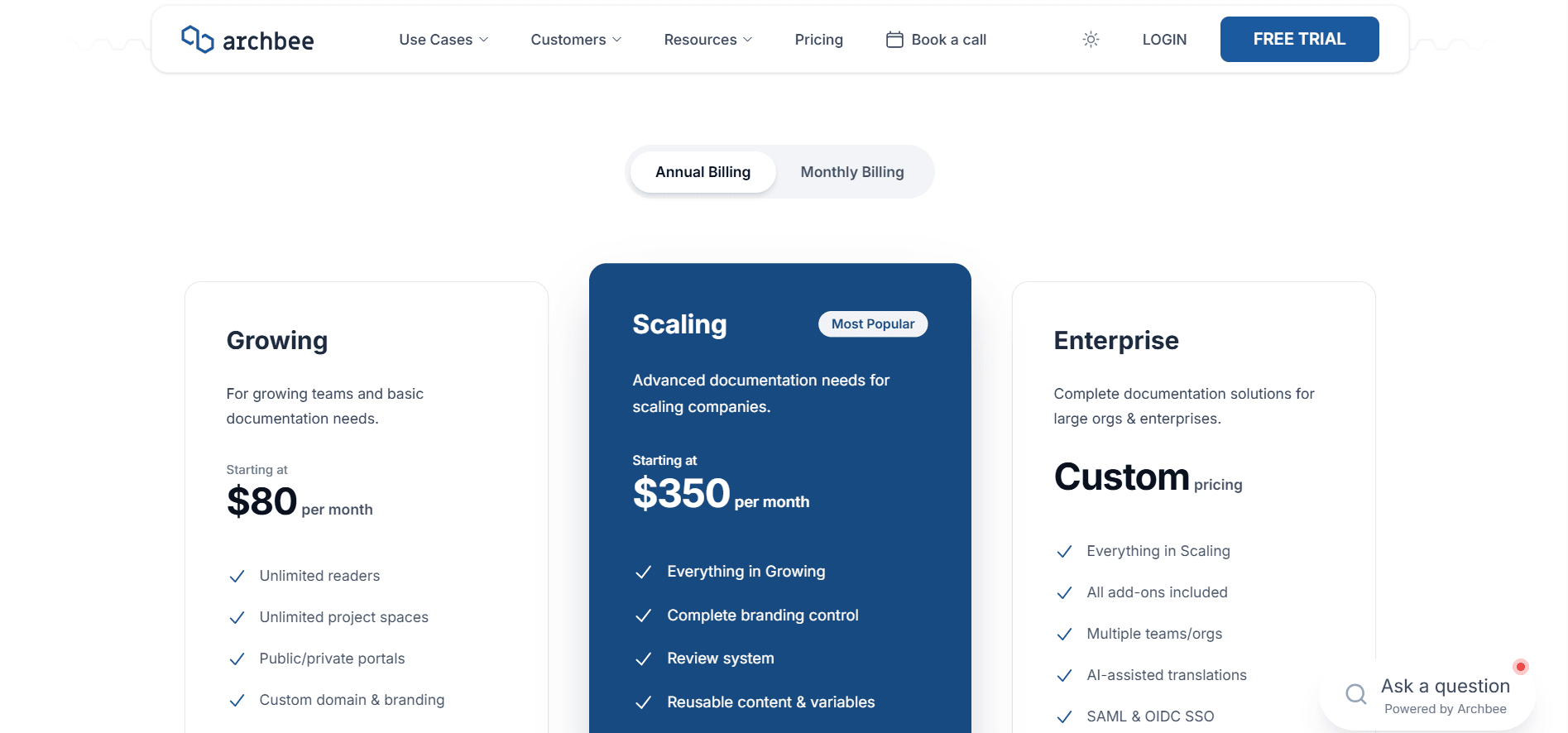
There is no free plan, only a 14-day trial with no credit card required.
Growing is $80 a month and includes five team members (additional members are $5 a month each). You get unlimited spaces and documents, public and private portals, one custom domain, custom branding and JavaScript, password protection, full-text search, SEO and LLM output, document verification, docs-as-code with GitHub, GitLab, and Bitbucket, OpenAPI import with a working try-it console, and the Jira and Slack integrations.
Scaling is $350 a month, also with five team members included (additional members are $10 a month each). It is where the collaboration and branding controls arrive: the review system, user groups with read, write, review, and publish permissions, reusable variables, versioning and localization, space links and space groups, search analytics, custom CSS, custom SEO settings, custom headers, landing pages, footer HTML, and removing the Archbee logo. Guest accounts, magic links, and JWT authentication for readers are here too.
Enterprise is custom, adding multiple organizations, SAML and OIDC SSO, AI-assisted translations, display rules and conditional content, the Intercom and Zendesk integrations, and every add-on included. Cloud-Prem, where Archbee deploys into an AWS subaccount you own, starts at $100,000 a year on a three-year minimum.
Price the add-ons before you commit. Six of them cost about as much as a second plan:
| Add-on | Growing | Scaling | Enterprise |
|---|---|---|---|
| AI (Ask AI, Write Assist, External Sources) | $16/mo, 20M tokens | $40/mo, 40M tokens | Included, 100M tokens |
| Insights (all analytics) | $80/mo | $80/mo | Included |
| Public API & CMS MCP access | $80/mo | $80/mo | Included |
| App widget | $80/mo | $80/mo | Included |
| Q&A on portal pages | $80/mo | $80/mo | Included |
| Print to PDF | $80/mo | $80/mo | Included |
| Static HTML export | $80/mo | $80/mo | Included |
| Extra custom domains | $10/mo | $20/mo | $100/mo |
Token overage on the AI add-on is billed at $1.20 per 1M tokens, with soft and hard limits available in settings.
Do not write all of them off as upsells on basic functionality. These three are real products:
- Insights is the whole analytics layer: views, average time on site, unique visitors, bounce rate, per-page filtering, reader feedback votes and comments, search queries, and a log of Ask AI conversations with ratings. It is a competent dashboard, and it is also why a team on a trial will tell you Archbee has no analytics. Search analytics as a distinct capability needs Scaling as well, so the cheapest route to knowing what readers search for is $350 a month plus $80.
- The app widget embeds the portal or a single article inside your product, loading asynchronously at around 56KB. It works well. It is also $80 a month for something Documentation.AI includes on every plan, free included, with help links that open the right page from any button in your app.
- Q&A lets readers ask questions on portal pages that your team or community answers, turning real questions into a public knowledge base. Also not something Documentation.AI offers.
None of them is bad value on its own. The trouble is that wanting analytics, the API, and in-product help puts you at $240 a month in add-ons before the plan underneath them.
Documentation.AI
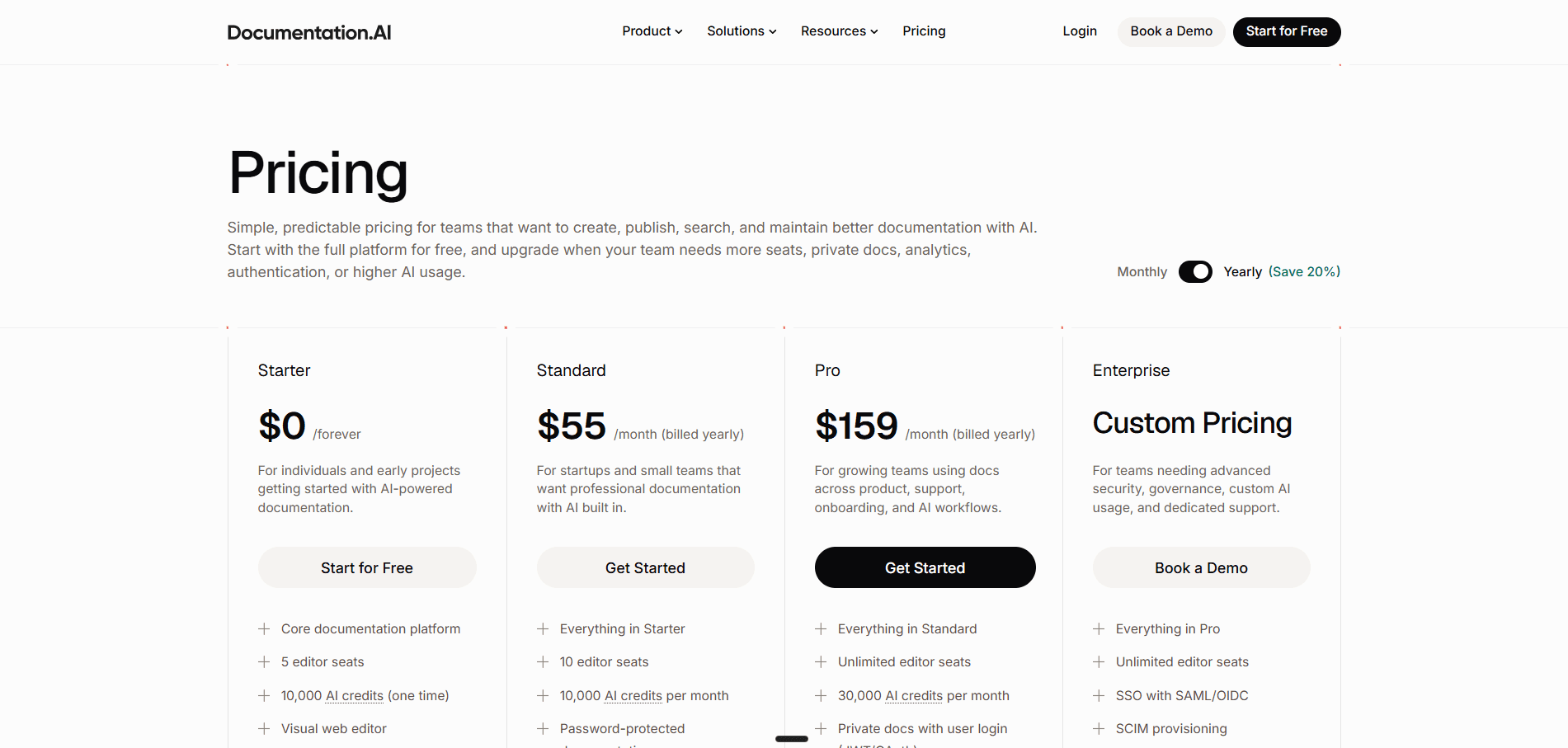
Starter is free and carries five editor seats, one documentation project, the visual web editor, an API playground, a custom domain, the MCP server, standard analytics, and 10,000 one-time AI credits covering the assistant, the agent, and its automations.
Standard is $55 a month billed annually, or $69 billed monthly. It doubles seats to 10, allows a second project, and replaces the one-time grant with 10,000 credits every month. It adds password-protected documentation and external sources for the AI Assistant.
Pro is $159 a month billed annually, or $199 billed monthly. Editor seats become unlimited, projects rise to four, and the monthly allowance triples to 30,000 credits. It adds private docs with user login through JWT or OAuth, role-based permissions, advanced analytics, PDF export, priority migration support, and a private Slack channel. Enterprise is custom, adding SSO with SAML or OIDC, SCIM provisioning, and dedicated support.
What a Real Team Actually Pays
Headline prices are not comparable here, because the Archbee number is a starting point and the Documentation.AI number is the total. Here is what each capability set costs on both, at annual rates.
| What you need | Archbee | Documentation.AI, billed annually |
|---|---|---|
| A public docs site, no AI, no analytics | $80/mo on Growing | Free on Starter |
| The same site with AI and analytics | $176/mo, after the AI and Insights add-ons | Free on Starter |
| Add password-protected docs and a second handful of editors | $201/mo, five extra seats billed on top | $55/mo on Standard |
| Add review workflows, versioning, and custom CSS | $520/mo, now on Scaling with seats billed per head | $159/mo on Pro |
| Add reader login and API access | $600/mo, the API is another add-on | $159/mo on Pro |
Pricing verdict: The $80 entry price is honest, but it buys a plan and not much else, and everything a working docs team eventually wants arrives as a line item: $80 for analytics, $80 for the API, $80 for the widget, $80 for PDF export, AI priced separately with overage on top, and seats billed per head at every tier. Documentation.AI does not work that way. Analytics, the API, the assistant, and the agent are in the plan, AI spend pauses instead of billing, and unlimited seats arrive at $159 billed annually, which is why the same requirements land three to four times cheaper.
Want the same feature set without the add-on menu?
Analytics, the reader assistant, the documentation agent, and a custom domain are all on the Documentation.AI free plan, with no credit card and no trial clock.
Start free or book a demo and bring your existing docs across.
The Biggest Trade-Offs With Archbee
Most of what follows is about the shape of the deal rather than the quality of the software.
Pros
- The template library for user manuals, API references, and internal documentation hands a new docs set a ready-made structure that most platforms leave you to build yourself
- Two-way GitHub, GitLab, and Bitbucket sync with Markdown and MDX support, included on every paid plan
- Shadow Docs lets private code and draft notes inform the reader assistant without ever being published
- Reader access control is deep: password, guest accounts, magic links, JWT, and revocable per-group links
- The in-app widget is mature, and the reader Q&A section is something most competitors, Documentation.AI included, do not offer
Cons
- No free plan, only a 14-day trial, so the site you build while evaluating is not a site you can keep
- Analytics, the API, the widget, Q&A, PDF export, and static HTML export are $80 a month each, on a plan that costs $80 a month
- AI is a separate purchase with overage billed at $1.20 per 1M tokens, so reader usage can raise the invoice
- Ask AI struggled to retrieve our own content inside project documents and was slow in both places we tried it, and Archbee's own docs still call the AI beta
- Five team members on both tiers, so every additional editor is billed per head whichever plan you are on
- The AI helps you write documentation but does nothing to keep it current after you publish
Feature-by-Feature Breakdown: Where Each Platform Pulls Ahead
Only the rows that would change a decision. The stronger option in each is in bold.
| Category | Archbee | Documentation.AI |
|---|---|---|
| Best for | Branded knowledge portals for non-technical teams | Docs sets that several teams maintain |
| Free plan | None, 14-day trial | Free forever, five seats |
| Paid entry | $80/mo, before add-ons | $55/mo billed annually, all in |
| Editor seats | 5 on both tiers, then $5 to $10/mo each | 10 on Standard, unlimited on Pro |
| Sold as add-ons | Analytics, public API and CMS MCP, PDF export, at $80/mo each | Nothing, all in the plan |
| Projects or spaces | Unlimited spaces from $80/mo | 1 free, 2 Standard, 4 Pro |
| Reader AI | AI add-on, from $16/mo | Every plan, including free |
| AI metering | Tokens, overage billed at $1.20 per 1M | Credits, AI pauses, no overage |
| AI for writers | Write Assistant, rewrite and summarize | Agent that drafts, edits, and restructures |
| AI that updates docs after publishing | Not available | Automations from code, changelogs, and feedback |
| MCP | Public-site reader server and llms.txt from Growing, a Claude connector, and an authoring (CMS) MCP server in the $80/mo API add-on | Reader and Authoring servers, every plan |
| Analytics | Insights add-on, $80/mo, search analytics needs Scaling | Free plan: traffic, search, feedback, answer confidence |
| Review, previews, collaboration | Review system on Scaling, $350/mo | Branches, a preview URL each, live co-editing, every plan |
| What Archbee's $350 tier unlocks | Review, versioning, localization, custom CSS, reader login, roles | Versioning and CSS included, roles and reader login on Pro at $159 billed annually |
| Reader authentication | Guest accounts, magic links, JWT, revocable per-group links | Password on Standard, JWT and OAuth on Pro |
| In-product docs and AI | App widget add-on, $80/mo | Embedded Docs and help links, every plan |
| Reader Q&A | Add-on, $80/mo | Not offered |
| Multi-audience structure | Spaces and space groups | Dimensions, separate navigation trees in one project |
| Git sync | Two-way: GitHub, GitLab, Bitbucket | Two-way: GitHub and GitLab |
| Markdown, MDX, OpenAPI import | Included from $80/mo | Included on the free plan |
| Migration help | Export to Markdown or PDF, self-serve | Priority support from Pro, white-glove on Enterprise |
Who Should Choose Archbee vs Documentation.AI?
The split is not about which product is better built. It is about whether you are standing up a knowledge portal or maintaining a documentation set that several teams write into.
Choose Archbee If You Are Building a Knowledge Portal
Archbee is at its best when the goal is one branded place where readers find things, and a small group of people keeps it stocked. Everything the product does well points that way.
- Product docs, internal handbooks, runbooks, and onboarding material all live in one portal, and the templates mean nobody starts from a blank page
- The people writing are not developers, and a block editor with drag-and-drop structure is the entire requirement
- You publish to more than one audience and need guest accounts, magic links, or per-group links you can revoke a customer at a time
- You want reader questions answered publicly by your team or your community through the Q&A section
- Private code or internal notes should inform reader answers without ever being published, which is what Shadow Docs does
Choose Documentation.AI If Documentation Is Shared Across Teams
Documentation.AI is built for the case where no single person owns the docs and the hard part is keeping them true after they ship.
- Product, support, and engineering all contribute, and you cannot have them maintaining two versions of the truth in two editors
- Everyone needs the same guardrails: branches, preview links, comment threads, and review before anything reaches readers, on whatever plan you are on
- Adding contributors should not add cost, because seats are unlimited on Pro rather than billed per head
- Your docs go stale faster than anyone can hand-edit them, and you want automations that update pages from merged code and changelogs
- Someone has to reorganize a growing set without breaking URLs, and you would rather an agent did it against a set of rules
- You need to see which reader questions came back with low confidence, so the gaps in your docs are a list instead of a hunch
- Help should live inside your product, next to the feature it explains, without a separate widget to buy
- Analytics, the API, PDF export, and AI should be in the plan rather than five separate purchases
Moving off Archbee: What Actually Has to Happen
If you already have docs in Archbee, you are weighing one last objection: what the switch costs. Here is the honest version. The content is the easy part. The URLs are not.
Getting the content out. Archbee exports individual documents as Markdown or rendered PDF from the document menu, a whole space from the space dropdown, and the entire organization from admin settings, which emails every admin a link to a zip of your content and users. There is also a public API endpoint, /api/public-api/team/export, that returns the same zip, though public API access is one of the $80 a month add-ons. Nothing is held hostage.
What does not come across cleanly. Standard Markdown moves without drama. Archbee's own MDX components will not, so anything built on workflow blocks, minitaskers, link grids, or reusable variables needs a pass to rebuild in the destination's components. Budget time proportional to how heavily your pages use those, not to how many pages you have.
The part that matters for traffic. Your existing URLs are carrying inbound links and rankings, and a restructure quietly throws both away. Map old paths to new ones before you publish anything, then load them as redirects. Documentation.AI takes these in documentation.json under a redirects array with a source and destination per entry, dynamic segments supported, and a statusCode you can set to 301 for a permanent move. Redirects are resolved in middleware before the page renders, so an old bookmark never reaches a 404.
Where to get help. Documentation.AI includes priority migration support from the Pro plan and white-glove migration on Enterprise. If your setup is a handful of spaces and a Git-synced repo, the work is a few days rather than a project, and the redirect map is most of it.
Final Verdict: Which Platform Should You Choose?
Archbee earns its reputation with non-technical teams. The templates get a first document written faster than anything else we tested, the block editor is easy to hand to someone who has never written docs, the reader access controls go further than Documentation.AI's, and Shadow Docs solves a problem most of the category has not noticed. If you are standing up a portal for a small group to run, it is a real answer.
Against Documentation.AI, though, the decision turns on three arguments, and taste is not one of them.
The price you compare is not the price you pay. $80 buys a plan. Analytics, the API, the widget, Q&A, and PDF export are $80 each, AI is priced separately with overage on top, and both paid tiers include only five editors before per-head billing starts. Cost the capabilities you actually want, not the tiers, and the same requirements land three to four times cheaper on Documentation.AI, which includes analytics on its free plan and unlimited seats at $159 a month billed annually.
The trial ends and the docs go with it. Archbee has no free plan, so you have 14 days to decide and nothing to keep. Documentation.AI's free tier carries five seats, a custom domain, standard analytics, the assistant, and the agent, which means you can evaluate it by running your real docs on it and only pay when the team outgrows the plan.
Writing docs is not the problem that costs you money. Archbee's AI helps you draft and answers reader questions, and it does the first well. Documentation.AI's agent updates pages when code merges, restructures a set without breaking URLs, and reports back which reader questions came back with low confidence. Documentation rots between releases, not during them, and only one of these two products is pointed at that.
Product teams at Shiprocket, Seclore, and Protecto run their documentation on Documentation.AI, and the migration path off Archbee is described above in full.
Moving from Archbee, or deciding before the trial runs out?
If your setup involves several spaces, a Git-synced repo, or a portal your customers already have bookmarked, our team will walk through the migration with you.
Start free, book a demo, or join the Documentation.AI Slack channel and ask us directly.
Related Archbee Comparisons
Weighing more than one platform? These cover the rest of the field:
- Archbee review, the editor, Git sync, Ask AI, and analytics scored on the same eight criteria as every review in the series
- Archbee pricing, both plans, the AI token meter, and every add-on worked through
- Archbee alternatives, five platforms ranked for teams moving off Archbee
- Archbee vs Mintlify, a block editor with a portal attached against a repository with a docs site attached
- Archbee vs GitBook, one plan with add-ons against per-site and per-user multipliers
- Mintlify vs Documentation.AI, docs-as-code against an AI-first workflow
- GitBook vs Documentation.AI, per-site billing against bundled projects
- ReadMe vs Documentation.AI, API-first developer hubs against full docs sets
- Document360 vs Documentation.AI, a knowledge base platform against an AI-native one
- Theneo vs Documentation.AI, an API-spec-first platform against a full docs set
- Redocly vs Documentation.AI, a Git-native OpenAPI platform against a full docs set
- Fern vs Documentation.AI, Git-required SDK-first docs against Git-optional publishing
- Developer documentation tools, the whole category compared at once
Frequently Asked Questions
1. How Much Does Archbee Cost in 2026?
Archbee has three plans on annual billing. Growing is $80 a month with five team members included and $5 a month per extra member. Scaling is $350 a month, also with five members included and $10 a month per extra member. Enterprise is custom. Readers are never charged and guest accounts do not consume a seat, but analytics, the API, PDF export, and AI are all sold on top.
2. Is Archbee's AI Included in the Price?
No, AI is a paid add-on. It is $16 a month on Growing with 20M tokens included, $40 a month on Scaling with 40M tokens, and it is bundled into Enterprise with 100M tokens. Usage beyond the allowance is billed at $1.20 per 1M tokens, so set the soft and hard limits in settings.
3. Does Archbee Have Analytics?
Yes, but Insights is an $80 a month add-on rather than a plan feature, which is why Archbee often reads as having no analytics during a trial. Once enabled it reports views, average time on site, unique visitors, bounce rate, reader feedback, search queries, and Ask AI conversations. Search analytics as a separate capability requires the $350 Scaling plan.
4. Does Archbee Support Markdown and Git?
Yes, and this is easy to miss behind the block editor. Docs-as-code with GitHub, GitLab, and Bitbucket is on every paid plan, the sync runs both ways, and Archbee supports standard Markdown plus its own MDX components. GitHub stays the source of truth: edits made in Archbee open a pull request for you to merge.
5. What Are Shadow Docs in Archbee?
Shadow Docs are documents that readers never see but the AI assistant indexes. You can point the shadowDocs field in .archbee.yaml at parts of a synced repository so the assistant answers questions about code that is never published, or add rough internal notes that inform answers without appearing on the portal.
6. Which Platform Is Better for Non-Technical Contributors?
Both are genuinely no-code, and Archbee's templates make the first document easier because a support lead writing an internal handbook starts from a structure rather than a blank page. Documentation.AI pulls ahead once several teams contribute, because the visual editor and the code editor write to the same source, so a support lead publishing from the browser and an engineer merging a pull request are not maintaining two versions of the truth.
7. How Do the Two Platforms Differ on AI?
Archbee's AI helps you write and answers reader questions, metered in tokens with billed overage, and its paid Public API & CMS MCP add-on lets an outside agent create and edit content. Documentation.AI's AI does the writing and answering too, and adds automations that update documentation from merged code, changelogs, and reader feedback, with Reader and Authoring MCP servers on every plan. It is metered in credits with no overage: if you run out, the AI pauses and the docs stay live.
8. Can You Try Both Platforms for Free?
Not on the same terms. Archbee gives you 14 days with no credit card, after which you choose a paid plan, though open source projects can apply for a free Growing plan and startups for 50% off for two years. Documentation.AI's Starter plan is free permanently and includes five editor seats, a custom domain, standard analytics, the API playground, and 10,000 one-time AI credits, so the reader assistant and the documentation agent are both usable before anything is paid. Start free here.
Sources
Every figure and capability in this comparison was checked against the vendors' own current documentation, listed below.
Archbee
Documentation.AI
Paying per add-on?
Analytics and AI, not extras
Bring your docs across and get the assistant, the agent, and the dashboards on one plan.
No credit card required