

Response Field
Reference for documenting API response fields with types, requirements, and status indicators.
Overview
The ResponseField component documents the fields returned by your API responses. It shows:
- Field name: The key in the JSON or response object.
- Type: The data type such as string, integer, or object.
- Status: Required and Deprecated badges.
- Rich descriptions: Human-readable explanations of what the field represents.
You can use ResponseField in two ways:
- Editor UI: Add and edit response fields visually with a form-based panel.
- MDX: Use the
<ResponseField>component directly in your content.
ResponseField is similar to ParamField but specifically designed for documenting API response bodies and returned data structures.
Using with Web Editor
Add a ResponseField block
- Place your cursor where you want to describe a response field.
- Type / to open the command menu and search for Response Field.
- Select Response Field to insert the component.
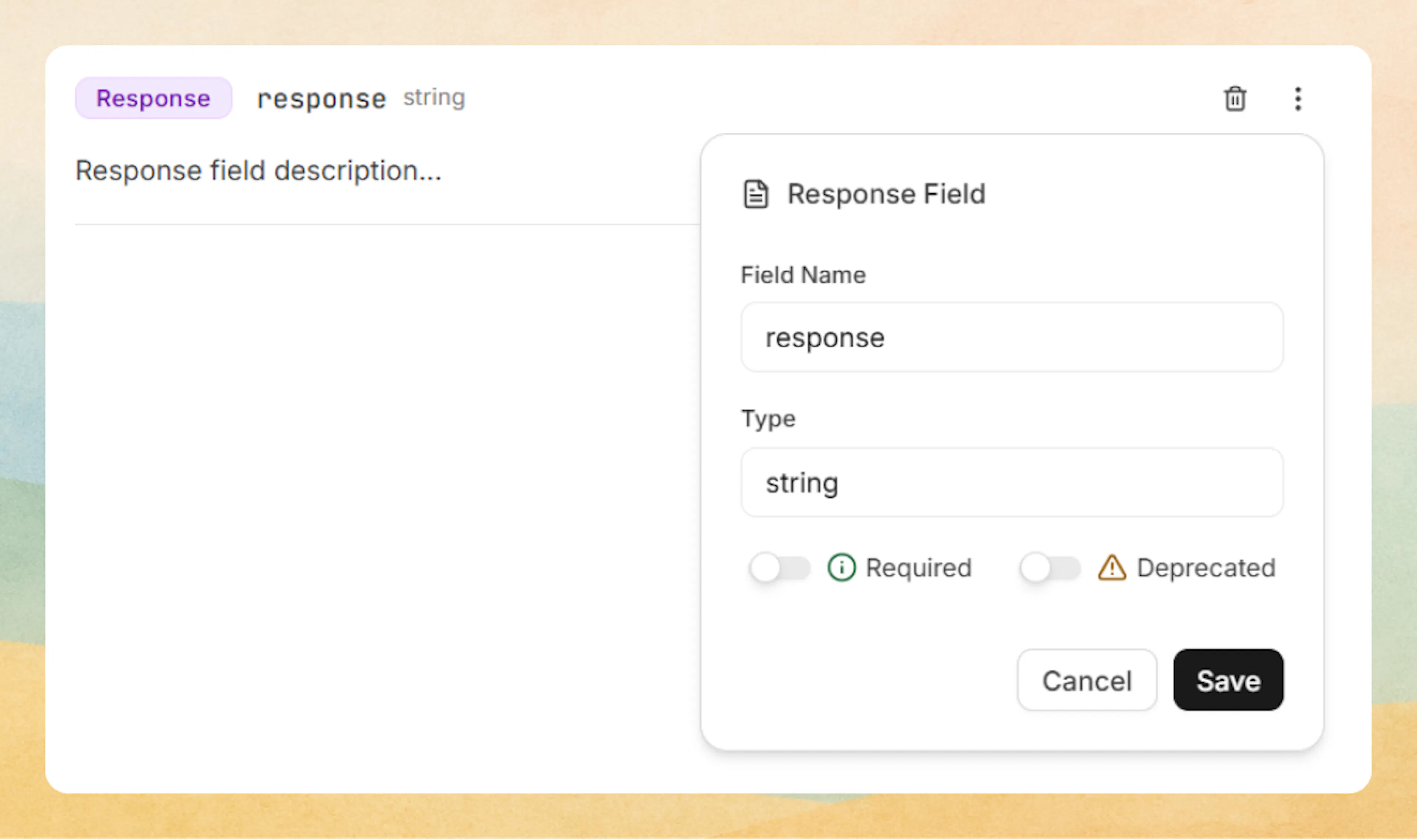
A new response field row appears with a default name and type plus a description placeholder.
Prefer writing in code?
You can switch to MDX view inside the Web Editor to write or edit this component using the same syntax as the Code Editor. This is useful if you want full control while staying in the Web Editor.
Edit field metadata
To change the label and status:
- Click the three-dot menu on the right side of the ResponseField block.
- In the Response Field settings panel, you can edit:
- Field Name: The name of the field in the response payload (for example,
id,status,user). - Type: The data type of the field (for example,
string,integer,boolean,object,array). - Required: Toggle on to mark the field as required in the response.
- Deprecated: Toggle on to show that the field is deprecated.
Click Save to apply your changes.
Edit the description
-
Click in the description area under the badges (for example, Response field description…).
-
Add your explanation using any supported content:
- Text and headings
- Lists and tables
- Code blocks showing example responses
- Callouts and other MDX components
Using with Code Editor
Basic syntax
Use the <ResponseField> component to document API response fields with their type and status.
<ResponseField name="id" field-type="string" required="true">
  Unique identifier for the resource.
</ResponseField>
Unique identifier for the resource.
Examples
Optional field
<ResponseField name="description" field-type="string">
  Optional description text for the resource.
</ResponseField>
Optional description text for the resource.
Deprecated field
<ResponseField name="legacy_id" field-type="integer" deprecated="true">
  Deprecated legacy identifier. Use `id` instead.
</ResponseField>
Deprecated legacy identifier. Use id instead.
Complex type
<ResponseField name="user" field-type="object" required="true">
  User object containing profile information and preferences.
</ResponseField>
User object containing profile information and preferences.
Advanced options
Attributes
Field name displayed in the response documentation (default: "response").
Data type: string, integer, boolean, object, array, etc.
Set to "true" for required fields (default: "false").
Set to "true" to mark as deprecated (default: "false").