

On‑Page AI Menu
Give readers quick, AI‑friendly actions for exporting or opening any page in external AI tools using optimized Markdown.
Overview
The on‑page AI menu provides fast actions that let readers use your documentation directly with external AI tools. Each published page includes three shortcuts that expose the full content in Markdown, a clean and model‑friendly format.
Markdown is one of the most reliable formats for large language models because it preserves structure, headings, lists, and code blocks in a predictable way.
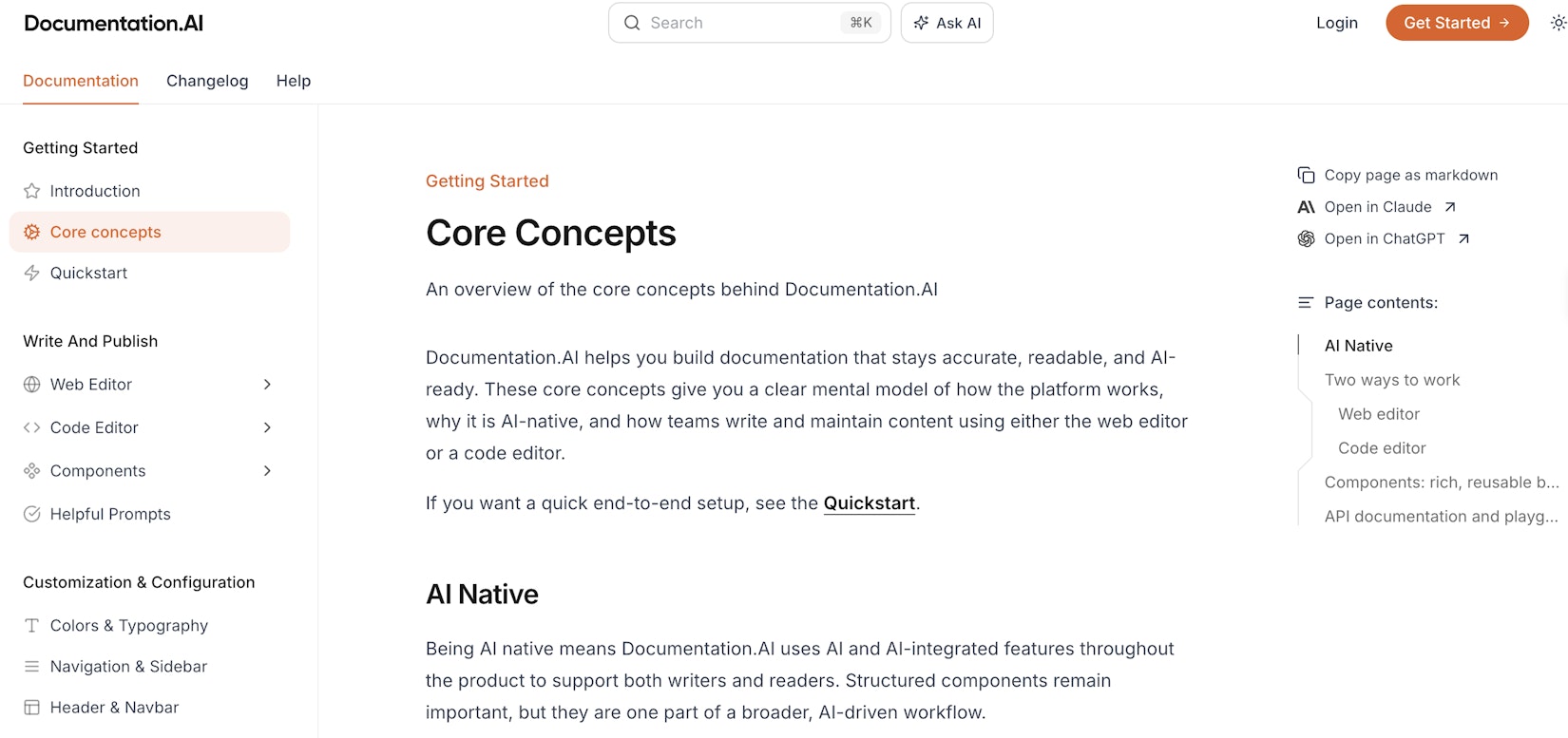
The menu appears in the same location on every published page, ensuring consistent access to AI‑ready exports.
Available options
The menu provides three AI‑focused actions:
-
Copy page as markdown
-
Open in Claude
-
Open in ChatGPT
Copy as Markdown
This option exports the current page as Markdown and places it on the clipboard. Readers can paste it into any AI prompt, editor, or workflow with no additional formatting.
Open in Claude
This opens Claude in a new browser tab and passes the page's Markdown file URL. Claude retrieves that file and uses the content as context for the chat session.
Open in ChatGPT
This launches ChatGPT with a shareable Markdown link that loads the full page content. ChatGPT can then summarize, analyze, or transform the page with accurate context.
The "Open in Claude" and "Open in ChatGPT" options only work when SEO is enabled for your documentation site.
Last updated Jan 8, 2026