Guides · · 21 min read
How to Write a User Manual: A Complete Guide for Modern Teams
A practical user manual guide: how to create a user manual from scratch, a template you can copy, and what changes when you write a user manual for a software application.

Roop Reddy
Co-Founder, Documentation.AI
On this page
- How to Write a User Manual: The Short Version
- What Is a User Manual?
- Why User Manuals Still Matter
- Types of User Manuals
- What Goes Inside a User Manual
- How to Create a User Manual in 10 Steps
- A User Manual Template You Can Copy
- How to Write a User Manual for a Software Application
- Writing Rules That Make the Difference
- Standards and Regulations Worth Knowing
- Online vs. Offline: Choosing Your Formats
- Tools for Creating a User Manual
- User Manual Examples Worth Learning From
- How to Measure Whether Your User Manual Works
- Make Your User Manual AI-Readable
- Common User Manual Mistakes to Avoid
- Frequently Asked Questions (FAQs)
- Write Your User Manual with Documentation.AI
- References
A user manual is not a catalogue of everything your product can do. It is a tool for helping someone complete a task when they need an answer. For a software product, that might mean setting up an account, configuring a feature, completing a workflow, or fixing a problem.
The best user manuals are organized around what users need to accomplish, not around everything the product team knows. You need to decide which tasks deserve their own instructions, what information belongs in each section, how much context a user actually needs, and how to turn a complicated process into steps someone can follow without guesswork. A good user manual also has to be accurate, easy to navigate, consistent, and depending on the product and market aligned with relevant standards and safety or regulatory requirements.
This guide covers all of it, in the order you would actually do the work. There is a user manual template you can copy, tables you can use as checklists, and a section on what changes when you write a user manual for a software application specifically. The examples throughout are software, because that is where most manuals are written now, and the few places where a physical product changes the answer are called out where they come up.
How to Write a User Manual: The Short Version
To write a user manual, define the audience, build a ranked inventory of the tasks they perform, pick an information model, then write one procedure per task with a goal, prerequisites, numbered steps, and a way to confirm it worked. Review for accuracy, test for usability, publish, and version it against product releases.
The full process, expanded later in this guide:
- Define the audience and their assumed knowledge
- Build a task inventory and rank it by frequency and consequence
- Choose an information model and build templates
- Draft the procedures
- Write the warnings
- Add visuals that carry information
- Control your terminology
- Review for accuracy, then test for usability
- Publish in the formats your users and regulators need
- Maintain, version, and retire
What Is a User Manual?
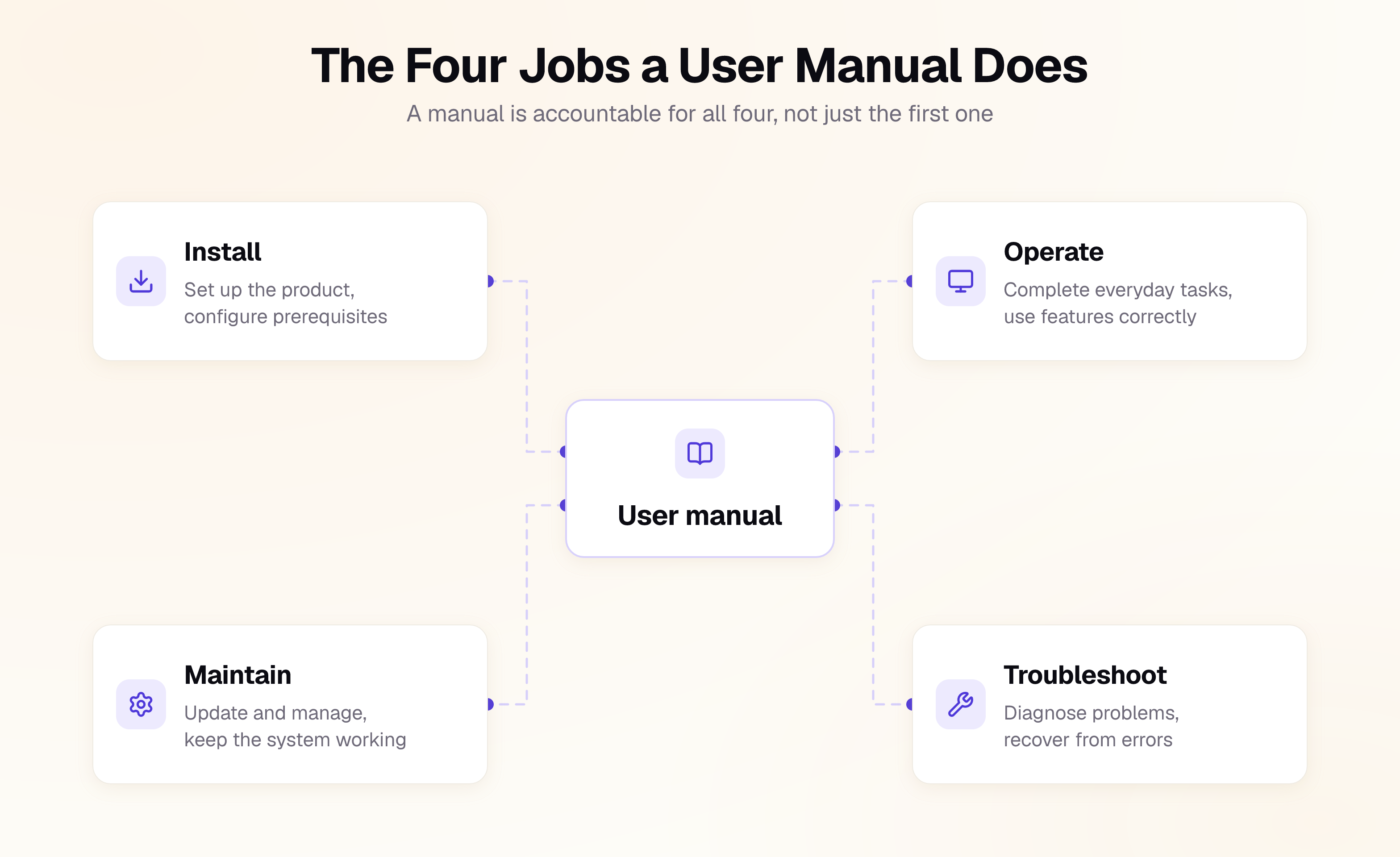
A user manual is a structured document that tells a defined audience how to install, operate, maintain, and troubleshoot a product safely and correctly. Its job is task completion, not feature coverage: a reader arrives with something they are trying to do, and the manual either gets them there or it does not.
You will see the same artifact called a user guide, an operating manual, an instruction manual, product documentation, or in standards language information for use. The names are mostly interchangeable, but what is not interchangeable is the job each document does, and blurring them is the most common structural mistake in the field.
One relationship is worth naming, because it is a difference of scope rather than of vocabulary. A user manual is scoped to one audience and the tasks they perform. A product manual is scoped to the whole product across its versions, configurations, and audiences, and it usually contains several user manuals as deliverables inside it.
The user manual is one document in a set, and the types table below shows which question each of the others answers.
Why User Manuals Still Matter
A user manual is one of the simplest ways to help users solve problems without involving your support or engineering teams. When it works, customers can complete common tasks, troubleshoot issues, and learn the product without waiting for someone to explain it to them.
The goal isn't to document every feature or produce the longest possible guide. It's to make important tasks understandable and actionable.
They are useful in these business case situations:
- Support deflection. Every documented task that a user completes alone is a ticket that never opens, which is the same mechanism behind reducing support tickets with documentation.
- Faster onboarding. New users and new hires reach competence without long learning curves, and documentation is often what decides how fast that happens.
- Sales and procurement. Enterprise buyers read your documentation during evaluation, because it is the most honest artifact you publish.
Types of User Manuals
Products rarely need one manual. They need a small cluster of documents aimed at different competence levels. Before writing any manual, make a scoping decision based on who reads it and what they are trying to do, because the wrong scope is expensive to correct later.
Pick the row that matches the question your reader arrives with. If two rows look like the same document, you have found a scoping decision you have not made yet.
| Document | The question it answers | Written for |
|---|---|---|
| Getting started guide | How do I get this working in my first session? | A brand new user |
| User manual | How do I complete my everyday tasks? | The regular user of the product |
| Deployment guide | How do I install and configure this for our environment? | An IT admin or platform engineer |
| Administrator guide | How do I manage users, roles, integrations, and backups? | An IT administrator |
| Troubleshooting guide | Something is broken. How do I fix it? | Anyone with a broken workflow |
| Runbook | How do I operate this in production and recover it when it breaks? | An on-call engineer |
| Reference | What does this setting, parameter, or code mean? | Someone who already knows the task |
| API documentation | What do I call, and what comes back? | A developer or an AI agent |
| Upgrade and migration guide | What breaks if I move, and how do I move safely? | An existing user or admin |
| Release notes | What changed in this version? | An existing user deciding whether to upgrade |
Format is a separate decision from type, and it is covered in online versus offline further down.
What Goes Inside a User Manual
A user manual needs nine sections: what the manual covers, the safeguards around destructive actions, a product overview, setup, one procedure per everyday task, administration, troubleshooting by symptom, reference material, and a version history. The order matters as much as the list, because it follows the sequence a reader needs each piece in rather than the order your product team thinks about them.
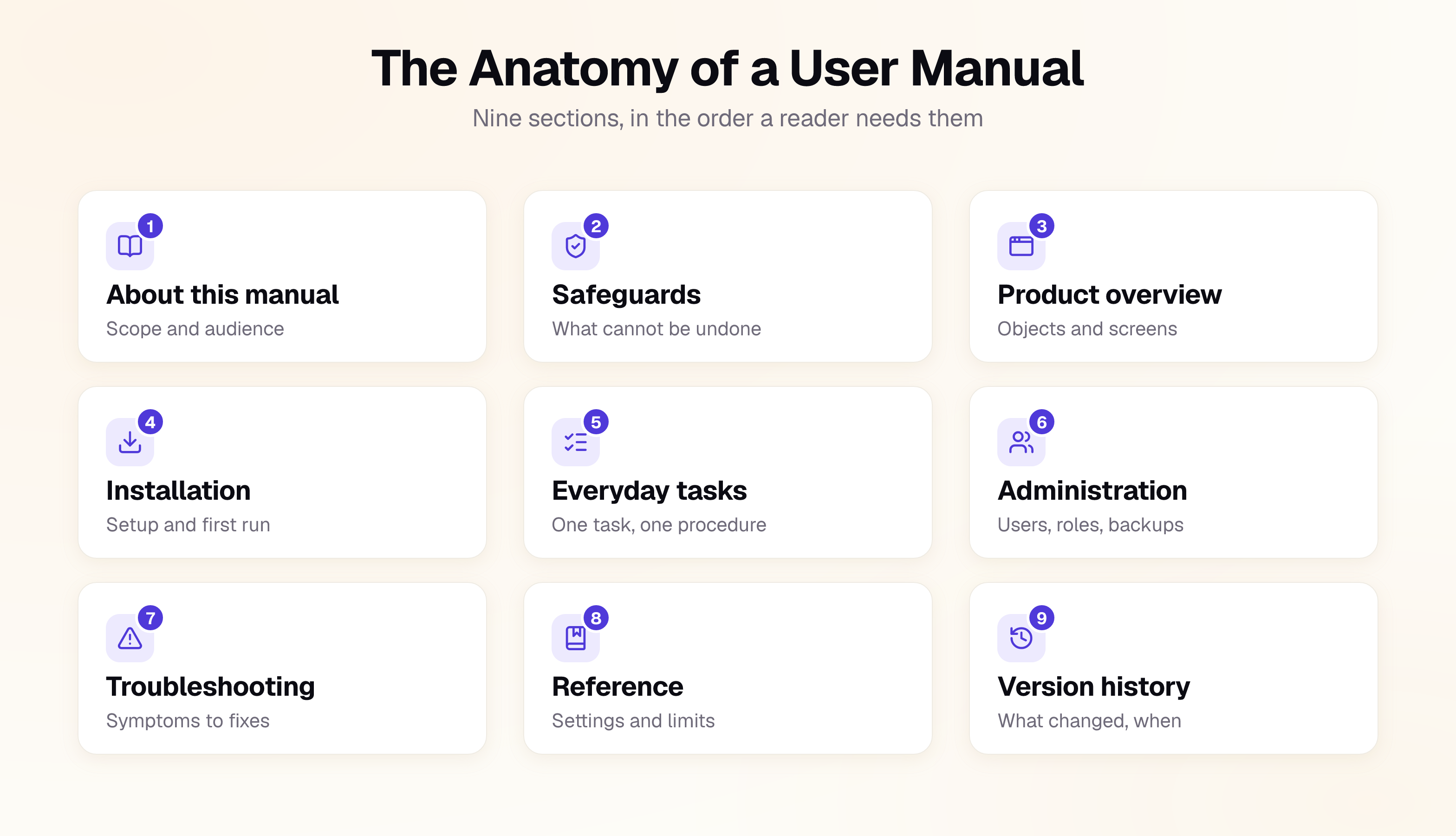
The outline below is the structural user manual template most software products need. Remove sections that do not apply and add product-specific sections where the product demands them.
1. About this manual
   1.1 Product and versions covered
   1.2 Intended audience and assumed knowledge
   1.3 What this manual does not cover, and where to go instead
   1.4 How to get support
   1.5 Conventions used (notation, admonitions, formatting)

2. Safeguards and irreversible actions
   2.1 Roles and permissions each task requires
   2.2 Actions that cannot be undone
   2.3 Data loss, retention, and export
   2.4 Admonition levels used in this manual

3. Product overview
   3.1 What the product does
   3.2 Core objects and how they relate
   3.3 Interface tour: navigation, main screens, key controls
   3.4 States, modes, and plan tiers

4. Installation and setup
   4.1 Accounts, licences, and access you need first
   4.2 System, browser, network, or environment prerequisites
   4.3 Setup procedure
   4.4 First-use verification ("how you know it worked")

5. Everyday tasks
   5.x One procedure per task, ordered by frequency

6. Administration and upkeep
   6.1 Users, roles, and permissions
   6.2 Integrations and connected services
   6.3 Backups, exports, and data retention
   6.4 Upgrades, migrations, and deprecations

7. Troubleshooting
   7.1 Symptom index
   7.2 Diagnostic procedures
   7.3 Error and status codes
   7.4 When to stop and contact support

8. Reference
   8.1 Settings and parameters
   8.2 Limits, quotas, and rate limits
   8.3 Glossary
   8.4 Security, compliance, and data residency
   8.5 Terms, licensing, and legal notices

9. Version history
If your product has a physical component, section 2 becomes a full safety section instead: signal words, intended use and foreseeable misuse, residual hazards, and the qualifications an operator needs. That is a regulated field with its own standards, starting with ANSI Z535.6 for how safety messages are placed in a manual, and the product manual guide covers where the wider obligations come from. Everything else in this guide applies either way.
How to Create a User Manual in 10 Steps
Work in this order. Each step gives you something you can use in the next, from defining the audience and tasks through to testing, publishing, and maintaining the manual. The sequence matters more than the speed: skipping the task inventory is what produces a manual organized around features nobody searches for.
1. Define the audience and their assumed knowledge
Write down who the manual is for and, more usefully, what you are allowed to assume they already know.
If you have several audiences, resist the urge to serve them all on the same page. Give each audience a clear path through the documentation, whether that means separate guides, sections, or cross-links.
2. Build a task inventory and rank it
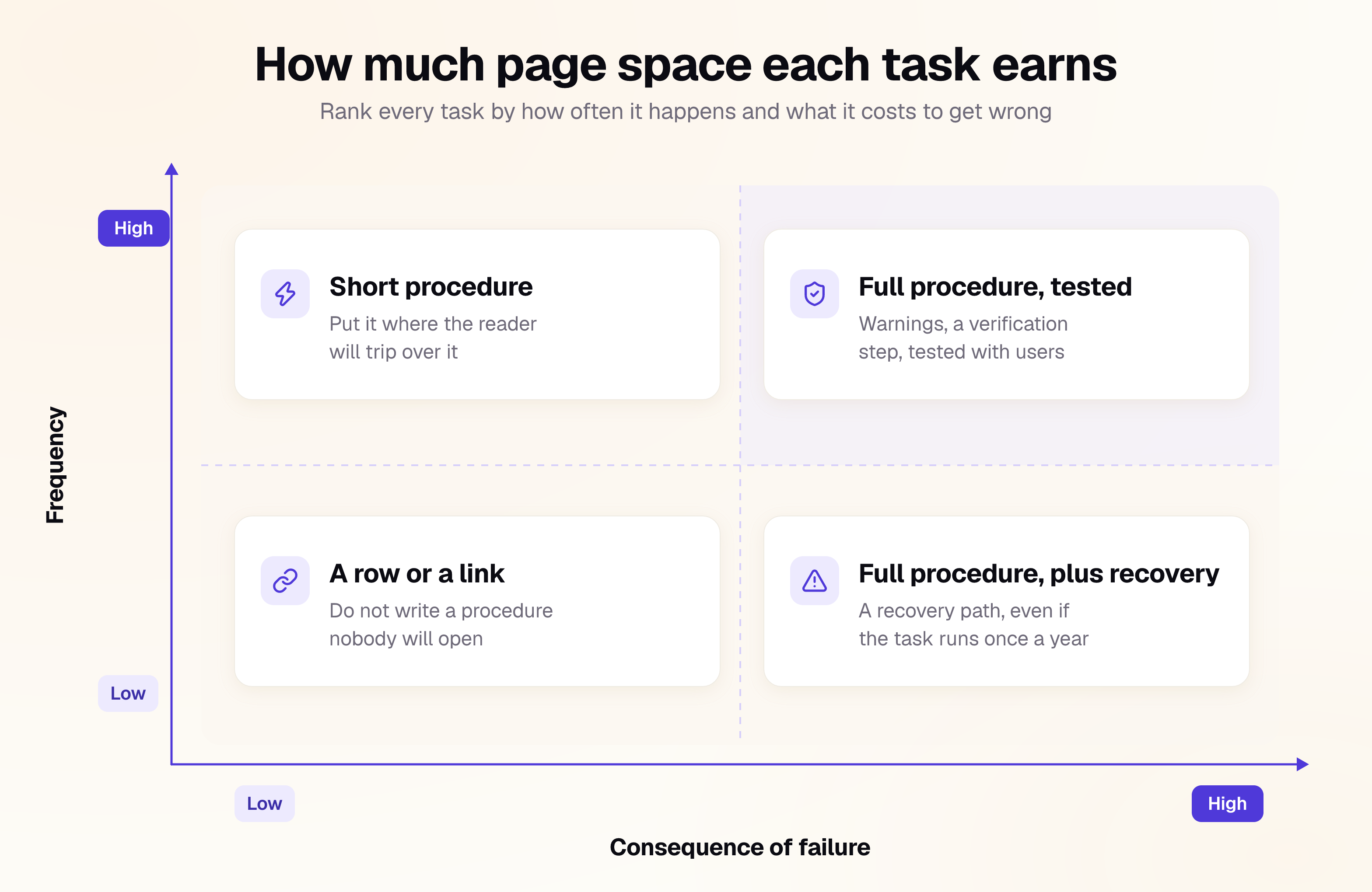
List every task a user performs, in the user's words rather than the product's. "Reset your password," not "account credential management." Pull candidates from support tickets, search logs, onboarding calls, QA, and session recordings of real usage.
Then rank each task on two axes, because together they decide how much page space you owe it.
3. Choose an information model and build templates
The most useful model in software documentation is Diátaxis, which separates tutorials, how-to guides, reference, and explanation by user intent.
Then build a template for each content type: a procedure template, a reference template, and a troubleshooting template. Templates keep a manual consistent when multiple people contribute to it over time, and they are often more useful than a style guide nobody opens.
4. Draft the procedures
A procedure is the unit of a manual, and this is where most quality problems appear. Give every procedure a goal, prerequisites, numbered steps, and a way for the reader to confirm it worked. Keep each step focused on one primary action.
The step specification worth enforcing:
- Start with the imperative verb: "Select Settings," not "You should now select Settings."
- Put the condition before the action: "If the job status is Failed, select Retry" gives the reader the test before they act on it.
- Name controls exactly as they are labeled: Paraphrasing a label costs the reader a search.
- State the observable result when the outcome is not obvious: "The status changes to Active" gives them a checkpoint.
- Put the location before the action in long interfaces: "In the sidebar, select Billing" stops them scanning the whole screen.
- Split at around seven steps: Especially when they contain multiple goals or become difficult to scan.
- Put warnings above the step they govern: A caution the reader meets after the destructive action has already run is decoration. Embedding one inside a step is allowed but should be the exception, because an inline note is easier to skim past than a block above the step.
5. Write the warnings
Most software has no physical hazards, which is exactly why its warnings get written carelessly. The risk is still real: deletions that skip the trash, migrations that cannot be rolled back, permission changes that lock an admin out of their own workspace, exports that expose customer data.
Mark those before the reader reaches them. A useful warning names three things: what the action does, what it costs if it goes wrong, and whether it can be undone. "This permanently deletes the project and its history. It cannot be undone" is worth more than a red box that says "Warning: be careful."
Use a small, fixed set of admonition levels, define them in section 1 of the manual, and do not invent a fourth one halfway through. If your product does have safety implications, follow the applicable safety standard and your organization's approved warning format instead.
6. Add visuals that carry information
Use an image when it answers a question that words answer slowly: which control, which setting, which state the screen is in, or where to find something. Decorative screenshots add maintenance cost without adding much reader value.
- Label diagram callouts with the same numbers as the steps beside them.
- Crop screenshots to the control that matters.
- Write alternative text that conveys the useful information in the image, not its filename.
- Show the failure state when it helps users recognize or diagnose a problem.
7. Control your terminology
Pick one word per concept and use it consistently. Writers trained on essays instinctively use synonyms to avoid repetition. In a manual, a synonym makes the reader wonder whether two terms mean different things.
Build a term list early and make it part of the review process. Consistent terminology also helps AI systems retrieve the right documentation, because using multiple terms for the same concept can split relevant information across different passages.
If you write for a global or safety-critical audience, look at ASD-STE100 Simplified Technical English, a controlled language developed for maintenance documentation. Even if you never adopt it formally, its discipline of using clear, consistent terminology is useful for any technical documentation team.
8. Review for accuracy, then test for usability
These are two different activities, and teams routinely do only the first. A technical review by engineering tells you whether the manual is correct. A usability test tells you whether it works. A manual can be entirely correct and completely unusable.
Recruit people who match your defined audience and have not seen the document. Give them the real task and the real product, then watch without helping. Measure whether they completed the task, how long it took, and where they went wrong.
9. Publish in the formats your users and regulators need
Decide formats deliberately rather than defaulting to a PDF that is hard to search and difficult to update. For most software products HTML should be the primary source because it is searchable, linkable, and easier to maintain. Provide PDF or other formats when users have a real need for them.
Whatever format you choose, make the manual reachable from the product itself through help links, contextual links, or other entry points.
10. Maintain, version, and retire
A manual with no version number cannot be trusted, because the reader cannot tell whether it describes the product in front of them. State the product version each edition covers, keep previous editions reachable, and never overwrite a published manual once the product has moved on.
For docs-as-code workflows, use version branches or versioned documentation paths so published documentation stays tied to the corresponding product release.
Set explicit review triggers such as:
- A release changes the behavior, labels, or screens inside a documented task
- A significant product change that affects an existing procedure
- The product enters a new market or a new language
- Support tickets spike on a task the manual already covers
- A supported version reaches end of life and its manual moves to the archive
A User Manual Template You Can Copy
The outline earlier in this guide is the template for the whole manual. This is the template for the unit inside it: one procedure. A consistent procedure structure makes documentation easier to scan, write, review, and maintain, so copy this, adapt it once, and use the result everywhere.
## <Task name, starting with a verb: "Create an API key">

<One sentence explaining what the task achieves and when the user would do it.>

**Before you start**
- Required permissions, access, or prerequisites
- Estimated time, if useful
- Warnings or important conditions that apply to the whole task

**Steps**
1. <One primary action. Put the condition before the action when needed.>
2. <One primary action. Include the observable result if it is not obvious.>
3. ...

**Check it worked**
<The observable state that confirms the task is complete.>

**If it did not work**
| What you see | What it means | What to do |
| --- | --- | --- |
| <Symptom> | <Likely cause> | <Recovery step> |

**Related tasks**
<Links to the next likely task and relevant reference material.>
Here is the same user manual template filled in:
Example: Create an API key
Create an API key to authenticate requests to the API.
Before you start: You need administrator or developer access to the workspace. Keep the generated key secure; it may only be shown once.
Steps
- In the dashboard, select Settings → Developer.
- Select API Keys, then select Create key.
- Enter a name for the key and select the required permissions.
- Select Create.
- Copy the API key and store it in your secrets manager.
Check it worked: Make an authenticated API request using the new key. The request returns a successful response.
If it did not work:
| What you see | What it means | What to do |
|---|---|---|
401 Unauthorized | The key is invalid or missing | Check that the key is copied correctly and included in the request |
403 Forbidden | The key does not have the required permission | Create a new key or update its permissions |
The structured version gives the user a clear starting point, separates prerequisites from actions, defines what successful completion looks like, and provides a recovery path when something goes wrong. It also gives documentation teams a repeatable structure they can apply across every procedure.
How to Write a User Manual for a Software Application
Writing a user manual for a software application follows the same 10 steps, but three things change: the product changes underneath the manual every release, the interface you screenshot is the part that decays fastest, and the manual has to be reachable from inside the application itself.
What that means in practice:
- Version against releases, not against the calendar. Tie each edition of the manual to a product version, and publish documentation from a version branch or a versioned path so a user on an older release still sees instructions that match their screen.
- Write for roles, not just for users. Most software has permission tiers. A step that works for an administrator and fails silently for a standard user is a support ticket, so state the required role in the prerequisites of every procedure.
- Put entry points inside the product. A help link next to the feature outperforms a manual the user has to go looking for. Deep-link from empty states, error messages, and settings screens to the specific procedure, not to the documentation homepage.
- Treat screenshots as a liability with a benefit. Crop to the control that matters so a redesign of the surrounding page does not invalidate the image, and skip the screenshot entirely when a labeled control name does the job.
- Cover the parts users cannot see. Rate limits, data retention, export formats, integration scopes, and error codes belong in the reference section. These are the questions support answers most often and manuals document least often.
- Keep it in the same workflow as the code. A docs-as-code setup, where the manual lives in Git and changes are reviewed alongside the pull request that caused them, is the most reliable way to stop the documentation drifting from the software.
If your software application exposes an API, keep the API reference separate from the task-oriented manual and link between them. They serve different readers arriving with different questions, and merging them makes both harder to use.
The procedures inside that manual that a developer runs at a terminal, such as installation, setup, and integration guides, need a different step-level craft again: prerequisites with check commands, expected output after each command, and errors handled inside the step. Our guide on how to write an instruction manual covers that unit in full.
Writing Rules That Make the Difference
"Be clear" is easy advice to give and difficult to enforce. The rules below are specific enough to apply during writing and review, and each one addresses a usability problem that shows up repeatedly in user testing.
| Rule | Instead of | Write |
|---|---|---|
| Address the reader directly | The user should configure the webhook URL | Configure the webhook URL |
| Use active voice | The API key is generated by the dashboard | Generate the API key in the dashboard |
| One action per step | Enter your details and save | 1. Enter your details. 2. Select Save. |
| Condition before action | Select Retry if the job status is Failed | If the job status is Failed, select Retry |
| Name the outcome | Save the settings | Select Save. The panel closes. |
| Cut hedging | You may wish to consider clearing the cache | Clear the cache |
| Prefer the concrete | Wait a moment | Wait 30 seconds |
| One term per concept | sign in, log in, authenticate | Pick one, use it everywhere |
| Front-load headings | Export options | How to export data as CSV |
| Positive instructions | Do not close the tab while the import runs | Wait for the import to finish before closing the tab |
Two other rules are worth keeping in mind.
Write headings around the task or question the reader is trying to solve, and use the same terminology users type into search so they can find the right page quickly.
Keep troubleshooting content scannable. Use short paragraphs, bullets, tables, and clear subheadings when they make the problem easier to diagnose. Don't force a sentence limit; structure the content around how someone will actually look for the answer.
Standards and Regulations Worth Knowing
You do not need to formally follow every documentation standard. But if you create or manage software user documentation, two standards are particularly relevant, and both are worth reading before you commit to a structure you will have to live with.
| Standard or regulation | What it covers | Who needs it |
|---|---|---|
| ISO/IEC/IEEE 26514:2022 | Design and development of information for software users | Software documentation teams |
| ISO/IEC/IEEE 26511:2018 | Managing information for users as a process | Documentation managers |
ISO/IEC/IEEE 26514:2022
This is the most directly relevant standard for writing a software user manual. It covers how to identify user needs, organize information, develop content, present it effectively, and maintain it throughout the software lifecycle.
The practical takeaway is simple: documentation should be designed around what users need to accomplish, not simply around the features the product contains.
ISO/IEC/IEEE 26511:2018
This standard is more relevant to documentation leaders than individual writers. It covers the management of user documentation, including planning, staffing, production, review, testing, publishing, translation, and evaluation.
The practical takeaway is that documentation quality is not only a writing problem. It is also a process, ownership, and maintenance problem.
Other standards may apply when software is part of a regulated or safety-critical product, but these two are the best starting points for general software user documentation.
Online vs. Offline: Choosing Your Formats
For most software products, the online manual should be the primary format. HTML is searchable, linkable, easy to update, and can be connected directly to the product. PDF can still be useful when users need an offline or printable copy.
The important part is to publish both from the same source. Do not maintain the HTML manual and the PDF as separate documents. When the same content exists in two places, the updates eventually diverge.
| HTML manual | PDF manual |
|---|---|
| Searchable across the documentation site | Searchable within the file |
| Easy to update and republish | Requires a new version when content changes |
| Linkable from the product and other documentation | Easy to download and use offline |
| Can support analytics, search data, and interactive content | Useful when users need a fixed, printable version |
| Can support accessibility features such as semantic headings and screen-reader navigation | Accessibility depends on how the PDF is created and tagged |
For software, start with HTML unless your users have a clear reason to need another format. Whatever you publish, make sure the documentation is versioned so users can tell which product release it describes.
Tools for Creating a User Manual
Choose the tool based on how your team writes, reviews, publishes, and maintains content, not simply on the number of features it offers. The question that matters is how the documentation will be maintained six months or three years from now.
For software teams, the main options are:
| Category | Best for |
|---|---|
| Docs-as-code platforms | Teams that want documentation in Git with version control, reviews, and deployments tied to the product |
| Documentation platforms | Teams that need structured authoring, collaboration, publishing, search and analytics without managing the entire docs infrastructure |
| Knowledge bases and help centers | Support-led documentation focused on self-service and customer questions |
| Static site generators | Technical teams that want full control over the documentation site and are comfortable maintaining the build and deployment workflow |
Look for version control, structured content, reliable search, review workflows, and a clear publishing process.
If your documentation lives alongside the product code, a docs-as-code workflow makes updates easier to review and version. If writers, product managers, support, and engineers all contribute, a platform combining structured authoring with Git integration usually fits better, and most current tooling supports both rather than forcing a choice. For named options in each category, see our roundups of developer documentation tools, API documentation tools, and AI tools for documentation. Documentation.AI is built for that combination, pairing Git-based and WYSIWYG editing against the same structured source.
User Manual Examples Worth Learning From
Study documentation that resembles what you actually have to ship, not just the developer docs everyone links to. The three examples below are public, maintained against a changing product, and each does one thing well enough to borrow outright.
- Stripe Docs keeps task-oriented guides and API reference clearly separated, with working examples throughout. Steal: the separation between user intent and reference material.
- GitHub Docs organizes a large documentation set around products, tasks, concepts, and reference material, with versioned documentation for different product releases. Steal: the information architecture and versioning approach.
- Atlassian Documentation serves multiple products and audiences while separating user, administrator, and developer documentation. Steal: the way different user paths are organized without turning everything into one manual.
What they share is more useful than any individual design choice: the documentation is searchable, task-oriented, maintained alongside a changing software product, and structured so users can find the level of information they need.
How to Measure Whether Your User Manual Works
Do not judge a manual by page views alone. Measure whether users can complete the tasks it documents and where they get stuck, because a page with heavy traffic and a low completion rate is not a success.
| Metric | How to get it | What it tells you |
|---|---|---|
| Task success rate | Usability tests with representative users | Whether users can complete a documented task without help |
| Time on task | The same usability tests | Which procedures take longer than expected |
| Zero-result search rate | Documentation search analytics | Where your terminology does not match what users search for |
| Searches with no useful result | Search analytics and click-through data | Which questions or tasks your documentation is failing to answer |
| Support questions about documented tasks | Support tags or ticket analysis | Which procedures exist but are still causing confusion |
| Documentation freshness | Compare page versions with product releases | Which pages may no longer match the current product |
| Task completion feedback | Page feedback, surveys, or contextual prompts | Which pages users find useful or incomplete |
Be careful with support-deflection claims. A change in ticket volume can come from a product release, a pricing change, or seasonality, not just documentation. Start with metrics you can directly connect to the documentation itself, such as task success and failed searches.
The goal is not to prove that your manual is being read. It is to find out whether users can accomplish what they came to the manual to do.
Make Your User Manual AI-Readable
Software documentation is increasingly consumed by more than human readers. Search systems, AI assistants, and coding agents retrieve and summarize documentation before a user ever opens the page, which makes clean structure and consistent terminology useful for both audiences at once. We cover that shift in more depth in what AI documentation means in practice.
One emerging approach is llms.txt, a proposal for publishing a machine-friendly overview of a website at /llms.txt. The format uses Markdown to provide a short description of the site and links to the pages that contain the most useful information. It can also point to clean Markdown versions of documentation pages. A newer proposal, WebMCP, works at the page level instead: a browser API that lets a documentation page register tools an agent in the reader's browser can call directly. It is early and sits alongside llms.txt rather than replacing it.
You do not need llms.txt to make software documentation machine-readable. The fundamentals are the same ones that make documentation easier for people to use: semantic headings, one topic per page, explicit prerequisites, clear outcomes, consistent terminology, and well-structured procedures.
A badly structured manual creates problems for both audiences. If a troubleshooting page uses vague symptoms, hides prerequisites, or mixes several tasks together, an AI system retrieving that content faces the same ambiguity as a human reader.
Common User Manual Mistakes to Avoid
Most documentation problems come from a small set of recurring mistakes, and every one of them is visible in a short read by someone with no product knowledge at all. Run this list against your manual before sending it for review, because each item is cheap to fix now and expensive to fix after translation.
- Organized by feature instead of task, so readers must guess which feature holds the action they need
- Troubleshooting sorted by cause not symptom, forcing users to diagnose before they can search
- Several actions in one step, which hides where things went wrong
- Warnings placed after the action they were meant to prevent
- Synonyms for the same concept, so users assume two terms mean two things
- Screenshots of the whole interface instead of the control that matters
- No success criteria, which means users cannot tell whether the task worked
- No version information
- PDF as the only format, making it harder to update, link, and analyze than an online manual
- Written entirely by the people who built the product, which bakes in wrong assumptions
Frequently Asked Questions (FAQs)
1. What should a user manual include?
At minimum: what the manual covers and who it is for, the safeguards around actions that cannot be undone, a product overview, installation and setup, one procedure per everyday task, administration, troubleshooting organized by symptom, a reference section, and a version history. The outline earlier in this guide is a working template you can delete sections from.
2. How long should a user manual be?
As long as the ranked task inventory requires, and no longer. Length is an output, not a target. A manual covering 12 everyday tasks and a troubleshooting section may be relatively short, while a complex product may require much more. The right length depends on what users need to accomplish.
3. Who should write the user manual?
A documentation professional should own the manual, working with the engineers and product experts who built the product. Engineers provide the technical knowledge; documentation specialists turn that knowledge into information that users can actually follow.
4. How do I write a user manual for a software application?
Follow the same 10 steps, then adapt for software: version the manual against product releases, state the required permission role in every procedure's prerequisites, link into the manual from inside the product, and keep the documentation in the same review workflow as the code so it does not drift.
5. Do I still need a printed manual?
For most software products, a printed manual is not necessary. An online manual is easier to search, update, link, and maintain. Provide a downloadable or printable version when your users have a clear need for offline access or a fixed copy.
6. What is the difference between a user manual and a user guide?
The terms are often used interchangeably. There is no universal distinction, so what matters more is clearly defining the document's audience, scope, and purpose.
7. What is the difference between a user manual and a product manual?
Scope. A user manual is written for one audience and the tasks that audience performs. A product manual covers the whole product across its versions, plans, and configurations, and it typically brings together several documents for different readers, including end users, administrators, and developers. A user manual is usually one deliverable inside a product manual.
8. Is there a free user manual template I can use?
Yes. This guide contains two: a full manual outline covering the nine standard sections, and a procedure template with prerequisites, steps, a verification step, and a recovery table. Copy both, delete what your product does not need, and keep the rest consistent across every task you document.
9. How often should a user manual be updated?
Update it whenever a product change affects a documented task, workflow, interface, or outcome. Also review documentation when support questions increase around an existing topic, or when a product version reaches end of life. Release-triggered reviews are generally more useful than relying only on a fixed calendar.
Write Your User Manual with Documentation.AI
The hard part of a user manual is not the first draft. It is the twentieth release, when a renamed button has quietly falsified nine procedures and nobody can tell you which nine.
Documentation.AI keeps the manual in the same review as the change that broke it, versions each edition against the release it describes, and answers your readers from your own procedures with a citation back to the exact step. If your screenshots show a screen your product no longer has, start with Documentation.AI.
References
- ISO/IEC/IEEE 26514:2022, design and development of information for software users
- ISO/IEC/IEEE 26511:2018, managing information for users as a process
- ANSI Z535.6, product safety information in product manuals, instructions, and other collateral materials, published by NEMA
- ASD-STE100 Simplified Technical English, a controlled language specification for technical documentation
- Diátaxis, the framework that separates tutorials, how-to guides, reference, and explanation by user intent
- llms.txt, a proposal for publishing a machine-readable overview of a website
Writing the manual?
Skip the setup, keep writing
A live URL, starter pages, navigation and search arrive configured. You bring the words.
Start freeNo credit card required