How to Write a Product Manual: The Complete Guide
Learn how to write a product manual. Get a practical guide to product manual structure, content, best practices, examples, and maintenance.

Roop Reddy · Co-Founder, Documentation.AI
Last updated

On this page
- How to Write a Product Manual: The Short Version
- What Is a Product Manual?
- Product Manual vs. User Manual
- What to Include in a Product Manual
- How to Write a Product Manual in Nine Steps
- A Product Manual Specification You Can Copy
- Where the User Manual Sits Inside the Product Manual
- Best Practices to Write a Product Manual
- Standards and Compliance for Product Manuals
- Choosing a Tool for Your Product Manual
- Measure Product Manual Effectiveness
- Common Product Manual Mistakes
- Frequently Asked Questions (FAQs)
- Sources
- Write Your Product Manual with Documentation.AI
Writing a product manual is not difficult because there is too much to say, it's difficult because there is too much to document.
A single product can have different users, workflows, configurations, and technical requirements. An administrator needs setup instructions, an end user needs task guidance, and a developer may need API or integration details. Put all of that into one undifferentiated document, and the manual quickly becomes difficult to use and even harder to maintain.
A good product manual gives each user the information they need, when they need it. For software that can include setup, configuration, workflows, permissions, integrations, troubleshooting and reference information.
This guide explains how to scope, structure, write, review, and maintain a product manual as the product evolves. If you first need the case for investing in it at all, start with why documentation matters.
How to Write a Product Manual: The Short Version
To write a product manual, follow these steps:
- Define the scope of the product manual
- Identify your audiences and their tasks
- Map the content
- Establish a source of truth for product information
- Structure content for reuse and maintenance
- Write around the user's workflow, not the product's architecture
- Review for accuracy, usability, and completeness
- Tie documentation updates to product releases
- Version, update, translate, and retire content as the product changes
What Is a Product Manual?
A product manual is a structured set of information that explains how a product works and how users can use it effectively. It can cover everything from getting started and configuring the product to completing tasks, managing settings, troubleshooting issues and understanding technical specifications.
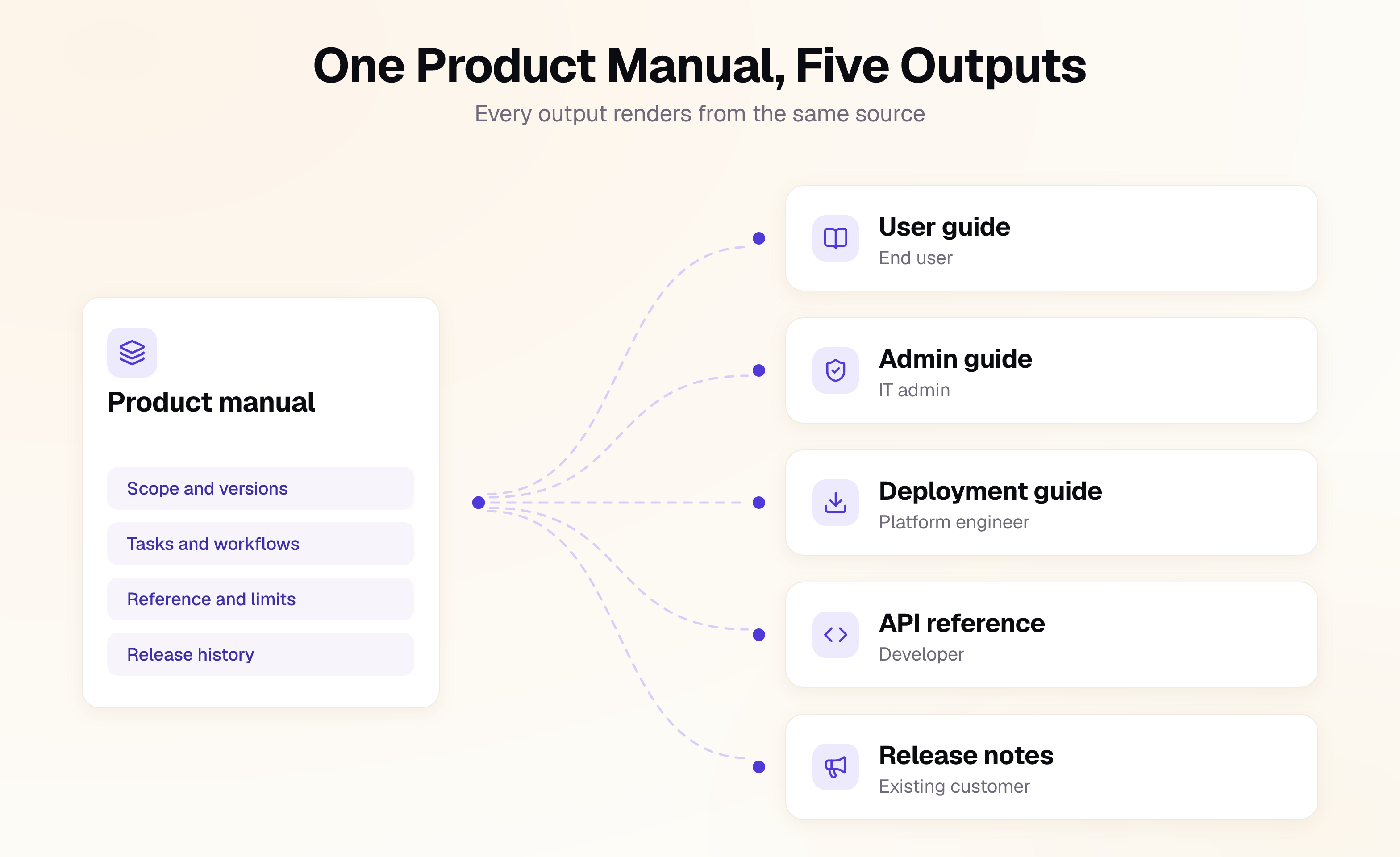
For software products, a product manual is rarely a single document. It may include a user guide for everyday workflows, an administrator guide for setup and configuration, developer documentation for APIs and integrations and reference material for specific features or settings.
Thinking of the manual as a body of content rather than a file makes it easier to maintain. When a product detail appears in several places, that information should have a clear source of truth. Otherwise, every product change creates another opportunity for documentation to become inconsistent or outdated.
Product Manual vs. User Manual
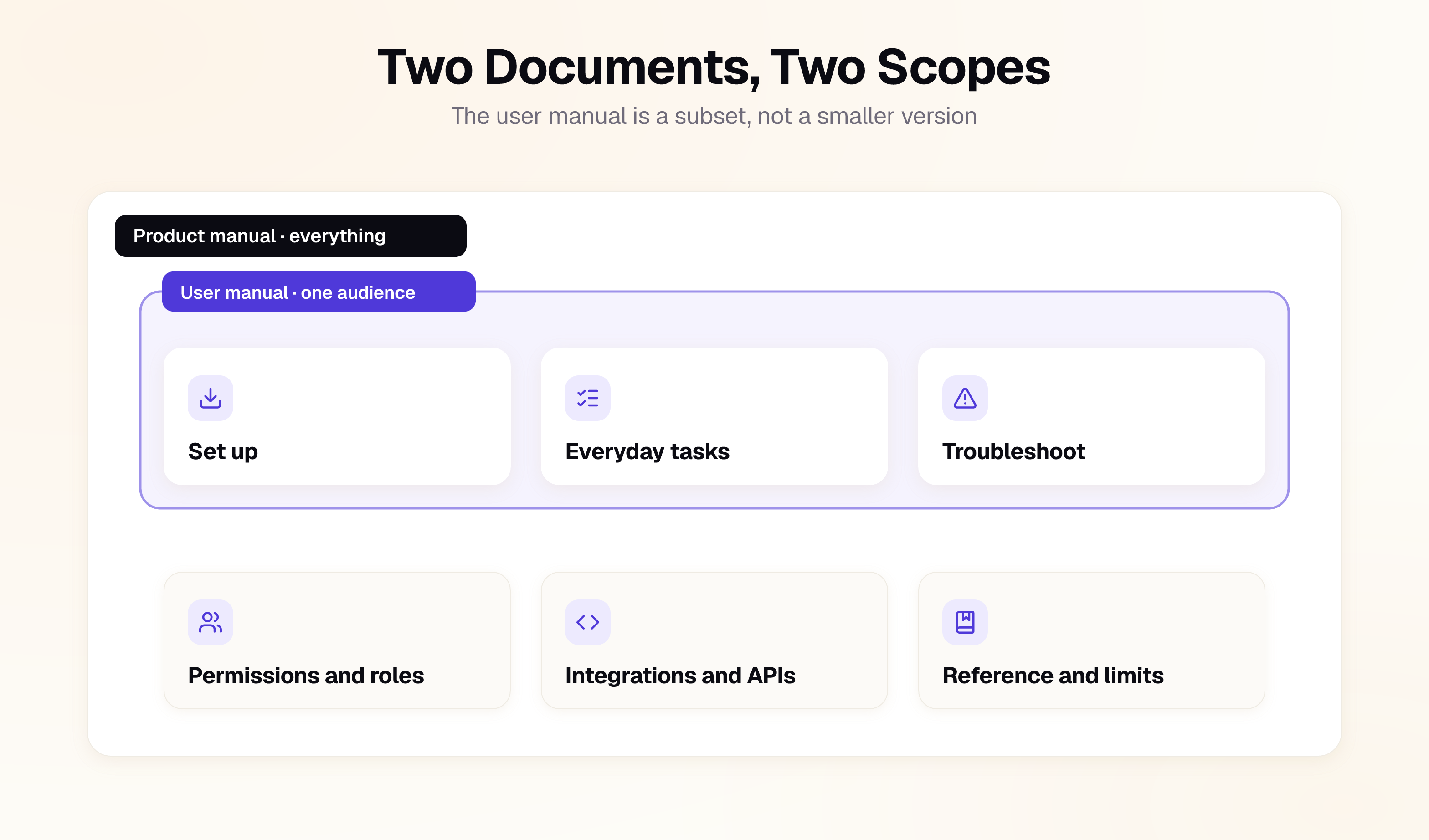
The difference is scope, not size or formality. A user manual is scoped to one audience and the tasks that audience performs, and it is finished when those tasks can be completed. A product manual is scoped to one product across its versions, configurations, and every audience that touches it, and it is finished when the product's required information is accurate and maintainable.
In practice that means a product manual usually contains several user manuals, along with the administrator, deployment, and reference material no single audience owns.
| Dimension | User manual | Product manual |
|---|---|---|
| Unit of scope | One audience and their tasks | One product, its versions, and configurations |
| Organizing principle | User intent and workflows | Product structure, audiences, and lifecycle |
| Audience | A specific user or role | Users, admins, developers, support, and other stakeholders |
| Content | Tasks and workflows | Tasks, configuration, reference, troubleshooting, and product information |
| Ownership | Documentation or support | Documentation with Product, Engineering, and other subject-matter experts |
| Definition of done | Users can complete the documented tasks | The product's required information is accurate, complete, and maintainable |
| Output | Usually a focused guide | A set of related documents from a shared source of truth |
The practical consequence is ownership. A technical writer can produce a user manual independently, but a product manual depends on information owned across the organization. Product teams know supported configurations, engineers know technical behavior, and legal or security teams may own specific requirements.
That makes writing a product manual less about putting everything into one document and more about assembling the right information into a maintainable documentation system.
A product manual defines the broader documentation system around a product. If you want to go deeper into the documentation written for a specific audience, see our guide on how to write a user manual. For documentation focused on guiding a reader through a specific task or process, see how to write an instruction manual.
What to Include in a Product Manual
Before writing the content, define exactly what the manual covers. A reader should be able to tell quickly whether the documentation applies to the product, version, configuration, and environment they are using.
The identification block
For software, the identification block can sit at the beginning of the manual or documentation site and establish its scope at a glance.
Product: [Product name]
Documentation: Product Manual
Version: [Product version this manual documents]
Last updated: [Date]
Applies to: [Plans, editions, or configurations]
Supported environments: [Cloud, self-hosted, on-premises, etc.]
Not covered: [Versions, configurations, or products outside this manual's scope]
Available until: [Date this edition stays reachable, at the earliest]
Several of these fields are especially important:
- Version tells readers whether the instructions match the product they are using.
- Applies to prevents users from following instructions for a different plan, edition, or configuration.
- Not covered makes outdated or unsupported documentation explicit.
- Last updated gives readers a quick indication of how current the information is.
- Available until commits to how long this edition stays online. It is optional for pure software, and it is the field that turns a retention promise into something a reader can check. For machinery sold in the EU it is not optional at all, for reasons covered in the standards section below.
The exact fields will vary by product, but the principle is the same: make the scope of the documentation visible before the reader starts using it.
Components of a product manual
A product manual should not be treated as one long document. Start by mapping the information users need to the audiences and tasks they have, then decide which documents or sections should contain it.
| Document | The question it answers | Written for |
|---|---|---|
| Overview | What is this product, and what can it do? | Buyers, evaluators, new users |
| Getting started | How do I get up and running? | New users, admins |
| User guide | How do I complete my everyday tasks? | End users |
| Administration guide | How do I configure the product, users, roles, and settings? | Administrators |
| Configuration guide | How do I configure the product for our environment? | Admins, IT teams |
| Integration guide | How do I connect this product to other systems? | Developers, technical teams |
| API reference | What endpoints, parameters, and responses are available? | Developers |
| Troubleshooting | Something isn't working. How do I fix it? | Users, admins, support |
| Reference | What does this setting, term, or parameter mean? | Technical and advanced users |
| Security and compliance | What security, privacy, and compliance information do we need? | Security, IT, procurement |
| Release notes | What changed, and does it affect me? | Existing customers |
Note: Not every product needs all of these. Some teams might only need a getting-started guide, user documentation, and reference material, while a complex enterprise platform may require documentation for several roles and technical use cases.
The important thing is to make the decision deliberately. Define what belongs in the product manual, who each piece is for, and where it will be maintained before you start writing.
How to Write a Product Manual in Nine Steps
1. Define the scope of the product manual
Start by documenting exactly what the manual covers and what it does not.
For a software product, define the product versions, editions or plans, supported environments, configurations, integrations, and regions covered by the documentation. If different versions require different instructions, decide whether to maintain separate documentation or use conditional content within the same manual.
The goal is to make one thing unambiguous: which product does this manual describe?
2. Identify your audiences and their tasks
List the people who will use the manual and the tasks they need to complete.
An administrator configuring permissions, an end user completing a workflow, and a developer setting up an API integration may all use the same product manual but they are looking for very different information.
Name each audience explicitly. If you do not identify a user group and its tasks during planning, its documentation needs are likely to be missed later.
3. Map the content
Create a coverage matrix with audiences on one axis and product areas or tasks on the other. For each intersection, identify the documentation needed and who owns the underlying information.
It also exposes gaps before they become support tickets: an administrator with no documentation for security settings, a developer with no integration guide, or a user workflow that has no troubleshooting information.
4. Establish a source of truth for product information
A product manual contains information that often originates in different parts of the organization: product requirements, engineering specifications, API definitions, security documentation, pricing plans, support processes, and more.
Identify the source of truth for each class of information and reference it rather than manually recreating the same facts in multiple places.
If a product limit, configuration value, or API parameter changes, you should know exactly where that information comes from and which documentation depends on it.
5. Structure content for reuse and maintenance
Avoid treating every page as an isolated document. Break recurring information into reusable content where it makes sense: warnings, prerequisites, configuration instructions, terminology, reference information, and common procedures should not need to be rewritten every time they appear elsewhere.
This approach aligns with the content-management principles described in ISO/IEC/IEEE 26531:2023, which covers managing information throughout the lifecycle of systems and software products.
6. Write around the user's workflow, not the product's architecture
Organize the manual around what users are trying to accomplish, not how your product is structured internally. For most software products, that means moving from getting started and configuration to core workflows, troubleshooting, and reference information. Organizing content this way also exposes missing prerequisites and dependencies while you write. Keeping task pages apart from reference and explanation, as the Diátaxis documentation framework does, stops any one page from trying to serve every reader.
7. Review for accuracy, usability, and completeness
A technical review alone is not enough. A strong product manual needs at least three types of review:
| Review | Run by | Catches |
|---|---|---|
| Technical accuracy | Engineering and Product | Incorrect behavior, outdated steps, wrong values |
| Compliance and policy | Legal, security, or relevant subject-matter experts | Unsupported claims, missing requirements, policy conflicts |
| Usability | Representative users | Instructions that are technically correct but difficult to follow |
Then run the coverage matrix from Step 3 again. Any unanswered audience or task is a documentation gap.
8. Tie documentation updates to product releases
Documentation should be part of the product release process, not a task that happens after the release.
Add documentation to the definition of done. When a feature changes, verify its procedures, update screenshots or examples where necessary, document new errors or settings, and confirm that affected translations are updated.
9. Version, update, translate, and retire content as the product changes
Tie documentation versions to the product versions they describe. Do not assume that the latest documentation is sufficient for everyone: customers may still be using an older version, plan, configuration, or deployment.
When translating documentation, establish the source version before translation begins and track which translations correspond to which source.
When a product version reaches end of life, archive its documentation rather than simply deleting it.
Writing it yourself?
Skip the setup, keep the writing
Search, navigation and an OpenAPI reference arrive configured. You bring the words.
No credit card required
A Product Manual Specification You Can Copy
Before you write a product manual, define the manual itself. A one-page specification forces you to settle its scope, audiences, deliverables, sources of truth, review process, and versioning strategy before those questions become problems during drafting. Copy the template below, remove anything that does not apply, and keep it with the documentation rather than burying it in a project plan. Its purpose is simple: every important decision about the manual should have a recorded answer.
product: [Product name]

covers:
  versions: [current versions]
  plans: [plans or editions]
  environments: [cloud, self-hosted, on-premises]
  regions: [supported regions]
  excludes: [versions, configurations, or products not covered]

variant_strategy: [single source, separate versions, conditional content]

audiences:
  - [audience]
  - [audience]

deliverables:
  - name: [document name]
    audience: [audience]
    format: [html, pdf]
    owner: [team]

sources_of_truth:
  product_information: [source]
  technical_reference: [source]
  security: [source]
  pricing_or_plan_limits: [source]

reviews:
  - technical
  - usability
  - compliance

release_gate: [yes/no]

languages:
  - [source language]
  - [translations]

retention: [retention policy]
Where the User Manual Sits Inside the Product Manual
A user manual for a software product is one deliverable inside the product manual, scoped to a single audience and the tasks they perform. The process is the same nine steps applied to a narrower scope: define who the manual is for, list the tasks they arrive with, then write one procedure per task with prerequisites, numbered steps, and a way to confirm it worked.
Our guide on how to write a user manual covers the procedure structure, the writing rules, and the usability testing method in full.
One thing is specific to software. Documentation is increasingly read by assistants and search systems before a person opens the page, so semantic headings, one topic per page, explicit prerequisites, and consistent terminology are what let a retrieval system return the right passage. The same structure helps human readers, a shift we cover in what AI documentation means in practice. For the publishing side, see our guide to AI documentation for agents and LLMs.
Best Practices to Write a Product Manual
A good product manual is not just well written. It is structured so that information stays accurate, discoverable, and useful as the product changes.
1. Version documentation against product releases
Tie documentation to the product versions, plans, or configurations it describes, not just the date it was published. Customers using an older release should be able to find instructions that match the product they actually have.
2. State prerequisites and required permissions
Every procedure should tell the reader what they need before they begin, including required roles, permissions, plans, API keys, or dependencies. A procedure that works for an administrator but fails for a standard user is a support ticket waiting to happen.
3. Link users directly to the relevant documentation
Don't send users to the documentation homepage when they already know what they need. Link from an error message to its troubleshooting procedure, from an empty state to the relevant setup guide, and from a settings screen to documentation for that setting.
4. Document what users cannot see
Some of the most important product information is invisible in the interface. Document rate limits, quotas, retention periods, supported formats, permissions, error codes, limitations, and integration requirements.
5. Give every section a clear owner
Every piece of product information should have someone responsible for keeping it accurate. Engineering may own API behavior, Product may own feature behavior, and Security may own security requirements. Documentation can own the published content and coordinate reviews.
6. Establish one source of truth
If the same product fact appears in several places, decide where it is maintained. Don't copy the same limit, configuration value, terminology, or procedure into multiple documents and expect every copy to stay synchronized. Reuse content wherever possible.
7. Use one term per concept
Pick one name for each concept and use it everywhere. A synonym makes readers wonder whether two terms mean two different things, and it splits the same topic across several passages for search engines and AI assistants retrieving your documentation.
8. Write for the user's task, not the product's feature list
A feature name is rarely a useful instruction. Organize procedures around what users are trying to accomplish rather than your internal product structure. This makes the manual easier to navigate and reduces the product knowledge users need before they can find an answer.
9. Keep documentation in the product review workflow
Documentation changes should happen alongside the product changes that affect them. If a pull request changes an API endpoint, interface, permission, configuration option, or workflow, the corresponding documentation should be reviewed at the same time.
The longer documentation sits outside the product development workflow, the more likely it is to drift.
Standards and Compliance for Product Manuals
In the EU, and in regulated product categories elsewhere, the manual is part of the product for regulatory purposes. A compliant product with a non-compliant manual is a non-compliant product. You need not formally adopt every standard, but you should know which apply before committing to a structure.
| Standard or regulation | What it covers | Who needs it |
|---|---|---|
| IEC/IEEE 82079-1:2019 | Preparing instructions for use | Any product that ships instructions |
| ISO/IEC/IEEE 26531:2023 | Content management for product lifecycle and service information | Teams single-sourcing a manual set |
| Regulation (EU) 2023/988 | General product safety, including clear consumer instructions | Consumer products in the EU |
| Regulation (EU) 2023/1230 | Machinery safety, including digital instructions | Machinery in the EU |
If you ship software only, the first two rows are the ones that bind you. The rest start applying the moment there is a physical product or a consumer market in the picture, which catches more software teams than expected. Ship a device, an embedded component, or a module that goes into someone else's machinery, and those rules can reach your documentation through it.
IEC/IEEE 82079-1:2019 is the closest thing to a universal specification for instructions, applying from a tin of paint to a turnkey industrial plant to software.
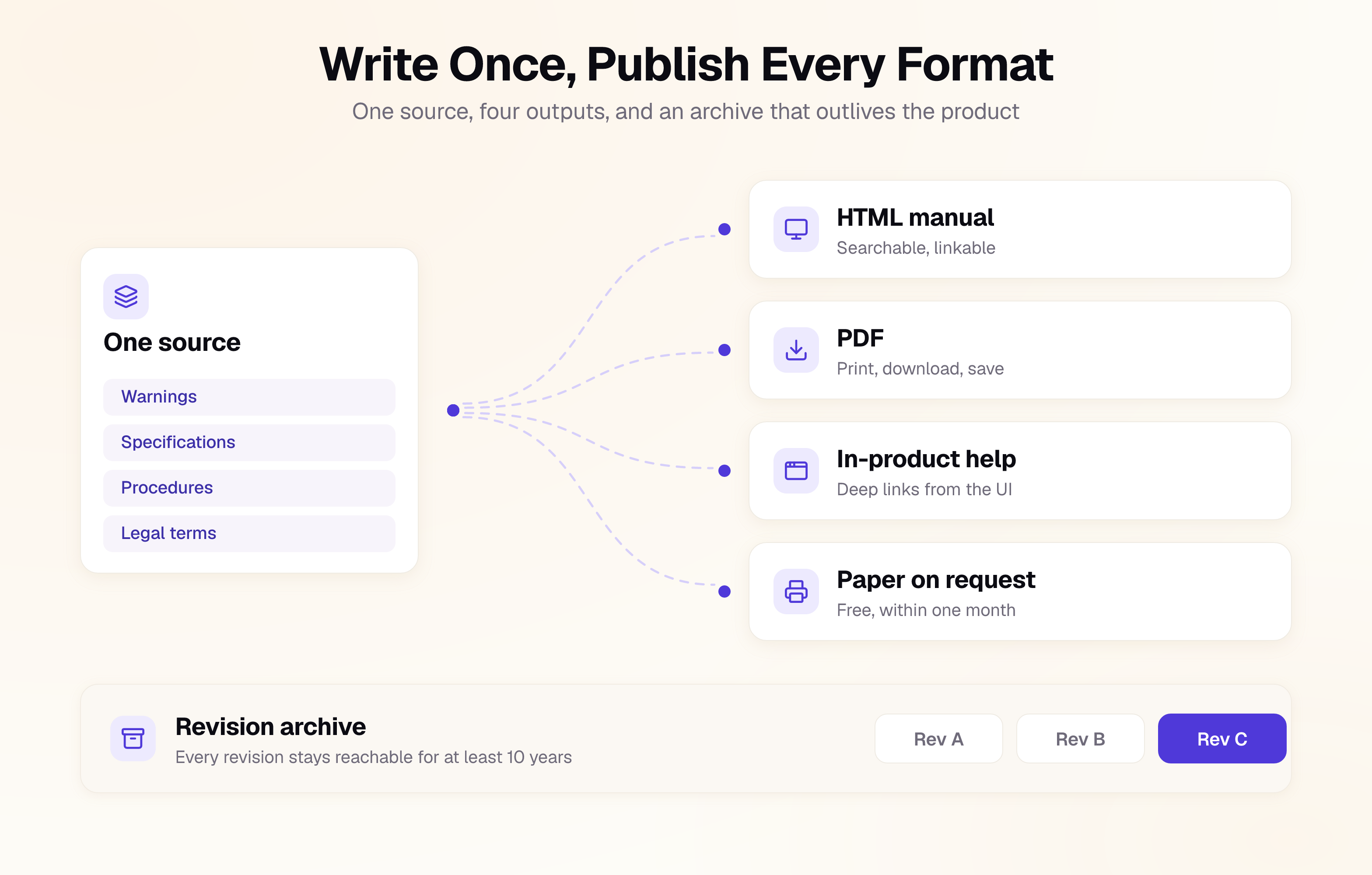
Regulation (EU) 2023/1230 is the one that changes publishing plans, and it is why the identification block carries an "Available until" date. It permits digital instructions, and Article 10(7) attaches conditions: state on the product how to access them, present them in a format that lets the user print, download, and save them, and "make them accessible online during the expected lifetime of the machinery or related product and for at least 10 years after the placing on the market." A user who asks at the time of purchase must still get a free paper copy within one month. It applies from 20 January 2027.
Read that as a documentation architecture requirement, not a legal footnote. A ten-year availability commitment rules out publishing manuals inside a tool you might churn away from, and rules out overwriting old revisions in place.
Choosing a Tool for Your Product Manual
The right documentation tool depends on how your manual needs to be maintained and published. Two questions decide most of it: do you need to reuse content across variants or documents, and do you need to publish a fixed-format PDF alongside the web version?
| Tool | Best for | Notable for product manuals |
|---|---|---|
| Documentation.AI | Product documentation and knowledge bases | Git-based and WYSIWYG editing from one structured source, versioned documentation, AI-assisted drafting with human review, and an assistant that answers from your documentation with citations |
| Paligo | Regulated products with many variants and languages | DITA-based component CMS, conditional content, and translation management |
| Heretto | Large enterprise documentation sets | DITA-based content management, content reuse, and API documentation |
| MadCap Flare | Teams that need polished PDF and print output | Single-source publishing, topic-based authoring, and strong print controls |
| Document360 | Support-led knowledge bases | Categories, versioning, and analytics without a DITA-based workflow |
| Docusaurus or MkDocs | Engineering teams that want full control | Free and Git-native, but limited built-in support for content variants and print publishing |
For products with many variants, languages, and fixed-format deliverables, a component-based documentation system is usually the better fit. For software products that change frequently, a Git-native or structured documentation platform makes it easier to keep content aligned with product releases.
For more options, see our roundups of developer documentation tools, API documentation tools, and AI tools for documentation.
Measure Product Manual Effectiveness
Judge a product manual by its coverage, freshness, and usefulness, not just page views. A manual can be widely read and still leave important user tasks undocumented.
| Metric | How to get it | What it tells you |
|---|---|---|
| Coverage | Audit the content matrix each release | Which audiences, tasks, or product areas still lack documentation |
| Revision lag | Compare documentation updates with product releases | How far the manual trails the product |
| Task success rate | Test procedures with representative users | Whether users can actually complete documented tasks |
| Reported errors | Add a feedback mechanism to documentation | Where users find incorrect, confusing, or outdated information |
Treat coverage and revision lag as leading indicators, and use task success and reported errors to diagnose problems. Be careful with support-deflection claims: ticket volume can change because of releases, pricing, product complexity, or other factors unrelated to documentation.
Common Product Manual Mistakes
- No clear scope. The manual does not state which product versions, plans, configurations, or environments it covers.
- One document for every audience. Administrators, end users, developers, and other audiences are forced to navigate the same undifferentiated content.
- Duplicated facts. Specifications, limits, configuration values, or other product information are copied across documents instead of maintained from a source of truth.
- Undocumented product limitations. Rate limits, permissions, supported configurations, error codes, and other constraints are left out because they are not visible in the main interface.
- The web experience treated as secondary. Documentation is published primarily as a fixed document instead of being searchable, linkable, and easy to access alongside the product.
- Documentation outside the release process. The manual is updated after the product ships, if someone remembers to update it at all.
Frequently Asked Questions (FAQs)
1. What is a product manual?
A product manual is a structured set of information that explains how a product works and how different users can use it effectively. For software products, it can include getting-started instructions, user workflows, administration, configuration, integrations, troubleshooting, reference information, and release documentation.
2. What is the difference between a product manual and a user manual?
A user manual focuses on a specific audience and the tasks they need to complete. A product manual covers the product more broadly and can bring together documentation for different audiences, including end users, administrators, developers, support teams, and other stakeholders.
3. What should a product manual include?
A product manual should include the information users need to understand, configure, use, and troubleshoot the product. Depending on the product, this may include an overview, getting-started content, user and administrator guides, configuration and integration guides, API reference, troubleshooting, security information, and release notes. The components table maps each one to its audience.
4. How do you write a product manual?
Start by defining the product, versions, configurations, and audiences the manual covers. Then map the tasks each audience needs to complete, establish sources of truth for product information, structure the content for reuse, write around user workflows, review it for accuracy and usability, and keep it synchronized with product releases.
5. Who should write a product manual?
A technical writer or documentation team should usually own the structure, content, and publishing process, but they should not be the sole source of information. Product, engineering, security, legal, and other subject-matter experts should own and review the information within their areas of expertise.
6. How do you keep a product manual up to date?
Treat documentation as part of the product release process. When a feature, workflow, API, configuration, or interface changes, review the documentation at the same time. Version documentation against product releases and use a clear source of truth for information that appears in multiple places. If you want that workflow without assembling it yourself, you can create a product manual in Documentation.AI and version it against your releases.
7. Can a product manual be digital?
Yes. For software products, a digital manual is often the most practical format because it can be searchable, linkable, versioned, and updated alongside the product. Depending on the product, industry, and market, additional formats such as PDF or printed documentation may still be required.
Sources
- IEC/IEEE 82079-1:2019, preparation of information for use (instructions for use) of products, part 1
- ISO/IEC/IEEE 26531:2023, content management for product life cycle, user and service management information for users
- Regulation (EU) 2023/1230 on machinery, Article 10(7) on digital instructions for use
- Regulation (EU) 2023/988, the General Product Safety Regulation, applicable since 13 December 2024
Write Your Product Manual with Documentation.AI
The hard part of a product manual is not the first draft. It is the day a limit changes and you have to find every plan, edition, and translation that quoted the old number, while a revision you published in 2019 still has to resolve for another decade.
Documentation.AI holds one structured source behind every guide you ship, versions each edition against the release it describes, and keeps superseded revisions addressable instead of overwritten. If you cannot name where your rate limits are maintained, start with Documentation.AI.
Writing it yourself?
Skip the setup, keep the writing
Search, navigation and an OpenAPI reference arrive configured. You bring the words.
No credit card required