How to Write an Instruction Manual Someone Can Actually Follow
An instruction manual is judged on one thing: whether the reader reaches the working end state. Here is how to write one for software, from prerequisites that carry their weight through expected output, inline failure handling, and the clean-room test that proves it works.

Roop Reddy · Co-Founder, Documentation.AI
Last updated

On this page
- How to Write an Instruction Manual: The Short Version
- What Is an Instruction Manual?
- How Readers Actually Use an Instruction Manual
- Write Prerequisites That Readers Can Verify
- The Anatomy of a Software Instruction Manual
- How to Write Effective Instruction Steps
- Show Expected Output for Each Step
- How to Add Troubleshooting to an Instruction Manual
- Versioning and Updating an Instruction Manual
- Testing an Instruction Manual
- An Instruction Manual Template You Can Copy
- Common Instruction Manual Mistakes
- Frequently Asked Questions (FAQs)
- Sources
- Write Your Instruction Manual with Documentation.AI
People rarely read an instruction manual from beginning to end. They open it when they need to accomplish something, find the relevant procedure, and work through the steps until they reach the expected result.
That behavior should shape how you write an instruction manual. Every step should help the reader move toward a specific outcome, with the right prerequisites, instructions, expected results, and recovery steps available when they need them.
This means writing around tasks rather than features. A good instruction manual tells the reader what to do, what they should see, and what to do if something goes wrong. It should work whether the reader is following a UI workflow, running commands, configuring a system, or completing a technical setup.
How to Write an Instruction Manual: The Short Version
To write an instruction manual, define the outcome first, list the prerequisites and how to verify them, break the task into clear steps, show the expected result for important actions, handle likely failures where they occur, add checkpoints the reader can verify, explain how to undo the changes, and test the procedure before publishing it.
The full process:
- Define the end state in one sentence
- List the prerequisites and show how to verify them
- Break the task into clear, actionable steps
- Show the expected result for important actions
- Handle likely failures where they occur
- Add checkpoints the reader can verify
- Explain how to undo or reverse the changes
- Record the versions the procedure was verified against
- Test the procedure in a clean environment before publishing
What Is an Instruction Manual?
An instruction manual is a set of instructions that takes a reader from a known starting state to a specific working outcome. Its scope is one task and its result, not an entire product or audience. The manual is complete when the reader can reach that outcome by following the instructions.
That scope distinguishes an instruction manual from the two documents it is most often confused with. A user manual is organized around an audience and the tasks that audience performs. A product manual covers a product across its lifecycle and usually consists of multiple documents. An instruction manual focuses on one outcome and the procedure required to achieve it.
The terminology is not consistent across products or industries. A document called an "instruction manual" may actually contain the breadth of a user manual, while standards often use broader terms such as "information for use." For writing purposes, the important distinction is scope: what does this document help the reader accomplish, and where does it end?
| Document | Instruction manual | User manual | Product manual |
|---|---|---|---|
| Unit of scope | One task and its outcome | One audience and their tasks | One product across its lifecycle |
| Answers | How do I accomplish this? | How do I use this product? | What information is needed to understand and use this product? |
| Definition of done | The reader reaches the intended outcome | The documented tasks can be completed | The product's required documentation is complete |
| Typical size | One procedure or a small set of procedures | A set of pages or topics | A set of documents |
| Primary owner | Documentation or the team responsible for the workflow | Documentation or support | Product, documentation, and subject-matter owners |
| Goes stale when | The procedure, dependency, or expected result changes | Product behavior or workflows change | Product versions, configurations, or requirements change |
In the Diátaxis framework, an instruction manual corresponds most closely to a how-to guide: directions that take the reader through a problem toward a specific result. It is distinct from a tutorial, which is designed to teach a beginner through a guided learning experience.
That distinction matters in software documentation. An instruction manual should contain the information necessary to complete the task, but not turn every procedure into a lesson about the underlying technology. If a user is configuring an API integration, they need the endpoint, credentials, parameters, commands, expected response, and recovery steps. They do not necessarily need a lesson on why REST is stateless in the middle of the procedure.
How Readers Actually Use an Instruction Manual
Readers rarely work through an instruction manual from top to bottom. They search for the procedure they need, find the relevant step, perform the action, check what happens, and return to the surrounding explanation only when the result is different from what they expected.
Design for that behavior. An instruction manual should support readers who enter at the beginning, jump directly to a procedure, or arrive at a single step from a search result or link.
Four consequences follow:
- Every step should stand on its own. Someone may arrive at step 6 without reading steps one to five. Give each step enough context to understand what is happening and whether anything can safely be skipped. AI agents read the same way, one retrieved passage at a time, which our guide to AI documentation for agents and LLMs covers in detail.
- The action should be easy to find. Commands, UI actions, configuration values, and other instructions should be visually distinct from the explanation around them.
- Put essential context before the action. If the reader needs to know something before running a command, say it immediately before the command. Explanations that are useful only after the action can follow it.
- Do not rely on unstated knowledge. If step 7 only works because the reader happened to notice an assumption in step 2, the procedure has a documentation problem.
Write Prerequisites That Readers Can Verify
Many instruction manuals fail before the first step because the author has assumed that the reader already has everything required to begin.
Prerequisites should make those assumptions explicit. State the versions, permissions, dependencies, and configuration the procedure actually requires.
A useful prerequisite section can include:
- Operating system and shell, when they affect the commands
- Runtime and package manager versions, where version differences can change behavior
- Accounts and permissions, including the specific role or access scope required
- Network requirements, including required hosts, ports, proxies, or VPN access
- Environment variables and configuration files that must already exist
- Dependencies or software the procedure assumes are installed
- Previous steps or procedures the reader must complete first
- What the guide does not cover, so readers can identify when they are in the wrong place
Then apply a simple rule: every prerequisite that can be checked should have a way to check it. A requirement such as "Node.js 20 or later" is useful. A requirement accompanied by node --version is actionable.
Written out, a prerequisite section looks like this:
Before you begin
| Requirement | Check |
|---|---|
| Node.js 20.x or later | node --version |
| npm 10 or later | npm --version |
| Docker running locally | docker info |
| An API key with write scope | curl -sI https://api.example.com/v1/me -H "Authorization: Bearer $EXAMPLE_API_KEY" |
| Port 8080 free | lsof -i :8080 |
This guide assumes you have already created a project. It does not cover deploying to production or configuring SSO.
A good prerequisite section prevents the reader from starting the wrong procedure with the wrong environment.
The Anatomy of a Software Instruction Manual
A software instruction manual should contain everything a reader needs to move from a defined starting state to a working outcome. Each part answers a question the reader would otherwise have to answer through trial and error.
| Part | What it does | What its absence costs |
|---|---|---|
| Title naming the outcome | Lets readers quickly decide whether the procedure applies to them | Readers start a guide that was never relevant |
| Goal statement | States what the reader will accomplish | Readers cannot tell what they are working toward |
| Prerequisites and checks | Makes assumptions explicit before the procedure begins | Failures caused by missing dependencies or permissions |
| Numbered steps | Gives readers clear actions and a position they can return to | Difficult troubleshooting and unclear support requests |
| Expected output | Lets readers verify that an action worked | Errors can go unnoticed until a later step |
| Inline failure handling | Addresses common problems where they occur | Readers have to stop and search elsewhere for help |
| Completion checkpoint | Confirms that the intended outcome has been reached | Readers finish the steps without knowing whether the task succeeded |
| Teardown or rollback | Explains how to undo temporary changes or retry cleanly | Leftover resources and inconsistent environments |
| Verified-against information | Records the versions and environments where the procedure was tested | Readers cannot distinguish an outdated procedure from a product problem |
| Next steps | Points readers to the next relevant procedure or reference | Readers finish the task without knowing where to go next |
Writing it yourself?
Skip the setup, keep the writing
Search, navigation and an OpenAPI reference arrive configured. You bring the words.
No credit card required
How to Write Effective Instruction Steps
Each step should tell the reader what to do and what should happen next. Keep the action itself distinct from the explanation around it.
-
Give each step one primary action. If the reader needs to evaluate the result before continuing, do not combine multiple commands into one block. Separate them so the reader can identify exactly where something went wrong.
-
Show complete commands. Avoid instructions such as "run the same command with
--verbose." Repeat the full command so the reader does not have to scroll back and reconstruct it. -
Do not include the shell prompt. Write
kubectl get pods, not$ kubectl get pods. The command should be directly copyable. The Kubernetes documentation style guide follows this convention. -
Use placeholders consistently. If a command requires a value the reader must provide, make the placeholder visually obvious and explain exactly what needs to be replaced. For example:
export API_KEY=YOUR_API_KEYThen explain what
YOUR_API_KEYrepresents and where the reader can obtain it. Consistency matters more than the specific placeholder convention you choose. -
Put explanations after the action when possible. If the reader needs information before they can safely run a command, put that information first. Otherwise, give the command first and put additional context in a note below it.
-
Test every command from the published version. Formatting problems can break otherwise correct commands. Curly quotes, non-breaking spaces, wrapped URLs, and incorrect line breaks can all cause copy-and-paste failures. Copy commands from the published page, not just the source, and run them in the environment the reader is expected to use.
For sentence-level guidance on writing procedures, including imperative verbs, conditions, and naming interface controls, our user manual guide covers the underlying writing principles in more detail.
Show Expected Output for Each Step
In documentation, the expected output plays the same role as an image in an assembly manual: it shows the reader what the result should look like before they move on.
Without expected output, a reader can complete a command successfully or incorrectly and have no way to tell. The problem may not become visible until several steps later.
Kubernetes uses the phrase "The output is similar to this," which is useful because command output often contains IDs, timestamps, paths, and version strings that will differ between environments. Readers need to know which differences are expected and which indicate a problem.
Written out, a step with its output looks like this:
3. Start the local server.
npm run dev
The output is similar to this:
> [email protected] dev
> next dev --port 8080

Ready in 1.4s
Local:   http://localhost:8080
The port and the startup time will differ. If you see a Ready line, the server started.
Four rules make output blocks useful:
- Show the line that proves success. Do not paste an entire terminal buffer when only one or two lines matter. Truncate the rest and indicate that you have done so.
- Identify expected differences. Call out values such as IDs, ports, paths, and timings that may vary between environments.
- Show common failure output. Including the beginning of a likely error helps readers recognize a known failure and makes the error text searchable.
- Add checkpoints after important groups of steps. A health check, curl request, docker ps, or status command can confirm that the accumulated state is correct before the reader continues.
How to Add Troubleshooting to an Instruction Manual
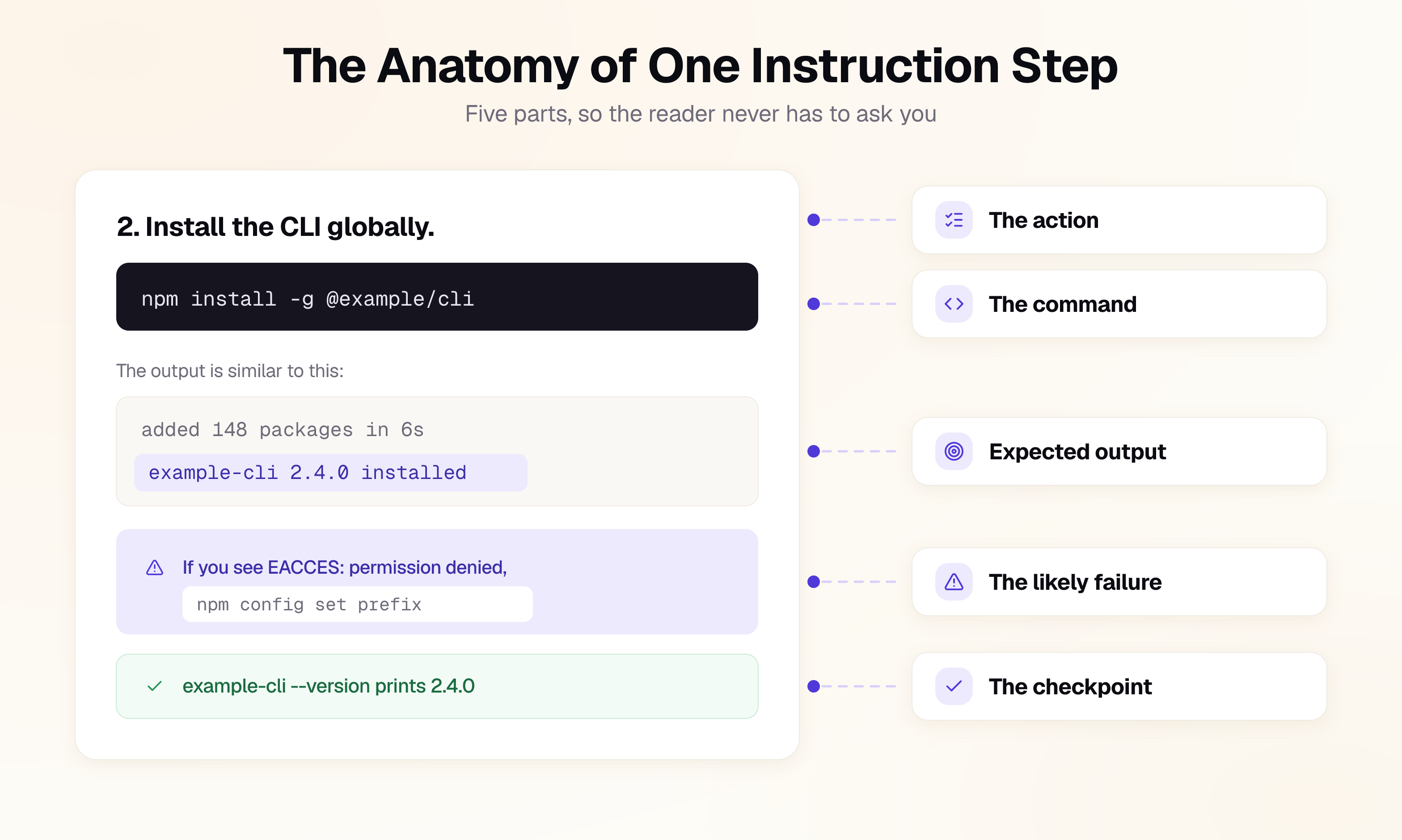
Put the handling for a likely failure inside the step that produces it. When a reader encounters an error, they should not have to leave the procedure and search a separate troubleshooting section to find out what it means.
Software rarely runs in exactly the environment used to write the manual. Operating systems, dependency versions, permissions, network configuration, and existing installations can all change the result. An instruction manual that documents only the successful path leaves the reader to diagnose predictable failures themselves.
You do not need to anticipate every possible error. Prioritize the two or three failures that are both likely and costly to resolve for each important step. Support tickets, issue trackers, CI logs, and your own testing are useful sources for identifying them.
Keep failure handling visually subordinate to the main procedure:
2. Install the CLI globally.
npm install -g @example/cli
If you see EACCES: permission denied, npm is trying to write to a directory owned by root. Do not rerun with sudo, which leaves root-owned files in your npm cache. Set a user-level prefix instead:
npm config set prefix ~/.npm-global
Then reopen your shell and run the install again.
Use the actual error text where possible. Readers can compare it directly with what they see and search for the exact message if they need more help.
Also explain what not to do when there is a common but problematic workaround. If sudo, for example, would appear to solve an immediate permission error but create another permissions problem later, say so.
Move a failure to a separate troubleshooting page when the resolution is longer than the procedure itself, applies across multiple steps, or requires significant diagnosis. Link to that page from the relevant step, but keep the symptom visible so readers can immediately tell whether the troubleshooting content applies to them.
Versioning and Updating an Instruction Manual
Software instructions can become outdated as dependencies, APIs, interfaces, and supported environments change. An instruction manual should therefore state exactly what versions and environments it has been verified against.
Place this information near the beginning of the manual:
- Verified against:
example-cli 2.4.0, Node.js 20.11, macOS 15 and Ubuntu 24.04 - Last verified: 19 August 2026
- Minimum supported:
example-cli 2.0
State both the version used for verification and the minimum supported version when they differ. If a feature or procedure depends on a specific release, say so explicitly.
The more important part is the workflow behind the version information. Update the instruction manual when the product or its dependencies change, not after readers report that the procedure is broken. The wider business case for keeping procedures current is set out in why documentation matters.
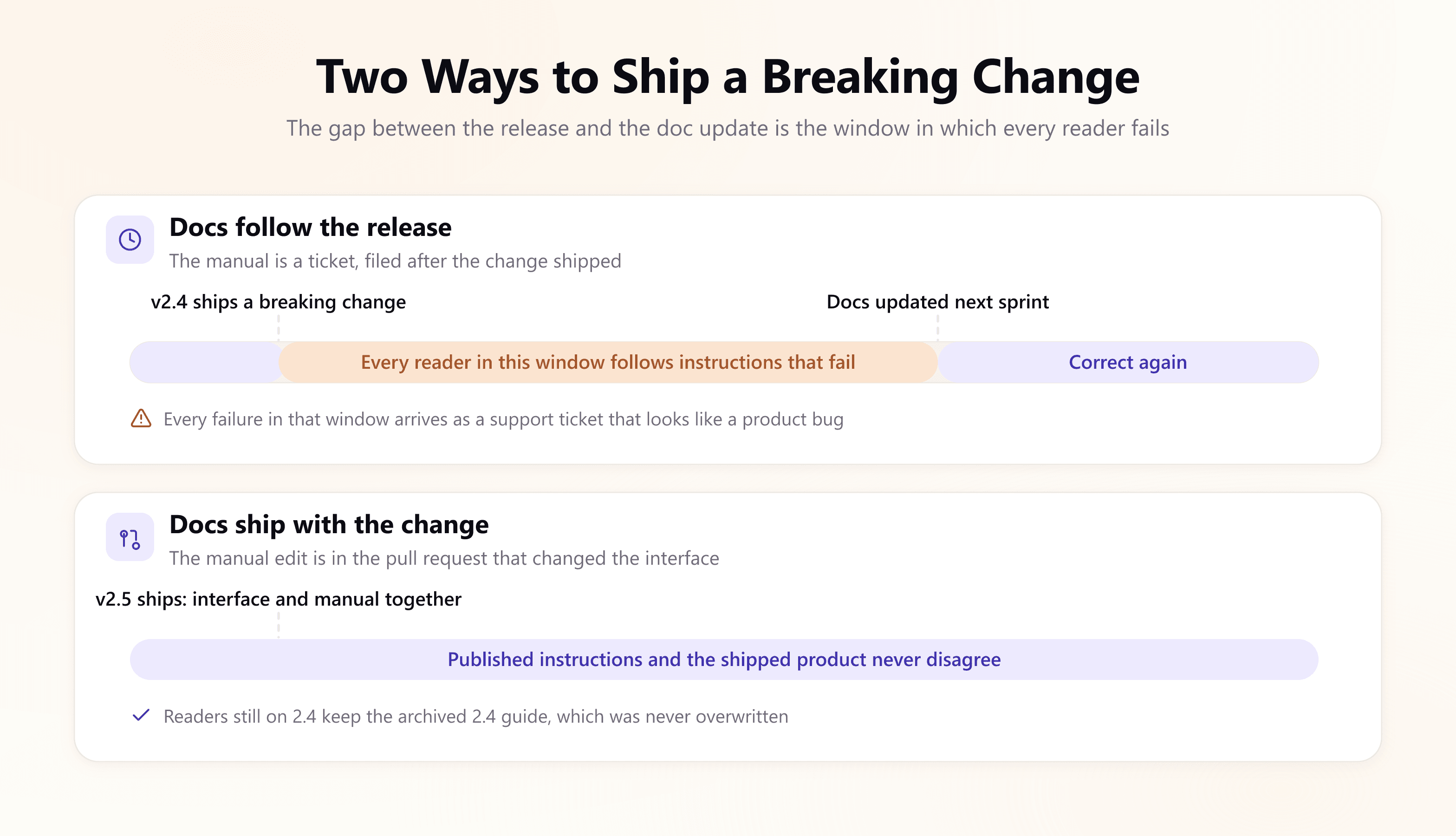
For software teams, documentation changes should be reviewed alongside the code or product changes they describe. If an interface changes in a pull request, the corresponding procedure should be updated in the same change whenever possible.
For breaking changes, do not silently overwrite the previous instructions. Publish the new version and keep the previous version available to users who are still running the older release.
Finally, re-test important procedures periodically even when the product itself has not changed. Dependencies, operating systems, APIs, and external services can change independently of your release cycle.
Testing an Instruction Manual
Before publishing an instruction manual, run the complete procedure in an environment that does not contain the setup used during authoring.
Your development machine is a poor test environment because it may already have the required credentials, global packages, environment variables, cached dependencies, and configuration files. Those hidden dependencies can make an incomplete manual appear correct.
Useful testing environments include:
- A temporary container created from a clean base image
- A fresh cloud VM or development environment
- A colleague's machine with a different operating system
- A new team member who has not used the product before
Use one rule throughout the test:
Every undocumented step or assumption is a documentation defect.
If you install software that the manual did not mention, you have found a missing prerequisite. If you modify a configuration file that the manual did not mention, that dependency needs to be documented. If a command fails because of its formatting on the published page, the published version has a defect.
Some documentation can also be tested automatically. Rust can run code examples in documentation comments with cargo test, while Go can execute Example functions and compare their output against the documented result.
You do not need a sophisticated documentation-testing system to start. A simple CI job that runs the commands from your quickstart or installation procedure in a clean environment can catch many of the failures that a conventional editorial review will miss.
An Instruction Manual Template You Can Copy
This is the template for one instruction manual: one end state, one page. Copy it, delete the parts your task does not need, and keep the order, because it matches the sequence in which a reader needs each piece.
# <Verb the end state: "Connect your app to the Example API">

What you will have at the end: a running local app that authenticates
against the Example API and returns your account record.
Time: about 15 minutes.

Verified against: example-cli 2.4.0, Node.js 20.11, macOS 15 / Ubuntu 24.04
Last verified: <date>

## Before you begin

- <Requirement, with exact version>    <command that checks it>
- <Requirement, with exact version>    <command that checks it>

This guide assumes <what they already did, linked>.
It does not cover <the adjacent thing, linked>.

## 1. <Imperative action>

<one complete command>

The output is similar to this:

<output, truncated, keeping the line that proves success>

<Note: what varies. If you see "<verbatim error>", <what to do>.>

## 2. <Imperative action>

...

## Confirm it worked

<one command that verifies the whole end state>

<the output that means success>

## Clean up

<commands that undo everything this guide created>

## Next steps

- <the guide that follows this one>
- <the reference page for what they just used>
Common Instruction Manual Mistakes
- Prerequisites written as a sentence, with no versions and nothing the reader can run to check them
- Commands with no expected output, so no step can be judged as passed or failed
- Only the happy path documented, on the assumption that the reader's machine resembles yours
- Explanation mixed into the action line, so the reader parses a paragraph before they can act
- A troubleshooting section at the end, handling failures the reader met 20 minutes earlier
- A leading
$, curly quotes, or a wrapped line that breaks the paste - Placeholders in two different conventions on the same page, with no replacement list
- No version stamp, leaving the reader unable to tell a stale guide from a broken product
- No completion checkpoint, so finishing the last step is not the same as knowing it worked
- Never run on a clean machine, which means it has only ever been tested by someone who cannot fail
Frequently Asked Questions (FAQs)
1. What is an instruction manual?
An instruction manual is a set of instructions that takes a reader from a known starting state to one specific working end state. In software it usually appears as a setup guide, a quickstart, an integration guide, or a runbook, and it is finished when a reader who satisfies the prerequisites can reach the end state without help.
2. What is the difference between an instruction manual and a user manual?
An instruction manual is scoped to one task and its outcome, so it answers "how do I get this working?" A user manual is scoped to an audience and covers everything that audience does with the product. Most user manuals contain many instruction manuals; our user manual guide covers the wider document.
3. What should an instruction manual include?
A title naming the end state, a goal statement with a time estimate, prerequisites each paired with a check command, numbered steps carrying one command each, the expected output for every command, inline handling for the likely failures, a completion checkpoint, teardown instructions, a verified-against stamp, and links to what comes next.
4. How long should an instruction manual be?
As long as one end state takes, and no longer. If a guide runs past roughly a dozen steps or covers two outcomes, split it and link the parts, because a reader who abandons a long guide at step 15 has gained nothing from the 14 steps they completed.
5. How do you write an instruction manual for software?
Write for non-linear reading. Make each step self-contained, put a complete command in every step, show the output that proves it worked, handle the likely errors where they happen, stamp the page with the versions you verified against, and test the whole thing in a clean container before publishing.
6. How often should an instruction manual be updated?
Whenever the interface it documents changes, in the same pull request as that change, and on a schedule regardless, because most breakage comes from dependencies you do not control. Re-verifying critical guides such as quickstarts and installation instructions at every release is the usual baseline.
Sources
- Diátaxis, how-to guides, on directions that guide the reader towards a result
- Google developer documentation style guide, formatting placeholders, and procedures
- Kubernetes documentation style guide, code snippet formatting and example versioning
Write Your Instruction Manual with Documentation.AI
The hard part of an instruction manual is not writing the steps. It is keeping them true while the CLI, the SDK, and every dependency underneath them keep shipping, and knowing which of your published guides stopped working this week.
Documentation.AI is built for that: documentation that lives alongside your code and is reviewed in the same pull request, versioned against your releases, with AI drafting under human review and an assistant that answers from your own guides with citations back to the exact step. If your setup guide is older than your last three releases, start with Documentation.AI.
Writing it yourself?
Skip the setup, keep the writing
Search, navigation and an OpenAPI reference arrive configured. You bring the words.
No credit card required