What Is an LLM Wiki? Steps to Build One for Your Team or Business
The LLM Wiki started as a pattern for one person and a folder of notes. A team has more knowledge, more sources, and more to lose when it goes stale. Here is how the pattern changes for a team, how our marketing team runs one, and how to build your own on Documentation.AI.

Roop Reddy · Co-Founder, Documentation.AI
Last updated
On this page
On 4 April 2026, Andrej Karpathy published a GitHub gist that contained no code. It was a short idea file describing a way to keep a knowledge base that largely maintains itself. You collect sources in a folder. An AI model reads each one and writes what it learned into linked Markdown pages, which it keeps in order as new sources arrive. When you want to know something, you ask the pages instead of searching the sources. He called it an LLM Wiki. [1]
The setup was built for one person. A team's knowledge is spread across more places and read by more people, and keeping it in order is rarely anyone's job. This guide explains the pattern, then shows how our marketing team runs one and how to build your own on Documentation.AI.
What Is an LLM Wiki?
At its simplest, an LLM Wiki is a set of Markdown pages that a model writes and maintains from a collection of source documents. Questions are answered from the pages rather than from the raw sources.
That sounds close to retrieval-augmented generation (RAG), but the timing differs. RAG searches the raw documents every time someone asks a question. A wiki does the synthesis once, when a source arrives, and saves it as a page that later sources build on. The idea file calls the wiki "a persistent, compounding artifact." [1]
Karpathy's Three Layers: Sources, Wiki, Schema
The pattern has three parts.
Raw sources are the documents you drop in: articles, papers, transcripts, tickets, release notes. They are the record the wiki is accountable to.
The wiki is the set of cross-linked Markdown pages the model writes, one page per topic. Two pages hold it together: an index.md catalogs every page with a one-line summary, so the model can find what exists without a search index. A log.md records what changed and when, in a list that is only ever appended to.
The schema is a short file of rules a person writes for the model. It sets the page types and naming, and says what to do when a source contradicts an existing page. In the original setup it is a CLAUDE.md or AGENTS.md file the agent reads at the start of every session.
The idea file compares the split to a codebase: "Obsidian is the IDE; the LLM is the programmer; the wiki is the codebase." [1]
The Three Operations: Ingest, Query, Lint
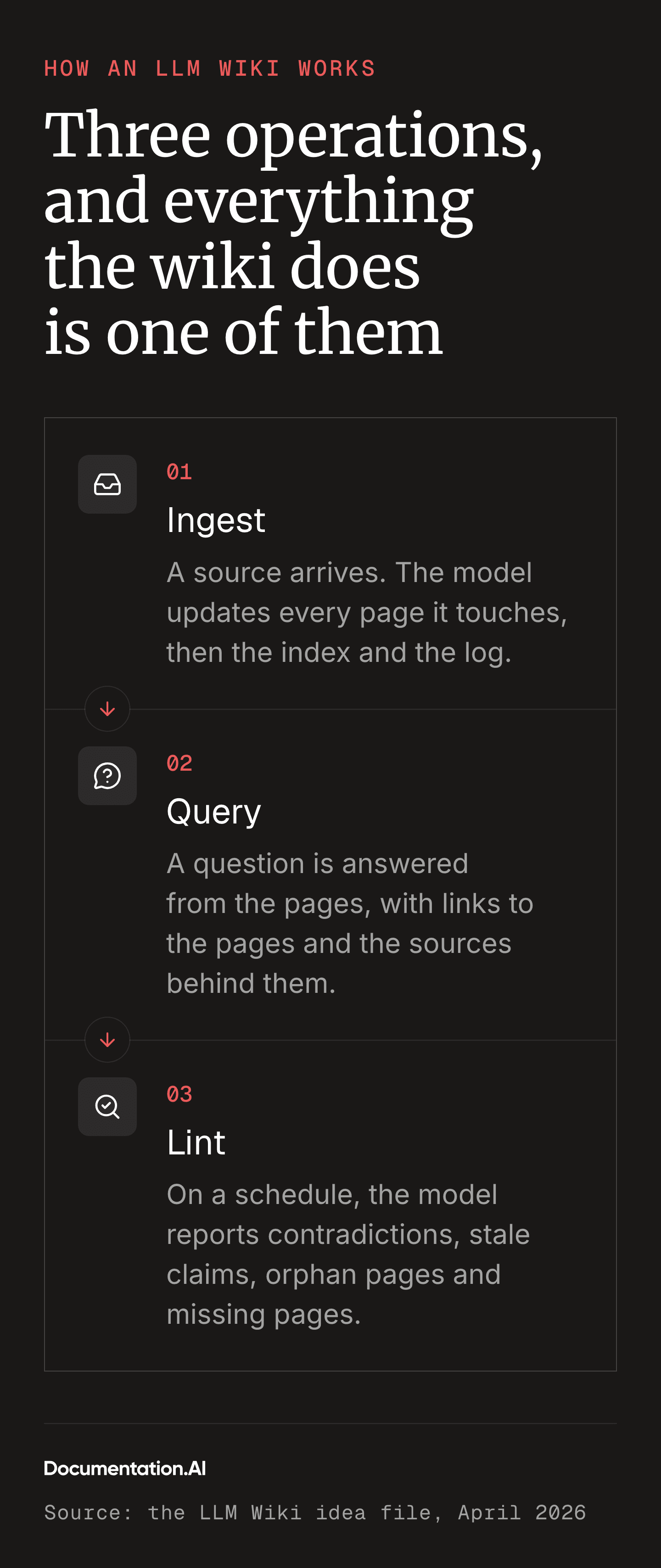
- Ingest: A new source arrives. The model updates every page it affects and creates any that are missing, then records the change in the index and the log. The idea file puts it at "10-15 wiki pages" for one document. [1]
- Query: You ask a question. The model reads the index, opens the pages that matter, and answers with links back to those pages and the sources behind them. A good answer can be saved as a new page, so the wiki gets better from being used.
- Lint: On a schedule, the model reads the whole wiki and reports what is wrong: two pages that contradict each other, a claim a newer source has overtaken, a page nothing links to, or a concept that comes up often and has no page of its own.


As the idea file puts it: "The tedious part of maintaining a knowledge base is not the reading or the thinking, it's the bookkeeping." [1] A person can judge what a source means but rarely remembers the eleven other pages it affects. The model keeps track of those.
LLM Wiki vs RAG: What Changes
| LLM Wiki | RAG | |
|---|---|---|
| When synthesis happens | On ingest, once per source | On every query |
| What is stored | Pages the model wrote, cross-linked | Chunks of the raw documents, embedded |
| What answers a question | The pages, by reading the index | The chunks nearest the question |
| Infrastructure | A folder and a model | An embedding model, a vector index, a retriever |
| Where it stops working | When the index no longer fits in context | When the corpus is small enough that retrieval adds nothing |
The wiki's advantage is that cross-references already exist when a question arrives, so an answer can draw on pages that share no words with it.
Its limit is scale. One analysis estimated the ceiling at 50,000 to 100,000 tokens of index, which works out to a "bounded and stable" corpus of about 100 articles. [2] One practitioner's wiki began giving "confident but wrong" answers at 80 to 100 articles, blending unrelated notes together, until a search step over the pages fixed it. [3]
A team wiki reaches that size within months, so it has to plan for the ceiling from the start.
Personal vs Team LLM Wiki
The idea file gives the team use case a single line: "an internal wiki maintained by LLMs, fed by Slack threads, meeting transcripts, project documents, customer calls." [1] A team's sources come from many people and systems, no one has read them all, and the people asking questions are rarely the ones who added the sources. Every new person or system feeding the wiki adds to the bookkeeping.
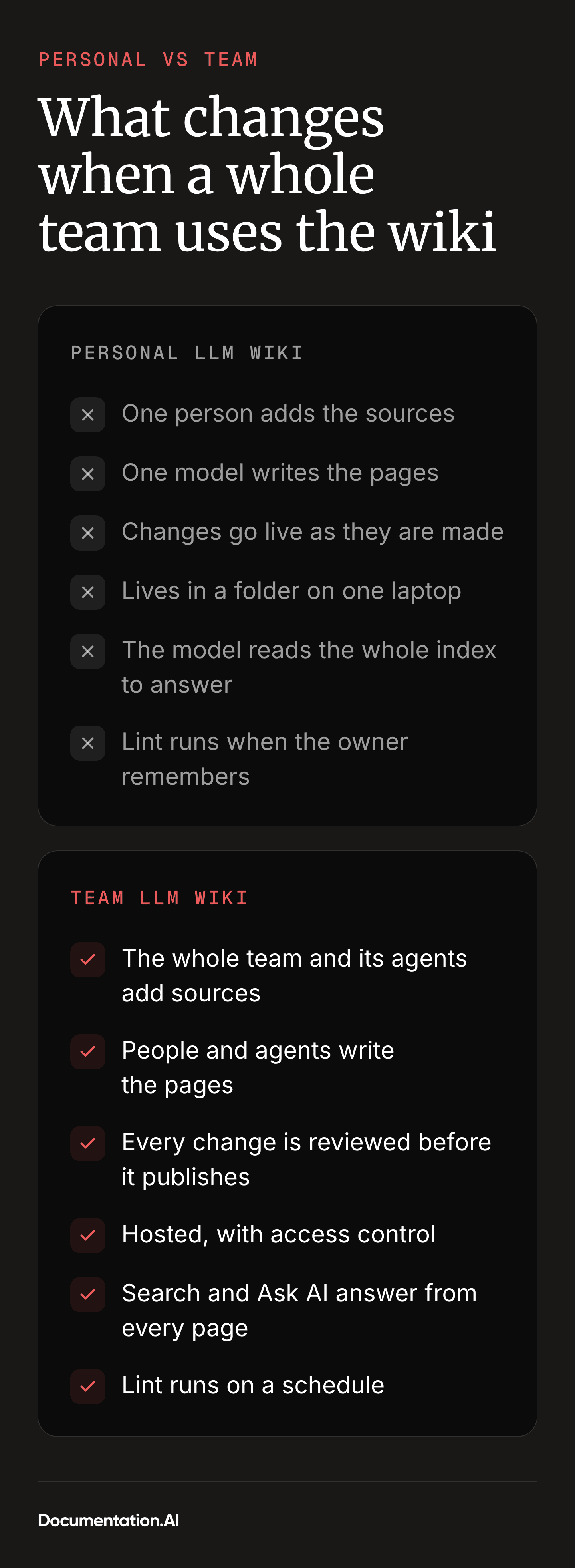
| Personal | Team | |
|---|---|---|
| Who adds sources | You | Everyone on the team, and agents |
| Who writes pages | One model, in one session | People in the editor, and several agents |
| Who checks a change | You, when you notice | A reviewer, before it publishes |
| Where it lives | A folder on one laptop | A hosted site, with access control |
| How it is searched | The model reads the index | Search and Ask AI over every page |
| Who reads it | You | Employees, support bots, AI agents |
| When lint runs | When you remember | On a schedule |


Many Contributors: People and Agents
People write in a team wiki too. Some pages are better written by hand, like the positioning a marketing lead has argued over for a month or a runbook an engineer has actually used during an incident. The model doesn't rewrite those pages. It keeps the pages that depend on them in step, links them from the index, and flags them in lint when a newer source contradicts them.
Meanwhile a marketer adds a call transcript, a scheduled agent files a competitor update, and a coding agent documents a release, all touching the same company-facts page in the same afternoon. Codebases solved this long ago with branches and merges, and a team wiki borrows both. Every change also names its author, so a wrong fact can be traced back.
Agents write to the wiki, not only read it. One files a page when a feature ships. Another saves a fact it found while drafting a blog post. The schema treats them as writers under the same rules as people, plus one: an agent's change always waits for a person.
Every Change Needs a Review
Most people reading a team wiki never saw the source behind a page, and a support assistant will repeat that page to a customer as written. So no edit goes live on its own. Each one lands where a person can read the diff, check the source, and publish or send it back. Most reviews take two minutes, and they catch wrong facts before a customer hears them.
It Has to Work Past 100 Pages
A marketing team's wiki passes 100 pages in its first quarter, which is where loading the whole index into context starts to fail. A team wiki needs a search step: find the five pages that matter, then read those. Hosted documentation platforms already have one, with a search index and an assistant that cites the page and section. The wiki keeps its cross-references and can answer from 500 pages without reading them all.
More Readers: People, Support Bots and AI Agents
The readers multiply too, from a new hire browsing the site to a coding agent checking plan limits mid-task. So the wiki has to be published behind access control as a site, with llms.txt and Markdown copies for crawlers and an MCP endpoint for agents that would rather search. Our guide to documentation for AI agents and LLMs covers how each of these is read.
For notes only you read, the personal pattern is still the right tool. The rest of this guide is for teams.
Ready to build one?
A wiki your agents can write to
Branches, review, Ask AI and an MCP server from one project. Connect Claude Code and start ingesting.
No credit card required
LLM Wiki Example: How Our Marketing Team Runs One
Our marketing team runs its own LLM Wiki on Documentation.AI. What follows is simplified from the real wiki, with competitor names and internal figures swapped for placeholders.
What Goes In: Customer Calls, Competitor Pages, Product Releases
Nothing in the sources folder is edited once it arrives. After each sales or customer call, someone files a short call summary covering who the prospect is and why they are looking, with names left out. The rest is competitor pages clipped as Markdown with the capture date, every product release, and support questions with customer details removed.
Who Writes to It: Marketers and Agents
The marketers write the pages that carry judgement, like brand voice and positioning, by hand in the web editor, and argue over them in inline comments. They also file call summaries and review every change an agent makes.
The agents keep the factual pages in step. A competitor-watch agent re-captures competitor pricing and feature pages weekly. A release agent turns each changelog entry into a source and runs an ingest. The blog agent files back any fact it had to look up, with a note on where it came from. A lint agent runs every Monday.
Every change arrives on a branch named for whoever made it, and nothing an agent writes goes live until a marketer merges it.
The Pages: Brand Voice, Buyer Profile, Positioning, Competitors, Company Facts
The wiki holds about 60 pages. These are the ones every writer, human or agent, reads first:
- Brand voice: Plain words, short sentences, no hype terms, and which words we never use. Written by people.
- Buyer profile: Who buys and what they are trying to stop doing, each line linked to the call summaries behind it.
- Positioning: One main message and three supporting points, each with its evidence and the date it was last confirmed. Written by people; agents add evidence underneath.
- One page per competitor: Plans, prices, feature gaps both ways, homepage claims, and a "last checked" date.
- Company facts: Which features are on which plan, which integrations are live or planned, and the claims we cannot make yet.
- The index and the log, as in the original pattern.
The Schema: Rules Every Writer, Human or Agent, Follows
The schema file is 40 lines. These are the rules that do most of the work:
# Marketing wiki: rules

- Every claim on a page links to a file in sources/.
- A feature is "available" only if company-facts says it has shipped.
  Otherwise it is "planned", with the roadmap entry linked.
- Never quote a call or ticket word for word. Summarise it and link the source.
- Competitor pages carry a "last checked" date. Older than 60 days is stale.
- Every change names who made it: a person, or an agent by name.
- Pages with "owner: people" in their frontmatter are written by people.
  Agents flag a needed change in lint-report; they do not edit the page.
- Agents always work on a branch. Only a person merges into the live branch.
- When a new source contradicts a page, update the page, note the
  contradiction in the log, and link both sources.
Who Reads It: Blog, LinkedIn, SEO and the Website
Most of the wiki's readers are machines. The blog agent loads brand voice and the buyer profile before drafting and checks every product claim against company facts. The LinkedIn agent works from positioning and the latest release notes, while the website build pulls plan names and limits so the pricing page cannot drift. The one human reader in the example is a new marketer, who asks Ask AI how we compare to Competitor A and gets an answer linked to the competitor page.
The Facts It Keeps Straight
In one week, the lint report caught these before they shipped:
- A blog draft said a feature was "available on every plan". Company facts said middle plan and above.
- The Competitor A page was 74 days old, and the competitor had changed its pricing since. A comparison post was about to quote the old number.
- A page of case-study ideas had no incoming links and had gone unseen for two months.
How to Build a Team LLM Wiki With Documentation.AI
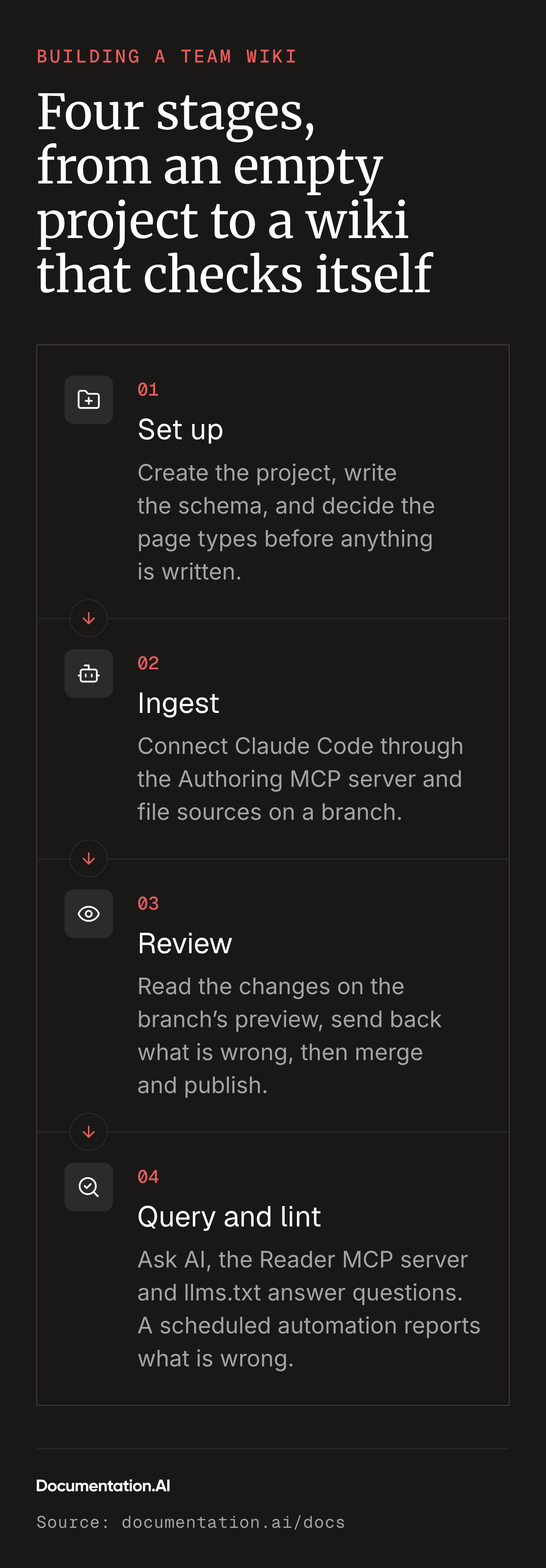
The eight steps below build the marketing wiki described above. They use Claude Code, but any other coding agent works in its place.


Step 1: Create the Project and Plan the Wiki's Structure
Create a documentation project and decide what kinds of page it will hold before anything is written. Without page types, the model has nowhere obvious to file things and the wiki turns into a pile. For the marketing wiki, the types are the five above, plus one section per competitor, with an index page at the top of the navigation and a log page at the bottom.
Pages can be plain Markdown or MDX, so an existing folder of .md files moves in as it is. People write in the same project, with real-time collaboration and inline comments in the web editor, and their pages go through the same branches as the agents'.
Set the project's access control at the same time. An internal wiki goes behind password, organisation sign-in, JWT, or OAuth, and the setting carries through to Ask AI and the MCP endpoint, so a gated page stays gated everywhere.
Keep raw sources out of the project, because any Markdown file inside it becomes a reachable page, even when it is not in the navigation. Store them in a repository or folder the agent can read, and add the ones Ask AI should also search as external sources: PDFs and web pages the assistant cites without publishing them.
Step 2: Write the Team Schema File
Write the schema as a CLAUDE.md at the root of the documentation repository. Claude Code reads it at the start of every session (the Claude Code guide covers placement). If other agents will contribute too, put the rules in an AGENTS.md and have CLAUDE.md import it with a single @AGENTS.md line, so every agent reads the same copy.
Start from the schema above and add three things it leaves implicit:
- Who owns each page type: which pages people write and agents only keep in step, and which pages agents write themselves.
- The page template for each type: the frontmatter fields, the heading order, where the sources list goes.
- The ingest procedure, in order: read the source, list the pages it affects, update each, add missing pages, update the index, append to the log, open the change for review.
Keep the file short enough that the model reads all of it.
Step 3: Ingest Sources With Claude Code and the Authoring MCP
Connect Claude Code to the project through the Authoring MCP server, which exposes the project's pages, branches, and publishing as tools the agent can call:
claude mcp add --transport http documentation-ai https://api.documentation.ai/mcp
Run /mcp, choose documentation-ai, and sign in. The server acts with your own permissions, so an Editor account can create pages and branches and a Viewer account can only read. Then run the first ingest:
Create a branch called ingest-2026-10-14-calls. Read every file in
sources/calls/ from this week. For each one, follow the ingest procedure
in CLAUDE.md: list the wiki pages it affects, update each page agents
may edit, create any page that is missing, update index, and append to
log. For pages people own, note the needed change in lint-report
instead. Save the branch. Do not merge it into the live branch.
The agent edits pages through update_page and create_page, and the changes stay on that branch until a person merges them. Each branch also gets its own search index, so the agent searches the wiki as it stands on that branch. Start with 10 to 20 sources rather than the whole archive: the first ingest is where the schema's gaps show up, and they are cheaper to fix before 200 pages depend on them.
Step 4: Review the Agent's Changes on a Branch, Then Publish
Open the branch in the web editor. On plans with preview sites, the branch has its own preview URL, so a reviewer can read the changed pages as readers will see them.
For the diff, open a pull request from the branch if the project is connected to GitHub or GitLab, or use list_changes and diff_page from Claude Code.
For each change, ask: does the page say what the source says? Does every claim link to a source? And did the agent update the pages it should have, while leaving alone the ones it should not?
A change that fails goes back with a note, and the agent fixes it on the same branch. Once the branch is clean, merge and publish, which regenerates the site, its Markdown pages, and its llms.txt.
Step 5: Query the Wiki With Ask AI, the MCP Server and llms.txt
Once published, the wiki is open to people, agents, and crawlers:
- People use the site's search and Ask AI, which answers from the published pages and cites the page and section it used.
- AI agents connect to the Reader MCP server at the site's
/_mcpendpoint, or/_mcp/authfor a gated site, and callsearchDocumentation, so a teammate's coding agent can check a plan limit without leaving the editor. - Crawlers and assistants without MCP read the generated
llms.txt, which lists every page with a one-line description, and fetch the Markdown version of any page by adding.mdto its URL.
The published llms.txt takes over the job of index.md, regenerated on every publish instead of maintained by hand.
Step 6: Add a New Source and Watch the Wiki Update
The payoff shows up on later ingests, when one source changes pages nobody thought to check. Take the release agent's case from the marketing wiki. A changelog entry announces that SSO has moved from the top plan to the middle plan.


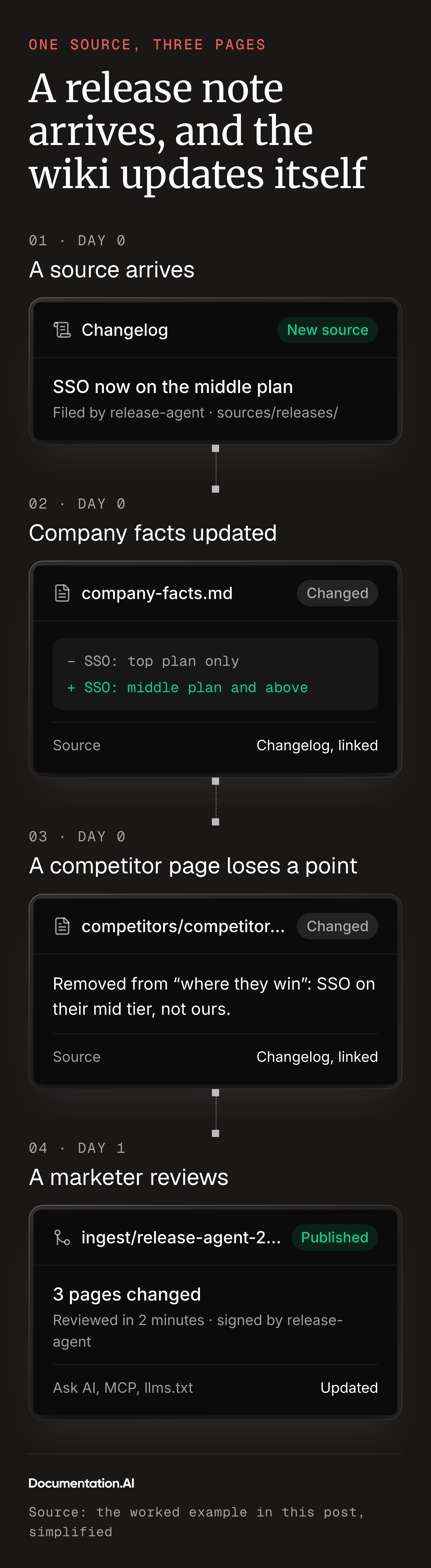
That one entry touches three pages: company facts moves SSO to the right plan, the Competitor A page drops a "where they win" point that no longer holds, and positioning gains a supporting fact. Each edit links the changelog, and the log records all three. A marketer reviews and publishes, and by the next morning Ask AI, the MCP endpoint, and the blog agent all give the new answer. Nobody had to remember that the competitor page mentioned SSO.
Step 7: Let Other Agents Contribute Through the MCP Server or the API
How an agent like the release agent connects depends on whether a person is at the keyboard.
- An agent someone is driving (in Cursor, Claude Code or another MCP client) signs in to the Authoring MCP server as that person and works exactly as in Step 3.
- An agent that runs unattended, like a release agent fired by a merged pull request or a competitor watcher on a weekly timer, uses the REST API with a project-scoped Editor key: it creates a branch, pushes its page changes as one commit, and stops.
These rules, taken from the schema, keep agents out of each other's way:
- One branch per agent run, named for the agent and the date, so two agents never edit the same working copy.
- Agents never merge into the live branch. The schema forbids it even though the tools allow it. A person merges and publishes.
- The agent signs its work. Every log entry names the agent, so any change can be tied back to the run that made it.
Step 8: Schedule a Lint With Automations
Teams forget to lint because nothing prompts it. Automations fix that: they run daily, weekly, monthly, or when a pull request merges, and leave their changes on a branch for review.
Three built-in templates already cover part of lint: Broken Link Audit, Navigation Audit, and Style Guide Enforcement, which checks pages against the schema's rules. For contradictions, stale pages, and orphans, create a custom automation with a prompt like this:
Read every page in the wiki. Write a page called lint-report with one
section per finding, each naming the pages involved and linking them:
1. Any two pages that state different values for the same fact
   (a price, a plan limit, a feature's availability).
2. Any competitor page whose "last checked" date is more than 60 days old.
3. Any claim that a feature is "available" that company-facts does not
   confirm has shipped.
4. Any page with no incoming links from index or any other page.
5. Any page people own that a newer source contradicts, with the source.
Change nothing else.
Schedule it for Monday mornings. A marketer opens the report from the run's summary and works through the findings, and over a quarter the list should get shorter.
Where Else a Team LLM Wiki Fits
The pattern fits any team whose knowledge arrives faster than anyone can file it.
- Support: Tickets and unanswered Ask AI questions become pages for known issues and recurring questions, which is how better documentation cuts support tickets. Documentation.AI's Self-Heal by User Feedback automation already turns low ratings into proposed fixes.
- Sales enablement: Win and loss notes sit beside call summaries, and every competitor page carries a "last checked" date that lint watches.
- Engineering: Design documents and incident reviews turn into decision records and runbooks. When behaviour changes, a Documentation Update from Code automation drafts the page edit for an engineer to review with the code.
- Onboarding: A wiki that has been ingesting for a quarter answers most of a new hire's first-week questions with a citation, and the ones it cannot answer show which pages are missing.
FAQs
1. Who created the LLM Wiki?
Andrej Karpathy, who published the pattern as a GitHub gist on 4 April 2026. It is an idea file rather than software, and leaves the implementation to whichever agent and editor you already use. [1]
2. Does an LLM Wiki replace RAG or a vector database?
No. A wiki does its synthesis when sources arrive, which gives it cross-references RAG cannot see. Past about 100 pages it still needs search to find the right ones, so a team wiki uses both. On Documentation.AI that search is built in, so there is no vector database for the team to run.
3. How large can a team LLM Wiki grow?
As large as the search over it stays good. The 80-to-100-article limit in the personal pattern comes from loading the whole index into context, and a search step removes it. [3] In practice, review capacity is the real limit. Once changes arrive faster than reviewers can read them, unmerged branches pile up and the wiki falls behind.
4. Do you need Obsidian or a template to build an LLM Wiki?
No. Karpathy uses Obsidian as the viewer, browsing pages and the graph view while the agent edits, and suggests its Web Clipper and Dataview plugin. [1] Any editor that opens a folder of Markdown files does the same job, and on Documentation.AI the web editor and published site take its place. There is no official template either: the idea file is meant to be pasted into your agent. For a team, the schema in the marketing example above is a reasonable start.
5. Who checks the edits the LLM makes?
A person, before anything goes live. Every agent change, including lint findings, lands on a branch with a preview and a diff, and a reviewer merges it or sends it back.
6. Can people write pages in an LLM Wiki, or only the model?
People can, and in a team they should. Pages that carry judgement, like positioning or a runbook, are better written by hand. The schema marks them so the model keeps related pages in step and flags contradictions without rewriting them.
7. Can AI agents add to the wiki, or only read it?
Both. An agent a person is driving writes through the Authoring MCP server, and one that runs on its own uses the REST API with a project-scoped key. Either way it works on a branch and never merges into the live one.
8. Can AI agents outside the team read the wiki?
Only if you let them. Any agent can read a public wiki through llms.txt, the Markdown pages, and the /_mcp endpoint. A gated wiki is readable through /_mcp/auth only by agents whose user has signed in or that hold machine credentials an admin issued.
Sources
- Andrej Karpathy. "LLM Wiki." GitHub Gist, 4 April 2026. https://gist.github.com/karpathy/442a6bf555914893e9891c11519de94f
- Atlan. "LLM Wiki vs RAG Knowledge Base: The Karpathy Approach Explained." Atlan, 7 April 2026. https://atlan.com/know/llm-wiki-vs-rag-knowledge-base/
- Zafer Dace. "Scaling LLM Knowledge Bases: Why RAG is Necessary After 100 Articles." earezki.com, 17 April 2026. https://www.earezki.com/ai-news/2026-04-17-karpathys-obsidian-wiki-broke-at-100-articles-rag-fixed-it/
Ready to build one?
A wiki your agents can write to
Branches, review, Ask AI and an MCP server from one project. Connect Claude Code and start ingesting.
No credit card required