10 Best Knowledge Base Software in 2026: Ranked and Compared
We tested 13 live knowledge bases to see which ones AI agents can read, checked every price at the source, and worked out what a five-person support team pays in a year.

Roop Reddy · Co-Founder, Documentation.AI
Last updated
On this page
- Knowledge base software compared
- What is knowledge base software?
- Types of knowledge base software
- How we tested knowledge base software
- 1. Documentation.AI
- 2. Document360
- 3. Helpjuice
- 4. GitBook
- 5. Zendesk
- 6. Intercom
- 7. Confluence
- 8. Notion
- 9. Guru
- 10. BookStack
- What knowledge base software costs
- How to choose knowledge base software
- FAQs
- Final verdict
- Sources
The best knowledge base software in 2026 is Documentation.AI if customers and AI agents both need answers from your product content, Document360 for a governed help center, Zendesk or Intercom if the knowledge base has to live inside your helpdesk, Confluence or Notion for internal knowledge, Guru for governed company-wide knowledge, and BookStack if you want it free and self-hosted.
Knowledge base software compared
The table shows who each tool serves, the free option, the entry price, and its score on our five AI-readability checks: llms.txt, a Markdown copy, text without JavaScript, article schema, and an official MCP server. Prices are published figures billed annually unless the cell says otherwise, and "quote" means the vendor publishes no price.
| Tool | Best for | Type | Free option | Entry paid price | AI-readable (of 5) |
|---|---|---|---|---|---|
| Documentation.AI | Product knowledge read by customers and AI agents | Docs platform | Yes, five editors | $55/mo | 5 |
| Document360 | Governed customer help centers | Dedicated KB | No, 14-day trial | Quote | 4 |
| Helpjuice | Flat pricing with many editors | Dedicated KB | No, 14-day trial | $249/mo | 2 |
| GitBook | Writer-friendly product docs | Docs platform | Yes, one user | $65/site/mo + $12/user | 4 |
| Zendesk | Teams already running Zendesk tickets | Helpdesk | No | $55/agent/mo | 2 |
| Intercom | In-app support with an AI agent | Helpdesk | No, 14-day trial | $29/seat/mo | 5 |
| Confluence | Atlassian shops | Team wiki | Yes, 10 users | $7.15/user/mo (monthly) | 2 |
| Notion | Teams already working in Notion | Team wiki | Yes | $10/member/mo | 3 |
| Guru | Verified internal answers across the company | Knowledge layer | No | Quote | 4 |
| BookStack | Free self-hosted documentation | Open source | Yes, MIT license | $0 plus hosting | 1 |
What is knowledge base software?
Knowledge base software is an application for writing, organizing, publishing, and searching answers in one place, so customers or employees can solve a problem without asking a person. A typical tool combines an editor, a category structure, search, permissions, and analytics that show what readers failed to find.
The benefit is fewer repeated questions, but only if people can find the answer. Gartner surveyed 5,728 customers and found that just 14% of service issues were fully resolved in self-service. The most common failure, in more than 43% of cases, was being unable to find relevant content. [2] Our guide on reducing support tickets with better documentation covers what to do about that.
Look for features that close that gap:
- Search that handles a customer's wording, with AI answers that cite their source.
- Search and answer analytics, so you can see failed queries.
- Ownership and review reminders, so old articles get checked.
- Permissions, for public, private, and mixed content.
- Machine-readable output, so AI tools can read your articles.
Types of knowledge base software
Knowledge base software comes in four types: dedicated tools and docs platforms for customer help centers, helpdesks with a built-in knowledge base, team wikis for internal knowledge, and open-source tools you host yourself. Decide which type you need first, because the tools within a type compete far more directly than tools across them.
Customer help centers and docs platforms (tools 1 to 4) publish a public, branded site. Documentation.AI and GitBook grew out of product documentation, so they add Git workflows and API references. Document360 and Helpjuice were built as knowledge bases from the start.
Helpdesks with a knowledge base (tools 5 and 6) sell articles alongside tickets and live chat. The articles feed the vendor's AI agent, which makes the combination strong, but you pay per support seat for the whole helpdesk.
Team wikis and knowledge layers (tools 7 to 9) hold internal knowledge such as SOPs, runbooks, and onboarding guides. Confluence and Notion can share a page publicly, yet neither is designed to be a customer help center. Guru goes further on governance: it verifies content and delivers answers inside the tools employees already use.
Open-source tools such as BookStack (tool 10) cost nothing to license and keep your data on your own servers. In exchange, someone on your team has to run them.
How we tested knowledge base software
We tested what a reader or an AI agent actually receives from each live knowledge base, then answered buyer questions from each vendor's pricing page and documentation. We did not use review-site scores. Documentation.AI is our own product, so we ran it through exactly the same checks as every other tool, and its cons are listed with the rest.
We also signed in to nine of the ten products on 4 and 5 November 2026, opened each one's article editor, and wrote or opened a sample article. The screenshots come from those sessions. Guru offers no trial, so its screenshot shows its public help center instead. We did not run any tool with a real team for weeks, so treat the pricing and AI-readability results as the core evidence.
We fetched one real article from each vendor's public knowledge base on 2 November 2026 and ran five checks:
- llms.txt: does the knowledge base serve an llms.txt index for AI tools?
- Markdown: can a client request a clean Markdown copy of the article?
- No JavaScript needed: is the article text in the HTML, so a simple crawler can read it?
- Article schema: does the page mark itself up as an article in structured data?
- Official MCP: does the vendor document an MCP server for AI clients?
Zendesk returns a 200 for a .md address but sends ordinary HTML, so we checked the content of every response, not only the status code. We also compared rendered pages with raw HTML to confirm the third check.
We tested 13 knowledge bases. ProProfs, Help Scout, and Outline were tested but did not make the final ten.
| Knowledge base tested | llms.txt | Markdown | No JavaScript needed | Article schema | Official MCP | Score |
|---|---|---|---|---|---|---|
| Documentation.AI (documentation.ai/docs) | Yes | Yes | Yes | Yes | Yes | 5 |
| Intercom (intercom.com/help) | Yes | Yes | Yes | Yes | Yes | 5 |
| Document360 (docs.document360.com) | Yes | Yes | Yes | No | Yes | 4 |
| GitBook (gitbook.com/docs) | Yes | Yes | Yes | No | Yes | 4 |
| Guru (help.getguru.com) | No | Yes | Yes | Yes | Yes | 4 |
| Notion (notion.com/help) | No | No | Yes | Yes | Yes | 3 |
| ProProfs (help.proprofskb.com) | No | No | Yes | Yes | Yes | 3 |
| Zendesk (support.zendesk.com) | No | No | Yes | Yes | Early access | 2 |
| Helpjuice (help.helpjuice.com) | No | No | Yes | No | Yes | 2 |
| Help Scout (docs.helpscout.com) | No | No | Yes | No | Yes | 2 |
| Confluence (support.atlassian.com) | No | No | Yes | No | Yes | 2 |
| Outline (docs.getoutline.com) | No | Yes | No | No | Yes | 2 |
| BookStack (bookstackapp.com/docs) | No | No | Yes | No | No | 1 |
What the results show:
- llms.txt is a platform feature at Documentation.AI, Document360, and GitBook: all three generate it for their customers. Intercom's also looks like one, because two customer help centers we sampled (help.kit.com and support.claude.com) serve one, although we found no Intercom documentation that confirms it.
- Some vendors' help sites are not built on their own wiki. Notion, Confluence, Guru, and BookStack appear to publish help with other tooling, so for those four the first four checks describe the vendor's site more than the product. We sampled a public notion.site page and BookStack's demo, and neither served llms.txt.
- Private wikis depend on the MCP column. Crawlers cannot reach an internal knowledge base, so MCP is the route that counts there.
1. Documentation.AI
Documentation.AI is an AI-native documentation platform that works as a customer knowledge base, a product documentation site, or a private internal one. Writers use a visual editor, engineers can work in Git, and an agent drafts and updates pages using your code, tickets, and support conversations.
Key features
- Ask AI on every plan, including the free one, with AI answer analytics and reader feedback that show what your articles failed to cover.
- Embedded Docs on every plan, which puts articles and the assistant inside your product.
- llms.txt, per-page Markdown, and docs and authoring MCP servers on every plan.
- An agent with connectors for GitHub, Jira, Confluence, Linear, Notion, HubSpot, and Plain, plus automations that update pages on a schedule or when code merges.
- Public, password-protected, and private modes, with reader sign-in through JWT or OAuth on Pro.
Pros
- Reader AI, the agent, and a custom domain are all on the free plan.
- A flat price per workspace, with no charge per reader.
Cons
- There is no ticketing or live chat, so support teams keep a helpdesk beside it.
- Organization sign-in gives every member all protected pages. Role-based access needs Pro.
Pricing
| Plan | Price, billed yearly | Editor seats | AI credits |
|---|---|---|---|
| Starter | Free | 5 | 10,000, one time |
| Standard | $55 a month ($69 monthly) | 10 | 10,000 a month |
| Pro | $159 a month ($199 monthly) | Unlimited | 30,000 a month |
| Enterprise | Custom | Custom | Custom |
A reader question costs 10 credits, so Standard covers 1,000 answers a month. [1]
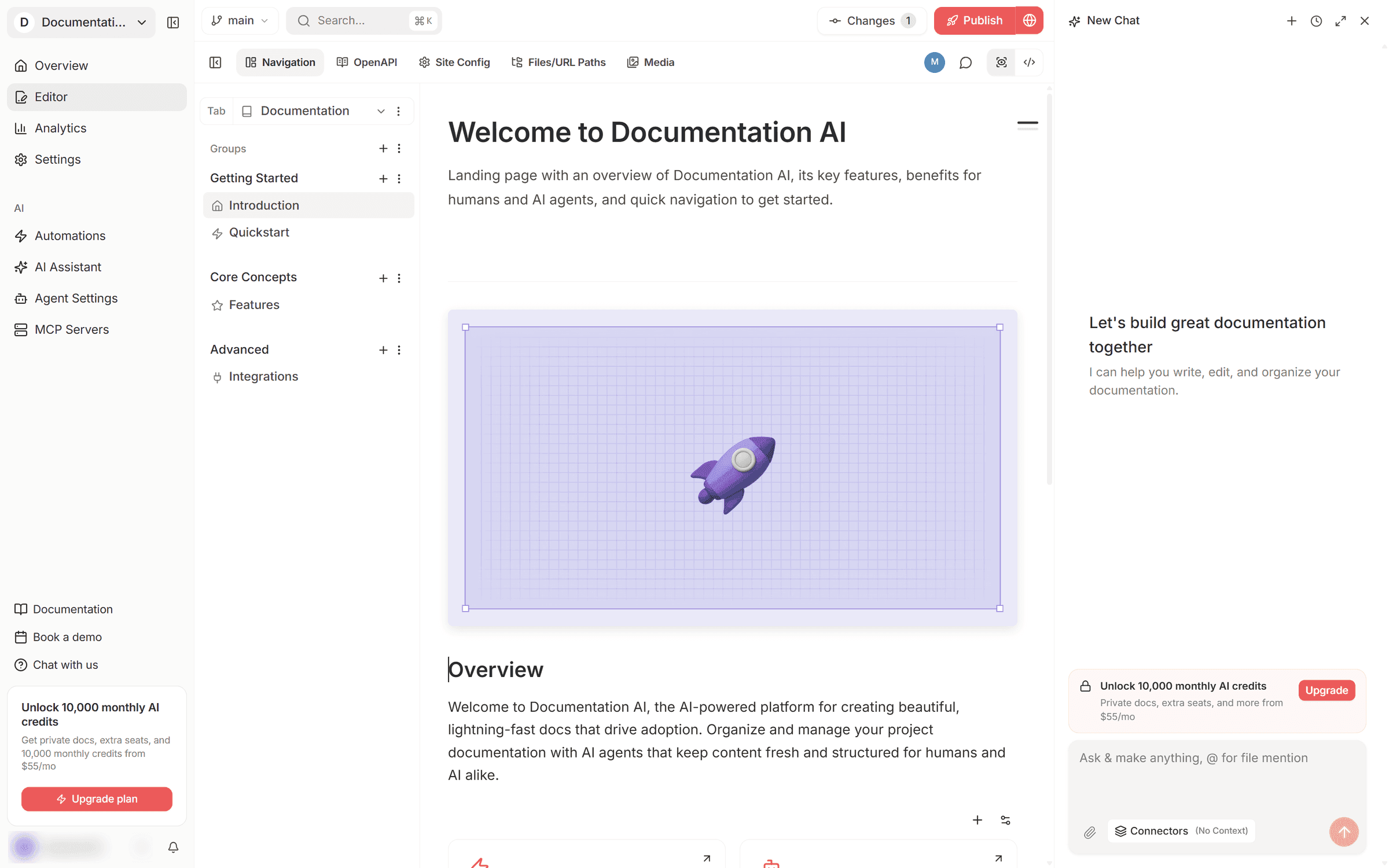
What we saw: The page tree, a visual page editor, and the AI agent sit in one view, with the Git branch, a count of unpublished changes, and Publish along the top.
Verdict: Start here when the same articles have to answer both customers and AI agents. You can test the whole loop on the free plan, including seeing which questions go unanswered. For staff-only knowledge, our internal knowledge base page shows the private setup.
2. Document360
Document360 is a dedicated knowledge base for customer self-service and internal teams. It organizes articles in categories, adds workflow stages and review reminders for governance, and publishes a hosted site with an AI assistant called Eddy.
Key features
- Custom workflow designer, with review reminders that mark articles as stale.
- Eddy AI for reader questions, metered in credits.
- PDF export with designable templates.
- MCP server and automatic llms.txt.
Pros
- Reader login through SAML, OIDC, or JWT.
Cons
- No free plan and no published prices.
- GitHub sync runs one way and leaves synced articles read-only.
- AI usage is part of the quote, so it needs estimating up front.
Pricing
| Price | Trial | What sets the price |
|---|---|---|
| Quote only | 14-day trial with every feature | Team accounts, workspaces, languages, security needs, privacy model, and AI usage |
Prices from Document360's pricing page.
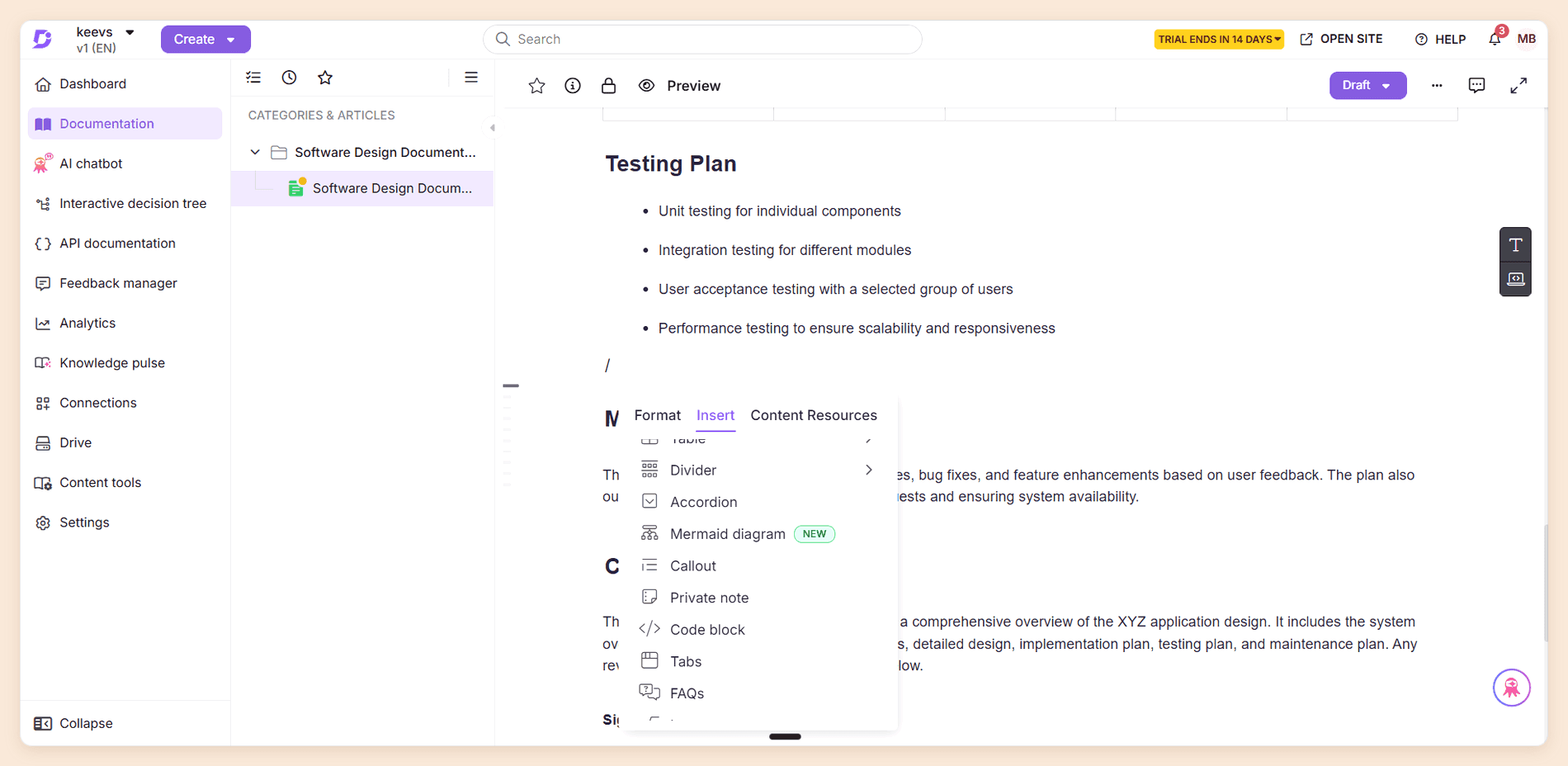
What we saw: Typing a slash opens a block menu with Format, Insert, and Content Resources tabs, including Mermaid diagrams, private notes, tabs, and FAQ blocks, and articles stay in Draft until you publish. Trial note: when our 14-day trial ended, the dashboard showed only "Trial expired" and an Upgrade Now button.
Verdict: The workflow stages and review reminders suit a support operations lead running thousands of articles. Engineers will miss a real docs-as-code flow. See how it stacks up in our Document360 alternatives roundup.
Have articles already?
A knowledge base that flags its own gaps
Import your articles from any live site and see which reader questions they fail to answer.
No credit card required
3. Helpjuice
Helpjuice is a knowledge base built around a customizable template system and detailed analytics. Its plans are priced by the number of people who log in, which helps teams where many colleagues contribute.
Key features
- Analytics, version history, and multilingual support on every plan.
- Unlimited articles on every plan.
- AI Suite with AI Writer, AI Search, and AI Chatbot from the middle plan up.
- MCP server with about 53 admin tools.
Pros
- Public readers do not count as users, unless you add them or they arrive through SSO.
- A flat monthly price that covers 30 or 100 users.
- Multilingual support on the entry plan, where Zendesk and Intercom hold it for higher tiers.
Cons
- The entry plan has no AI at all.
- Running several knowledge bases means separate linked accounts.
- No llms.txt or Markdown route in our test.
Pricing
| Plan | Price a month | Users | AI |
|---|---|---|---|
| Knowledge Base | $249 | 30 | None |
| AI-Knowledge Base | $449 | 100 | AI Suite |
| Unlimited AI-Knowledge Base | $799 | Unlimited | AI Suite |
Prices from Helpjuice's pricing page.
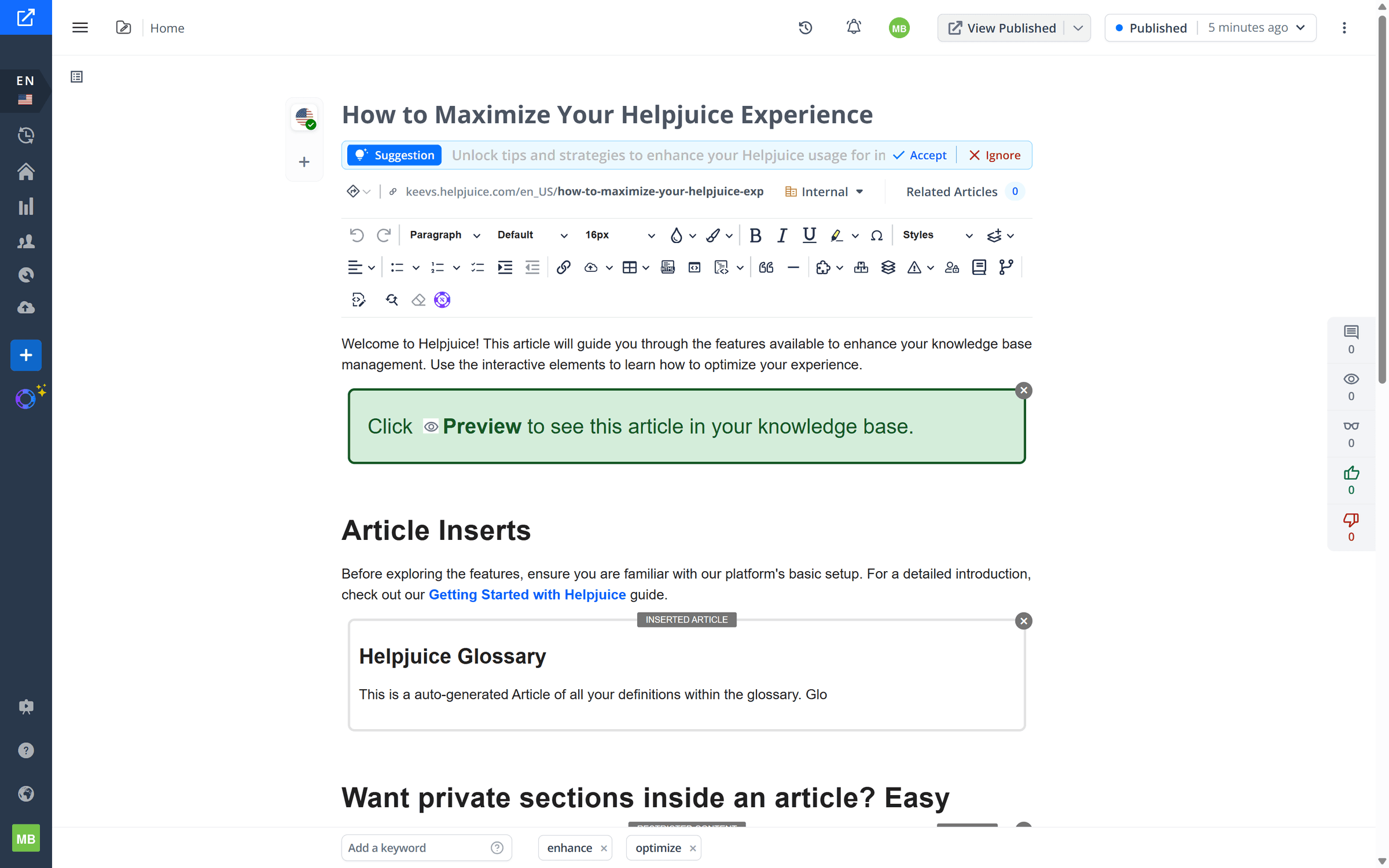
What we saw: A two-row toolbar carries blocks most editors lack, such as inserted articles and restricted sections visible only to signed-in users, and an AI suggestion for the title appeared with Accept and Ignore buttons as soon as we opened the article.
Verdict: The maths favors companies where many colleagues need a login: 30 users at $249 works out near $8 each, and 100 at $449 near $4.50. A team of five pays for capacity it will not use, and adding AI costs another $200 a month.
4. GitBook
GitBook is a hosted documentation platform with a block editor that non-technical writers pick up quickly. Two-way Git Sync lets engineers work in Markdown while writers stay in the browser.
Key features
- Block editor with change requests and version history.
- Two-way Git Sync with GitHub and GitLab.
- AI answers for readers on Essential, with the Assistant sidebar on Ultimate.
- A read-only MCP server on every published site.
Pros
- An API playground on every plan, including Free.
- Change requests give each edit a review step.
Cons
- Reader AI is not on the free plan.
- Essential's credits cover about 100 answers a month.
- Each extra site adds a site fee, and internal readers cost a seat.
Pricing
| Plan | Price, billed annually | Includes |
|---|---|---|
| Free | Free | One user |
| Essential | $65 per site a month plus $12 per user | $20 of AI credits |
| Ultimate | $249 per site a month plus $12 per user | $100 of AI credits |
Extra answers cost $0.20 each, per GitBook's pricing page. Our GitBook pricing guide works through multi-site cases.
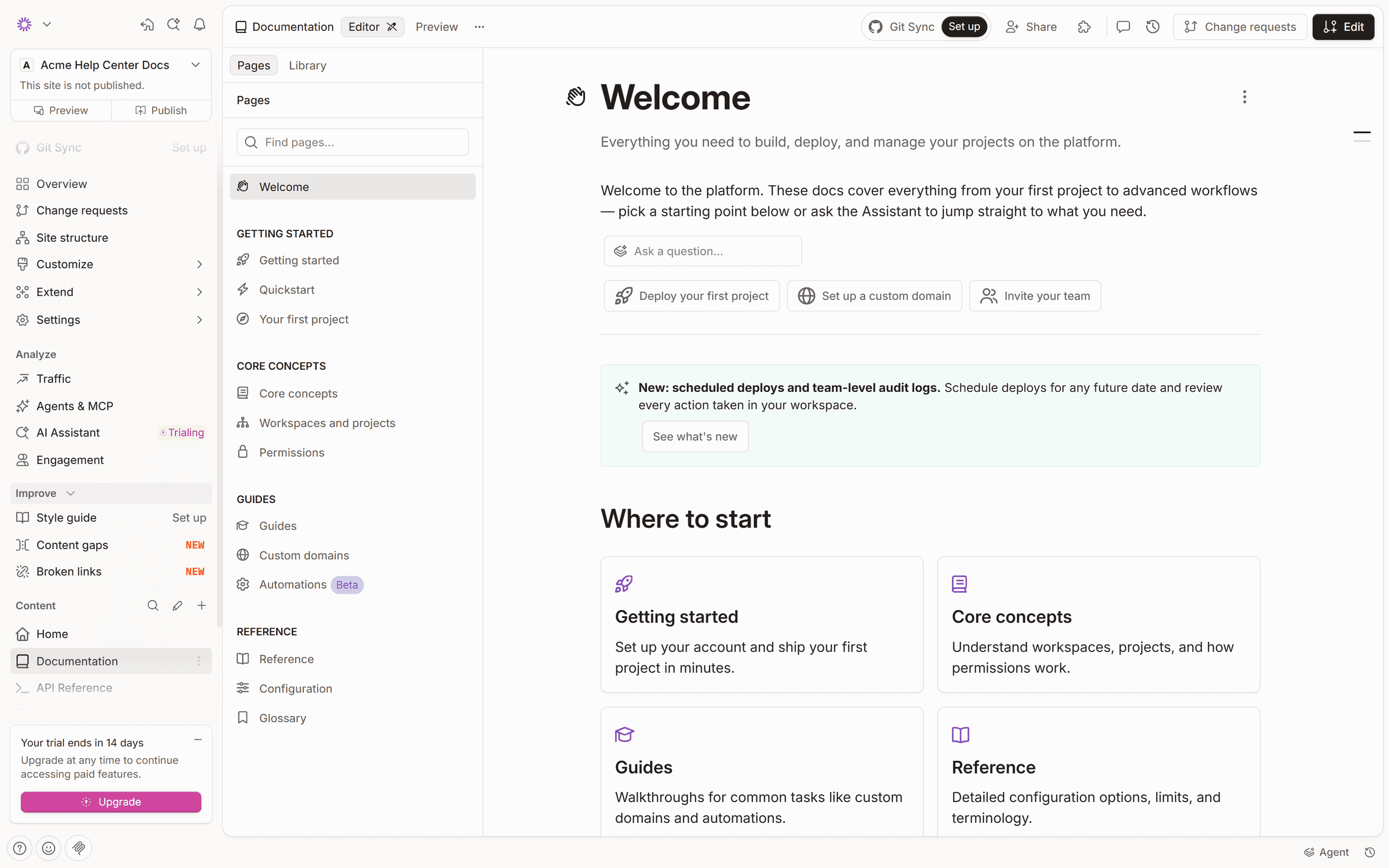
What we saw: The editor groups pages into sections, edits go through change requests rather than straight to the live site, and Git Sync sits in the top bar. Trial note: creating a free organization started a 14-day Ultimate trial on its own.
Verdict: One site for a small team stays reasonably priced. Documentation.AI includes roughly 10 times the reader answers at a lower price, so compare the allowance before you settle. Read more in our GitBook review.
5. Zendesk
Zendesk is a customer service suite whose knowledge base powers both its help center and its AI agents. Articles live beside tickets, so agents can answer from them and customers can find them before opening a request.
Key features
- Help center with one language on Suite Team and 40+ on Suite Professional.
- AI writing tools from Suite Team up.
- Article verification and Team Publishing on Suite Enterprise.
- One help center on Suite Team, up to five on Suite Professional.
Pros
- Tickets, knowledge, and AI agents share one system.
- Fin connects to it, so you are not tied to one AI vendor.
Cons
- The Support Team plan has no help center, and Knowledge is not sold without a Support plan.
- You pay per agent for the whole suite, even if you mainly want articles.
- $2.00 per pay-as-you-go resolution is the highest AI rate we found.
Pricing
| Plan | Billed yearly | Billed monthly | Automated resolutions included |
|---|---|---|---|
| Suite Team | $55 per agent a month | $69 | 5 per agent a month |
| Suite Professional | $115 per agent a month | $149 | 10 per agent a month |
Past the allowance, each resolution costs $2.00 pay as you go, with lower committed rates, per Zendesk's pricing page.
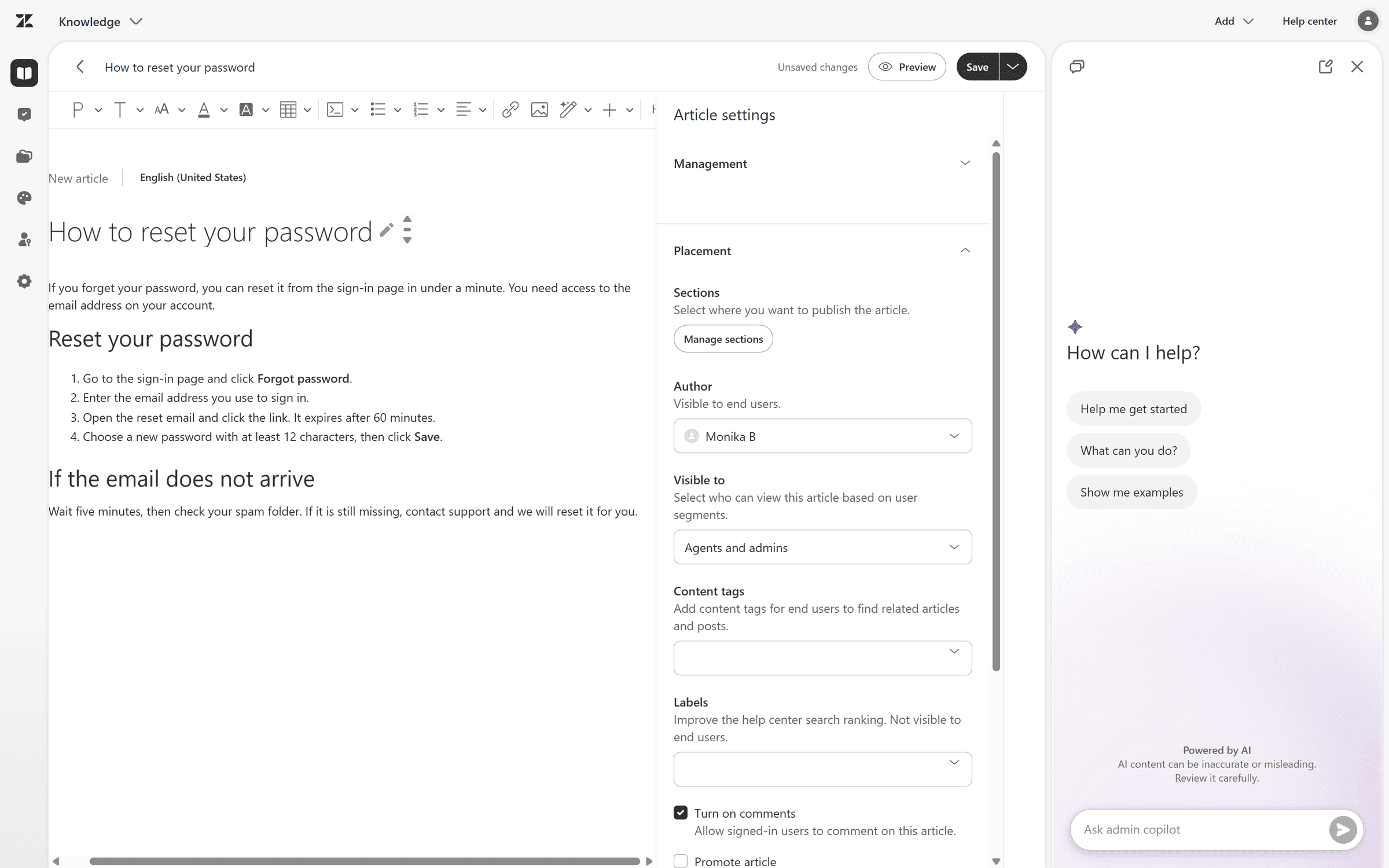
What we saw: Article settings for permissions, section placement, visibility, and labels sit in a panel beside the text, with the admin copilot alongside, and changes stay unsaved until you click Save.
Verdict: If your team already works in Zendesk all day, the knowledge base comes with the suite and moving it would achieve little. Do not adopt Zendesk just for articles, because you would be paying for a full support desk.
6. Intercom
Intercom, now owned by Salesforce and operating as Fin, is a helpdesk with a messenger, a help center, and an AI agent that answers from your knowledge. [3] Fin can also run on Zendesk, Salesforce, HubSpot, and Freshdesk, so the AI is sold beyond Intercom's own helpdesk.
Key features
- Public help center on Essential, private and multilingual on Advanced, and multibrand on Expert.
- Fin AI Agent, charged per outcome.
- Official MCP server.
Pros
- You pay for Fin only when it delivers an outcome.
- Articles reach customers inside your product through the messenger.
Cons
- A private or multilingual help center requires Advanced at $85 a seat.
- Outcome billing makes the monthly bill harder to forecast.
- The Salesforce ownership is new, and the announcement says little about the roadmap.
Pricing
| Plan | Price per seat a month, billed annually |
|---|---|
| Essential | $29 list, shown at $19 for new customers |
| Advanced | $85 |
| Expert | $132 |
Fin costs $0.99 per outcome, per Intercom's pricing page.
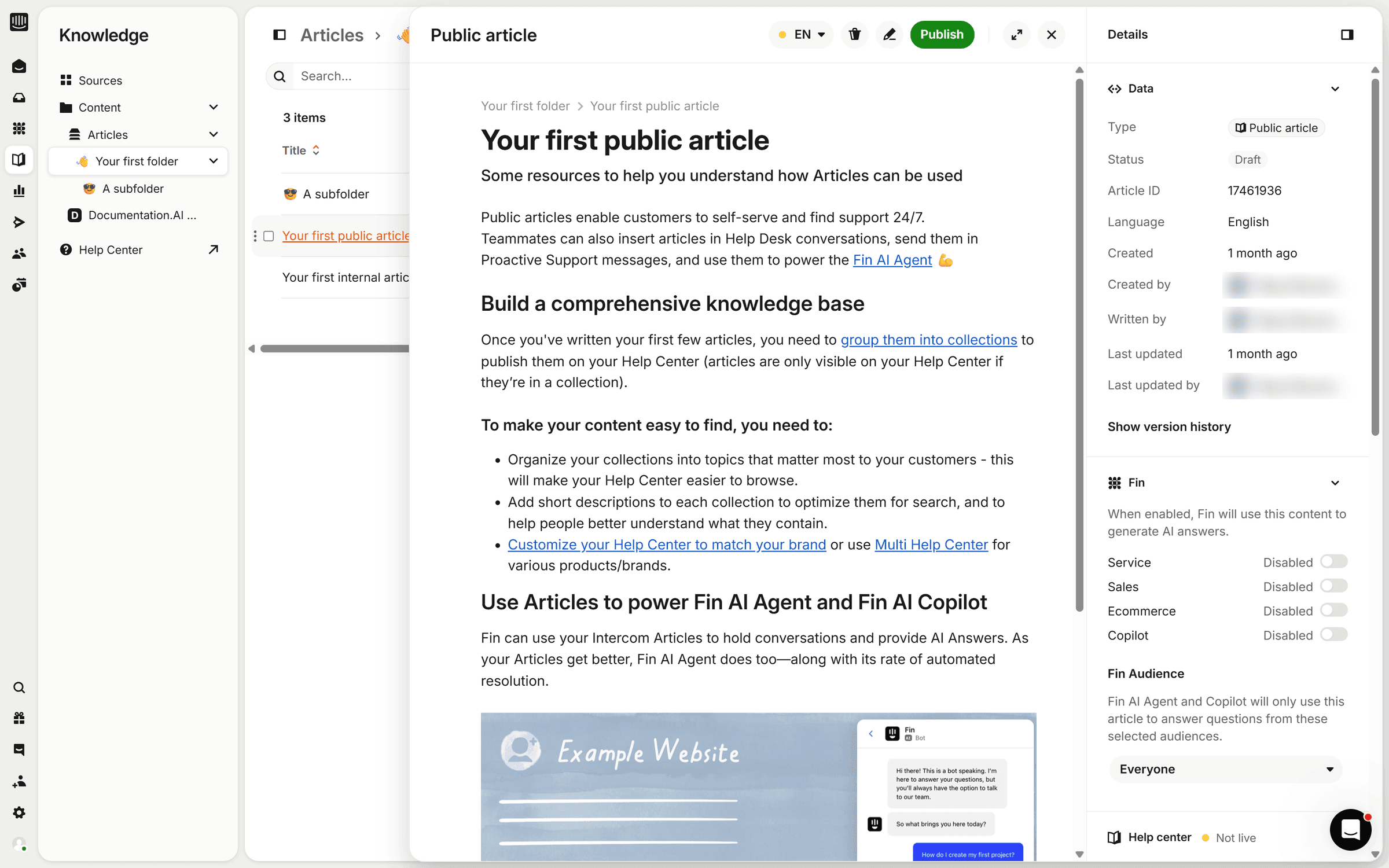
What we saw: Articles open in a side panel over the folder list, and their details panel has switches that decide separately whether Fin may use the article for Service, Sales, Ecommerce, and Copilot, and for which audience.
Verdict: Buy it for the messenger and Fin, and treat the help center as what comes along with them. Every outcome carries a fee, so model your conversation volume before you switch Fin on for everyone.
7. Confluence
Confluence is Atlassian's team wiki, and in many engineering organizations it is already the internal knowledge base. Pages sit in spaces and connect to Jira.
Key features
- Rovo Search, Chat, and Agents on Standard and up, at 25, 70, or 150 credits per user a month.
- Public links and anonymous access from Standard.
- Page analytics in full on Premium and up.
- Atlassian MCP server, which draws on Rovo credits.
Pros
- Free for up to 10 users.
- Pages connect directly to Jira work.
- Standard costs $7.15 per user a month, against $12 on Notion Plus at the same monthly billing.
Cons
- Rovo is not on the Free plan.
- A public space reads like a wiki, not a branded help center.
- Page sprawl builds up without an owner.
Pricing
| Plan | Price per user a month, monthly billing at 10 users |
|---|---|
| Free | Free for up to 10 users, with 2 GB of storage |
| Standard | $7.15 |
| Premium | $14.10 |
| Enterprise | Sold through sales |
Prices from Confluence's pricing page. [4]
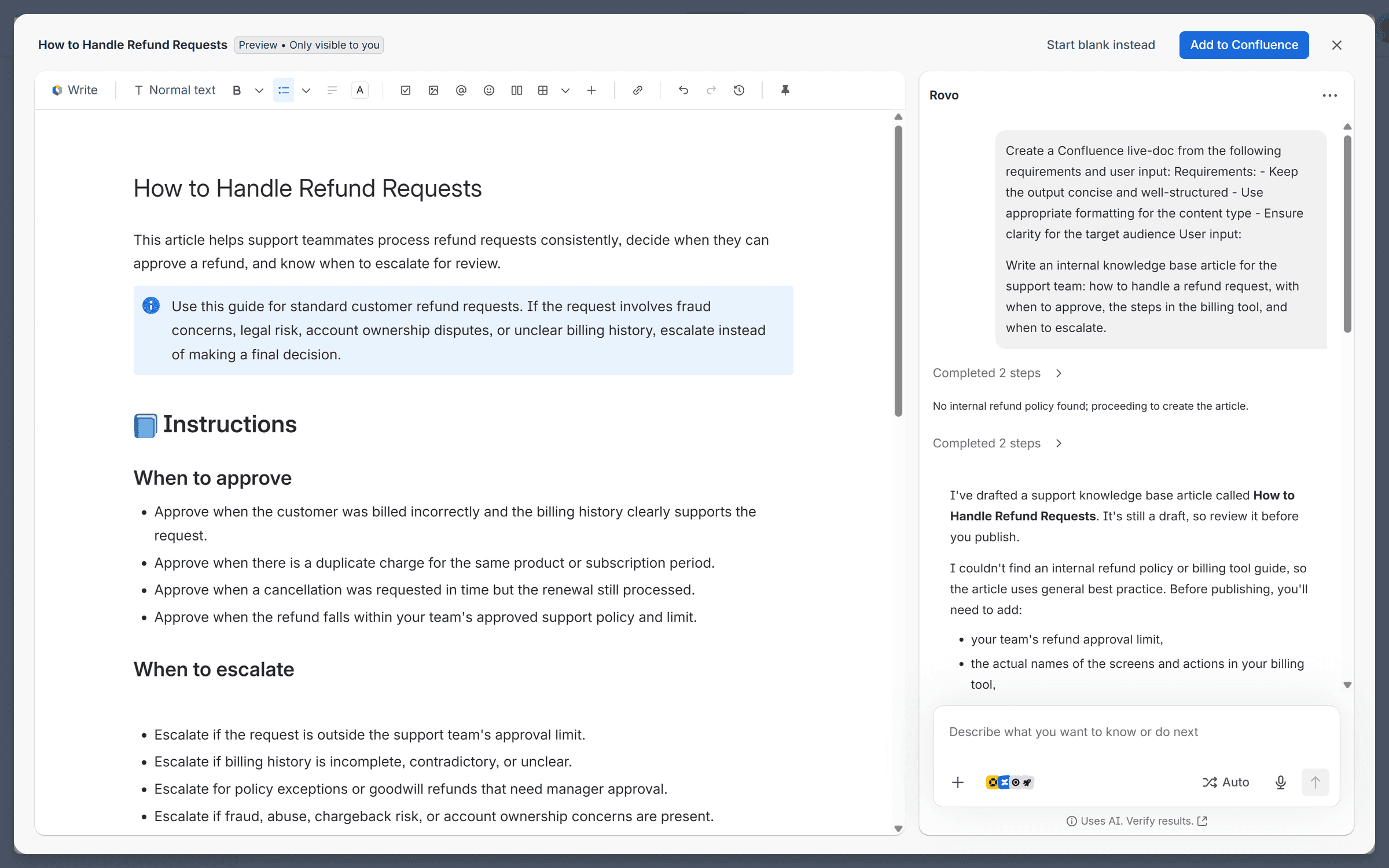
What we saw: Rovo drafted a complete support article from a one-line prompt in about a minute, with an info panel, approval and escalation lists, and a checklist, and told us it had found no internal policy and what we should fill in. Trial note: signing up through the free link put the site on a Premium trial, set to bill USD 14.10 a month from 4 December.
Verdict: Stay on it if Jira runs your company. Customer-facing content deserves a separate tool, and Documentation.AI can read your Confluence pages through a connector, so internal notes can feed public articles without being copied by hand.
8. Notion
Notion is an all-in-one workspace where a knowledge base is built from pages and databases. Teams already writing specs and notes there often grow a wiki without planning one, and Notion Sites can publish pages to the web.
Key features
- Pages and databases with flexible structure.
- Notion Agent, AI Meeting Notes, and Enterprise Search on Business.
- Verified pages on Business and Enterprise.
- Official MCP server.
Pros
- One tool for docs, projects, and knowledge, so the wiki sits next to the work it describes.
Cons
- Full AI requires Business, at twice the price of Plus.
- Notion Sites has no password protection.
- A custom domain costs $8 a month billed annually, per domain.
Pricing
| Plan | Billed yearly | Billed monthly |
|---|---|---|
| Free | Free | Free |
| Plus | $10 per member a month | $12 |
| Business | $20 per member a month | $24 |
| Enterprise | Custom | Custom |
Prices from Notion's pricing page.
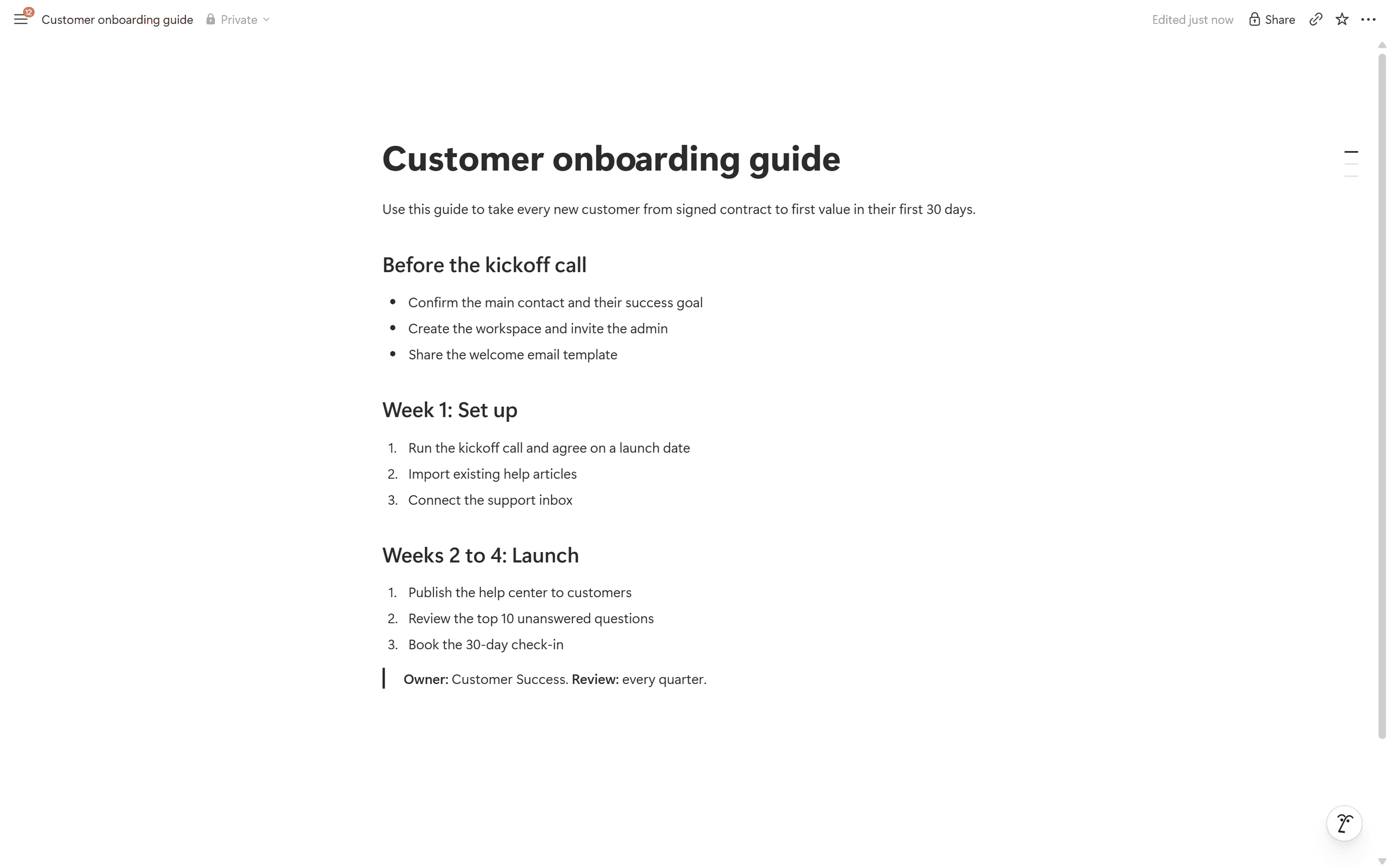
What we saw: There is no separate article editor. A knowledge base page is an ordinary Notion page, where pasted Markdown became real headings, numbered lists, and a quote block, and new pages land in Private until you move them.
Verdict: Fine as an internal wiki when your team already lives there, and a harder fit for customer-facing help.
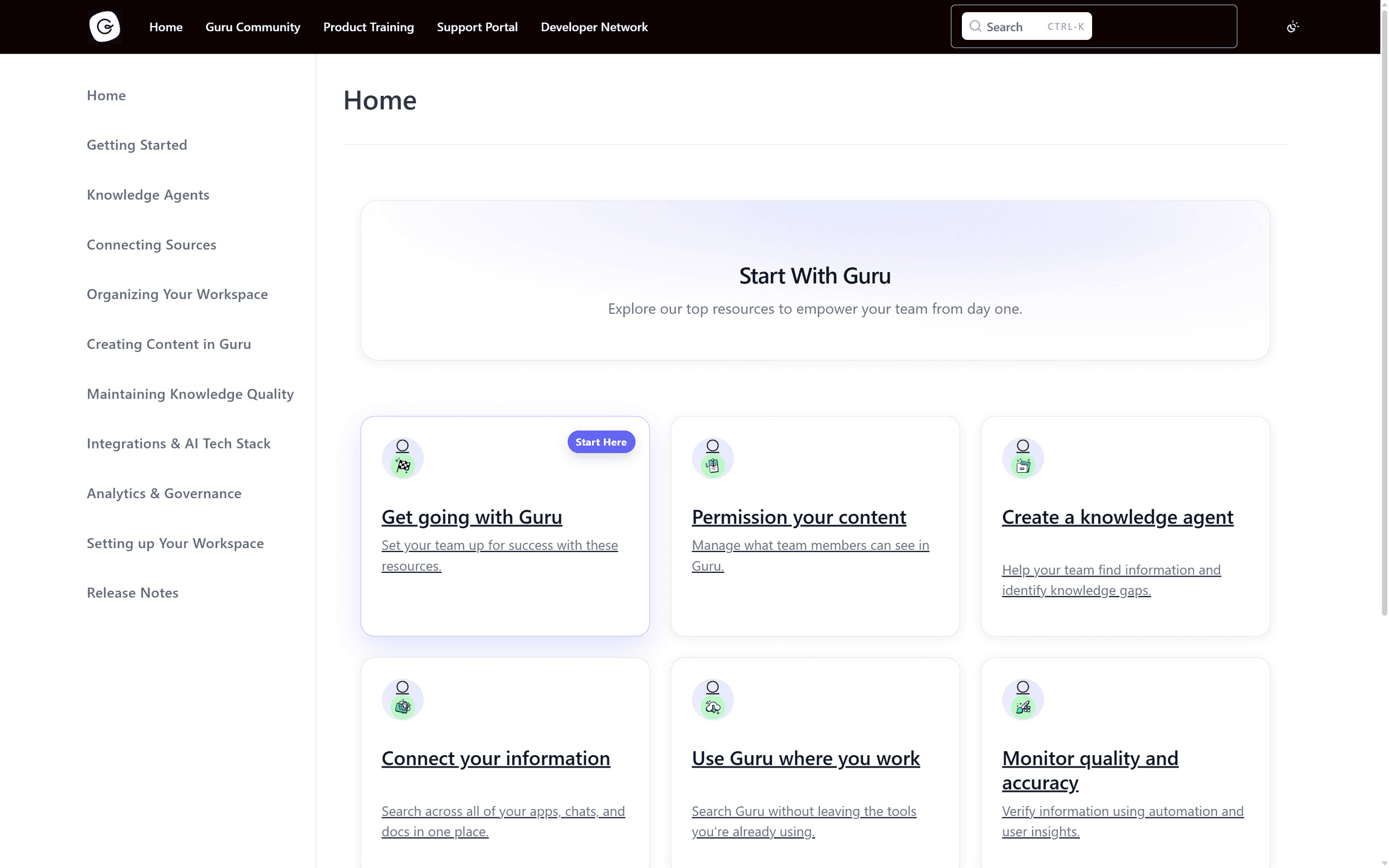
9. Guru
Guru calls itself a governed knowledge layer for enterprise AI. It holds internal knowledge, checks that it stays accurate, and delivers cited answers in Slack, Microsoft Teams, the browser, and other AI tools over MCP, under each employee's existing permissions. [5]
Key features
- Knowledge Agents that flag conflicting versions, duplicates, gaps, and stale content, and can verify or unverify content automatically.
- Citations on every AI answer, with permission-aware access by role.
- MCP delivery, so assistants such as Claude and Cursor can draw on the same verified knowledge.
Pros
- Verification is built in, so every answer can point to content an owner has checked.
- Answers reach people where they already work, without a separate site to visit.
- Enterprise controls, including SSO, audit trails, and data loss prevention.
Cons
- No free plan, free trial, or published prices: every deal starts with sales.
- Built for internal knowledge, not a public help center.
Pricing
| Price | Trial | What sets the price |
|---|---|---|
| Quote only | None published | Organization scale, knowledge complexity, and AI maturity |
Prices from Guru's pricing page.
What we saw: No trial, so no editor access.
Verdict: Guru earns its place where a wrong internal answer has compliance or brand consequences, and where knowledge has to reach employees inside Slack or Teams. A small team would be buying governance it may never use.
10. BookStack
BookStack is a free, self-hosted documentation platform that organizes content as books, chapters, and pages. Built with PHP and Laravel on MySQL, it runs on a low-cost server.
Key features
- Books, chapters, and pages, with search across all of them.
- WYSIWYG and Markdown editors, plus built-in diagrams.net drawing.
- Page revisions, a role and permission system, MFA, and a REST API.
Pros
- Free under the MIT license.
- OIDC, SAML2, and LDAP sign-in at no cost, where Documentation.AI and GitBook keep SSO for Enterprise.
- Your data stays on your own server.
Cons
- No built-in AI and no official MCP server.
- No official hosted version, so you handle updates and security patches.
- The rigid three-level hierarchy can feel tight for large libraries.
Pricing
| License | Running costs | Support |
|---|---|---|
| Free, MIT | Hosting and the time to run it | Paid support from the project's maintainers |
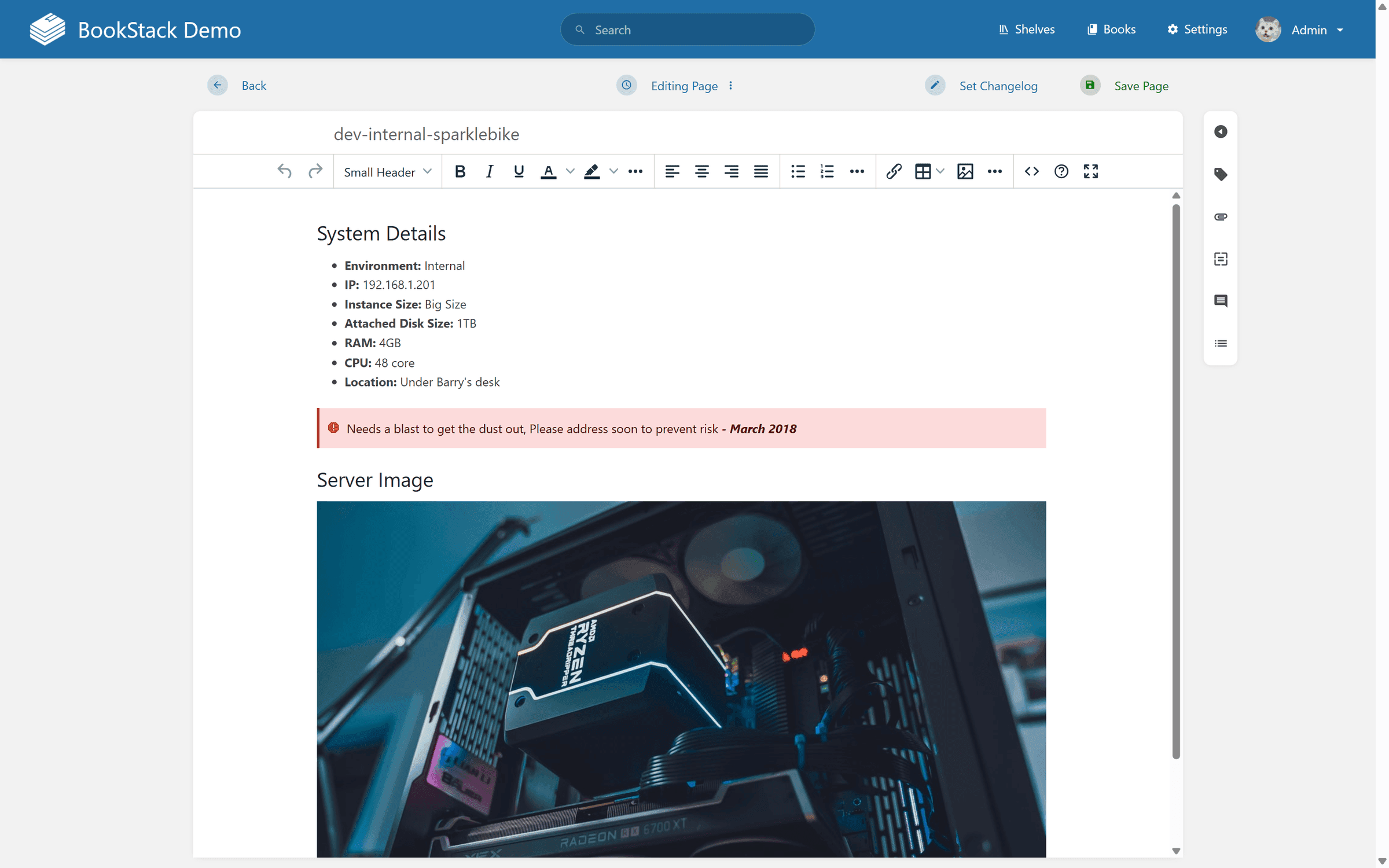
What we saw: The WYSIWYG editor covers headings, callouts, tables, images, and code, with tags, attachments, and revisions in a side rail and a changelog note before you save. The public demo fills in an admin login, so all of this takes a minute to try.
Verdict: IT teams who want a private wiki and already run servers should try it first, since the demo resets every half hour and costs nothing to explore. Plan for patching: BookStack's own site carried a PHP security warning when we checked.
What knowledge base software costs
Vendors charge per seat, per site, per author, or per workspace, so list prices do not compare directly. This is what five people pay in a year for a public help center with AI answers for readers, on the cheapest plan that covers it, billed annually.


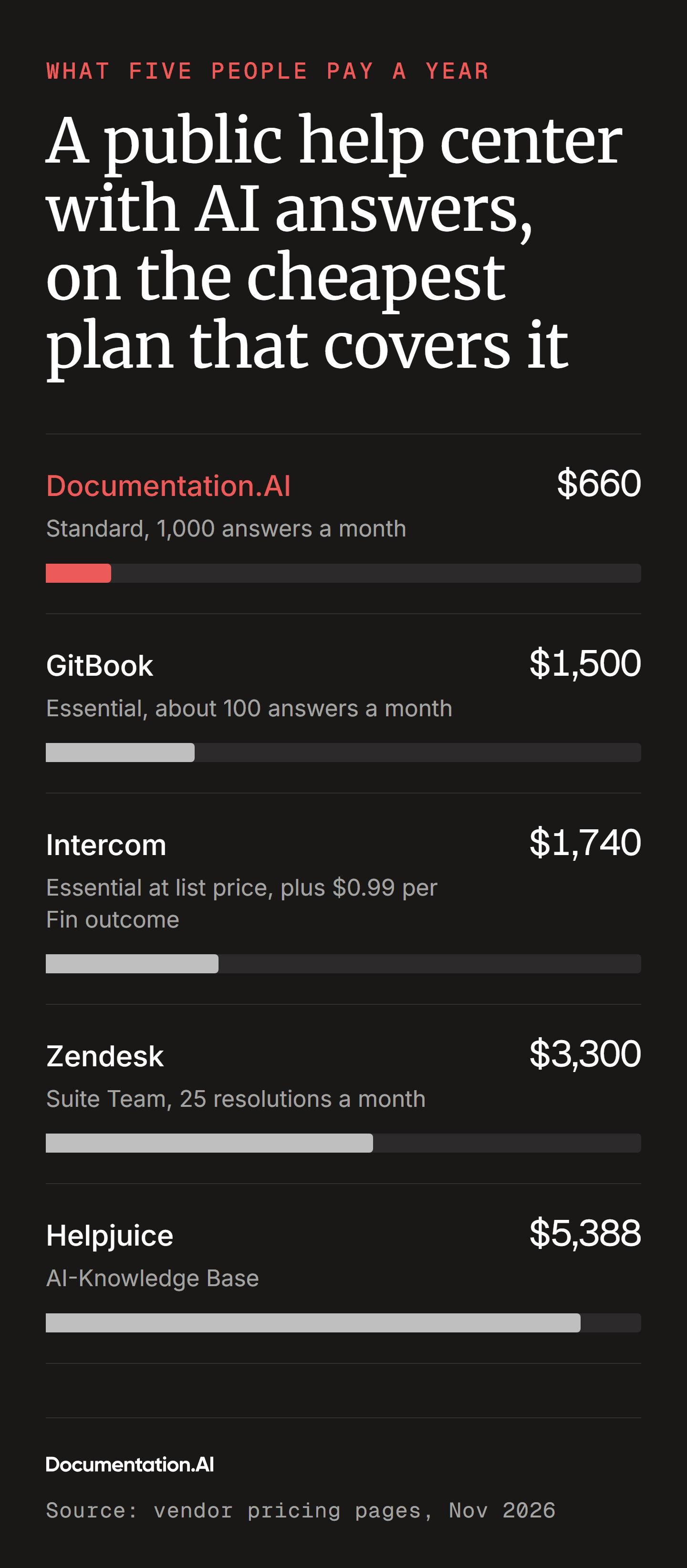
Busy help centers pay more again. Past the allowance, an AI answer costs $0.20 on GitBook, $0.99 per Fin outcome on Intercom, and $2.00 per resolution on Zendesk, against about $0.055 a question within Documentation.AI's Standard plan. The Intercom and Zendesk prices also buy a helpdesk inbox, and Document360 and Guru are missing because neither publishes prices.
How to choose knowledge base software
- Start with the audience: a customer help center, a helpdesk add-on, and an internal wiki solve different problems. Settle that with the comparison table, then work out your real price at your real team size.
- Ask who keeps articles current: find out who owns updates after launch and what the tool does to flag stale pages.
- Check what happens on a miss: see what the tool shows you when an article cannot answer a question. That gap report tells you what to write next.
- Run the same trial on your top two: import 20 real articles, then ask the search and the AI the 10 questions your support team hears most, worded the way customers word them. Note which answers are right, whether they cite a source, and what the tool shows you about the misses.
- Test AI readability: if AI assistants matter to you, paste a page URL into one and see whether it can read the content.
- Plan the migration: exporting Markdown is simple, while rebuilding categories, redirects, and permissions takes longer. Include old URLs in your plan to protect search traffic.
FAQs
1. What is the best knowledge base software?
Documentation.AI is the best knowledge base software for product content that customers and AI agents both read, because reader AI and answer analytics come on every plan, including the free one. Document360 suits a governed help center, Zendesk or Intercom suit teams already on that helpdesk, and Confluence or Notion suit internal wikis.
2. What is the best free knowledge base software?
Documentation.AI's free Starter plan is the strongest free option for a public knowledge base, with five editors, a custom domain, and reader AI. Confluence is free for up to 10 users if you need an internal wiki, Notion has a free plan, and BookStack costs nothing if you host it yourself.
3. What is the best knowledge base software for small business?
Documentation.AI suits most small businesses: the free plan covers five editors, and Standard costs $660 a year for a five-person team, the lowest in our cost comparison. If your small team also needs a support inbox, Intercom's Essential plan includes one at $1,740 a year at list price.
4. What is the best internal knowledge base software for employees?
Confluence is the usual choice for companies that run on Jira, and it is free for up to 10 users. Notion suits teams that already write specs and notes there, and Guru suits larger companies that need verified answers delivered inside Slack or Microsoft Teams. If the same knowledge also feeds customer docs, Documentation.AI keeps internal pages private behind sign-in on the same platform, as our internal knowledge base page shows.
5. What is the best open-source knowledge base software?
BookStack is the best open-source knowledge base software for most teams. It is free under the MIT license, has no paid tiers, and includes OIDC, SAML2, and LDAP sign-in. Outline has a more modern editor but uses the Business Source License, so it is source-available rather than open source.
6. What is the difference between a knowledge base and a wiki?
A knowledge base is a structured set of answers written for people to look up, with search, categories, and analytics that show what readers failed to find. A wiki is a looser shared space where anyone can create and link pages. Confluence and Notion are wikis that many teams use as internal knowledge bases, and our internal knowledge base page shows a private setup with AI answers.
7. What is the difference between a knowledge base and knowledge management software?
A knowledge base stores published answers that people look up. Knowledge management software is the wider category, which can also cover capturing expertise, verification workflows, and enterprise search across other apps. Guru and Glean sit at that wider end, while Helpjuice and Document360 are knowledge bases.
8. Can Notion be used as a knowledge base?
Yes, Notion works well as an internal knowledge base, especially for teams that already write specs and notes there. It is weaker for customers: Notion Sites has no password protection, a custom domain is a paid add-on, and full AI features require the Business plan at $20 per member a month.
9. Can Confluence be used as a knowledge base?
Yes, Confluence works well as an internal knowledge base, especially for teams that run on Jira, and it is free for up to 10 users. It is a weaker fit for customers, because a public space reads like a wiki rather than a branded help center, and Rovo AI is not on the Free plan.
Final verdict
Pick the tool by who reads your knowledge base and who will keep it current. Documentation.AI gives you reader answers, gap analytics, and AI-readable output on the free plan, so you can start free, import your existing articles, and see what your knowledge base is missing before you pay.
Sources
- Documentation.AI. "Pricing." Documentation.AI. https://documentation.ai/pricing
- Gartner. "Gartner Survey Finds Only 14% of Customer Service Issues Are Fully Resolved in Self-Service." Gartner, 19 August 2024. https://www.gartner.com/en/newsroom/press-releases/2024-08-19-gartner-survey-finds-only-14-percent-of-customer-service-issues-are-fully-resolved-in-self-service
- Fin. "Salesforce Completes Acquisition of Fin." Fin, 10 September 2026. https://fin.ai/blog/salesforce-completes-acquisition-of-fin
- Atlassian. "Confluence Pricing." Atlassian. https://www.atlassian.com/software/confluence/pricing
- Guru. "The Governed Knowledge Layer for Enterprise AI." Guru, accessed 5 November 2026. https://www.getguru.com
Have articles already?
A knowledge base that flags its own gaps
Import your articles from any live site and see which reader questions they fail to answer.
No credit card required