GitBook vs. Mintlify: Detailed Comparison (2026)
Both platforms publish good documentation, and both keep the reader-facing assistant on their most expensive self-serve plan. The decision usually comes down to who edits your docs, how many sites you run, and how many questions your readers ask.

Monika B. · GTM Engineer, Documentation.AI
Last updated
On this page
- Quick Decision Guide
- How These Platforms Were Compared
- Onboarding: Is GitHub Required to Publish?
- Writing and Maintaining Docs: MDX and Git vs Block Editing
- AI Capabilities in Real Usage: Writing Agents, Ask AI, and What Each Tier Unlocks
- Pricing: What GitBook and Mintlify Actually Cost
- Public Documentation Experience
- Pros and Cons
- Head to Head Comparison: GitBook vs Mintlify
- Final Take
- FAQs: GitBook vs Mintlify
- Sources
GitBook and Mintlify get compared constantly, and usually on the wrong axis. The stock framing is visual editor against docs-as-code, which was accurate two years ago and is now mostly obsolete: GitBook has real two-way Git Sync, and Mintlify has a collaborative browser editor with live cursors and drag-and-drop navigation.
What separates them today is where each one puts its AI, what that AI costs per reader question, and how the bill behaves when you add a second documentation site.
Every figure below comes from each vendor's latest published pricing and product documentation.
Quick Decision Guide
The answer turns on one number: how many people need a login. With a reader assistant running, GitBook is cheaper up to 16 logins and Mintlify is cheaper from 17. [1] [3] Everything below is the tiebreaker for teams sitting near that line.
GitBook is the better fit when:
- Writers, support, and product managers all edit docs, and you want a block editor they will adopt without training
- You need a reader-facing chat assistant, which GitBook opens a tier earlier than Mintlify does [1] [3]
- Your editing team is larger than five but you do not need reader AI, since GitBook charges per seat instead of jumping to one flat premium tier [1] [3]
- You want preview deployments, versioning, and the machine-readable layer without paying anything [1]
- You are a non-profit, open source project, or school, where GitBook's Community plan gives away every Ultimate feature except SAML SSO [2]
Mintlify is the better fit when:
- Your documentation is OpenAPI reference and SDK guides, and the playground is the product
- You have five editors or fewer and no need for AI, because Mintlify's free tier covers that and GitBook's free plan allows only one user [1] [3]
- Your editing team is large and you do need reader AI, since Pro includes unlimited seats [3]
- You want published output that looks designed without configuring anything, and custom CSS when you do want to configure it [3]
- Your writers work in a local toolchain and want a CLI, local previews, and link validation before anything ships
Bottom line: For one site with five editors or fewer and no reader AI, Mintlify's free tier costs nothing where GitBook's stops at a single user. Past that, the number that decides your invoice is how many products you document, because both platforms bill per documentation site. Price your second site before you compare features.
The one thing to take from this page.
Both platforms keep the reader-facing assistant on their most expensive self-serve plan, and both meter it. GitBook Ultimate includes 500 answers a month, then keeps answering and bills the excess at a rate it does not publish. Mintlify Pro includes 400, then switches the assistant off unless you enable overage. Whichever you choose, budget for reader AI as a separate line from the plan. [1] [2] [3]
Documentation.AI puts that assistant on its free plan instead, at 10 credits per question. Start free.
How These Platforms Were Compared
We built the same documentation on each platform and compared the same six things: signup and onboarding, importing and syncing a repository, editing and restructuring content, the AI features in real use, the published reading experience, and total cost at the tier a growing team would actually buy.
No winner is declared per category. Each section reports what GitBook did, then what Mintlify did, then what the difference means in practice. Pricing claims come from each vendor's own pricing page and billing documentation rather than from estimates. Each platform also has its own full write-up, in our GitBook review and Mintlify review.
Onboarding: Is GitHub Required to Publish?
No, on either platform. Both let you sign up with email or Google, and both can produce a live site without connecting your own repository. What differs is how visible Git stays afterwards, and that decides who on your team can maintain docs unsupervised.
GitBook
Signup offers email, Google, or GitHub, so nobody is pushed through a Git provider to create an account. Onboarding then asks a genuine set of questions about what kind of documentation you are building, whether it needs to stay private, and what you want to connect it to.
That is the most thoughtful onboarding in this comparison, and it costs time. More questions means a longer path to a live site, and while connecting a repository was straightforward, the first sync took long enough to step away from.
Git Sync is opt-in. A team can run an entire GitBook site from the block editor and never connect a repository, which is the single biggest reason non-technical owners pick it. The review model still borrows Git's shape through change requests, so the vocabulary of branches and merges does not disappear altogether.
The free plan is one person. GitBook Free allows a single user and no custom domain, so a team cannot evaluate it together without paying. Mintlify's free tier carries five editor seats and a custom domain, and Documentation.AI's carries five seats, a custom domain, analytics, and working AI. [1] [3] Start free, no credit card required.
Mintlify
Signup is equally quick with Google or email, then you choose between connecting a GitHub repository and starting from scratch. We connected an existing repository. Generation took long enough to notice, though what came out was sensible: the structure held together and the navigation bar was configured without manual cleanup.
Git does not become optional afterwards. Content is MDX in a repository, docs.json describes the site, creating a branch opens a draft pull request, and publishing writes a commit. Someone who has never merged anything can still write a page, but they are working inside a Git workflow whether or not they know the words for it. [4]
GitLab works, with a caveat worth pricing into your setup. Instead of installing an app, you issue a project access token and create the webhook by hand. [4]
Verdict: GitBook suits teams where documentation is not owned by engineering. Neither platform demands a GitHub account, but only GitBook lets the Git model recede fully into the background. Mintlify gets to a decision faster and its generated structure needed no cleanup, so a developer-owned team loses nothing by choosing it.
Writing and Maintaining Docs: MDX and Git vs Block Editing
Both platforms now offer a visual editor and a source view, so the old split has narrowed to almost nothing on a single page. It reopens in two places: what happens when a change becomes a reorganization, and what happens when you eventually want your content back.
GitBook
Elements come from a toolbar, a slash menu, or drag and drop, and the drag handling is smooth enough that non-technical writers stop noticing the tool. Underneath it the content is still Markdown, so you can work in the editor, in your repository, or across both.
Editing happens inside change requests, which brings pull-request review to people who have never opened a terminal. That is real editorial control, and it adds formality to small updates. Real-time collaboration and reusable content both require Premium, so the free plan's single user gets neither. [1]
As the site grew, the page tree and the media library both wore on us. Past 50 or so pages the page tree gets heavy, with a beat of lag on drag operations that is absent at 10 pages. Media is the weaker corner: after a few dozen uploads there is no good way to find an image again, so people re-upload instead of hunting.
The harder limit is the exit. There is no export button. GitBook's documented route out is to sync a section to an empty repository and treat that repository as your export, and it warns that some blocks have no Markdown representation and appear as HTML. PDF export starts at Premium. [1] [2]
Mintlify
The current editor is a different product from the one older comparisons describe. It runs in the browser with a visual mode and a source mode, several people can edit a page with live cursors, and comments, suggestions, and a visual diff view are all built in. Navigation is drag and drop, so reordering the site no longer means editing a configuration file. [4]
The local toolchain is the strongest part of the product for developers. The mint CLI runs a local preview server, scaffolds projects, and formats MDX across the tree. It catches build errors before they ship, detects broken links, and warns when your local preview has drifted from the deployed site. Extensions cover VS Code, Cursor, and JetBrains. [4]
Because pages are ordinary MDX in an ordinary repository, project-wide search and replace, scripted bulk edits, linting, and CI all work unchanged. The model earns its keep there, and it doubles as the exit: moving off Mintlify means moving files rather than extracting them.
Verdict: GitBook takes the editor, Mintlify takes the toolchain around it, and the split tells you which team should own your docs. If writers and support people contribute, GitBook's block editor is worth more than any CLI. If engineers contribute, link validation before a merge is worth more than drag and drop. On reorganization the two are closer than they used to be, because Mintlify's editor agent now rewrites navigation and edits docs.json directly, while GitBook still routes every structural change through a change request a person opens and merges.
AI Capabilities in Real Usage: Writing Agents, Ask AI, and What Each Tier Unlocks
Capability is not what separates these platforms. Both ship a competent authoring agent and a competent reader-facing assistant. What separates them is which plan opens each one, and what happens when readers ask more questions than your plan includes.
GitBook
GitBook Agent works inside the editor, writes and edits accurately, and produces clean results on scoped, single-page changes. It will also audit a page for outdated content and hand back the claims it wants a person to verify. On the free plan it is capped at 10 messages a week, Premium removes the cap, and it is not metered per action at any tier. [1] [2]
Reader AI is split into two products, and the split costs more than anything else on the pricing page. AI search puts a short generated answer beside keyword results and starts on Premium. GitBook Assistant, the full chat sidebar, is Ultimate only, along with embedding it in your own product, customizing it, and connecting external knowledge sources. [1] [2]
Those external sources are a genuine strength. Zendesk, Intercom, Front, Linear, and Jira can all feed the Assistant, which is the broadest set of support-desk connectors here. AI insights, also Ultimate, reports how many unique questions readers asked, the share the Assistant answered, and which questions went fully, partially, or entirely unanswered, grouped into topics. [2]
One correction to a claim that follows GitBook around: it does meter reader AI. The Ultimate Assistant includes 500 successful answers a month, labelled a soft limit with a "contact us beyond" note, and GitBook's billing documentation confirms the feature keeps running past the allowance and bills the extra usage on the next invoice. The rate is not published anywhere. [1] [2]
Mintlify
The assistant sits on your published site, uses tool calling rather than plain retrieval, cites its sources with navigable links, and returns method, parameter, and schema detail from your OpenAPI specs. Indexing is immediate on publish. Two caveats before you demo it: draft branches and preview deployments are not indexed, and hidden pages are excluded unless you set seo.indexing: "all" in docs.json. [4]
The agent researches, plans, writes, validates with the CLI, and opens a pull request rather than writing to your live site. It works from prompts, pull requests, Slack threads, or file attachments, and it can read source code from any repository with the Mintlify GitHub App installed. The panel still labels it beta. [4]
GitBook has nothing equivalent to automations. The agent runs on four triggers, covering content updates, code changes, a custom schedule, and integration events, though the integration trigger requires Enterprise. Each automation allows 500 runs a day. [4]
The credit system was repriced recently and most articles still have it wrong. Only two actions spend credits now: an assistant answer costs a fixed 25, and an automation run that updates your docs costs 250. A question the assistant cannot answer costs nothing, an automation run that finds nothing costs nothing, and the editor and Slack agents draw no credits at all on Pro. [3] [6]
What Each Tier Actually Unlocks
| AI capability | GitBook | Mintlify |
|---|---|---|
| Authoring agent | Free at 10 messages a week, uncapped from Premium | Pro only, and it costs no credits |
| Reader answers in search | Premium and above | Not sold separately |
| Reader chat assistant | Ultimate only | Pro only |
| Reader answers included | 500 a month on Ultimate | 400 a month on Pro, at 25 credits each |
| Past the allowance | Keeps answering, billed next invoice at an unpublished rate | Stops, unless you turn on overage at $0.01 per credit |
| Scheduled or triggered doc updates | Not available at any tier | Automations on Pro, 250 credits per run that changes something |
| Answer analytics | AI insights, Ultimate only | Assistant conversations grouped by topic and rating, on Pro |
| External knowledge sources | Zendesk, Intercom, Front, Linear, and Jira, on Ultimate | 21 integrations including Jira, Confluence, Linear, and Zendesk, on Enterprise |
| Machine-readable publishing | llms.txt, llms-full.txt, and an MCP server on every plan including free | llms.txt, llms-full.txt, skill.md, and an MCP server on every plan including free |
| Free-plan AI | The authoring agent, capped | None, beyond a 14-day trial with 5,000 credits |
Verdict: Mintlify's AI is the more autonomous of the two, because nothing on GitBook updates documentation on a schedule or on merge. GitBook's is the more testable, since you can put a working authoring agent in front of your team without paying, and its reader assistant arrives a tier earlier. Neither, though, puts the reader assistant in front of you without reaching the top of the self-serve range.
Judge the AI before you buy it, not after.
On Documentation.AI the reader assistant and the authoring agent are both on the free plan, a reader question costs 10 credits rather than 25, and credits pause instead of billing. Run it over your own pages and see what it answers. Start free or book a demo.
Neither quite fits?
Reader AI without the top tier
Both keep the assistant on their priciest plan. Import your docs free and judge ours from use.
No credit card required
Pricing: What GitBook and Mintlify Actually Cost
The headline numbers hide the shape. GitBook has two multipliers, per site and per user. Mintlify has one flat paid tier per site with unlimited seats. That means the cheaper platform flips depending on your seat count and on whether your readers need an assistant. Both quote annual rates, and Enterprise is custom on both.
GitBook
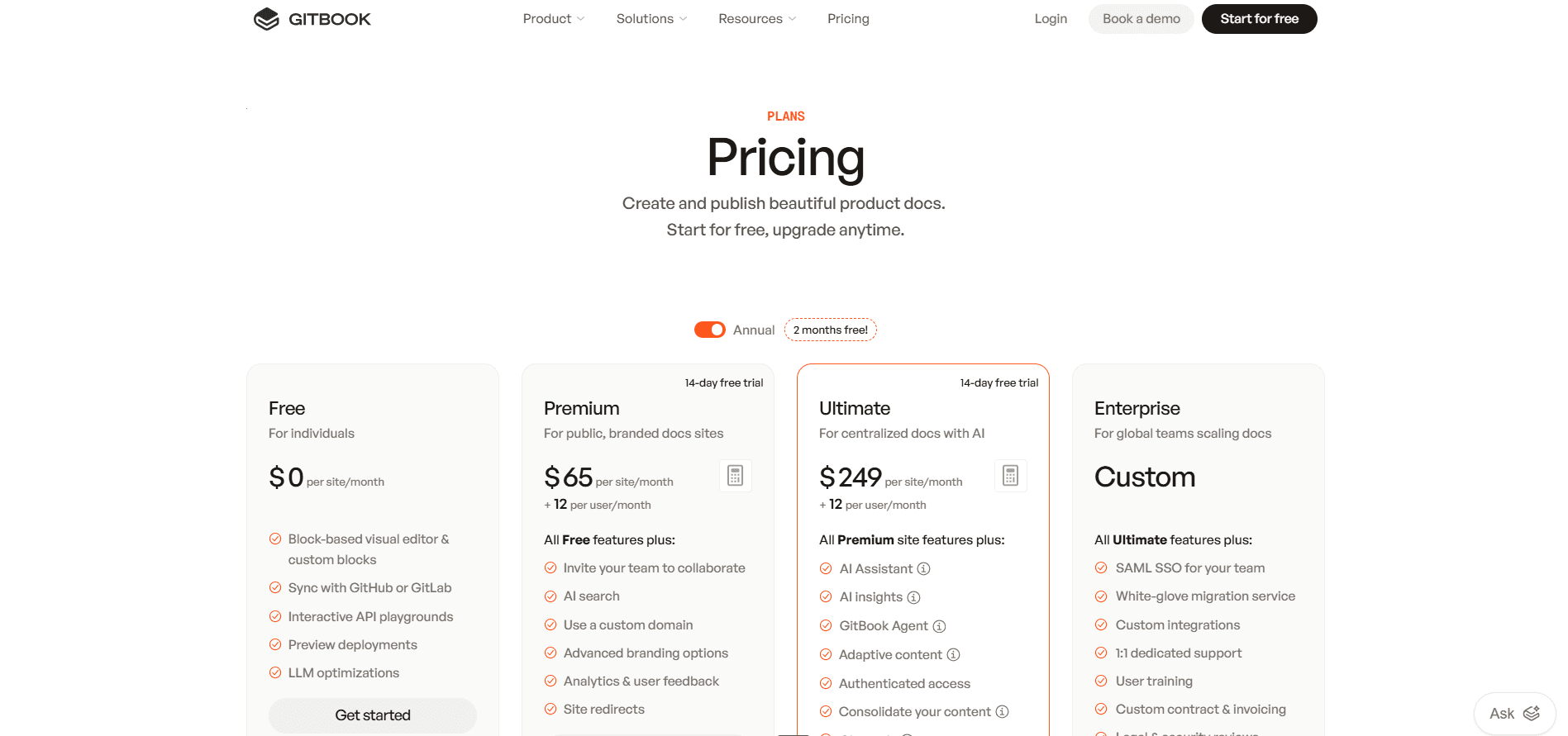
Free is one user with no custom domain. Premium is $65 per site per month plus $12 per user, and Ultimate is $249 per site per month plus $12 per user. [1] Our GitBook pricing guide works through the add-ons and the Assistant allowance.
Mintlify
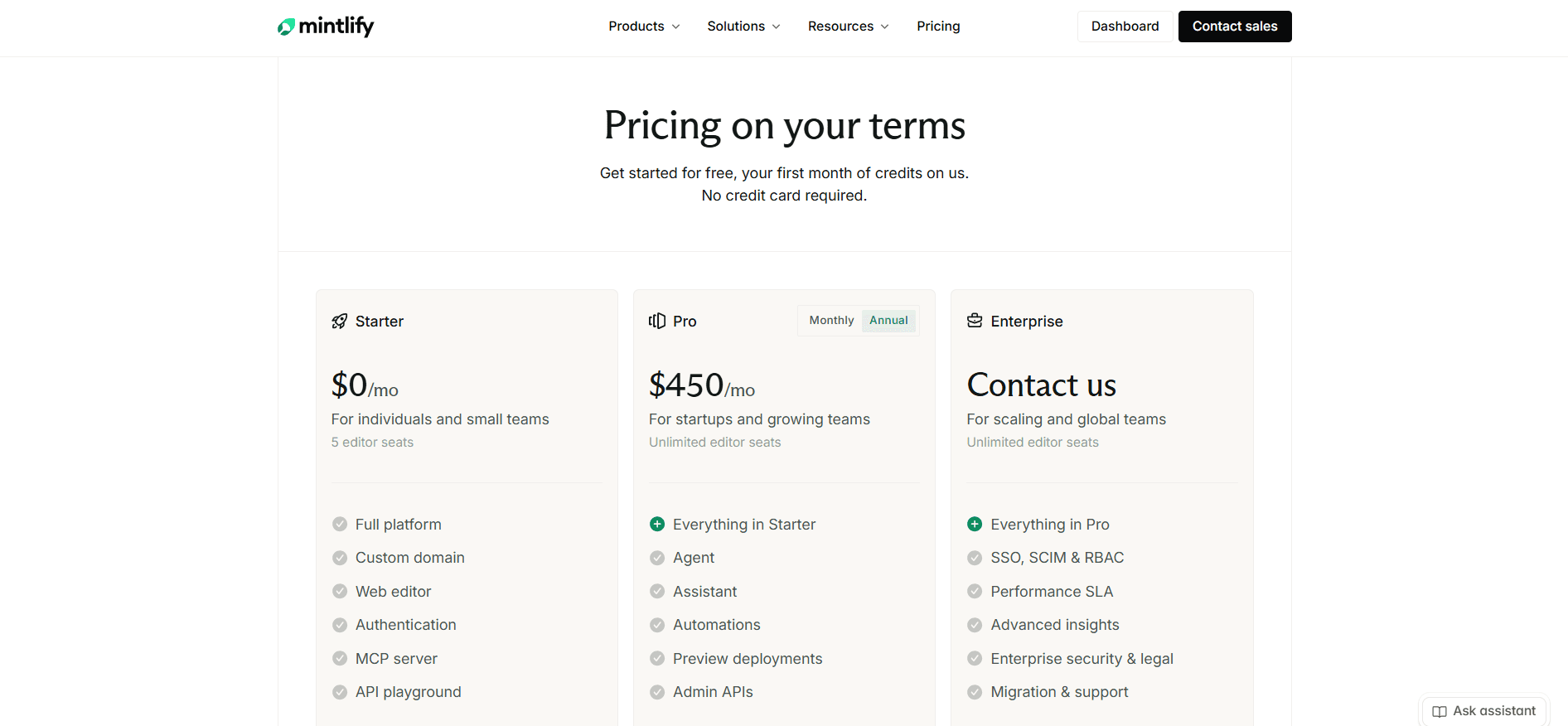
Starter is free with five editor seats and a custom domain but no AI at all, and Pro is $450 per site per month with unlimited seats. [3] The Mintlify pricing guide covers the credit packs and overage.
One Site, No Reader Assistant
| Editors | GitBook | Mintlify | Cheaper |
|---|---|---|---|
| 1 | $77, Premium | $0, Starter | Mintlify |
| 5 | $125, Premium | $0, Starter | Mintlify |
| 10 | $185, Premium | $450, Pro | GitBook |
| 32 | $449, Premium | $450, Pro | GitBook |
| 33 | $461, Premium | $450, Pro | Mintlify |
Mintlify's free tier is the cheapest way to publish one documentation site, and it is not close: five seats and a custom domain for nothing, where GitBook's free plan stops at one user and no custom domain, pushing a small team to $125. Past five seats Mintlify has nothing between free and Pro, so GitBook's per-seat pricing is gentler all the way to 32 logins.
One Site, Reader Assistant On
| Editors | GitBook | Mintlify | Cheaper |
|---|---|---|---|
| 5 | $309, Ultimate | $450, Pro | GitBook |
| 10 | $369, Ultimate | $450, Pro | GitBook |
| 16 | $441, Ultimate | $450, Pro | GitBook |
| 17 | $453, Ultimate | $450, Pro | Mintlify |
Here the crossover is 17 logins. Below it GitBook Ultimate is the cheaper way to put a chat assistant on your docs, and it includes 500 monthly answers against Mintlify's 400. Above it, Mintlify's unlimited seats win and keep winning.
Several Documentation Sites
Both platforms bill per site, which is the expensive detail in each model. Mintlify Pro is billed per deployment, so four sites means four subscriptions, though credits pool into one organization-wide balance. GitBook multiplies both the site fee and the seats, but offers a consolidation lever: site sections let you collapse several products into one Ultimate site, which is cheaper and gives up separate domains, separate branding, and separate access rules. [1] [2] [3]
| Four sites, 10 editors, reader assistant on | Monthly |
|---|---|
| GitBook Ultimate, four sites | $1,116 |
| GitBook Ultimate, one site with four sections | $369 |
| Mintlify Pro, four deployments | $1,800 |
Two details compound the GitBook figure. Every login is $12 whether that person writes pages or only leaves comments, and auto-updating translations are billed separately on Premium at $25 for the first 50,000 words and $0.20 per 1,000 after that, included only once you reach Ultimate. [1]
Pricing several products at once?
Documentation.AI bundles four documentation projects into one plan with unlimited editor seats, and bills no overage on any plan. See the pricing.
Public Documentation Experience
Both publish fast, responsive, accessible sites with light and dark modes and full-text search. Mintlify's output looks better untouched and goes further when you want to change it. GitBook's is more constrained, and more generous about what arrives free.
GitBook
Pages render as clean responsive layouts, OpenAPI integrations produce interactive API blocks, and built-in SEO handling covers meta information and sitemaps without configuration. A URL-linked spec is checked for updates every six hours, with a manual refresh when you cannot wait. [2]
Preview deployments are unlimited on every plan including Free, which is unusual in this category, and pushing a branch posts a preview link on the commit status. Site variants for versions and translations are also free. [1]
The constraints are structural rather than cosmetic. Customization is theme-driven: logos, fonts, footer, colors, code themes, and icon styles. You cannot change the layout of page elements and you cannot inject custom CSS, HTML, or JavaScript into a published site. The "Powered by GitBook" link cannot be removed on any plan, Enterprise included. [2]
Mintlify
Design quality carries the product. A default site has clean typography, working dark mode, sensible syntax highlighting, and components for tabs, callouts, cards, steps, and code groups that you do not have to build.
For an API-first product, the API playground alone justifies the platform. It generates interactive pages from OpenAPI 3.0 or 3.1, or AsyncAPI 3.0 for WebSocket channels, and updates them when your spec changes. Authentication fields come from securitySchemes, an x-default extension can prefill test credentials so a reader's first request works, and code samples generate in 18 languages. [4]
Customization goes considerably further than GitBook's. Custom CSS and JavaScript are supported on every plan including the free one, and only white labeling is held back for Enterprise, so a docs site that has to match a design system is achievable without a contract. Access control, though, works at page level only, so a page can be restricted to a user group but an individual block inside it cannot. [3] [4]
Verdict: Mintlify takes design quality, design freedom, and anything driven by an OpenAPI spec. GitBook is clearly good at a few things worth having, notably preview deployments, versioning, and the machine-readable layer, all of which are free where Mintlify reserves previews for its paid tier. But GitBook is the more locked of the two: theme options only, no custom code at any price, and another company's name permanently in your footer.
Your domain, your CSS, your preview.
Documentation.AI accepts custom CSS and JavaScript on every plan and builds a preview site for every branch from the entry tier. Start free and point it at your existing docs.
Pros and Cons
Both platforms are competent, so the lists below skip the table stakes that every documentation tool now ships and keep to what tends to settle an evaluation.
GitBook
Pros
- A block editor with drag-and-drop structure and Markdown underneath, which mixed teams adopt without training
- Two-way Git Sync that works, with monorepo configuration and preview links posted on commit status
- Onboarding that asks real questions about what you are building
- A free tier carrying preview deployments, versioning, full-text search,
llms.txt, and an MCP server [1] - Authoring AI gated by plan rather than counted per action, so writers never watch a balance [1]
- Per-seat pricing that scales gently, which beats Mintlify from six editors to 32 when you do not need reader AI [1] [3]
- Change requests, which give non-developers pull-request review without a terminal
- A Community plan giving non-profits, open source projects, and schools every Ultimate feature except SAML SSO [2]
- ISO 27001 and SOC 2 coverage on every plan, including Free [1]
Cons
- Two multipliers, per site and per user, so a second product costs as much as the first. Reviewers raise this more than any other issue, one writing "I'd rather pay for everything per month, not per site" [5]
- The reader chat assistant is an Ultimate feature, and it is metered on top at 500 answers before an unpublished overage rate [1] [2]
- No custom CSS, HTML, or JavaScript, no layout control, and a footer link you cannot remove at any tier [2]
- No export button. The documented exit is a Git sync to an empty repository, and custom blocks come out as HTML [2]
- The free plan is one user with no custom domain, so a team cannot evaluate it properly without paying [1]
- Nothing updates documentation on a schedule or on merge
- Only the published-site renderer can be self-hosted, and it is GPLv3 and unsupported, so air-gapped and data-residency reviews rule GitBook out regardless of the editor [2]
Mintlify
Pros
- Published output that looks designed with almost no configuration
- An API playground generated from OpenAPI and AsyncAPI, with code samples in 18 languages and prefilled credentials [4]
- Custom CSS and JavaScript on every plan including the free one, which GitBook does not offer at any price [2] [3]
- A genuinely usable free tier: five editor seats, a custom domain, the web editor, an MCP server, and the API playground [3]
- Unlimited editor seats on Pro, which beats GitBook above 17 logins once reader AI is in play [3]
- A local toolchain with a CLI, local preview server, MDX formatting, and link validation before anything ships [4]
- Automations that run the agent on a schedule or a code change, which GitBook has no equivalent for [4]
- Fixed credit prices, so each action's cost is predictable even when the volume is not [6]
Cons
- No AI on the free plan, so the capability the platform is sold on cannot be tested without buying it or starting a 14-day trial [3]
- No middle tier. The upgrade path runs from free straight to Pro, which is a steep first step for a team of six [3]
- 10,000 credits cover 400 reader questions, so public docs with traffic you do not control run out, and the assistant switches itself off unless you enable overage [3] [6]
- Billed per deployment, so four documentation sites means four Pro subscriptions [3]
- RBAC, audit logs, PDF export, SSO, SCIM, personalization, white labeling, self-hosting, and EU hosting are all Enterprise. Without RBAC, every editor on Pro can publish to your live site [4]
- Migration services are an Enterprise line item, and the pricing FAQ and the docs disagree on which platforms are supported [3] [4]
- Access control is page level only, so a restricted block inside a public page is not possible [4]
- GitLab setup means issuing an access token and creating a webhook by hand [4]
Head to Head Comparison: GitBook vs Mintlify
Neither platform sweeps the table. GitBook takes editing, free-tier publishing features, and seat economics below reader AI. Mintlify takes published design, API tooling, automation, and the free tier itself.
| Category | GitBook | Mintlify |
|---|---|---|
| Best suited to | Docs owned across writing, support, and engineering | API and SDK reference owned by engineering |
| Free plan | One user, no custom domain, authoring agent capped at 10 messages a week | Five editor seats, custom domain, no AI at all |
| Entry paid price | $65 per site per month plus $12 per user | $450 per site per month, seats included |
| Reader chat assistant | Ultimate, $249 per site per month | Pro, $450 per site per month |
| Reader answers included | 500 a month, then billed at an unpublished rate | 400 a month, then off unless overage is enabled |
| Cost per reader question | Unpublished past 500 | 25 credits, about $1.13 per included answer |
| Multi-site billing | Per site, or collapse into one Ultimate site with sections | Per deployment, with credits pooled across the organization |
| Editor seats | $12 each, on every paid plan | Unlimited on Pro |
| Visual editor | Block-based, with Markdown underneath | Visual and MDX source modes with live cursors |
| Local development | None, the editor and the repository are the workflow | mint CLI, local preview server, link validation |
| Structural reorganization | Manual, through change requests | Editor agent rewrites navigation and docs.json |
| Automated maintenance | Not available | Automations on four triggers, 500 runs a day each |
| API reference | Swagger 2.0 and OpenAPI 3.0 and 3.1, on a Scalar playground | OpenAPI 3.0 and 3.1 and AsyncAPI 3.0, own playground, 18 languages |
| Analytics | Page views free, search analytics Premium, AI insights Ultimate | None on free, conversations and traffic on Pro, advanced insights Enterprise |
| Custom CSS and JavaScript | Not supported on any plan | Every plan, including free |
| Vendor branding in the footer | Cannot be removed on any plan | White labeling on Enterprise |
| Authenticated docs | Ultimate | Password on Pro, OAuth and JWT on Enterprise |
| SSO and SCIM | Enterprise, SAML | Enterprise |
| Compliance | ISO 27001 and SOC 2 on every plan including free | Audit logs and RBAC on Enterprise only |
| Self-hosting | Published-site renderer only, GPLv3 and unsupported | Enterprise |
| Machine-readable output | llms.txt, llms-full.txt, MCP server, all plans | llms.txt, llms-full.txt, skill.md, MCP server, all plans |
| Migration help | Enterprise | Enterprise |
Final Take
Pick GitBook if documentation is a team sport. The block editor is the one writers and support people actually use, change requests give them review without a terminal, and per-seat pricing stays reasonable as that team grows, provided you can live inside a theme and a footer you cannot change.
Pick Mintlify if documentation is an API reference. The playground, the local toolchain, and the published design are the best here, the free tier is genuinely usable, and custom CSS on every plan means the site can match your brand. The catch is the jump from free to Pro, which is a steep first step for a team of six.
What they share is the part worth arguing with. Both reserve reader-facing AI for their top self-serve plan, both bill per documentation site, and both meter the assistant, differing only in the failure mode: GitBook keeps answering and bills a rate it does not publish, while Mintlify stops answering unless you opt into overage. One is an invoice you cannot forecast, the other is a silent outage.
That gap is what Documentation.AI was built around: the reader assistant and the authoring agent are both on the free plan, a reader question costs 10 credits rather than 25, four documentation projects come bundled into one plan with unlimited editor seats, and no plan bills an overage, so if credits run out the AI pauses while your docs stay published. Import your existing GitBook or Mintlify content free and run the agent over your own pages before you decide.
For each platform measured against Documentation.AI directly, see GitBook vs Documentation.AI and Mintlify vs Documentation.AI. Teams leaving either one have their own shortlists in our GitBook alternatives and Mintlify alternatives guides. If the shortlist is wider, the same test runs through Mintlify vs Redocly, Archbee vs GitBook, and Mintlify vs GitBook vs ReadMe.
See it on your own documentation.
Start free, no credit card required, or book a demo and we will bring your existing docs across.
FAQs: GitBook vs Mintlify
1. Which Is Cheaper, GitBook or Mintlify?
It flips on two questions. For one site with five editors and no reader AI, Mintlify is free and GitBook costs $125 a month, because GitBook's free plan allows only one user. Past five editors Mintlify jumps to Pro, so GitBook's per-seat pricing is cheaper up to 32 logins. With the reader chat assistant on, GitBook Ultimate is cheaper up to 16 logins and Mintlify wins from 17. [1] [3]
2. Does GitBook or Mintlify Require GitHub?
Neither requires a GitHub account to sign up or to publish. GitBook's Git Sync is optional, so a team can run an entire site from the block editor. Mintlify keeps pages as MDX in a repository and publishes by writing a commit, so the Git model stays visible even when you start from scratch rather than connecting your own repository. [2] [4]
3. Which Has Better AI, GitBook or Mintlify?
They are strong in different directions. Mintlify's agent is more autonomous, opening pull requests and running on schedules or code changes, which GitBook has no equivalent for at any tier. GitBook's reader AI arrives a tier earlier, its external knowledge connectors covering Zendesk, Intercom, Front, Linear, and Jira are broader, and it gives you a working authoring agent on its free plan where Mintlify gives you none. [1] [2] [4]
4. How Much Does the Reader-Facing Assistant Cost on Each Platform?
GitBook Assistant requires Ultimate at $249 per site per month and includes 500 successful answers, after which GitBook keeps answering and bills the excess on your next invoice at a rate it does not publish. Mintlify's Ask AI requires Pro at $450 per site per month and includes 10,000 credits, which is 400 answers at 25 credits each, after which it stops unless you enable overage at $0.01 per credit. [1] [2] [3] [6]
5. Can You Customize the Design of a GitBook or Mintlify Site?
Mintlify, much further. It supports custom CSS and JavaScript on every plan including the free one, and reserves only white labeling for Enterprise. GitBook is theme-driven: logos, fonts, colors, code themes, and icon styles are yours to change, page layout is not, no custom CSS, HTML, or JavaScript can be injected, and the "Powered by GitBook" link cannot be removed on any plan, Enterprise included. [2] [3] [4]
6. Which Platform Is Better for Non-Technical Contributors?
GitBook, on two counts. Git Sync is optional rather than deferred, and change requests give writers review without a terminal. Mintlify's editor has closed most of the gap with visual mode, live cursors, comments, and drag-and-drop navigation, but the model underneath is still branches, pull requests, and MDX in a repository. [2] [4]
7. What Happens When You Run Out of AI Usage?
The failure modes are opposites, and this is worth deciding on before you sign. GitBook keeps the Assistant running past its 500 monthly answers and bills the extra on your next invoice at an unpublished rate. Mintlify turns Ask AI off until the balance resets, because overages are off by default, though you can enable them at $0.01 per credit with a spending cap and alerts. [2] [3] [6]
8. Is There a Middle Tier on Either Platform?
On GitBook, yes. Premium at $65 per site per month sits between free and Ultimate, and it includes generated answers in the search box, real-time collaboration, a custom domain, and an uncapped authoring agent. On Mintlify there is nothing between the free Starter plan and Pro, which is the steepest single step in this comparison. [1] [3]
Sources
- GitBook. "Pricing." GitBook. https://www.gitbook.com/pricing
- GitBook. "GitBook Docs." GitBook. https://gitbook.com/docs
- Mintlify. "Pricing." Mintlify. https://www.mintlify.com/pricing
- Mintlify. "Mintlify Docs." Mintlify. https://www.mintlify.com/docs
- Capterra. "GitBook Reviews." Capterra. https://www.capterra.com/p/197183/GitBook/reviews/
- Mintlify. "Simpler, Outcome-Based AI Pricing." Mintlify Blog. https://www.mintlify.com/blog/outcome-based-ai-pricing
Neither quite fits?
Reader AI without the top tier
Both keep the assistant on their priciest plan. Import your docs free and judge ours from use.
No credit card required